Share Python libraries(共享 Python 库)
The recommended workflow for sharing code across multiple Python transforms repositories is publishing a Python library package—specifically, a Conda ↗ library. Publishing Python libraries is supported in Python transforms repositories with version 1.23.1 and higher.
Publish a Python library
Here are the required steps for publishing a Python library:
-
Create a new repository that will contain the Python code for your shared library.
-
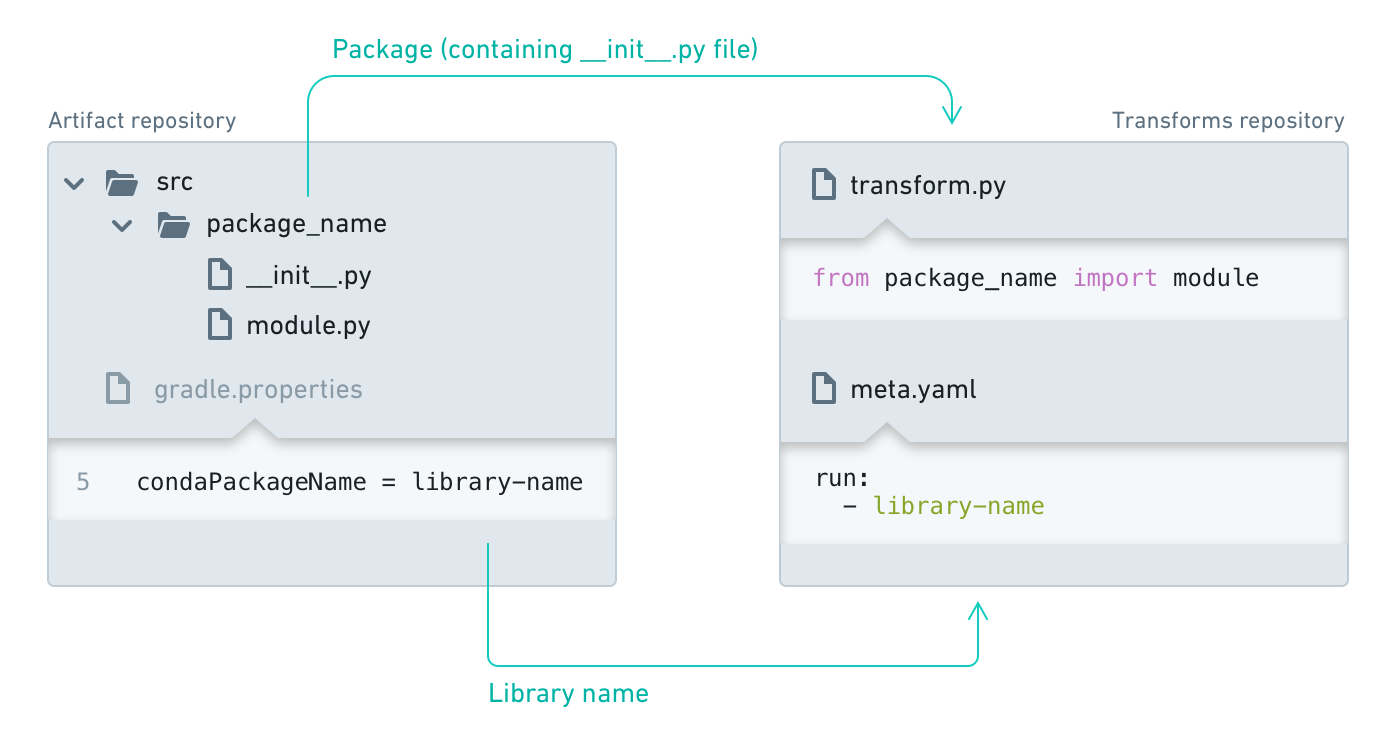
Name your repository. Your library will be named after the repository name when initialized. Other code repositories will use this name to discover and use your library. You can rename it later by accessing the
gradle.propertiesfile and editing thecondaPackageNameparameter (this file is hidden, so you may need to select "Show hidden files" in the file editor first).
:::callout{title="Library naming"}
Note that the condaPackageName can only contain ASCII lowercase letters, numbers, or hyphens. Any sequence of non-alphanumeric/non-hyphen characters will be replaced by a single hyphen (for example my_library repo will be published as my-library-repo, and Foobar _baz$$$ will be published as foobar-baz-).
:::
-
Select the Create button in the Python Library template section.
-
Create a package: Any folder in your library containing an
__init__.pyfile will be published as a package. Your repository will be initialized with such a folder - rename it and add additional packages if needed. -
Create modules: Within your package folder, you can add Python files that contain your code. These modules will later be imported by other repositories.
- Tag your repository: When you are ready to make a release, navigate to the "Branches" tab, select "Tags" and create a new tag. By default, your Python library will only get published for commits that are tagged. To change this default behavior, you must modify the
build.gradlefile.
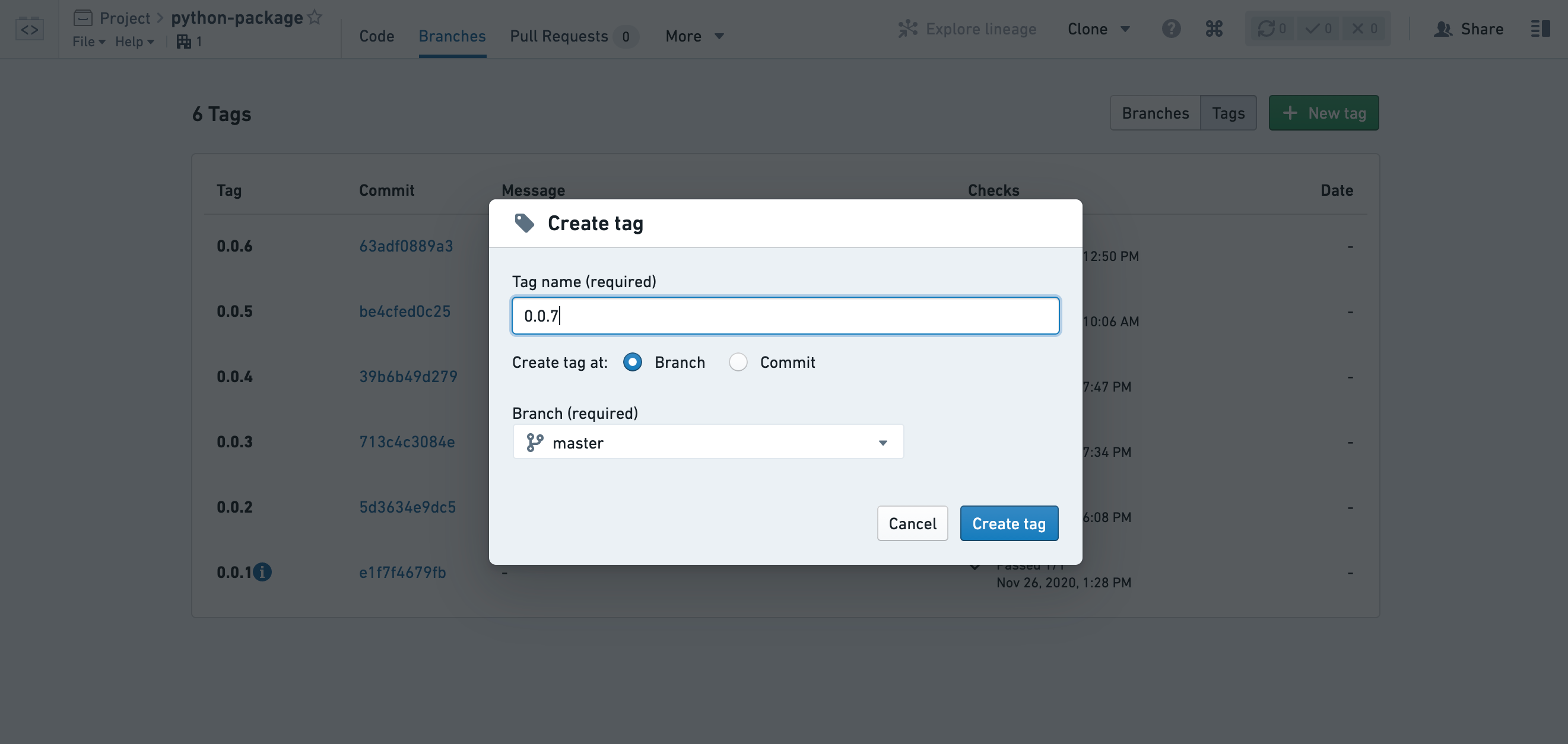
:::callout{theme="warning" title="Warning"} Note that tag names must conform to SLS versioning, as specified in the SLS Versions documentation ↗. :::
- Your library version will be published once the checks finish successfully. You can view the status of checks in the Tags list and in the Checks tab of your repository.
:::callout{theme="neutral"} By default, changes to your library will only be published when you create a tag. You can create a tag for the current state of one of your branches, or for a specific commit. Once checks pass your library will be published and users will be able to upgrade to the newest version. :::
:::callout{theme="neutral"} Consuming repositories do not automatically upgrade to use the newest version when a new version is published. To manually upgrade your repository to use the newest version, see the documentation on discovering and using Python libraries and on Conda lock files for re-resolving the Conda environment. :::
- Ensure that you give permissions to your library consumers. By default, users should have "Viewer" role on your shared repository. Add a reference to the library repository under the transform repository settings Artifacts tab.
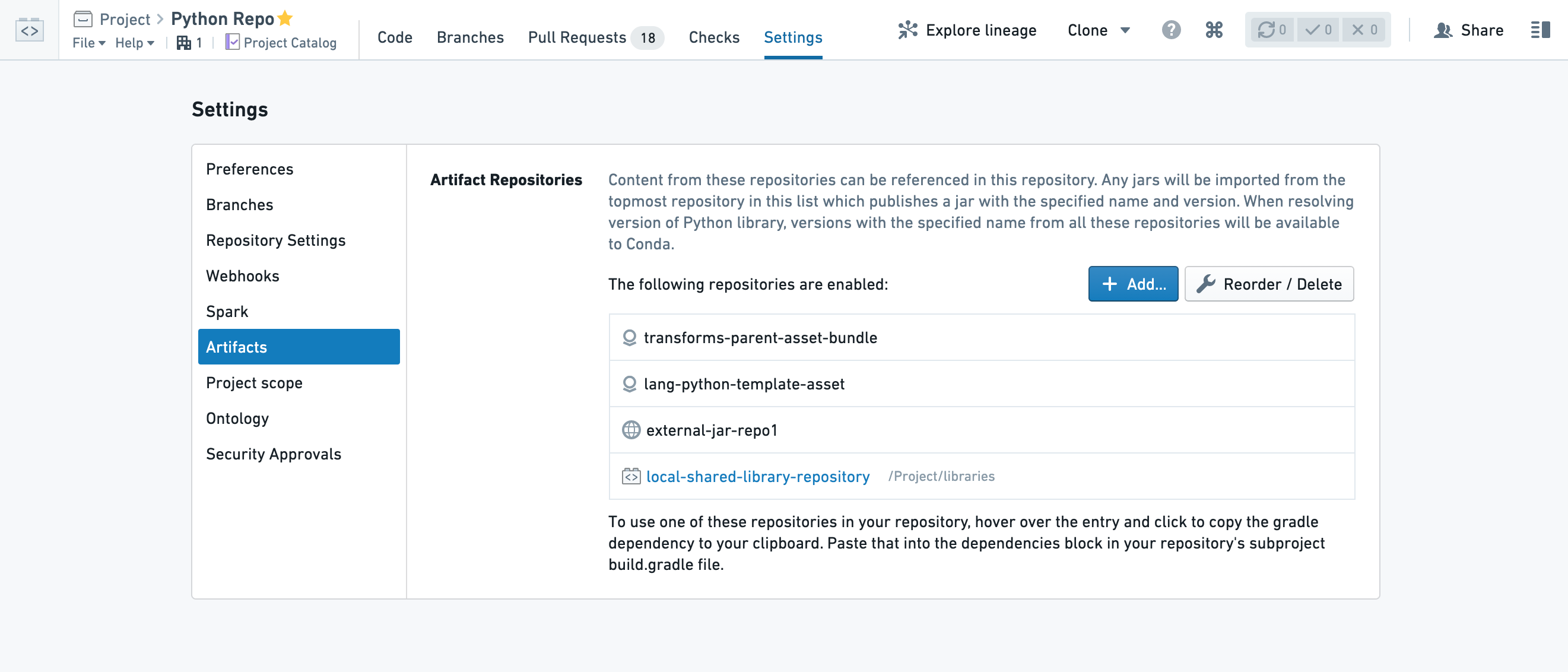
Your library at this point should be available for other apps and repositories to consume. Read more about discovering and using Python packages.
Find consumers of a Python library
To see which repositories are consuming your published library, navigate to the Artifact Repositories interface and use the Search tab to locate your library. Find the version you are interested in and expand the Downloads column to view the \</> Consumers section.
中文翻译
共享 Python 库
在多个 Python 转换(Transforms)代码仓库之间共享代码的推荐工作流是发布一个 Python 库包——具体来说,是一个 Conda ↗ 库。Python 转换(Transforms)代码仓库在 1.23.1 及以上版本支持发布 Python 库。
发布 Python 库
以下是发布 Python 库所需的步骤:
-
创建一个新的代码仓库,该仓库将包含共享库的 Python 代码。
-
为你的代码仓库命名。 初始化后,你的库将以代码仓库名称命名。其他代码仓库将使用此名称来发现和使用你的库。你可以稍后通过访问
gradle.properties文件并编辑condaPackageName参数来重命名(该文件是隐藏的,因此你可能需要先在文件编辑器中选择"显示隐藏文件")。
:::callout{title="库命名"}
请注意,condaPackageName 只能包含 ASCII 小写字母、数字或连字符。任何非字母数字/非连字符的字符序列都将被替换为单个连字符(例如,my_library repo 将发布为 my-library-repo,而 Foobar _baz$$$ 将发布为 foobar-baz-)。
:::
-
在 Python 库(Python Library) 模板部分选择 创建(Create) 按钮。
-
创建一个包: 库中包含
__init__.py文件的任何文件夹都将作为包发布。你的代码仓库将使用这样一个文件夹进行初始化——重命名它,并根据需要添加额外的包。 -
创建模块: 在你的包文件夹中,可以添加包含代码的 Python 文件。这些模块稍后将被其他代码仓库导入。
- 标记你的代码仓库: 当你准备好发布时,导航到"分支(Branches)"选项卡,选择"标签(Tags)"并创建一个新标签。默认情况下,你的 Python 库只会为带有标签的提交发布。要更改此默认行为,你必须修改
build.gradle文件。
:::callout{theme="warning" title="警告"} 请注意,标签名称必须符合 SLS 版本控制规范,详见 SLS 版本控制文档 ↗。 :::
- 一旦检查成功完成,你的库版本将被发布。你可以在标签(Tags)列表和代码仓库的检查(Checks)选项卡中查看检查状态。
:::callout{theme="neutral"} 默认情况下,只有在创建标签时才会发布对库的更改。你可以为某个分支的当前状态或特定提交创建标签。一旦检查通过,你的库将被发布,用户将能够升级到最新版本。 :::
:::callout{theme="neutral"} 当新版本发布时,消费代码仓库不会自动升级到最新版本。 要手动升级你的代码仓库以使用最新版本,请参阅关于发现和使用 Python 库以及关于 Conda 锁定文件以重新解析 Conda 环境的文档。 :::
- 确保为你的库消费者授予权限。默认情况下,用户应对你的共享代码仓库拥有"查看者(Viewer)"角色。在转换代码仓库设置的构件(Artifacts)选项卡下添加对库代码仓库的引用。
此时,你的库应该可供其他应用和代码仓库使用。了解更多关于发现和使用 Python 包的信息。
查找 Python 库的消费者
要查看哪些代码仓库正在使用你已发布的库,请导航到构件仓库界面,使用搜索(Search)选项卡定位你的库。找到你感兴趣的版本,展开下载(Downloads)列以查看 \</> 消费者(Consumers)部分。