Python transforms on virtual tables(虚拟表上的 Python 转换)
Virtual tables allow you to query and write to tables in supported data platforms without storing the data in Foundry. You can interact with virtual tables in Python transforms using the transforms-tables library.
Foundry supports two compute modes on virtual tables:
- Foundry-native Spark compute: This can be used with virtual table inputs or outputs from one or multiple sources, and composed together with Foundry-native dataset inputs and outputs. Note that virtual tables do not support lightweight compute engines such as Polars and Pandas in Foundry.
- Compute pushdown: In this mode, through lightweight, Foundry orchestrates external compute in the source system. In order to use compute pushdown, all inputs and outputs must be virtual tables associated with the same source, and the source must be compute pushdown compatible.
:::callout{theme="neutral"}
Incremental computation using the @incremental decorator is not currently supported when using compute pushdown.
:::
Prerequisites
To use virtual tables in a Python transform, you must:
- Upgrade your Python repository to the latest version.
- Install
transforms-tablesfrom the Libraries tab.
:::callout{theme="warning"}
Transforms that use the use_external_systems decorator are not compatible with virtual tables. Switch to source-based external transforms or split your transform into multiple transforms, one that uses virtual tables and one that uses the use_external_systems decorator.
:::
When virtual tables are used in Code Repositories, the transforms consuming them will automatically obtain network egress based on the egress policies configured on the source.
The following settings must be enabled on the source:
- Code imports: This allows the source to be imported and used in a code repository. More information on this setting can be found in the documentation on importing a source into code.
- Export controls: This controls which security markings and organizations will be allowed on inputs to a Python transform using a virtual table. Review the documentation on configuring export controls on the source for more information.
:::callout{theme="neutral"} Tables used as inputs and outputs in a Python transform do not need to come from the same source, or even the same platform. By default, Python transforms will use Foundry's compute to read and write tables, which allows querying across different external systems. Refer to the Compute pushdown section for details on fully federating compute to an external system. :::
Quick start examples
:::callout{theme="neutral"} Remember to import the output source into your repository using the sidebar. :::
Below is an example using a Snowflake source that takes a virtual table input and generates a virtual table output using Foundry-native Spark compute.
from transforms.api import transform
from transforms.tables import TableInput, TableOutput, TableTransformInput, TableTransformOutput, SnowflakeTable


@transform.spark.using(
    input_table=TableInput('/path/input_table_name'),
    output_table=TableOutput(
        '/path/output_table_name',  # Virtual table output in Foundry
        'ri.magritte..source.123...',  # The output source RID
        SnowflakeTable('DATABASE', 'SCHEMA', 'TABLE'),  # The output storage location
    ),
)
def compute(input_table: TableTransformInput, output_table: TableTransformOutput):
    output_table.write_dataframe(input_table.dataframe())
Foundry datasets can also be used in combination with virtual tables. The example below takes a Foundry dataset input and writes a virtual table output to the external source.
from transforms.api import transform, Input, TransformInput
from transforms.tables import TableOutput, TableTransformOutput, SnowflakeTable


@transform.spark.using(
    input_dataset=Input('/path/input_dataset_name'),
    output_table=TableOutput(
        '/path/output_table_name',  # Virtual table output in Foundry
        'ri.magritte..source.123...',  # Output source RID
        SnowflakeTable('DATABASE', 'SCHEMA', 'TABLE'),  # Output storage location
    ),
)
def compute(input_dataset: TransformInput, output_table: TableTransformOutput):
    output_table.write_dataframe(input_dataset.dataframe())
Lastly, below is an example with virtual table inputs and outputs using compute pushdown.
from snowflake.snowpark.functions import lit
import snowflake.snowpark as snow
from transforms.api import transform
from transforms.tables import (
    SnowflakeTable,
    TableInput,
    TableOutput,
    SnowflakeInput,
    SnowflakeOutput,
)

@transform.snowflake.using(
    input_table=TableInput('/path/input_table_name'),
    output_table=TableOutput(
        '/path/output_table_name',  # Virtual table output in Foundry
        'ri.magritte..source.123...',  # Output source RID
        SnowflakeTable('DATABASE', 'SCHEMA', 'TABLE'),  # Output storage location
    ),
)
def compute_in_snowflake(input_table: SnowflakeInput, output_table: SnowflakeOutput):

    # Get a Snowpark DataFrame instance
    df: snow.DataFrame = input_table.dataframe()

    # Example data transformation - create a new column
    df = df.with_column("NEW_COLUMN", lit("ABC"))

    # Write back to the new table
    output_table.write(df)
JDBC partitioning
When reading a virtual table data using JDBC connectivity, you can configure partitioning in Python transforms to parallelize the read and improve the performance of loading the table.
Below is an example that adds partitioning when loading input_table. This will be based on column_name which will be divided into three equal sized partitions between a lower bound of 1 and an upper bound of 100.
@transform(
    input_table=TableInput("/path/input_table_name"),
    output_df=Output("/path/output_dataset_name")
)
def compute(input_table: TableTransformInput, output_df: TransformOutput):
    input_df = input_table.dataframe(
        options={
            "numPartitions": "3",
            "partitionColumn": "column_name",
            "lowerBound": "1",
            "upperBound": "100"
        }
    )

    output_df.write_dataframe(input_df)
Partitioning configuration should be passed via the options parameter when calling .dataframe() to load the virtual table input. partitionColumn must be a numeric, date, or timestamp column. The data will be distributed into a number of partitions specified by numPartitions. These will be evenly sized ranges between the lowerBound and upperBound options.
Note that lowerBound and upperBound are used only to calculate the partition stride, not to filter rows. All rows in the table will be returned, including those with values outside the specified bounds.
For more details about the available partitioning options, see the Spark JDBC documentation ↗.
File template configuration wizard [Beta]
:::callout{theme="neutral" title="Beta"} Virtual table outputs in the file template configuration wizard are in the beta phase of development. Functionality may change during active development. :::
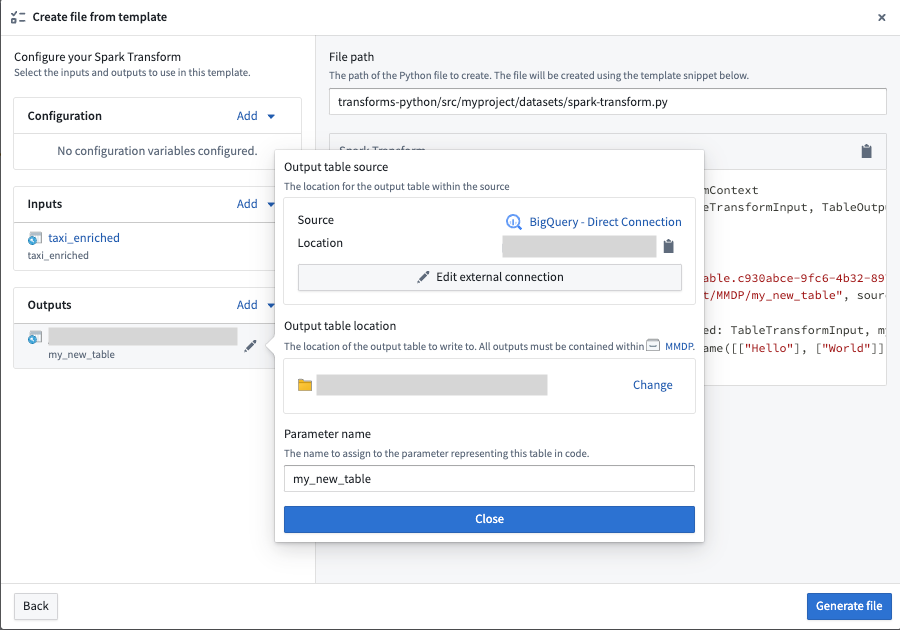
Virtual table inputs and outputs can be configured in the Code Repositories file template configuration wizard using the virtual table template variable type. When creating virtual table outputs, the wizard will walk you through selecting an output source to write to, along with a Foundry location for the virtual table.
中文翻译
虚拟表上的 Python 转换
虚拟表(Virtual tables) 允许您查询和写入受支持数据平台中的表,而无需将数据存储在 Foundry 中。您可以使用 transforms-tables 库在 Python 转换中与虚拟表进行交互。
Foundry 支持虚拟表的两种计算模式:
- Foundry 原生 Spark 计算(Foundry-native Spark compute): 此模式可用于来自一个或多个源的虚拟表输入或输出,并可将其与 Foundry 原生数据集输入和输出组合使用。请注意,虚拟表不支持 Foundry 中的轻量级计算引擎(Lightweight compute engines)(如 Polars 和 Pandas)。
- 计算下推(Compute pushdown): 在此模式下,Foundry 通过轻量级方式在源系统中编排外部计算。要使用计算下推,所有输入和输出必须是与同一源关联的虚拟表,并且该源必须兼容计算下推。
:::callout{theme="neutral"}
使用 @incremental 装饰器的增量计算(Incremental computation)在使用计算下推时目前不受支持。
:::
前提条件
要在 Python 转换中使用虚拟表,您必须:
- 将您的 Python 仓库 升级到最新版本。
- 从 库选项卡(Libraries tab) 安装
transforms-tables。
:::callout{theme="warning"}
使用 use_external_systems 装饰器的转换与虚拟表不兼容。请切换到 基于源的外部转换(Source-based external transforms),或将您的转换拆分为多个转换,一个使用虚拟表,另一个使用 use_external_systems 装饰器。
:::
当在代码仓库(Code Repositories)中使用虚拟表时,使用这些表的转换将根据源上配置的 出口策略(Egress policies) 自动获取网络出口。
必须在源上启用以下设置:
- 代码导入(Code imports): 这允许将源导入并用于代码仓库。有关此设置的更多信息,请参阅 将源导入代码 的文档。
- 导出控制(Export controls): 这控制哪些 安全标记(Security markings) 和组织将被允许作为使用虚拟表的 Python 转换的输入。有关更多信息,请查看 在源上配置导出控制 的文档。
:::callout{theme="neutral"} 在 Python 转换中用作输入和输出的表不必来自同一源,甚至不必来自同一平台。默认情况下,Python 转换将使用 Foundry 的计算来读写表,这允许跨不同外部系统进行查询。有关将计算完全联邦到外部系统的详细信息,请参阅 计算下推(Compute pushdown) 部分。 :::
快速入门示例
:::callout{theme="neutral"} 请记住使用侧边栏将输出源导入到您的仓库中。 :::
以下是一个使用 Snowflake 源的示例,该示例接收一个虚拟表输入,并使用 Foundry 原生 Spark 计算生成一个虚拟表输出。
from transforms.api import transform
from transforms.tables import TableInput, TableOutput, TableTransformInput, TableTransformOutput, SnowflakeTable


@transform.spark.using(
    input_table=TableInput('/path/input_table_name'),
    output_table=TableOutput(
        '/path/output_table_name',  # Foundry 中的虚拟表输出
        'ri.magritte..source.123...',  # 输出源 RID
        SnowflakeTable('DATABASE', 'SCHEMA', 'TABLE'),  # 输出存储位置
    ),
)
def compute(input_table: TableTransformInput, output_table: TableTransformOutput):
    output_table.write_dataframe(input_table.dataframe())
Foundry 数据集也可以与虚拟表结合使用。以下示例接收一个 Foundry 数据集输入,并将虚拟表输出写入外部源。
from transforms.api import transform, Input, TransformInput
from transforms.tables import TableOutput, TableTransformOutput, SnowflakeTable


@transform.spark.using(
    input_dataset=Input('/path/input_dataset_name'),
    output_table=TableOutput(
        '/path/output_table_name',  # Foundry 中的虚拟表输出
        'ri.magritte..source.123...',  # 输出源 RID
        SnowflakeTable('DATABASE', 'SCHEMA', 'TABLE'),  # 输出存储位置
    ),
)
def compute(input_dataset: TransformInput, output_table: TableTransformOutput):
    output_table.write_dataframe(input_dataset.dataframe())
最后,以下是一个使用计算下推的虚拟表输入和输出示例。
from snowflake.snowpark.functions import lit
import snowflake.snowpark as snow
from transforms.api import transform
from transforms.tables import (
    SnowflakeTable,
    TableInput,
    TableOutput,
    SnowflakeInput,
    SnowflakeOutput,
)

@transform.snowflake.using(
    input_table=TableInput('/path/input_table_name'),
    output_table=TableOutput(
        '/path/output_table_name',  # Foundry 中的虚拟表输出
        'ri.magritte..source.123...',  # 输出源 RID
        SnowflakeTable('DATABASE', 'SCHEMA', 'TABLE'),  # 输出存储位置
    ),
)
def compute_in_snowflake(input_table: SnowflakeInput, output_table: SnowflakeOutput):

    # 获取 Snowpark DataFrame 实例
    df: snow.DataFrame = input_table.dataframe()

    # 示例数据转换 - 创建一个新列
    df = df.with_column("NEW_COLUMN", lit("ABC"))

    # 写回新表
    output_table.write(df)
JDBC 分区
当使用 JDBC 连接读取虚拟表数据时,您可以在 Python 转换中配置分区以并行化读取并提高加载表的性能。
以下是一个在加载 input_table 时添加分区的示例。这将基于 column_name 进行分区,该列将在下限 1 和上限 100 之间被划分为三个大小相等的分区。
@transform(
    input_table=TableInput("/path/input_table_name"),
    output_df=Output("/path/output_dataset_name")
)
def compute(input_table: TableTransformInput, output_df: TransformOutput):
    input_df = input_table.dataframe(
        options={
            "numPartitions": "3",
            "partitionColumn": "column_name",
            "lowerBound": "1",
            "upperBound": "100"
        }
    )

    output_df.write_dataframe(input_df)
分区配置应通过调用 .dataframe() 加载虚拟表输入时的 options 参数传递。partitionColumn 必须是数值、日期或时间戳列。数据将分布到由 numPartitions 指定的多个分区中。这些分区将是 lowerBound 和 upperBound 选项之间大小均匀的范围。
请注意,lowerBound 和 upperBound 仅用于计算分区步长,而不是用于过滤行。表中的所有行都将被返回,包括值超出指定范围的行。
有关可用分区选项的更多详细信息,请参阅 Spark JDBC 文档 ↗。
文件模板配置向导 [Beta]
:::callout{theme="neutral" title="Beta"} 文件模板配置向导中的虚拟表输出处于 beta 开发阶段。功能在活跃开发期间可能会发生变化。 :::
虚拟表输入和输出可以在 代码仓库文件模板配置向导(Code Repositories file template configuration wizard) 中使用 virtual table 模板变量类型进行配置。创建虚拟表输出时,向导将引导您选择要写入的输出 源(Source),以及虚拟表的 Foundry 位置。