Unit tests(单元测试(Unit tests))
:::callout{theme="neutral"} The Python repository unit tests described on this page are only applicable to batch pipelines, and are not supported for streaming pipelines. :::
Python repositories have the option of running tests as part of checks. These tests are run using the popular Python testing framework, pytest ↗.
CI tasks: condaPackRun
All CI checks contain condaPackRun, among other tasks.
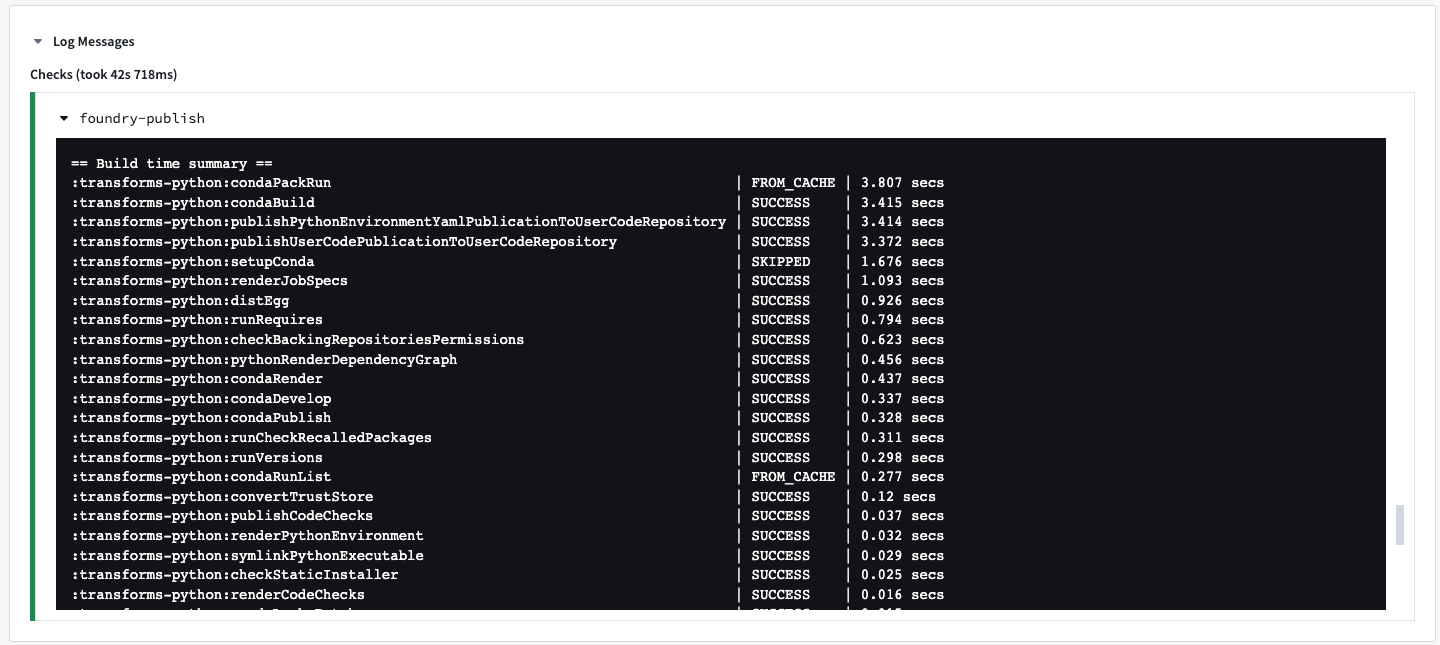
The condaPackRun task is responsible for installing the environment. Each artifact is retrieved from the proper channel, and conda uses these artifacts to construct the environment.
This task contains the following three stages:
- Download and extract all packages in the solved environment.
- Verify package contents. Depending on configuration, conda will either use a checksum or verify that the file size is correct.
- Link packages into the environment.
Environment specifications are stored as a cache for following builds in the hidden files listed below.
conda-version-run.linux-64.lockconda-version-test.linux-64.lock
:::callout{theme="neutral"} The cache is stored for 7 days. It is re-cached if any change happens in the meta.yaml file.
This task is heavily dependent on how many packages are added to the repository. The more packages added, the slower the task will run. :::
Enable style checks
PEP8 and Pylint style checks can be enabled by applying the com.palantir.conda.pep8 and com.palantir.conda.pylint Gradle plugins in your Python project's build.gradle file. For transforms repositories, this can be found in the Python sub-project. For library repositories, this can be found in the root folder.
Below is an example of a transforms build.gradle file:
apply plugin: 'com.palantir.transforms.lang.python'
apply plugin: 'com.palantir.transforms.lang.python-defaults'

// Apply the pep8 linting plugin
apply plugin: 'com.palantir.conda.pep8'
apply plugin: 'com.palantir.conda.pylint'
Pylint can be configured in the src/.pylintrc file in your Python project. For
example, specific messages can be disabled as shown below:
[MESSAGES CONTROL]
disable =
    missing-module-docstring,
    missing-function-docstring
:::callout{theme="neutral" title="Pylint limitations"}
Not all configurations of Pylint are guaranteed to work in Foundry. If a feature in src/.pylintrc is not displayed in checks, this indicates that the feature is not supported.
:::
Enable tests
Tests can be enabled by applying the com.palantir.transforms.lang.pytest-defaults Gradle plugin in your Python project’s build.gradle file. For transforms repositories, this can be found in the Python subproject. For library repositories, this can be found in the root folder.
Below is an example of a transforms build.gradle file:
apply plugin: 'com.palantir.transforms.lang.python'
apply plugin: 'com.palantir.transforms.lang.python-defaults'

// Apply the testing plugin
apply plugin: 'com.palantir.transforms.lang.pytest-defaults'
A library build.gradle file may look as follows:
apply plugin: 'com.palantir.transforms.lang.python-library'
apply plugin: 'com.palantir.transforms.lang.python-library-defaults'

// Apply the testing plugin
apply plugin: 'com.palantir.transforms.lang.pytest-defaults'

// Publish only for tagged releases (zero commits ahead of last git tag)
condaLibraryPublish.onlyIf { versionDetails().commitDistance == 0 }
:::callout{theme="neutral"} Runtime requirements defined in the meta.yaml file will be available in your tests. Additional requirements can also be specified in the conda test section ↗. :::
Write tests
Pytest identifies tests in Python files that begin with test_ or end with _test.py. We recommend putting all tests in a test package under your project's src directory. Tests are Python functions that are named with the test_ prefix, and contain assertions made using Python’s assert statement. Pytest will also run tests written using Python’s built-in unittest ↗ module. Refer to the pytest documentation ↗ for detailed information on writing tests.
Simple test example
The following is an example of a simple test that could be found at transforms-python/src/test/test_increment.py. Note that this test is designed to fail for the purposes of this example.
def increment(num):
    return num + 1

def test_increment():
    assert increment(3) == 5
Running this test will cause checks to fail with the following message:
============================= test session starts =============================
collected 1 item

test_increment.py F                                                       [100%]

================================== FAILURES ===================================
_______________________________ test_increment ________________________________

    def test_increment():
>       assert increment(3) == 5
E       assert 4 == 5
E        +  where 4 = increment(3)

test_increment.py:5: AssertionError
========================== 1 failed in 0.08 seconds ===========================
DataFrame test example
You can also write tests using DataFrames, as shown in the example below:
```python tab="Polars" import polars as pl
def test_dataframe(): df = pl.DataFrame( [["a", 1], ["b", 2]], schema=["letter", "number"], orient="row" ) assert df.columns == ['letter', 'number']
```python tab="DuckDB"
import duckdb

def test_dataframe():
    conn = duckdb.connect()
    df = conn.sql("""SELECT * FROM VALUES
                    ('a', 1), ('b', 2)
                    AS t(letter, number)""").fetchdf()
    assert list(df.columns) == ['letter', 'number']
```python tab="Pandas" import pandas as pd
def test_dataframe(): df = pd.DataFrame([['a', 1], ['b', 2]], columns=['letter', 'number']) assert list(df.columns) == ['letter', 'number']
```python tab="PySpark"
def test_dataframe(spark_session):
    df = spark_session.createDataFrame([['a', 1], ['b', 2]], ['letter', 'number'])
    assert df.schema.names == ['letter', 'number']
:::callout{theme="neutral"}
In the Spark example above, note the usage of Pytest fixtures ↗, a powerful feature that enables injecting values into test functions by adding a parameter of the same name. This feature is used to provide a spark_session fixture for use in your test function.
:::
Create test inputs and expected outputs from a CSV
CSV files can be stored in a code repository and used as inputs and expected outputs for testing data transformations. In the example below, we will provide a sample data transformation and demonstrate how CSV files can be used in tests as inputs and expected outputs.
Example data transform
The following transformation is in a file named find_aircraft.py in the transforms-python/src/myproject/datasets/ folder.
```python tab="Polars" from transforms.api import transform, Input, Output import polars as pl
@transform.using(
output=Output("```python tab="DuckDB"
from transforms.api import transform, Input, Output
@transform.using(
output=Output("<output_dataset_rid>"),
aircraft=Input("<input_dataset_rid>"),
)
def compute(ctx, output, aircraft):
conn = ctx.duckdb().conn
filtered_query = conn.sql("""
SELECT * FROM aircraft
WHERE number_of_seats > 300
AND operating_status = 'Yes'
""")
output.write_table(filtered_query)
```python tab="Pandas" from transforms.api import transform, Input, Output import pandas as pd
@transform.using(
output=Output("```python tab="PySpark"
from pyspark.sql import functions as F
from transforms.api import transform, Input, Output
@transform.spark.using(
output=Output("<output_dataset_rid>"),
aircraft=Input("<input_dataset_rid>"),
)
def compute(output, aircraft):
aircraft_df = aircraft.dataframe()
filtered_df = aircraft_df.filter((F.col("number_of_seats") > F.lit(300)) & (F.col("operating_status") == F.lit("Yes")))
output.write_dataframe(filtered_df)
Example CSV files for validation
The following two CSV files and their respective contents would be in the transforms-python/src/test/resources/ folder.
Test inputs in aircraft_mock.csv:
tail_number,serial_number,manufacture_year,manufacturer,model,number_of_seats,capacity_in_pounds,operating_status,aircraft_status,acquisition_date,model_type
AAA1,20809,1990,Manufacturer_1,M1-100,1,3500,Yes,Owned,13/8/90,208
BBB1,46970,2013,Manufacturer_2,M2-300,310,108500,No,Owned,10/15/14,777
CCC1,44662,2013,Manufacturer_2,M2-300,310,108500,Yes,Owned,6/23/13,777
DDD1,58340,2014,Manufacturer_3,M3-200,294,100000,Yes,Leased,11/21/13,330
EEE1,58600,2013,Manufacturer_2,M2-300,300,47200,Yes,Leased,12/2/13,777
Expected outputs in expected_filtered_aircraft.csv:
tail_number,serial_number,manufacture_year,manufacturer,model,number_of_seats,capacity_in_pounds,operating_status,aircraft_status,acquisition_date,model_type
CCC1,44662,2013,Manufacturer_2,M2-300,310,108500,Yes,Owned,6/23/13,777
Example test with validation against CSV files
The following test is in a file named test_find_aircraft.py in the transforms-python/src/test/ folder.
:::callout{theme="neutral"} Note the use of MagicMock ↗ to intercept and capture the data that our transformation function writes to its output. This allows us to inspect and verify the results directly in our test without actually writing data to the output dataset. This approach keeps our test isolated and lets us test what would be written, without side effects on our data. :::
```python tab="Polars" import os from pathlib import Path import polars as pl from polars.testing import assert_frame_equal from unittest.mock import MagicMock, patch from myproject.datasets.find_aircraft import compute
TEST_RESOURCES_DIRECTORY_PATH = Path(os.path.dirname(file)).joinpath('resources')
def test_find_aircrafts(): aircraft_mock_df = pl.read_csv(TEST_RESOURCES_DIRECTORY_PATH / 'aircraft_mock.csv') expected_filtered_aircraft_df = pl.read_csv(TEST_RESOURCES_DIRECTORY_PATH / 'expected_filtered_aircraft.csv')
# Creating mock objects for inputs and outputs
results_output_mock = MagicMock()
aircraft_mock_input = MagicMock()
aircraft_mock_input.polars = MagicMock(return_value=aircraft_mock_df)
aircraft_mock_input.read_table = MagicMock(return_value=aircraft_mock_df)

# Mock datasets io
datasets = {"results_output": results_output_mock, "aircraft_input": aircraft_mock_input}
module = MagicMock()
with patch.dict("sys.modules", {"foundry": MagicMock(), "foundry.transforms": module}):
    module.Dataset.get.side_effect = datasets.get
    compute()

result_df = results_output_mock.write_polars.call_args[0][0]

assert result_df.columns == expected_filtered_aircraft_df.columns
assert result_df.height == expected_filtered_aircraft_df.height

result_sorted = result_df.sort(result_df.columns)
expected_sorted = expected_filtered_aircraft_df.sort(expected_filtered_aircraft_df.columns)
assert_frame_equal(result_sorted, expected_sorted)
python tab="DuckDB"
import os
from pathlib import Path
import duckdb
import pandas as pd
from unittest.mock import MagicMock, patch
from myproject.datasets.find_aircraft import compute
TEST_RESOURCES_DIRECTORY_PATH = Path(os.path.dirname(file)).joinpath('resources')
def test_find_aircrafts():
conn = duckdb.connect()
# Load CSV data using DuckDB
aircraft_mock_df = conn.sql(f"SELECT * FROM read_csv('{TEST_RESOURCES_DIRECTORY_PATH / 'aircraft_mock.csv'}', header=true)").fetchdf()
expected_filtered_aircraft_df = conn.sql(f"SELECT * FROM read_csv('{TEST_RESOURCES_DIRECTORY_PATH / 'expected_filtered_aircraft.csv'}', header=true)").fetchdf()
# Creating mock objects for inputs and outputs
results_output_mock = MagicMock()
aircraft_mock_input = MagicMock()
# Create mock context with DuckDB connection
ctx_mock = MagicMock()
duckdb_mock = MagicMock()
duckdb_mock.conn = conn
ctx_mock.duckdb = MagicMock(return_value=duckdb_mock)
# Register the test data in DuckDB connection
conn.register('aircraft', aircraft_mock_df)
# Mock datasets io
datasets = {"results_output": results_output_mock, "aircraft_input": aircraft_mock_input}
module = MagicMock()
with patch.dict("sys.modules", {"foundry": MagicMock(), "foundry.transforms": module}):
module.Dataset.get.side_effect = datasets.get
compute(ctx_mock, results_output_mock, aircraft_mock_input)
# Get the result from the mocked write_table call
result_query = results_output_mock.write_table.call_args[0][0]
result_df = result_query.fetchdf()
assert list(result_df.columns) == list(expected_filtered_aircraft_df.columns)
assert len(result_df) == len(expected_filtered_aircraft_df)
pd.testing.assert_frame_equal(
result_df.sort_values(by=list(result_df.columns)).reset_index(drop=True),
expected_filtered_aircraft_df.sort_values(by=list(expected_filtered_aircraft_df.columns)).reset_index(drop=True),
check_dtype=False
)
```
```python tab="Pandas" import os from pathlib import Path import pandas as pd from myproject.datasets.find_aircraft import compute
TEST_RESOURCES_DIRECTORY_PATH = Path(os.path.dirname(file)).joinpath('resources')
def test_find_aircrafts(): aircraft_mock_df = pd.read_csv(TEST_RESOURCES_DIRECTORY_PATH / 'aircraft_mock.csv') expected_filtered_aircraft_df = pd.read_csv(TEST_RESOURCES_DIRECTORY_PATH / 'expected_filtered_aircraft.csv')
# Creating mock objects for inputs and outputs
results_output_mock = MagicMock()
aircraft_mock_input = MagicMock()
aircraft_mock_input.pandas = MagicMock(return_value=aircraft_mock_df)
aircraft_mock_input.read_table = MagicMock(return_value=aircraft_mock_df)

# Mock datasets io
datasets = {"results_output": results_output_mock, "aircraft_input": aircraft_mock_input}
module = MagicMock()
with patch.dict("sys.modules", {"foundry": MagicMock(), "foundry.transforms": module}):
    module.Dataset.get.side_effect = datasets.get
    compute()

result_df = results_output_mock.write_pandas.call_args[0][0]

assert list(result_df.columns) == list(expected_filtered_aircraft_df.columns)
assert len(result_df) == len(expected_filtered_aircraft_df)
pd.testing.assert_frame_equal(
    result_df.sort_values(by=list(result_df.columns)).reset_index(drop=True),
    expected_filtered_aircraft_df.sort_values(by=list(expected_filtered_aircraft_df.columns)).reset_index(drop=True),
    check_dtype=False
)
python tab="PySpark"
import os
from pathlib import Path
from unittest.mock import MagicMock
from transforms.api import Input
from myproject.datasets.find_aircraft import compute
TEST_RESOURCES_DIRECTORY_PATH = Path(os.path.dirname(file)).joinpath('resources')
def test_find_aircrafts(spark_session):
aircraft_mock_df = spark_session.read.csv(
str(TEST_RESOURCES_DIRECTORY_PATH.joinpath('aircraft_mock.csv')),
inferSchema=True,
header=True
)
expected_filtered_aircraft_df = spark_session.read.csv(
str(TEST_RESOURCES_DIRECTORY_PATH.joinpath('expected_filtered_aircraft.csv')),
inferSchema=True,
header=True
)
# Create a mock object for the output
results_output_mock = MagicMock()
# Create a wrapper for the input and configure the returned dataset
aircraft_mock_input = Input()
aircraft_mock_input.dataframe = MagicMock(return_value=aircraft_mock_df)
# Run the transformation with the mock output object
compute(
results_output=results_output_mock,
aircraft_input=aircraft_mock_input
)
# Intercept the arguments that write_dataframe was called with,
# and extract the DataFrame that was sent to be written as a result of the transformation
args, kwargs = results_output_mock.write_dataframe.call_args
result_df = args[0]
assert result_df.columns == expected_filtered_aircraft_df.columns
assert result_df.count() == expected_filtered_aircraft_df.count()
assert result_df.exceptAll(expected_filtered_aircraft_df).count() == 0
assert expected_filtered_aircraft_df.exceptAll(result_df).count() == 0
```
The final repository structure should be as follows:
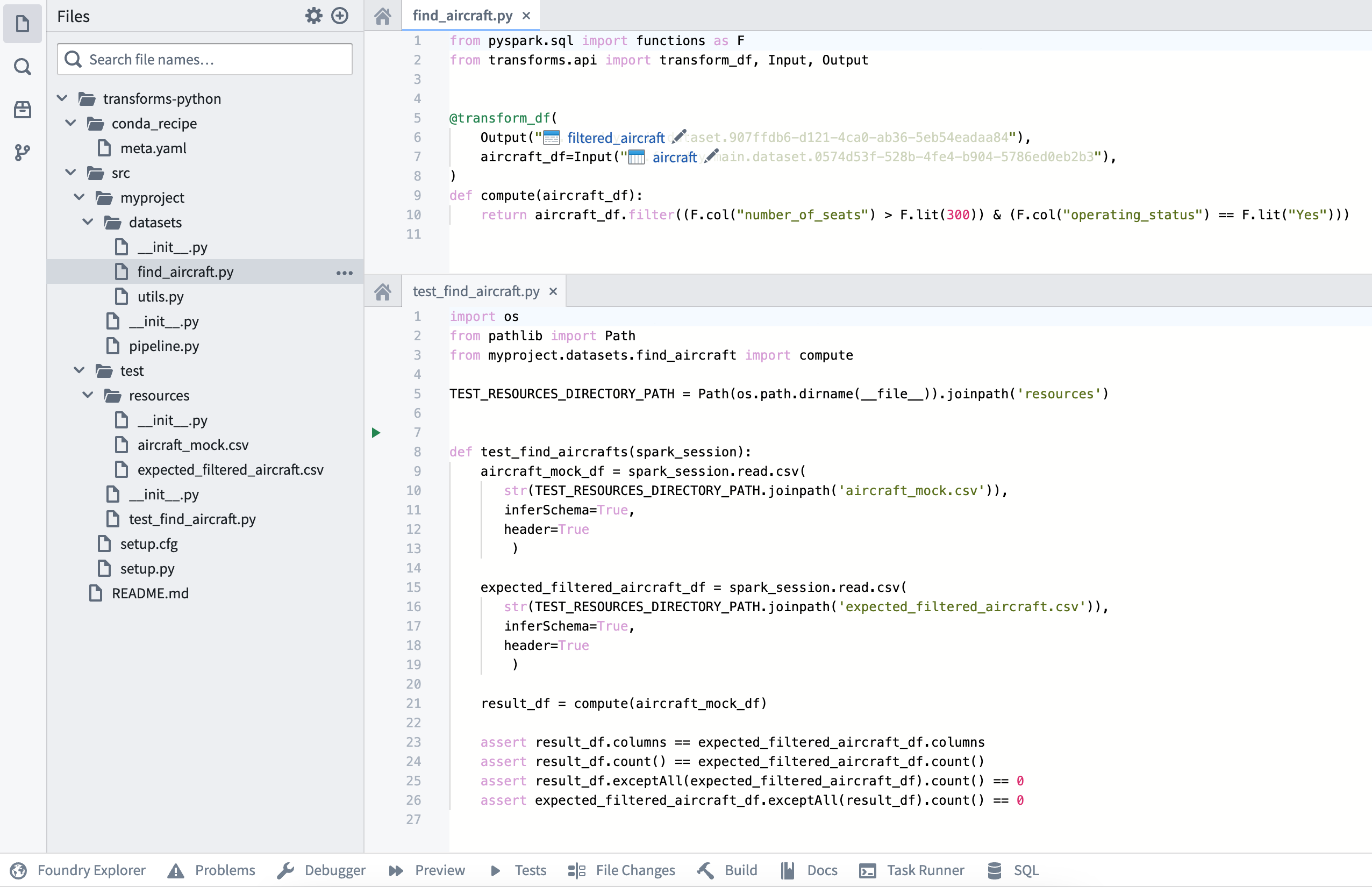
The test should be in the transforms-python/src/test/test_find_aircraft.py file, and the CSV resources containing the inputs and expected outputs should be in the transforms-python/src/test/resources folder.
View test output
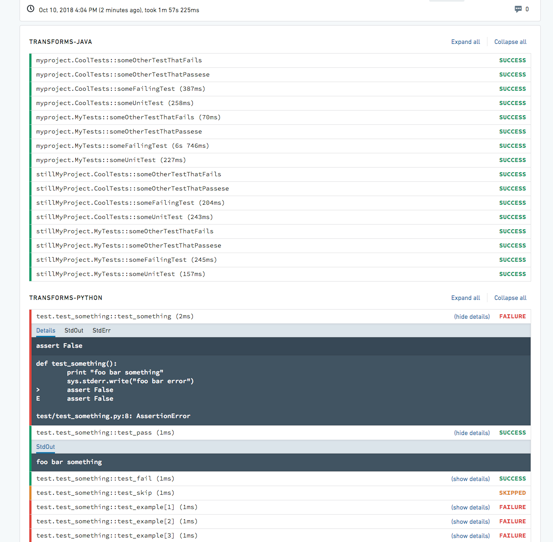
The output of configured tests will be displayed in the Checks tab with a separate output for each test. Test results will be collapsed by default, with the status PASSED, FAILED, or SKIPPED. Expanding each test or all tests will display the test output as well as the StdOut and StdErr logs.
Test coverage
Pytest coverage ↗ can be used to compute coverage and enforce a minimum percentage on your repository.
To do so, add the following to the repository's meta.yml file.
test:
  requires:
    - pytest-cov
Create a pytest.ini file at /transforms-python/src/pytest.ini with the following contents:
[pytest]
addopts = --cov=<<package name, e.g. myproject>> --cov-report term --cov-fail-under=100
:::callout{theme="neutral"}
The coverage required to fail checks is customizable. Select a percentage for the --cov-fail-under argument.
:::
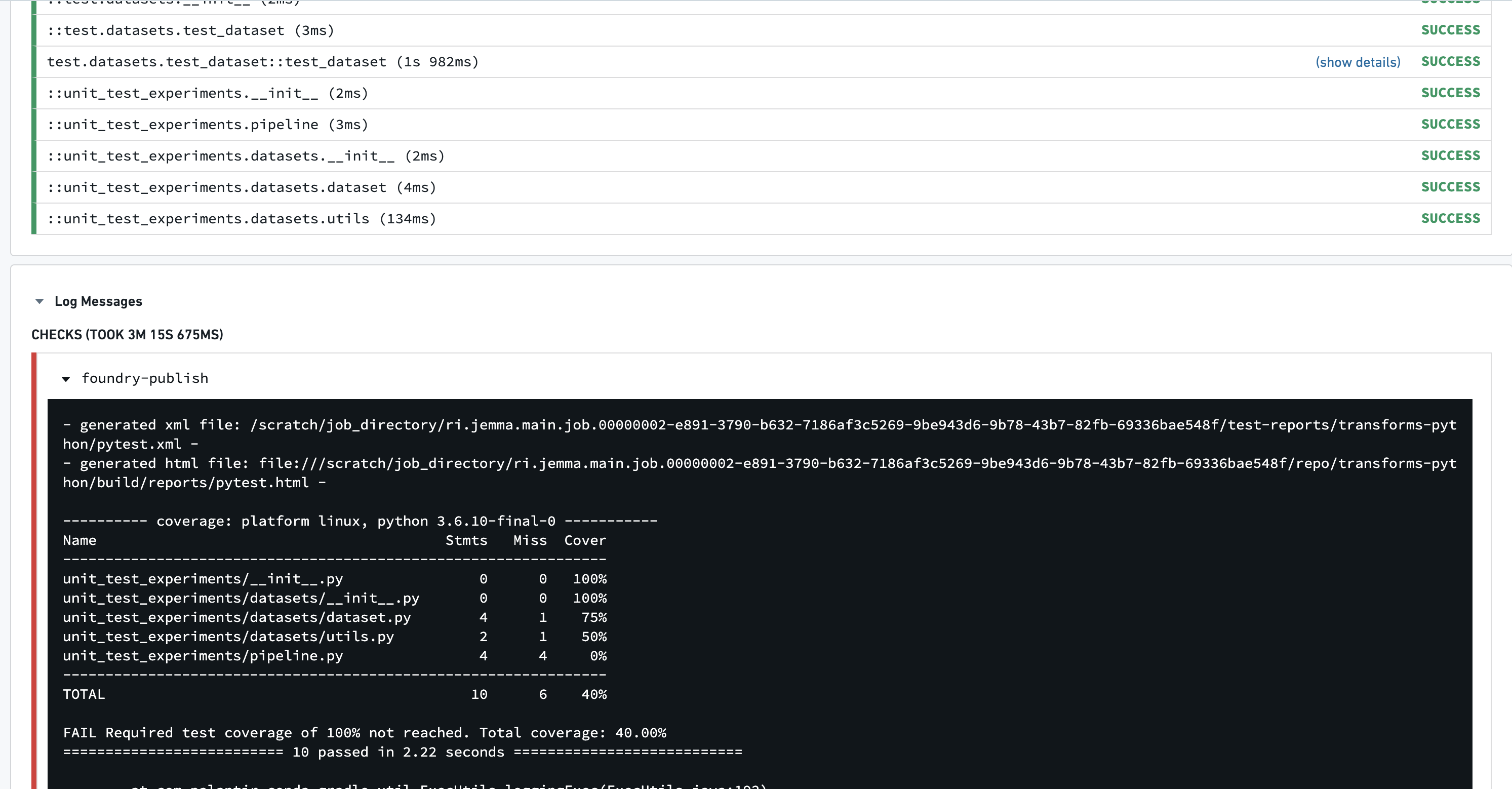
Running tests that result in coverage less than the prescribed amount will now fail with this output:
Parallelize tests
By default, pytest runs tests sequentially. To speed up test runs, you can send tests to multiple CPUs.
Edit the transforms build.gradle file and set numProcesses to the number of processes that should be used.
apply plugin: 'com.palantir.transforms.lang.python'
apply plugin: 'com.palantir.transforms.lang.python-defaults'

// Apply the testing plugin
apply plugin: 'com.palantir.transforms.lang.pytest-defaults'

tasks.pytest {
    numProcesses "3"
}
Test parallelization is run using the pytest-xdist ↗ testing plugin.
:::callout{theme="neutral"} Parallelizing tests involves sending pending tests to any available workers, without guaranteed orders. Any tests that require global/shared state and anticipate changes being made by other preceding tests should be adjusted accordingly. :::
Additional notes
- After enabling tests, you should see the
:transforms-python:pytesttask running in the CI logs when you commit. - Tests are discovered based on the
test_prefix at the beginning of both the file and function names. This is a pytest convention. - A quick way to get example records is to open a dataset in the Code Workbook console and call
.collect(). - To obtain a Python-formatted schema, open the dataset preview, then open the Columns tab and select Copy > Copy PySpark Schema.
Spark-specific test guidance
Below is some additional information that is relevant when using Foundry's Spark compute engine.
Enable the Spark anti-pattern plugin
The Spark anti-pattern linter can be enabled by applying the com.palantir.transforms.lang.antipattern-linter Gradle plugin in your Python project's build.gradle file.
// Apply the anti-pattern linter
apply plugin: 'com.palantir.transforms.lang.antipattern-linter'
The Spark anti-pattern plugin will warn against the usage of common anti-patterns in Spark such as correctness issues, poor Spark performance, and security implications.
中文翻译
单元测试(Unit tests)
:::callout{theme="neutral"} 本页描述的Python代码库单元测试仅适用于批处理管道(batch pipeline),不支持流处理管道(streaming pipeline)。 :::
Python代码库支持将运行测试作为检查(check)环节的一部分,这些测试使用主流Python测试框架pytest ↗运行。
持续集成(CI)任务:condaPackRun
所有CI检查都包含condaPackRun及其他任务。
condaPackRun任务负责安装环境,每个制品(artifact)都会从对应渠道拉取,conda会使用这些制品构建环境。
该任务包含以下三个阶段: 1. 下载并解压已解析环境中的所有包 2. 校验包内容。根据配置不同,conda会使用校验和(checksum)或验证文件大小是否正确 3. 将包链接到环境中
环境规范会作为缓存存储在下方列出的隐藏文件中,供后续构建使用:
* conda-version-run.linux-64.lock
* conda-version-test.linux-64.lock
:::callout{theme="neutral"} 缓存有效期为7天。如果meta.yaml文件发生任何变更,缓存会重新生成。 该任务的耗时与代码库添加的包数量高度相关,包越多,任务运行越慢。 :::
启用风格检查
你可以通过在Python项目的build.gradle文件中应用com.palantir.conda.pep8和com.palantir.conda.pylint Gradle插件(Gradle plugin),启用PEP8和Pylint风格检查。对于转换(transforms)代码库,该文件位于Python子项目中;对于库代码库,该文件位于根目录。
以下是转换代码库build.gradle文件的示例:
apply plugin: 'com.palantir.transforms.lang.python'
apply plugin: 'com.palantir.transforms.lang.python-defaults'

// Apply the pep8 linting plugin
apply plugin: 'com.palantir.conda.pep8'
apply plugin: 'com.palantir.conda.pylint'
你可以在Python项目的src/.pylintrc文件中配置Pylint,例如可以按如下方式禁用特定提示:
[MESSAGES CONTROL]
disable =
    missing-module-docstring,
    missing-function-docstring
:::callout{theme="neutral" title="Pylint使用限制"}
并非所有Pylint配置都能在Foundry中正常运行。如果src/.pylintrc中的某项功能未在检查中生效,说明该功能不受支持。
:::
启用测试
你可以通过在Python项目的build.gradle文件中应用com.palantir.transforms.lang.pytest-defaults Gradle插件启用测试。对于转换(transforms)代码库,该文件位于Python子项目中;对于库代码库,该文件位于根目录。
以下是转换代码库build.gradle文件的示例:
apply plugin: 'com.palantir.transforms.lang.python'
apply plugin: 'com.palantir.transforms.lang.python-defaults'

// Apply the testing plugin
apply plugin: 'com.palantir.transforms.lang.pytest-defaults'
库代码库的build.gradle文件示例如下:
apply plugin: 'com.palantir.transforms.lang.python-library'
apply plugin: 'com.palantir.transforms.lang.python-library-defaults'

// Apply the testing plugin
apply plugin: 'com.palantir.transforms.lang.pytest-defaults'

// Publish only for tagged releases (zero commits ahead of last git tag)
condaLibraryPublish.onlyIf { versionDetails().commitDistance == 0 }
:::callout{theme="neutral"} meta.yaml文件中定义的运行时依赖在测试中可以直接使用,你也可以在conda测试章节 ↗中指定额外依赖。 :::
编写测试
pytest会识别文件名以test_开头或_test.py结尾的Python文件中的测试。我们建议将所有测试放在项目src目录下的test包中。测试是以test_为前缀命名的Python函数,使用Python内置的assert语句编写断言。pytest也支持运行使用Python内置unittest ↗模块编写的测试。你可以参考pytest官方文档 ↗了解编写测试的详细信息。
简单测试示例
以下是位于transforms-python/src/test/test_increment.py的简单测试示例,注意为了演示效果,这个测试被设计为运行失败:
def increment(num):
    return num + 1

def test_increment():
    assert increment(3) == 5
运行该测试会触发检查失败,错误信息如下:
============================= test session starts =============================
collected 1 item

test_increment.py F                                                       [100%]

================================== FAILURES ===================================
_______________________________ test_increment ________________________________

    def test_increment():
>       assert increment(3) == 5
E       assert 4 == 5
E        +  where 4 = increment(3)

test_increment.py:5: AssertionError
========================== 1 failed in 0.08 seconds ===========================
数据帧(DataFrame)测试示例
你也可以使用DataFrame编写测试,示例如下: ```python tab="Polars" import polars as pl
def test_dataframe(): df = pl.DataFrame( [["a", 1], ["b", 2]], schema=["letter", "number"], orient="row" ) assert df.columns == ['letter', 'number']
```python tab="DuckDB"
import duckdb

def test_dataframe():
    conn = duckdb.connect()
    df = conn.sql("""SELECT * FROM VALUES
                    ('a', 1), ('b', 2)
                    AS t(letter, number)""").fetchdf()
    assert list(df.columns) == ['letter', 'number']
```python tab="Pandas" import pandas as pd
def test_dataframe(): df = pd.DataFrame([['a', 1], ['b', 2]], columns=['letter', 'number']) assert list(df.columns) == ['letter', 'number']
```python tab="PySpark"
def test_dataframe(spark_session):
    df = spark_session.createDataFrame([['a', 1], ['b', 2]], ['letter', 'number'])
    assert df.schema.names == ['letter', 'number']
:::callout{theme="neutral"}
在上面的Spark示例中,注意使用了Pytest固件 ↗,这是pytest的强大功能,你可以通过添加同名参数将值注入测试函数。该功能用于提供spark_session固件供测试函数使用。
:::
从CSV创建测试输入和预期输出
CSV文件可以存储在代码仓库中,用作测试数据转换的输入和预期输出。在下面的示例中,我们将提供一个示例数据转换,并演示如何在测试中使用CSV文件作为输入和预期输出。
示例数据转换
下面的转换代码位于transforms-python/src/myproject/datasets/文件夹下的find_aircraft.py文件中:
```python tab="Polars"
from transforms.api import transform, Input, Output
import polars as pl
@transform.using(
output=Output("```python tab="DuckDB"
from transforms.api import transform, Input, Output
@transform.using(
output=Output("<output_dataset_rid>"),
aircraft=Input("<input_dataset_rid>"),
)
def compute(ctx, output, aircraft):
conn = ctx.duckdb().conn
filtered_query = conn.sql("""
SELECT * FROM aircraft
WHERE number_of_seats > 300
AND operating_status = 'Yes'
""")
output.write_table(filtered_query)
```python tab="Pandas" from transforms.api import transform, Input, Output import pandas as pd
@transform.using(
output=Output("```python tab="PySpark"
from pyspark.sql import functions as F
from transforms.api import transform, Input, Output
@transform.spark.using(
output=Output("<output_dataset_rid>"),
aircraft=Input("<input_dataset_rid>"),
)
def compute(output, aircraft):
aircraft_df = aircraft.dataframe()
filtered_df = aircraft_df.filter((F.col("number_of_seats") > F.lit(300)) & (F.col("operating_status") == F.lit("Yes")))
output.write_dataframe(filtered_df)
用于校验的示例CSV文件
下面两个CSV文件及对应内容存放在transforms-python/src/test/resources/文件夹下:
测试输入文件aircraft_mock.csv内容:
tail_number,serial_number,manufacture_year,manufacturer,model,number_of_seats,capacity_in_pounds,operating_status,aircraft_status,acquisition_date,model_type
AAA1,20809,1990,Manufacturer_1,M1-100,1,3500,Yes,Owned,13/8/90,208
BBB1,46970,2013,Manufacturer_2,M2-300,310,108500,No,Owned,10/15/14,777
CCC1,44662,2013,Manufacturer_2,M2-300,310,108500,Yes,Owned,6/23/13,777
DDD1,58340,2014,Manufacturer_3,M3-200,294,100000,Yes,Leased,11/21/13,330
EEE1,58600,2013,Manufacturer_2,M2-300,300,47200,Yes,Leased,12/2/13,777
预期输出文件expected_filtered_aircraft.csv内容:
tail_number,serial_number,manufacture_year,manufacturer,model,number_of_seats,capacity_in_pounds,operating_status,aircraft_status,acquisition_date,model_type
CCC1,44662,2013,Manufacturer_2,M2-300,310,108500,Yes,Owned,6/23/13,777
使用CSV文件校验的示例测试
下面的测试位于transforms-python/src/test/文件夹下的test_find_aircraft.py文件中:
:::callout{theme="neutral"}
注意我们使用了MagicMock ↗来拦截和捕获转换函数写入输出的数据,这让我们可以直接在测试中检查和验证结果,而不需要真的将数据写入输出数据集。这种方法让测试保持隔离,我们可以测试本应写入的内容,不会对数据产生副作用。
:::
```python tab="Polars" import os from pathlib import Path import polars as pl from polars.testing import assert_frame_equal from unittest.mock import MagicMock, patch from myproject.datasets.find_aircraft import compute
TEST_RESOURCES_DIRECTORY_PATH = Path(os.path.dirname(file)).joinpath('resources')
def test_find_aircrafts(): aircraft_mock_df = pl.read_csv(TEST_RESOURCES_DIRECTORY_PATH / 'aircraft_mock.csv') expected_filtered_aircraft_df = pl.read_csv(TEST_RESOURCES_DIRECTORY_PATH / 'expected_filtered_aircraft.csv')
# Creating mock objects for inputs and outputs
results_output_mock = MagicMock()
aircraft_mock_input = MagicMock()
aircraft_mock_input.polars = MagicMock(return_value=aircraft_mock_df)
aircraft_mock_input.read_table = MagicMock(return_value=aircraft_mock_df)

# Mock datasets io
datasets = {"results_output": results_output_mock, "aircraft_input": aircraft_mock_input}
module = MagicMock()
with patch.dict("sys.modules", {"foundry": MagicMock(), "foundry.transforms": module}):
    module.Dataset.get.side_effect = datasets.get
    compute()

result_df = results_output_mock.write_polars.call_args[0][0]

assert result_df.columns == expected_filtered_aircraft_df.columns
assert result_df.height == expected_filtered_aircraft_df.height

result_sorted = result_df.sort(result_df.columns)
expected_sorted = expected_filtered_aircraft_df.sort(expected_filtered_aircraft_df.columns)
assert_frame_equal(result_sorted, expected_sorted)
python tab="DuckDB"
import os
from pathlib import Path
import duckdb
import pandas as pd
from unittest.mock import MagicMock, patch
from myproject.datasets.find_aircraft import compute
TEST_RESOURCES_DIRECTORY_PATH = Path(os.path.dirname(file)).joinpath('resources')
def test_find_aircrafts():
conn = duckdb.connect()
# Load CSV data using DuckDB
aircraft_mock_df = conn.sql(f"SELECT * FROM read_csv('{TEST_RESOURCES_DIRECTORY_PATH / 'aircraft_mock.csv'}', header=true)").fetchdf()
expected_filtered_aircraft_df = conn.sql(f"SELECT * FROM read_csv('{TEST_RESOURCES_DIRECTORY_PATH / 'expected_filtered_aircraft.csv'}', header=true)").fetchdf()
# Creating mock objects for inputs and outputs
results_output_mock = MagicMock()
aircraft_mock_input = MagicMock()
# Create mock context with DuckDB connection
ctx_mock = MagicMock()
duckdb_mock = MagicMock()
duckdb_mock.conn = conn
ctx_mock.duckdb = MagicMock(return_value=duckdb_mock)
# Register the test data in DuckDB connection
conn.register('aircraft', aircraft_mock_df)
# Mock datasets io
datasets = {"results_output": results_output_mock, "aircraft_input": aircraft_mock_input}
module = MagicMock()
with patch.dict("sys.modules", {"foundry": MagicMock(), "foundry.transforms": module}):
module.Dataset.get.side_effect = datasets.get
compute(ctx_mock, results_output_mock, aircraft_mock_input)
# Get the result from the mocked write_table call
result_query = results_output_mock.write_table.call_args[0][0]
result_df = result_query.fetchdf()
assert list(result_df.columns) == list(expected_filtered_aircraft_df.columns)
assert len(result_df) == len(expected_filtered_aircraft_df)
pd.testing.assert_frame_equal(
result_df.sort_values(by=list(result_df.columns)).reset_index(drop=True),
expected_filtered_aircraft_df.sort_values(by=list(expected_filtered_aircraft_df.columns)).reset_index(drop=True),
check_dtype=False
)
```
```python tab="Pandas" import os from pathlib import Path import pandas as pd from myproject.datasets.find_aircraft import compute
TEST_RESOURCES_DIRECTORY_PATH = Path(os.path.dirname(file)).joinpath('resources')
def test_find_aircrafts(): aircraft_mock_df = pd.read_csv(TEST_RESOURCES_DIRECTORY_PATH / 'aircraft_mock.csv') expected_filtered_aircraft_df = pd.read_csv(TEST_RESOURCES_DIRECTORY_PATH / 'expected_filtered_aircraft.csv')
# Creating mock objects for inputs and outputs
results_output_mock = MagicMock()
aircraft_mock_input = MagicMock()
aircraft_mock_input.pandas = MagicMock(return_value=aircraft_mock_df)
aircraft_mock_input.read_table = MagicMock(return_value=aircraft_mock_df)

# Mock datasets io
datasets = {"results_output": results_output_mock, "aircraft_input": aircraft_mock_input}
module = MagicMock()
with patch.dict("sys.modules", {"foundry": MagicMock(), "foundry.transforms": module}):
    module.Dataset.get.side_effect = datasets.get
    compute()

result_df = results_output_mock.write_pandas.call_args[0][0]

assert list(result_df.columns) == list(expected_filtered_aircraft_df.columns)
assert len(result_df) == len(expected_filtered_aircraft_df)
pd.testing.assert_frame_equal(
    result_df.sort_values(by=list(result_df.columns)).reset_index(drop=True),
    expected_filtered_aircraft_df.sort_values(by=list(expected_filtered_aircraft_df.columns)).reset_index(drop=True),
    check_dtype=False
)
python tab="PySpark"
import os
from pathlib import Path
from unittest.mock import MagicMock
from transforms.api import Input
from myproject.datasets.find_aircraft import compute
TEST_RESOURCES_DIRECTORY_PATH = Path(os.path.dirname(file)).joinpath('resources')
def test_find_aircrafts(spark_session):
aircraft_mock_df = spark_session.read.csv(
str(TEST_RESOURCES_DIRECTORY_PATH.joinpath('aircraft_mock.csv')),
inferSchema=True,
header=True
)
expected_filtered_aircraft_df = spark_session.read.csv(
str(TEST_RESOURCES_DIRECTORY_PATH.joinpath('expected_filtered_aircraft.csv')),
inferSchema=True,
header=True
)
# Create a mock object for the output
results_output_mock = MagicMock()
# Create a wrapper for the input and configure the returned dataset
aircraft_mock_input = Input()
aircraft_mock_input.dataframe = MagicMock(return_value=aircraft_mock_df)
# Run the transformation with the mock output object
compute(
results_output=results_output_mock,
aircraft_input=aircraft_mock_input
)
# Intercept the arguments that write_dataframe was called with,
# and extract the DataFrame that was sent to be written as a result of the transformation
args, kwargs = results_output_mock.write_dataframe.call_args
result_df = args[0]
assert result_df.columns == expected_filtered_aircraft_df.columns
assert result_df.count() == expected_filtered_aircraft_df.count()
assert result_df.exceptAll(expected_filtered_aircraft_df).count() == 0
assert expected_filtered_aircraft_df.exceptAll(result_df).count() == 0
```
最终的代码库结构应该如下:
测试应该放在transforms-python/src/test/test_find_aircraft.py文件中,包含输入和预期输出的CSV资源文件应该放在transforms-python/src/test/resources文件夹下。
查看测试输出
已配置测试的输出会显示在检查(Checks)标签页中,每个测试都有独立的输出。测试结果默认折叠,状态分为PASSED(通过)、FAILED(失败)或SKIPPED(跳过)。展开单个测试或全部测试,可以查看测试输出以及标准输出(StdOut)和标准错误(StdErr)日志。
测试覆盖率
你可以使用Pytest coverage ↗计算覆盖率,并为代码库设置最低覆盖率要求。
操作步骤如下:首先在代码库的meta.yml文件中添加以下内容:
test:
  requires:
    - pytest-cov
然后在/transforms-python/src/pytest.ini路径下创建pytest.ini文件,内容如下:
[pytest]
addopts = --cov=<<package name, e.g. myproject>> --cov-report term --cov-fail-under=100
:::callout{theme="neutral"}
触发检查失败的覆盖率阈值可以自定义,你可以为--cov-fail-under参数设置对应百分比。
:::
如果运行测试后的覆盖率低于指定阈值,检查会失败,输出如下:
测试并行化
默认情况下,pytest会顺序运行测试。要加快测试运行速度,你可以将测试分发到多个CPU运行。
编辑转换(transforms)代码库的build.gradle文件,将numProcesses设置为要使用的进程数:
apply plugin: 'com.palantir.transforms.lang.python'
apply plugin: 'com.palantir.transforms.lang.python-defaults'

// Apply the testing plugin
apply plugin: 'com.palantir.transforms.lang.pytest-defaults'

tasks.pytest {
    numProcesses "3"
}
测试并行化使用pytest-xdist ↗测试插件实现。 :::callout{theme="neutral"} 测试并行化会将待运行的测试分配给任何可用的工作进程,不保证执行顺序。如果你的测试依赖全局/共享状态,且依赖前置测试修改后的状态,需要对应调整测试逻辑。 :::
其他注意事项
- 启用测试后,提交代码时你可以在CI日志中看到
:transforms-python:pytest任务正在运行。 - 测试是基于文件和函数名开头的
test_前缀识别的,这是pytest的约定规则。 - 获取示例记录的快捷方法是在代码工作台(Code Workbook)控制台中打开数据集,然后调用
.collect()。 - 要获取Python格式的模式(schema),打开数据集预览,然后打开列(Columns)标签页,选择复制 > 复制PySpark模式即可。
Spark专属测试指南
下面是使用Foundry的Spark计算引擎时的相关补充信息。
启用Spark反模式(anti-pattern)静态检查器(linter)插件
你可以通过在Python项目的build.gradle文件中应用com.palantir.transforms.lang.antipattern-linter Gradle插件,启用Spark反模式静态检查器:
// Apply the anti-pattern linter
apply plugin: 'com.palantir.transforms.lang.antipattern-linter'