Share code across repositories(跨仓库共享代码)
This section covers the basic workflow for sharing Java code between repositories.
Prerequisites
Before reading on, make sure you've created a separate repository containing the Java code / macros which you will depend on in other repositories. Throughout this guide, we will refer to this repository containing the Java code / macros to be shared as the shared code repository, and we will refer to any repository that depends on the shared code repository as a dependent repository.
After adding Java code / macros to your shared code repository, make sure to compile the repository by committing your changes.
Permissions Setup
In order to share code, you must ensure that the dependent repository has access to the artifact produced by the shared code repository. To configure the artifacts that can be referenced from the dependent repository, navigate to the Artifacts section of the Settings tab. Learn more about artifact settings.
Gradle Setup
For the Dependent Repository
:::callout{theme="neutral"} The Gradle setup for the dependent repository is required any time you're sharing code across repositories (this includes Java code as well as macros). :::
Jemma automatically publishes the artifact produced by the shared code repository. Thus, after setting up the required permissions mentioned above, all the dependent repository needs to do is point to the published artifact. That will involve adding a block like the following to the end of the build.gradle file in the language-specific subproject of the dependent repository:
dependencies {
    compile '<SHARED_CODE_REPO_RID>:<SHARED_CODE_REPO_GRADLE_SUBPROJECT>:<SHARED_CODE_REPO_VERSION>'
}
Let's step through the process for getting the required information and adding it to the build.gradle file.
-
First, you need the
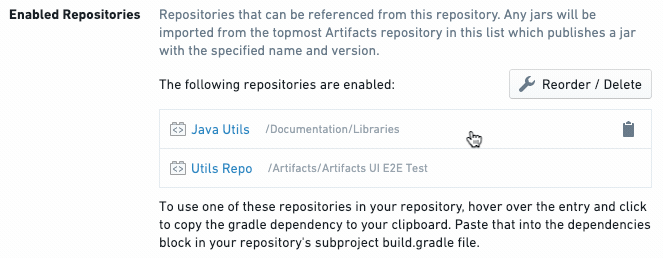
SHARED_CODE_REPO_RID, that is, the RID of the shared code repository. You can obtain this from the repo URL. Alternatively, you can click on a repository entry on the Artifacts Settings tab to copy the abovecompileline with the shared repository RID filled in (such ascompile 'ri.stemma.repository.some-random-rid:<SHARED_CODE_REPO_GRADLE_SUBPROJECT>:<SHARED_CODE_REPO_VERSION>') to your clipboard.
\
-
Next, you need to obtain values for
SHARED_CODE_REPO_GRADLE_SUBPROJECTandSHARED_CODE_REPO_VERSION. To obtain these, modify theci.ymlfile in the shared code repository by adding--infoto the last line (starting with./gradlew). For example:
./gradlew --no-daemon --build-cache --stacktrace patch publish
Becomes:
./gradlew --no-daemon --build-cache --stacktrace patch publish --info
Then, refer to the CI output for the latest Jemma job in the shared code repository. Look for a line in the CI output that matches one of the following forms:
Upload https://<MAVEN_REPO_URL>/maven-repository-proxy/authz/user-code/<SHARED_CODE_REPO_RID>/<SHARED_CODE_REPO_GRADLE_SUBPROJECT>/<SHARED_CODE_REPO_VERSION>/<SHARED_CODE_REPO_GRADLE_SUBPROJECT>-<SHARED_CODE_REPO_VERSION>.jar
or
Uploading: ri/stemma/main/repository/<SHARED_CODE_REPO_UUID>/<SHARED_CODE_REPO_GRADLE_SUBPROJECT>/<SHARED_CODE_REPO_VERSION>/<SHARED_CODE_REPO_GRADLE_SUBPROJECT>-<SHARED_CODE_REPO_VERSION>.jar to repository remote at https://<ARTIFACTS_URL>/artifacts/api/legacy/mrp/authz/user-code/
or
Uploading: ri/stemma/main/repository/<SHARED_CODE_REPO_UUID>/<SHARED_CODE_REPO_GRADLE_SUBPROJECT>/<SHARED_CODE_REPO_VERSION>/<SHARED_CODE_REPO_GRADLE_SUBPROJECT>-<SHARED_CODE_REPO_VERSION>.jar to repository remote at https://<ARTIFACTS_URL>/artifacts/api/repositories/<SHARED_CODE_REPO_UUID>/contents/release/maven/
Using the information from the CI output, you can construct the Maven coordinate referencing the artifact produced by your shared code repository. Note that the <SHARED_CODE_REPO_RID> you provide in your Maven coordinate should be of the form ri.stemma.main.repository.{RID_VALUE}.
- Now that you have the Maven coordinate, you can update the
build.gradlefile. Make sure you edit thebuild.gradlefile in the language-specific subproject folder (e.g.transforms-java/build.gradle), not the one at the root of the repository. Your updatedbuild.gradleshould look something like the following (note the twodependenciesblocks):
buildscript {
    // ...
    dependencies {
        classpath "com.palantir.transforms.java:lang-java-gradle-plugin:${transformsJavaVersion}"
    }
}

apply plugin: 'com.palantir.transforms.lang.java'
apply plugin: 'com.palantir.transforms.lang.java-defaults'

dependencies {
    compile '<SHARED_CODE_REPO_RID>:<SHARED_CODE_REPO_GRADLE_SUBPROJECT>:<SHARED_CODE_REPO_VERSION>'
}
You should now be able to access code from the shared code repository in the dependent code repository!
:::callout{theme="warning" title="Warning"}
As you update the code in the shared code repository, you will need to update the <SHARED_CODE_REPO_VERSION> in your Maven coordinate to ensure that your dependent repository is using the most up-to-date version of the shared code. Each time you compile the shared code repository, check the CI output to find the updated version number you should be referencing.
:::
Conclusion
Now, you're ready to start sharing code across repositories. For any dependent repository that needs to reference code from the shared code repository, make sure you've taken the steps mentioned above to set up the correct permissions and dependencies.
:::callout{theme="neutral"} Unlike with Python, Code Repositories does not support the creation of Java libraries, only the sharing of Java repositories. This means features such as tagging are also unsupported for Java. :::
中文翻译
跨仓库共享代码
本节介绍在仓库之间共享 Java 代码的基本工作流程。
前置条件
在继续阅读之前,请确保您已创建一个独立的仓库,其中包含您将在其他仓库中依赖的 Java 代码/宏。在本指南中,我们将包含待共享 Java 代码/宏的仓库称为共享代码仓库(shared code repository),将任何依赖共享代码仓库的仓库称为依赖仓库(dependent repository)。
将 Java 代码/宏添加到共享代码仓库后,请务必通过提交更改来编译该仓库。
权限设置
要共享代码,您必须确保依赖仓库有权访问共享代码仓库生成的工件(artifact)。要配置可从依赖仓库引用的工件,请导航至设置(Settings)选项卡的工件(Artifacts)部分。了解更多关于工件设置的信息。
Gradle 设置
针对依赖仓库
:::callout{theme="neutral"} 无论何时跨仓库共享代码(包括 Java 代码和宏),都需要对依赖仓库进行 Gradle 设置。 :::
Jemma 会自动发布共享代码仓库生成的工件。因此,在设置好上述所需权限后,依赖仓库只需指向已发布的工件即可。这需要在依赖仓库的语言特定子项目的 build.gradle 文件末尾添加如下代码块:
dependencies {
    compile '<SHARED_CODE_REPO_RID>:<SHARED_CODE_REPO_GRADLE_SUBPROJECT>:<SHARED_CODE_REPO_VERSION>'
}
让我们逐步了解获取所需信息并将其添加到 build.gradle 文件的过程。
-
首先,您需要
SHARED_CODE_REPO_RID,即共享代码仓库的 RID。您可以从仓库 URL 获取此信息。或者,您可以点击工件设置(Artifacts Settings)选项卡上的仓库条目,将上述compile行(其中已填入共享仓库 RID,例如compile 'ri.stemma.repository.some-random-rid:<SHARED_CODE_REPO_GRADLE_SUBPROJECT>:<SHARED_CODE_REPO_VERSION>')复制到剪贴板。
\ -
接下来,您需要获取
SHARED_CODE_REPO_GRADLE_SUBPROJECT和SHARED_CODE_REPO_VERSION的值。为此,请修改共享代码仓库中的ci.yml文件,在最后一行(以./gradlew开头)添加--info。例如:
./gradlew --no-daemon --build-cache --stacktrace patch publish
变为:
./gradlew --no-daemon --build-cache --stacktrace patch publish --info
然后,查看共享代码仓库中最新 Jemma 任务的 CI 输出。在 CI 输出中查找与以下格式之一匹配的行:
Upload https://<MAVEN_REPO_URL>/maven-repository-proxy/authz/user-code/<SHARED_CODE_REPO_RID>/<SHARED_CODE_REPO_GRADLE_SUBPROJECT>/<SHARED_CODE_REPO_VERSION>/<SHARED_CODE_REPO_GRADLE_SUBPROJECT>-<SHARED_CODE_REPO_VERSION>.jar
或
Uploading: ri/stemma/main/repository/<SHARED_CODE_REPO_UUID>/<SHARED_CODE_REPO_GRADLE_SUBPROJECT>/<SHARED_CODE_REPO_VERSION>/<SHARED_CODE_REPO_GRADLE_SUBPROJECT>-<SHARED_CODE_REPO_VERSION>.jar to repository remote at https://<ARTIFACTS_URL>/artifacts/api/legacy/mrp/authz/user-code/
或
Uploading: ri/stemma/main/repository/<SHARED_CODE_REPO_UUID>/<SHARED_CODE_REPO_GRADLE_SUBPROJECT>/<SHARED_CODE_REPO_VERSION>/<SHARED_CODE_REPO_GRADLE_SUBPROJECT>-<SHARED_CODE_REPO_VERSION>.jar to repository remote at https://<ARTIFACTS_URL>/artifacts/api/repositories/<SHARED_CODE_REPO_UUID>/contents/release/maven/
利用 CI 输出中的信息,您可以构建引用共享代码仓库所生成工件的 Maven 坐标。请注意,您在 Maven 坐标中提供的 <SHARED_CODE_REPO_RID> 应采用 ri.stemma.main.repository.{RID_VALUE} 的形式。
- 现在您已获得 Maven 坐标,可以更新
build.gradle文件了。请确保编辑的是语言特定子项目文件夹中的build.gradle文件(例如transforms-java/build.gradle),而不是仓库根目录下的那个。更新后的build.gradle文件应类似于以下内容(注意两个dependencies代码块):
buildscript {
    // ...
    dependencies {
        classpath "com.palantir.transforms.java:lang-java-gradle-plugin:${transformsJavaVersion}"
    }
}

apply plugin: 'com.palantir.transforms.lang.java'
apply plugin: 'com.palantir.transforms.lang.java-defaults'

dependencies {
    compile '<SHARED_CODE_REPO_RID>:<SHARED_CODE_REPO_GRADLE_SUBPROJECT>:<SHARED_CODE_REPO_VERSION>'
}
现在,您应该能够在依赖仓库中访问共享代码仓库的代码了!
:::callout{theme="warning" title="警告"}
当您更新共享代码仓库中的代码时,需要更新 Maven 坐标中的 <SHARED_CODE_REPO_VERSION>,以确保您的依赖仓库使用的是最新版本的共享代码。每次编译共享代码仓库时,请检查 CI 输出以找到应引用的更新版本号。
:::
总结
现在,您已准备好开始跨仓库共享代码。对于任何需要引用共享代码仓库中代码的依赖仓库,请确保已按照上述步骤设置正确的权限和依赖关系。
:::callout{theme="neutral"} 与 Python 不同,代码仓库(Code Repositories)不支持创建 Java 库,仅支持共享 Java 仓库。这意味着标记(tagging)等功能也不适用于 Java。 :::