Transforms versions(Transforms 版本)
In transforms, the Spark and Java version used depends on the transforms version during the build. Transforms are upgraded automatically in the background to ensure that jobs stay up to date with the latest security and performance improvements. As per the Spark versioning policy ↗, the API is kept consistent between versions and legacy configs are enabled to prevent behavior changes. These configs are documented in the Spark migration guide ↗.
Releases
The versions used are indicated in the tables listed below.
Python
| Transforms version | Spark version | Java version |
|---|---|---|
| 1.1048.0+ | 3.4.1 | 17 |
| 2.0.0+ | 3.5.1 | 17 |
| 3.0.0+ | 3.5.5 | 17 |
Java
| Transforms version | Spark version | Java version |
|---|---|---|
| 1.1015.0+ | 3.4.1 | 17 |
| 2.0.0+ | 3.5.1 | 17 |
| 3.0.0+ | 3.5.5 | 17 |
SQL
| Transforms version | Spark version | Java version |
|---|---|---|
| 1.861.0+ | 3.4.1 | 17 |
| 2.0.0+ | 3.5.1 | 17 |
| 3.0.0+ | 3.5.5 | 17 |
Environment page
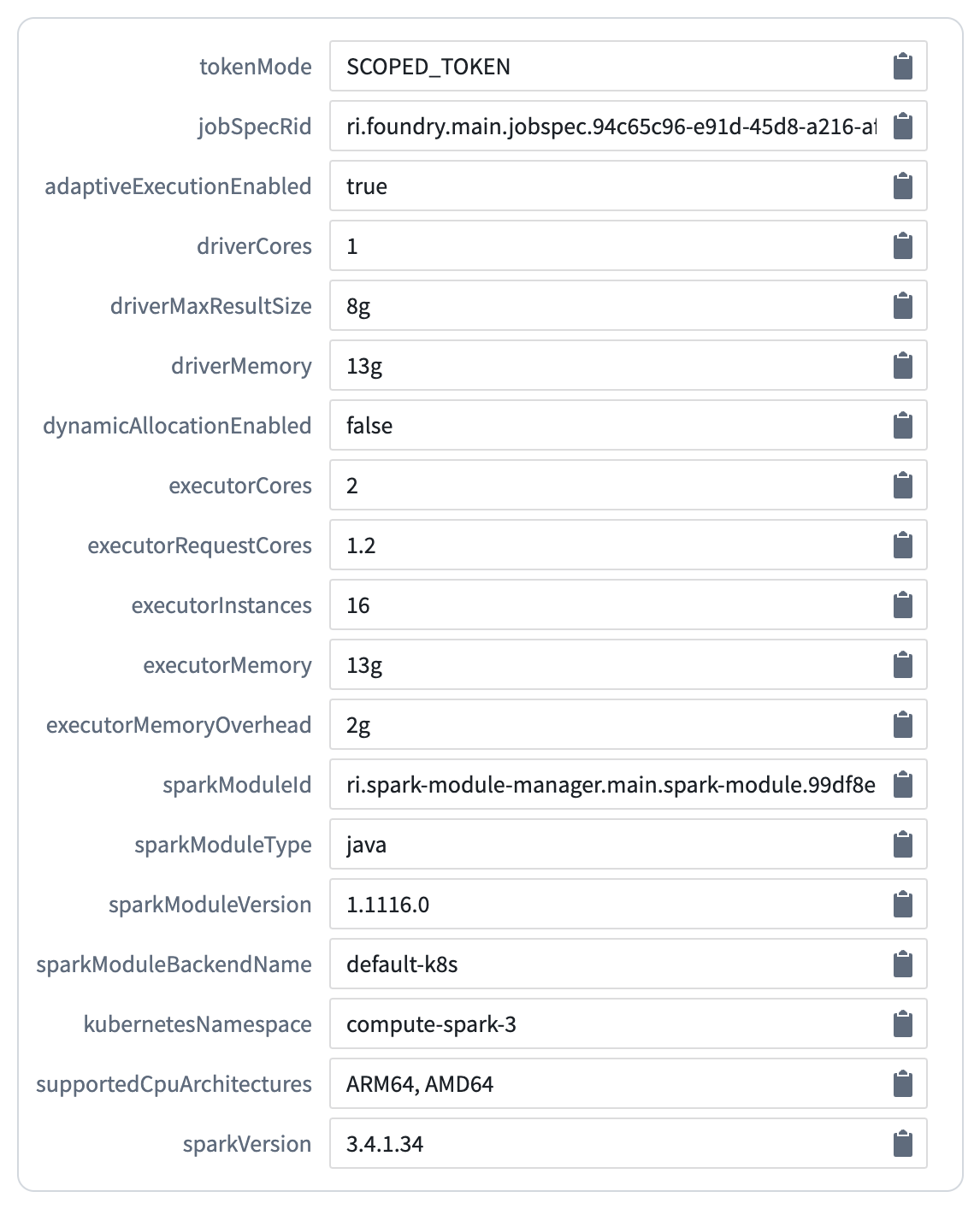
The Environment page is accessible from the job tracker by selecting Spark Details > Environment. Here, you will see the key configuration details of your build, including the transforms and Spark versions.
The sparkModuleVersion corresponds to the transform version and the sparkVersion corresponds to the version of Spark used in the build.
Runtime versioning
A transforms runtime version is selected every time a build is run. A system called “adjudication” is used to ensure that your build does not upgrade to a version that no longer works; the adjudication process selectively tests upgrades and falls back to old versions when necessary. When a new Spark version comes out, it will be automatically tested and implemented in your pipelines without any user intervention if feasible. If the upgrade is unsuccessful, your pipeline will continue to run on the old Spark version. Each Spark version upgrade will be paired with an announcement. To temporarily stay on an existing version of Spark, use module pinning to pin the pipeline to a fixed version.
Around one month after runtime versions are released, repository upgrade prompts will be sent to inform users of issues where automatic upgrades were not possible. You should be able to debug these cases based on the checks errors in the repository.
Debug jobs
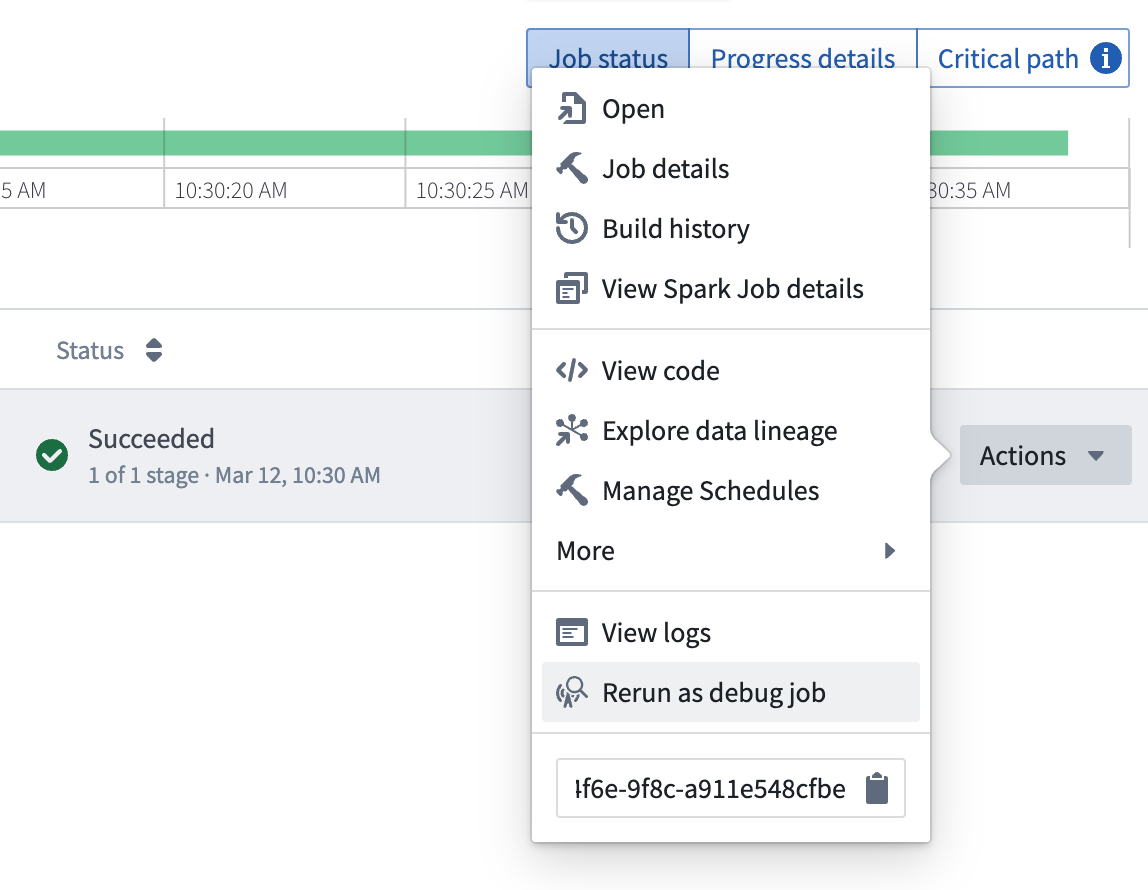
If you suspect that a transforms upgrade has introduced a break to your pipeline, use a debug job to diagnose the issue. On failed jobs, select Actions and Rerun as debug job to specify a previously successful version and confirm that the change in transform version is responsible for the break. If you encounter a situation where a transforms upgrade has broken your pipeline, contact Palantir support for further assistance.
:::callout{theme="neutral"} Running debug jobs is not currently supported for the following:
- External transforms that use sources with secrets.
- Legacy external transforms that use credentials.
For both of the above, debug jobs are expected to fail with a OneTimeAccessKeyService:OneTimeAccessKeyNotFound error.
:::
中文翻译
Transforms 版本
在 transforms 中,构建时使用的 Spark 和 Java 版本取决于 transforms 版本。Transforms 会在后台自动升级,以确保任务始终使用最新的安全更新和性能改进。根据 Spark 版本策略 ↗,API 在不同版本间保持一致,并启用了旧版配置以防止行为变化。这些配置在 Spark 迁移指南 ↗ 中有详细说明。
发布版本
使用的版本如下表所示。
Python
| Transforms 版本 | Spark 版本 | Java 版本 |
|---|---|---|
| 1.1048.0+ | 3.4.1 | 17 |
| 2.0.0+ | 3.5.1 | 17 |
| 3.0.0+ | 3.5.5 | 17 |
Java
| Transforms 版本 | Spark 版本 | Java 版本 |
|---|---|---|
| 1.1015.0+ | 3.4.1 | 17 |
| 2.0.0+ | 3.5.1 | 17 |
| 3.0.0+ | 3.5.5 | 17 |
SQL
| Transforms 版本 | Spark 版本 | Java 版本 |
|---|---|---|
| 1.861.0+ | 3.4.1 | 17 |
| 2.0.0+ | 3.5.1 | 17 |
| 3.0.0+ | 3.5.5 | 17 |
环境页面
环境页面可通过任务追踪器中的 Spark 详情 > 环境 访问。在此页面中,您将看到构建的关键配置详情,包括 transforms 和 Spark 版本。
sparkModuleVersion 对应 transform 版本,sparkVersion 对应构建中使用的 Spark 版本。
运行时版本管理
每次运行构建时,都会选择一个 transforms 运行时版本。系统会使用一种称为"裁定"的机制,确保您的构建不会升级到不再可用的版本;裁定过程会选择性测试升级,并在必要时回退到旧版本。当新 Spark 版本发布时,系统会自动测试并在可行的情况下将其应用到您的管道中,无需用户干预。如果升级失败,您的管道将继续使用旧 Spark 版本运行。每次 Spark 版本升级都会附带相应的公告。如需临时停留在现有 Spark 版本,可使用模块锁定将管道固定到特定版本。
运行时版本发布约一个月后,系统会发送仓库升级提示,通知用户存在无法自动升级的问题。您应根据仓库中的检查错误来排查这些情况。
调试任务
如果您怀疑 transforms 升级导致管道中断,可使用调试任务来诊断问题。对于失败的任务,选择 操作 和 以调试任务重新运行,指定之前成功的版本,确认 transform 版本变化是导致中断的原因。如果遇到 transforms 升级导致管道中断的情况,请联系 Palantir 支持团队获取进一步帮助。
:::callout{theme="neutral"} 以下情况目前不支持运行调试任务:
- 使用包含密钥的源的外部 transforms
- 使用凭据的旧版外部 transforms
对于上述两种情况,调试任务预计会失败并显示 OneTimeAccessKeyService:OneTimeAccessKeyNotFound 错误。
:::