Ontology edits(本体编辑(Ontology edits))
An Ontology edit is the act of creating, modifying, or deleting an object. Functions support returning Ontology edits for use in a function-backed action.
- TypeScript v1 functions are authored using the
@OntologyEditFunctiondecorator, which provides special semantics to simplify your code. TypeScript v1 functions also use the@Editsdecorator to provide actions with provenance information, which the actions may use to enforce permissions. You can write unit tests for TypeScript v1 Ontology edit functions using the APIs available for verifying Ontology edits. - TypeScript v2 functions are authored using the
createEditBatchfunction exported from the@osdk/functionspackage. These functions rely on theEditstype to provide actions with provenance information. - Python functions are authored by creating an edits container using the
FoundryClientexported from the Ontology SDK. These functions rely on theeditsparameter of the@functiondecorator to provide actions with provenance information.
The rest of this document describes how Ontology edit functions work behind the scenes to provide you with a better understanding of the underlying infrastructure.
When edits are applied
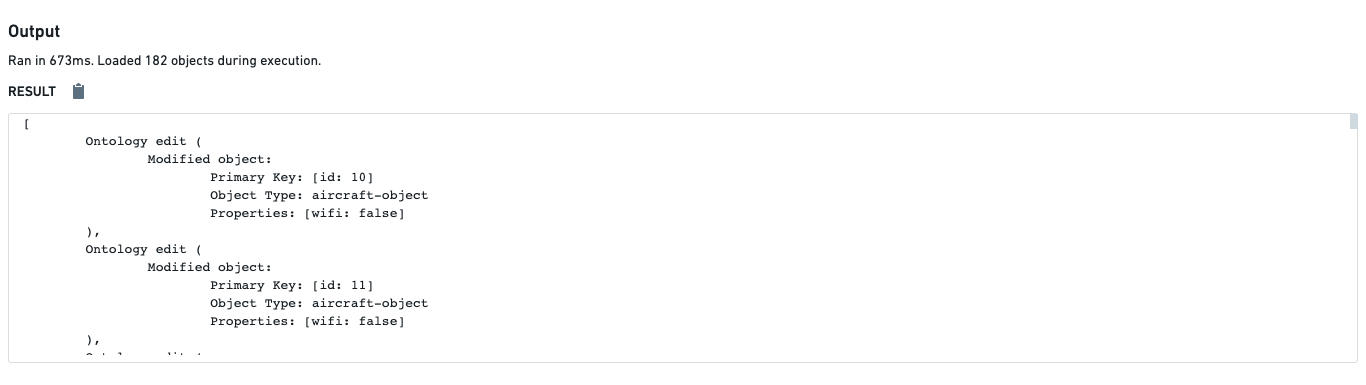
A common misunderstanding about Ontology edit functions is whether or not running them will update objects in the Ontology. When you run an Ontology edit function in the functions helper in Authoring, edits are not applied to the actual objects. The only way to update objects using a function is by configuring an action to use the function as described in the documentation for function-backed actions.
This means that you can freely run Ontology edit functions in the functions helper to validate results on various inputs, without concern that the objects themselves will be updated.
Caveats
Edits and object search
Changes to objects and links are propagated to the object set APIs after your function has finished executing. This means that Objects.search() APIs will use the old objects, properties, and links. As a result, search, filtering, search arounds, and aggregations may not reflect the edits to the Ontology, including creation and deletion. Your function will need to handle this case manually.
For the following example, assume there is an Employee with ID 1.
```typescript tab="TypeScript v1" import { OntologyEditFunction, Edits } from "@foundry/functions-api"; import { Employee, Objects } from "@foundry/ontology-api";
export class CaveatEditFunctions {
@Edits(Employee)
@OntologyEditFunction()
public async editAndSearch(): Promise
    const count = await Objects.search().employee().filter(e => e.name.exactMatch("Bob")).count() ?? -1;
    console.log(count);
    // Expected: 1, Actual: 0
}
}
typescript tab="TypeScript v2"
import { Client } from "@osdk/client";
import { Employee } from "@ontology/sdk";
import { Edits, createEditBatch } from "@osdk/functions";
type OntologyEdit = Edits.Object
```python tab="Python" from functions.api import function, OntologyEdit from ontology_sdk import FoundryClient from ontology_sdk.ontology.objects import Employee
@function(edits=[Employee]) def edit_and_search() -> list[OntologyEdit]: client = FoundryClient() ontology_edits = client.ontology.edits()
employee = client.ontology.objects.Employee.get(1)
editable_employee = ontology_edits.objects.Employee.edit(employee)
editable_employee.name = "Bob"

count = client.ontology.objects.Employee.where(Employee.object_type.name == "Bob").count().compute()
print(count)
# Expected: 1, Actual: 0

return ontology_edits.get_edits()
```
Optional arrays in function-backed actions
While omitted optional arrays are handled as undefined when running an @OntologyEditFunction in code repositories, they are passed as empty arrays when executing the function through an action.
中文翻译
本体编辑(Ontology edits)
本体编辑(Ontology edit) 是指创建、修改或删除对象的操作。函数支持返回本体编辑(Ontology edits),用于函数支持的操作(function-backed action)。
* TypeScript v1 函数使用 @OntologyEditFunction 装饰器编写,该装饰器提供特殊语义以简化代码。TypeScript v1 函数还使用 @Edits 装饰器 为操作提供溯源信息(provenance information),操作可利用这些信息来强制执行权限(enforce permissions)。您可以使用验证本体编辑(verifying Ontology edits) 的 API 为 TypeScript v1 本体编辑函数编写单元测试。
* TypeScript v2 函数使用从 @osdk/functions 包导出的 createEditBatch 函数编写。这些函数依赖 Edits 类型为操作提供溯源信息。
* Python 函数通过使用从 Ontology SDK 导出的 FoundryClient 创建编辑容器(edits container)来编写。这些函数依赖 @function 装饰器的 edits 参数为操作提供溯源信息。
本文档的其余部分将描述本体编辑函数在后台的工作原理,以帮助您更好地理解底层基础设施。
编辑何时应用
关于本体编辑函数的一个常见误解是,运行它们是否会更新本体中的对象。当您在编写(Authoring) 环境的函数助手(functions helper)中运行本体编辑函数时,编辑不会应用于实际对象。使用函数更新对象的唯一方法是将操作配置为使用该函数,如函数支持的操作(function-backed actions)文档所述。
这意味着您可以自由地在函数助手中运行本体编辑函数,以验证各种输入的结果,而无需担心对象本身会被更新。
注意事项
编辑与对象搜索
对对象和链接的更改会在函数执行完成之后才传播到对象集 API(object set APIs)。这意味着 Objects.search() API 将使用旧的对象、属性和链接。因此,搜索、过滤、周边搜索(search arounds)和聚合可能不会反映对本体的编辑,包括创建和删除。您的函数需要手动处理这种情况。
以下示例假设存在一个 ID 为 1 的员工(Employee)。
typescript tab="TypeScript v1"
import { OntologyEditFunction, Edits } from "@foundry/functions-api";
import { Employee, Objects } from "@foundry/ontology-api";

export class CaveatEditFunctions {
    @Edits(Employee)
    @OntologyEditFunction()
    public async editAndSearch(): Promise<void> {
        const employeeOne = Objects.search().employee().filter(e => e.id.exactMatch(1)).all()[0];
        employeeOne.name = "Bob";

        const count = await Objects.search().employee().filter(e => e.name.exactMatch("Bob")).count() ?? -1;
        console.log(count);
        // 预期: 1, 实际: 0
    }
}
```typescript tab="TypeScript v2" import { Client } from "@osdk/client"; import { Employee } from "@ontology/sdk"; import { Edits, createEditBatch } from "@osdk/functions";
type OntologyEdit = Edits.Object
async function editAndSearch(client: Client): OntologyEdit[] {
const batch = createEditBatch
const employeeOne = await client(Employee).fetchOne(1);
batch.update(employeeOne, { name: "Bob" });

const count = await client(Employee)
    .where({
        name: {
            $eq: "Bob"
        }
    })
    .aggregate({
        $select: {
            $count: "unordered"
        }
    })
    .then(response => response.$count);
console.log(count);
// 预期: 1, 实际: 0

return batch.getEdits();
}
export default editAndSearch;
```python tab="Python"
from functions.api import function, OntologyEdit
from ontology_sdk import FoundryClient
from ontology_sdk.ontology.objects import Employee

@function(edits=[Employee])
def edit_and_search() -> list[OntologyEdit]:
    client = FoundryClient()
    ontology_edits = client.ontology.edits()

    employee = client.ontology.objects.Employee.get(1)
    editable_employee = ontology_edits.objects.Employee.edit(employee)
    editable_employee.name = "Bob"

    count = client.ontology.objects.Employee.where(Employee.object_type.name == "Bob").count().compute()
    print(count)
    # 预期: 1, 实际: 0

    return ontology_edits.get_edits()
函数支持的操作中的可选数组(Optional arrays)
虽然在代码仓库中运行 @OntologyEditFunction 时,省略的可选数组会被处理为 undefined,但通过操作执行函数时,它们会被作为空数组传递。