Add functions to a Marketplace product(向 Marketplace 产品添加函数)
Use Foundry DevOps to include your functions in Marketplace products for other users to install and reuse. Learn how to create your first product.
Supported features
DevOps packages functions for installation and reuse but does not provide user-viewable source code for TypeScript V1 functions. This means that after installation, you will be able to use the installed TypeScript functions, but you will not be able to view their source logic; the repository accompanying the function will be empty.
Python and TypeScript V2 functions do include user-viewable source code in the Marketplace product. However, the contents of the functions still cannot be edited after installation when installed in production mode.
Adding functions to products
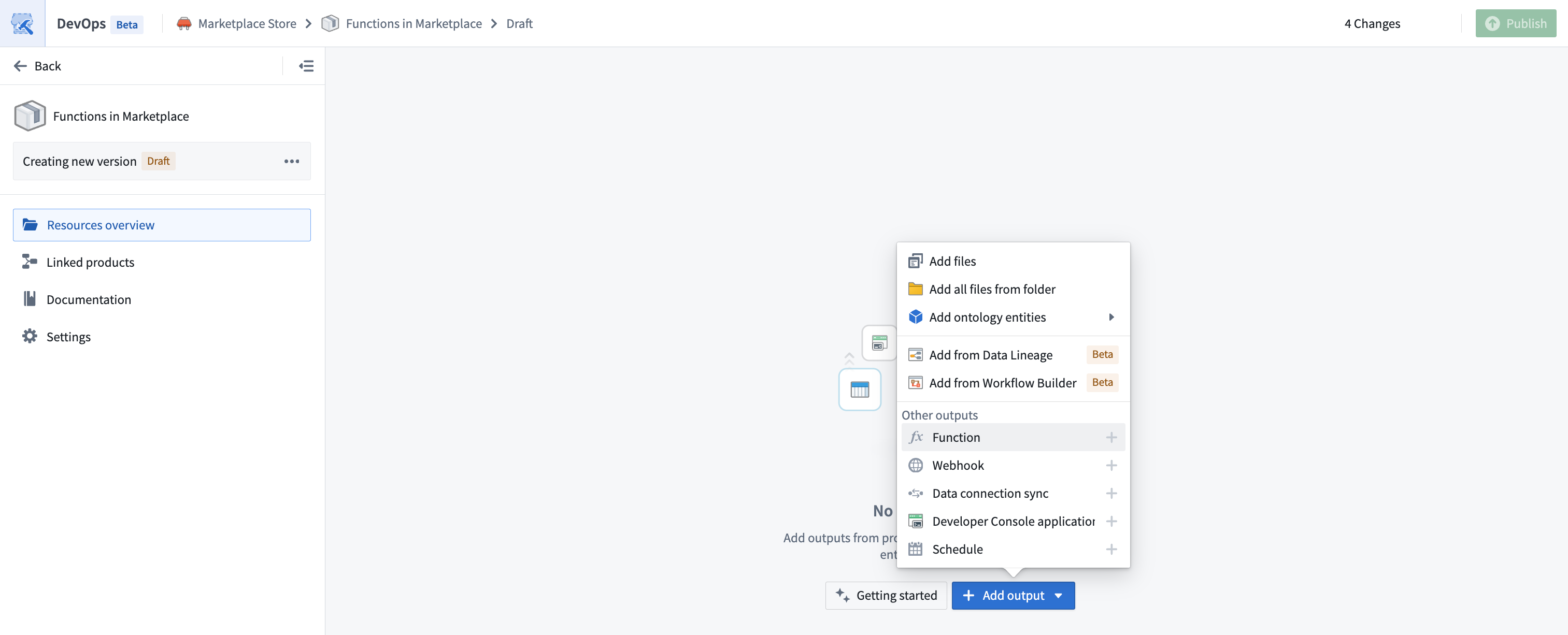
To add a function to a product, create a product. Then, add a Function output as shown below.
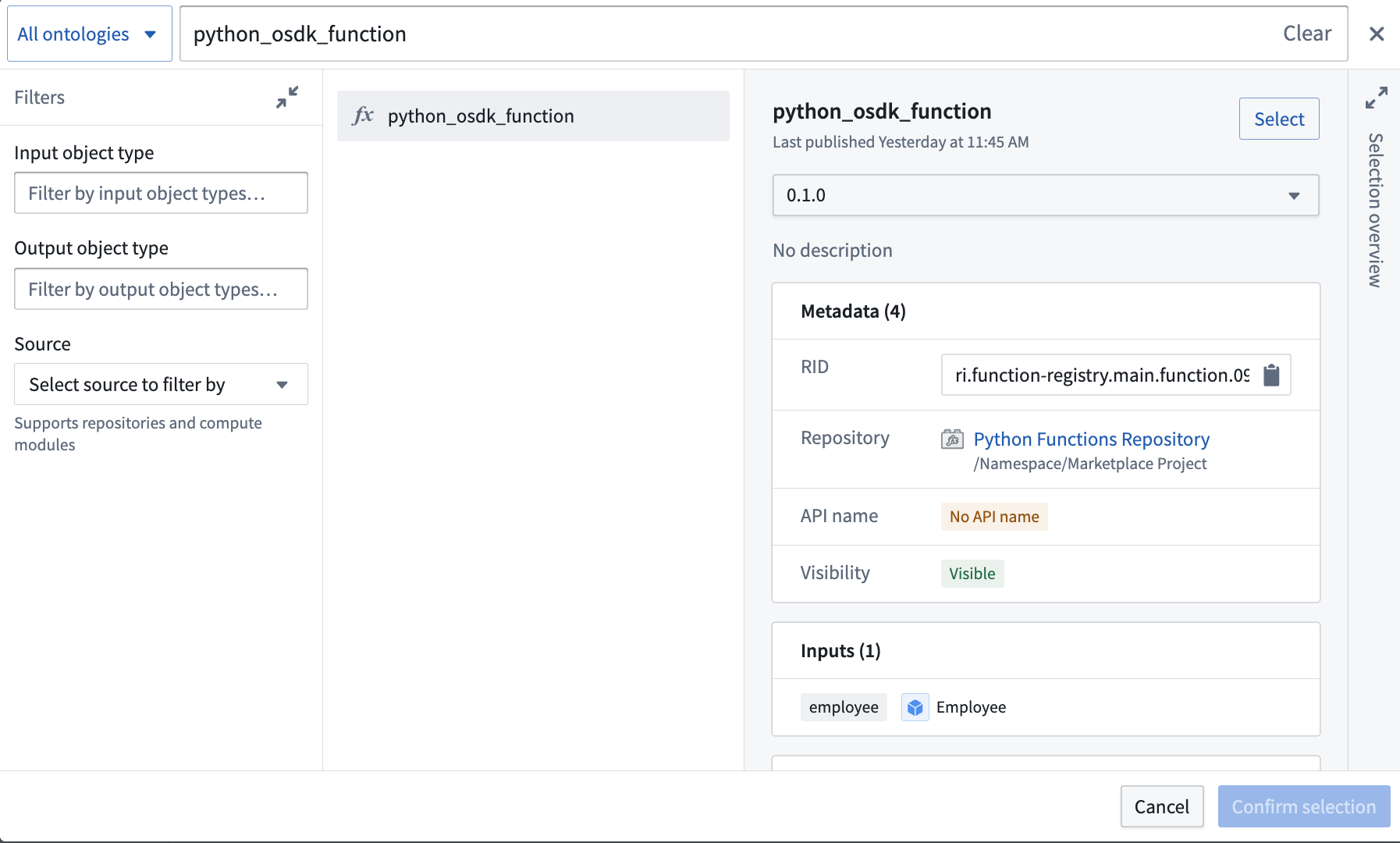
You will then be prompted to choose a function and a version. In most cases, you should select the latest version of a function.
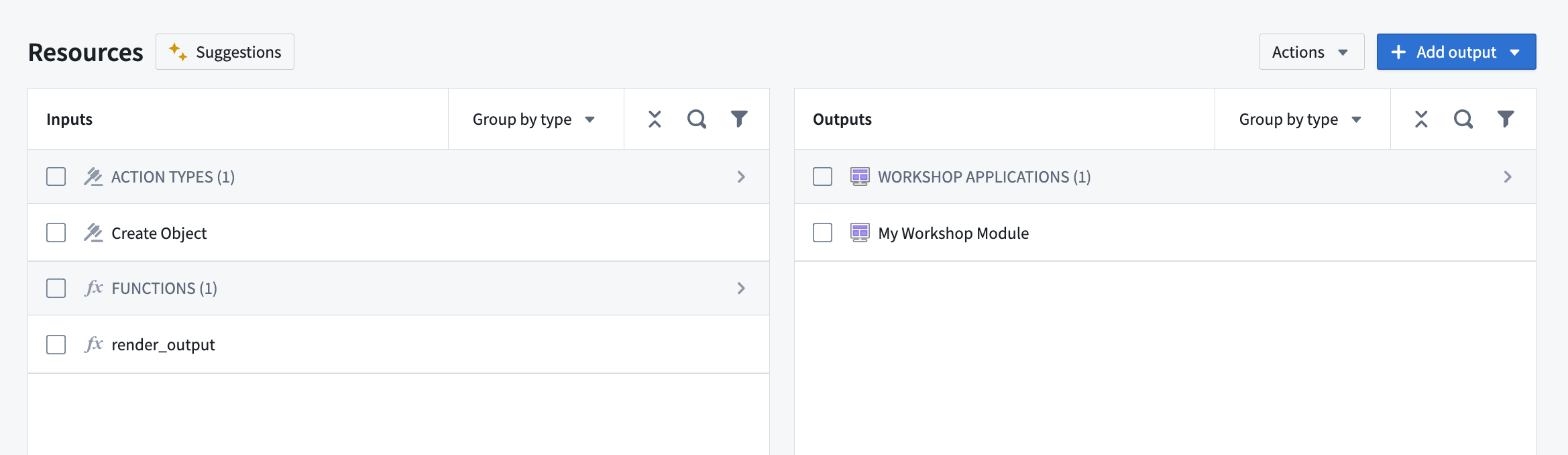
While you can select functions directly, we recommend first adding content such as Workshop applications; the functions these resources require will be automatically added as inputs to your product.
Use OSDK functions in Marketplace products
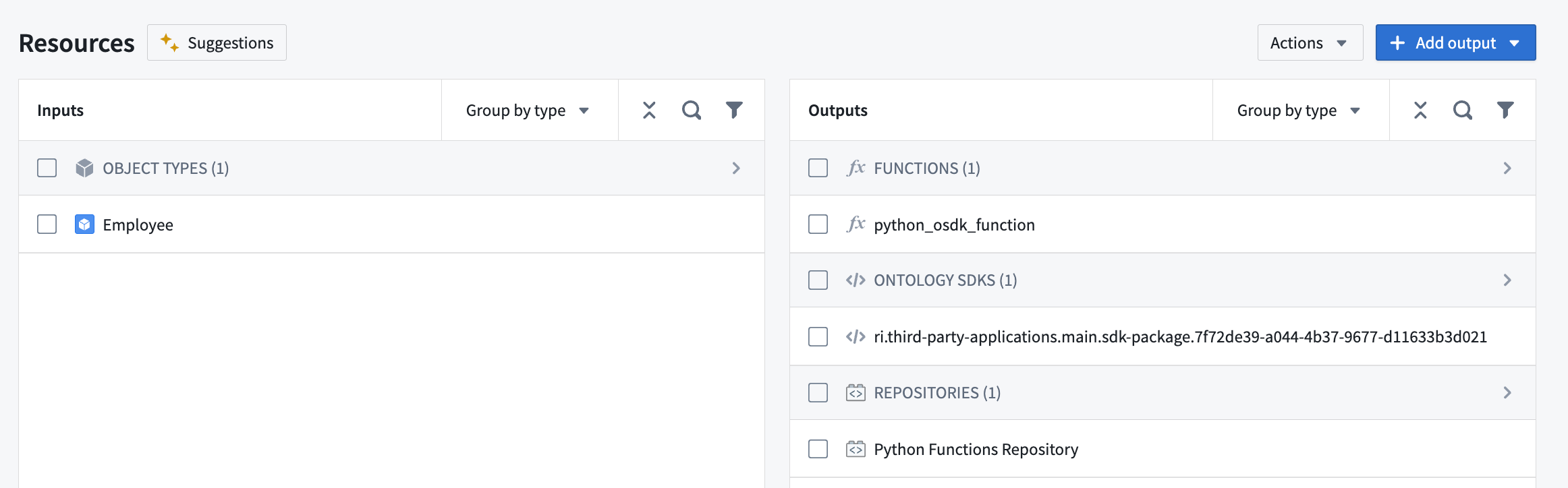
Python and TypeScript V2 functions that use OSDKs can also be packaged as outputs in Marketplace products. When you add a function that uses an OSDK as an output to your Marketplace product, the OSDK will also be added as an output while the ontology entities used in your OSDK will be added as inputs.
Users who install your Marketplace product will then be able to remap the objects, links, and other ontology entities referenced in your OSDK to refer to entities in the ontology where the product is being installed.
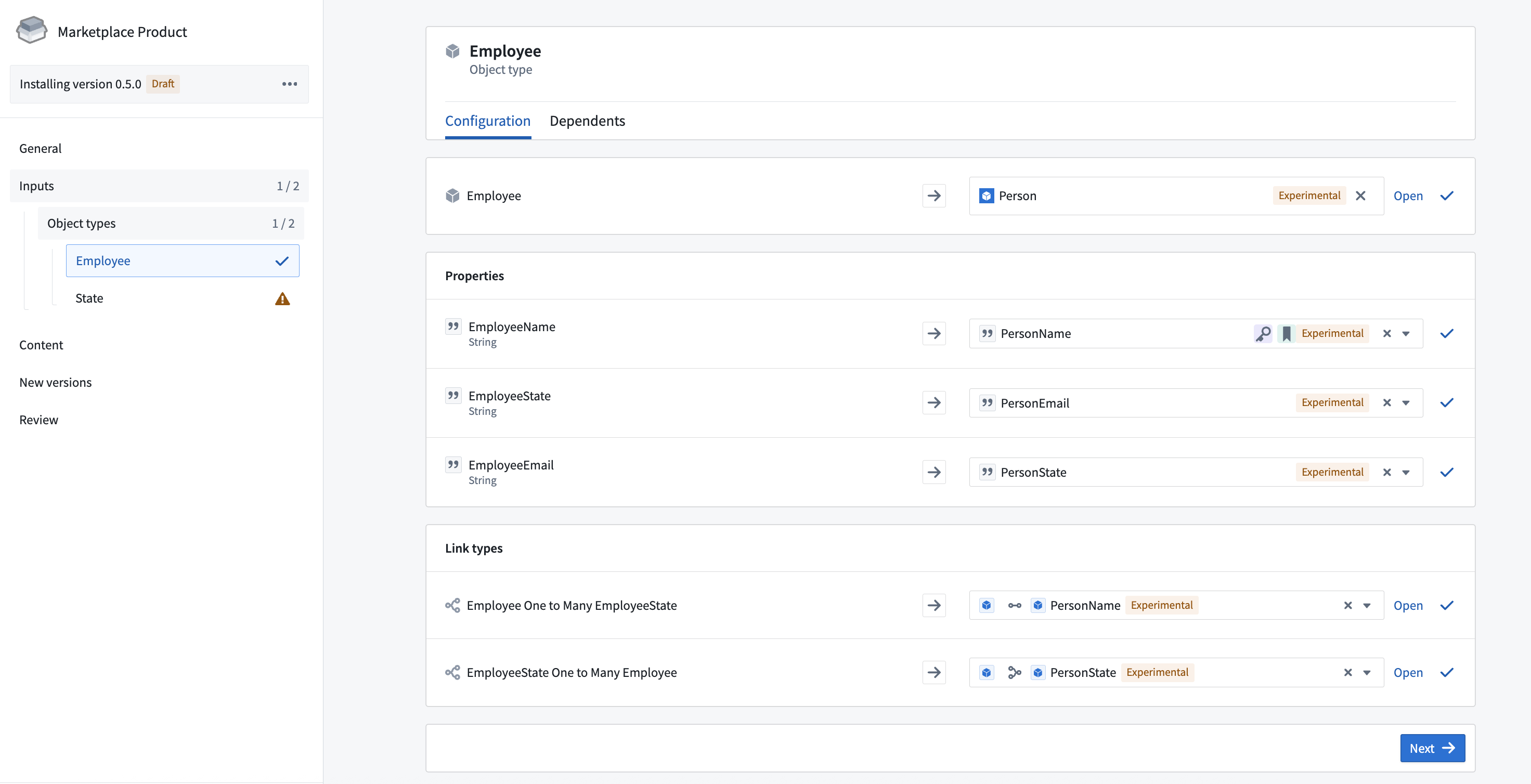
When the function is executed after installation, it will automatically use the ontology entities that were configured during installation.
Function overrides at installation
:::callout{theme="warning"} Calling queries or making API calls within overridden static functions is not supported. :::
It is possible to modify parts of a function’s behavior at install time by providing a locally defined function which overrides the “static” function input that is shipped with your Marketplace product. To do this, you can specify that a particular function may be overridden by using the @Static decorator.
For example, consider a function that negates a given number:
// Normal function

import { Function, Double } from "@foundry/functions-api";

export class MyFunctions {

    @Function()
    public async modifyNumber(d: Double): Promise<Double> {
        return -d;
    }

}
To make this function overridable, rewrite it as follows:
// Overridable function

import { Function, Static, Double } from "@foundry/functions-api";

export class MyFunctions {

    @Function()
    public async modifyNumberByStaticFoo(
        n: Double,
        @Static() staticFunctionInput: (num: Double) => Promise<Double> = this.defaultFoo
        ): Promise<Double> {
        return await staticFunctionInput(n);
    }

    private async defaultFoo(n: number) {
        return -n;
    }

}
When packaging a static function, inputs will appear as staticFunctionInputs during installation, as shown below. Installers can then provide their own function logic that will override the default behavior. Conceptually, the staticFunctionInputs serve as function input parameters to the overridable function.
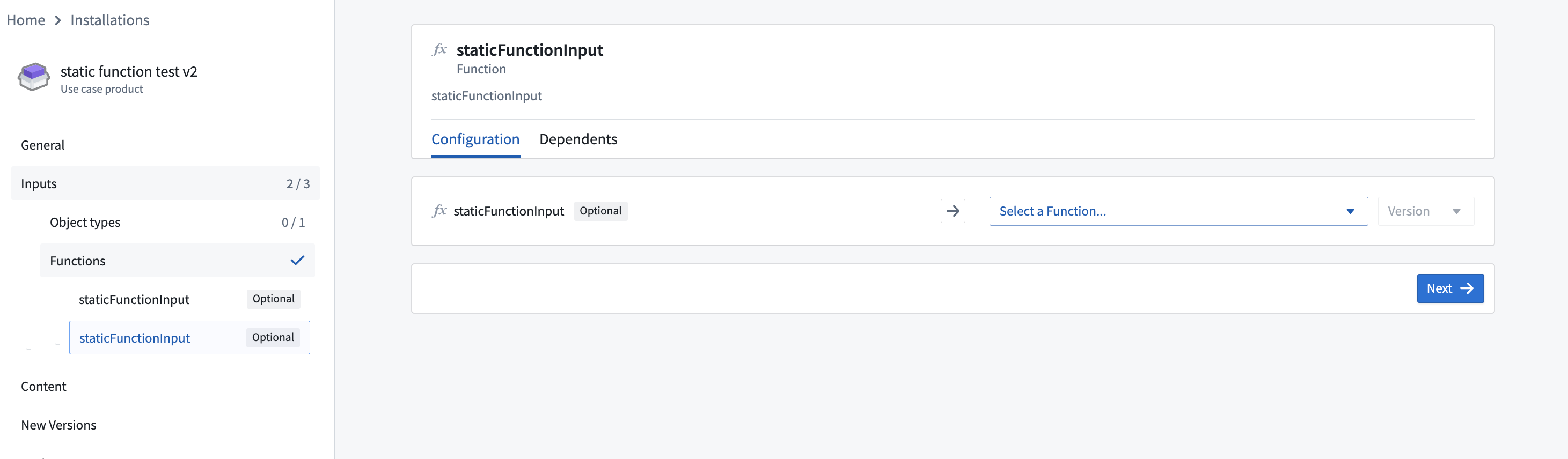
For example, you may have a supply chain optimization function whose logic needs slight adjustments in another context. To allow this, specify that the function is overridable before packaging it, and then override it during installation.
中文翻译
向 Marketplace 产品添加函数
使用 Foundry DevOps 将您的函数包含在 Marketplace 产品中,供其他用户安装和复用。了解如何创建您的第一个产品。
支持的功能
DevOps 将函数打包以便安装和复用,但不会为 TypeScript V1 函数提供用户可查看的源代码。这意味着安装后,您可以使用已安装的 TypeScript 函数,但无法查看其源代码逻辑;函数附带的代码库将为空。
Python 和 TypeScript V2 函数在 Marketplace 产品中包含用户可查看的源代码。但是,以生产模式安装后,函数的内容仍然无法编辑。
向产品添加函数
要向产品添加函数,请先创建一个产品。然后,添加一个函数(Function)输出,如下所示。
系统将提示您选择一个函数及其版本。在大多数情况下,您应选择函数的最新版本。
虽然您可以直接选择函数,但我们建议先添加诸如 Workshop 应用之类的内容;这些资源所需的函数将自动作为输入(Inputs)添加到您的产品中。
在 Marketplace 产品中使用 OSDK 函数
使用 OSDK 的 Python 和 TypeScript V2 函数也可以打包为 Marketplace 产品的输出。当您将使用 OSDK 的函数作为输出添加到 Marketplace 产品时,OSDK 也会被添加为输出,而 OSDK 中使用的本体论(Ontology)实体将被添加为输入。
安装您的 Marketplace 产品的用户将能够重新映射 OSDK 中引用的对象、链接和其他本体论(Ontology)实体,使其指向安装该产品所在本体论(Ontology)中的实体。
安装后执行函数时,它将自动使用安装期间配置的本体论(Ontology)实体。
安装时的函数覆盖
:::callout{theme="warning"} 不支持在覆盖的静态函数中调用查询(Queries)或进行 API 调用。 :::
您可以通过提供本地定义的函数来覆盖 Marketplace 产品附带的"静态(Static)"函数输入,从而在安装时修改函数的部分行为。为此,您可以使用 @Static 装饰器指定某个函数可以被覆盖。
例如,考虑一个对给定数字取反的函数:
// 普通函数

import { Function, Double } from "@foundry/functions-api";

export class MyFunctions {

    @Function()
    public async modifyNumber(d: Double): Promise<Double> {
        return -d;
    }

}
要使此函数可覆盖,请按如下方式重写:
// 可覆盖函数

import { Function, Static, Double } from "@foundry/functions-api";

export class MyFunctions {

    @Function()
    public async modifyNumberByStaticFoo(
        n: Double,
        @Static() staticFunctionInput: (num: Double) => Promise<Double> = this.defaultFoo
        ): Promise<Double> {
        return await staticFunctionInput(n);
    }

    private async defaultFoo(n: number) {
        return -n;
    }

}
打包静态函数时,输入将在安装期间显示为 staticFunctionInputs,如下所示。安装者随后可以提供自己的函数逻辑来覆盖默认行为。从概念上讲,staticFunctionInputs 作为可覆盖函数的函数输入参数。
例如,您可能有一个供应链优化函数,其逻辑在另一个上下文中需要稍作调整。为此,请在打包前指定该函数为可覆盖,然后在安装期间进行覆盖。