Permissions(权限)
Authoring and executing functions in the platform is subject to many kinds of permission checks. This section outlines the different types of permissions you should be aware of and common issues you may run into.
Function authoring
Functions repositories must be granted appropriate permissions to:
- Access the Ontology so that proper code bindings can be generated.
- Load objects in order to run a live preview of a function execution.
Note that repository permissions must be explicitly granted, and are not the same as the permissions granted to your user account. As a result, you have to take specific steps to import object types, link types, and backing datasources into the Project that contains your repository.
For a tutorial on these steps, see this section. Below, we explain the specific resources that are imported and the permissions granted for those resources.
Ontology entity permissions
In a repository, whenever checks run or Code Assist starts up, the functions plugins load the latest Ontology based on the repository’s permissions and generate code bindings for every object and link type that was loaded. The set of object and link types that are loaded depends on the imports of the following resource types:
- Ontologies
- Ontology branches
- Object types
- Link types
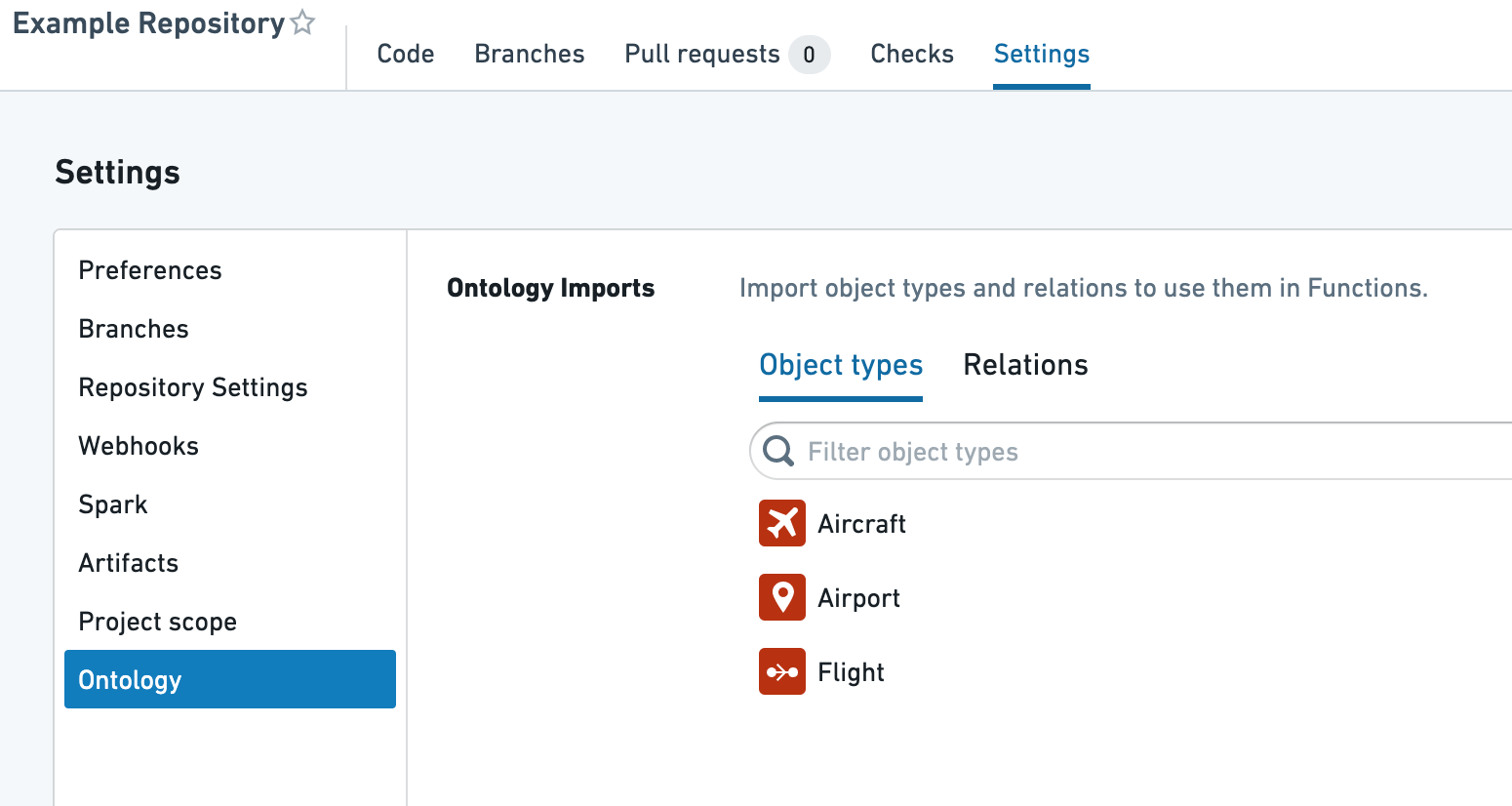
In a functions repository, you can import the needed Ontology resources by navigating to Settings > Ontology. This interface allows you to choose object and link types to import into your Project.
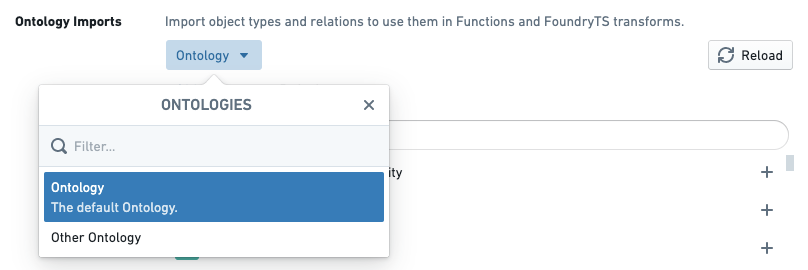
If your user account has access to multiple Ontologies, you can also choose which Ontology you’d like to use. Currently, importing multiple Ontologies into a single Project is unsupported.
:::callout{theme="warning" title="Warning"} Although the above interface shows up within functions repositories, any Ontologies, object types, and link types you import are added at the Project level. This means that changing imports in one repository can affect other repositories in the same Project. If you want to have two repositories that rely on different Ontology entities, you should separate them into different Projects. :::
Object loading permissions
The functions helper in a repository allows users to execute functions in two ways: by executing a published function, or by executing code in live preview. When executed in a live preview, functions code is compiled and executed in Code Assist, which is infrastructure designed to enable quick iteration for code authors.
Because it is tied to the repository, Code Assist is subject to the same permissions requirements as code generation, as described above. This means that when running a function in live preview, the backing datasources underlying each object type you wish to use must be imported into the Project.
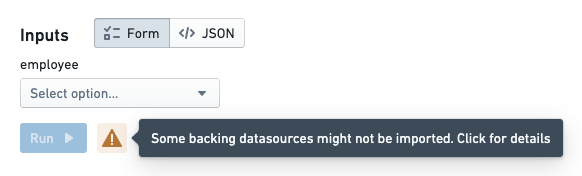
In the functions helper, if there are object types imported into your Project without the corresponding datasource being imported, a warning will be displayed in live preview prompting you to update the imports:
In the case of most object types, the Import backing datasources dialog will prompt you to import a Foundry dataset. For object types that have row-level security enabled, you will be prompted to import a Restricted View.
Published function execution
Once a function has been published, it is ready for use by a broader audience of users and can be configured to execute in applications such as Workshop and Actions. There are still some considerations to keep in mind for permissions to execute a published function.
Function permissions
In order to execute a function, a user must have Viewer role on the repository from which the function was published. Typically, it is best to locate functions repositories in the same Project as end-user applications that rely on functions in that repository, whether those applications are created using Workshop, Slate, or some other tool. If users encounter errors indicating that they lack permissions to read a function (ReadFunctionsPermissionDenied), check whether they have read access to the repository. Learn more about how to move and share resources.
:::callout{theme="neutral"} The Check access panel in the sidebar can be used to check someone's access to a Workshop or Slate application, including access to dependent functions. For more information, see the Check access panel documentation. :::
Function-backed Actions are a special case in which end users do not necessarily need read access to the function in order to apply an Action that uses it. An administrative user must have read access to a function when configuring an Action to use it. Afterwards, users will be able to apply the Action based on Action-level permissions, regardless of their access to the function.
Object loading permissions
When a function loads object data, either as a parameter or via an Object search, the permissions of the end user running the function determine which objects are loaded. In the case of object types secured using row-level permissions, this means that different users executing the same function may receive different results. This behavior is intended—users should only see the objects they have access to, and this behavior enables a single function to work for users with differing access to individual objects.
中文翻译
权限
在平台上编写和执行函数需通过多种权限检查。本节概述了您需要了解的不同权限类型以及可能遇到的常见问题。
函数编写
函数仓库必须被授予适当的权限,以便:
- 访问本体(Ontology),从而生成正确的代码绑定。
- 加载对象,以便运行函数执行的实时预览。
请注意,仓库权限必须被显式授予,这与授予您用户账户的权限不同。因此,您必须采取特定步骤,将对象类型、链接类型和支持数据源导入到包含您仓库的项目(Project)中。
有关这些步骤的教程,请参阅此章节。下文将解释导入的具体资源以及为这些资源授予的权限。
本体实体权限
在仓库中,每当检查运行或 Code Assist 启动时,函数插件会根据仓库的权限加载最新的本体,并为加载的每个对象类型和链接类型生成代码绑定。加载的对象类型和链接类型集合取决于以下资源类型的导入:
在函数仓库中,您可以通过导航至设置 > 本体来导入所需的本体资源。此界面允许您选择要导入到项目中的对象类型和链接类型。
如果您的用户账户有权访问多个本体,您还可以选择要使用的本体。目前,不支持将多个本体导入到单个项目中。
:::callout{theme="warning" title="警告"} 尽管上述界面出现在函数仓库中,但您导入的任何本体、对象类型和链接类型都会在项目级别添加。这意味着更改一个仓库中的导入可能会影响同一项目中的其他仓库。如果您希望两个仓库依赖不同的本体实体,应将它们分到不同的项目中。 :::
对象加载权限
仓库中的函数助手允许用户通过两种方式执行函数:执行已发布的函数,或在实时预览中执行代码。在实时预览中执行时,函数代码会在 Code Assist 中编译和执行,Code Assist 是一种旨在让代码作者快速迭代的基础设施。
由于 Code Assist 与仓库绑定,因此它需要满足与代码生成相同的权限要求,如上所述。这意味着在实时预览中运行函数时,您希望使用的每个对象类型所对应的支持数据源必须被导入到项目中。
在函数助手中,如果您的项目中导入了对象类型但未导入相应的数据源,实时预览中会显示警告,提示您更新导入:
对于大多数对象类型,导入支持数据源对话框会提示您导入一个 Foundry 数据集。对于启用了行级权限的对象类型,系统会提示您导入一个受限视图。
已发布函数的执行
一旦函数发布,即可供更广泛的用户群体使用,并可配置在Workshop和操作等应用中执行。对于执行已发布函数的权限,仍需注意一些事项。
函数权限
要执行函数,用户必须对发布该函数的仓库拥有查看者角色。通常,最好将函数仓库与依赖该仓库中函数的最终用户应用(无论是使用 Workshop、Slate 还是其他工具创建的应用)放在同一项目中。如果用户遇到错误,提示缺少读取函数的权限(ReadFunctionsPermissionDenied),请检查他们是否对该仓库拥有读取权限。了解更多关于移动和共享资源的信息。
:::callout{theme="neutral"} 侧边栏中的检查访问权限面板可用于检查某人对 Workshop 或 Slate 应用的访问权限,包括对依赖函数的访问权限。更多信息,请参阅检查访问权限面板文档。 :::
函数支持的操作是一个特殊情况:最终用户不一定需要拥有对函数的读取权限才能应用使用该函数的操作。管理员用户在配置操作以使用函数时,必须拥有对该函数的读取权限。之后,用户将能够基于操作级权限应用该操作,无论他们对函数的访问权限如何。
对象加载权限
当函数加载对象数据时(无论是作为参数还是通过对象搜索),运行函数的最终用户的权限决定了加载哪些对象。对于使用行级权限保护的对象类型,这意味着执行同一函数的不同用户可能会获得不同的结果。这种行为是预期的——用户应仅能看到他们有权访问的对象,并且这种行为使得单个函数能够为对单个对象拥有不同访问权限的用户工作。