Use a Python function in Pipeline Builder(在 Pipeline Builder 中使用 Python 函数)
:::callout{theme="neutral"} Pipeline Builder supports both Java and Python user-defined functions (UDF). Learn more about Java UDFs. :::
Prerequisites
This guide assumes you have already authored and published a Python function. Review our getting started with Python functions documentation for a tutorial.
Architecture
Python functions run in a Pipeline Builder pipeline as a sidecar container. This means that the function does not need to be deployed and scales dynamically with the size of your pipeline. Embedded functions can be previewed similarly to other transforms in Pipeline Builder.
Use your function in a Pipeline Builder pipeline
Follow the steps below to prepare and configure a Python function in your pipeline:
- Open the Pipeline Builder pipeline in which you want to use your Python function.

- Import your UDF into Pipeline Builder using one of two methods:
- From the graph view:
- Select Reusables from the upper part of the pipeline graph, then choose User-defined functions.

2. Select Import UDF and search through the available functions to find the one you want to use 3. Choose Add next to the function name. The function should then display an Imported tag.

4. Close the import dialogue and select Transform on your Pipeline Builder graph where you would like to use the function. 5. From the list of transforms, find the UDFs tab to the left to view your imported functions.
- Select Reusables from the upper part of the pipeline graph, then choose User-defined functions.
- Use the transform picker:
- Select Transform on the pipeline builder graph.
- Enter the name of the UDF you want to import.

3. Select Search unimported UDFs. 4. Hover over the desired UDF and select Import.

- Fill out the transform definition specifying the input columns and parameters, then select Apply.

You should now see your Python function on your Pipeline Builder graph and can preview the output of the function.

External API calls in Pipeline Builder
To make API calls to an external system from Pipeline Builder, you can publish a Python function with access to external systems. This will allow you to write logic that communicates with external systems and use it as part of your pipeline.
To be used as a user-defined function (UDF) in Pipeline Builder, all sources used in your function must be configured to be importable into pipelines. To configure this setting, navigate to the source in Data Connection, then to the Connection settings > Code import configuration tab:
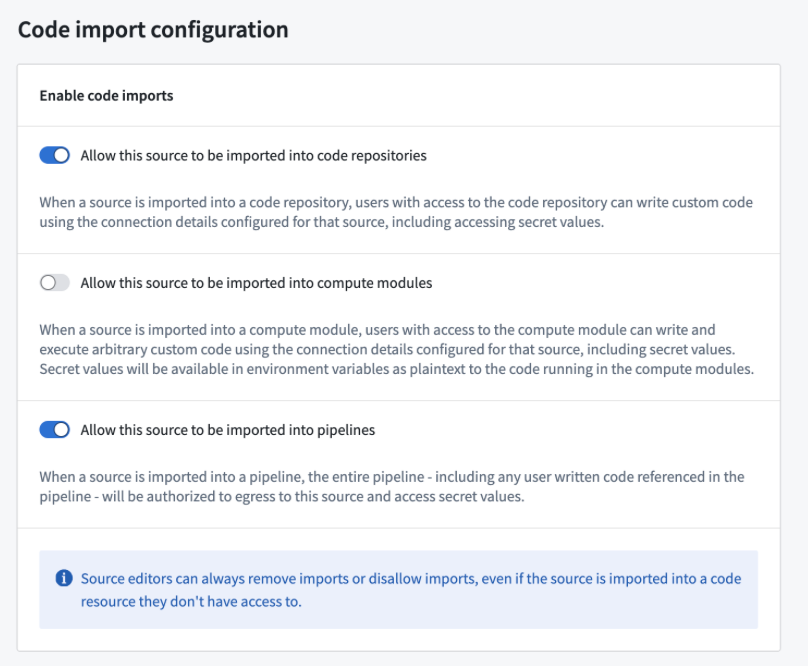
Once you have enabled this option on your source and published your Python function, it can be used in your pipeline in the same way as any other Python function.
中文翻译
在 Pipeline Builder 中使用 Python 函数
:::callout{theme="neutral"} Pipeline Builder 同时支持 Java 和 Python 用户自定义函数(UDF)。了解更多关于 Java UDF 的信息。 :::
前提条件
本指南假设您已经编写并发布了一个 Python 函数。请参阅我们的 Python 函数入门文档以获取教程。
架构
Python 函数在 Pipeline Builder 管道中以边车容器(sidecar container)的形式运行。这意味着该函数无需部署,并且可以根据管道规模动态扩展。嵌入的函数可以像 Pipeline Builder 中的其他转换(transform)一样进行预览。
在 Pipeline Builder 管道中使用函数
请按照以下步骤在管道中准备和配置 Python 函数:
- 打开您要使用 Python 函数的 Pipeline Builder 管道。
- 使用以下两种方法之一将您的 UDF 导入 Pipeline Builder:
- 从图形视图导入:
- 在管道图形上方选择 可复用组件(Reusables),然后选择 用户自定义函数(User-defined functions)。
2. 选择 导入 UDF(Import UDF),在可用函数中搜索您要使用的函数 3. 在函数名称旁选择 添加(Add)。函数应显示 已导入(Imported) 标签。
4. 关闭导入对话框,在 Pipeline Builder 图形上选择您要使用函数的 转换(Transform) 位置。 5. 在转换列表中,找到左侧的 UDF 选项卡以查看已导入的函数。
- 在管道图形上方选择 可复用组件(Reusables),然后选择 用户自定义函数(User-defined functions)。
- 使用转换选择器:
- 在 Pipeline Builder 图形上选择 转换(Transform)。
- 输入您要导入的 UDF 名称。
3. 选择 搜索未导入的 UDF(Search unimported UDFs)。 4. 悬停在所需的 UDF 上并选择 导入(Import)。
- 填写转换定义,指定输入列和参数,然后选择 应用(Apply)。
现在您应该能在 Pipeline Builder 图形上看到您的 Python 函数,并且可以预览该函数的输出。
Pipeline Builder 中的外部 API 调用
要从 Pipeline Builder 向外部系统发起 API 调用,您可以发布一个具有外部系统访问权限的 Python 函数。这将允许您编写与外部系统通信的逻辑,并将其作为管道的一部分使用。
要在 Pipeline Builder 中作为用户自定义函数(UDF)使用,函数中使用的所有数据源(source)都必须配置为可导入管道。要配置此设置,请导航至 Data Connection 中的数据源,然后进入 连接设置 > 代码导入配置(Connection settings > Code import configuration) 选项卡:
在数据源上启用此选项并发布 Python 函数后,该函数就可以像其他任何 Python 函数一样在管道中使用。