Use a Python function in Workshop(在 Workshop 中使用 Python 函数)
Prerequisites
This guide assumes you have already authored and published a Python function. Review the getting started with Python functions documentation for a tutorial. For examples of how to query the Ontology using the Python SDK, see the Python Ontology SDK documentation.
Use the Python function in Workshop
In Workshop, search for the Python function from the Variables tab to the left side of the module. Both serverless and deployed functions will appear here. Serverless functions can always be run at any version and do not need to be manually deployed. Deployed functions will show an icon with one of three states for both the function and the function version:
- Running: This function and version can serve requests.
- Stopped: This function and version are not available. In the function selector, hover over the information icon, select Configure and then Create and start deployment to make the function available.
- Upgrading: This function and version are not yet available.

Cut a new release
Only one version of the function’s repository is hosted at a given time. To make changes to functions with limited downtime we recommend adding a new function (like function_v1) with the changes and tagging as described here. From your published functions under tags and releases, select Open in Ontology Manager.
In Ontology Manager, select the version of the function repository you want to use in applications, then select Upgrade.

Update all downstream applications using functions from this repository to the new version you have deployed. Note that the previous deployment version will no longer be running so your applications will have a short downtime as you make this change. You will have function_v0 and function_v1 available at the same time so while you need to switch to the new deployment version, you do not have to change the function you are using. When function_v0 is no longer used, you can delete the function.
Debug errors
If your function is not working as expected in Workshop, first check if the issue is related to the logic or the responsiveness of the function. If there is an issue with the logic, inspect the source code in the backing code repository. If there is an issue with the function being unresponsive or throwing an error, follow the steps below:
- Check if the version you selected is currently running in the function selector dropdown menu.

- If the function is not deployed or
Upgrading, hover over the function’s information icon and select Configure. This will take you to Ontology Manager where you can select Start Deployment to get your function running again.

- If your function is
Runningor you need more information about the deployment’s behavior, select Deployment from the left panel in Ontology Manager to view detailed logs. SLS logs are also available if you select View live.

Create a function-backed column
To create a function-backed column, you must publish a function that meets the following requirements:
-
The function's input parameters must include an object set parameter (imported from
ontology_sdk.ontology.object_sets) and can optionally include other input parameters. This object set parameter will enable the objects displayed in the table to be passed into the function to then generate the desired derived column. Note that alist[ObjectType]parameter will also work here, but this less performant option is not recommended. -
The function's return type must be
dict[ObjectType, ColumnType], whereColumnTypeis the desired type for the column, ordict[ObjectType, CustomType]to return multiple columns from the function. Learn more about custom types.
Once a function that meets the above criteria is configured and published, you can configure a function-backed property column within the Object Table widget configuration.
An example of a function returning one column:
from functions.api import Date, Integer, String, function
from ontology_sdk import FoundryClient
from ontology_sdk.ontology.object_sets import MyObjectTypeObjectSet
from ontology_sdk.ontology.objects import MyObjectType

@function
def function_backed_column_single_col(
    selected_objects: MyObjectTypeObjectSet
) -> dict[MyObjectType, Integer]:
    final_dict = {}

    for curr_obj in selected_objects:
        final_dict[curr_obj] = 10 # The value can be defined for any arbitrary logic

    return final_dict
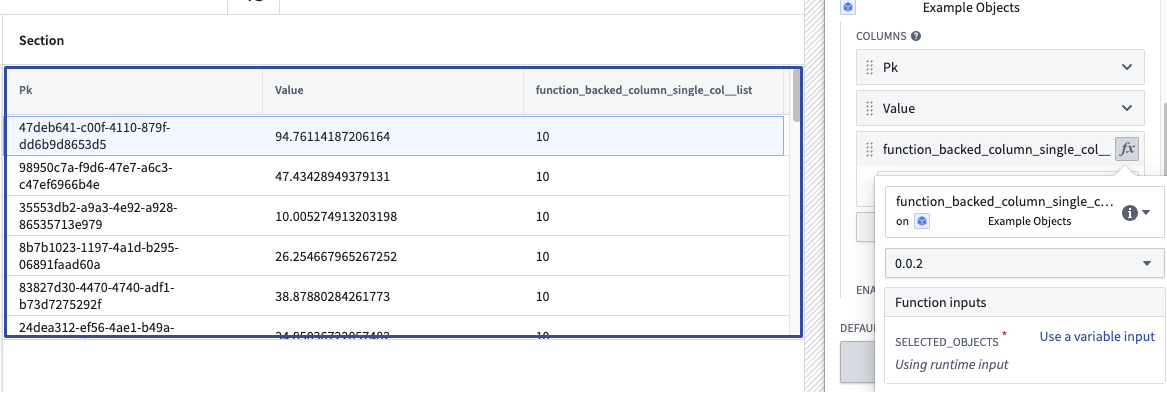
An example of a function returning multiple columns:
from dataclasses import dataclass

@dataclass
class CustomType:
    column_name_a: int
    column_name_b: int

@function
def function_backed_column_multiple_cols(
    selected_objects: MyObjectTypeObjectSet, some_other_parameter: String
) -> dict[MyObjectType, CustomType]:
    final_dict = {}

    for curr_obj in selected_objects:
        final_dict[curr_obj] = CustomType(column_name_a=10, column_name_b=20)

    return final_dict
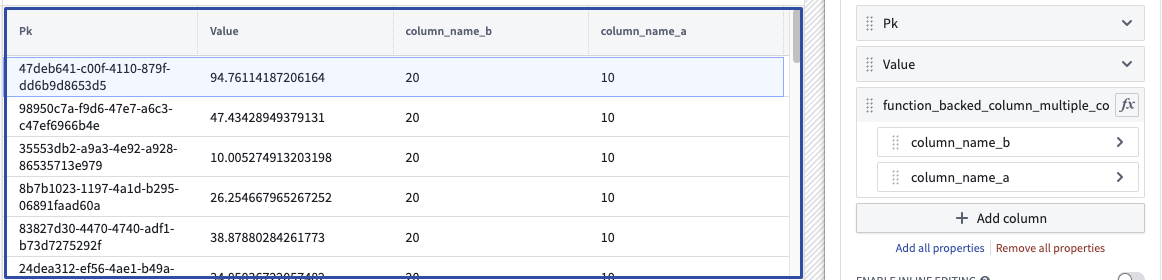
中文翻译
在 Workshop 中使用 Python 函数
前提条件
本指南假设您已经编写并发布了一个 Python 函数。请参阅 Python 函数入门 文档了解相关教程。有关如何使用 Python SDK 查询本体论(Ontology)的示例,请参见 Python 本体论 SDK 文档。
在 Workshop 中使用 Python 函数
在 Workshop 中,从模块左侧的 变量(Variables) 选项卡搜索 Python 函数。无服务器函数和已部署函数 都会显示在此处。无服务器函数(Serverless functions)始终可以在任何版本下运行,无需手动部署。已部署函数(Deployed functions)会显示一个图标,表示函数及其版本的三种状态之一:
- 运行中(Running): 该函数和版本可以处理请求。
- 已停止(Stopped): 该函数和版本不可用。在函数选择器中,悬停在信息图标上,选择 配置(Configure),然后选择 创建并启动部署(Create and start deployment) 以使该函数可用。
- 升级中(Upgrading): 该函数和版本尚不可用。
发布新版本
在任意给定时间,函数仓库(Repository)只有一个版本被托管。为了在尽量减少停机时间的情况下对函数进行更改,我们建议添加一个新函数(例如 function_v1)并按照此处的描述进行标记。从已发布函数的标签和发布版本中,选择 在本体论管理器中打开(Open in Ontology Manager)。
在本体论管理器(Ontology Manager)中,选择您希望在应用程序中使用的函数仓库版本,然后选择 升级(Upgrade)。
将所有使用此仓库中函数的下游应用程序更新到您已部署的新版本。请注意,之前的部署版本将不再运行,因此在进行此更改时,您的应用程序会有短暂的停机时间。您将同时拥有 function_v0 和 function_v1,因此虽然您需要切换到新的部署版本,但不必更改正在使用的函数。当 function_v0 不再使用时,您可以删除该函数。
调试错误
如果您的函数在 Workshop 中未按预期工作,请首先检查问题是否与函数的逻辑或响应能力有关。如果是逻辑问题,请检查底层代码仓库中的源代码。如果函数无响应或抛出错误,请按照以下步骤操作:
- 检查您选择的版本当前是否在函数选择器下拉菜单中处于运行状态。
- 如果函数未部署或处于
升级中(Upgrading)状态,请悬停在函数的信息图标上并选择 配置(Configure)。这将带您进入本体论管理器,您可以在其中选择 启动部署(Start Deployment) 以使函数重新运行。
- 如果您的函数处于
运行中(Running)状态,或者您需要有关部署行为的更多信息,请在本体论管理器中选择左侧面板的 部署(Deployment) 以查看详细日志。如果您选择 实时查看(View live),还可以查看 SLS 日志。
创建函数支持列
要创建函数支持列(Function-backed column),您必须发布一个满足以下要求的函数:
-
函数的输入参数必须包含一个对象集参数(Object set parameter)(从
ontology_sdk.ontology.object_sets导入),并且可以选择包含其他输入参数。此对象集参数将使表中显示的对象能够传递到函数中,从而生成所需的派生列。请注意,list[ObjectType]参数也可以在此处使用,但不推荐使用这种性能较差的选项。 -
函数的返回类型必须是
dict[ObjectType, ColumnType],其中ColumnType是所需的列类型,或者是dict[ObjectType, CustomType],用于从函数返回多个列。了解更多关于自定义类型的信息。
一旦配置并发布了满足上述条件的函数,您就可以在对象表(Object Table) 小部件配置中配置函数支持属性列。
返回单个列的函数示例:
from functions.api import Date, Integer, String, function
from ontology_sdk import FoundryClient
from ontology_sdk.ontology.object_sets import MyObjectTypeObjectSet
from ontology_sdk.ontology.objects import MyObjectType

@function
def function_backed_column_single_col(
    selected_objects: MyObjectTypeObjectSet
) -> dict[MyObjectType, Integer]:
    final_dict = {}

    for curr_obj in selected_objects:
        final_dict[curr_obj] = 10 # 该值可以根据任意逻辑定义

    return final_dict
返回多个列的函数示例:
from dataclasses import dataclass

@dataclass
class CustomType:
    column_name_a: int
    column_name_b: int

@function
def function_backed_column_multiple_cols(
    selected_objects: MyObjectTypeObjectSet, some_other_parameter: String
) -> dict[MyObjectType, CustomType]:
    final_dict = {}

    for curr_obj in selected_objects:
        final_dict[curr_obj] = CustomType(column_name_a=10, column_name_b=20)

    return final_dict