Queries(查询(Queries))
Queries are the read-only subsets of functions that may be optionally exposed through the API gateway. They cannot have any side effects, such as modifying the Ontology or altering external systems. You should use an Action if you need those additional editing capabilities through the API gateway.
Query decorator
Use the following syntax to define a query function.
```typescript tab="TypeScript v1" import { Query } from "@foundry/functions-api";
@Query({ apiName: "myTypeScriptV1Function" })
```typescript tab="TypeScript v2"
// Export a config object with an apiName parameter from the file containing the function
export const config = {
    apiName: "myTypeScriptV2Function"
};
```python tab="Python" from functions.api import function
@function(api_name="myPythonFunction")
For Python and TypeScript v1 functions, the decorator accepts an API name parameter of type `string`, which is required to define an API name. When using TypeScript v1, the query will behave similarly to the existing [`@Function` decorator](https://palantir.com/docs/foundry/functions/decorators/) if the `apiName` parameter is not defined. Note that the corresponding Python syntax is `api_name`.

### Example: API-named query

The example below demonstrates how to expose a query through the [API gateway](https://palantir.com/docs/foundry/api/general/overview/introduction/):

```typescript tab="TypeScript v1"
import { Query, Double } from "@foundry/functions-api";
import { Objects, Aircraft } from "@foundry/ontology-api";

export class PublishedQueries {
    @Query({ apiName: "getReschedulableAircraftCount" })
    public async countAircraftTakingOffAfter(minimumTimeInMinutes: Double): Promise<Double> {
        const aircaftCount = await Objects.search().aircraft()
                 .filter(aircraft => aircraft.timeUntilNextFlight.range().gt(minimumTimeInMinutes))
                 .count();

        return aircaftCount!;
    }
}
```typescript tab="TypeScript v2" import { Client } from "@osdk/client"; import { Double } from "@osdk/functions"; import { Aircraft } from "@ontology/sdk";
export const config = { apiName: "getReschedulableAircraftCount" };
async function countAircraftTakingOffAfter(client: Client, minimumTimeInMinutes: Double): Promise
return $count;
}
export default countAircraftTakingOffAfter;
```python tab="Python"
from functions.api import Double, function
from ontology_sdk import FoundryClient
from ontology_sdk.ontology.objects import Aircraft

@function(api_name="getReschedulableAircraftCount")
def count_aircraft_taking_off_after(minimum_time_in_minutes: Double) -> Double:
    client = FoundryClient()
    aircraft_count = client.ontology.objects.Aircraft.where(
        Aircraft.time_until_next_flight > minimum_time_in_minutes
    ).count().compute()

    return aircraft_count
API name validations
The apiName of a query must be a string that meets the following requirements:
- Be in
lowerCamelCase. - Be under 100 characters.
- Not contain leading numbers.
- Be unique among all Ontologies imported into the repository.
- The tagging process will fail if the
apiNameis not unique, requiring you to change the name.
Additionally, a repository containing API-named queries must import entities from at least one ontology.
Version and update API-named queries
API-named queries will always use the latest tagged version of the published query and do not follow the same semantic versioning paradigm as other Foundry functions.
To disassociate the API name from the query and break it in the API gateway, you must remove the API name from the query decorator and release a new tag from the repository.
:::callout{theme="neutral"} Changing the API name in the decorator and publishing a new tag will break the consumer. Only the latest published version of the query is supported.
To allow consumers to upgrade at their convenience without breaking changes, you can support multiple versions of the same API name. To do this, you must make a copy of the query code in your repository and give it a different API name, for example getReschedulableAircraftCountV2.
:::
Search and view queries
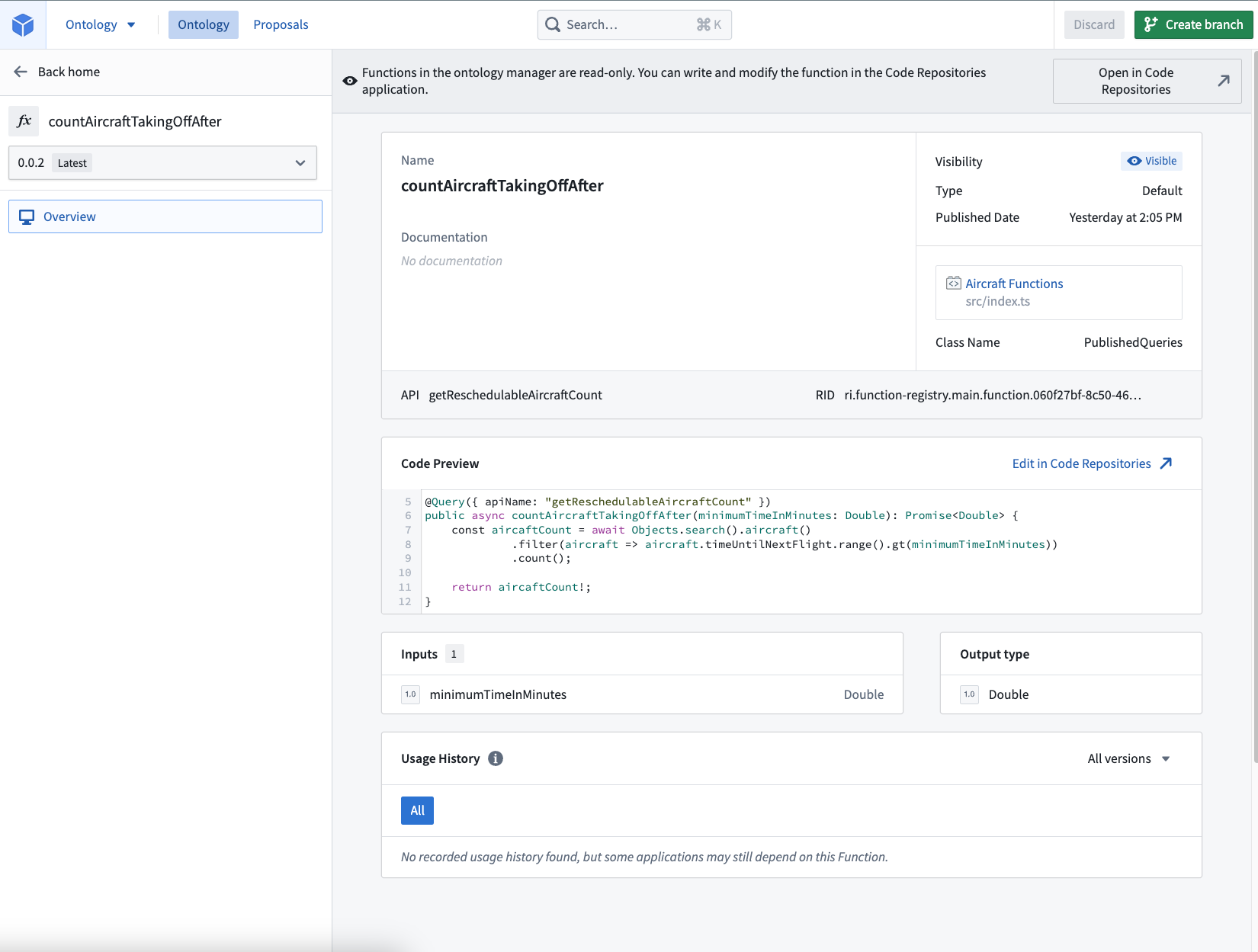
As with other functions, you can search for and manage your queries in Ontology Manager. You can search for the query name or the API name. In the example above, the queries are getReschedulableAircraftCount for the API name and countAircraftTakingOffAfter for the query name, respectively.
:::callout{theme="neutral"}
When using TypeScript v1 functions, you may need to update the functions.json file in your repository to enable queries by setting the enableQueries property to true:
```typescript tab="TypeScript v1" { "enableQueries": true }
:::

## Call a query function

After publishing your TypeScript or Python query function, navigate to the code repository where you want to consume the function, and import it using the [**Resource imports** sidebar](https://palantir.com/docs/foundry/functions/resource-imports-sidebar/).

Your function will be callable from the consuming repository. For example:

```typescript tab="TypeScript v1"
import { Queries } from "@foundry/ontology-api";

export class MyFunctions {
    @Function()
    public callQueryFunction(): Promise<Double> {
        return Queries.getReschedulableAircraftCount(10);
    }
}
```typescript tab="TypeScript v2" import { Client } from "@osdk/client"; import { Double } from "@osdk/functions"; import { getReschedulableAircraftCount } from "@ontology/sdk";
async function callQueryFunction(client: Client): Promise
export default callQueryFunction;
```python tab="Python"
from functions.api import Double, function
from ontology_sdk import FoundryClient

@function
def call_query_function() -> Double:
    return FoundryClient().ontology.queries.get_reschedulable_aircraft_count(
        time_until_next_flight=Double(10)
    )
For TypeScript v1 functions, Foundry must know which query functions you call from a published function. We automatically provide static analysis to try and detect queries that are called. However, this static analysis may occasionally miss certain calls leading to a runtime error instructing you to add the @Uses decorator. This decorator serves to augment the automatically detected query usage.
The following example demonstrates the usage of the @Uses decorator:
```typescript tab="TypeScript v1" import { Uses } from "@foundry/functions-api"; import { Queries } from "@foundry/ontology-api";
export class MyFunctions {
@Uses({ queries: [Queries.getReschedulableAircraftCount] })
@Function()
public callQueryFunction(): Promise---
# 中文翻译
# 查询(Queries)
查询(Queries)是函数(Functions)的只读子集,可选择通过[API网关(API gateway)](https://palantir.com/docs/foundry/api/general/overview/introduction/)对外暴露。查询不能产生任何副作用,例如修改本体论(Ontology)或更改外部系统。如果您需要通过API网关(API gateway)进行额外的编辑操作,应使用[操作(Action)](https://palantir.com/docs/foundry/api/ontology-resources/actions/apply-action/)。
## 查询装饰器(Query decorator)
使用以下语法定义查询函数(Query function)。
```typescript tab="TypeScript v1"
import { Query } from "@foundry/functions-api";
@Query({ apiName: "myTypeScriptV1Function" })
```typescript tab="TypeScript v2" // 从包含函数的文件中导出一个包含apiName参数的配置对象 export const config = { apiName: "myTypeScriptV2Function" };
```python tab="Python"
from functions.api import function

@function(api_name="myPythonFunction")
对于Python和TypeScript v1函数,装饰器接受一个string类型的API名称参数(API name parameter),该参数用于定义API名称(API name)。使用TypeScript v1时,如果未定义apiName参数,查询的行为将与现有的@Function装饰器类似。请注意,对应的Python语法为api_name。
示例:带API名称的查询(API-named query)
以下示例演示了如何通过API网关(API gateway)暴露查询:
```typescript tab="TypeScript v1" import { Query, Double } from "@foundry/functions-api"; import { Objects, Aircraft } from "@foundry/ontology-api";
export class PublishedQueries {
@Query({ apiName: "getReschedulableAircraftCount" })
public async countAircraftTakingOffAfter(minimumTimeInMinutes: Double): Promise
    return aircaftCount!;
}
}
typescript tab="TypeScript v2"
import { Client } from "@osdk/client";
import { Double } from "@osdk/functions";
import { Aircraft } from "@ontology/sdk";
export const config = {
apiName: "getReschedulableAircraftCount"
};
async function countAircraftTakingOffAfter(client: Client, minimumTimeInMinutes: Double): Promise
```python tab="Python" from functions.api import Double, function from ontology_sdk import FoundryClient from ontology_sdk.ontology.objects import Aircraft
@function(api_name="getReschedulableAircraftCount") def count_aircraft_taking_off_after(minimum_time_in_minutes: Double) -> Double: client = FoundryClient() aircraft_count = client.ontology.objects.Aircraft.where( Aircraft.time_until_next_flight > minimum_time_in_minutes ).count().compute()
return aircraft_count
```
API名称验证(API name validations)
查询的apiName必须是一个字符串,并满足以下要求:
* 采用小驼峰命名法(lowerCamelCase)。
* 长度不超过100个字符。
* 不能以数字开头。
* 在导入到仓库的所有本体论(Ontologies)中保持唯一。
* 如果apiName不唯一,标记过程(tagging process)将失败,需要您更改名称。
此外,包含带API名称查询(API-named queries)的仓库必须从至少一个本体论(Ontology)中导入实体(entities)。
版本管理与更新带API名称的查询(Version and update API-named queries)
带API名称的查询(API-named queries)将始终使用已发布查询的最新标记版本(latest tagged version),并且不遵循其他Foundry函数(Functions)的相同语义化版本控制范式(semantic versioning paradigm)。
要解除API名称(API name)与查询的关联并在API网关(API gateway)中使其失效,您必须从查询装饰器(Query decorator)中移除API名称(API name),并从仓库发布一个新标签(new tag)。
:::callout{theme="neutral"}
更改装饰器中的API名称(API name)并发布新标签将导致消费者(consumer)无法使用。仅支持查询的最新发布版本。
为了让消费者能够在不产生破坏性变更(breaking changes)的情况下自行选择升级时机,您可以支持同一API名称(API name)的多个版本。为此,您需要在仓库中复制查询代码,并为其指定不同的API名称(API name),例如getReschedulableAircraftCountV2。
:::
搜索与查看查询(Search and view queries)
与其他函数(Functions)一样,您可以在本体管理器(Ontology Manager)中搜索和管理您的查询。您可以按查询名称(query name)或API名称(API name)进行搜索。在上述示例中,API名称(API name)为getReschedulableAircraftCount,查询名称(query name)为countAircraftTakingOffAfter。
:::callout{theme="neutral"}
使用TypeScript v1函数时,您可能需要更新仓库中的functions.json文件,通过将enableQueries属性设置为true来启用查询:
typescript tab="TypeScript v1"
{
  "enableQueries": true
}
:::
调用查询函数(Call a query function)
发布您的TypeScript或Python查询函数(Query function)后,导航到您要使用该函数的代码仓库,并通过资源导入侧边栏(Resource imports sidebar)导入它。
您的函数将从消费仓库(consuming repository)中可调用。例如:
```typescript tab="TypeScript v1" import { Queries } from "@foundry/ontology-api";
export class MyFunctions {
@Function()
public callQueryFunction(): Promise```typescript tab="TypeScript v2"
import { Client } from "@osdk/client";
import { Double } from "@osdk/functions";
import { getReschedulableAircraftCount } from "@ontology/sdk";
async function callQueryFunction(client: Client): Promise<Double> {
return client(getReschedulableAircraftCount).executeFunction({ timeUntilNextFlight: 10 });
}
export default callQueryFunction;
```python tab="Python" from functions.api import Double, function from ontology_sdk import FoundryClient
@function def call_query_function() -> Double: return FoundryClient().ontology.queries.get_reschedulable_aircraft_count( time_until_next_flight=Double(10) )
对于TypeScript v1函数,Foundry必须知道您从已发布函数中调用了哪些查询函数(Query function)。我们会自动提供静态分析(static analysis)来尝试检测被调用的查询。然而,这种静态分析有时可能会遗漏某些调用,从而导致运行时错误(runtime error),提示您添加`@Uses`装饰器。此装饰器用于补充自动检测到的查询使用情况。

以下示例演示了`@Uses`装饰器的用法:

```typescript tab="TypeScript v1"
import { Uses } from "@foundry/functions-api";
import { Queries } from "@foundry/ontology-api";

export class MyFunctions {
    @Uses({ queries: [Queries.getReschedulableAircraftCount] })
    @Function()
    public callQueryFunction(): Promise<Double> {
        return Queries.getReschedulableAircraftCount(10);
    }
}