Source aliases(源别名(Source aliases))
Source aliases are named, portable references to Data Connection sources. By referring to a source by its alias key instead of a specific source identifier, you decouple your function logic from any one source. This keeps your functions portable across environments.
Import a source
To import a source:
-
Open a TypeScript v2 or Python code repository and navigate to the Resource imports panel.
-
Select the Ontology SDK tab.
-
Select Add > Sources.
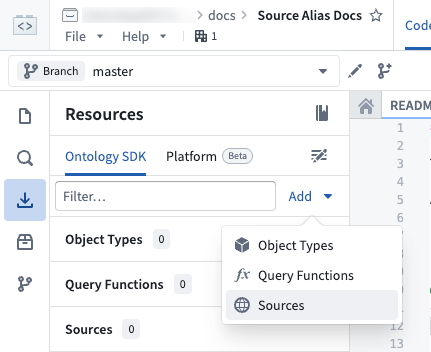
- Search for and select the source to import, then choose Confirm selection.
Add a source alias
After importing a source, you can add an alias to it:
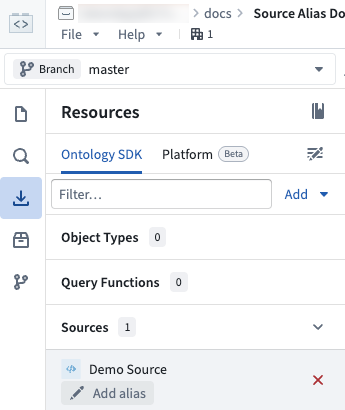
- In the Resource imports panel, locate the source under Sources.
- Select Add alias below the source name.
:::callout{theme="neutral"} Alias keys must be unique within the repository. :::
Edit a source alias
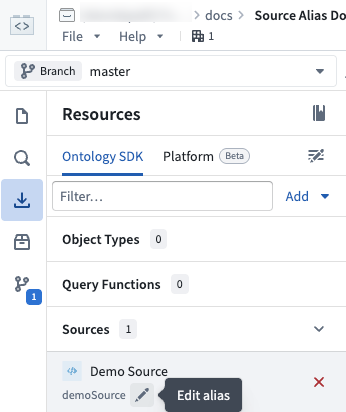
To edit an existing source alias, navigate to the Sources section in the Resource imports panel. Select the pen icon next to the alias to edit it inline.
Use a source alias in code
To use a source alias in your function, reference the alias by its key wherever you declare and retrieve the source. Pass the alias key to the sources configuration and to getSource (TypeScript v2) or get_source (Python):
```typescript tab="TypeScript v2" import { getSource, getHttpsConnection, getFetch } from "@palantir/functions-sources";
export const config = { sources: ["demoSource"] }
async function myExternalFunction(): Promise
const response = await fetch(url);

return response.text();
}
python tab="Python"
from functions.api import function
from functions.sources import get_source
@function(sources=["demoSource"])
def my_external_function() -> str:
source = get_source("demoSource")
url = source.get_https_connection().url
client = source.get_https_connection().get_client()
response = client.get(url)
return response.text
```
If you need the resource identifier (RID) of the source that an alias resolves to, use the Aliases.source utility in TypeScript v2 or the source utility in Python. Read the resolved RID from the .rid property:
```typescript tab="TypeScript v2" import { Aliases } from "@osdk/functions";
const sourceRid = Aliases.source("demoSource").rid;
```python tab="Python"
from functions.aliases import source

source_rid = source("demoSource").rid
For more information about using sources in functions, including accessing credentials and using pre-configured clients, see Make API calls from functions.
Use source aliases with Marketplace
When you add a function that uses source aliases to a Marketplace product, each aliased source appears as a configurable input under Data connection sources. Installers can map each input source to an available source in their environment during installation, without needing to modify the function source code.

Set a description
To help installers understand which source to provide, you can add a description to the source input. Select the source under Inputs to open the Details panel, then enter a description on the General tab.

Installation experience
During installation, installers see the source description and can select a source appropriate for their environment. Marketplace remaps the selected source to the defined alias automatically, so the function code remains untouched.

中文翻译
源别名(Source aliases)
源别名(Source aliases)是对数据连接源(Data Connection sources)的命名式可移植引用。通过使用别名键而非特定源标识符来引用源,可以将函数逻辑与任何特定源解耦。这使您的函数能够在不同环境中保持可移植性。
导入源(Import a source)
要导入源:
-
打开 TypeScript v2 或 Python 代码仓库,导航至 资源导入(Resource imports) 面板。
-
选择 本体SDK(Ontology SDK) 选项卡。
-
选择 添加(Add) > 源(Sources)。
- 搜索并选择要导入的源,然后选择 确认选择(Confirm selection)。
添加源别名(Add a source alias)
导入源后,您可以为其添加别名:
- 在 资源导入(Resource imports) 面板中,找到 源(Sources) 下的目标源。
- 选择源名称下方的 添加别名(Add alias)。
:::callout{theme="neutral"} 别名键在仓库内必须唯一。 :::
编辑源别名(Edit a source alias)
要编辑现有源别名,请导航至 资源导入(Resource imports) 面板中的 源(Sources) 部分。选择别名旁边的笔形图标进行内联编辑。
在代码中使用源别名(Use a source alias in code)
要在函数中使用源别名,请在声明和检索源的位置通过其键引用该别名。将别名键传递给 sources 配置以及 getSource(TypeScript v2)或 get_source(Python):
```typescript tab="TypeScript v2" import { getSource, getHttpsConnection, getFetch } from "@palantir/functions-sources";
export const config = { sources: ["demoSource"] }
async function myExternalFunction(): Promise
const response = await fetch(url);

return response.text();
}
python tab="Python"
from functions.api import function
from functions.sources import get_source
@function(sources=["demoSource"])
def my_external_function() -> str:
source = get_source("demoSource")
url = source.get_https_connection().url
client = source.get_https_connection().get_client()
response = client.get(url)
return response.text
```
如果您需要别名解析到的源的资源标识符(RID),请在 TypeScript v2 中使用 Aliases.source 工具,或在 Python 中使用 source 工具。从 .rid 属性读取解析后的 RID:
```typescript tab="TypeScript v2" import { Aliases } from "@osdk/functions";
const sourceRid = Aliases.source("demoSource").rid;
```python tab="Python"
from functions.aliases import source

source_rid = source("demoSource").rid
有关在函数中使用源的更多信息,包括访问凭据和使用预配置客户端,请参阅从函数发起API调用(Make API calls from functions)。
将源别名与Marketplace结合使用(Use source aliases with Marketplace)
当您将使用源别名的函数添加到Marketplace产品(Marketplace product)时,每个带别名的源都会作为可配置输入显示在 数据连接源(Data connection sources) 下。安装者可以在安装过程中将每个输入源映射到其环境中的可用源,而无需修改函数源代码。
设置描述(Set a description)
为了帮助安装者了解应提供哪个源,您可以为源输入添加描述。在 输入(Inputs) 下选择源以打开 详情(Details) 面板,然后在 常规(General) 选项卡中输入描述。
安装体验(Installation experience)
在安装过程中,安装者会看到源描述,并可以选择适合其环境的源。Marketplace会自动将所选源重新映射到已定义的别名,因此函数代码保持不变。