Migrate from TypeScript v1 to TypeScript v2(从 TypeScript v1 迁移到 TypeScript v2)
This guide describes the syntax and structure differences you may encounter while migrating existing TypeScript functions from v1 to v2. Refer to the feature support documentation to learn about v2 enhancements and what each version supports.
Declare a function
To publish a function to the platform in TypeScript v1, you must annotate it with the @Function() decorator from the @foundry/functions-api package. Additionally, the function must be a method of a class that is exported from the root index.ts file of the repository.
// src/index.ts

import { Function } from "@foundry/functions-api";

export class MyFunctions {

    @Function()
    public reverseStringArray(arr: string[]): string[] {
        return arr.reverse();
    }
}
To publish a function to the platform in TypeScript v2, you must write it in a file in the src/functions directory and export it using export default. Each file can export a single function.
// src/functions/reverseStringArray.ts

export default function reverseStringArray(
    arr: string[]
): string[] {
    return arr.reverse();
}
To keep your repository organized, we recommend grouping related functions into subdirectories within the src/functions directory. For example, the following folder structure organizes functions into payroll and staffing subdirectories to make the separation of responsibilities clearer.
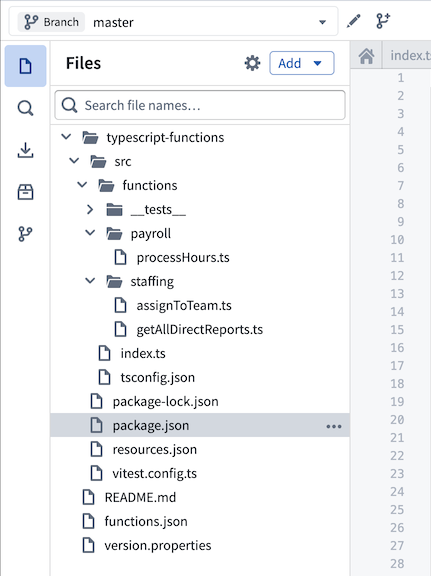
Refer to our documentation on getting started with TypeScript v2 functions for more information.
Use the @osdk/functions package
In TypeScript v1, you must import primitive types like Integer and Double from the @foundry/functions-api package to use them in the signature. In TypeScript v2, however, you must instead use the @osdk/functions package.
The following example imports the Integer type from the @foundry/functions-api package and uses it in the signature of a TypeScript v1 function to calculate the greatest common divisor of two integers:
import { Function, Integer } from "@foundry/functions-api";

export class MyFunctions {

    @Function()
    public gcd(a: Integer, b: Integer): Integer {
        if (b === 0) {
            return a;
        }
        return gcd(b, a % b);
    }
}
In TypeScript v2, the core TypeScript logic is identical, but you must use the Integer type from the @osdk/functions package:
import { Integer } from "@osdk/functions";

export default function gcd(a: Integer, b: Integer): Integer {
    if (b === 0) {
        return a;
    }
    return gcd(b, a % b);
}
Refer to the types reference for examples of how to import and use types in the signature across both TypeScript v1 and TypeScript v2 functions.
Dates and timestamps
TypeScript v1 uses the LocalDate and Timestamp types from the @foundry/functions-api package for working with temporal data. TypeScript v2 replaces these with the DateISOString and TimestampISOString types from the @osdk/functions package, which represent dates and timestamps as ISO 8601 ↗ strings.
TypeScript v2 functions can use any date and timestamp library available in the NPM ecosystem, such as dayjs ↗, date-fns ↗, and luxon ↗.
Generate the Ontology SDK
TypeScript v2 functions provide first-class support for querying and editing the Ontology through the Ontology SDK. Like in TypeScript v1, TypeScript v2 repositories allow you to import Ontology entities through the Resource imports sidebar. Once you add your object types and link types, you are prompted to create an initial version of the Ontology SDK.
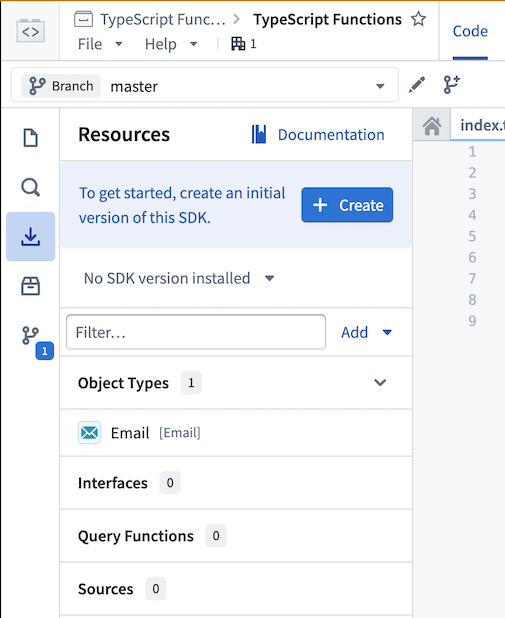
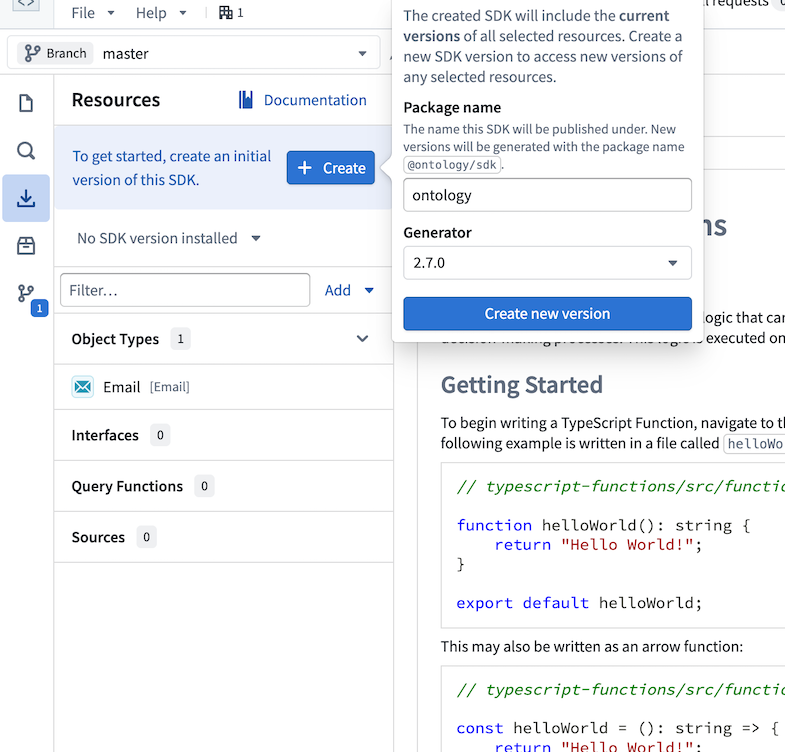
Select Create, then choose a name for the Ontology SDK. This name cannot be changed after the first version is generated. Select Create new version to generate the Ontology SDK.
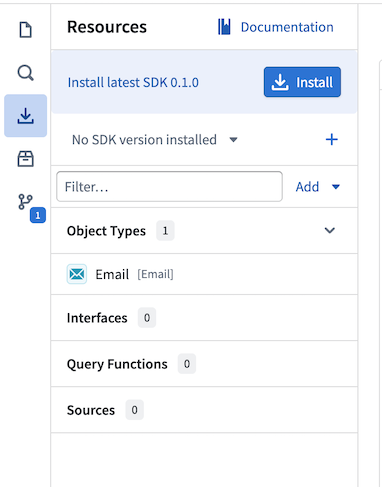
Once the Ontology SDK is created, you will see an option to install it into the workspace. Selecting Install will add the Ontology SDK as a dependency in the package.json file and make it available to use in TypeScript code.
View the Documentation tab in the sidebar for comprehensive examples of working with your Ontology in TypeScript.
Query the Ontology
In TypeScript v1, you must import Objects from the @foundry/ontology-api package to perform searches against your Ontology:
import { Function, Integer } from "@foundry/functions-api";
import { Objects } from "@foundry/ontology-api";

export class MyFunctions {

    @Function()
    public async countAircraft(): Promise<Integer> {
        const count = await Objects.search().aircraft().count() ?? 0;

        return count;
    }
}
In TypeScript v2, you must access an Ontology SDK client by specifying it as the first argument in the function signature:
import { Aircraft } from "@ontology/sdk";
import { Client } from "@osdk/client";
import { Integer } from "@osdk/functions";

export default async function countAircraft(client: Client): Promise<Integer> {
    const aircraft = await client(Aircraft).aggregate({
        $select: {
            $count: "unordered"
        }
    });

    return aircraft.$count;
}
Edit the Ontology
To write an Ontology edit function in TypeScript v1, you must annotate it with the @OntologyEditFunction() decorator from the @foundry/functions-api package and give it a void return type. You must also apply the @Edits decorator to declare all edited object types up front, allowing permissions on those object types to be enforced before the function-backed action is called.
import { Edits, OntologyEditFunction } from "@foundry/functions-api";
import { Aircraft, Employee } from "@foundry/ontology-api";

export class MyOntologyEditFunctions {

    @Edits(Aircraft, Employee)
    @OntologyEditFunction()
    public myFunction(aircraft: Aircraft, employee: Employee): void {
        aircraft.businessCapacity = 3;
        employee.department = "HR";
    }
}
In TypeScript v2, you must import the createEditBatch function from the @osdk/functions package to construct a store of edits that is used for the duration of the execution. You must use the Edits type to declare which entities your function is permitted to edit. This enforces type safety at compile time; if you attempt to edit an object or link of a type not covered by your Edits type, the TypeScript compiler will return an error.
import { createEditBatch, Edits } from "@osdk/functions";
import { Aircraft, Employee } from "@ontology/sdk";
import { Client, Osdk } from "@osdk/client";

type OntologyEdit = Edits.Object<Aircraft> | Edits.Object<Employee>;

export default function myFunction(
    client: Client,
    aircraft: Osdk.Instance<Aircraft>,
    employee: Osdk.Instance<Employee>
): OntologyEdit[] {

    const batch = createEditBatch<OntologyEdit>(client);

    batch.update(aircraft, { businessCapacity: 3 });
    batch.update(employee, { department: "HR" });

    return batch.getEdits();
}
In TypeScript v1, edits are not applied to the Ontology during function execution. As described in our edits and object search documentation, changes to objects and links are only propagated after the function finishes executing, and only when called within a function-backed action.
TypeScript v2 makes this behavior more explicit. Rather than implicitly accumulating edits, your function must track them using an edit batch and return them upon completion.
Refer to the Ontology edits section in the TypeScript v2 documentation for the full list of supported operations.
Generate unique IDs for objects
To generate unique IDs for newly created objects in TypeScript v1, use the Uuid utility from the @foundry/functions-utils package.
import { Edits, OntologyEditFunction } from "@foundry/functions-api";
import { Uuid } from "@foundry/functions-utils";
import { FlightScenario, Objects } from "@foundry/ontology-api";

export class ExampleEditFunctions {

    @Edits(FlightScenario)
    @OntologyEditFunction()
    public createFlightScenario(): void {
        const scenario = Objects.create().flightScenarios(Uuid.random());
        scenario.scenarioName = "New scenario";
    }
}
TypeScript v2 runs in a full Node.js environment, so you can use the node:crypto core module instead:
import { FlightScenario } from "@ontology/sdk";
import { Client } from "@osdk/client";
import { createEditBatch, Edits } from "@osdk/functions";
import { randomUUID } from "node:crypto";

type OntologyEdit = Edits.Object<FlightScenario>;

export default function createFlightScenario(client: Client): OntologyEdit[] {

    const batch = createEditBatch<OntologyEdit>(client);

    batch.create(FlightScenario, {
        id: randomUUID(),
        scenarioName: "New scenario",
    });

    return batch.getEdits();
}
:::callout{theme="warning"}
Avoid calling randomUUID or other random value generators at the top level of a module outside of the function body. TypeScript v2 functions use warm invocations where all module-level code is evaluated once during initialization and then reused across subsequent invocations. This means that a randomUUID call at the module level will be evaluated a single time and produce the same value for every warm invocation. Always generate random values inside the function body to ensure uniqueness.
:::
Load objects into memory
TypeScript v1 functions expose the .all() and .allAsync() APIs to load all objects of a particular type into memory for processing. However, this approach can lead to high memory usage and slower performance as the number of objects in your Ontology grows.
import { Edits, OntologyEditFunction } from "@foundry/functions-api";
import { Aircraft, Objects } from "@foundry/ontology-api";

export class MyFunctions {

    @Edits(Aircraft)
    @OntologyEditFunction()
    public editAircraft(): void {

        const aircraft = Objects.search().aircraft().all();

        aircraft.forEach(a => {
            a.arrived = true;
        });
    }
}
TypeScript v2 functions support streaming object processing via the Ontology SDK, avoiding the need to hold the entire set of objects in memory at once. We recommend this approach where possible.
import { Aircraft } from "@ontology/sdk";
import { Client } from "@osdk/client";
import { createEditBatch, Edits } from "@osdk/functions";

type OntologyEdit = Edits.Object<Aircraft>;

export default async function editAircraft(client: Client): Promise<OntologyEdit[]> {

    const batch = createEditBatch<OntologyEdit>(client);

    for await (const a of client(Aircraft).asyncIter()) {
        batch.update(a, { arrived: true });
    }

    return batch.getEdits();
}
If data scale is not a concern, the following alternative loads all objects of a particular type:
import { Aircraft } from "@ontology/sdk";
import { Client } from "@osdk/client";
import { createEditBatch, Edits } from "@osdk/functions";

type OntologyEdit = Edits.Object<Aircraft>;

export default async function editAircraft(client: Client): Promise<OntologyEdit[]> {

    const batch = createEditBatch<OntologyEdit>(client);

    const aircraft = await Array.fromAsync(client(Aircraft).asyncIter());

    aircraft.forEach(a => {
        batch.update(a, { arrived: true });
    });

    return batch.getEdits();
}
中文翻译
从 TypeScript v1 迁移到 TypeScript v2
本指南介绍了在将现有 TypeScript 函数从 v1 迁移到 v2 时可能遇到的语法和结构差异。请参阅功能支持文档,了解 v2 的增强功能及各版本支持的内容。
声明函数
在 TypeScript v1 中,要将函数发布到平台,必须使用 @foundry/functions-api 包中的 @Function() 装饰器对其进行注解。此外,该函数必须是类的成员方法,且该类需从仓库根目录的 index.ts 文件中导出。
// src/index.ts

import { Function } from "@foundry/functions-api";

export class MyFunctions {

    @Function()
    public reverseStringArray(arr: string[]): string[] {
        return arr.reverse();
    }
}
在 TypeScript v2 中,要将函数发布到平台,需在 src/functions 目录下的文件中编写函数,并使用 export default 导出。每个文件只能导出一个函数。
// src/functions/reverseStringArray.ts

export default function reverseStringArray(
    arr: string[]
): string[] {
    return arr.reverse();
}
为保持仓库结构清晰,建议将相关函数分组到 src/functions 目录的子目录中。例如,以下文件夹结构将函数组织到 payroll 和 staffing 子目录中,使职责划分更加明确。
更多信息请参阅 TypeScript v2 函数入门文档。
使用 @osdk/functions 包
在 TypeScript v1 中,必须在函数签名中使用 Integer 和 Double 等原始类型时,从 @foundry/functions-api 包中导入它们。而在 TypeScript v2 中,则必须改用 @osdk/functions 包。
以下示例从 @foundry/functions-api 包中导入 Integer 类型,并在 TypeScript v1 函数的签名中使用它来计算两个整数的最大公约数:
import { Function, Integer } from "@foundry/functions-api";

export class MyFunctions {

    @Function()
    public gcd(a: Integer, b: Integer): Integer {
        if (b === 0) {
            return a;
        }
        return gcd(b, a % b);
    }
}
在 TypeScript v2 中,核心 TypeScript 逻辑完全相同,但必须使用 @osdk/functions 包中的 Integer 类型:
import { Integer } from "@osdk/functions";

export default function gcd(a: Integer, b: Integer): Integer {
    if (b === 0) {
        return a;
    }
    return gcd(b, a % b);
}
请参阅类型参考文档,了解如何在 TypeScript v1 和 v2 函数的签名中导入和使用类型的示例。
日期和时间戳
TypeScript v1 使用 @foundry/functions-api 包中的 LocalDate 和 Timestamp 类型处理时间数据。TypeScript v2 将其替换为 @osdk/functions 包中的 DateISOString 和 TimestampISOString 类型,这些类型将日期和时间戳表示为 ISO 8601 ↗ 字符串。
TypeScript v2 函数可以使用 NPM 生态系统中任何可用的日期和时间库,例如 dayjs ↗、date-fns ↗ 和 luxon ↗。
生成 Ontology SDK
TypeScript v2 函数通过 Ontology SDK 提供对查询和编辑 Ontology 的一流支持。与 TypeScript v1 类似,TypeScript v2 仓库允许通过 资源导入侧边栏 导入 Ontology 实体。添加对象类型和链接类型后,系统会提示您创建 Ontology SDK 的初始版本。
选择 创建,然后为 Ontology SDK 命名。生成第一个版本后,此名称将无法更改。选择 创建新版本 以生成 Ontology SDK。
创建 Ontology SDK 后,您将看到将其安装到工作区的选项。选择 安装 会将 Ontology SDK 作为依赖项添加到 package.json 文件中,并使其可在 TypeScript 代码中使用。
查看侧边栏中的 文档 选项卡,获取在 TypeScript 中使用 Ontology 的全面示例。
查询 Ontology
在 TypeScript v1 中,必须从 @foundry/ontology-api 包中导入 Objects 才能对 Ontology 执行搜索:
import { Function, Integer } from "@foundry/functions-api";
import { Objects } from "@foundry/ontology-api";

export class MyFunctions {

    @Function()
    public async countAircraft(): Promise<Integer> {
        const count = await Objects.search().aircraft().count() ?? 0;

        return count;
    }
}
在 TypeScript v2 中,必须通过将 Ontology SDK 客户端指定为函数签名的第一个参数来访问它:
import { Aircraft } from "@ontology/sdk";
import { Client } from "@osdk/client";
import { Integer } from "@osdk/functions";

export default async function countAircraft(client: Client): Promise<Integer> {
    const aircraft = await client(Aircraft).aggregate({
        $select: {
            $count: "unordered"
        }
    });

    return aircraft.$count;
}
编辑 Ontology
要在 TypeScript v1 中编写 Ontology 编辑函数,必须使用 @foundry/functions-api 包中的 @OntologyEditFunction() 装饰器对其进行注解,并指定 void 返回类型。还必须应用 @Edits 装饰器 预先声明所有编辑的对象类型,以便在调用函数支持的操作之前强制执行对这些对象类型的权限。
import { Edits, OntologyEditFunction } from "@foundry/functions-api";
import { Aircraft, Employee } from "@foundry/ontology-api";

export class MyOntologyEditFunctions {

    @Edits(Aircraft, Employee)
    @OntologyEditFunction()
    public myFunction(aircraft: Aircraft, employee: Employee): void {
        aircraft.businessCapacity = 3;
        employee.department = "HR";
    }
}
在 TypeScript v2 中,必须从 @osdk/functions 包中导入 createEditBatch 函数,以构建一个在执行期间使用的编辑存储。必须使用 Edits 类型声明函数允许编辑的实体。这会在编译时强制执行类型安全;如果尝试编辑 Edits 类型未涵盖的对象或链接,TypeScript 编译器将返回错误。
import { createEditBatch, Edits } from "@osdk/functions";
import { Aircraft, Employee } from "@ontology/sdk";
import { Client, Osdk } from "@osdk/client";

type OntologyEdit = Edits.Object<Aircraft> | Edits.Object<Employee>;

export default function myFunction(
    client: Client,
    aircraft: Osdk.Instance<Aircraft>,
    employee: Osdk.Instance<Employee>
): OntologyEdit[] {

    const batch = createEditBatch<OntologyEdit>(client);

    batch.update(aircraft, { businessCapacity: 3 });
    batch.update(employee, { department: "HR" });

    return batch.getEdits();
}
在 TypeScript v1 中,编辑操作不会在函数执行期间应用到 Ontology。如编辑和对象搜索文档所述,对对象和链接的更改仅在函数执行完成后传播,且仅在函数支持的操作中调用时生效。
TypeScript v2 使此行为更加明确。函数不会隐式累积编辑,而是必须使用编辑批次跟踪编辑,并在完成后返回它们。
请参阅 TypeScript v2 文档中的 Ontology 编辑 部分,了解所有支持的操作。
为对象生成唯一 ID
要在 TypeScript v1 中为新创建的对象生成唯一 ID,请使用 @foundry/functions-utils 包中的 Uuid 工具。
import { Edits, OntologyEditFunction } from "@foundry/functions-api";
import { Uuid } from "@foundry/functions-utils";
import { FlightScenario, Objects } from "@foundry/ontology-api";

export class ExampleEditFunctions {

    @Edits(FlightScenario)
    @OntologyEditFunction()
    public createFlightScenario(): void {
        const scenario = Objects.create().flightScenarios(Uuid.random());
        scenario.scenarioName = "New scenario";
    }
}
TypeScript v2 在完整的 Node.js 环境中运行,因此可以使用 node:crypto 核心模块代替:
import { FlightScenario } from "@ontology/sdk";
import { Client } from "@osdk/client";
import { createEditBatch, Edits } from "@osdk/functions";
import { randomUUID } from "node:crypto";

type OntologyEdit = Edits.Object<FlightScenario>;

export default function createFlightScenario(client: Client): OntologyEdit[] {

    const batch = createEditBatch<OntologyEdit>(client);

    batch.create(FlightScenario, {
        id: randomUUID(),
        scenarioName: "New scenario",
    });

    return batch.getEdits();
}
:::callout{theme="warning"}
避免在函数体外的模块顶层调用 randomUUID 或其他随机值生成器。TypeScript v2 函数使用热调用(warm invocations),所有模块级代码在初始化时仅评估一次,然后在后续调用中重复使用。这意味着模块级别的 randomUUID 调用将仅评估一次,并为每次热调用生成相同的值。始终在函数体内生成随机值以确保唯一性。
:::
将对象加载到内存中
TypeScript v1 函数公开 .all() 和 .allAsync() API,用于将特定类型的所有对象加载到内存中进行处理。然而,随着 Ontology 中对象数量的增长,这种方法可能导致高内存使用率和较慢的性能。
import { Edits, OntologyEditFunction } from "@foundry/functions-api";
import { Aircraft, Objects } from "@foundry/ontology-api";

export class MyFunctions {

    @Edits(Aircraft)
    @OntologyEditFunction()
    public editAircraft(): void {

        const aircraft = Objects.search().aircraft().all();

        aircraft.forEach(a => {
            a.arrived = true;
        });
    }
}
TypeScript v2 函数通过 Ontology SDK 支持流式对象处理,无需一次性将所有对象集保留在内存中。我们建议尽可能采用此方法。
import { Aircraft } from "@ontology/sdk";
import { Client } from "@osdk/client";
import { createEditBatch, Edits } from "@osdk/functions";

type OntologyEdit = Edits.Object<Aircraft>;

export default async function editAircraft(client: Client): Promise<OntologyEdit[]> {

    const batch = createEditBatch<OntologyEdit>(client);

    for await (const a of client(Aircraft).asyncIter()) {
        batch.update(a, { arrived: true });
    }

    return batch.getEdits();
}
如果数据规模不是问题,以下替代方法会加载特定类型的所有对象:
import { Aircraft } from "@ontology/sdk";
import { Client } from "@osdk/client";
import { createEditBatch, Edits } from "@osdk/functions";

type OntologyEdit = Edits.Object<Aircraft>;

export default async function editAircraft(client: Client): Promise<OntologyEdit[]> {

    const batch = createEditBatch<OntologyEdit>(client);

    const aircraft = await Array.fromAsync(client(Aircraft).asyncIter());

    aircraft.forEach(a => {
        batch.update(a, { arrived: true });
    });

    return batch.getEdits();
}