Getting started(开始使用)
Functions ships with support for Jest ↗ unit tests. Follow the steps in this guide to get unit testing tools set up for your repository.
By default, functions includes a unit test located in the test file functions-typescript/src/__tests__/index.ts. You can create test files anywhere in the __tests__ folder.
Example
For example, we may want to test the following function addOne in functions-typescript/src/index.ts:
import { Function, Integer } from "@foundry/functions-api";

export class MyFunctions {

    @Function()
    public addOne(n: Integer): Integer {
         return n + 1;
    }
}
We can test the function addOne by writing the following test test add one:
import { MyFunctions } from ".."

describe("example test suite", () => {
    const myFunctions = new MyFunctions();
    test("test add one", () => {
        expect(myFunctions.addOne(42)).toEqual(43);
    });
});
Refer to the Jest API ↗ for details about the full testing API available to you.
Running tests
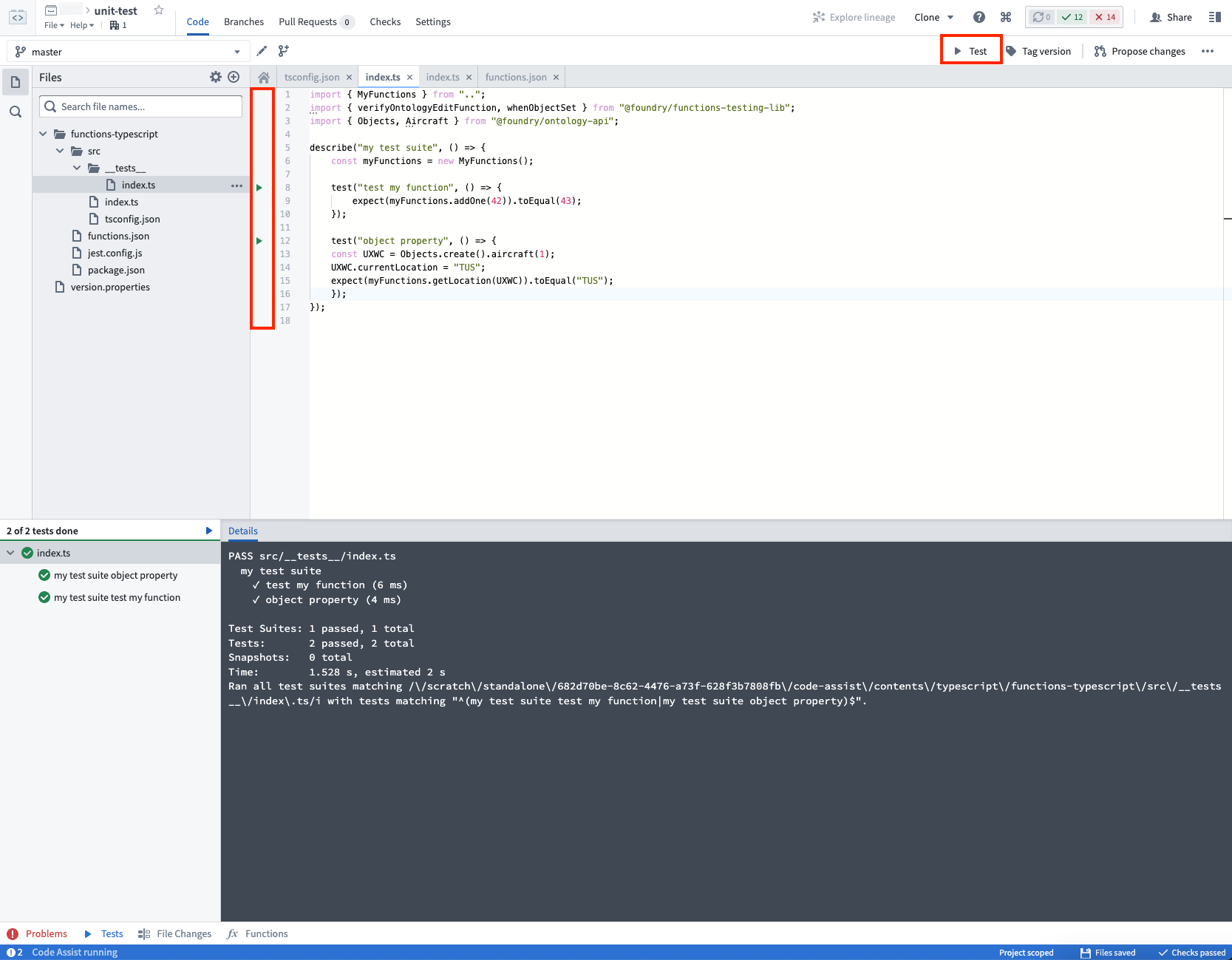
You can run all your tests by clicking on the Test button located on the top right, or run each individual test by clicking on the triangular "Play" button located beside the line number for each test.
When you click Commit, all tests will also run in Checks:

Next steps
Next, learn about the range of options available for testing functions that interact with the Ontology:
中文翻译
开始使用
Functions 支持使用 Jest ↗ 进行单元测试。按照本指南中的步骤,为您的代码仓库设置单元测试工具。
默认情况下,Functions 在测试文件 functions-typescript/src/__tests__/index.ts 中包含一个单元测试。您可以在 __tests__ 文件夹中的任意位置创建测试文件。
示例
例如,我们可能想要测试 functions-typescript/src/index.ts 中的以下函数 addOne:
import { Function, Integer } from "@foundry/functions-api";

export class MyFunctions {

    @Function()
    public addOne(n: Integer): Integer {
         return n + 1;
    }
}
我们可以通过编写以下测试 test add one 来测试函数 addOne:
import { MyFunctions } from ".."

describe("示例测试套件", () => {
    const myFunctions = new MyFunctions();
    test("测试加一", () => {
        expect(myFunctions.addOne(42)).toEqual(43);
    });
});
有关可用完整测试 API 的详细信息,请参阅 Jest API ↗。
运行测试
您可以点击右上角的 Test 按钮运行所有测试,也可以点击每个测试行号旁边的三角形“播放”按钮单独运行每个测试。
当您点击 提交 (Commit) 时,所有测试也将在检查 (Checks) 中运行:
后续步骤
接下来,了解用于测试与 Ontology 交互的函数的一系列选项: