Use functions in the platform(在平台中使用函数)
This section documents various ways that you can use functions throughout the Foundry platform. This list is kept mostly up to date, but there may be additional ways to use functions that are not captured here.
Workshop
Workshop supports integration with functions in a variety of ways, enabling the use of custom logic throughout modules built in Workshop.
Variables
Most Workshop Variables can be Function-backed, allowing an application builder to use functions to compute values that can then be used throughout Workshop. By default, the value for a variable is recomputed when another variable it depends on is updated. This enables flexible recomputation of values in response to user feedback—for example, when a user edits an input component, a dependent Function-backed Object Set variable will be recomputed automatically.
To learn more, take a look at the tutorial on how to use functions to back Workshop variables.
Below is the mapping between Workshop variable types and their equivalents in TypeScript. A Workshop variable of each given type can be backed by a Function that returns one of the valid types listed. Learn more about the available Function types are documented.
- Boolean:
boolean - String:
string - Numeric:
Integer,Long,Float,Double - Date:
LocalDate - Timestamp:
Timestamp - Array:
BaseType[]orSet<BaseType> - Object Set:
ObjectSet<ObjectType>(recommended),ObjectType[], orSet<ObjectType>
Object Table: Derived properties
Workshop’s Object Table widget can be configured to compute a Function-backed column, which can update based on user input and will be recomputed on the fly as end users scroll through the table. You can see a full tutorial for using this functionality.
Chart: Derived aggregations
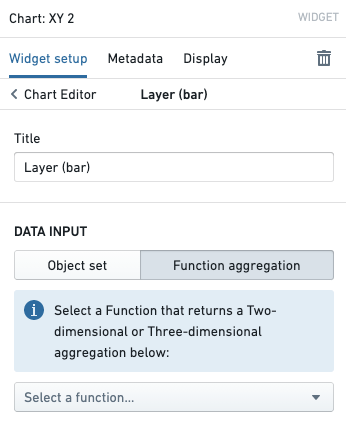
Workshop’s Chart: XY widget supports using a Function-backed aggregation to derive aggregated values on demand. This can be useful if you want to have aggregation data be based on user selection. To use functions in a Chart widget, simply click to configure a chart layer and select Function aggregation.
A reference for the Aggregation API is available. For more advanced use cases, you may want to read the documentation about how to compute custom aggregations.
Actions
Action types enable applications to make changes to the objects in the Foundry ontology and to dispatch external notifications and side effects in a way that is flexible and secure. Within Actions, functions provide complete flexibility, enabling code authors to define how objects should be updated or how side effects should be configured.
Function-backed Actions
Function-backed Actions use the Ontology edits API to define the logic for how objects should be updated. This allows you to express complex edits in code—for example, updating every objected linked to some starting object. See a tutorial for how to use Function-backed Actions end-to-end.
Side effects: Notifications
An Action can be configured to send a Notification to a specified user. You can use functions to compute which users should receive a Notification, as well as the contents of the Notification itself. This provides flexibility such as loading recipient user IDs that are stored within objects, or rendering email content based on object data. To learn more, consult the full documentation about Notifications and a guide for how to use functions to configure Notifications.
Side effects: Webhooks
An Action can also be configured to trigger a Webhook when it is applied. Webhooks enable integration of Foundry with other systems, enabling user-applied Actions to write back to APIs outside of Foundry. You can use functions to compute the parameters that should be sent to the Webhook that will be executed, enabling workflows like populating Webhook parameters based on object data. View full documentation about Webhooks.
Slate
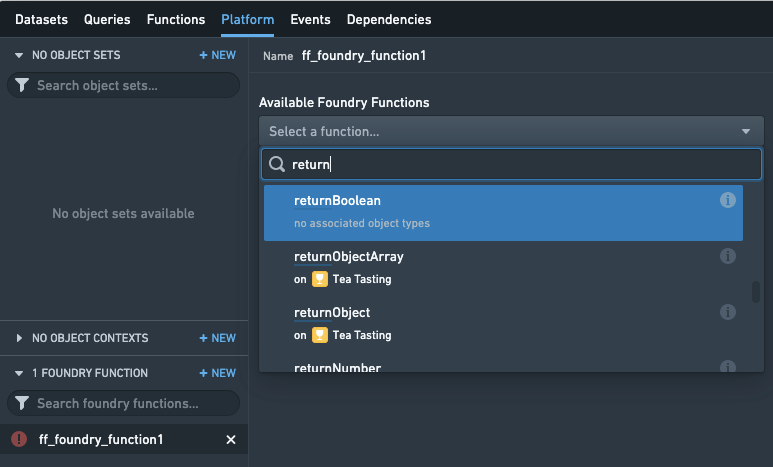
Slate includes native support for finding and using functions within the Platform tab. When editing a Slate document, open the Platform tab and add a Foundry Function in the bottom-left. Now, you can search for a Function, configure parameters, and use the result in your Slate document.
Note that for historical reasons, the Slate product has its own notion of "functions", which are snippets of JavaScript logic located within each Slate document. This is why the functions product is called "Foundry functions" and is located under the Platform tab. Slate's functions capability allows for quick, easy data manipulation within a document, but do not have native support for objects.
You can use Slate's functions and Foundry functions in combination with each other—for example, you could return data from a Foundry Function and manipulate it in a Slate Function, or use a Slate Function to compute parameters that should be passed into a Foundry Function.
Quiver
Object set plots in Quiver use the same underlying component as Workshop's Chart: XY widget. As such, you can use Function-backed Aggregations in Quiver analyses as well.
Automate
Automate allows you to create function-backed automations, which automatically execute functions when a specified condition is met.
When configuring a Function effect, you can select a function and specify its version. For stable versions (1.0.0 and greater), you can enable automatic upgrades to compatible versions. Functions in Automate execute asynchronously and can run for up to 4 hours.
Note that functions with ontology edit return types will not have the edits applied when used as effects in Automate. To learn more, see the Function effects documentation.
中文翻译
在平台中使用函数
本文档介绍了在 Foundry 平台中使用函数的各种方式。此列表基本保持最新,但可能还有其他未收录的函数使用方式。
Workshop
Workshop 支持以多种方式与函数集成,使得在 Workshop 构建的模块中能够使用自定义逻辑。
变量
大多数 Workshop 变量 都可以由函数(Function)支持,允许应用构建者使用函数计算值,这些值随后可在整个 Workshop 中使用。默认情况下,当变量所依赖的其他变量更新时,该变量的值会重新计算。这使得能够根据用户反馈灵活地重新计算值——例如,当用户编辑输入组件时,依赖的函数支持的对象集(Object Set)变量将自动重新计算。
要了解更多信息,请查看关于如何使用函数支持 Workshop 变量的教程。
以下是 Workshop 变量类型与其 TypeScript 对应类型之间的映射关系。每种给定类型的 Workshop 变量都可以由返回所列有效类型之一的函数支持。了解更多关于可用函数类型的文档。
- 布尔型(Boolean):
boolean - 字符串型(String):
string - 数值型(Numeric):
Integer、Long、Float、Double - 日期型(Date):
LocalDate - 时间戳型(Timestamp):
Timestamp - 数组型(Array):
BaseType[]或Set<BaseType> - 对象集型(Object Set):
ObjectSet<ObjectType>(推荐)、ObjectType[]或Set<ObjectType>
对象表:派生属性
Workshop 的对象表组件可以配置为计算由函数支持的列,该列可以根据用户输入进行更新,并在最终用户滚动表格时实时重新计算。您可以查看关于使用此功能的完整教程。
图表:派生聚合
Workshop 的图表:XY组件支持使用函数支持的聚合(Function-backed aggregation)按需计算聚合值。如果您希望聚合数据基于用户选择,这将非常有用。要在图表组件中使用函数,只需点击配置图表图层并选择函数聚合。
聚合 API 参考文档可供查阅。对于更高级的用例,您可能需要阅读关于如何计算自定义聚合的文档。
操作
操作类型使应用程序能够以灵活且安全的方式对 Foundry 本体中的对象进行更改,并发送外部通知和副作用。在操作中,函数提供了完全的灵活性,使代码编写者能够定义对象应如何更新或副作用应如何配置。
函数支持的操作
函数支持的操作(Function-backed Actions)使用本体编辑 API 来定义对象应如何更新的逻辑。这允许您在代码中表达复杂的编辑操作——例如,更新与某个起始对象关联的每个对象。查看关于如何端到端使用函数支持的操作的教程。
副作用:通知
操作可以配置为向指定用户发送通知。您可以使用函数来计算哪些用户应接收通知,以及通知本身的内容。这提供了灵活性,例如加载存储在对象中的接收者用户 ID,或基于对象数据渲染电子邮件内容。要了解更多信息,请查阅关于通知的完整文档以及关于如何使用函数配置通知的指南。
副作用:Webhooks
操作还可以配置为在应用时触发 Webhook。Webhook 使 Foundry 能够与其他系统集成,允许用户应用的操作回写到 Foundry 外部的 API。您可以使用函数来计算应发送给将要执行的 Webhook 的参数,从而实现基于对象数据填充 Webhook 参数等工作流。查看关于 Webhook 的完整文档。
Slate
Slate 原生支持在平台选项卡中查找和使用函数。编辑 Slate 文档时,打开平台选项卡并在左下角添加一个Foundry 函数。现在,您可以搜索函数、配置参数,并在 Slate 文档中使用结果。
请注意,由于历史原因,Slate 产品有自己的"函数"概念,即位于每个 Slate 文档中的 JavaScript 逻辑片段。这就是为什么函数产品被称为"Foundry 函数"并位于平台选项卡下。Slate 的函数功能允许在文档内快速、简便地进行数据操作,但不原生支持对象。
您可以结合使用 Slate 函数和 Foundry 函数——例如,从 Foundry 函数返回数据并在 Slate 函数中操作,或使用 Slate 函数计算应传递给 Foundry 函数的参数。
Quiver
Quiver 中的对象集图表使用与 Workshop 的图表:XY 组件相同的底层组件。因此,您也可以在 Quiver 分析中使用函数支持的聚合。
Automate
Automate 允许您创建由函数支持的自动化任务,当指定条件满足时自动执行函数。
配置函数效果时,您可以选择一个函数并指定其版本。对于稳定版本(1.0.0 及以上),您可以启用对兼容版本的自动升级。Automate 中的函数异步执行,最长可运行 4 小时。
请注意,当具有本体编辑返回类型的函数用作 Automate 中的效果时,编辑操作将不会生效。要了解更多信息,请参阅函数效果文档。