Webhooks in functions(函数中的Webhook)
:::callout{theme="warning"} The following documentation is specific to TypeScript v1 functions. For more robust capabilities, including support for Ontology SDK and configurable resource requests, we recommend migrating to TypeScript v2. :::
:::callout{theme="neutral"} Webhooks can be published as first-class functions. This means you can invoke them from Workshop, the Ontology SDK, Actions, and other functions. To publish a webhook as a function instead, see Webhook functions. :::
This guide will walk you through setting up a function that can make requests to external systems using webhooks.
:::callout{theme="neutral" title="Prerequisites"} This guide assumes you have already created a data connection source and a webhook. For more information, see the documentation how to create a data connection source and webhook. :::
Webhooks backed by outbound applications are supported. For more information, see the Supported workflows section in the outbound application configuration page.
Import sources into a functions repository
Before following this guide, make sure you already created a functions repository and understand how to write and publish functions as described in our tutorial.
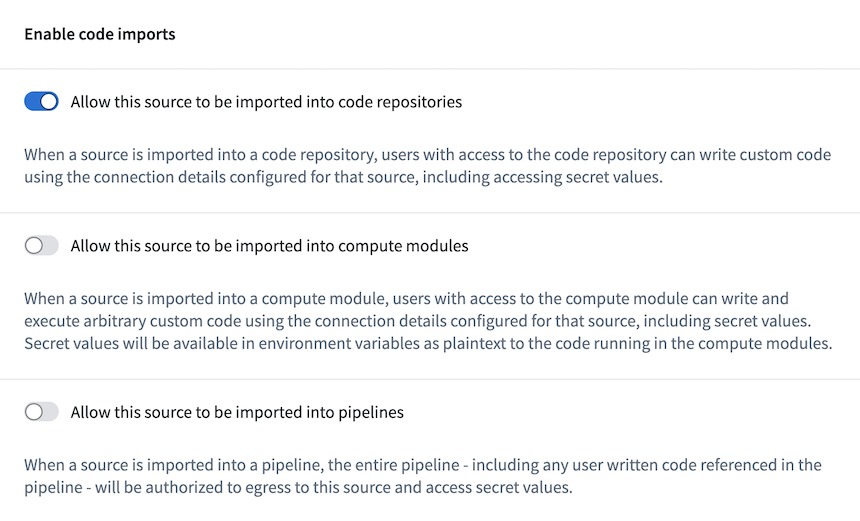
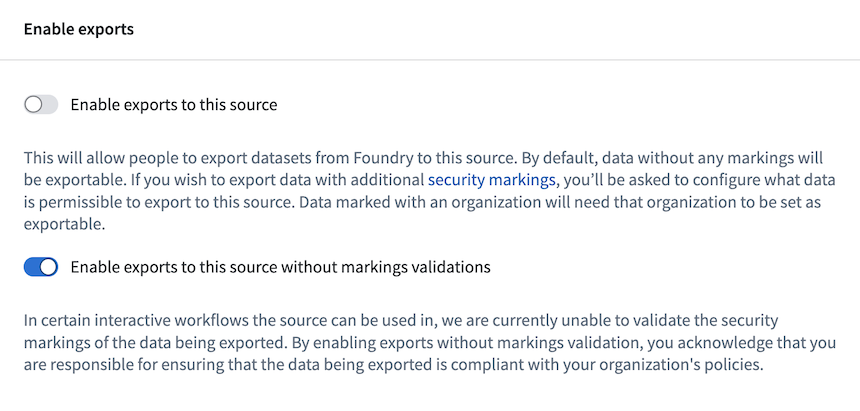
You must first enable the source to be imported into Code Repositories. To do this, go to the Enable code imports menu for your REST API source and enable the option to allow the source to be imported into Code Repositories. Since it is not possible to perform exportable Marking validations in all workflows where functions are used, you must also enable exports to the source without Marking validations in the Enable exports menu for each source.
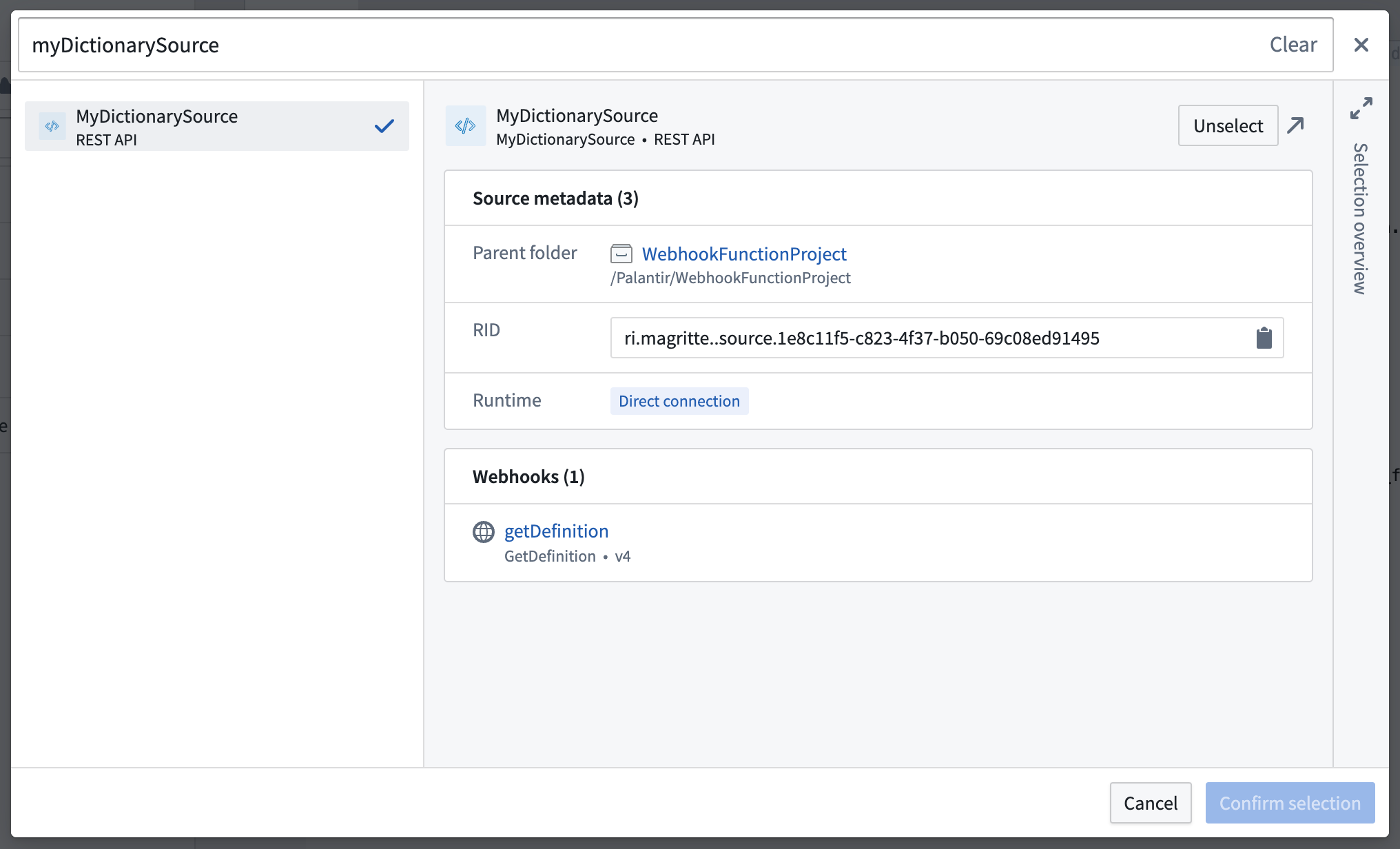
Next, to use a webhook in functions, the backing REST API source of the webhook must first be imported into the repository. Select the Resource imports left-side panel to view the sources imported into the repository. Select Add > Sources to display a search dialog where you may select the source you want to import. Only sources with API names may be imported through this dialog.
:::callout{theme="neutral"}
Source imports into Function repositories for webhook usage work differently than source imports to Python transforms repositories and compute modules. Function repositories that utilize a given source only for webhook usage will not be displayed in the list of repositories shown on the source overview. Any user with Viewer access to a source will be able to import and use those webhooks in external functions.
:::
Use webhooks in functions
Once you import the REST API source to the functions repository, it will be available in the TypeScript environment and accessible through the namespace of the source:
import { Function } from "@foundry/functions-api";
import { MyDictionarySource } from "@foundry/external-systems/sources";
If you get the error Cannot find module '@foundry/external-systems' or its corresponding type declarations., ensure the value for enableExternalSystems is set to true in the functions-typescript/functions.json file. Once you update it and commit the changes, the system should install the necessary packages, including @foundry/external-systems.

Example: Make multiple calls from a Function
In the example below, we will explain how to make multiple calls to the dictionary API using a single Function.
If your Function does not make any Ontology edits, you will create a @Query() function. If you would like to make Ontology edits, it would instead require the @OntologyEditFunction decorator. Learn more about making Ontology edits from functions in our documentation.
Using the standard TypeScript async/await pattern ↗, multiple webhook calls can be made simultaneously from a Function. Check the success of calls using the isOk helper function exported from @foundry/functions-api.
The following Function accepts a list of words as a TypeScript string array and makes one call for each word:
import { OntologyEditFunction, isOk } from "@foundry/functions-api";
import { MyDictionarySource } from "@foundry/external-systems/sources";

export class MyFunctions {

    @OntologyEditFunction()
    public async defineWords(words: string[]): Promise<void> {

        const results = await Promise.all(words.map(word => MyDictionarySource.webhooks.GetDefinition.call({
            wordToDefine: word
        })));

        results.forEach((result, i) => {
            if (isOk(result)) {
                const output = result.value.output;
                output.dictionary_definitions.forEach(definitions_for_word => {
                    definitions_for_word.meanings.forEach(meaning => {
                        meaning.definitions.forEach(def_for_part_of_speech => {
                            console.log(`Found a ${meaning.partOfSpeech} definition for "${words[i]}": ${def_for_part_of_speech.definition}`);
                        })
                    })
                });
            }
        });
    }
}
Log output for an input of ["tuba", "cool"]:
LOG [2023-07-28T03:16:22.968Z] Found a noun definition for "tuba": A large brass musical instrument, usually in the bass range, played through a vibration of the lips upon the mouthpiece and fingering of the keys.
LOG [2023-07-28T03:16:22.968Z] Found a noun definition for "tuba": A type of Roman military trumpet, distinct from the modern tuba.
LOG [2023-07-28T03:16:22.968Z] Found a noun definition for "tuba": A large reed stop in organs.
LOG [2023-07-28T03:16:22.968Z] Found a noun definition for "tuba": A Malayan plant whose roots are a significant source of rotenone, Derris malaccensis.
LOG [2023-07-28T03:16:22.968Z] Found a noun definition for "tuba": A reddish palm wine made from coconut or nipa sap.
LOG [2023-07-28T03:16:22.968Z] Found a noun definition for "tuba": A tube or tubular organ.
LOG [2023-07-28T03:16:22.968Z] Found a noun definition for "cool": A moderate or refreshing state of cold; moderate temperature of the air between hot and cold; coolness.
LOG [2023-07-28T03:16:22.968Z] Found a noun definition for "cool": A calm temperament.
Error handling
To help mitigate failures when working with a networked system, functions expose errors propagated from webhooks using Result objects, which give information about the kind of error that occurred:
import { OntologyEditFunction, isOk } from "@foundry/functions-api";
import { MyDictionarySource } from "@foundry/external-systems/sources";

export class MyFunctions {

    @OntologyEditFunction()
    public async defineWords(words: string[]): Promise<void> {

        const results = await Promise.all(words.map(word => MyDictionarySource.webhooks.GetDefinition.call({
            wordToDefine: word
        })));

        results.forEach((result, i) => {
            if (isOk(result)) {
                // Extract the response
            } else {
                const errorName = result.error.name;

                if (errorName === "WebhookExecutionFailedToStart") {
                    console.log("We were unable to initiate a request to the dictionary API.");
                } else if (errorName === "ParsingResponseFailed") {
                    console.log("The external request succeeded, but the response couldn't be parsed.");
                } else {
                    console.log("Something went wrong.");
                }
            }
        });
    }
}
When handling errors, authored code should listen for specific names and react accordingly. Functions currently return the following errors:
| Error | Description |
|---|---|
WebhookExecutionFailedToStart |
The webhook failed to start. If this error is returned, it can be safely assumed that no request was made to the external system. |
WebhookExecutionTimedOut |
The webhook execution began, but no response was received from the external system within the configured webhook time limit. |
RemoteRestApiReturnedError |
The external system returned an error. Only returned for webhooks configured on a REST API source. |
RemoteApiReturnedError |
The external system returned an error. Only returned for webhooks configured on a non-REST API source. |
ParsingResponseFailed |
The webhook execution was successful, but the response from the external system could not be successfully parsed. This can happen if, for example, the response from the external system did not contain an expected field. Since the result of a webhook call will not necessarily be used, it is up to the application builder whether this should marked as a failure to end users. |
ServerError |
An internal problem occurred within the webhooks service or the connector. |
UnknownError |
An error occurred which could not be directly attributed to any Foundry service. |
This list of error types may change; users should structure their code to include a default case in the event that the Function executor returns an error with a new name.
Example: Handle errors when making multiple webhook calls from a single Function
The following code describes how to handle multiple webhook calls where some succeed and some fail within the same function. In our example, a RemoteRestApiReturnedError is returned in the event that the dictionary server cannot find the definition for a given word.
import { OntologyEditFunction, isOk } from "@foundry/functions-api";
import { MyDictionarySource } from "@foundry/external-systems/sources";

export class MyFunctions {

    @OntologyEditFunction()
    public async defineWords(words: string[]): Promise<void> {

        const results = await Promise.all(words.map(word => MyDictionarySource.webhooks.GetDefinition.call({
            wordToDefine: word
        })));

        results.forEach((result, i) => {
            if (isOk(result)) {
                const output = result.value.output;
                output.dictionary_definitions.forEach(definitions_for_word => {
                    definitions_for_word.meanings.forEach(meaning => {
                        meaning.definitions.forEach(def_for_part_of_speech => {
                            console.log(`Found a ${meaning.partOfSpeech} definition for "${words[i]}": ${def_for_part_of_speech.definition}`);
                        })
                    })
                });
            } else {
                if (result.error.name === "RemoteRestApiReturnedError") {
                    console.log(`ERROR: ${words[i]} could not be defined`, result.error.message);
                }
            }
        });
    }
}
Inputting ["asdf", "shire"] to the above Function returns the following result:
LOG [2023-07-28T15:38:47.263Z] ERROR: asdf could not be defined Request returned an unsuccessful response code: 404 Response body: {"title":"No Definitions Found","message":"Sorry pal, we couldn't find definitions for the word you were looking for.","resolution":"You can try the search again at later time or head to the web instead."}
LOG [2023-07-28T15:38:47.264Z] Found a noun definition for "shire": Physical area administered by a sheriff.
LOG [2023-07-28T15:38:47.264Z] Found a noun definition for "shire": Former administrative area of Britain; a county.
LOG [2023-07-28T15:38:47.264Z] Found a noun definition for "shire": The general area in which a person lives or comes from, used in the context of travel within the United Kingdom.
LOG [2023-07-28T15:38:47.264Z] Found a noun definition for "shire": A rural or outer suburban local government area of Australia.
LOG [2023-07-28T15:38:47.264Z] Found a noun definition for "shire": A shire horse.
LOG [2023-07-28T15:38:47.264Z] Found a verb definition for "shire": To (re)constitute as one or more shires or counties.
Limitations
Currently, there are no limits to the number of requests that can be made from within an Ontology edit function, but existing functions resource limits still apply. Webhook limits are also enforced.
Functions currently support webhooks with the following input and output types:
- Attachments
- Booleans
- Integers
- Longs
- Doubles
- Strings
- Optionals
- Dates
- Timestamps
- Lists
- Enums (list of allowed String type values)
- Records with and without expected fields
When calling webhooks from a @Query function, the webhook must perform only Read API calls that do not mutate the external system. Query functions are frequently retried or silently executed on pageload, and thus do not provide the same level of structured deliberate execution that is possible with an @OntologyEditFunction. When configuring a webhook, you can specify whether it is safe to execute from a Query function by using the option for Read API or Write API.
Unsupported webhook features
- Webhooks that use the
ORtype as an input or output parameter are currently not supported. No code will be generated for those webhooks.
Handle version changes in functions and webhooks
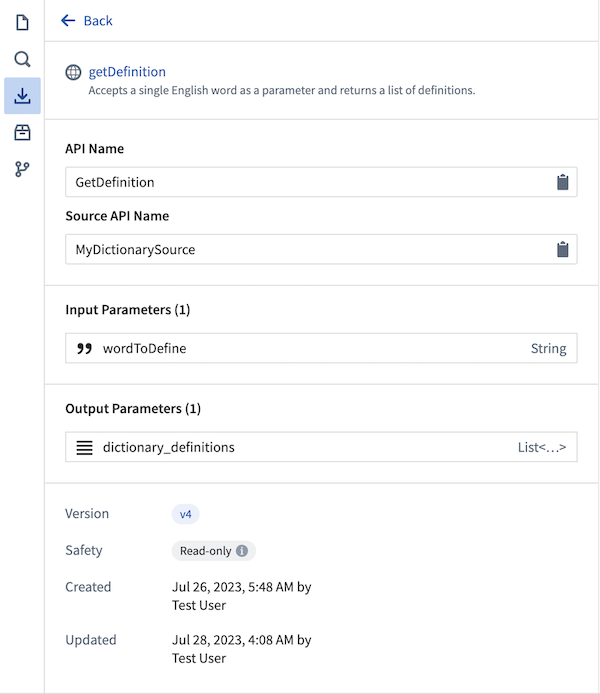
Functions and webhooks have versions, and callers may invoke any version of a Function or webhook. When a Function is published, the most recent webhook version available at that time will be pinned to it.
When a functions repository is opened in the Code Repositories application, the generated code bindings used for autocomplete will always use the most recent version of the webhook. This webhook version is displayed in the Resource imports side panel to the left.
:::callout{theme="warning"} Make sure your webhook is stable before publishing functions that rely on its functionality. :::
Remember to republish the Function and bump users to new versions when changes are made to the webhook or Function. Previously published, pinned versions of the Function will still be available for use.
Permissions
The following table summarizes the permissions that are required to author, publish, and consume external functions.
| Action | User | Permission required |
|---|---|---|
| Import webhook to a functions repository | Function editor | webhooks:editor on the webhook, which is granted to the Editor default role. |
| Publish Function invoking a webhook | Function editor | webhooks:execute permission on the source, which is only granted to Owner and Editor default roles. |
Configure an Action to use an @OntologyEditFunction() that calls webhooks |
Action editor | webhooks:grant-action-validated-execution permission on the webhook and Viewer permission on the Function |
Execute a @Query() webhook from Workshop |
End user | webhooks:execute permission on the source, which is only granted to Owner and Editor default roles. |
Execute an @OntologyEditFunction() from an Action |
End user | The user must meet the submission criteria for the Action. No permissions on the source, webhook, or Function are checked in this case. Users creating and managing Actions must ensure that submission criteria are configured appropriately. |
Monitoring, troubleshooting, and debugging
Use the following platform tools to gain more insight into webhook executions from functions:
- Webhook execution history, which is available in the History tab when viewing a single webhook in Data Connection.
- The Function usage history, available in Ontology Manager, shows a history of when functions were executed including the inputs, outputs, and user that triggered the Function.
- Code authoring preview for functions, which provides performance profiling, debug output, and more.
Best practices
We recommend the following best practices when using external sources to call webhooks from functions:
- Thoroughly test webhooks with the test webhook side panel in Data Connection before attempting to use those webhooks in functions.
- Use webhook input and output
recordtype parameters with expected fields, if possible. Using explicit types, rather than JSON, means that Function code is less likely to throw unexpected runtime errors. - Use the
isOkandisErrbuilt-in functions exported from@foundry/functions-apito check for success and error states, and narrow down the type of error through the name field. - If users will be writing to both an external system and the Ontology from a single Function call, remember that the write to the Ontology could fail, even if the write to the external system succeeds. Be sure that measures are in place to deal with such inconsistencies, and grant users visibility into the state of their modification to both systems if needed.
中文翻译
函数中的Webhook
:::callout{theme="warning"} 以下文档专门针对TypeScript v1函数。如需更强大的功能,包括对Ontology SDK和可配置资源请求的支持,我们建议迁移到TypeScript v2。 :::
:::callout{theme="neutral"} Webhook可以作为一等函数发布。这意味着您可以从Workshop、Ontology SDK、操作(Actions)和其他函数中调用它们。如需将webhook作为函数发布,请参阅Webhook函数。 :::
本指南将引导您设置一个能够使用webhook向外部系统发送请求的函数。
:::callout{theme="neutral" title="前提条件"} 本指南假设您已经创建了数据连接源和数据连接(Data Connection)源和webhook。更多信息,请参阅如何创建数据连接源和webhook的文档。 :::
支持由出站应用程序支持的Webhook。更多信息,请参阅出站应用程序配置页面中的支持的工作流部分。
将源导入函数仓库
在遵循本指南之前,请确保您已经创建了函数仓库,并理解如何按照我们的教程编写和发布函数。
您必须首先启用源以导入代码仓库。为此,请进入REST API源的启用代码导入菜单,并启用允许源导入代码仓库的选项。由于在函数使用的所有工作流中无法执行可导出的标记验证,您还必须在每个源的启用导出菜单中启用无需标记验证的源导出。
接下来,要在函数中使用webhook,必须先将webhook的后端REST API源导入仓库。选择资源导入左侧面板查看已导入仓库的源。选择添加 > 源以显示搜索对话框,您可以在其中选择要导入的源。只有具有API名称的源才能通过此对话框导入。
:::callout{theme="neutral"}
用于webhook用途的函数仓库中的源导入与Python转换仓库和计算模块的源导入工作方式不同。仅将给定源用于webhook用途的函数仓库不会显示在源概览页面的仓库列表中。对源具有查看者(Viewer)访问权限的任何用户都可以导入并在外部函数中使用这些webhook。
:::
在函数中使用Webhook
将REST API源导入函数仓库后,它将在TypeScript环境中可用,并可通过源的命名空间访问:
import { Function } from "@foundry/functions-api";
import { MyDictionarySource } from "@foundry/external-systems/sources";
如果出现错误Cannot find module '@foundry/external-systems' or its corresponding type declarations.,请确保在functions-typescript/functions.json文件中将enableExternalSystems的值设置为true。更新并提交更改后,系统应安装必要的包,包括@foundry/external-systems。
示例:从单个函数进行多次调用
在下面的示例中,我们将解释如何使用单个函数对字典API进行多次调用。
如果您的函数不进行任何Ontology编辑,您将创建一个@Query()函数。如果您希望进行Ontology编辑,则需要使用@OntologyEditFunction装饰器。在我们的文档中了解更多关于从函数进行Ontology编辑的信息。
使用标准的TypeScript async/await模式 ↗,可以从一个函数同时进行多次webhook调用。使用从@foundry/functions-api导出的isOk辅助函数检查调用的成功状态。
以下函数接受一个TypeScript字符串数组形式的单词列表,并为每个单词进行一次调用:
import { OntologyEditFunction, isOk } from "@foundry/functions-api";
import { MyDictionarySource } from "@foundry/external-systems/sources";

export class MyFunctions {

    @OntologyEditFunction()
    public async defineWords(words: string[]): Promise<void> {

        const results = await Promise.all(words.map(word => MyDictionarySource.webhooks.GetDefinition.call({
            wordToDefine: word
        })));

        results.forEach((result, i) => {
            if (isOk(result)) {
                const output = result.value.output;
                output.dictionary_definitions.forEach(definitions_for_word => {
                    definitions_for_word.meanings.forEach(meaning => {
                        meaning.definitions.forEach(def_for_part_of_speech => {
                            console.log(`找到"${words[i]}"的${meaning.partOfSpeech}定义:${def_for_part_of_speech.definition}`);
                        })
                    })
                });
            }
        });
    }
}
输入["tuba", "cool"]的日志输出:
LOG [2023-07-28T03:16:22.968Z] 找到"tuba"的名词定义:A large brass musical instrument, usually in the bass range, played through a vibration of the lips upon the mouthpiece and fingering of the keys.
LOG [2023-07-28T03:16:22.968Z] 找到"tuba"的名词定义:A type of Roman military trumpet, distinct from the modern tuba.
LOG [2023-07-28T03:16:22.968Z] 找到"tuba"的名词定义:A large reed stop in organs.
LOG [2023-07-28T03:16:22.968Z] 找到"tuba"的名词定义:A Malayan plant whose roots are a significant source of rotenone, Derris malaccensis.
LOG [2023-07-28T03:16:22.968Z] 找到"tuba"的名词定义:A reddish palm wine made from coconut or nipa sap.
LOG [2023-07-28T03:16:22.968Z] 找到"tuba"的名词定义:A tube or tubular organ.
LOG [2023-07-28T03:16:22.968Z] 找到"cool"的名词定义:A moderate or refreshing state of cold; moderate temperature of the air between hot and cold; coolness.
LOG [2023-07-28T03:16:22.968Z] 找到"cool"的名词定义:A calm temperament.
错误处理
为了帮助减轻与网络系统协作时的故障,函数使用Result对象暴露从webhook传播的错误,这些对象提供有关所发生错误类型的信息:
import { OntologyEditFunction, isOk } from "@foundry/functions-api";
import { MyDictionarySource } from "@foundry/external-systems/sources";

export class MyFunctions {

    @OntologyEditFunction()
    public async defineWords(words: string[]): Promise<void> {

        const results = await Promise.all(words.map(word => MyDictionarySource.webhooks.GetDefinition.call({
            wordToDefine: word
        })));

        results.forEach((result, i) => {
            if (isOk(result)) {
                // 提取响应
            } else {
                const errorName = result.error.name;

                if (errorName === "WebhookExecutionFailedToStart") {
                    console.log("我们无法向字典API发起请求。");
                } else if (errorName === "ParsingResponseFailed") {
                    console.log("外部请求成功,但无法解析响应。");
                } else {
                    console.log("出现了问题。");
                }
            }
        });
    }
}
在处理错误时,编写的代码应监听特定的错误名称并做出相应反应。函数目前返回以下错误:
| 错误 | 描述 |
|---|---|
WebhookExecutionFailedToStart |
Webhook启动失败。如果返回此错误,可以安全地假设未向外部系统发出请求。 |
WebhookExecutionTimedOut |
Webhook执行已开始,但在配置的webhook时间限制内未收到外部系统的响应。 |
RemoteRestApiReturnedError |
外部系统返回了错误。仅针对在REST API源上配置的webhook返回。 |
RemoteApiReturnedError |
外部系统返回了错误。仅针对在非REST API源上配置的webhook返回。 |
ParsingResponseFailed |
Webhook执行成功,但无法成功解析来自外部系统的响应。例如,如果外部系统的响应不包含预期字段,就可能发生这种情况。由于webhook调用的结果不一定被使用,因此由应用程序构建者决定是否应将其标记为对最终用户的失败。 |
ServerError |
Webhook服务或连接器内部出现问题。 |
UnknownError |
发生了无法直接归因于任何Foundry服务的错误。 |
此错误类型列表可能会发生变化;用户应在其代码中构建一个默认情况,以防函数执行器返回具有新名称的错误。
示例:从单个函数进行多次webhook调用时处理错误
以下代码描述了如何处理同一函数中部分成功、部分失败的多次webhook调用。在我们的示例中,如果字典服务器无法找到给定单词的定义,则会返回RemoteRestApiReturnedError。
import { OntologyEditFunction, isOk } from "@foundry/functions-api";
import { MyDictionarySource } from "@foundry/external-systems/sources";

export class MyFunctions {

    @OntologyEditFunction()
    public async defineWords(words: string[]): Promise<void> {

        const results = await Promise.all(words.map(word => MyDictionarySource.webhooks.GetDefinition.call({
            wordToDefine: word
        })));

        results.forEach((result, i) => {
            if (isOk(result)) {
                const output = result.value.output;
                output.dictionary_definitions.forEach(definitions_for_word => {
                    definitions_for_word.meanings.forEach(meaning => {
                        meaning.definitions.forEach(def_for_part_of_speech => {
                            console.log(`找到"${words[i]}"的${meaning.partOfSpeech}定义:${def_for_part_of_speech.definition}`);
                        })
                    })
                });
            } else {
                if (result.error.name === "RemoteRestApiReturnedError") {
                    console.log(`错误:无法定义${words[i]}`, result.error.message);
                }
            }
        });
    }
}
向上述函数输入["asdf", "shire"]返回以下结果:
LOG [2023-07-28T15:38:47.263Z] 错误:无法定义asdf 请求返回了不成功的响应代码:404 响应体:{"title":"No Definitions Found","message":"Sorry pal, we couldn't find definitions for the word you were looking for.","resolution":"You can try the search again at later time or head to the web instead."}
LOG [2023-07-28T15:38:47.264Z] 找到"shire"的名词定义:Physical area administered by a sheriff.
LOG [2023-07-28T15:38:47.264Z] 找到"shire"的名词定义:Former administrative area of Britain; a county.
LOG [2023-07-28T15:38:47.264Z] 找到"shire"的名词定义:The general area in which a person lives or comes from, used in the context of travel within the United Kingdom.
LOG [2023-07-28T15:38:47.264Z] 找到"shire"的名词定义:A rural or outer suburban local government area of Australia.
LOG [2023-07-28T15:38:47.264Z] 找到"shire"的名词定义:A shire horse.
LOG [2023-07-28T15:38:47.264Z] 找到"shire"的动词定义:To (re)constitute as one or more shires or counties.
限制
目前,从Ontology编辑函数内发出的请求数量没有限制,但现有的函数资源限制仍然适用。Webhook限制也会强制执行。
函数目前支持具有以下输入和输出类型的webhook:
- 附件(Attachments)
- 布尔值(Booleans)
- 整数(Integers)
- 长整数(Longs)
- 双精度浮点数(Doubles)
- 字符串(Strings)
- 可选值(Optionals)
- 日期(Dates)
- 时间戳(Timestamps)
- 列表(Lists)
- 枚举(Enums)(允许的字符串类型值列表)
- 带预期字段和不带预期字段的记录(Records)
从@Query函数调用webhook时,webhook必须仅执行不改变外部系统的读取API(Read API)调用。查询函数在页面加载时经常被重试或静默执行,因此无法提供与@OntologyEditFunction相同级别的结构化、有意的执行。配置webhook时,您可以使用读取API(Read API)或写入API(Write API)选项指定是否可以从查询函数安全地执行。
不支持的Webhook功能
- 使用
OR类型作为输入或输出参数的Webhook目前不受支持。不会为这些webhook生成代码。
处理函数和Webhook中的版本变更
函数和webhook具有版本,调用者可以调用任何版本的函数或webhook。发布函数时,当时可用的最新webhook版本将被固定到该函数。
当在代码仓库应用程序中打开函数仓库时,用于自动补全的生成代码绑定将始终使用最新版本的webhook。此webhook版本显示在左侧的资源导入侧面板中。
:::callout{theme="warning"} 在发布依赖webhook功能的函数之前,请确保您的webhook是稳定的。 :::
请记住,当对webhook或函数进行更改时,重新发布函数并提示用户升级到新版本。先前发布的固定版本的函数仍可供使用。
权限
下表总结了编写、发布和使用外部函数所需的权限。
| 操作 | 用户 | 所需权限 |
|---|---|---|
| 将webhook导入函数仓库 | 函数编辑器 | webhook上的webhooks:editor权限,该权限授予编辑器(Editor)默认角色。 |
| 发布调用webhook的函数 | 函数编辑器 | 源上的webhooks:execute权限,该权限仅授予所有者(Owner)和编辑器(Editor)默认角色。 |
配置使用调用webhook的@OntologyEditFunction()的操作 |
操作编辑器 | webhook上的webhooks:grant-action-validated-execution权限和函数的查看者(Viewer)权限 |
从Workshop执行@Query() webhook |
最终用户 | 源上的webhooks:execute权限,该权限仅授予所有者(Owner)和编辑器(Editor)默认角色。 |
从操作执行@OntologyEditFunction() |
最终用户 | 用户必须满足操作的提交标准。在这种情况下,不会检查源、webhook或函数的权限。创建和管理操作的用户必须确保提交标准配置得当。 |
监控、故障排除和调试
使用以下平台工具获取有关从函数执行webhook的更多洞察:
- Webhook执行历史,可在数据连接(Data Connection)中查看单个webhook时的历史记录(History)选项卡中找到。
- 函数使用历史,可在Ontology管理器(Ontology Manager)中找到,显示函数执行的历史记录,包括输入、输出和触发函数的用户。
- 函数的代码编写预览,提供性能分析、调试输出等功能。
最佳实践
我们建议在使用外部源从函数调用webhook时遵循以下最佳实践:
- 在尝试在函数中使用webhook之前,先在数据连接(Data Connection)中使用测试webhook侧面板彻底测试webhook。
- 如果可能,使用带有预期字段的webhook输入和输出
记录(record)类型参数。使用显式类型而非JSON意味着函数代码不太可能抛出意外的运行时错误。 - 使用从
@foundry/functions-api导出的内置函数isOk和isErr检查成功和错误状态,并通过名称字段缩小错误类型。 - 如果用户将从单个函数调用同时写入外部系统和Ontology,请记住即使写入外部系统成功,写入Ontology也可能失败。请确保已采取措施处理此类不一致情况,并在需要时让用户了解其对两个系统的修改状态。