SQL console(SQL 控制台)
The SQL console is the embedded SQL interface available within Foundry applications, providing contextual SQL access to the resource you are currently viewing. The SQL console is targeted for quick queries in the context of a specific resource (such as a dataset or object type). For a dedicated, full-screen SQL application, see SQL Studio.
Accessing SQL console
You can access the SQL console in the bottom panel of supported applications:
| Application | Resources queryable |
|---|---|
| Dataset Preview | Tabular data |
| Data Lineage | Tabular data |
| Ontology Manager | Ontology object types and backing tabular data |
The starter query is prepopulated based on the resource you are currently viewing.
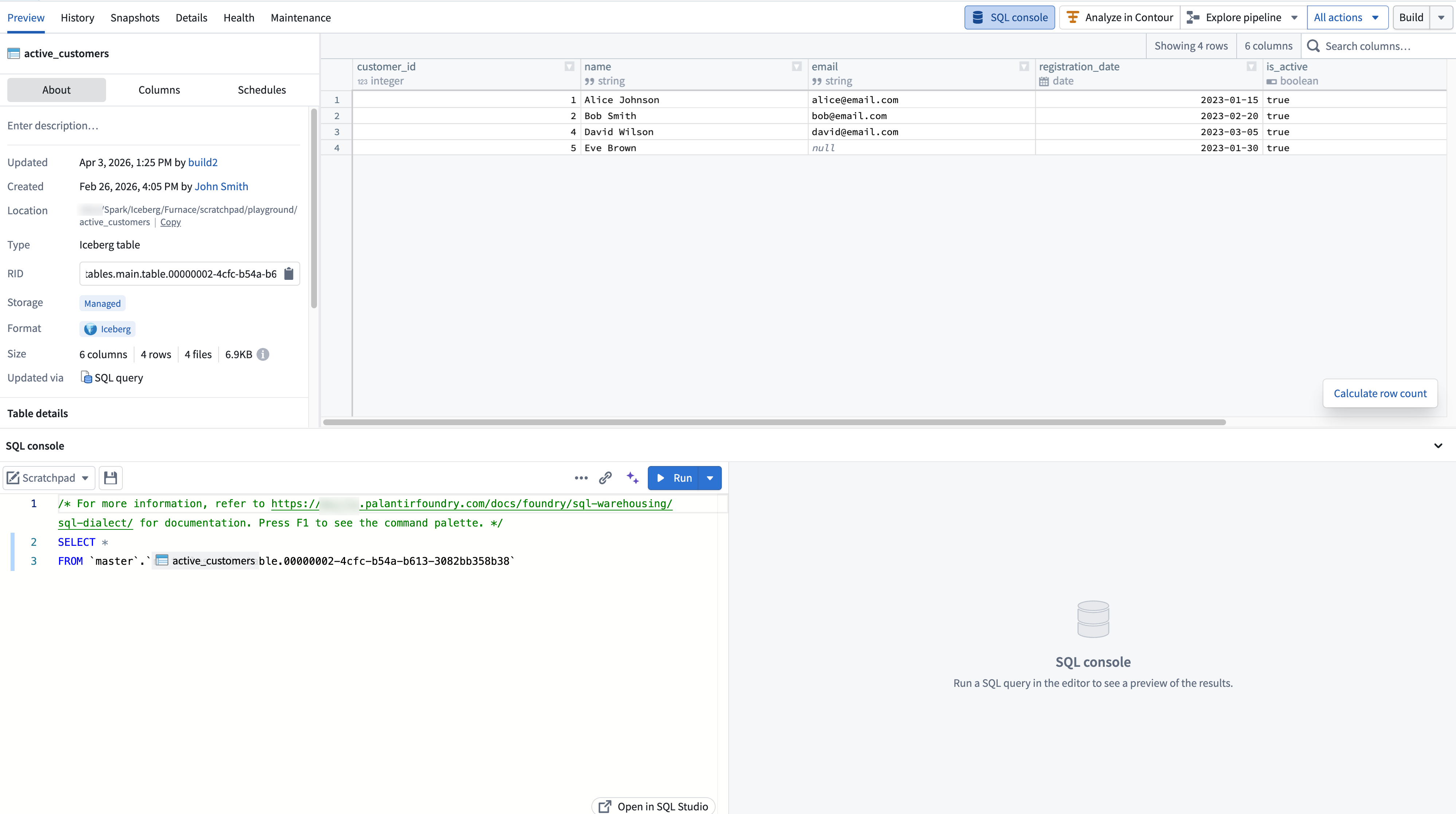
Using SQL console
The SQL console provides core SQL editing and execution functionality, including running queries, autocomplete for tables and columns, an inline results panel, and the ability to save queries as SQL worksheets. The SQL console uses Foundry's Spark SQL dialect.
For full details on SQL features, including worksheets, AI-assisted query generation, and result visualization, see the SQL Studio documentation.
Modes
In Ontology Manager, the SQL console supports two modes:
- Data mode for querying tabular data using Furnace.
- Object mode for querying ontology object types using Ontology SQL.
When viewing an object type in Ontology Manager, you can select between modes from the mode dropdown in the SQL console toolbar. The object type's backing dataset is suggested as the default resource in data mode.

In other applications, only data mode is available.
Expanding to SQL Studio
To open the current query in a dedicated, full-screen application, select the expand option in the SQL console toolbar. This launches SQL Studio, which provides a full SQL application with a resource browser, version history, AI-assisted query generation, and additional capabilities not available in the embedded console.
:::callout{theme="neutral"} A standalone full-screen view of the SQL console is temporarily available in environments where SQL Studio is not yet enabled. This standalone view will be replaced by the SQL Studio application. :::
Roles and permissions
Access to the SQL console is governed by the same SQL and download control roles that apply across Foundry. For details on the available roles and how they interact with SQL access, see SQL permissions.
中文翻译
SQL 控制台
SQL 控制台是 Foundry 应用程序中内嵌的 SQL 界面,可为您当前查看的资源提供上下文相关的 SQL 访问。SQL 控制台专为在特定资源(如数据集或对象类型)的上下文中执行快速查询而设计。如需使用专用的全屏 SQL 应用程序,请参阅 SQL Studio。
访问 SQL 控制台
您可以在支持的应用底部面板中访问 SQL 控制台:
| 应用程序 | 可查询的资源 |
|---|---|
| 数据集预览(Dataset Preview) | 表格数据 |
| 数据血缘(Data Lineage) | 表格数据 |
| 本体管理器(Ontology Manager) | 本体对象类型及底层表格数据 |
起始查询会根据您当前查看的资源自动预填充。
使用 SQL 控制台
SQL 控制台提供核心的 SQL 编辑和执行功能,包括运行查询、表和列的自动补全、内联结果面板,以及将查询保存为 SQL 工作表(SQL worksheets) 的能力。SQL 控制台使用 Foundry 的 Spark SQL 方言(Spark SQL dialect)。
有关 SQL 功能的完整详情,包括工作表、AI 辅助查询生成和结果可视化,请参阅 SQL Studio 文档。
模式
在本体管理器(Ontology Manager)中,SQL 控制台支持两种模式:
- 数据模式(Data mode):使用 Furnace 查询表格数据。
- 对象模式(Object mode):使用 本体 SQL(Ontology SQL) 查询本体对象类型。
在本体管理器中查看对象类型时,您可以通过 SQL 控制台工具栏中的模式下拉菜单在两种模式之间进行选择。在数据模式下,对象类型的底层数据集会被建议为默认资源。
在其他应用程序中,仅提供数据模式。
扩展至 SQL Studio
要在专用的全屏应用程序中打开当前查询,请选择 SQL 控制台工具栏中的展开选项。这将启动 SQL Studio,它提供完整的 SQL 应用程序,包含资源浏览器、版本历史、AI 辅助查询生成以及内嵌控制台所不具备的其他功能。
:::callout{theme="neutral"} 在尚未启用 SQL Studio 的环境中,暂时提供 SQL 控制台的独立全屏视图。该独立视图将被 SQL Studio 应用程序取代。 :::
角色与权限
SQL 控制台的访问权限由适用于整个 Foundry 的相同 SQL 和下载控制角色管理。有关可用角色及其与 SQL 访问交互方式的详细信息,请参阅 SQL 权限。