SQL Studio
SQL Studio is Foundry's dedicated application for writing and running SQL queries against datasets, tables, and ontology object types. SQL Studio supports interactive analytical workflows, read and write operations on tabular data, and the authoring of Ontology SQL functions (beta).
SQL Studio is built on Foundry's two SQL engines: Ontology SQL for querying ontology object types and Furnace for querying tabular data, which share a common Spark SQL dialect. For embedded SQL access in the context of a specific resource (such as a dataset or object type), see SQL console.
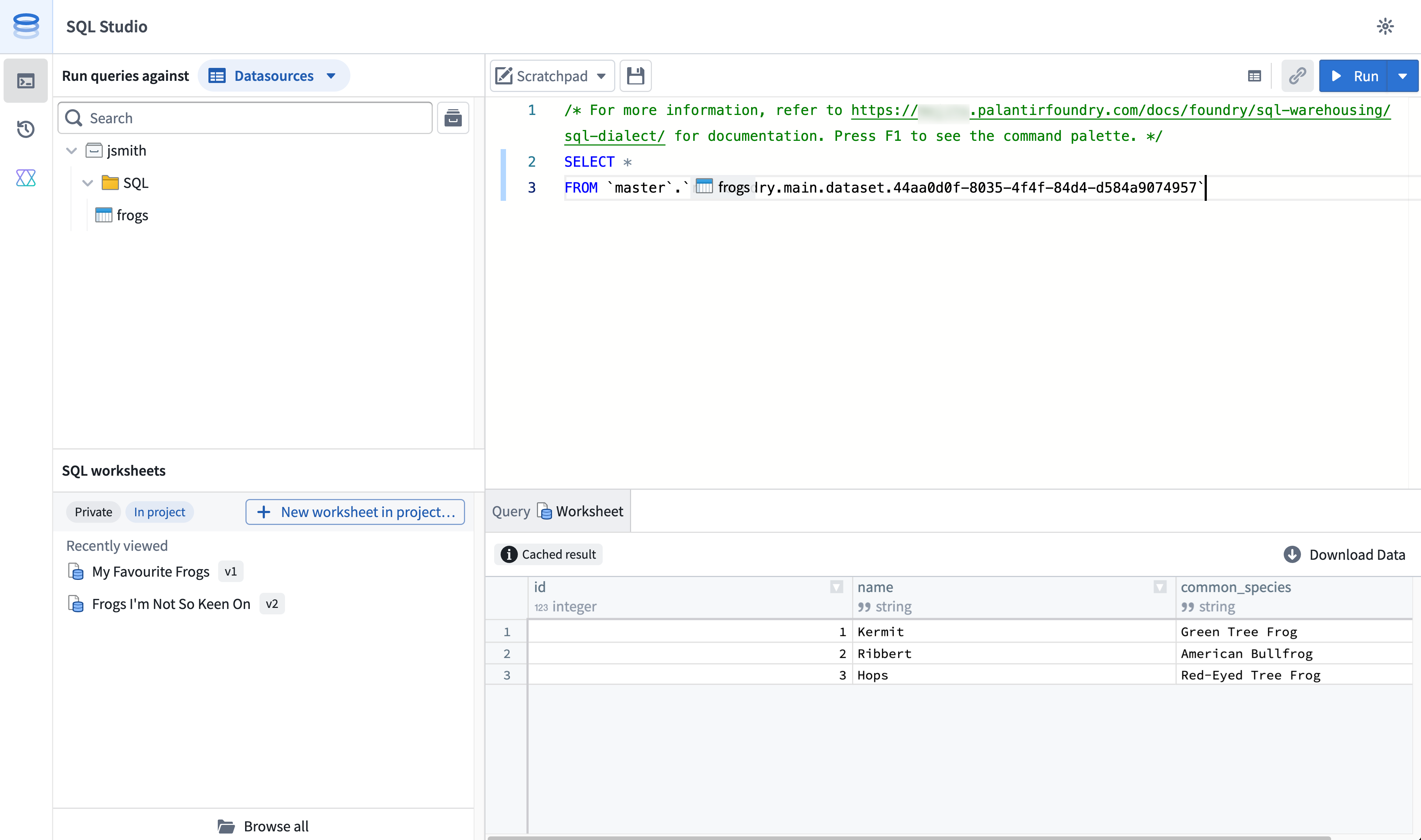
Accessing SQL Studio
Once enabled by a Foundry administrator, SQL Studio is accessible from:
- The Applications menu.
- The expand option in any embedded SQL console.
- Opening a SQL worksheet from the Compass browser.
To enable SQL Studio, Foundry administrators can navigate to the Application access page of Control Panel.
Modes
SQL Studio supports two modes that determine which compute engine executes your queries and which resources you can query.
You can switch between modes from the mode selector in the resource browser toolbar. The active mode determines which resources appear in the browser and which engine executes your query.
Data mode
In data mode, you can query tabular data, such as tabular datasets, Iceberg tables, and virtual tables, using the Furnace SQL engine.
Data mode supports both read and write operations:
SELECTqueries.CREATE TABLEoperations.INSERT,UPDATE, andDELETEoperations on Iceberg tables.
Object mode
In object mode, you can query ontology object types and many-to-many links using the Ontology SQL engine. Object mode is read-only and supports SELECT queries against object types defined in Ontology Manager.
Worksheets
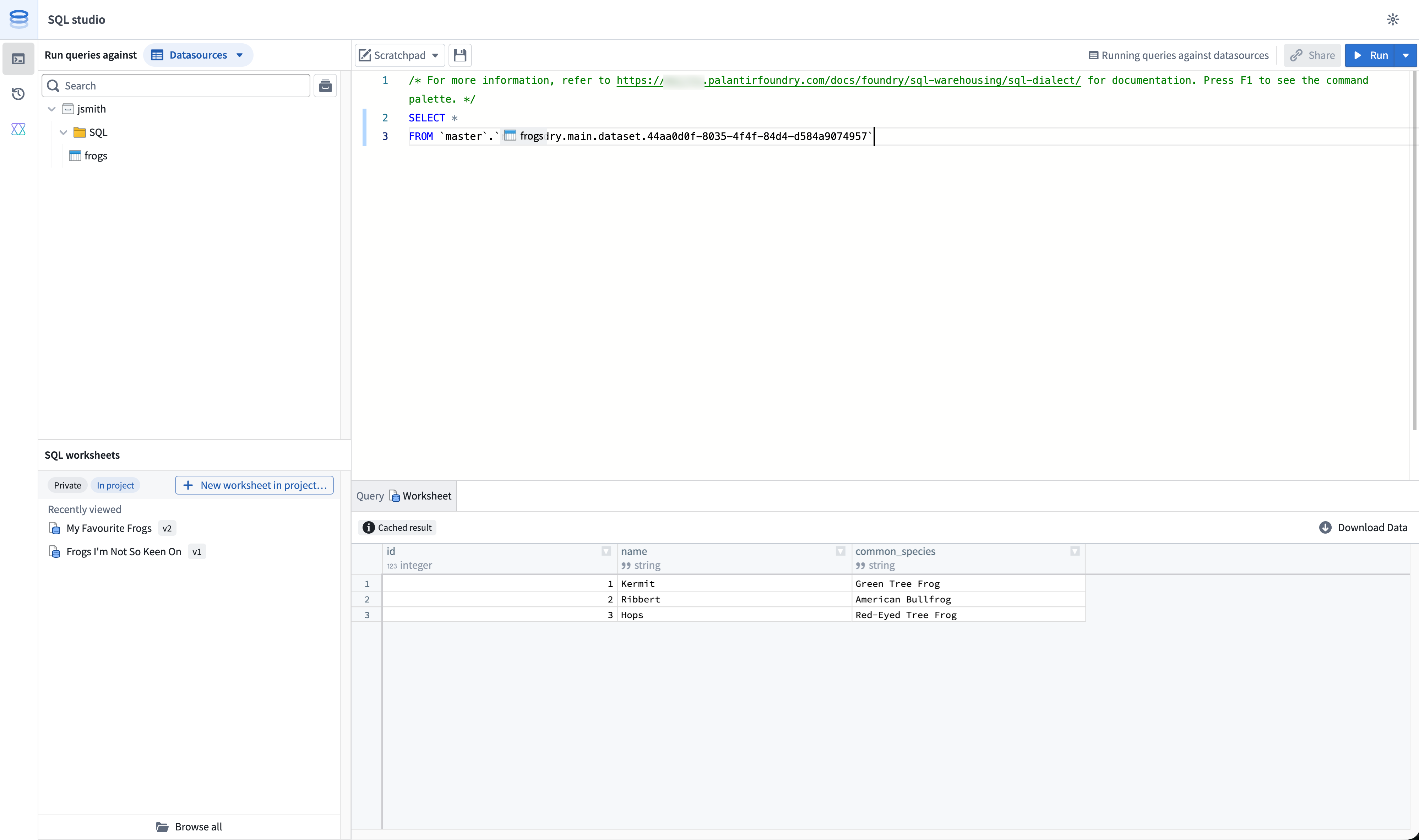
Worksheets are the primary way you organize work in SQL Studio. SQL Studio supports both ephemeral and persistent worksheet workflows.
Scratchpad
The scratchpad is an ephemeral editor for one-off analyses. Scratchpad contents are not saved as a Foundry resource and are not shared with other users.
Saved worksheets
You can save your code as a SQL worksheet to persist it as a Foundry resource. Your worksheet can optionally be saved either:
- Privately, accessible only to you and visible only from SQL Studio.
- Into a project, making the worksheet available as a project resource that can be shared with other users who have access to the project.
Worksheet versioning
Saved worksheets are versioned. Each manual save creates a new version that you can view and restore from the worksheet's version history. Between manual saves, unsaved changes are automatically staged so that in-progress work persists across sessions; auto-staged changes do not create new versions.
:::callout{theme="warning"} Note that the scratchpad is not versioned. If work is replaced or overwritten in the scratchpad, it is not retrievable. :::
Writing and running queries
SQL Studio uses Foundry's Spark SQL dialect for both data mode and object mode. The editor provides syntax highlighting, autocomplete for table, object type, and column names, and inline error reporting.
To run a query, select Run in the editor toolbar or use the keyboard shortcut. To run only part of a query, highlight the relevant SQL and run the selection.
In data mode, table identifiers are referenced by filesystem path or resource identifier (RID), wrapped in backticks:
SELECT * FROM `branch_name`.`/path/to/dataset`;
In object mode, object types are referenced by their RID:
SELECT * FROM `ri.ontology.main.object-type.<object-type-rid>`;
For full syntax reference, see the SQL dialect documentation. For mode-specific guidance, see Furnace and Ontology SQL.
AI-assisted query generation
SQL Studio includes a conversational AIP side panel that can generate, explain, and debug SQL queries. The panel is available alongside the editor and supports multi-turn interactions within a single session.
The AIP panel has access to:
- The current contents of the editor.
- The schemas of any datasets, tables, or object types referenced in the query.
- Foundry's SQL dialect, including supported functions and syntax for the active mode.
When generating SQL, the panel can either replace the editor contents with new code or append to the existing query. Each prompt and response is preserved in the session so you can iterate conversationally on the generated output.
The AIP side panel is available for users with the AIP and core assistant features permission enabled.
Previewing and visualizing results
After running a query, results are displayed in the results panel below the editor.
The default preview limit is 1,000 rows. Users with the appropriate permissions can configure SQL Studio to return up to 10,000 rows per query from the SQL Studio settings menu.
Results can be visualized in a table or as a chart. Both visualizations are subject to the preview limit. For example, if a query produces 100,000 matching rows, you would by default view a table or chart of only the first 1,000 rows.
Ontology SQL functions
You can author and publish Ontology SQL functions (Beta) from SQL Studio. Ontology SQL functions are reusable, parameterized SQL queries over ontology objects that can be published as ontology functions and called from across Foundry.
Connecting external tools
For tabular data querying via the Furnace engine, you can also connect externally using:
For object types querying via the Ontology SQL engine, you can connect externally using the Ontology MCP server, which exposes ontology SQL to MCP-compatible clients.
Roles and permissions
Access to SQL Studio is governed by the same SQL and download control roles that apply across Foundry. For details on the available roles and how they interact with SQL access, see SQL permissions.
中文翻译
# SQL Studio
SQL Studio 是 Foundry 的专用应用程序,用于针对数据集、数据表和本体对象类型编写和运行 SQL 查询。SQL Studio 支持交互式分析工作流、对表格数据的读写操作,以及[本体 SQL 函数(测试版)](https://palantir.com/docs/foundry/sql-warehousing/sql-functions/)的编写。
SQL Studio 基于 Foundry 的两个 SQL 引擎构建:[本体 SQL(Ontology SQL)](https://palantir.com/docs/foundry/sql-warehousing/ontology-sql/)用于查询本体对象类型,以及 [Furnace](https://palantir.com/docs/foundry/sql-warehousing/furnace/) 用于查询表格数据,这两个引擎共享通用的 [Spark SQL 方言(Spark SQL dialect)](https://palantir.com/docs/foundry/sql-warehousing/sql-dialect/)。如需在特定资源(如数据集或对象类型)的上下文中嵌入 SQL 访问,请参阅 [SQL 控制台(SQL console)](https://palantir.com/docs/foundry/sql-warehousing/sql-console/)。

## 访问 SQL Studio
一旦由 Foundry 管理员启用,即可通过以下方式访问 SQL Studio:
* **应用程序**菜单。
* 任何嵌入式 [SQL 控制台(SQL console)](https://palantir.com/docs/foundry/sql-warehousing/sql-console/)中的展开选项。
* 从 Compass 浏览器中打开 SQL 工作表。
要启用 SQL Studio,Foundry 管理员可以导航至控制面板的 [**应用程序访问**页面](https://palantir.com/docs/foundry/administration/configure-application-access/)。
## 模式
SQL Studio 支持两种模式,这两种模式决定了执行查询的计算引擎以及您可以查询的资源。
您可以通过资源浏览器工具栏中的模式选择器在模式之间切换。活动模式决定了浏览器中显示的资源以及执行查询的引擎。
### 数据模式
在**数据模式**下,您可以使用 [Furnace SQL 引擎](https://palantir.com/docs/foundry/sql-warehousing/furnace/)查询表格数据,例如表格[数据集(datasets)](https://palantir.com/docs/foundry/data-integration/datasets/)、[Iceberg 表(Iceberg tables)](https://palantir.com/docs/foundry/data-integration/iceberg-tables/)和[虚拟表(virtual tables)](https://palantir.com/docs/foundry/data-integration/virtual-tables/)。
数据模式支持读写操作:
* `SELECT` 查询。
* `CREATE TABLE` 操作。
* 对 Iceberg 表的 `INSERT`、`UPDATE` 和 `DELETE` 操作。
### 对象模式
在**对象模式**下,您可以使用[本体 SQL 引擎(Ontology SQL engine)](https://palantir.com/docs/foundry/sql-warehousing/ontology-sql/)查询本体对象类型和多对多链接。对象模式为只读模式,支持针对在[本体管理器(Ontology Manager)](https://palantir.com/docs/foundry/ontology-manager/overview/)中定义的对象类型执行 `SELECT` 查询。
## 工作表
工作表是您在 SQL Studio 中组织工作的主要方式。SQL Studio 支持临时性和持久性两种工作表工作流。
### 草稿板
**草稿板**是一个用于一次性分析的临时编辑器。草稿板的内容不会保存为 Foundry 资源,也不会与其他用户共享。
### 已保存的工作表
您可以将代码保存为 **SQL 工作表**,以将其持久化为 Foundry 资源。您可以选择将工作表保存为:
* **私有**,仅您可访问,且仅在 SQL Studio 中可见。
* **保存到项目中**,使工作表作为项目资源可用,并可与有权访问该项目的其他用户共享。
### 工作表版本控制
已保存的工作表具有版本控制。每次手动保存都会创建一个新版本,您可以从工作表的版本历史中查看和恢复该版本。在手动保存之间,未保存的更改会自动暂存,以便正在进行的工作在会话之间持续存在;自动暂存的更改不会创建新版本。
:::callout{theme="warning"}
请注意,草稿板没有版本控制。如果草稿板中的工作被替换或覆盖,则无法恢复。
:::
## 编写和运行查询
SQL Studio 在数据模式和对象模式下均使用 Foundry 的 [Spark SQL 方言(Spark SQL dialect)](https://palantir.com/docs/foundry/sql-warehousing/sql-dialect/)。编辑器提供语法高亮、表名、对象类型名和列名的自动补全,以及内联错误报告。
要运行查询,请选择编辑器工具栏中的 **运行** 或使用键盘快捷键。要仅运行部分查询,请高亮相关的 SQL 并运行所选内容。
在数据模式下,表标识符通过文件系统路径或资源标识符(RID)引用,并用反引号包裹:
```sql
SELECT * FROM `branch_name`.`/path/to/dataset`;
在对象模式下,对象类型通过其 RID 引用:
SELECT * FROM `ri.ontology.main.object-type.<object-type-rid>`;
有关完整的语法参考,请参阅 SQL 方言(SQL dialect)文档。有关特定模式的指导,请参阅 Furnace 和本体 SQL(Ontology SQL)。
AI 辅助查询生成
SQL Studio 包含一个对话式 AIP 侧面板,可以生成、解释和调试 SQL 查询。该面板与编辑器并列可用,并支持单个会话内的多轮交互。
AIP 面板可以访问:
- 编辑器的当前内容。
- 查询中引用的任何数据集、数据表或对象类型的模式。
- Foundry 的 SQL 方言(SQL dialect),包括活动模式下支持的函数和语法。
生成 SQL 时,该面板可以用新代码替换编辑器内容,或追加到现有查询中。每个提示和响应都会保留在会话中,以便您可以对话式地迭代生成的输出。
AIP 侧面板可供已启用 AIP 和核心助手功能权限的用户使用。
预览和可视化结果
运行查询后,结果会显示在编辑器下方的结果面板中。
默认预览限制为 1,000 行。拥有适当权限的用户可以从 SQL Studio 设置菜单中配置 SQL Studio,使每个查询最多返回 10,000 行。
结果可以以表格或图表形式可视化。两种可视化方式均受预览限制。例如,如果某个查询产生了 100,000 行匹配结果,默认情况下您只能查看前 1,000 行的表格或图表。
本体 SQL 函数
您可以从 SQL Studio 编写和发布本体 SQL 函数(测试版)(Ontology SQL functions (Beta))。本体 SQL 函数是对本体对象进行查询的可重用、参数化的 SQL 查询,可以发布为本体函数并从 Foundry 各处调用。
连接外部工具
对于通过 Furnace 引擎进行的表格数据查询,您还可以使用以下方式从外部连接:
对于通过本体 SQL 引擎进行的对象类型查询,您可以使用本体 MCP 服务器(Ontology MCP server)从外部连接,该服务器向兼容 MCP 的客户端公开本体 SQL。
角色与权限
对 SQL Studio 的访问受适用于整个 Foundry 的相同 SQL 和下载控制角色管理。有关可用角色及其如何与 SQL 访问交互的详细信息,请参阅 SQL 权限(SQL permissions)。 ```