Core concepts(核心概念)
The concepts explained below are important to understand before using or configuring Data Lifetime in your enrollment.
Data Lifetime policies
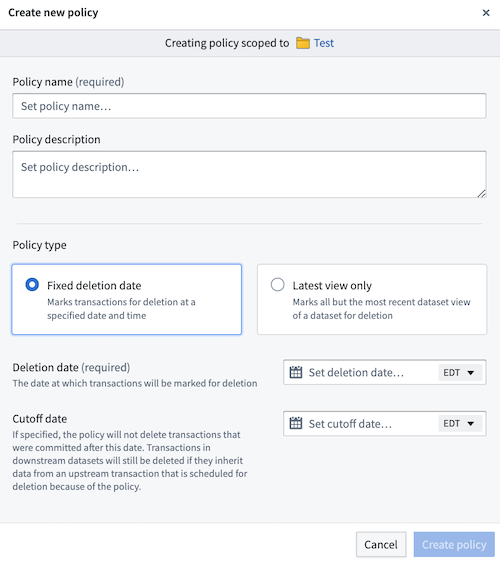
Data Lifetime allows you to define “lineage-aware" retention policies at the namespace level and apply them to datasets within these namespaces. Once a policy is applied, Data Lifetime assigns deletion dates to all transactions in the dataset based on policy configurations. Two types of policies can be configured:
- Fixed deletion date: By default, all transactions in a root dataset are assigned the same specified deletion time (unless a cutoff date is configured).
- Latest view only: All transactions in a root dataset that are not in that dataset's current view will be assigned a deletion date equal to the current time. This means that all historical transactions will be marked for immediate deletion, while transactions in the latest view of the dataset will not be assigned a deletion date.
Retention policies vs. lineage-aware retention policies
Foundry offers two ways to systematically delete data from the system:
-
Retention policies, defined in the Retention application, are applied to dataset transactions based on specific rules and can systematically delete data. However, these policies are not lineage-aware and thus do not propagate to downstream datasets. Learn more about retention policies.
-
Data Lifetime policies are distinct from retention policies. The lineage-aware deletion mechanism of Data Lifetime policies ensures that when a transaction is deleted, all downstream transactions derived from that transaction are also removed. A key distinction between both methods is that Data Lifetime suggests that policies be applied to either root or otherwise upstream datasets, while policies managed through Retention do not have this requirement.
:::callout{theme="warning"} Though policies can be simultaneously configured on the same enrollment, Data Lifetime does not consider other retention policies when showing deletion dates for transactions. For example, if a retention policy is meant to delete a specific transaction on Tuesday, and Data Lifetime is set to delete that same transaction on Wednesday, Data Lifetime will report Wednesday as the deletion date for that transaction. This remains true even if, realistically, the transaction will be deleted on Tuesday based off of the retention policy. :::
Permissions and roles
:::callout{theme="warning"} Understanding permissions and roles is a crucial part of using Data Lifetime. Learn more about the importance of safeguarding policies. :::
The default roles for permissions in Data Lifetime are described below:
- Namespace Viewer: View retention policies.
- Dataset Editor: Set/remove retention policies on/from datasets.
- Data Governance Officer:
- Create/update/delete retention policies for namespaces they can view.
- Set/remove retention policies and policy overrides for datasets they can view.
The Data Governance Officer role is particularly vital for managing and safeguarding Data Lifetime policies. Learn more about assigning permissions within Control Panel. Additionally, we recommend all Organizations review and understand our data governance principles and implementation within the platform.
The following matrix shows the actions that would only be granted to individuals with the role of Data Governance Officer and depicts the additional permissions needed to take action.
| Namespace Viewer | Policy Viewer | Dataset Viewer | |
|---|---|---|---|
| Create Data Lifetime policy | ✅ | ❌ | ❌ |
| Update Data Lifetime policy | ✅ | ✅ | ❌ |
| Delete Data Lifetime policy | ✅ | ✅ | ❌ |
| Set Data Lifetime policy on dataset | ✅ | ✅ | ✅ |
| Remove Data Lifetime policy from dataset | ✅ | ✅ | ✅ |
| Set Data Lifetime policy override on dataset | ✅ | ✅ | ✅ |
The following matrix shows the actions all users (particularly, those who do not have the Data Governance Officer role for their Organization) can take and the permissions needed to take action.
| Namespace Viewer | Policy Viewer | Dataset Viewer | Dataset Editor | |
|---|---|---|---|---|
| View Data Lifetime policy | ✅ | ✅ | ❌ | ❌ |
| View Data Lifetime policies for dataset | ✅ | ✅ | ✅ | ❌ |
| Set Data Lifetime policy on dataset | ✅ | ✅ | ❌ | ✅ |
| Remove Data Lifetime policy from dataset | ✅ | ✅ | ❌ | ✅ |
中文翻译
核心概念
在您的组织中使用或配置 Data Lifetime 前,理解以下概念至关重要。
Data Lifetime 策略
Data Lifetime 允许您在命名空间级别定义"可感知血缘关系"的保留策略,并将其应用于这些命名空间内的数据集。策略应用后,Data Lifetime 会根据策略配置为数据集中的所有事务分配删除日期。可配置两种类型的策略:
- 固定删除日期策略: 默认情况下,根数据集中的所有事务会被分配相同的指定删除时间(除非配置了截止日期)。
- 仅保留最新视图策略: 根数据集中不属于当前视图的所有事务将被分配一个等于当前时间的删除日期。这意味着所有历史事务将被标记为立即删除,而数据集最新视图中的事务则不会被分配删除日期。
保留策略 vs. 可感知血缘关系的保留策略
Foundry 提供两种系统化删除数据的方式:
-
保留策略(Retention policies),在保留应用中定义,基于特定规则应用于数据集事务,可系统化删除数据。但这些策略不感知血缘关系,因此不会传播到下游数据集。了解更多关于保留策略的信息。
-
Data Lifetime 策略与保留策略不同。Data Lifetime 策略的血缘感知删除机制确保当一个事务被删除时,所有从该事务衍生的下游事务也会被移除。两种方法的关键区别在于:Data Lifetime 建议将策略应用于根数据集或上游数据集,而通过保留管理的策略则无此要求。
:::callout{theme="warning"} 虽然可以在同一组织中同时配置多种策略,但 Data Lifetime 在显示事务删除日期时不会考虑其他保留策略。例如,如果某个保留策略计划在周二删除特定事务,而 Data Lifetime 设置为在周三删除同一事务,Data Lifetime 将报告周三为该事务的删除日期。即使实际上该事务会基于保留策略在周二被删除,此情况依然成立。 :::
权限与角色
:::callout{theme="warning"} 理解权限与角色是使用 Data Lifetime 的关键部分。了解更多关于保护策略的重要性。 :::
Data Lifetime 中权限的默认角色描述如下:
- 命名空间查看者(Namespace Viewer): 查看保留策略。
- 数据集编辑者(Dataset Editor): 在数据集上设置/移除保留策略。
- 数据治理官(Data Governance Officer):
- 为其可查看的命名空间创建/更新/删除保留策略。
- 为其可查看的数据集设置/移除保留策略及策略覆盖。
数据治理官角色对于管理和保护 Data Lifetime 策略至关重要。了解更多关于在控制面板中分配权限的信息。此外,我们建议所有组织审查并理解平台内的数据治理原则与实施。
下表显示了仅授予数据治理官角色的操作,并描述了执行操作所需的额外权限。
| 命名空间查看者 | 策略查看者 | 数据集查看者 | |
|---|---|---|---|
| 创建 Data Lifetime 策略 | ✅ | ❌ | ❌ |
| 更新 Data Lifetime 策略 | ✅ | ✅ | ❌ |
| 删除 Data Lifetime 策略 | ✅ | ✅ | ❌ |
| 在数据集上设置 Data Lifetime 策略 | ✅ | ✅ | ✅ |
| 从数据集移除 Data Lifetime 策略 | ✅ | ✅ | ✅ |
| 在数据集上设置 Data Lifetime 策略覆盖 | ✅ | ✅ | ✅ |
下表显示了所有用户(特别是那些未拥有其组织数据治理官角色的用户)可执行的操作及所需权限。
| 命名空间查看者 | 策略查看者 | 数据集查看者 | 数据集编辑者 | |
|---|---|---|---|---|
| 查看 Data Lifetime 策略 | ✅ | ✅ | ❌ | ❌ |
| 查看数据集的 Data Lifetime 策略 | ✅ | ✅ | ✅ | ❌ |
| 在数据集上设置 Data Lifetime 策略 | ✅ | ✅ | ❌ | ✅ |
| 从数据集移除 Data Lifetime 策略 | ✅ | ✅ | ❌ | ✅ |