Dataset selectors(数据集选择器)
Every dataset selector can be configured to either Select or Exclude the datasets that match the criteria in the selector. For example, Select derived datasets will narrow the funnel to include ONLY derived datasets. Exclude datasets in folder /palantir/finance will narrow the funnel by not including datasets in the given folder.
Some datasets selectors also include a second argument, for example the list of folders or worker types to include or exclude from the policy.
The following list describes the dataset selectors available for use when configuring retention policies in the Retention application.
In the following datasets
Selects all datasets by their given RIDs. Note that the dataset RID will not change, even if you rename the dataset.
Learn more about identifying a dataset's RID.
Takes 1 argument: list of datasets (a list of datasets saved by their RIDs).
Example
Select the following datasets: <list of datasets>

Datasets in the following folders
Selects all datasets in the given folders or Projects identified by their given RID. Any future dataset created in these folders or Projects will also be subject to this policy.
Takes 1 argument: list of folders (a list of folders or Projects saved by their RIDs).
Example
Select datasets in the following folders: <list of folders>

Is derived dataset
A dataset is defined to be a derived dataset if, and only if, the following conditions are true:
- The dataset contains a JobSpec in its master branch.
- The dataset has a non-zero number of dataset inputs.
Datasets that do not meet these conditions, including raw datasets, datasets ingested from an external source, and datasets that were never built on a master branch, will not be selected by this selector.
Takes an optional worker type list as argument: The worker type list is a set of worker types that are specified in the workerType field in the JobSpec (for example, transforms and phonograph2-writeback in the image below). If this field is left empty, this selector will affect ALL derived datasets.
Example
Select derived datasets with the following worker types: transforms, phonograph2-writeback

Is in trash
Select datasets that are in the trash.
Takes no arguments.
Example
Select datasets in the Trash

Example of combined selectors
To demonstrate the dataset selectors and how they can work in combination, consider the following two examples:
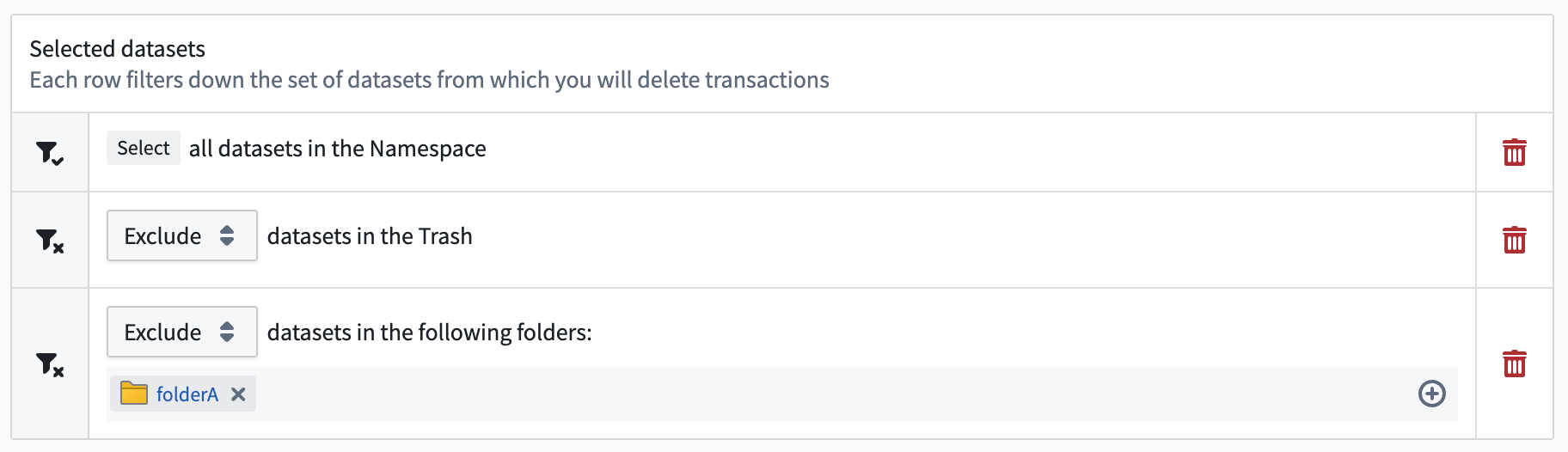
Apply a broad policy with exemptions in a specific folder
The following collection of dataset selectors will select all untrashed datasets in the space which aren't contained in folderA:
Selectall datasets in the spaceExcludedatasets in the TrashExcludedatasets in the following folders:folderA
Select all datasets in a project except one
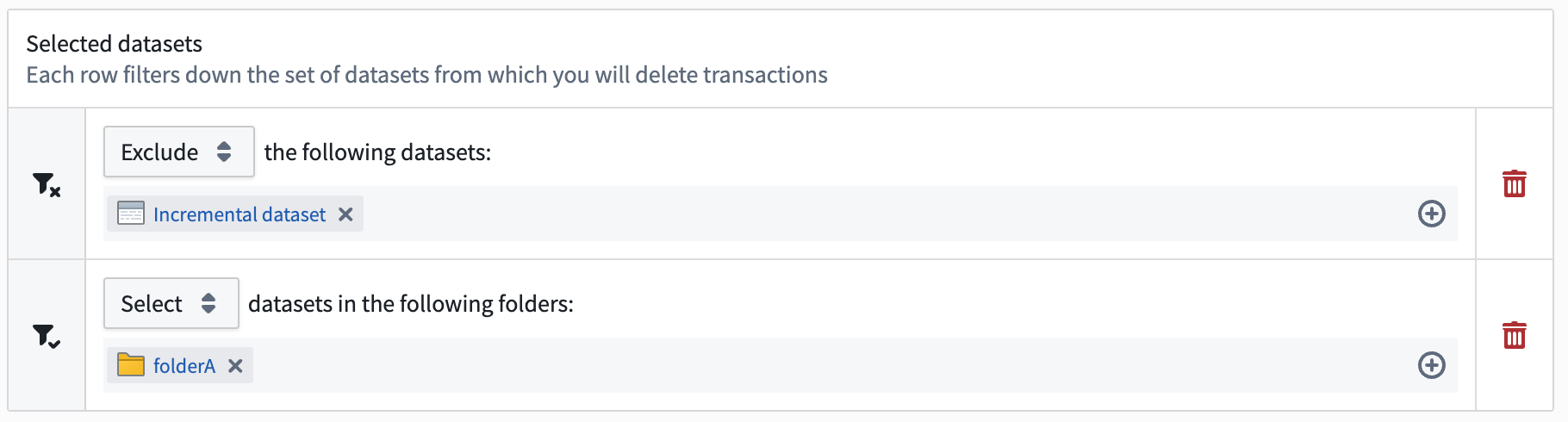
The following collection of dataset selectors will select all datasets in folderA except for Incremental dataset:
Excludethe following datasets:Incremental DatasetSelectdatasets in the following folders:folderA
Protecting datasets from retention
You can protect specific datasets from a given retention policy by using the Exclude mode with the In the following datasets selector. This excludes individual datasets from that policy by their RIDs.
Note that this exclusion applies only to the policy you are configuring. Other retention policies operating in the same space — including recommended (platform-managed) policies and any other custom policies — may still mark transactions on the excluded datasets. To fully protect a dataset, review every policy that could apply to it.
Deprecated selectors
In compass name
We recommend using the Datasets in the following folders selector instead.
In dataset paths
We recommend using the In the following datasets selector instead.
中文翻译
数据集选择器
每个数据集选择器都可以配置为选择(Select)或排除(Exclude)符合选择器条件的数据集。例如,选择(Select)派生数据集将缩小范围,仅包含派生数据集。排除(Exclude)文件夹/palantir/finance中的数据集将通过不包含指定文件夹中的数据集来缩小范围。
某些数据集选择器还包含第二个参数,例如要包含或排除在策略中的文件夹或工作节点类型列表。
以下列表描述了在Retention应用中配置保留策略时可用的数据集选择器。
在以下数据集中
通过给定的RID选择所有数据集。请注意,即使重命名数据集,数据集RID也不会改变。
接受1个参数: 数据集列表(通过RID保存的数据集列表)。
示例
选择(Select)以下数据集:<数据集列表>
在以下文件夹中的数据集中
选择给定文件夹或项目(通过其RID标识)中的所有数据集。未来在这些文件夹或项目中创建的任何数据集也将受此策略约束。
接受1个参数: 文件夹列表(通过RID保存的文件夹或项目列表)。
示例
选择(Select)以下文件夹中的数据集:<文件夹列表>
是否为派生数据集
当且仅当满足以下条件时,数据集才被定义为派生数据集:
- 数据集在其主分支中包含JobSpec。
- 数据集具有非零数量的数据集输入。
不满足这些条件的数据集,包括原始数据集、从外部源摄取的数据集以及从未在主分支上构建的数据集,将不会被此选择器选中。
接受可选的工作节点类型列表作为参数: 工作节点类型列表是在JobSpec的workerType字段中指定的一组工作节点类型(例如,下图中transforms和phonograph2-writeback)。如果此字段留空,此选择器将影响所有派生数据集。
示例
选择(Select)具有以下工作节点类型的派生数据集:transforms、phonograph2-writeback
是否在回收站中
选择位于回收站中的数据集。
不接受参数。
示例
选择(Select)回收站中的数据集
组合选择器示例
为了演示数据集选择器及其组合工作方式,请参考以下两个示例:
在特定文件夹中应用宽泛策略并设置豁免
以下数据集选择器组合将选择空间(Space)中所有不在folderA中且未被删除的数据集:
选择(Select)空间中的所有数据集排除(Exclude)回收站中的数据集排除(Exclude)以下文件夹中的数据集:folderA
选择项目中除一个之外的所有数据集
以下数据集选择器组合将选择folderA中除增量数据集(Incremental dataset)之外的所有数据集:
排除(Exclude)以下数据集:增量数据集(Incremental Dataset)选择(Select)以下文件夹中的数据集:folderA
保护数据集免受保留策略影响
您可以通过使用排除(Exclude)模式配合在以下数据集中选择器,保护特定数据集免受给定保留策略的影响。这将通过RID从该策略中排除单个数据集。
请注意,此排除仅适用于您正在配置的策略。在同一空间(Space)中运行的其他保留策略——包括推荐(平台管理)策略和任何其他自定义策略——仍可能对排除的数据集标记事务。要完全保护数据集,请审查可能适用于该数据集的每个策略。
已弃用的选择器
按Compass名称
我们建议改用在以下文件夹中的数据集中选择器。
按数据集路径
我们建议改用在以下数据集中选择器。