Managing retention policies(管理保留策略)
Retention policies are managed separately by each space used in your Organization. Each policy is independently evaluated and applied in no particular order. When configuring policies, you can choose the datasets to include in the policy; when the policy runs, any selected dataset that runs the specified transaction type will be marked for deletion and will no longer be available for any user. The full deletion of these marked transactions will occur periodically, completely removing the data from the platform.
Each retention policy is built off of a set of dataset selectors that define which datasets need to be included or excluded from the policy, along with a set of transaction selectors that define the dataset transactions that should be marked for deletion.
A maximum of 50 custom policies are permitted per space.
:::callout{theme="warning" title="Excluding from a platform-managed retention policy"} If you need to exclude a namespace or a project from a platform-managed retention policy, also known as a recommended policy, contact Palantir Support. :::
:::callout{theme="warning" title="Revoking a retention policy"} Revoking a retention policy does not automatically restore changes already made by the policy. Marked transactions can all be unmarked — see Mark and sweep — but only until the sweep process starts for that transaction. Once a transaction has been swept, it is permanently deleted and cannot be recovered. Contact Palantir Support for assistance with unmarking transactions before they are swept. :::
Dataset selectors
By default, no datasets are selected at a policy's time of creation. Dataset selectors allow you to identify the datasets required for the policy by either selecting or excluding certain datasets cumulatively. The order of dataset selectors makes no difference to the end result. Each dataset selected by a policy will satisfy the constraints of all specified dataset selectors. At least one dataset selector should be configured in the Select mode, otherwise, no datasets will be selected.
Learn more about the dataset selectors available for retention policies.
Transaction selectors
By default, each policy includes all closed transactions, for every selected dataset, on all branches (OPEN transactions are always ignored). Each transaction selector allows you to narrow that scope to identify the dataset transactions required for the policy. As transaction selectors always narrow the scope, the selectors can be specified in any order. Each transaction deleted by a policy will satisfy the constraints of all specified transaction selectors.
Learn more about the transaction selectors available for retention policies.
If all transactions across all branches in the selected datasets should be deleted, use the Transaction count selector, retain 0 transactions, and make sure to configure Latest view transaction deletion appropriately.
Additional flags
:::callout{theme="danger" title="Warning"} The following flags are only for advanced usage as misconfiguration may result in incorrect data deletion. :::
Latest view transaction deletion
By default, retention policies will never delete transactions that are in the latest view of any branch. This flag overrides this behavior by allowing the deletion of current data, and should be considered very dangerous.
If these policies end up deleting data from the current view, a DELETE transaction will be added by Foundry to signify that the current view does not contain the deleted files.
This flag can be further customized with the Abort open transactions option. This should only be used if a dataset selected by the policy has a high frequency of transactions being committed (such as every few minutes, for example).
Example policy
As an example, we will describe a notional Foundry environment that has a recommended policy which deletes data if the data is outside the last 3 views and also older than 30 days.
In this instance, you may have a dataset which builds every 30 minutes incrementally (for example, with APPEND transactions). Since only SNAPSHOT transactions start a new view, all new transactions being committed will be in the same view, and none will ever be outside the last 3 views (until 2 SNAPSHOT transactions happen). Therefore, data in this dataset may never be deleted by the retention policy.
If you decide you want the data in this dataset to be deleted, you could create a policy like the following:
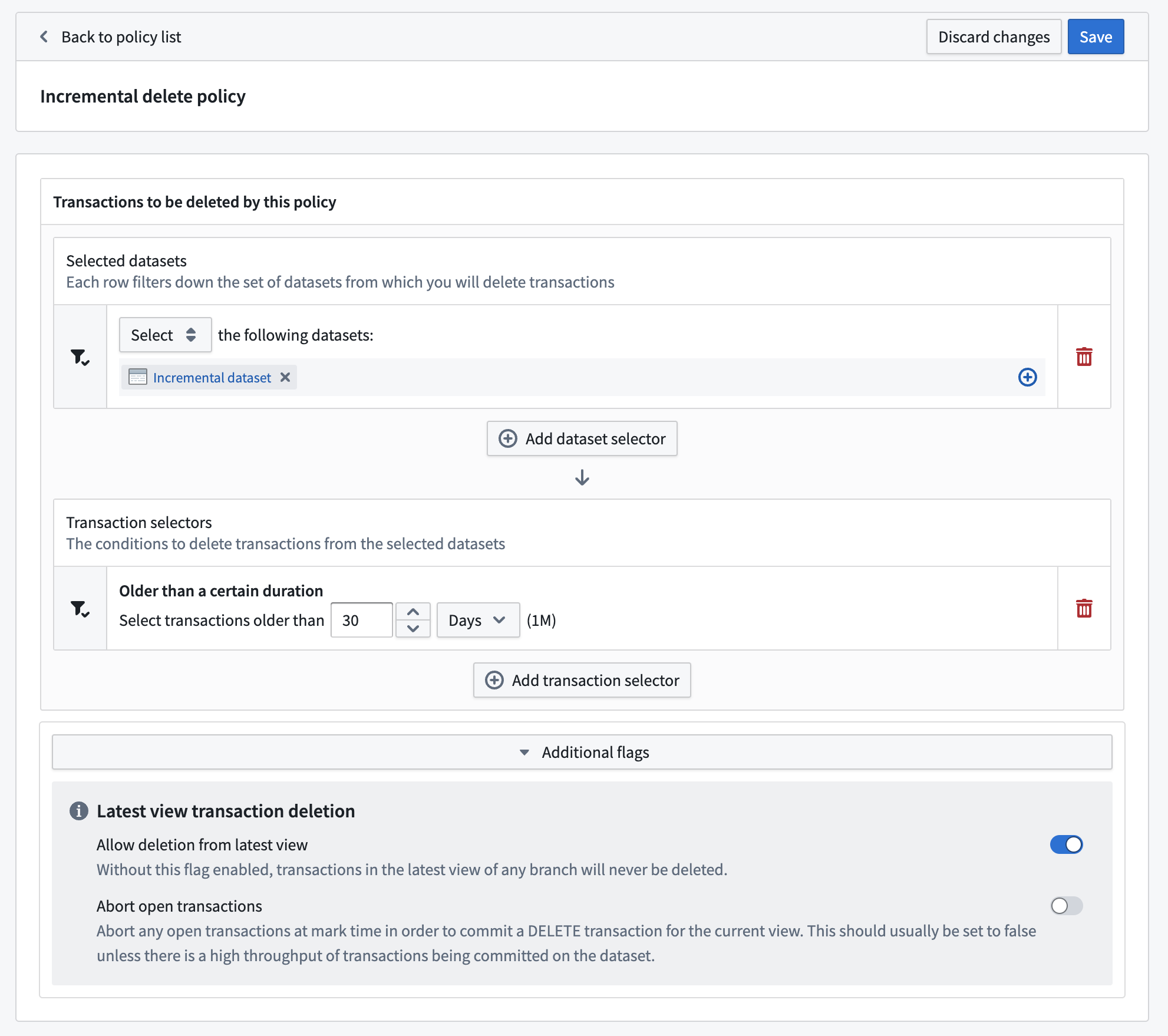
This would delete any transactions in the dataset that were committed more than 30 days ago, even if they are in the current view of any branch of the dataset.
Otherwise, if the selection was of the folder holding the dataset, the policy would apply to all datasets in that folder. This could be dangerous, for example, if you have a dataset with only a single transaction that was committed 31 days ago. That transaction would get deleted by this policy and its containing dataset would then have no data available, historical or current.
Branch deletion
The Retention Policies application only allows for the configuration of retention policies on transactions, but the underlying infrastructure also supports deletion of entire dataset branches and their corresponding JobSpecs. However, the details of branch deletion behavior are not currently configurable. The current default branch deletion behavior is that branches that satisfy all of the following criteria will be deleted:
- There is no branch with the same name in the corresponding code repository. The corresponding code repository is determined from the JobSpec on the branch.
- The branch has no committed or open transactions from the last seven days.
- The branch was not created in the last seven days.
- For branches that have never been built, the dataset's JobSpec was not created in the last seven days.
:::callout{theme="neutral"} The fact that a dataset branch can exist within the Foundry filesystem but not within Catalog is an implementation detail that users do not generally need to consider; we reference this fact in the above explanation in the interest of completeness and to aid debugging in the event that a branch is not being deleted as expected. :::
Branch deletion behavior may not be enabled in some Palantir environments created before 2021. If you observe that branches that satisfy all of the above criteria are not being deleted, contact Palantir Support to confirm whether the foundry-retention service is configured with a branch-deletion policy for your environment.
中文翻译
管理保留策略
保留策略由组织中使用的每个空间分别管理。每条策略独立评估并按任意顺序执行。配置策略时,您可以选择要纳入策略的数据集;策略运行时,任何执行指定事务类型的选定数据集都将被标记为删除,并且所有用户将无法再访问这些数据。这些被标记的事务将定期完全删除,从平台中彻底移除数据。
每条保留策略基于一组数据集选择器(dataset selectors)构建,这些选择器定义需要纳入或排除策略的数据集,同时还有一组事务选择器(transaction selectors),用于定义应标记删除的数据集事务。
每个空间最多允许配置50条自定义策略。
:::callout{theme="warning" title="从平台管理的保留策略中排除"} 如果您需要从平台管理的保留策略(也称为推荐策略)中排除某个命名空间或项目,请联系Palantir支持团队。 :::
:::callout{theme="warning" title="撤销保留策略"} 撤销保留策略不会自动恢复该策略已执行的更改。被标记的事务可以全部取消标记——请参阅标记与清理——但仅限于该事务的清理过程开始之前。一旦事务被清理,它将永久删除且无法恢复。如需在事务被清理前取消标记,请联系Palantir支持团队获取帮助。 :::
数据集选择器
默认情况下,策略创建时不会选择任何数据集。数据集选择器允许您通过累积选择或排除特定数据集来识别策略所需的数据集。数据集选择器的顺序对最终结果没有影响。每条策略选择的每个数据集都将满足所有指定数据集选择器的约束条件。至少应在选择模式下配置一个数据集选择器,否则将不会选择任何数据集。
了解更多关于保留策略可用的数据集选择器信息。
事务选择器
默认情况下,每条策略包含每个选定数据集在所有分支上的所有已关闭事务(OPEN事务始终被忽略)。每个事务选择器允许您缩小范围,以识别策略所需的数据集事务。由于事务选择器始终缩小范围,因此可以按任意顺序指定选择器。每条策略删除的每个事务都将满足所有指定事务选择器的约束条件。
了解更多关于保留策略可用的事务选择器信息。
如果应删除选定数据集中所有分支上的所有事务,请使用事务计数选择器,保留0个事务,并确保适当配置最新视图事务删除。
附加标志
:::callout{theme="danger" title="警告"} 以下标志仅适用于高级用法,因为配置错误可能导致数据被错误删除。 :::
最新视图事务删除
默认情况下,保留策略永远不会删除任何分支最新视图中的事务。此标志通过允许删除当前数据来覆盖此行为,应视为非常危险的操作。
如果这些策略最终删除了当前视图中的数据,Foundry将添加一个DELETE事务,以表明当前视图不包含已删除的文件。
此标志可以通过中止打开的事务选项进一步自定义。仅当策略选定的数据集具有较高的事务提交频率(例如每隔几分钟提交一次)时,才应使用此选项。
示例策略
作为示例,我们将描述一个假设的Foundry环境,该环境有一条推荐策略,删除不在最近3个视图内且超过30天的数据。
在这种情况下,您可能有一个每30分钟增量构建的数据集(例如使用APPEND事务)。由于只有SNAPSHOT事务会开始新视图,所有新提交的事务将处于同一视图中,并且永远不会超出最近3个视图(直到发生2次SNAPSHOT事务)。因此,该数据集中的数据可能永远不会被保留策略删除。
如果您决定删除此数据集中的数据,可以创建如下策略:
这将删除数据集中超过30天前提交的任何事务,即使它们位于数据集任何分支的当前视图中。
否则,如果选择的是包含该数据集的文件夹,则该策略将应用于该文件夹中的所有数据集。这可能很危险,例如,如果您有一个数据集仅包含一个31天前提交的事务,该事务将被此策略删除,而包含该事务的数据集将不再有任何可用数据,无论是历史数据还是当前数据。
分支删除
保留策略应用程序仅允许配置事务级别的保留策略,但底层基础设施也支持删除整个数据集分支及其对应的JobSpec。然而,分支删除行为的细节目前不可配置。当前默认的分支删除行为是,满足所有以下条件的分支将被删除:
- 在对应的代码仓库中没有同名分支。对应的代码仓库由分支上的JobSpec确定。
- 该分支在过去七天内没有已提交或打开的事务。
- 该分支不是在最近七天内创建的。
- 对于从未构建过的分支,数据集的JobSpec不是在最近七天内创建的。
:::callout{theme="neutral"} 数据集分支可以存在于Foundry文件系统中但不在Catalog中,这是一个实现细节,用户通常无需考虑;我们在上述解释中提及这一点是为了完整性,并帮助在分支未按预期删除时进行调试。 :::
分支删除行为可能未在2021年之前创建的一些Palantir环境中启用。如果您观察到满足上述所有条件的分支未被删除,请联系Palantir支持团队,以确认您的环境中的foundry-retention服务是否配置了branch-deletion策略。