Create a custom compute module client (Advanced)(创建自定义计算模块客户端(高级))
Why do I need a client?
If you are writing a compute module in a supported language (Python, Java, or TypeScript) and use our available SDK, you do not need to manually create client logic.
However, if you are not using the SDK or need to build a compute module using a language that is not currently supported, you must create a compute module client yourself using the process explained below.
Custom client responsibilities
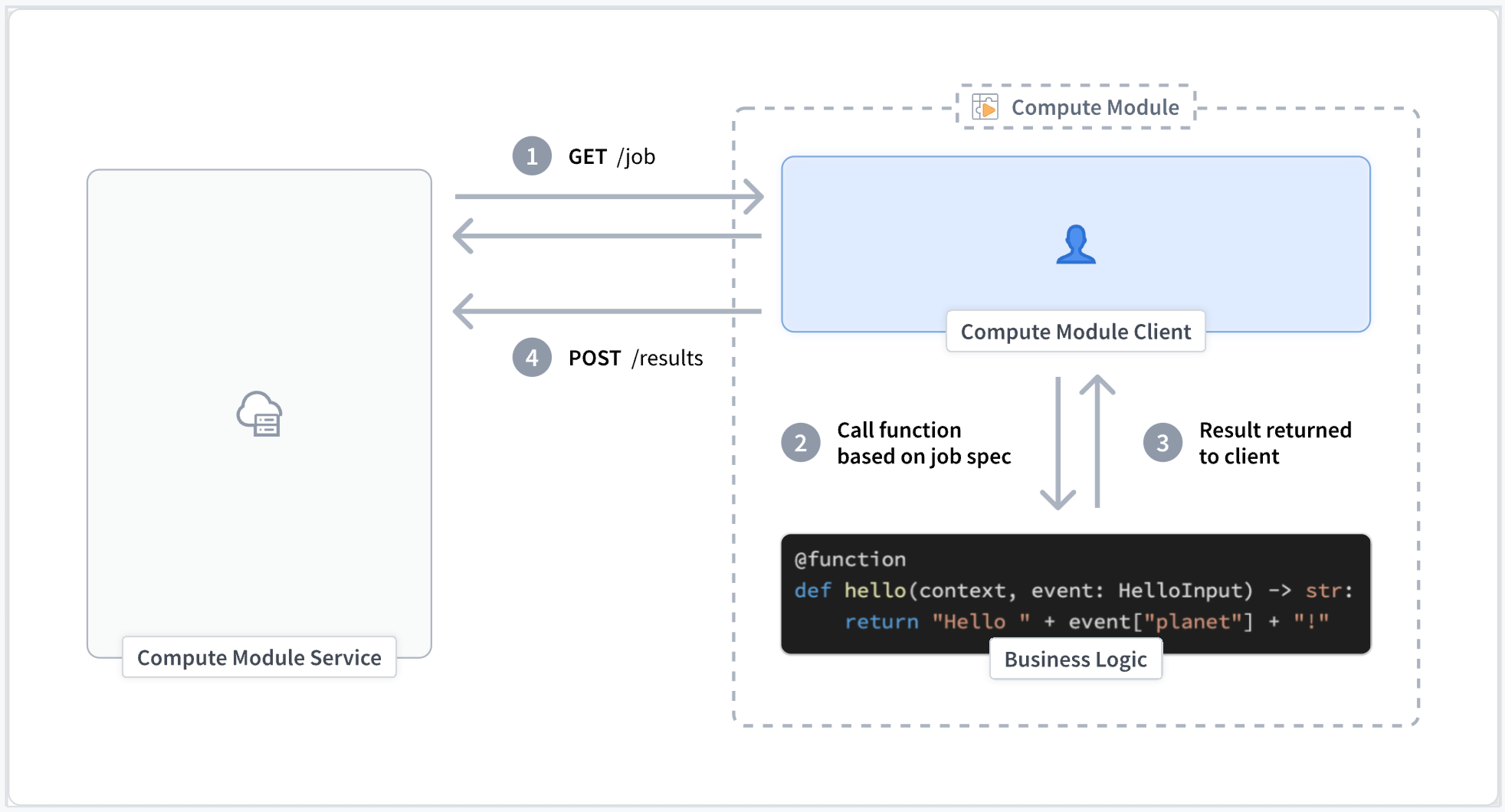
A compute module client manages the execution of the logic within a compute module and handles three primary responsibilities:
Post the function schema of your compute module (optional)
Before starting the main execution cycle of the client, we recommend publishing the schema of your compute module function(s). This exposes the schema of your compute module to the rest of Foundry. Alternatively, you can define this function schema manually in the Functions tab of your compute module.
For more information review our documentation on automatic function schema inference.
Poll for new jobs
The client polls the internal compute module service continuously for new jobs that must be processed. If a job is present, the client will find the function corresponding to that job and call that function with the associated payload.
Post the result (output) of the compute module
Once a function completes and returns the result to the client, the client is responsible for reporting that output back to the compute module service.
Below is a simple visual representation of a compute module client execution lifecycle:
API reference
:::callout{theme="warning"} You may see 'connection refused' errors when first attempting to send HTTP requests to the internal compute module service. This is expected behavior during startup and can be fixed with a retry after a short sleep period. :::
GET job
Variables
MODULE_AUTH_TOKEN string
- Review our environment variables documentation for more information.
DEFAULT_CA_PATH string
- Review our environment variables documentation for more information.
GET_JOB_URI string
- Review our environment variables documentation for more information.
Expected status codes
- 200: A new job to be processed exists.
- 204: No new jobs to be processed exist.
curl --header "Module-Auth-Token: $MODULE_AUTH_TOKEN" \
    --cacert $DEFAULT_CA_PATH \
    --request GET \
    $GET_JOB_URI
Response parameters
jobId string
- The unique identifier for the given job to be processed.
queryType string
- The name of the function to be invoked.
query JSON object
- The payload to be passed to the function.
temporaryCredentialsAuthToken string
- A temporary token that is used with the Foundry data sidecar.
authHeader string
- The Foundry authorization token that can be used to call other services within Foundry.
- Only available in certain modes.
{
    "computeModuleJobV1": {
        "jobId": "9a2a1e94-41d3-47d7-807f-db2f4c547b9c",
        "queryType": "multiply",
        "query": {
            "n": 4.0,
        },
        "temporaryCredentialsAuthToken": "token-data",
        "authHeader": "auth-header"
    }
}
POST result
Variables
result_data octet-stream
- The result returned from your compute module function.
jobId string
- The
jobIdprovided from the correspondingGETjob request.
MODULE_AUTH_TOKEN string
- Review our environment variables documentation for more information.
DEFAULT_CA_PATH string
- Review our environment variables documentation for more information.
POST_RESULT_URI string
- Review our environment variables documentation for more information.
Expected status codes
- 204: The request was accepted.
Response parameters
None
curl --header "Content-Type: application/octet-stream" \
    --header "Module-Auth-Token: $MODULE_AUTH_TOKEN" \
    --cacert $DEFAULT_CA_PATH \
    --request POST \
    --data $result_data \
    $POST_RESULT_URI/$jobId
POST function schema
Variables
schema_data JSON array
- The schema of your compute module function(s) in JSON format.
MODULE_AUTH_TOKEN string
- Review our environment variables documentation for more information.
DEFAULT_CA_PATH string
- Review our environment variables documentation for more information.
POST_SCHEMA_URI string
- Review our environment variables documentation for more information.
Expected status codes
204: The request was accepted.
Response parameters
None
curl --header "Content-Type: application/json" \
    --header "Module-Auth-Token: $MODULE_AUTH_TOKEN" \
    --cacert $DEFAULT_CA_PATH \
    --request POST \
    --data $schema_data \
    $POST_SCHEMA_URI
Python example
app.py
import json
import logging as log
import os
import socket
import time

import requests

log.basicConfig(level=log.INFO)

certPath = os.environ["DEFAULT_CA_PATH"]

with open(os.environ["MODULE_AUTH_TOKEN"], "r") as f:
    moduleAuthToken = f.read()

ip = socket.gethostbyname(socket.gethostname())

getJobUri = f"https://{ip}:8945/interactive-module/api/internal-query/job"
postResultUri = f"https://{ip}:8945/interactive-module/api/internal-query/results"
postSchemaUri = f"https://{ip}:8945/interactive-module/api/internal-query/schemas"

SCHEMAS = [
    {
        "functionName": "multiply",
        "inputs": [
            {
                "name": "n",
                "dataType": {"float": {}, "type": "float"},
                "required": True,
                "constraints": [],
            },
        ],
        "output": {
            "single": {
                "dataType": {
                    "float": {},
                    "type": "float",
                }
            },
            "type": "single",
        },
    },
    {
        "functionName": "divide",
        "inputs": [
            {
                "name": "n",
                "dataType": {"float": {}, "type": "float"},
                "required": True,
                "constraints": [],
            },
        ],
        "output": {
            "single": {
                "dataType": {
                    "float": {},
                    "type": "float",
                }
            },
            "type": "single",
        },
    },
]


# Get's a job from the compute module service. Jobs are only present when
# the status code is 200. If status code 204 is returned, try again.
# This endpoint has long-polling enabled, and may be called without delay.
def getJobBlocking():
    while True:
        response = requests.get(getJobUri, headers={"Module-Auth-Token": moduleAuthToken}, verify=certPath)
        if response.status_code == 200:
            return response.json()
        elif response.status_code == 204:
            log.info("No job found, trying again!")


# Process the query based on type
def get_result(query_type, query):
    if query_type == "multiply":
        return float(query["n"]) * 2
    elif query_type == "divide":
        return float(query["n"]) / 2
    else:
        log.info(f"Unknown query type: {query_type}")


# Posts job results to the compute module service. All jobs received must have a result posted,
# otherwise new jobs may not be routed to this worker.
def postResult(jobId, result):
    response = requests.post(
        f"{postResultUri}/{jobId}",
        data=json.dumps(result).encode("utf-8"),
        headers={"Module-Auth-Token": moduleAuthToken, "Content-Type": "application/octet-stream"},
        verify=certPath,
    )
    if response.status_code != 204:
        log.info(f"Failed to post result: {response.status_code}")


# Posts the schema of this compute module's function(s) to the compute module service.
# This only needs to be called 1 time, thus we call it before entering the main loop.
def postSchema():
    num_tries = 0
    success = False
    while not success and num_tries < 5:
        try:
            response = requests.post(
                postSchemaUri,
                json=SCHEMAS,
                headers={"Module-Auth-Token": moduleAuthToken, "Content-Type": "application/json"},
                verify=certPath,
            )
            success = True
            log.info(f"POST schema status: {response.status_code}")
            log.info(f"POST schema text: {response.text} reason: {response.reason}")
        except Exception as e:
            log.error(f"Exception occurred posting schema: {e}")
            time.sleep(2**num_tries)
            num_tries += 1


postSchema()

# Try forever
while True:
    try:
        job = getJobBlocking()
        v1 = job["computeModuleJobV1"]
        job_id = v1["jobId"]
        query_type = v1["queryType"]
        query = v1["query"]
        result = get_result(query_type, query)
        postResult(job_id, result)
    except Exception as e:
        log.info(f"Something failed {str(e)}")
        time.sleep(1)
中文翻译
创建自定义计算模块客户端(高级)
为什么需要客户端?
如果您使用支持的语言(Python、Java 或 TypeScript)编写计算模块(compute module),并且使用我们提供的 SDK,则无需手动创建客户端逻辑。
但是,如果您未使用 SDK,或者需要使用当前不支持的语言构建计算模块,则必须按照以下说明自行创建计算模块客户端。
自定义客户端的职责
计算模块客户端负责管理计算模块内部逻辑的执行,并处理以下三项主要职责:
发布计算模块的函数模式(可选)
在启动客户端的主执行循环之前,我们建议发布计算模块函数的模式(schema)。这会将计算模块的模式暴露给 Foundry 的其他部分。或者,您也可以在计算模块的函数选项卡中手动定义此函数模式。
更多信息请参阅我们的自动函数模式推断文档。
轮询新任务
客户端持续轮询内部计算模块服务,以获取需要处理的新任务。如果存在任务,客户端将找到与该任务对应的函数,并使用相关的负载(payload)调用该函数。
发布计算模块的结果(输出)
一旦函数执行完毕并将结果返回给客户端,客户端负责将该输出报告回计算模块服务。
以下是计算模块客户端执行生命周期的简单示意图:
API 参考
:::callout{theme="warning"} 首次尝试向内部计算模块服务发送 HTTP 请求时,您可能会看到"连接被拒绝"的错误。这是启动过程中的预期行为,可以通过短暂休眠后重试来解决。 :::
GET 任务
变量
MODULE_AUTH_TOKEN string
- 请参阅我们的环境变量文档了解更多信息。
DEFAULT_CA_PATH string
- 请参阅我们的环境变量文档了解更多信息。
GET_JOB_URI string
- 请参阅我们的环境变量文档了解更多信息。
预期状态码
- 200: 存在需要处理的新任务。
- 204: 不存在需要处理的新任务。
curl --header "Module-Auth-Token: $MODULE_AUTH_TOKEN" \
    --cacert $DEFAULT_CA_PATH \
    --request GET \
    $GET_JOB_URI
响应参数
jobId string
- 需要处理的给定任务的唯一标识符。
queryType string
- 要调用的函数名称。
query JSON object
- 要传递给函数的负载。
temporaryCredentialsAuthToken string
- 用于 Foundry 数据 sidecar 的临时令牌。
authHeader string
- 可用于调用 Foundry 内其他服务的 Foundry 授权令牌。
- 仅在特定模式下可用。
{
    "computeModuleJobV1": {
        "jobId": "9a2a1e94-41d3-47d7-807f-db2f4c547b9c",
        "queryType": "multiply",
        "query": {
            "n": 4.0,
        },
        "temporaryCredentialsAuthToken": "token-data",
        "authHeader": "auth-header"
    }
}
POST 结果
变量
result_data octet-stream
- 从计算模块函数返回的结果。
jobId string
- 对应
GET任务请求中提供的jobId。
MODULE_AUTH_TOKEN string
- 请参阅我们的环境变量文档了解更多信息。
DEFAULT_CA_PATH string
- 请参阅我们的环境变量文档了解更多信息。
POST_RESULT_URI string
- 请参阅我们的环境变量文档了解更多信息。
预期状态码
- 204: 请求已被接受。
响应参数
无
curl --header "Content-Type: application/octet-stream" \
    --header "Module-Auth-Token: $MODULE_AUTH_TOKEN" \
    --cacert $DEFAULT_CA_PATH \
    --request POST \
    --data $result_data \
    $POST_RESULT_URI/$jobId
POST 函数模式
变量
schema_data JSON array
- 计算模块函数的模式,采用 JSON 格式。
MODULE_AUTH_TOKEN string
- 请参阅我们的环境变量文档了解更多信息。
DEFAULT_CA_PATH string
- 请参阅我们的环境变量文档了解更多信息。
POST_SCHEMA_URI string
- 请参阅我们的环境变量文档了解更多信息。
预期状态码
204: 请求已被接受。
响应参数
无
curl --header "Content-Type: application/json" \
    --header "Module-Auth-Token: $MODULE_AUTH_TOKEN" \
    --cacert $DEFAULT_CA_PATH \
    --request POST \
    --data $schema_data \
    $POST_SCHEMA_URI
Python 示例
app.py
import json
import logging as log
import os
import socket
import time

import requests

log.basicConfig(level=log.INFO)

certPath = os.environ["DEFAULT_CA_PATH"]

with open(os.environ["MODULE_AUTH_TOKEN"], "r") as f:
    moduleAuthToken = f.read()

ip = socket.gethostbyname(socket.gethostname())

getJobUri = f"https://{ip}:8945/interactive-module/api/internal-query/job"
postResultUri = f"https://{ip}:8945/interactive-module/api/internal-query/results"
postSchemaUri = f"https://{ip}:8945/interactive-module/api/internal-query/schemas"

SCHEMAS = [
    {
        "functionName": "multiply",
        "inputs": [
            {
                "name": "n",
                "dataType": {"float": {}, "type": "float"},
                "required": True,
                "constraints": [],
            },
        ],
        "output": {
            "single": {
                "dataType": {
                    "float": {},
                    "type": "float",
                }
            },
            "type": "single",
        },
    },
    {
        "functionName": "divide",
        "inputs": [
            {
                "name": "n",
                "dataType": {"float": {}, "type": "float"},
                "required": True,
                "constraints": [],
            },
        ],
        "output": {
            "single": {
                "dataType": {
                    "float": {},
                    "type": "float",
                }
            },
            "type": "single",
        },
    },
]


# 从计算模块服务获取任务。仅当状态码为 200 时才存在任务。
# 如果返回状态码 204,则重试。
# 此端点启用了长轮询,可以无延迟调用。
def getJobBlocking():
    while True:
        response = requests.get(getJobUri, headers={"Module-Auth-Token": moduleAuthToken}, verify=certPath)
        if response.status_code == 200:
            return response.json()
        elif response.status_code == 204:
            log.info("No job found, trying again!")


# 根据查询类型处理查询
def get_result(query_type, query):
    if query_type == "multiply":
        return float(query["n"]) * 2
    elif query_type == "divide":
        return float(query["n"]) / 2
    else:
        log.info(f"Unknown query type: {query_type}")


# 将任务结果发布到计算模块服务。所有接收到的任务都必须发布结果,
# 否则新任务可能无法路由到此工作节点。
def postResult(jobId, result):
    response = requests.post(
        f"{postResultUri}/{jobId}",
        data=json.dumps(result).encode("utf-8"),
        headers={"Module-Auth-Token": moduleAuthToken, "Content-Type": "application/octet-stream"},
        verify=certPath,
    )
    if response.status_code != 204:
        log.info(f"Failed to post result: {response.status_code}")


# 将此计算模块函数的模式发布到计算模块服务。
# 此操作只需调用 1 次,因此我们在进入主循环之前调用它。
def postSchema():
    num_tries = 0
    success = False
    while not success and num_tries < 5:
        try:
            response = requests.post(
                postSchemaUri,
                json=SCHEMAS,
                headers={"Module-Auth-Token": moduleAuthToken, "Content-Type": "application/json"},
                verify=certPath,
            )
            success = True
            log.info(f"POST schema status: {response.status_code}")
            log.info(f"POST schema text: {response.text} reason: {response.reason}")
        except Exception as e:
            log.error(f"Exception occurred posting schema: {e}")
            time.sleep(2**num_tries)
            num_tries += 1


postSchema()

# 无限循环尝试
while True:
    try:
        job = getJobBlocking()
        v1 = job["computeModuleJobV1"]
        job_id = v1["jobId"]
        query_type = v1["queryType"]
        query = v1["query"]
        result = get_result(query_type, query)
        postResult(job_id, result)
    except Exception as e:
        log.info(f"Something failed {str(e)}")
        time.sleep(1)