Execution modes(执行模式)
Function execution mode vs. pipeline execution mode
| Function mode | Pipelines module |
|---|---|
| Use your compute module to host logic as functions. Use these functions across Foundry in applications like Workshop or the Developer Console with the Ontology SDK. | Read Foundry inputs and write to Foundry outputs for streaming and realtime media use cases. This module will be passed as a job token with access you can specify. |
| Power your Foundry applications using compute module functions. | Use the Foundry resource permissions system. |
| Execute compute module functions from another function. | Get data provenance across Foundry in the Data Lineage application. |
Function mode permissions
No platform permissions: You will not be provided with access to use Ontology SDK or platform APIs. Application permissions: Your application will use a service user for permissions rather than depending on user permissions.
Pipeline mode permissions
Foundry job tokens will be attached to the compute module. Job tokens will be scoped to input and output resources and can be used to obtain data.
Functions execution mode
Functions mode allows you to use your compute module to host logic for use across Foundry, such as in Workshop applications or through the Ontology SDK. You can define and write your logic in any language, register them as functions, and execute this logic with function calls in the platform.
Functions mode can operate through two permission modes:
- No platform permissions: Your application will not be provided with access to any platform APIs or the Ontology SDK. Use this mode for running logic that does not need to interact with Foundry. You can still configure egress to external systems in this mode. Review sources for more information.
- Application permissions: Your application will use its accompanying service user to determine its permissions for accessing the platform APIs and Ontology SDK. Permissions will remain the same regardless of the compute module user. Use this mode to run logic that needs to interact with Foundry with a set of permissions for the application as a whole.
Use application permissions
:::callout{theme="warning"} Application permissions may not be available on all enrollments. :::
Create the service user
- Navigate to your compute module's Configure page.
- Under Execution mode, choose a Functions module with Application's permissions.
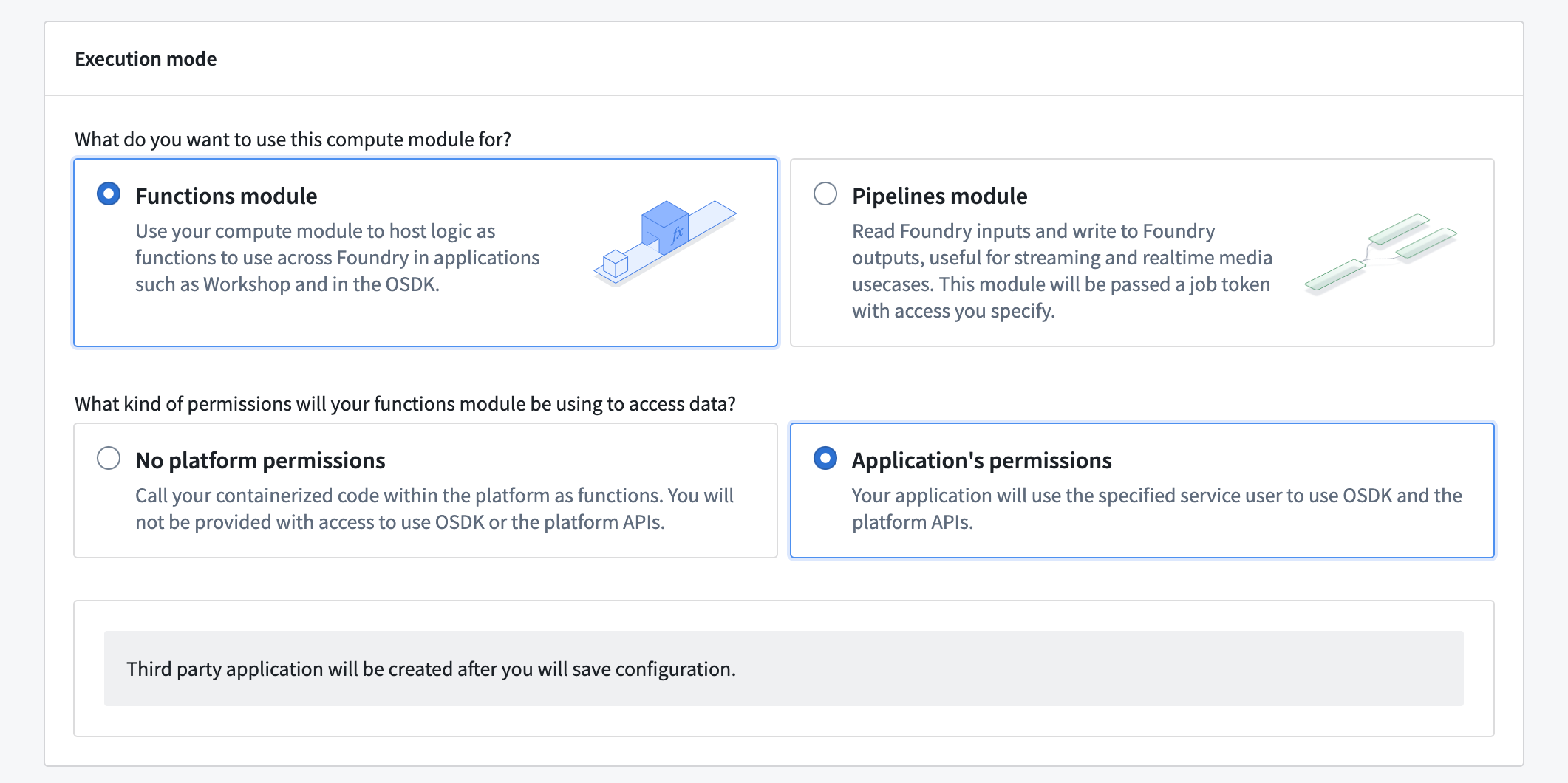
- Save your compute module configuration. This will automatically create a third-party application for your compute module and display its client ID and service user name.
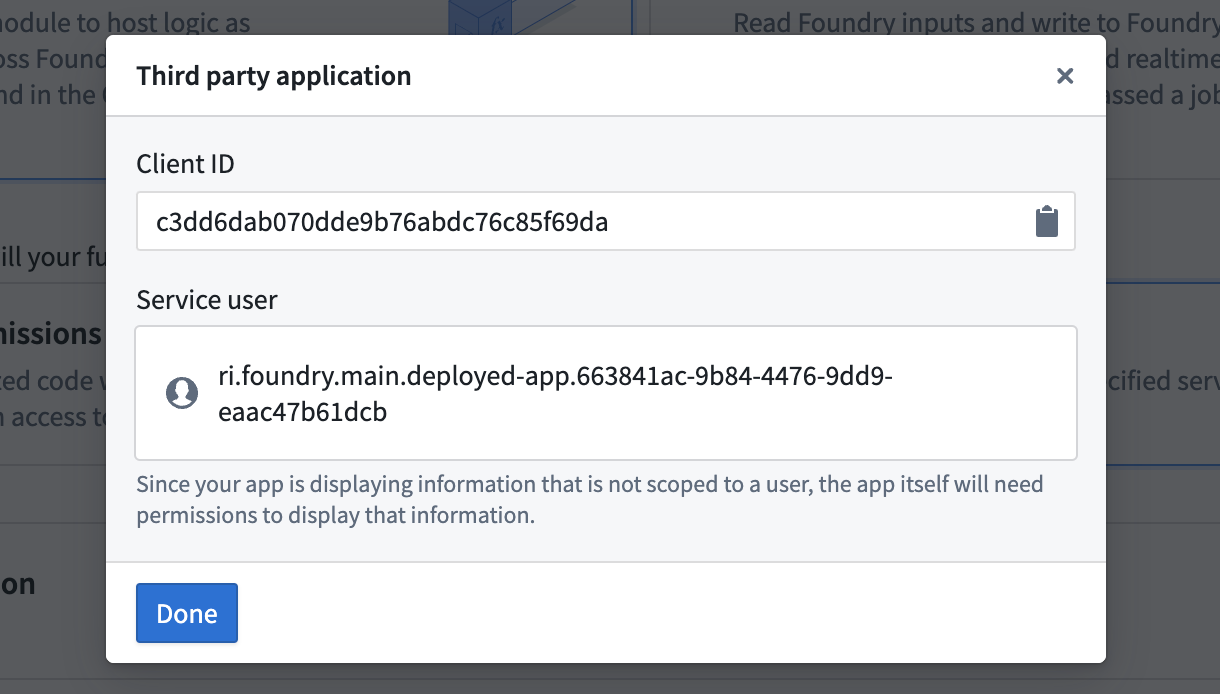 4. [Optional] Configure the service user as needed, such as restricting its access to select Markings, in the Third party applications section of Control Panel.
:::callout{theme="warning"}
Only users in your organization with permissions to Manage OAuth 2.0 clients can perform this step. Review the third-party applications documentation for more information.
:::
Use the service user in your compute module
-
Add a source with a network policy that enables access to your Foundry environment's URL.
-
Exchange the client ID and secret for an access token with the desired permissions.
In app.py, with the compute modules SDK:
from compute_modules.auth import oauth

access_token = oauth("yourenrollment.palantirfoundry.com", ["api:datasets-read", "api:datasets-write"])
:::callout{theme="neutral"} Review the following SDK guides for detailed authentication patterns, including OSDK integration and dataset access:
Without the compute modules SDK:
import requests
import os

token_response = requests.post("https://yourenrollment.palantirfoundry.com/multipass/api/oauth2/token",
    data={
        "grant_type": "client_credentials",
        "client_id": os.environ["CLIENT_ID"],
        "client_secret": os.environ["CLIENT_SECRET"],
        "scope": "api:datasets-read api:datasets-write"
    },
    headers={
        "Content-Type": "application/x-www-form-urlencoded",
    },
    verify=os.environ["DEFAULT_CA_PATH"]
)

access_token = token_response.json()["access_token"]
- Use the granted token to make calls to Foundry APIs.
In app.py:
import requests
import os

DATASET_ID = "ri.foundry.main.dataset.7bc5a955-5de4-4c5f-9370-248c5517187b"

dataset_response = requests.get(
    f"https://yourenrollment.palantirfoundry.com/api/v1/datasets/{DATASET_ID}",
    headers={
        "Authorization": f"Bearer {access_token}"
    },
    verify=os.environ["DEFAULT_CA_PATH"]
)

dataset_name = dataset_response.json()["name"]
print(f"Dataset name is {dataset_name}")
Pipeline execution mode
A compute module executed in pipeline mode is designed to facilitate computations for data pipeline workflows that require high data security and provenance control. Pipeline mode works by taking in Foundry inputs, executing user-specified computations, and subsequently producing outputs. The entire process strictly adheres to the protocols and workflows established by the Foundry build system.
Unlike function mode, where users directly interact with a compute module by sending queries, the inputs and outputs and their permissions are managed through the Foundry build system. This ensures that all data involved in the computation process is systematically tracked. By mandating that all inputs and outputs pass through the build system, the module maintains a high level of data integrity and traceability, which is crucial for Foundry data provenance control and security.
Due to provenance control requirements, pipeline mode compute modules are non-interactive, meaning users cannot send queries directly to the compute module. Because of this, the compute module only performs computations on inputs automatically provided by the build system once the compute module is running. The build system also manages the flow of information from a compute module's output. Interfaces are provided for interacting with inputs and outputs inside the container of a compute module running in pipeline mode.
To summarize, pipeline mode enforces data security and provenance control. Users should choose pipeline mode if the following is true:
- The relevant data is highly sensitive and must strictly conform to provenance control, marking control, and so on.
- Users want to track data lineage.
Add inputs and outputs
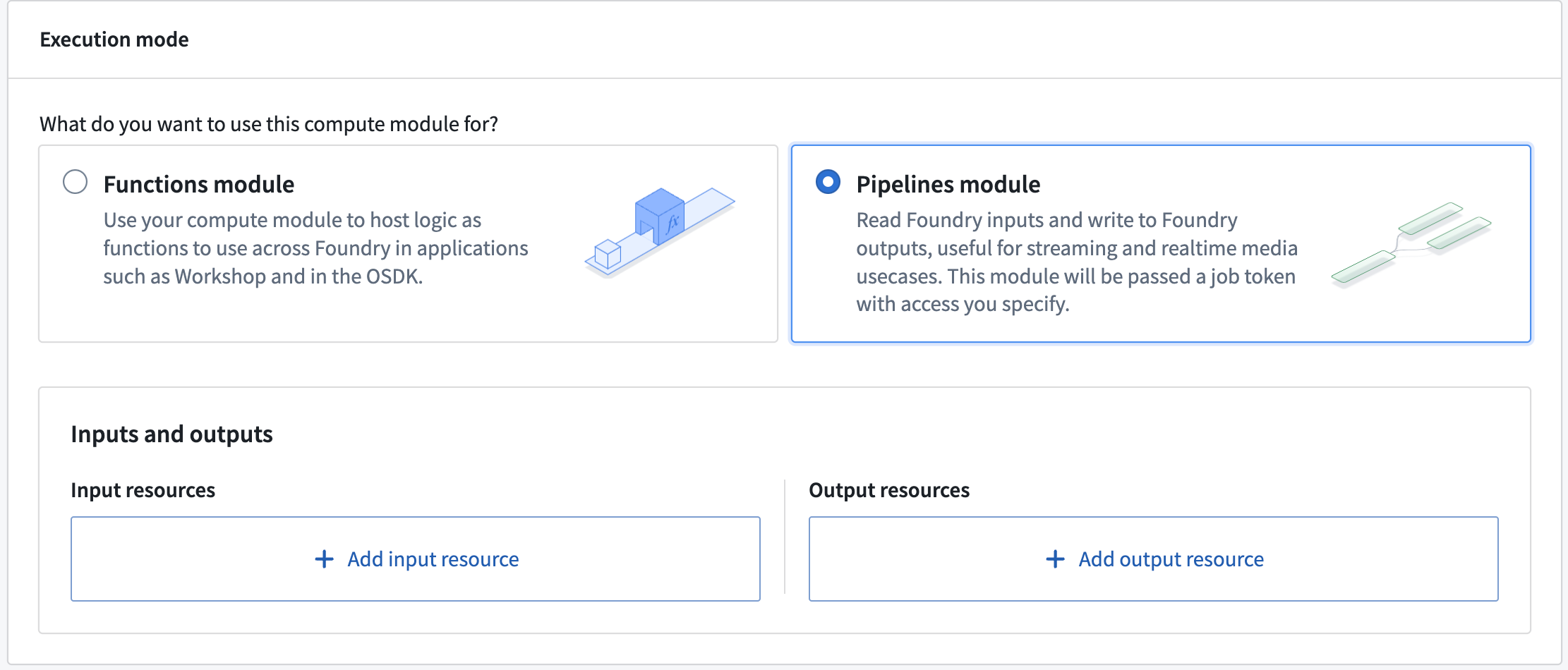
Pipeline mode compute modules strictly conform to the provenance control and security model established by the Foundry build system. By default, the compute module does not have permission to interact with any Foundry resources. Users must explicitly add Foundry resources as inputs and outputs. Permissions will then be granted on these added resources.
- In the configuration details for pipeline mode, choose to and an input or output resource.
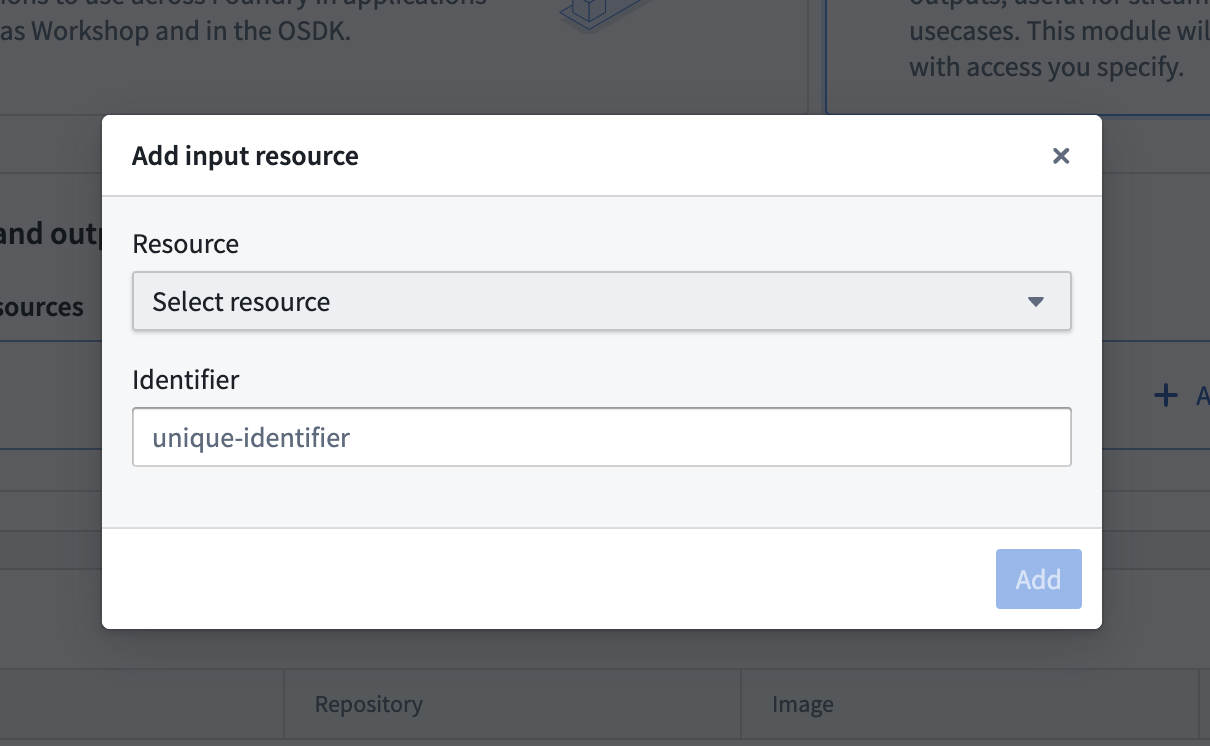
- Select a resource from the dropdown menu and give it a unique identifier. The identifier will be used to retrieve resource information inside the container. The resources must be from the same Project as the compute module. The currently supported inputs/outputs are Foundry datasets, streaming datasets, and media sets.
Interact with inputs and outputs within the compute module
- A bearer token will be mounted in a container file, where the file name is stored in a BUILD2_TOKEN environment variable. The token will have permissions on the inputs and outputs and will be the only way to access them.
In app.py:
with open(os.environ['BUILD2_TOKEN']) as f:
    bearer_token = f.read()
- A map of input and output unique identifiers and their information is mounted in a container file, where the file name is stored in a RESOURCE_ALIAS_MAP environment variable. You can get the resource information with the unique identifier you give in the configuration. The resource information is a tuple of RID and branch (branch can be none).
In app.py:
with open(os.environ['RESOURCE_ALIAS_MAP']) as f:
    resource_alias_map = json.load(f)

input_info = resource_alias_map['identifier you put in the config']
output_info = resource_alias_map['identifier you put in the config']

# structure of resource info
# {
#     'rid': rid
#     'branch': branch (can be none)
# }

input_rid = input_info['rid']
input_branch = input_info['branch'] or "master"
output_rid = output_info['rid']
output_branch = output_info['branch'] or "master"
- Now, you can use the token and resource information to interact with the inputs and outputs. For example, if your input is a stream dataset, you can get the latest records by requesting the stream-proxy service.
In app.py:
FOUNDRY_URL = "yourenrollment.palantirfoundry.com"
url = f"https://{FOUNDRY_URL}/stream-proxy/api/streams/{input_rid}/branches/{input_branch}/records"
response = requests.get(url, headers={"Authorization": f"Bearer {bearer_token}"})
Access dataset files using the API
If your input is a Foundry dataset, you can use the bearer token and resource information to list and retrieve files. The following example demonstrates how to list all files in a dataset and retrieve the content of a specific file.
In app.py:
FOUNDRY_URL = "yourenrollment.palantirfoundry.com"

# List all files in the dataset
params = {
    "pageSize": 100,
    "includeOpenExclusiveTransaction": "false",
    "excludeHiddenFiles": "false",
}
url = f"https://{FOUNDRY_URL}/foundry-catalog/api/catalog/datasets/{input_rid}/views2/master/files"
response = requests.get(url, params=params, headers={"Authorization": f"Bearer {bearer_token}"})

# Get the content of a specific file
file_name = "example.csv"
url = f"https://{FOUNDRY_URL}/foundry-data-proxy/api/dataproxy/datasets/{input_rid}/views/master/{file_name}"
response = requests.get(url, headers={"Authorization": f"Bearer {bearer_token}"})
dataset_content = response.json()
:::callout{theme="warning"} To access the Foundry URL from within the compute module container, you must add a source with a network policy that enables access to your Foundry environment URL. :::
Data provenance and observability
Pipeline mode provides built-in data provenance and observability through the Foundry build system. Because all inputs and outputs pass through the build system, every data transformation is tracked and visible in the Data Lineage application. This allows you to trace how data flows through your pipeline and audit the origin of any output.
:::callout{theme="neutral"} During pipeline execution, the build system opens transactions on output datasets. These transactions are managed automatically and are committed when the pipeline completes successfully. :::
Other considerations
- Scaling: Since no queries are sent to the compute module, the autoscaler may eventually scale it down to zero replicas. To keep your compute module constantly running, set the Minimum replicas to at least 1 in the scaling configuration.
- Compute module client: Since no queries are sent to the compute module, you do not need to implement a compute module client. Review our documentation on compute module clients for more information.
中文翻译
执行模式
函数执行模式与管道执行模式
| 函数模式 | 管道模块 |
|---|---|
| 使用计算模块将逻辑托管为函数。在 Workshop 或开发者控制台等 Foundry 应用中,通过 Ontology SDK 使用这些函数。 | 读取 Foundry 输入并写入 Foundry 输出,适用于流式处理和实时媒体场景。该模块将作为作业令牌(job token)传递,并附带您指定的访问权限。 |
| 使用计算模块函数为您的 Foundry 应用提供支持。 | 使用 Foundry 资源权限系统。 |
| 从另一个函数执行计算模块函数。 | 在数据沿袭(Data Lineage)应用中获取跨 Foundry 的数据来源信息。 |
函数模式权限
无平台权限: 您将无法获得使用 Ontology SDK 或平台 API 的权限。 应用权限: 您的应用将使用服务用户(service user)进行权限管理,而非依赖用户权限。
管道模式权限
Foundry 作业令牌将附加到计算模块。作业令牌的作用域限定于输入和输出资源,可用于获取数据。
函数执行模式
函数模式允许您使用计算模块托管逻辑,以便在 Foundry 中跨应用使用,例如在 Workshop 应用中或通过 Ontology SDK。您可以使用任何语言定义和编写逻辑,将其注册为函数,并通过平台中的函数调用来执行此逻辑。
函数模式可通过两种权限模式运行:
- 无平台权限: 您的应用将无法访问任何平台 API 或 Ontology SDK。使用此模式运行无需与 Foundry 交互的逻辑。在此模式下,您仍可配置对外部系统的出站访问。更多信息请参阅数据源。
- 应用权限: 您的应用将使用其关联的服务用户来确定访问平台 API 和 Ontology SDK 的权限。无论计算模块用户是谁,权限都将保持不变。使用此模式运行需要与 Foundry 交互的逻辑,并为整个应用设置一组权限。
使用应用权限
:::callout{theme="warning"} 应用权限可能并非在所有注册环境中可用。 :::
创建服务用户
- 导航至计算模块的配置页面。
- 在执行模式下,选择带有应用权限的函数模块。
- 保存您的计算模块配置。这将自动为您的计算模块创建一个第三方应用,并显示其客户端 ID 和服务用户名。
4. [可选] 根据需要配置服务用户,例如在控制面板的第三方应用部分限制其对选定标记(Markings)的访问。
:::callout{theme="warning"}
只有组织中拥有 管理 OAuth 2.0 客户端 权限的用户才能执行此步骤。更多信息请参阅第三方应用文档。
:::
在计算模块中使用服务用户
-
添加一个具有网络策略的数据源,以允许访问您的 Foundry 环境 URL。
-
将客户端 ID 和密钥交换为具有所需权限的访问令牌。
在 app.py 中,使用计算模块 SDK:
from compute_modules.auth import oauth

access_token = oauth("yourenrollment.palantirfoundry.com", ["api:datasets-read", "api:datasets-write"])
:::callout{theme="neutral"} 请参阅以下 SDK 指南,了解详细的身份验证模式,包括 OSDK 集成和数据集访问:
不使用计算模块 SDK 的情况:
import requests
import os

token_response = requests.post("https://yourenrollment.palantirfoundry.com/multipass/api/oauth2/token",
    data={
        "grant_type": "client_credentials",
        "client_id": os.environ["CLIENT_ID"],
        "client_secret": os.environ["CLIENT_SECRET"],
        "scope": "api:datasets-read api:datasets-write"
    },
    headers={
        "Content-Type": "application/x-www-form-urlencoded",
    },
    verify=os.environ["DEFAULT_CA_PATH"]
)

access_token = token_response.json()["access_token"]
- 使用获取的令牌调用 Foundry API。
在 app.py 中:
import requests
import os

DATASET_ID = "ri.foundry.main.dataset.7bc5a955-5de4-4c5f-9370-248c5517187b"

dataset_response = requests.get(
    f"https://yourenrollment.palantirfoundry.com/api/v1/datasets/{DATASET_ID}",
    headers={
        "Authorization": f"Bearer {access_token}"
    },
    verify=os.environ["DEFAULT_CA_PATH"]
)

dataset_name = dataset_response.json()["name"]
print(f"数据集名称为 {dataset_name}")
管道执行模式
以管道模式执行的计算模块旨在促进需要高数据安全性和来源控制的数据管道工作流的计算。管道模式通过接收 Foundry 输入、执行用户指定的计算,然后生成输出来工作。整个过程严格遵守 Foundry 构建系统建立的协议和工作流。
与函数模式(用户直接通过发送查询与计算模块交互)不同,管道模式的输入、输出及其权限通过 Foundry 构建系统进行管理。这确保了计算过程中涉及的所有数据都得到系统化跟踪。通过强制所有输入和输出都经过构建系统,该模块保持了高水平的数据完整性和可追溯性,这对于 Foundry 的数据来源控制和安全至关重要。
由于来源控制的要求,管道模式计算模块是非交互式的,这意味着用户无法直接向计算模块发送查询。因此,计算模块仅对构建系统在计算模块运行时自动提供的输入执行计算。构建系统还管理来自计算模块输出的信息流。提供了用于在管道模式下运行的计算模块容器内与输入和输出交互的接口。
总而言之,管道模式强制执行数据安全性和来源控制。如果满足以下条件,用户应选择管道模式:
- 相关数据高度敏感,必须严格遵守来源控制、标记控制等要求。
- 用户希望跟踪数据沿袭。
添加输入和输出
管道模式计算模块严格遵守 Foundry 构建系统建立的来源控制和安全模型。默认情况下,计算模块无权与任何 Foundry 资源交互。用户必须显式地将 Foundry 资源添加为输入和输出。随后将对这些添加的资源授予权限。
- 在管道模式的配置详情中,选择添加输入或输出资源。
- 从下拉菜单中选择一个资源,并为其指定一个唯一标识符。该标识符将用于在容器内检索资源信息。资源必须与计算模块属于同一项目。当前支持的输入/输出包括 Foundry 数据集、流式数据集和媒体集。
在计算模块内与输入和输出交互
- 一个持有者令牌(bearer token)将被挂载到容器文件中,文件名存储在 BUILD2_TOKEN 环境变量中。该令牌将拥有对输入和输出的权限,并且是访问它们的唯一方式。
在 app.py 中:
with open(os.environ['BUILD2_TOKEN']) as f:
    bearer_token = f.read()
- 输入和输出唯一标识符及其信息的映射被挂载到一个容器文件中,文件名存储在 RESOURCE_ALIAS_MAP 环境变量中。您可以使用在配置中指定的唯一标识符来获取资源信息。资源信息是一个包含 RID 和分支(分支可以为空)的元组。
在 app.py 中:
with open(os.environ['RESOURCE_ALIAS_MAP']) as f:
    resource_alias_map = json.load(f)

input_info = resource_alias_map['您在配置中输入的标识符']
output_info = resource_alias_map['您在配置中输入的标识符']

# 资源信息结构
# {
#     'rid': rid
#     'branch': branch (可以为空)
# }

input_rid = input_info['rid']
input_branch = input_info['branch'] or "master"
output_rid = output_info['rid']
output_branch = output_info['branch'] or "master"
- 现在,您可以使用令牌和资源信息与输入和输出进行交互。例如,如果您的输入是流数据集,您可以通过请求 stream-proxy 服务来获取最新记录。
在 app.py 中:
FOUNDRY_URL = "yourenrollment.palantirfoundry.com"
url = f"https://{FOUNDRY_URL}/stream-proxy/api/streams/{input_rid}/branches/{input_branch}/records"
response = requests.get(url, headers={"Authorization": f"Bearer {bearer_token}"})
使用 API 访问数据集文件
如果您的输入是 Foundry 数据集,您可以使用持有者令牌和资源信息来列出和检索文件。以下示例演示了如何列出数据集中的所有文件并检索特定文件的内容。
在 app.py 中:
FOUNDRY_URL = "yourenrollment.palantirfoundry.com"

# 列出数据集中的所有文件
params = {
    "pageSize": 100,
    "includeOpenExclusiveTransaction": "false",
    "excludeHiddenFiles": "false",
}
url = f"https://{FOUNDRY_URL}/foundry-catalog/api/catalog/datasets/{input_rid}/views2/master/files"
response = requests.get(url, params=params, headers={"Authorization": f"Bearer {bearer_token}"})

# 获取特定文件的内容
file_name = "example.csv"
url = f"https://{FOUNDRY_URL}/foundry-data-proxy/api/dataproxy/datasets/{input_rid}/views/master/{file_name}"
response = requests.get(url, headers={"Authorization": f"Bearer {bearer_token}"})
dataset_content = response.json()
:::callout{theme="warning"} 要从计算模块容器内部访问 Foundry URL,您必须添加一个具有网络策略的数据源,以允许访问您的 Foundry 环境 URL。 :::
数据来源与可观测性
管道模式通过 Foundry 构建系统提供内置的数据来源和可观测性。由于所有输入和输出都经过构建系统,每次数据转换都会被跟踪并在数据沿袭应用中可见。这使您可以追踪数据在管道中的流动方式,并审计任何输出的来源。
:::callout{theme="neutral"} 在管道执行期间,构建系统会在输出数据集上打开事务。这些事务会自动管理,并在管道成功完成时提交。 :::