Probes(探针(Probe))
A probe is a diagnostic mechanism used to check the readiness and liveness of containers in a compute module. Probes run custom checks to determine whether containers are functioning correctly and can handle traffic, then report the container status. You can configure two types of probes: readiness probes and liveness probes.
Readiness probe vs. liveness probe
A Readiness probe checks if a container is ready to handle queries. It runs intermittently throughout the container lifecycle. If the probe succeeds, the container is considered ready to receive queries. If the probe fails, the container is marked as unresponsive and will not receive queries until the probe succeeds again. A common use case for readiness probes is verifying that prerequisite tasks have completed during startup.
A Liveness probe checks if a container is still running correctly. Like the readiness probe, it runs intermittently throughout the container lifecycle. If the liveness probe fails, the container is restarted.
Both probe types only differ in the actions taken after the check returns a result. The probe check itself is agnostic to the subsequent actions.
Set up a probe
To configure a probe for your compute module:
-
Navigate to the Containers section of the Configure tab. Locate and select the container you want to configure.
-
Scroll to find the Readiness probe or Liveness probe section. Select Set or Edit.
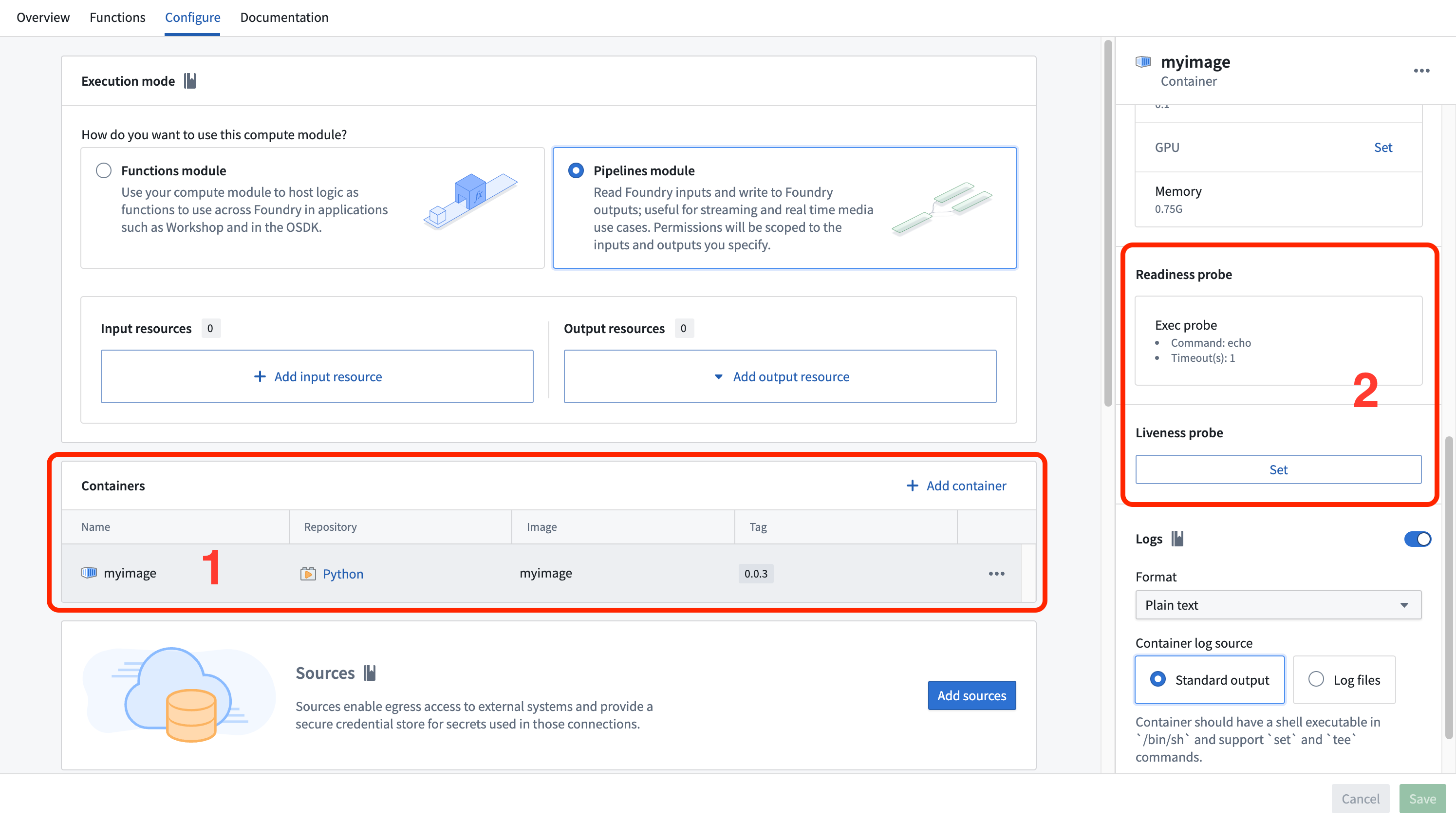
- Fill in the probe configuration by choosing between an exec probe or an HTTP probe.
Exec probe
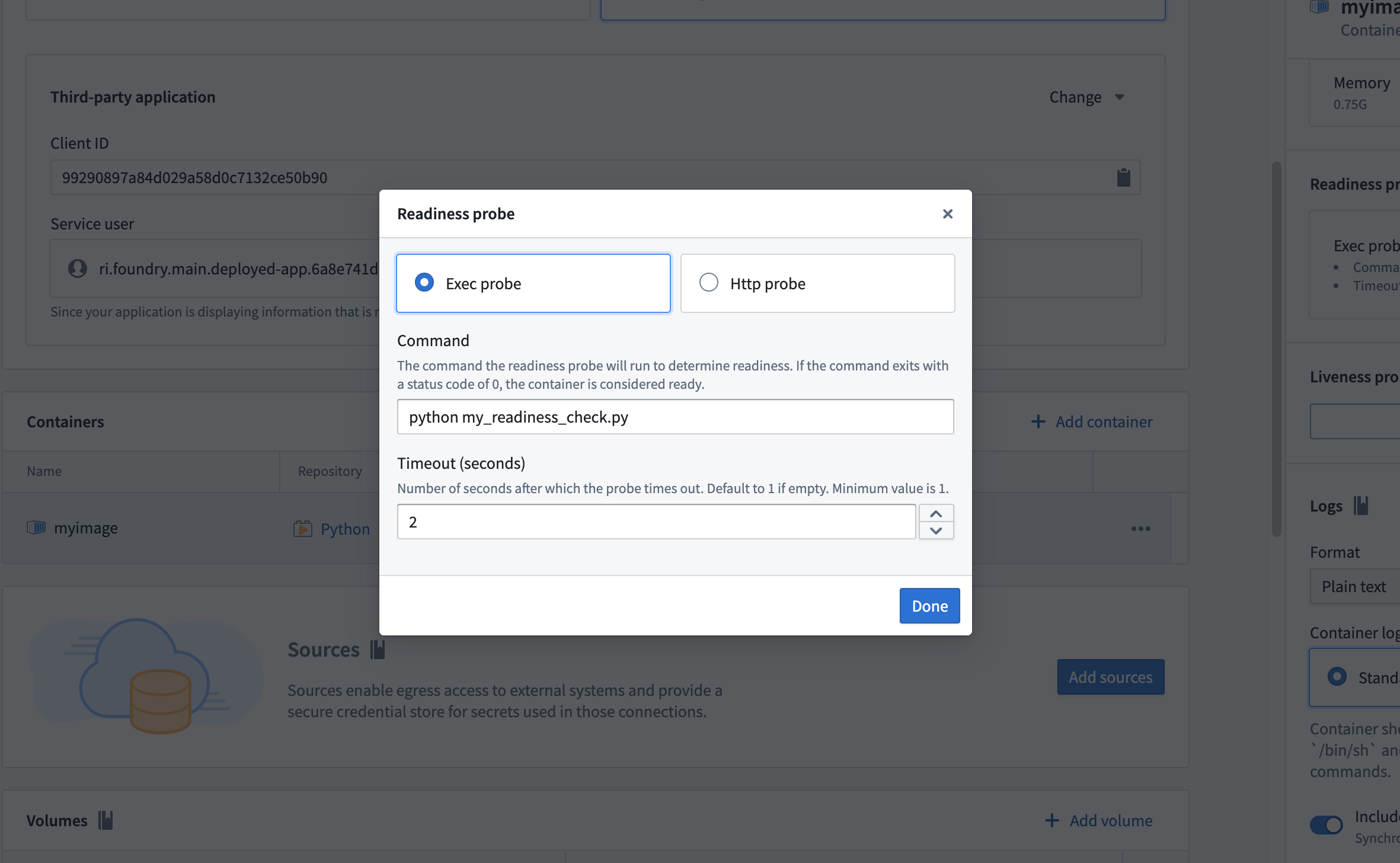
An exec probe executes a command inside the container and checks the exit status. An exit code of 0 indicates success, and any non-zero exit code indicates failure.
Configure the following fields for an exec probe:
- Command: The command to execute within the container
- Timeout (seconds): The maximum time allowed for the command to complete. If the command does not complete within this time, the probe fails.
:::callout{theme="neutral"}
By default, an exec readiness probe is set with the command echo to check if the container has crashed.
:::
Example: Python exec probe
The following example demonstrates a Python exec probe script that downloads a dataset file as a prerequisite task during container startup. The script uses application permissions to obtain an access token and fetch data from a Foundry dataset. Place this script in the same folder as your app.py so that it is copied into your container.
import os
import requests

HOSTNAME = "..."
CLIENT_SECRET = os.environ["CLIENT_SECRET"]
CLIENT_ID = os.environ["CLIENT_ID"]

# Get token using third-party application in function mode
TOKEN = requests.post(f"https://{HOSTNAME}/multipass/api/oauth2/token",
    data={
        "grant_type": "client_credentials",
        "client_id": CLIENT_ID,
        "client_secret": CLIENT_SECRET,
        "scope": "api:datasets-read"
    },
    ).json()["access_token"]
HEADERS = {
    "Authorization": f"Bearer {TOKEN}"
}

DATASET_RID = os.environ["DATASET_RID"]
FILENAME = "tmp/my_file.csv"

if not os.path.exists(FILENAME):
    response = requests.get(f'https://{HOSTNAME}/api/v1/datasets/{DATASET_RID}/readTable?branchId=master&format=CSV', headers=HEADERS)
    if (response.status_code >= 400):
        exit(1)
    with open(FILENAME, 'w') as file:
        file.write(response.text)
This script exits with code 1 if the dataset download fails, causing the readiness probe to report a failure and preventing the container from receiving queries until the download succeeds.
HTTP probe
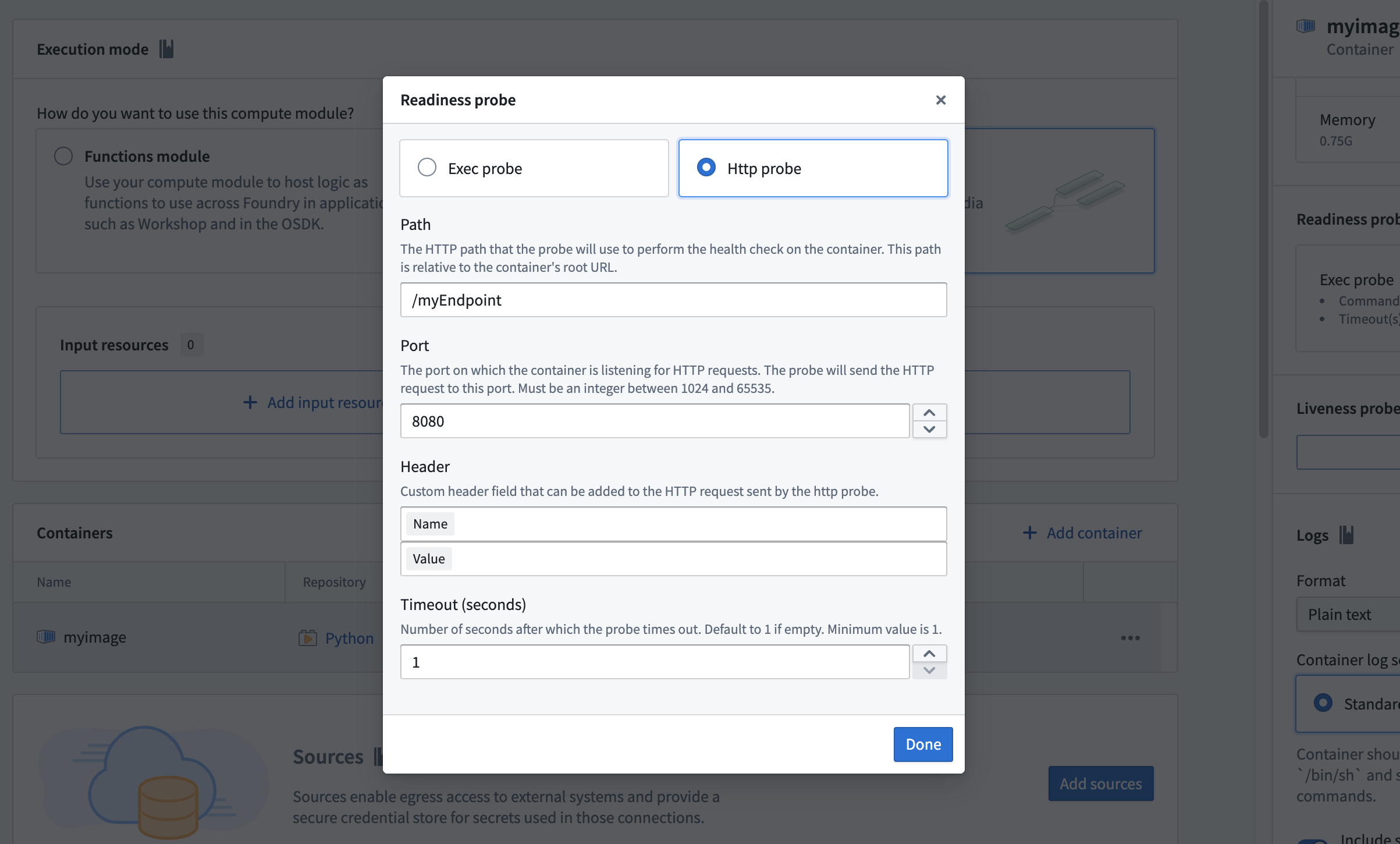
An HTTP probe sends an HTTP GET request to an endpoint on the container. A response with a status code between 200 and 399 indicates success, and any other status code indicates failure.
Configure the following fields for an HTTP probe:
- Path: The URL path of the endpoint to check
- Port: The port number for the request. The port must be between 1024 and 65535, excluding 8945 and 8946.
- HTTP header (optional): A custom header specified as a name-value pair
- Timeout (seconds): The maximum time allowed for the request to complete. If the request does not complete within this time, the probe fails.
中文翻译
探针(Probe)
探针是一种诊断机制,用于检查计算模块(compute module)中容器的就绪状态(readiness)和存活状态(liveness)。探针通过运行自定义检查来确定容器是否正常运行、能否处理流量,并报告容器状态。您可以配置两种类型的探针:就绪探针(readiness probe)和存活探针(liveness probe)。
就绪探针与存活探针的区别
就绪探针用于检查容器是否已准备好处理查询。它在容器的整个生命周期中间歇性运行。如果探针成功,容器被视为已就绪并可接收查询。如果探针失败,容器将被标记为无响应,并且在探针再次成功之前不会接收查询。就绪探针的常见用例是在启动期间验证前置任务是否已完成。
存活探针用于检查容器是否仍在正常运行。与就绪探针类似,它在容器的整个生命周期中间歇性运行。如果存活探针失败,容器将被重启。
两种探针类型的区别仅在于检查返回结果后所执行的操作不同。探针检查本身与后续操作无关。
设置探针
要为计算模块配置探针:
-
导航至 Configure 选项卡的 Containers 部分。找到并选择要配置的容器。
-
向下滚动找到 Readiness probe 或 Liveness probe 部分。选择 Set 或 Edit。
Exec 探针
Exec 探针在容器内执行一条命令并检查退出状态。退出码为 0 表示成功,任何非零退出码表示失败。
为 exec 探针配置以下字段:
- Command: 要在容器内执行的命令
- Timeout (seconds): 命令完成的最大允许时间。如果命令在此时间内未完成,探针将失败。
:::callout{theme="neutral"}
默认情况下,exec 就绪探针会设置命令 echo 来检查容器是否已崩溃。
:::
示例:Python exec 探针
以下示例演示了一个 Python exec 探针脚本,该脚本在容器启动期间将下载数据集文件作为前置任务。脚本使用应用程序权限获取访问令牌并从 Foundry 数据集获取数据。将此脚本放在与 app.py 相同的文件夹中,以便将其复制到容器中。
import os
import requests

HOSTNAME = "..."
CLIENT_SECRET = os.environ["CLIENT_SECRET"]
CLIENT_ID = os.environ["CLIENT_ID"]

# 使用函数模式下的第三方应用程序获取令牌
TOKEN = requests.post(f"https://{HOSTNAME}/multipass/api/oauth2/token",
    data={
        "grant_type": "client_credentials",
        "client_id": CLIENT_ID,
        "client_secret": CLIENT_SECRET,
        "scope": "api:datasets-read"
    },
    ).json()["access_token"]
HEADERS = {
    "Authorization": f"Bearer {TOKEN}"
}

DATASET_RID = os.environ["DATASET_RID"]
FILENAME = "tmp/my_file.csv"

if not os.path.exists(FILENAME):
    response = requests.get(f'https://{HOSTNAME}/api/v1/datasets/{DATASET_RID}/readTable?branchId=master&format=CSV', headers=HEADERS)
    if (response.status_code >= 400):
        exit(1)
    with open(FILENAME, 'w') as file:
        file.write(response.text)
如果数据集下载失败,此脚本将以退出码 1 退出,导致就绪探针报告失败,并阻止容器接收查询,直到下载成功。
HTTP 探针
HTTP 探针向容器上的一个端点发送 HTTP GET 请求。响应状态码在 200 到 399 之间表示成功,任何其他状态码表示失败。
为 HTTP 探针配置以下字段:
- Path: 要检查的端点的 URL 路径
- Port: 请求的端口号。端口必须在 1024 到 65535 之间,不包括 8945 和 8946。
- HTTP header (optional): 以名称-值对形式指定的自定义标头
- Timeout (seconds): 请求完成的最大允许时间。如果请求在此时间内未完成,探针将失败。