Scaling(扩缩容)
Compute modules offer automatic horizontal scaling capabilities, allowing you to efficiently manage your deployment's resources. You can configure a range of replicas and set concurrency limits per replica, both of which influence scaling behavior.
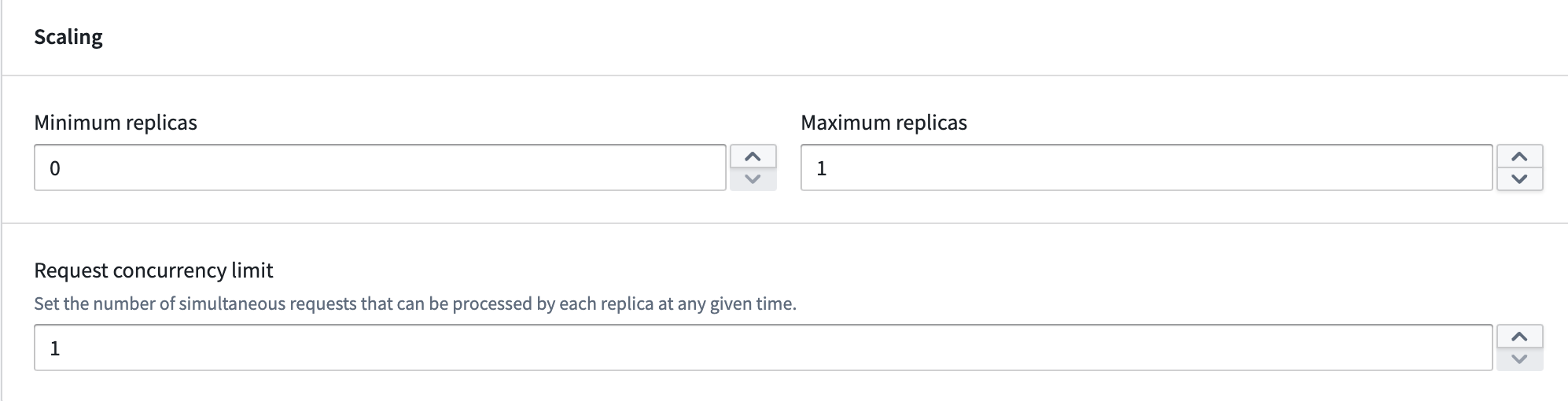
Minimum replicas
Non-zero minimum: Set the minimum number of replicas to greater than zero to ensure that at least that many instances of your application will be running at all times, even during periods of inactivity. Zero minimum: Set the minimum to zero to allow your application to scale down to zero replicas when there are no active requests. However, your application will immediately scale up from zero when a request is received, upon initial deployment, and whenever load is predicted.
Maximum replicas
- Set the highest number of active replicas for horizontal scaling.
- Ensure resource allocation stays within desired boundaries, prevent excessive costs, and protect against uncontrolled scaling due to traffic spikes.
Concurrency limit
The concurrency limit defines the maximum number of requests a single replica can process simultaneously. It represents the parallel processing capacity of each replica. For example, a concurrency limit of three means each replica can handle up to three queries at the same time. The default setting is one, meaning each replica processes requests sequentially.
If you are using one of the SDKs, this concurrency is built in for you. However, if you are building a custom client, this value can be obtained from the MAX_CONCURRENT_TASKS environment variable.
Autoscaling
Autoscaling adjusts the number of active replicas of your model based on the current workload. In addition to setting minimum and maximum replica limits, you can configure the scale-up load threshold, scale-down load threshold, and delays to control how and when scaling occurs.
Load thresholds
Load thresholds determine when autoscaling adds or removes replicas. The load is calculated using the following formula:
current running job count / (current replica count * concurrency limit)
Both the scale-up and scale-down thresholds must be between 0.0 and 1.0.
Scale-up load threshold
The scale-up load threshold defines the load level at which the deployment adds a replica. When the calculated load is greater than or equal to this threshold for the duration of the scale-up delay, the deployment scales up by one replica.
The default scale-up load threshold is 0.75. The scale-up load threshold cannot be lower than the scale-down load threshold.
Scale-down load threshold
The scale-down load threshold defines the load level at which the deployment removes a replica. When the calculated load falls below this threshold for the duration of the scale-down delay, the deployment scales down by one replica.
The default scale-down load threshold is 0.75. The scale-down load threshold cannot exceed the scale-up load threshold.
Delays
Delays control how long the deployment must remain above or below a load threshold before a scaling action is triggered. Configuring delays helps prevent unnecessary scaling events caused by brief fluctuations in load.
Scale-up delay
The scale-up delay is the amount of time the deployment must be oversubscribed (at or above the scale-up load threshold) before an additional replica is added. The default scale-up delay is one minute. The scale-up delay must be at most as high as the scale-down delay.
Scale-down delay
The scale-down delay is the amount of time the deployment must be undersubscribed (below the scale-down load threshold) before a replica is removed. The default scale-down delay is 30 minutes.
Predictive scaling
Compute modules feature predictive scaling by tracking historic query load for your deployment. This system attempts to preemptively scale up to meet anticipated demand. If the prediction is inaccurate, the system will adjust and scale down. Predictive scaling respects your configured maximum number of replicas, so be sure to monitor your deployment's scaling over time and adjust your settings accordingly.
Scheduled overrides
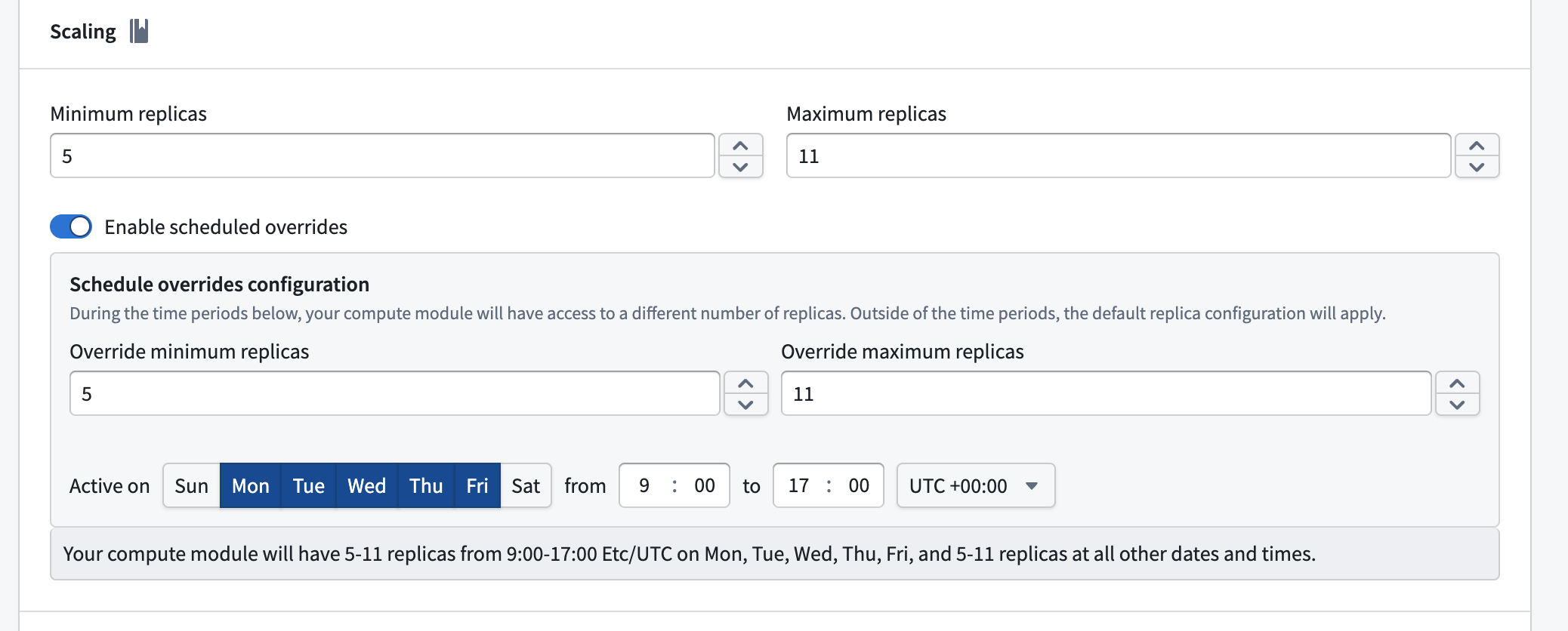
You can schedule overrides to your minimum and maximum replica configuration for specific days and times during the week. This is useful when you expect predictable changes in demand, such as higher traffic during business hours.
To configure a scheduled override, enable the Enable scheduled overrides toggle in the Scaling section. This reveals the Schedule overrides configuration panel, where you can set the following:
- Override minimum replicas: The minimum number of replicas during the scheduled period.
- Override maximum replicas: The maximum number of replicas during the scheduled period.
- Active on: The days of the week that the override will be applied.
- Time range: The start and end time for the override, along with the timezone.
Outside of the configured time periods, the default replica configuration applies. Currently, only one scheduled override is supported.
中文翻译
扩缩容
计算模块提供自动水平扩缩容能力,助您高效管理部署资源。您可以配置副本数量范围并设置每个副本的并发限制,这两项参数均会影响扩缩容行为。
最小副本数
非零最小值: 将最小副本数设置为大于零,可确保即使在无活动期间,您的应用也始终运行至少指定数量的实例。 零最小值: 将最小值设为零,允许应用在无活动请求时缩容至零副本。但收到请求、初始部署或预测到负载时,应用会立即从零开始扩容。
最大副本数
- 设置水平扩缩容时活跃副本的最高数量。
- 确保资源分配保持在预期范围内,防止成本超支,并避免因流量激增导致失控扩缩容。
并发限制
并发限制定义单个副本可同时处理的最大请求数,代表每个副本的并行处理能力。例如,并发限制为3表示每个副本可同时处理最多三个查询。默认设置为1,即每个副本按顺序处理请求。
若使用任一SDK,此并发功能已内置集成。但若您正在构建自定义客户端,可通过MAX_CONCURRENT_TASKS环境变量获取该值。
自动扩缩容
自动扩缩容根据当前工作负载调整模型的活跃副本数量。除设置最小/最大副本限制外,您还可配置扩容负载阈值、缩容负载阈值及延迟时间,以控制扩缩容的触发方式与时机。
负载阈值
负载阈值决定自动扩缩容何时增加或移除副本。负载通过以下公式计算:
当前运行任务数 / (当前副本数 × 并发限制)
扩容与缩容阈值均需在0.0至1.0之间。
扩容负载阈值
扩容负载阈值定义触发部署增加副本的负载水平。当计算负载在扩容延迟期间持续大于或等于该阈值时,部署将增加一个副本。
默认扩容负载阈值为0.75。扩容负载阈值不能低于缩容负载阈值。
缩容负载阈值
缩容负载阈值定义触发部署移除副本的负载水平。当计算负载在缩容延迟期间持续低于该阈值时,部署将减少一个副本。
默认缩容负载阈值为0.75。缩容负载阈值不能高于扩容负载阈值。
延迟时间
延迟时间控制部署在触发扩缩容操作前,需保持高于或低于负载阈值的持续时间。配置延迟有助于避免因负载短暂波动导致不必要的扩缩容事件。
扩容延迟
扩容延迟指部署在新增副本前,需保持过载状态(达到或超过扩容负载阈值)的持续时间。默认扩容延迟为一分钟。扩容延迟不得超过缩容延迟。
缩容延迟
缩容延迟指部署在移除副本前,需保持低负载状态(低于缩容负载阈值)的持续时间。默认缩容延迟为30分钟。
预测性扩缩容
计算模块通过追踪部署的历史查询负载实现预测性扩缩容。该系统会尝试预先扩容以满足预期需求。若预测不准确,系统将自动调整并缩容。预测性扩缩容会遵循您配置的最大副本数,因此请务必持续监控部署的扩缩容情况,并相应调整设置。
定时覆盖
您可以针对每周特定日期和时间,设置最小/最大副本配置的定时覆盖。当您预期需求出现可预测变化时(例如工作时段流量更高),此功能尤为实用。
要配置定时覆盖,请在扩缩容部分启用启用定时覆盖开关。此时将显示定时覆盖配置面板,您可设置以下参数:
- 覆盖最小副本数: 定时时段内的最小副本数量。
- 覆盖最大副本数: 定时时段内的最大副本数量。
- 生效日期: 覆盖规则适用的每周天数。
- 时间范围: 覆盖规则的开始与结束时间,以及对应时区。
在配置时段之外,将应用默认副本配置。目前仅支持单个定时覆盖。