Sources(数据源(Sources))
Compute modules in Foundry operate under a "zero trust" security model, ensuring maximum isolation and security. By default, these modules lack any external network access, including access to other Foundry services. This strict isolation is crucial for maintaining a secure environment.
To enable external network access for your compute module, you must explicitly configure a source through the Data Connection application. Sources also allow secure storage of credentials needed to access external systems for use in your compute module. The following sections outline the process of using sources within your compute module as a means of packaging network policies and credentials.
Add a source to your compute module
Create a source in Data Connection
- Create a source in the Data Connection application, attaching any required network policies and secrets.
-
Ensure the following configurations:
-
The source must be in the same Project as your compute module.
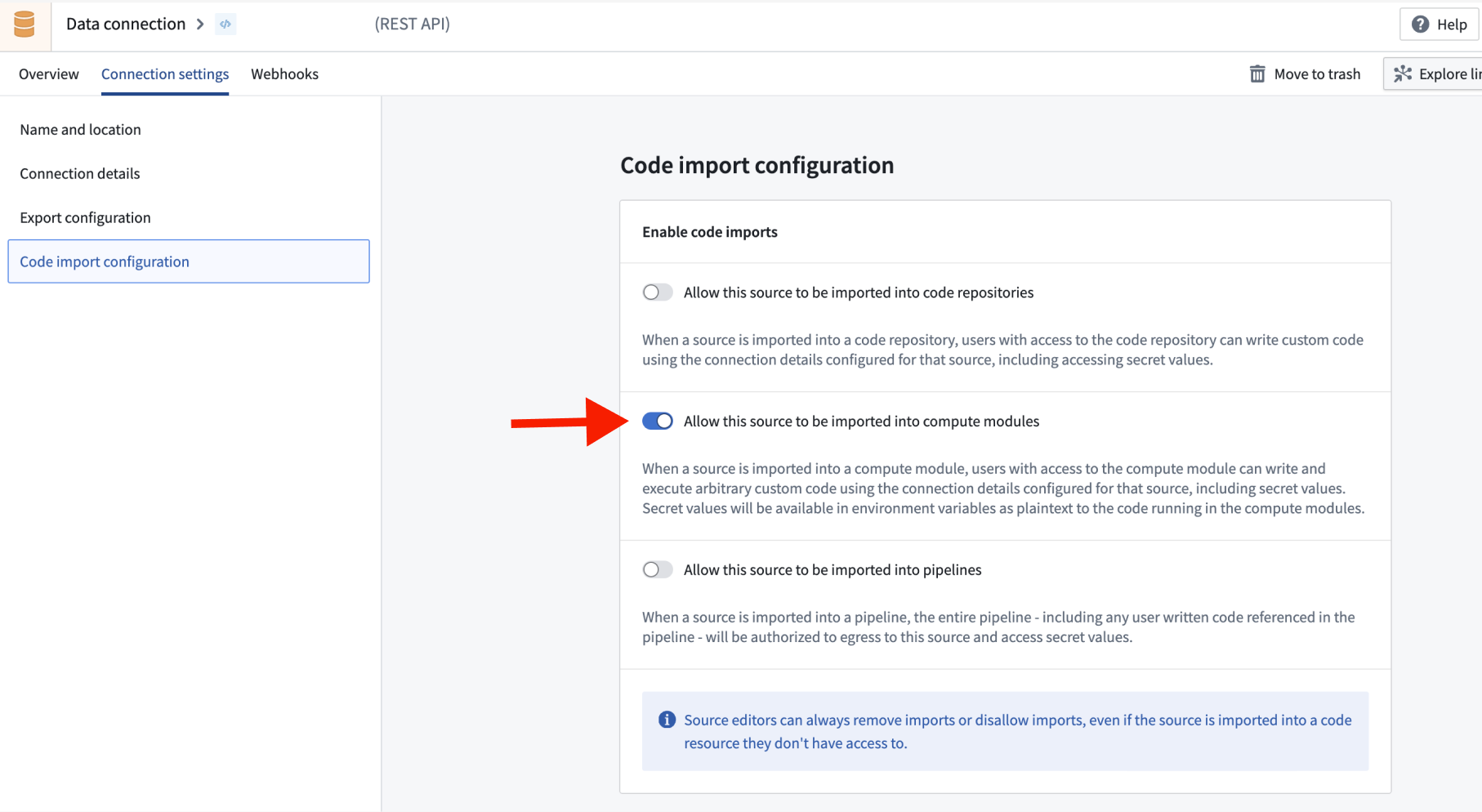
- In the Code import configuration tab, choose to Allow this source to be imported into compute modules.
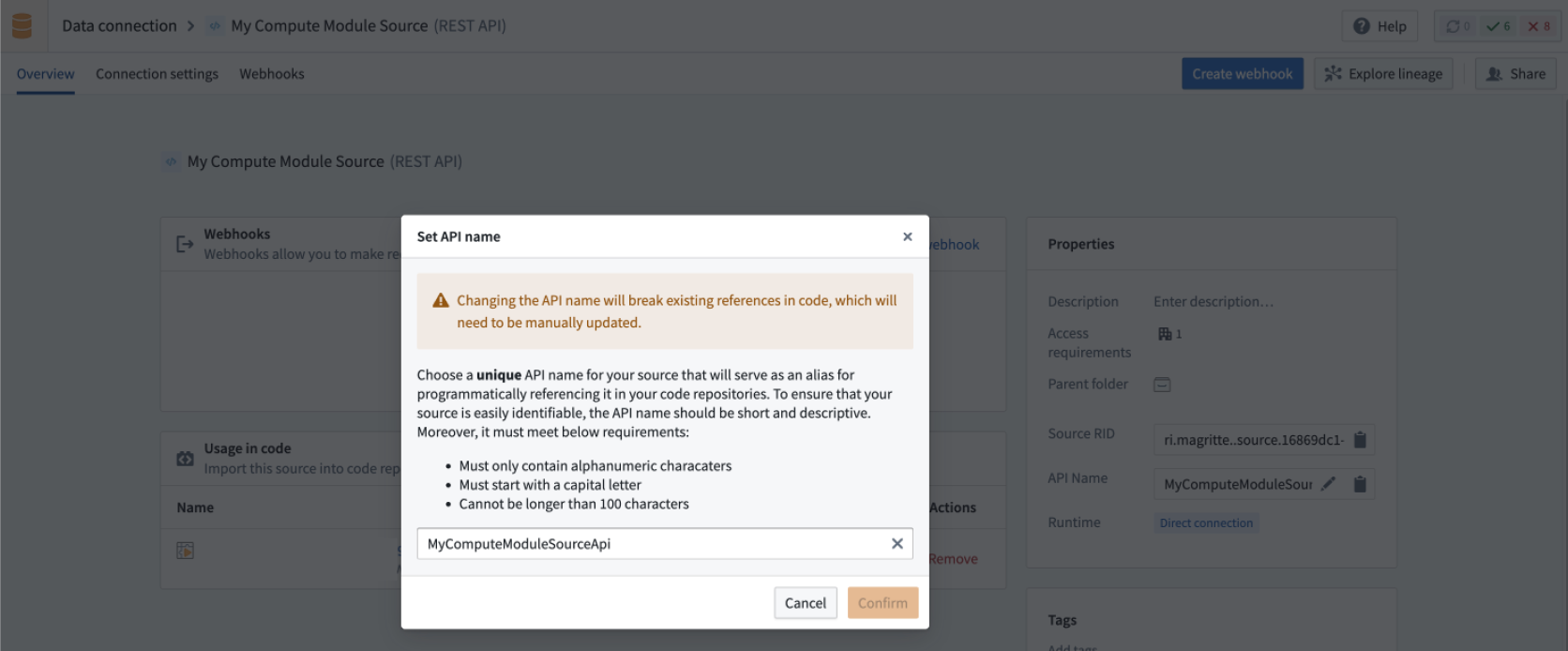
- Add an API name for the source that you will use to access it from your compute module.
Add the source to the compute module configuration
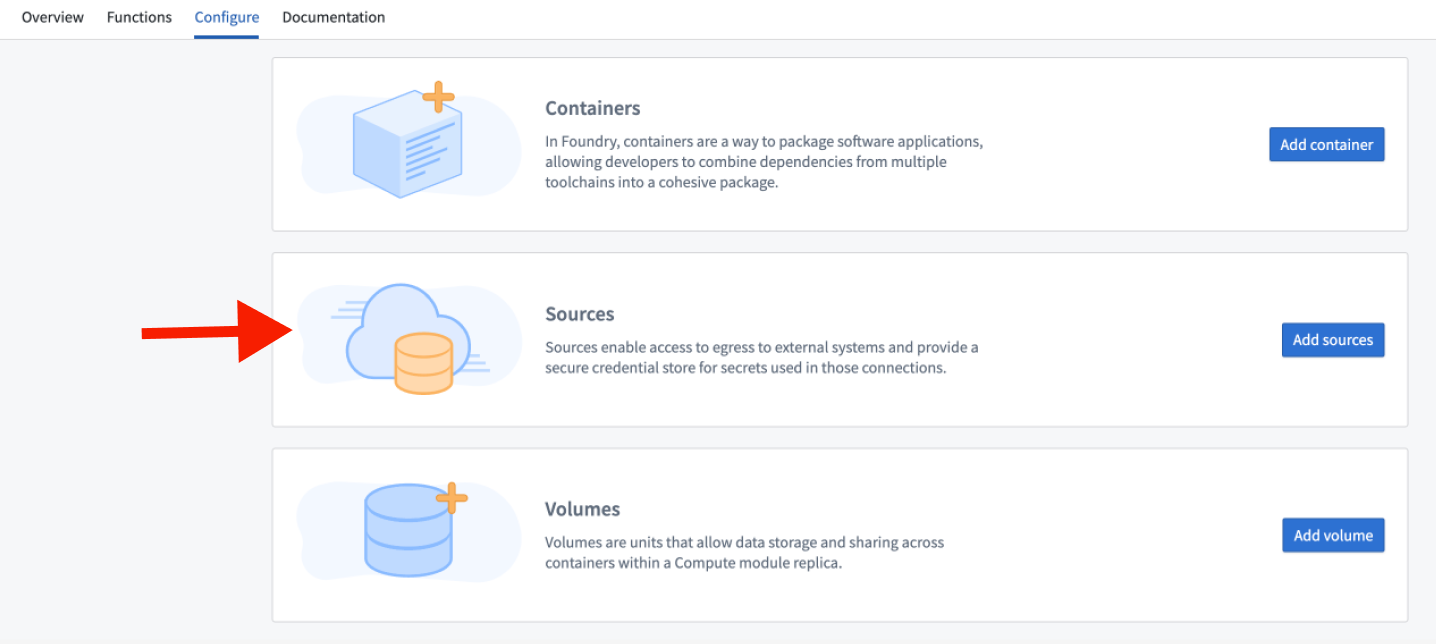
In your compute module, select Configure > Sources > Add Sources.
Access source credentials within a compute module
When a compute module launches, source credentials are mounted as JSON in a file where the file path is contained by the SOURCE_CREDENTIALS environment variable. To access these credentials, perform the following:
- Read the file pointed to by the
SOURCE_CREDENTIALSenvironment variable. - Parse the contents as a JSON dictionary.
- Access specific credentials first by specifying the source's API name, then the secret's name.
:::callout{theme="warning"}
Some sources, like REST sources, require an additionalSecret prefix before the specified secret's name (for example, additionalSecretMySecretName).
:::
```python tab="Python" import json import os
with open(os.environ['SOURCE_CREDENTIALS'], 'r') as f: credentials = json.load(f)
Access a specific secret (when using a REST source, secrets are prefixed with 'additionalSecret')
secret = credentials["```javascript tab="Node.js"
const credentials = require(process.env.SOURCE_CREDENTIALS);
// Access a specific secret (when using a REST source, secrets are prefixed with 'additionalSecret')
const secret = credentials["<Source API Name>"]["<Secret Name>"];
You can also access source configuration details, including connection URLs, through the SOURCE_CONFIGURATIONS_PATH environment variable:
```python tab="Python" import json import os
with open(os.environ['SOURCE_CONFIGURATIONS_PATH'], 'r') as f: credentials = json.load(f)
Access a specific secret
secrets = credentials["secrets"] url = credentials["httpConnectionConfig"]["url"]
```javascript tab="Node.js"
const credentials = require(process.env.SOURCE_CONFIGURATIONS_PATH);

const url = credentials["httpConnectionConfig"]["url"];
You can use the compute module SDK ↗ to simplify this process. See the section below for details.
Python Compute Module SDK
The compute module SDK ↗ provides a simplified interface for accessing sources and their credentials in Python. Instead of manually reading environment variables and parsing JSON, you can use the SDK to retrieve sources, secrets, and HTTPS connections directly.
To use the SDK, install the sources extra and import get_source from the compute_modules.sources_v2 module:
pip install foundry-compute-modules[sources]
Then, pass the API name of your source:
from compute_modules.sources_v2 import get_source
from external_systems.sources import Source

source: Source = get_source("<SOURCE_API_NAME>")

# Retrieving a secret
secret = source.get_secret("<SECRET_NAME>")

# Making an HTTPS request
https_connection = source.get_https_connection()
client = https_connection.get_client()
url = https_connection.url

response = client.get(url).text
The get_source function returns a Source object that provides the following methods:
get_secret("<SECRET_NAME>"): Retrieves a specific secret by name from the source.get_https_connection(): Returns an HTTPS connection object configured with the source's network policies and credentials. Useget_client()on the connection to obtain an HTTP client andurlto retrieve the base URL.
Manage sources
To add or remove sources on your compute module, you must first stop the compute module. You cannot add or remove a source if the compute module is running. Additionally, changes to network policies on the source require a full restart of the compute module to apply. Changes to credentials will be reflected in a compute module rolling upgrade.
中文翻译
数据源(Sources)
Foundry 中的计算模块(Compute modules)采用"零信任"安全模型运行,确保最大程度的隔离性和安全性。默认情况下,这些模块没有任何外部网络访问权限,包括对其他 Foundry 服务的访问。这种严格的隔离对于维护安全环境至关重要。
要为计算模块启用外部网络访问,您必须通过数据连接(Data Connection)应用显式配置数据源。数据源还允许安全存储访问外部系统所需的凭证,供计算模块使用。以下章节概述了在计算模块中使用数据源来封装网络策略和凭证的流程。
向计算模块添加数据源
在数据连接中创建数据源
- 在数据连接应用中创建数据源,并附加所需的网络策略和密钥(secrets)。
-
确保以下配置:
-
数据源必须与计算模块位于同一项目(Project)中。
- 在代码导入(Code import)配置选项卡中,选择允许将此数据源导入计算模块。
- 为数据源添加一个API名称(API name),用于从计算模块中访问该数据源。
将数据源添加到计算模块配置
在计算模块中,选择配置(Configure)> 数据源(Sources)> 添加数据源(Add Sources)。
在计算模块中访问数据源凭证
当计算模块启动时,数据源凭证会以JSON格式挂载到一个文件中,该文件的路径由SOURCE_CREDENTIALS环境变量指定。要访问这些凭证,请执行以下操作:
- 读取
SOURCE_CREDENTIALS环境变量指向的文件。 - 将内容解析为JSON字典。
- 先指定数据源的API名称,再指定密钥名称,以访问特定凭证。
:::callout{theme="warning"}
某些数据源(如REST数据源)需要在指定的密钥名称前添加additionalSecret前缀(例如,additionalSecretMySecretName)。
:::
```python tab="Python" import json import os
with open(os.environ['SOURCE_CREDENTIALS'], 'r') as f: credentials = json.load(f)
访问特定密钥(使用REST数据源时,密钥前需添加'additionalSecret'前缀)
secret = credentials["<数据源API名称>"]["<密钥名称>"]
```javascript tab="Node.js"
const credentials = require(process.env.SOURCE_CREDENTIALS);

// 访问特定密钥(使用REST数据源时,密钥前需添加'additionalSecret'前缀)
const secret = credentials["<数据源API名称>"]["<密钥名称>"];
您还可以通过SOURCE_CONFIGURATIONS_PATH环境变量访问数据源配置详情,包括连接URL:
```python tab="Python" import json import os
with open(os.environ['SOURCE_CONFIGURATIONS_PATH'], 'r') as f: credentials = json.load(f)
访问特定密钥
secrets = credentials["secrets"] url = credentials["httpConnectionConfig"]["url"]
```javascript tab="Node.js"
const credentials = require(process.env.SOURCE_CONFIGURATIONS_PATH);

const url = credentials["httpConnectionConfig"]["url"];
您可以使用计算模块SDK ↗来简化此过程。详情请参见下文。
Python计算模块SDK
计算模块SDK ↗提供了在Python中访问数据源及其凭证的简化接口。您无需手动读取环境变量和解析JSON,可以直接使用SDK检索数据源、密钥和HTTPS连接。
要使用SDK,请安装sources附加组件,并从compute_modules.sources_v2模块导入get_source:
pip install foundry-compute-modules[sources]
然后,传入数据源的API名称:
from compute_modules.sources_v2 import get_source
from external_systems.sources import Source

source: Source = get_source("<数据源API名称>")

# 检索密钥
secret = source.get_secret("<密钥名称>")

# 发起HTTPS请求
https_connection = source.get_https_connection()
client = https_connection.get_client()
url = https_connection.url

response = client.get(url).text
get_source函数返回一个Source对象,该对象提供以下方法:
get_secret("<密钥名称>"):从数据源中按名称检索特定密钥。get_https_connection():返回一个已配置数据源网络策略和凭证的HTTPS连接对象。使用连接上的get_client()获取HTTP客户端,使用url获取基础URL。
管理数据源
要在计算模块上添加或移除数据源,必须先停止计算模块。如果计算模块正在运行,则无法添加或移除数据源。此外,对数据源网络策略的更改需要完全重启计算模块才能生效。凭证的更改将在计算模块滚动升级(rolling upgrade)中反映。