Compute module usage and pricing(计算模块使用与定价)
Compute modules enables you to deploy interactive containers. To understand their compute usage you should know that these deployments can horizontally scale up and down automatically, and may do so even without requests due to predictive autoscaling. You might consume usage anytime you click build and the deployment is running.
When running any compute usage consumed will be attributed to the compute module itself. Compute usage is consumed any time you have a "replica" starting or running, and will not be consumed when you have no replicas starting or running. How much usage is consumed depends on the number of replicas and their associated resource usage over time.
To best understand your usage you should know that a compute module can have many replicas, and each replica can have many containers.
Pricing
Compute module usage is tracked as Foundry compute-seconds. Review our usage types documentation for more details.
Compute seconds are measured as long as a replica is starting or active. There are a few factors used to determine compute seconds:
- The number of vCPU’s per replica
- The GiB of RAM per replica
- The number of GPUs per replica
- The number of replicas
- The number of replicas at any given time is dynamic, but they all have the same resource configuration
When paying for Foundry usage, the default usage rates are the following:
| vCPU / GPU | Usage Rate |
|---|---|
| vCPU | 0.2 |
| T4 GPU | 1.2 |
| V100 GPU | 3 |
| A100 GPU | 1.3 |
| A10G GPU | 1.5 |
| L4 GPU | 2.1 |
| H100 GPU | 4.7 |
If you have an enterprise contract with Palantir, contact your Palantir representative before proceeding with compute usage calculations.
vcpu_compute_seconds = max(vCPUs_per_replica, GiB_RAM_per_replica / 7.5) * num_replicas * vcpu_usage_rate * time_active_in_seconds
The following formula measures GPU compute seconds:
gpu_compute_seconds = GPUs_per_replica * num_replicas * gpu_usage_rate * time_active_in_seconds
Scaling configuration for compute modules
You can configure the minimum and maximum number of allowed replicas directly on our configure page.
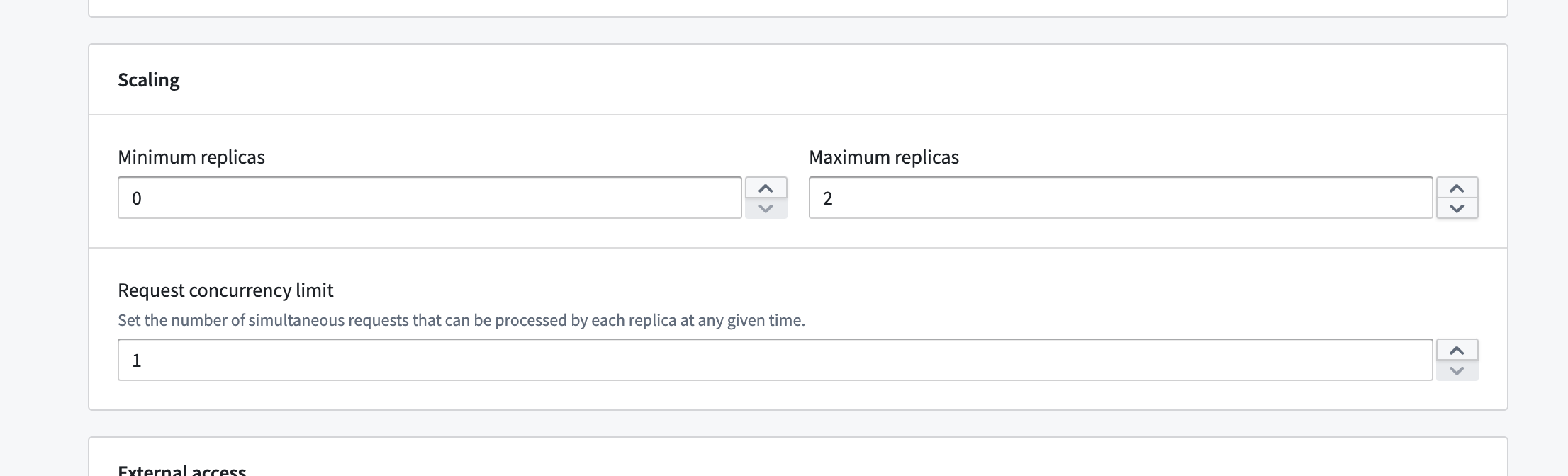
This range allows you to have some control over the automatic horizontal scaling. Essentially, we will be allowed to scale at any time to any number of replicas within the range you configure. You can also set concurrency limits per replica, which will have an impact on scaling. A lower concurrency limit may lead to more aggressive horizontal scaling under the same load.
If you set the minimum number of replicas to a non-zero value you will consume compute usage even if you are not actively using your deployment. If you set minimum to zero, and no request has been sent to your deployment in some time we can scale down to zero and in that case you will not consume usage. However we will immediately scale up from zero anytime a request is sent, immediately when you deploy for the first time, and any time that we predict there might be load.
Compute modules have predictive scaling where we track historic query load for your deployment and attempts to scale up preemptively to meet predicted demand. If our prediction was inaccurate we will use it to refine our next predictions and we will scale down relatively quickly. This system respects your configured max number of replicas, so you should monitor your deployments scaling overtime and tune your scaling settings accordingly.
Resource configuration for compute modules
The Compute Modules application interface enables you to configure resources for each container on a per-replica basis. CPU, memory, and GPU resource requests and limits can all be configured per replica.
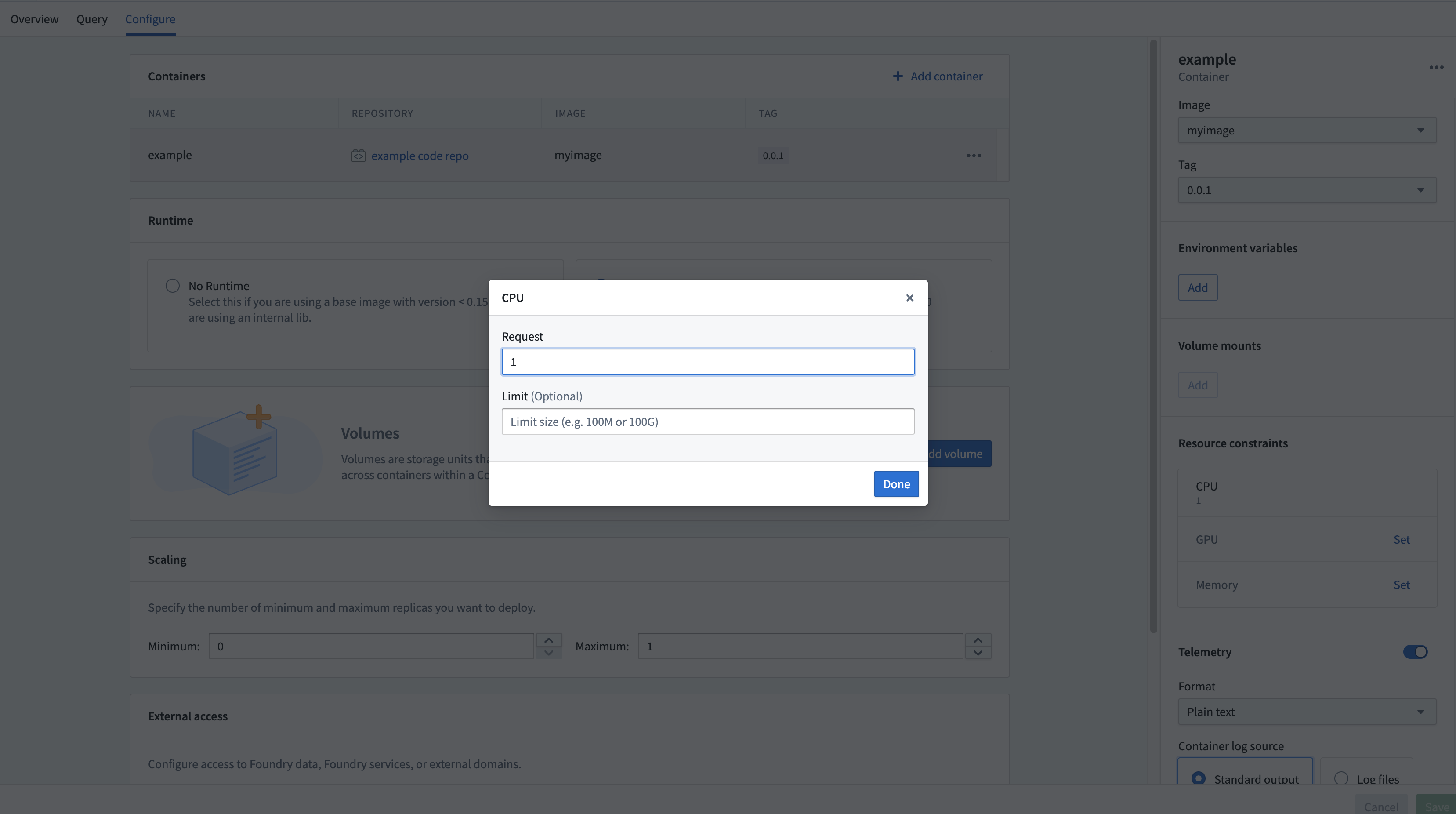
Setting these resources is optional; in the absence of configuration, the replica will default to 1 vCPU, 4 GB memory, and no GPU. Each replica will request the amount of configured resources, and will respect limits if set. This means if you use the default resources (1 vCPU and 4 GB memory and no limit) and you have four replicas, you may be consuming 4 vCPUs and 16 GB memory (though you could be consuming more or less depending on request load).
中文翻译
计算模块使用与定价
计算模块(Compute modules)使您能够部署交互式容器(interactive containers)。要了解其计算用量,您需要知道这些部署可以自动进行水平伸缩,并且由于预测性自动缩放(predictive autoscaling),即使在没有请求的情况下也可能发生伸缩。每当您点击构建(build)且部署正在运行时,都可能产生用量消耗。
当运行任何计算用量时,消耗的用量将归属于计算模块本身。 计算用量在您有"副本(replica)"启动或运行时才会被消耗,当没有副本启动或运行时则不会消耗。消耗的用量取决于副本数量及其随时间变化的关联资源使用情况。
为了更好地理解您的用量,您需要知道一个计算模块可以拥有多个副本,而每个副本又可以拥有多个容器。
定价
计算模块用量以 Foundry 计算秒数(Foundry compute-seconds)进行追踪。请查阅我们的用量类型文档了解更多详情。
只要副本处于启动或活动状态,就会计算计算秒数。决定计算秒数的因素包括:
- 每个副本的 vCPU 数量
- 每个副本的 GiB 内存
- 每个副本的 GPU 数量
- 副本数量
- 任何给定时间的副本数量是动态的,但它们都具有相同的资源配置
在支付 Foundry 用量费用时,默认用量费率如下:
| vCPU / GPU | 用量费率 |
|---|---|
| vCPU | 0.2 |
| T4 GPU | 1.2 |
| V100 GPU | 3 |
| A100 GPU | 1.3 |
| A10G GPU | 1.5 |
| L4 GPU | 2.1 |
| H100 GPU | 4.7 |
如果您与 Palantir 签订了企业合同,请在进行计算用量计算前联系您的 Palantir 代表。
vcpu_compute_seconds = max(vCPUs_per_replica, GiB_RAM_per_replica / 7.5) * num_replicas * vcpu_usage_rate * time_active_in_seconds
以下公式用于衡量 GPU 计算秒数:
gpu_compute_seconds = GPUs_per_replica * num_replicas * gpu_usage_rate * time_active_in_seconds
计算模块的缩放配置
您可以直接在配置页面上配置允许的最小和最大副本数量。
这个范围让您能够对自动水平缩放进行一定程度的控制。本质上,我们可以在您配置的范围内随时将副本数量缩放到任意数值。您还可以设置每个副本的并发限制(concurrency limits),这会影响缩放行为。较低的并发限制可能导致在相同负载下更激进的水平缩放。
如果您将最小副本数设置为非零值,即使没有主动使用部署,也会消耗计算用量。如果将最小值设置为零,并且在一段时间内没有向部署发送请求,我们可以缩容到零,在这种情况下您不会消耗用量。但是,当有请求发送时、当您首次部署时,以及当我们预测可能有负载时,我们会立即从零开始扩容。
计算模块具有预测性缩放功能,我们会跟踪部署的历史查询负载,并尝试抢先扩容以满足预测的需求。如果预测不准确,我们会利用这次经验优化下一次预测,并相对快速地缩容。该系统会尊重您配置的最大副本数,因此您应该持续监控部署的缩放情况,并相应调整缩放设置。
计算模块的资源配置
计算模块应用程序界面使您能够按副本为每个容器配置资源。CPU、内存和 GPU 资源请求(requests)和限制(limits)都可以按副本进行配置。
设置这些资源是可选的;如果没有配置,副本将默认使用 1 个 vCPU、4 GB 内存,且无 GPU。每个副本将请求配置的资源量,并在设置了限制的情况下遵守限制。这意味着如果您使用默认资源(1 个 vCPU 和 4 GB 内存且无限制)并拥有四个副本,您可能消耗 4 个 vCPU 和 16 GB 内存(不过实际消耗量可能因请求负载而有所增减)。