Volumes(卷(Volumes))
Volumes provide a method to share data between containers within a compute module replica. They enable more efficient storage by allowing volume size to be independent of the container root filesystem.
:::callout{theme="warning"} Volumes are ephemeral and do not persist data across replica restarts. All volume data is tied to the lifecycle of the replica. Do not rely on volumes for persistent state. :::
Volumes cannot share data between different replicas. Each replica has its own separate set of volumes.
Supported volume types
All volumes are ephemeral and are not intended for persistent storage. There are two supported volume types: empty directory and content directory.
Empty directory
An empty directory volume is created when a replica starts and exists for the duration of the replica lifespan. It is initially empty. All containers mounted to the volume can read and write the same files. The content is deleted when the replica terminates.
Use empty directory volumes when containers in the same replica need to exchange data at runtime.
Content directory
A content directory volume is pre-loaded with a predefined set of files when a replica starts. This is useful for separating environment-specific configuration from application code. Content directory volumes are read-only.
You must define the content before starting the compute module.
:::callout{theme="warning"} The total content size of a content directory volume cannot exceed 100KB. :::
Create a volume
- Navigate to the Configuration tab and scroll to the volumes section.
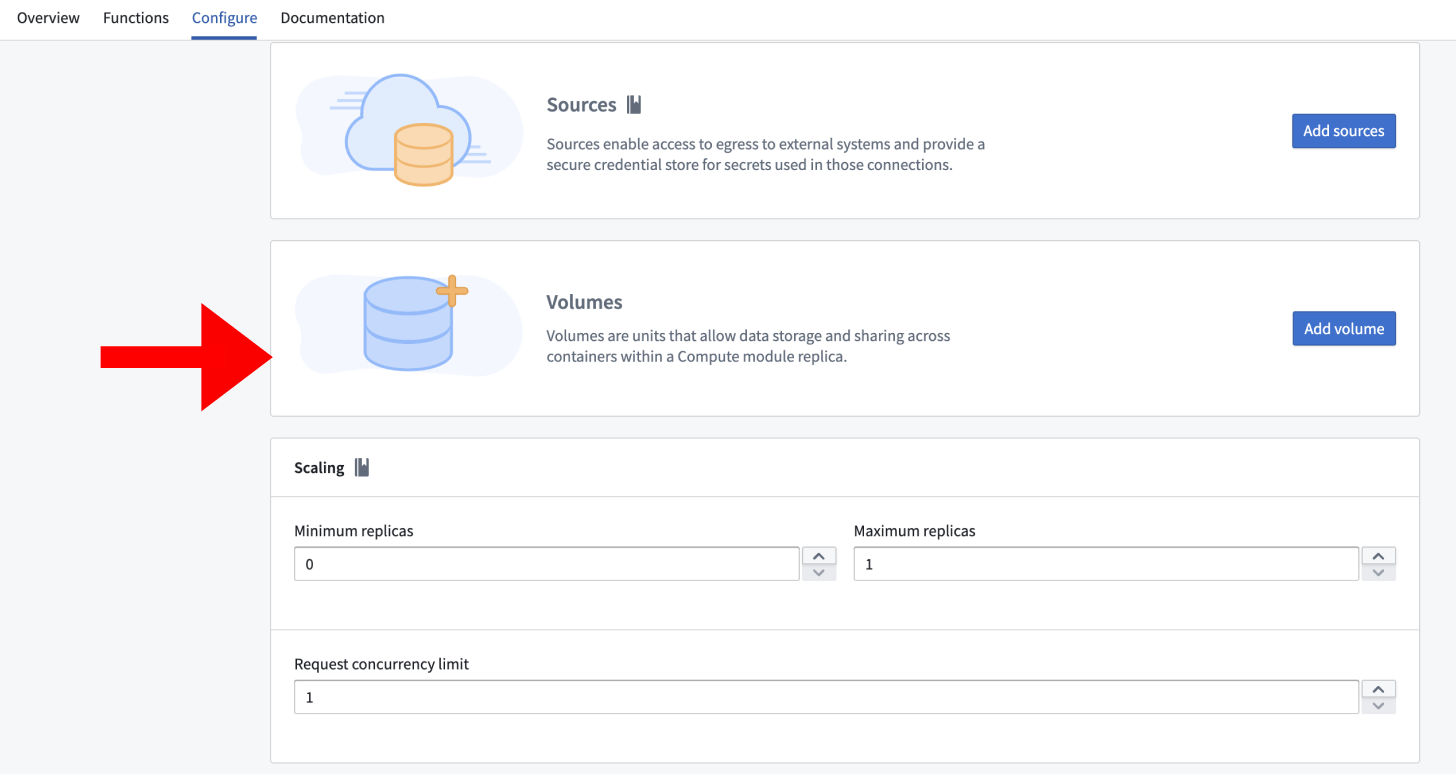
- Select Add Volume.
- Choose a name for the volume. The name must start with a letter and can only contain lowercase letters, numbers, and hyphens. The maximum length is 63 characters.
- By default, an empty directory volume is created.
Change to a content directory type
To change a volume from an empty directory to a content directory:
- Select the volume to open its settings.
- Change the type from Empty directory to Content directory.
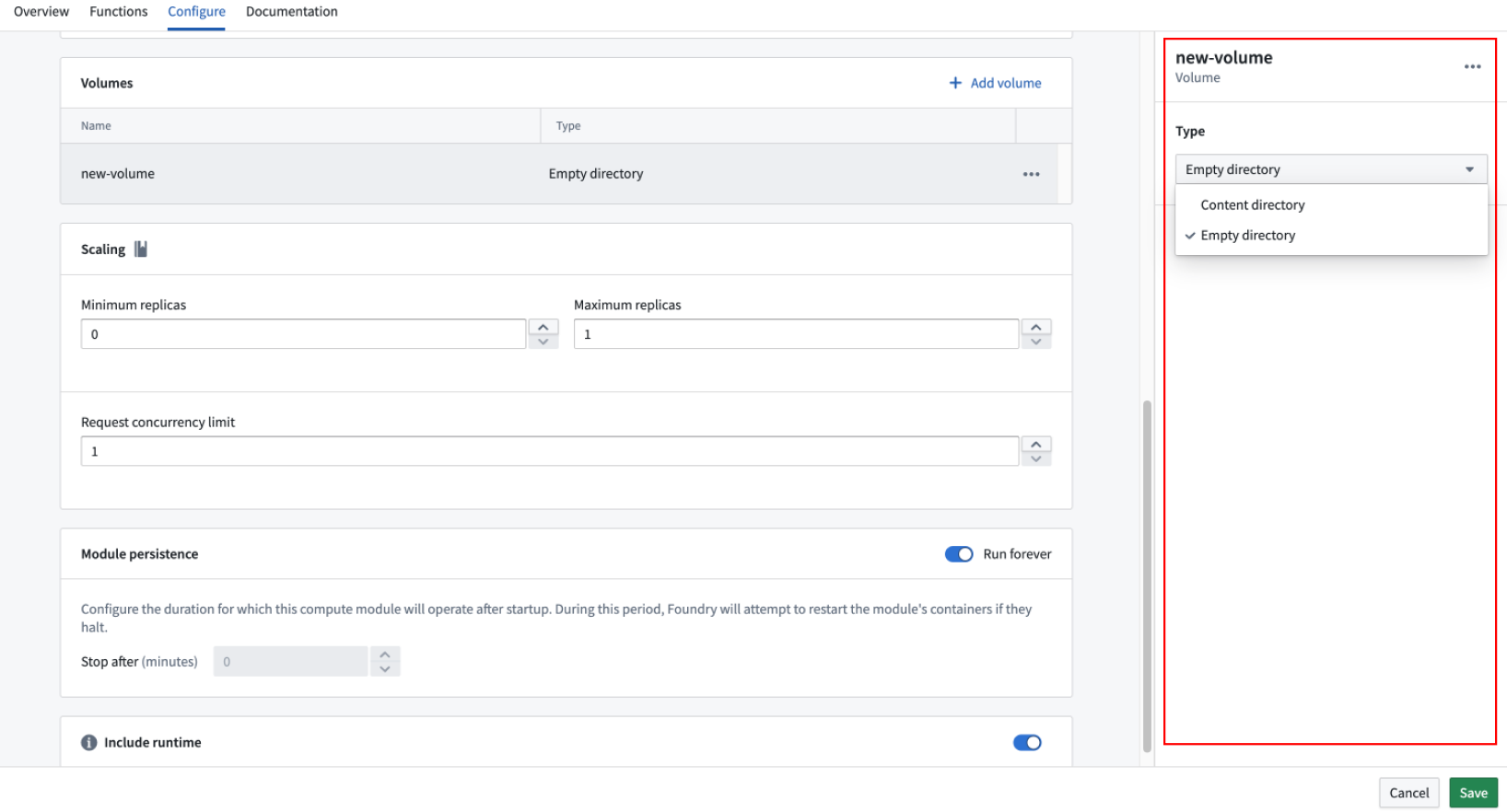
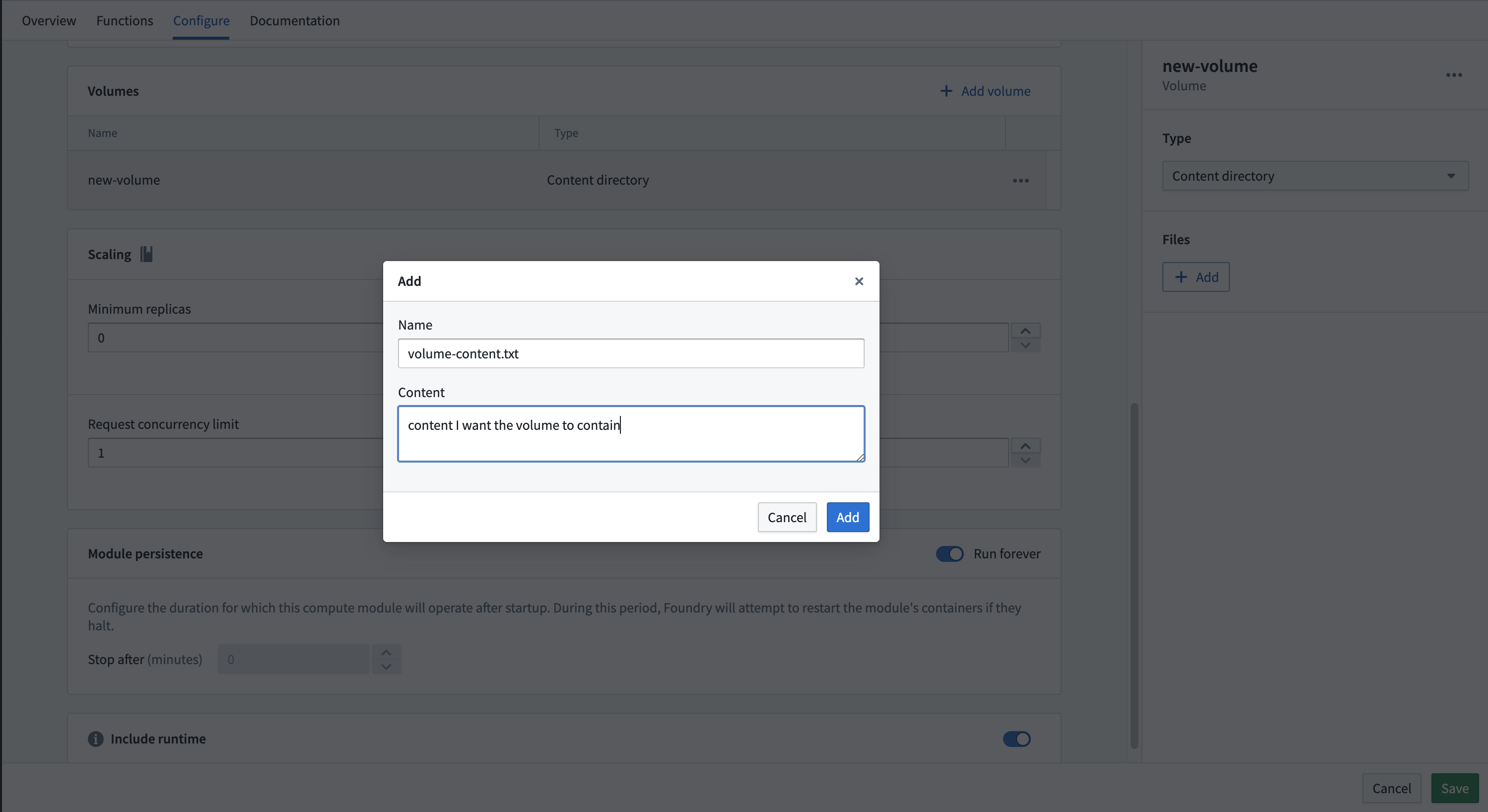
- Select + Add to add files.
- Fill in the Name field with the filename and the Content field with the plaintext content of the file.
- Select Save.
Mount a volume to a container
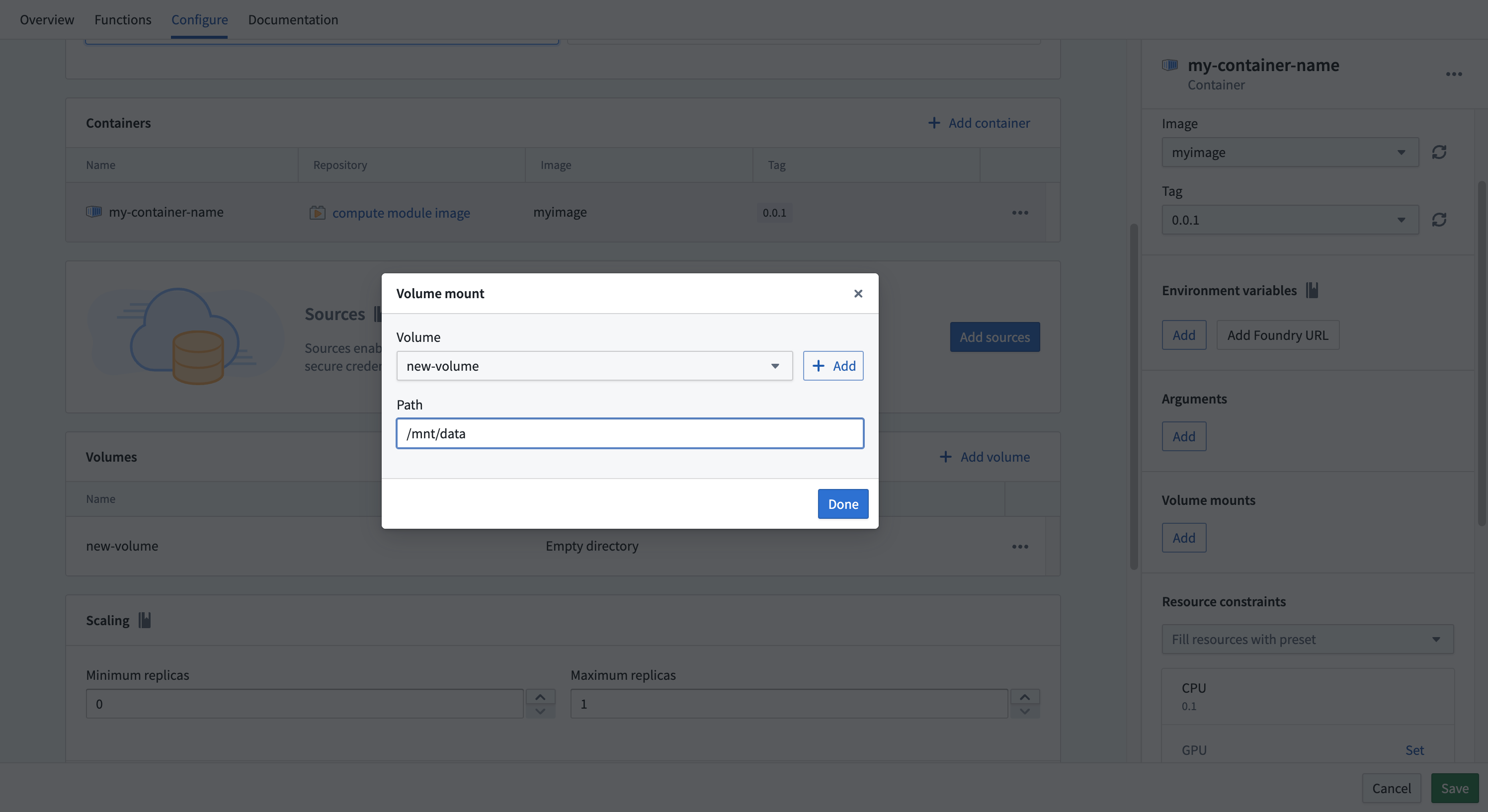
After creating a volume, you must mount it to a container before the container can access it.
- Navigate to the Containers section.
- Select the container you want to mount the volume to.
- Find the Volume mounts section.
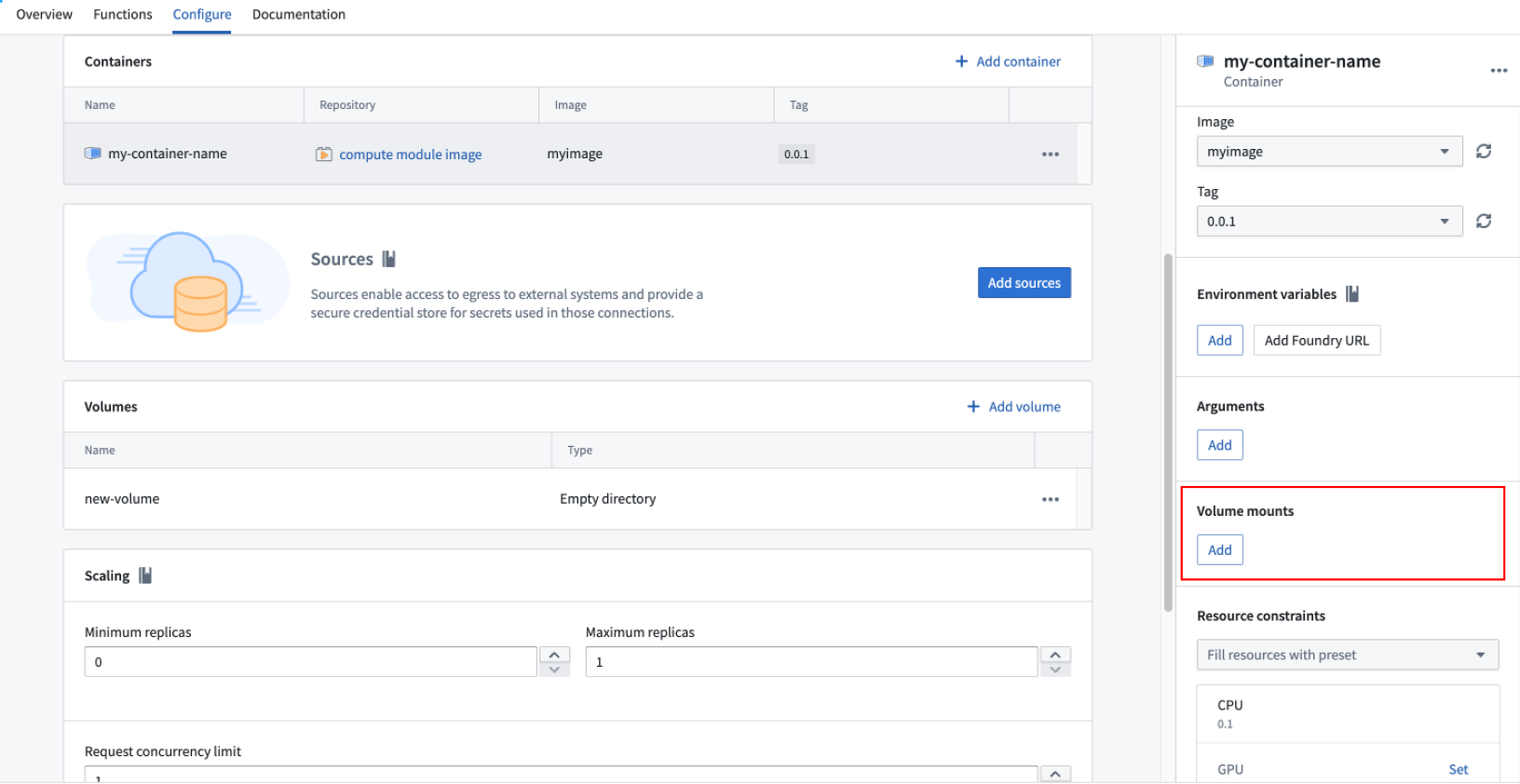
- Select Add and choose the volume.
- Specify the mount path. The mount path must be an absolute path and cannot be the root directory, for example,
/mnt/data. - Select Save.
Example use case
The following example demonstrates how to mount an Ontology object into an empty directory volume so that the data persists between function executions within the same replica. The volume is written to when the replica starts, and subsequent function calls read from the volume instead of reloading the data.
from compute_modules.annotations import function
import os
import json

# The following code runs when the replica starts up
# /mount/osdk was configured as the path to an empty volume
osdk_object = load_ontology_object()
write_to_empty_volume("/mount/osdk", osdk_object)

def load_ontology_object():
    # Code to load the ontology object
    # Replace with actual loading logic
    return {"example_key": "example_value"}

def write_to_empty_volume(path, obj):
    os.makedirs(os.path.dirname(path), exist_ok=True)
    with open(path, 'w') as f:
        json.dump(obj, f)

def read_from_volume(path):
    with open(path, 'r') as f:
        return json.load(f)

# Functions that read from the volume instead of reloading
@function
def use_object_set(ctx, event):
    osdk_object = read_from_volume("/mount/osdk")
    # Use the osdk_object as needed
Limitations
Review the following limitations when working with volumes:
- Persistent volumes are not supported. All volumes are ephemeral and tied to the replica lifecycle.
- Replicas have a maximum lifespan of 22 hours.
- Replicas may be replaced at any time by the platform.
- Do not rely on volumes for persistent state. Use Foundry datasets or other platform storage for data that must survive replica restarts.
中文翻译
卷(Volumes)
卷提供了一种在计算模块副本内的容器之间共享数据的方法。通过允许卷大小独立于容器根文件系统,卷能够实现更高效的存储。
:::callout{theme="warning"} 卷是临时性的,不会在副本重启后保留数据。所有卷数据都与副本的生命周期绑定。请勿依赖卷来保存持久化状态。 :::
卷无法在不同副本之间共享数据。每个副本都拥有自己独立的卷集合。
支持的卷类型
所有卷均为临时性,不适用于持久化存储。支持两种卷类型:空目录(empty directory) 和 内容目录(content directory)。
空目录
空目录卷在副本启动时创建,并在副本的整个生命周期内存在。初始状态为空。挂载到该卷的所有容器均可读写相同的文件。当副本终止时,其中的内容将被删除。
当同一副本中的容器需要在运行时交换数据时,请使用空目录卷。
内容目录
内容目录卷在副本启动时会预加载一组预定义的文件。这对于将特定环境的配置与应用程序代码分离非常有用。内容目录卷为只读。
您必须在启动计算模块之前定义好内容。
:::callout{theme="warning"} 内容目录卷的总内容大小不能超过 100KB。 :::
创建卷
- 导航至 配置(Configuration) 选项卡,滚动到卷部分。
- 选择 添加卷(Add Volume)。
- 为卷命名。名称必须以字母开头,且只能包含小写字母、数字和连字符。最大长度为 63 个字符。
- 默认情况下,会创建一个空目录卷。
更改为内容目录类型
要将卷从空目录更改为内容目录:
- 选择该卷以打开其设置。
- 将类型从 空目录(Empty directory) 更改为 内容目录(Content directory)。
- 选择 + 添加(+ Add) 来添加文件。
- 在 名称(Name) 字段中填写文件名,在 内容(Content) 字段中填写文件的纯文本内容。
- 选择 保存(Save)。
将卷挂载到容器
创建卷后,必须将其挂载到容器,容器才能访问该卷。
- 导航至 容器(Containers) 部分。
- 选择要挂载卷的容器。
- 找到 卷挂载(Volume mounts) 部分。
- 选择 添加(Add) 并选择卷。
- 指定挂载路径。挂载路径必须是绝对路径,且不能是根目录,例如
/mnt/data。 - 选择 保存(Save)。
示例用例
以下示例演示了如何将 Ontology 对象挂载到空目录卷中,以便数据在同一副本内的函数执行之间持久存在。该卷在副本启动时被写入,后续函数调用从卷中读取数据,而无需重新加载。
from compute_modules.annotations import function
import os
import json

# 以下代码在副本启动时运行
# /mount/osdk 被配置为空卷的路径
osdk_object = load_ontology_object()
write_to_empty_volume("/mount/osdk", osdk_object)

def load_ontology_object():
    # 加载 Ontology 对象的代码
    # 请替换为实际的加载逻辑
    return {"example_key": "example_value"}

def write_to_empty_volume(path, obj):
    os.makedirs(os.path.dirname(path), exist_ok=True)
    with open(path, 'w') as f:
        json.dump(obj, f)

def read_from_volume(path):
    with open(path, 'r') as f:
        return json.load(f)

# 从卷中读取数据而非重新加载的函数
@function
def use_object_set(ctx, event):
    osdk_object = read_from_volume("/mount/osdk")
    # 根据需要使用 osdk_object
限制
在使用卷时,请注意以下限制:
- 不支持持久化卷。所有卷均为临时性,并与副本生命周期绑定。
- 副本的最长生命周期为 22 小时。
- 平台可能随时替换副本。
- 请勿依赖卷来保存持久化状态。对于需要在副本重启后保留的数据,请使用 Foundry 数据集或其他平台存储。