Ontology-aware applications(本体感知应用(Ontology-aware applications))
Foundry contains a number of applications developed to operate natively on top of the Ontology. Together, these object-aware applications deliver a powerful analytical and operational platform that supports a range of use cases and user profiles.
To learn more about why setting up an Ontology and using object-aware applications is valuable, see this page.
This page provides a reference to the available applications, and explains when you should use each:
Application reference
Object Views
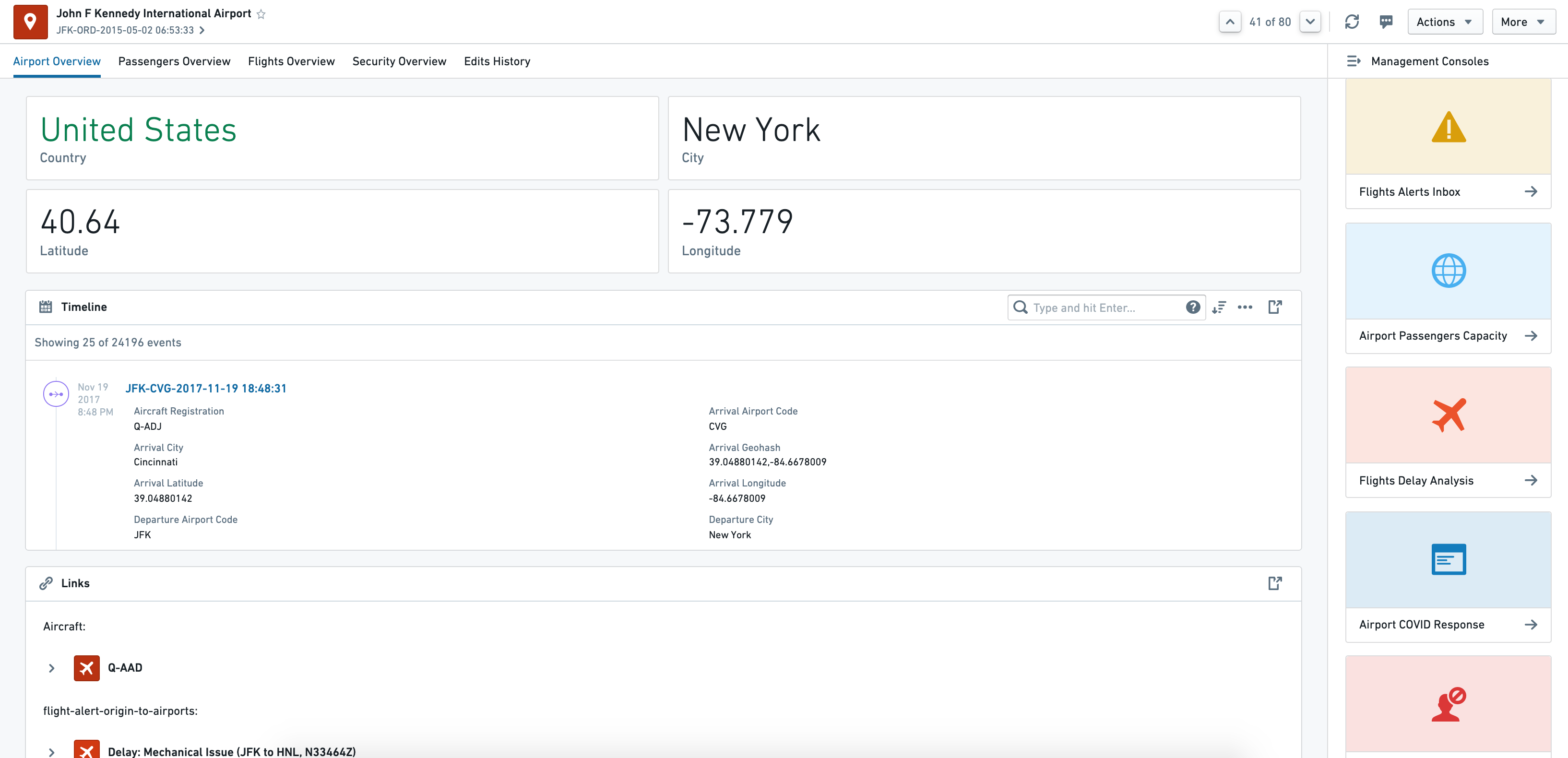
Object Views are a central hub for all information and workflows related to a particular object. This includes key "biographical data" about an object, any linked objects, key related metrics, and links to (or embedding of) key analyses, dashboards, and applications related to the object.
For example, the Airport object type object view might provide the following information for each Airport object:
- Biographical data such as
country,city,longitude,latitude, etc. - 360-degree view of all
Aircraftobjects andFlightobjects linked to theAirport - Embedded
Airport Covid Responseworkflow - Link to a
Root-Cause Analysisof aFlight delayevent related to theAirport
Object Explorer
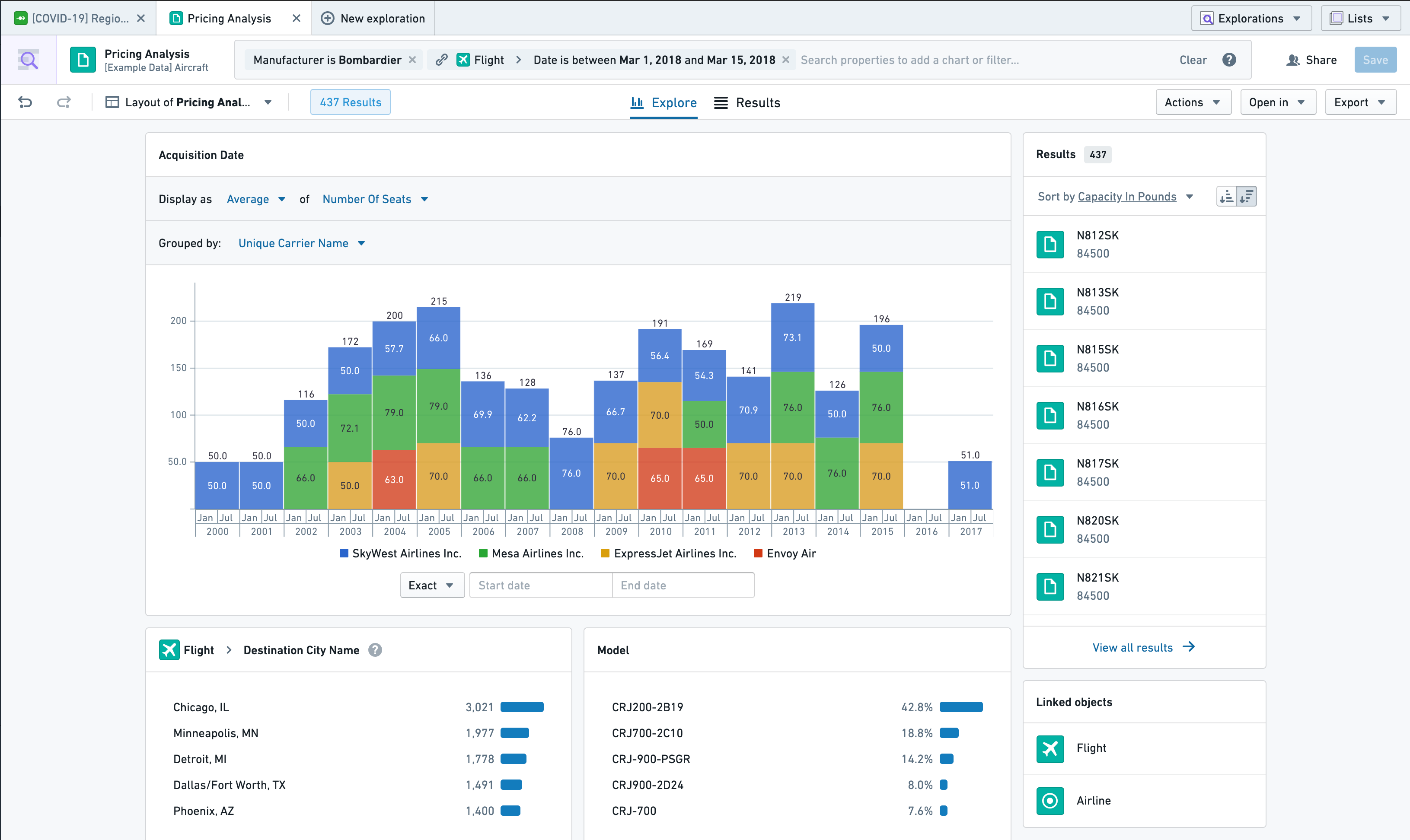
Object Explorer is a search and analysis tool for answering questions about anything in the Ontology layer. Users can visually compose search queries ranging from simple filters to Search Arounds to find objects of interest. From there, they can explore the resulting object sets using the exploration view or view them as a table of results. Additionally, users can compare and contrast object sets and take bulk Actions (for example, writeback) on the object set. Then, users can export the object sets or open them in compatible applications, such as Workshop.
The exploration view is a set of preset and configurable visualizations (such as charts or maps) that the user can further leverage to drill-down into specific subsets of objects. Object Explorer requires no pre-configuration and is geared towards less technical users.
Quiver
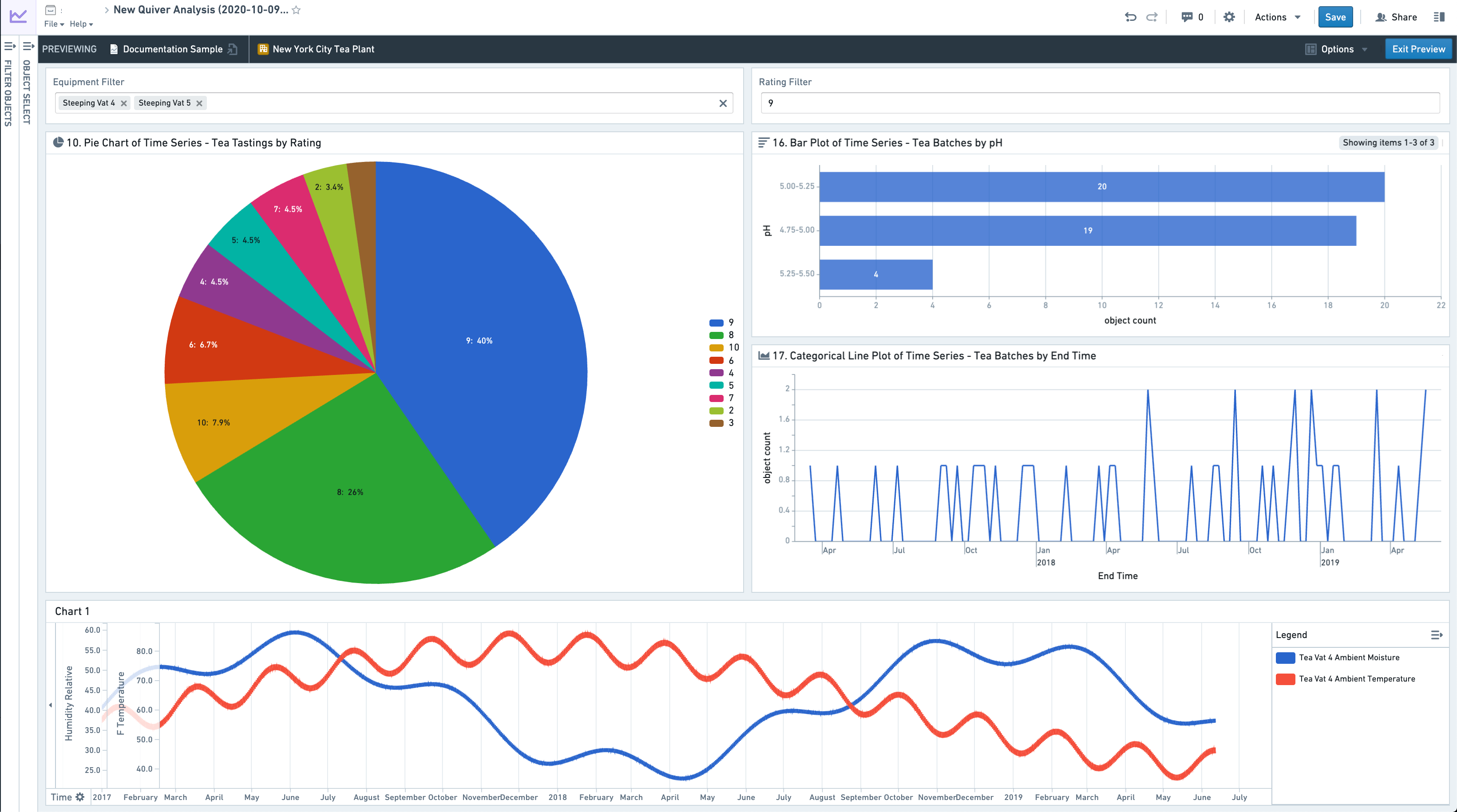
Quiver enables advanced analytical workflows in the Ontology layer through a visual point-and-click interface and a powerful charting library. Quiver can be used to support anything from simple linear drill-down analyses to highly-branched and complex analyses with aggregations and statistical functions. Quiver also supports native time series analysis. Quiver analyses can be templatized into read-only dashboards for broader consumption.
Workshop
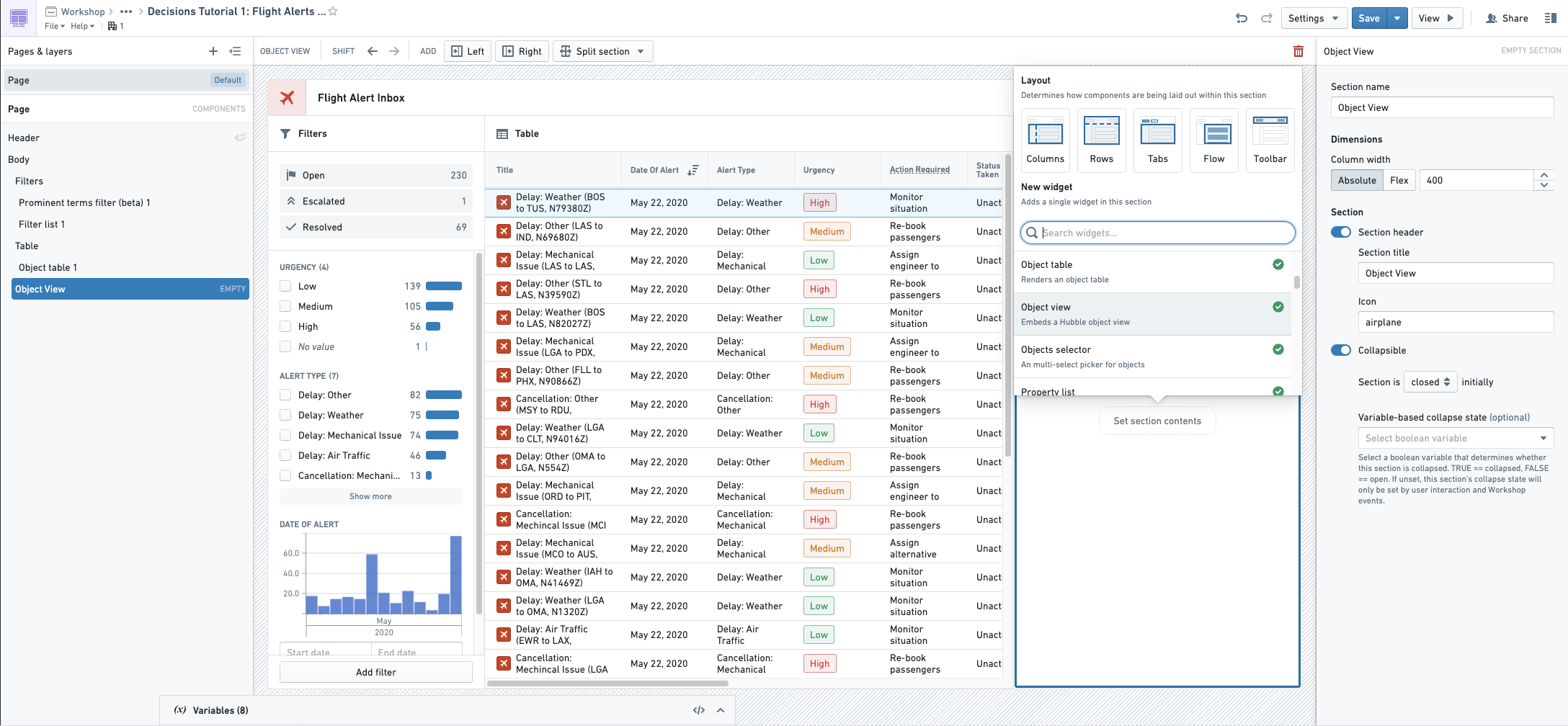
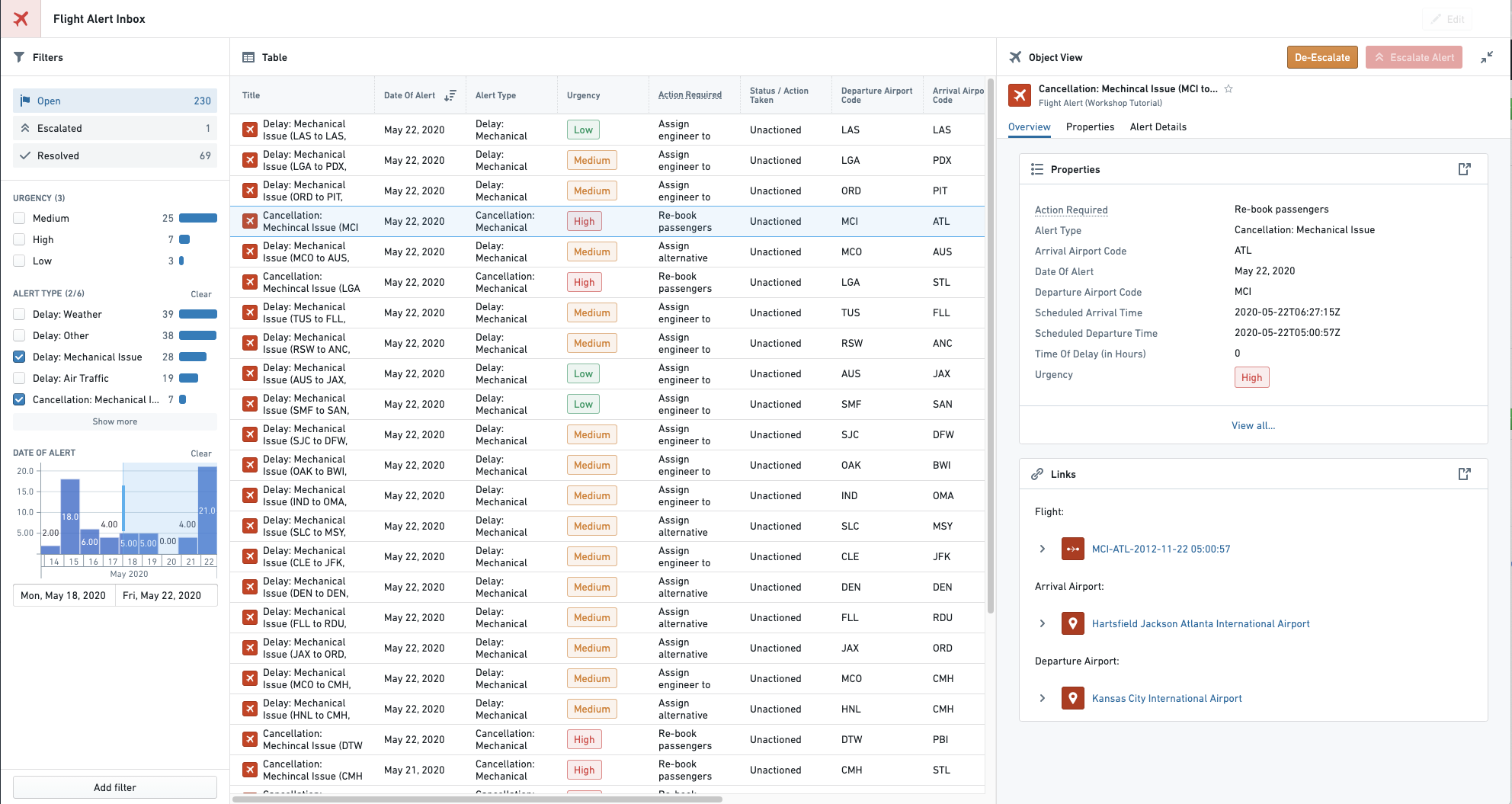
Workshop enables point-and-click code-less application-building natively on the Ontology layer. Applications built in Workshop are more dynamic and interactive than typical dashboards created in other point-and-click tools.
By leveraging high-quality Layouts and an easy-to-use but sophisticated Events system, Workshop applications aim to be as user-friendly and high-quality as custom React applications.
Workshop Editor View
Final Workshop Module
Slate
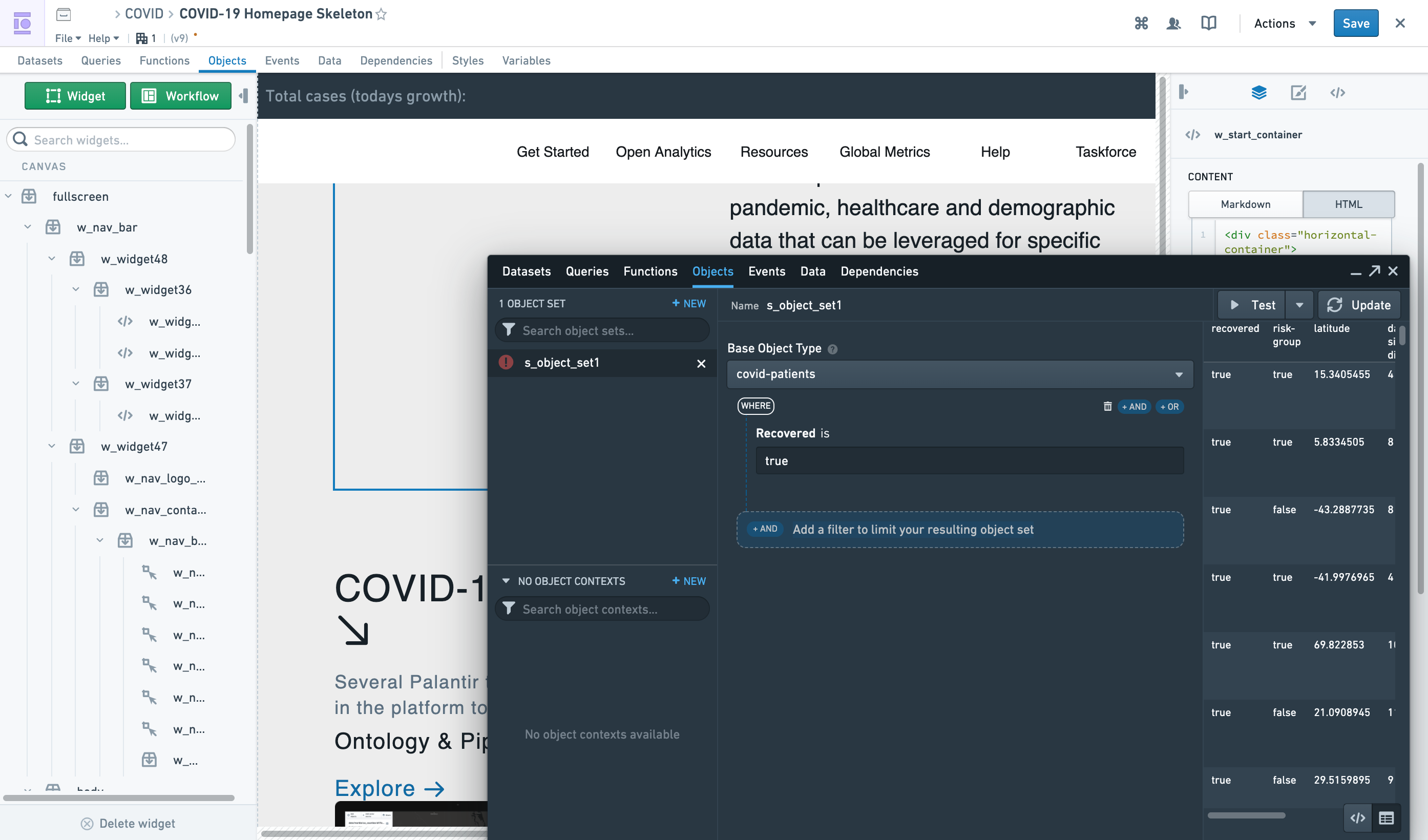
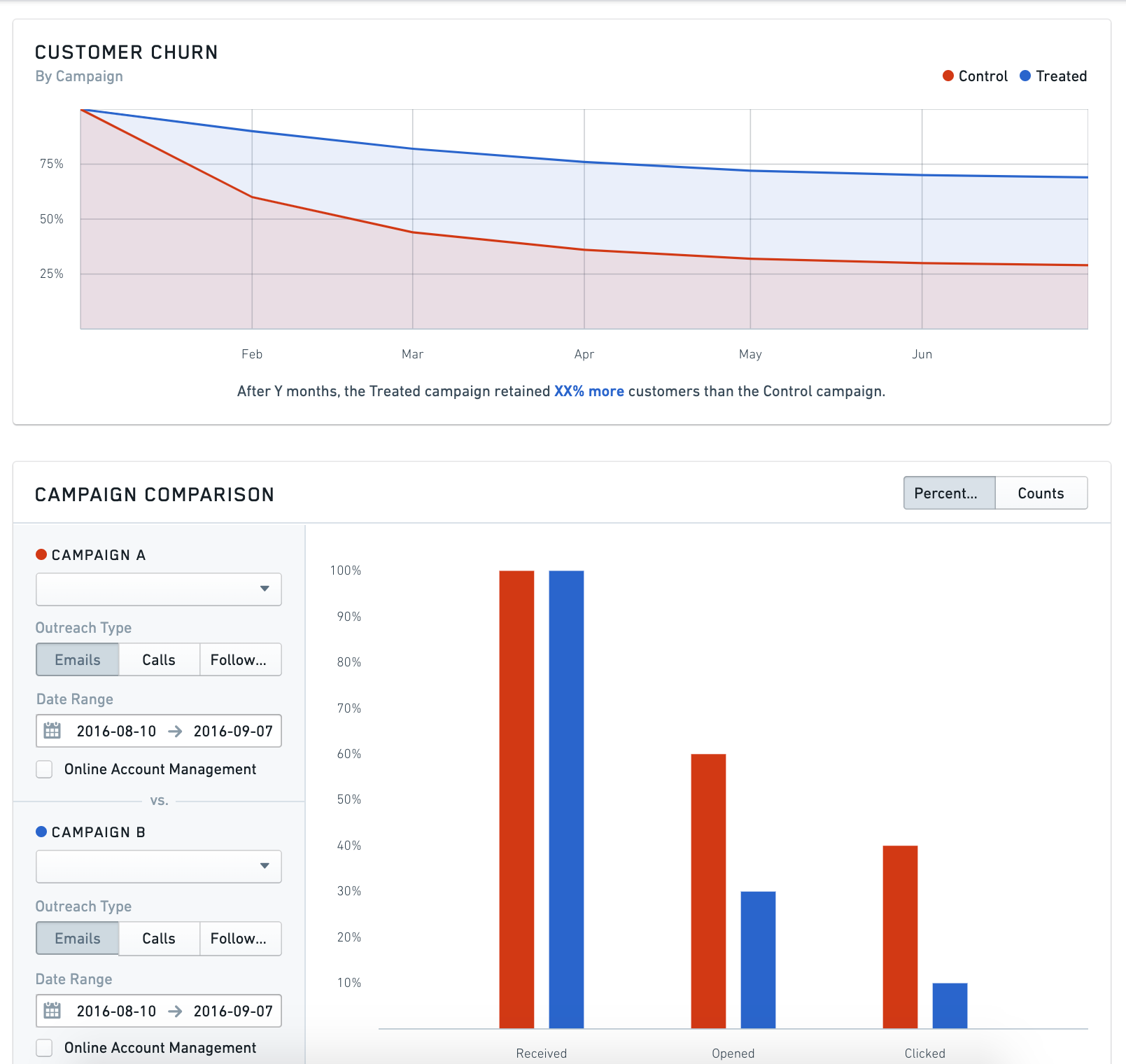
Slate is a flexible application builder for Foundry that requires more technical configuration and code than Workshop. Slate applications interact with the Ontology layer, but can also interact directly with Foundry datasets. Slate enables significant visual customization based on web development paradigms and has a wide range of available features, but also requires more technical knowledge to build and maintain applications than Workshop.
Slate Editor View
Slate Application View
Carbon
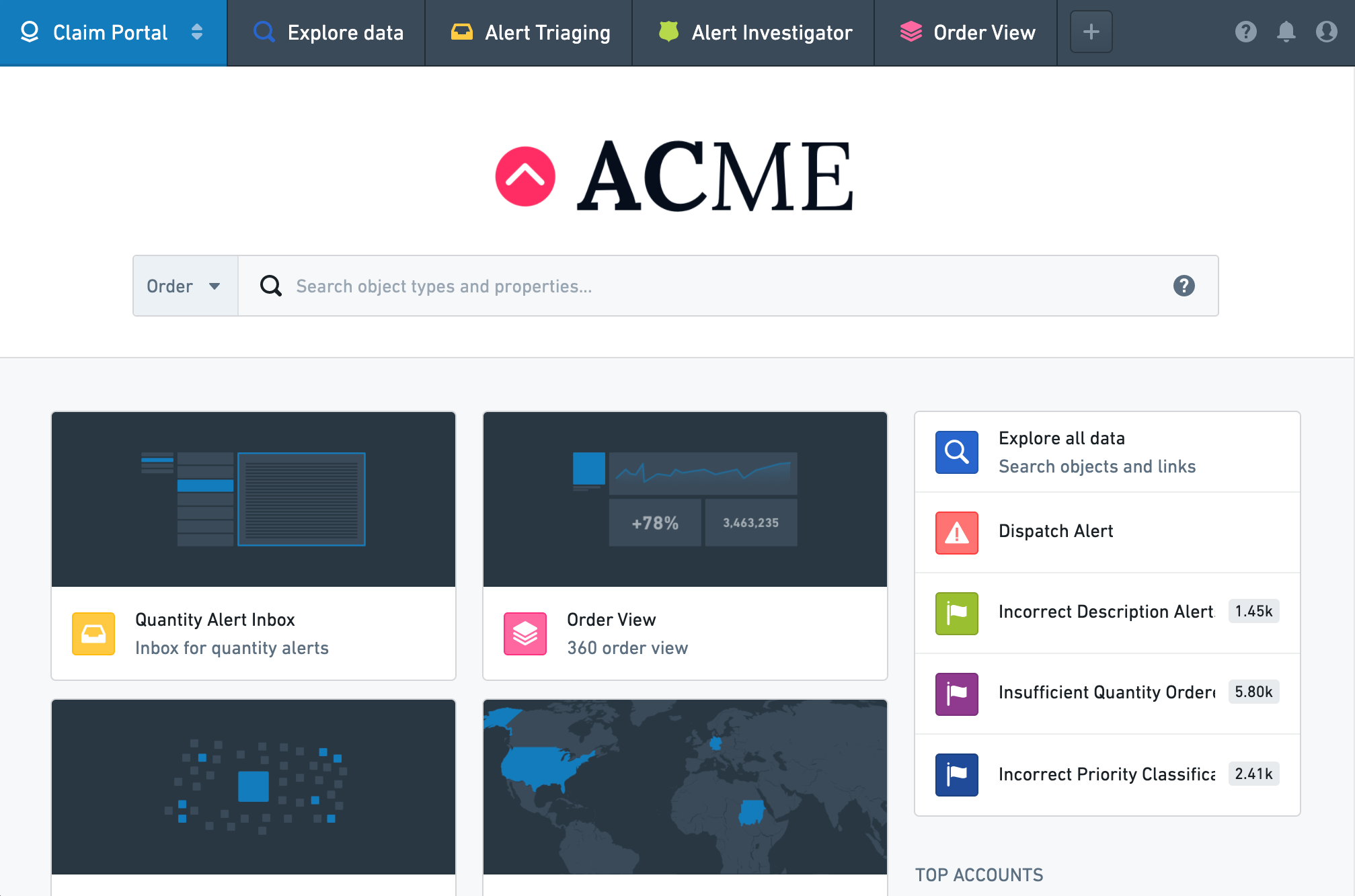
Carbon enables combining multiple resources or applications in Foundry to create highly curated workspaces for operational users. By allowing you to combine analytical results such as dashboards, applications built in Workshop or Slate, and out-of-the-box capabilities such as Object Views and Object Explorer, Carbon enables workflow builders to perform the "last mile" of customization to create a highly tailored and usable experience for end users.
Map
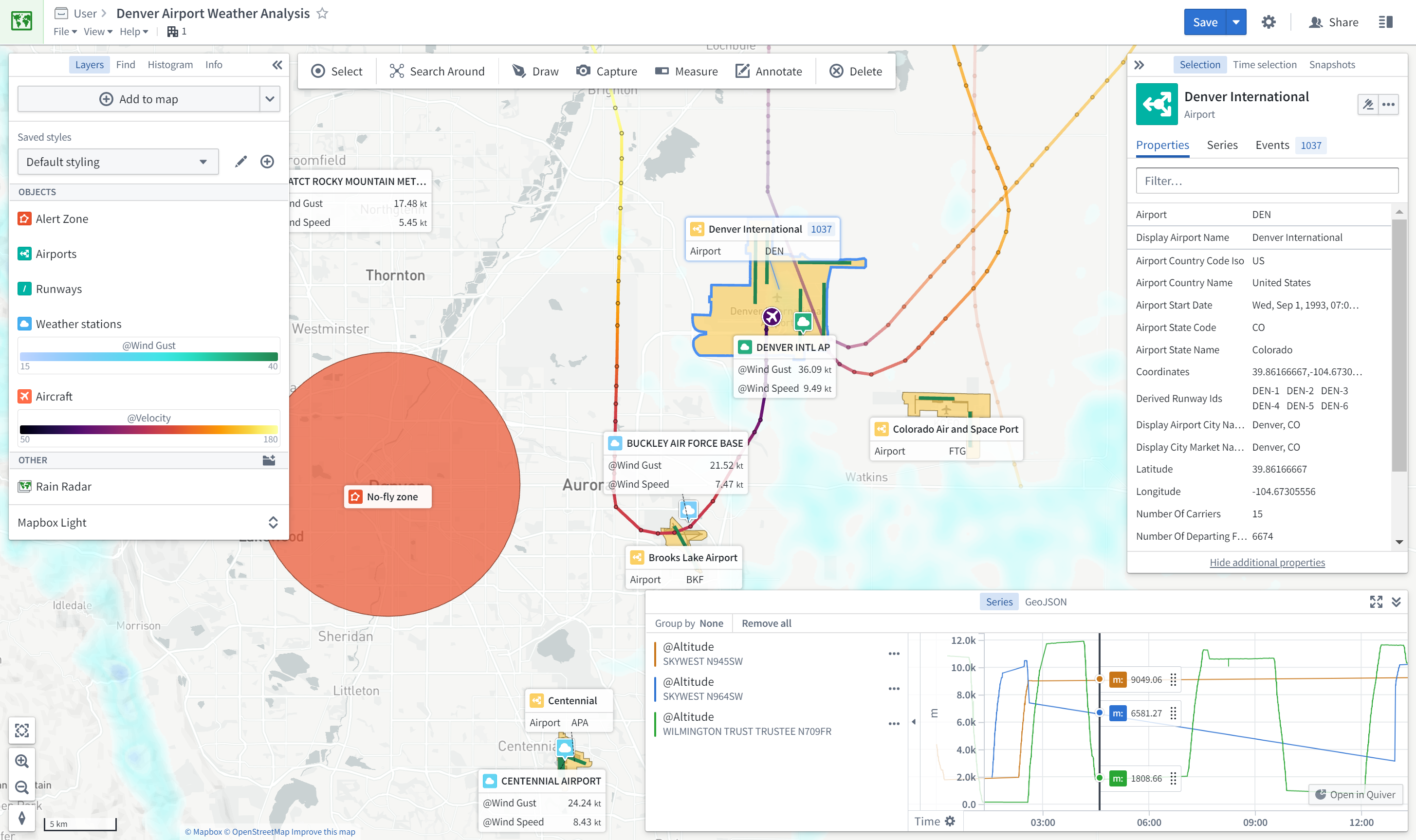
The Map application allows you to bring together and analyze objects and other data in a geospatial context.
Application comparison
Each object-aware application varies on a few dimensions. Three particularly important dimensions are:
- the primary use case(s),
- the workflow style, and
- the configuration model of the application.
| Foundry Application | Primary use case | Workflow Style | Configuration Model | Objects or Datasets |
|---|---|---|---|---|
| Object Views | Discovery | Workflow-specific | Walk-up usable | Objects |
| Object Explorer | Discovery & Analysis | Exploratory | Walk-up usable | Objects |
| Quiver | Analysis & Dashboards | Exploratory (for Analytical mode); workflow-specific (for Dashboard mode) | Walk-up usable (for Analytical mode); customizable (for Dashboard mode) | Objects |
| Workshop | Applications & Dashboards | Workflow-specific | Customizable | Objects |
| Slate | Applications & Dashboards (complex) | Workflow-specific | Customizable | Objects (recommended) and Datasets |
| Map | Geospatial | Exploratory or Workflow-specific | Walk-up usable | Objects |
Use cases
The main use cases supported by object-aware applications are Discovery, Analysis, Dashboards, and Applications.
- Discovery enables users to find the right information or workflow. Discovery is primarily enabled through two core features: curated content hubs and search. Curated content hubs (sometimes called landing pages or "360 views") range from a comprehensive standard view for any user to targeted views for a specific set of users or use case. Search functionality supports discovery through free-text search of key words as well as more iterative search through link traversals or drill-downs.
- Analysis enables users to answer a broad range of questions. These range from the simple (what is the average customer retention for a given product?) to the very complex (how do three different customer cohorts compare in terms of retention and overall revenue over time, across all products and for each individual product?). The analytical path is exploratory, meaning that it is defined by the end user themselves and is often highly iterative; as the initial questions are answered, new questions are developed and incorporated into the analysis path.
- Dashboards are sets of pre-configured visualizations consumed primarily in a read-only fashion by a broader set of consumer users. Dashboards are often used to turn meaningful Analyses into recurring reporting or operational monitoring. Dashboards are characterized by a large number of charts and other visualizations, but are not as customizable or interactive as Applications (see below). Dashboards are often parameterized such that users can filter down the visualizations to different subsets of data.
- Applications are interactive custom operational interfaces intended for a specific user group to solve a specific problem. Applications are often more complex than dashboards and are oriented at enabling users to follow a specific and on-rails workflow. While the application may contain some curated analytical content (e.g. statistics, charts, graphs, etc.) required to perform a decision, it also typically has several workflow elements and often captures user input (for example, writeback).
Workflow style
Object-aware applications are optimized for primary workflow styles.
- Exploratory applications do not need to be pre-configured by a "builder" user and are used out-of-the-box by end users as soon as data has been modeled into the Ontology. In exploratory applications, the end-user defines their analytical path, and can answer a wide range of questions that are not pre-determined. Exploratory applications typically contain a set of search, visualization, and transformation features to enable this. Object-aware applications that are primarily exploratory include Object Explorer and Quiver.
- Workflow-specific applications require pre-configuration by a "builder" user before an end user can actually use them. This is typical of Dashboards or Applications that have two primary user groups: (1) the builder group configuring the specific dashboard or application and (2) the downstream end users for whom the applications are built. Workshop and Slate modules both need to be pre-configured by a "Builder" user in edit mode.
Certain applications like Quiver accommodate both workflow styles because while their primary mode is exploratory, the outputs can be configured into a more broadly consumed workflow-specific artifact. While Quiver Analyses are highly exploratory, they can be published as Quiver Dashboards that are pre-configured analytical views accessible to a broader audience.
Configuration model
The configuration model describes the extent to which the user interface must be configured before it can be leveraged by an end user.
- Walk-up usable applications can be employed effectively and immediately by users, with little to no configuration requirement or maintenance burden. For example, Object Explorer has minimal-to-no configuration requirement, making it immediately usable for end users once an Ontology is defined.
- Customizable applications require an upfront investment (often by a separate "builder" user) to implement an interface that solves a particular problem for an end user. It also implies a higher ongoing maintenance cost. However, the resulting application is typically a fit-for-purpose interface that exactly meets the need of the specific workflow. Workshop and Slate are examples of this type of customization.
中文翻译
本体感知应用(Ontology-aware applications)
Foundry包含多个专为本体论(Ontology)原生运行而开发的应用。这些对象感知应用(Object-aware applications)共同构建了一个强大的分析和操作平台,支持多种用例和用户画像。
要了解为何建立本体论(Ontology)并使用对象感知应用(Object-aware applications)具有重要价值,请参阅此页面。
本页面提供可用应用的参考,并说明各应用的使用场景:
应用参考
对象视图(Object Views)
对象视图(Object Views) 是特定对象所有信息和工作流的中心枢纽。这包括对象的"关键传记数据"、任何关联对象、关键相关指标,以及与对象相关的关键分析、仪表盘和应用链接(或嵌入)。
例如,机场(Airport)对象类型的对象视图可能为每个机场(Airport)对象提供以下信息:
- 传记数据,如
国家(country)、城市(city)、经度(longitude)、纬度(latitude)等 - 与
机场(Airport)关联的所有飞机(Aircraft)对象和航班(Flight)对象的360度视图 - 嵌入的
机场新冠响应(Airport Covid Response)工作流 - 与
机场(Airport)相关的航班延误(Flight delay)事件的根因分析(Root-Cause Analysis)链接
对象浏览器(Object Explorer)
对象浏览器(Object Explorer) 是一个搜索和分析工具,用于回答关于本体论(Ontology)层中任何内容的问题。用户可以通过可视化方式组合搜索查询,从简单筛选到搜索周边(Search Arounds)来查找感兴趣的对象。随后,他们可以使用探索视图浏览结果对象集,或以表格形式查看结果。此外,用户还可以比较和对比对象集,并对对象集执行批量操作(例如写回(writeback))。最后,用户可以将对象集导出或在兼容应用(如Workshop)中打开。
探索视图是一组预设和可配置的可视化(如图表或地图),用户可以进一步利用这些可视化深入分析特定对象子集。对象浏览器(Object Explorer)无需预配置,面向技术能力较弱的用户。
Quiver
Quiver 通过可视化点击界面和强大的图表库,在本体论(Ontology)层实现高级分析工作流。Quiver可支持从简单的线性下钻分析到高度分支化的复杂分析(包含聚合和统计函数)。Quiver还支持原生时间序列分析。Quiver分析可以模板化为只读仪表盘,供更广泛的用户使用。
Workshop
Workshop 支持在本体论(Ontology)层原生进行点击式无代码应用构建。在Workshop中构建的应用比在其他点击式工具中创建的典型仪表盘更加动态和交互。
通过利用高质量的布局(Layouts)和易用但精密的事件系统(Events system),Workshop应用旨在达到与自定义React应用相同的用户友好度和质量。
Workshop编辑器视图
最终Workshop模块
Slate
Slate 是一个灵活的Foundry应用构建器,需要比Workshop更多的技术配置和代码。Slate应用与本体系(Ontology)层交互,但也可以直接与Foundry数据集交互。Slate基于Web开发范式实现显著的视觉自定义,并拥有广泛的功能,但构建和维护应用所需的技术知识也比Workshop更多。
Slate编辑器视图
Slate应用视图
Carbon
Carbon 支持将Foundry中的多个资源或应用组合起来,为操作用户创建高度策划的工作空间(workspaces)。通过允许您组合分析结果(如仪表盘)、在Workshop或Slate中构建的应用,以及开箱即用的功能(如对象视图(Object Views)和对象浏览器(Object Explorer)),Carbon使工作流构建者能够执行"最后一英里"的自定义,为最终用户创建高度定制和可用的体验。
地图(Map)
地图(Map) 应用允许您在地理空间上下文中整合和分析对象及其他数据。
应用对比
每个对象感知应用(Object-aware application)在多个维度上有所不同。三个特别重要的维度是:
| Foundry应用 | 主要用例 | 工作流风格 | 配置模型 | 对象或数据集 |
|---|---|---|---|---|
| 对象视图(Object Views) | 发现(Discovery) | 工作流特定(Workflow-specific) | 即用型(Walk-up usable) | 对象 |
| 对象浏览器(Object Explorer) | 发现与分析(Discovery & Analysis) | 探索型(Exploratory) | 即用型(Walk-up usable) | 对象 |
| Quiver | 分析与仪表盘(Analysis & Dashboards) | 探索型(分析模式);工作流特定(仪表盘模式) | 即用型(分析模式);可定制(仪表盘模式) | 对象 |
| Workshop | 应用与仪表盘(Applications & Dashboards) | 工作流特定(Workflow-specific) | 可定制(Customizable) | 对象 |
| Slate | 应用与仪表盘(复杂) | 工作流特定(Workflow-specific) | 可定制(Customizable) | 对象(推荐)和数据集 |
| 地图(Map) | 地理空间(Geospatial) | 探索型或工作流特定 | 即用型(Walk-up usable) | 对象 |
用例
对象感知应用(Object-aware applications)支持的主要用例包括发现(Discovery)、分析(Analysis)、仪表盘(Dashboards)和应用(Applications)。
- 发现(Discovery) 使用户能够找到正确的信息或工作流。发现主要通过两个核心功能实现:策划内容中心和搜索。策划内容中心(有时称为登录页面或"360度视图")涵盖从面向任何用户的全面标准视图到针对特定用户组或用例的定向视图。搜索功能通过关键词的自由文本搜索以及通过链接遍历或下钻的迭代搜索来支持发现。
- 分析(Analysis) 使用户能够回答广泛的问题。这些问题从简单的(某个产品的平均客户留存率是多少?)到非常复杂的(三个不同客户群体在留存率和总收入方面,随时间推移,在所有产品和每个单独产品上的表现如何?)。分析路径是探索性的,意味着由最终用户自己定义,并且通常高度迭代;随着初始问题得到解答,新问题会不断产生并纳入分析路径。
- 仪表盘(Dashboards) 是一组预配置的可视化,主要由更广泛的消费者用户以只读方式使用。仪表盘通常用于将有意义的分析(Analyses)转化为定期报告或运营监控。仪表盘的特点是包含大量图表和其他可视化,但不如应用(Applications)(见下文)那样可定制或交互。仪表盘通常参数化,使用户可以将可视化筛选到不同的数据子集。
- 应用(Applications) 是交互式自定义操作界面,旨在为特定用户组解决特定问题。应用通常比仪表盘更复杂,旨在使用户能够遵循特定的、有引导的工作流。虽然应用可能包含执行决策所需的一些策划分析内容(例如统计、图表、图形等),但它通常还具有多个工作流元素,并且经常捕获用户输入(例如写回(writeback))。
工作流风格
对象感知应用(Object-aware applications)针对主要工作流风格进行了优化。
- 探索型应用(Exploratory applications) 无需"构建者"用户预配置,一旦数据建模到本体论(Ontology)中,最终用户即可开箱即用。在探索型应用中,最终用户定义自己的分析路径,并可以回答各种未预先确定的问题。探索型应用通常包含一组搜索、可视化和转换功能来实现这一点。主要属于探索型的对象感知应用包括对象浏览器(Object Explorer)和Quiver。
- 工作流特定应用(Workflow-specific applications) 需要"构建者"用户进行预配置,最终用户才能实际使用。这通常是仪表盘或应用的典型特征,它们有两个主要用户组:(1) 配置特定仪表盘或应用的构建者组,以及(2) 为其构建应用的下游最终用户。Workshop和Slate模块都需要"构建者"用户在编辑模式下进行预配置。
某些应用(如Quiver)同时适应两种工作流风格,因为虽然其主要模式是探索型的,但输出可以配置为更广泛使用的工作流特定产物。虽然Quiver分析(Quiver Analyses)高度探索性,但它们可以发布为Quiver仪表盘(Quiver Dashboards),即预配置的分析视图,可供更广泛的受众访问。
配置模型
配置模型描述了用户界面在最终用户使用前需要配置的程度。
- 即用型(Walk-up usable) 应用用户可以立即有效地使用,几乎不需要配置要求或维护负担。例如,对象浏览器(Object Explorer)的配置要求极低甚至为零,一旦定义了本体论(Ontology),最终用户即可立即使用。
- 可定制(Customizable) 应用需要前期投入(通常由单独的"构建者"用户完成)来实现解决最终用户特定问题的界面。这也意味着更高的持续维护成本。然而,最终的应用通常是完全符合特定工作流需求的定制界面。Workshop和Slate是此类定制的典型例子。