Document processing(文档处理)
This page will discuss a few useful considerations for extracting data from a PDF document or image.
Data extraction
This page offers a basic guide for using Pipeline Builder to parse PDFs for semantic search and includes a recommendation for presenting the information in a Workshop application when you just have text content.
Semantic search is a powerful tool to use with PDFs, particularly if the content is broken down into smaller "chunks" that are embedded separately, helping users and workflows find important information that might otherwise be hard to access. This is especially useful considering the vast amount of unstructured knowledge in PDFs that often goes unnoticed.
To use, simply upload your PDFs to Foundry, extract the text, chunk the same text, search for those chunks, and surface the results of that search with the corresponding PDF rendered on the side for source-of-truth cross-validation for the users.
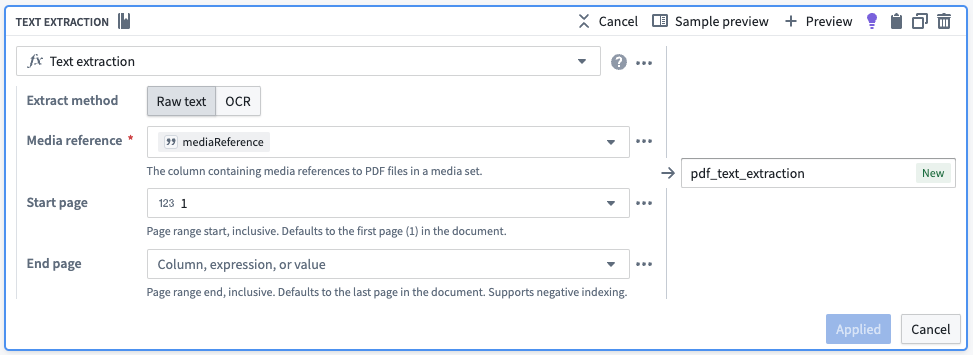
Follow the steps outlined below to import PDFs and extract text from PDFs:
- Import the PDFs as a media set.
- Add the media set to Pipeline Builder.
- Use the Get Media References board.

- Use the Text Extraction board.
Chunking
This page outlines how to incorporate a basic chunking strategy into your semantic search workflows. Chunking, in this context, means breaking up larger pieces of text into smaller pieces of text. This is advantageous because embedding models possess a maximum input length for text, and crucially, smaller pieces of text will be more semantically distinct during searches. Chunking is often used when parsing large documents like PDFs.
Primarily, the objective is to split long text into smaller "chunks", each with an associated Ontology object linked back to the original object.
Chunking example
As a starting point, we will show how a basic chunking strategy can be accomplished without using code in Pipeline Builder. For more advanced strategies, we recommend using a code repository as part of your pipeline.
For illustrative purposes, we will use a simple two row dataset with two columns, object_id and object_text. For ease of understanding, the object_text examples below are purposefully short.
| object_id | object_text |
|---|---|
| abc | gold ring lost |
| xyz | fast cars zoom |
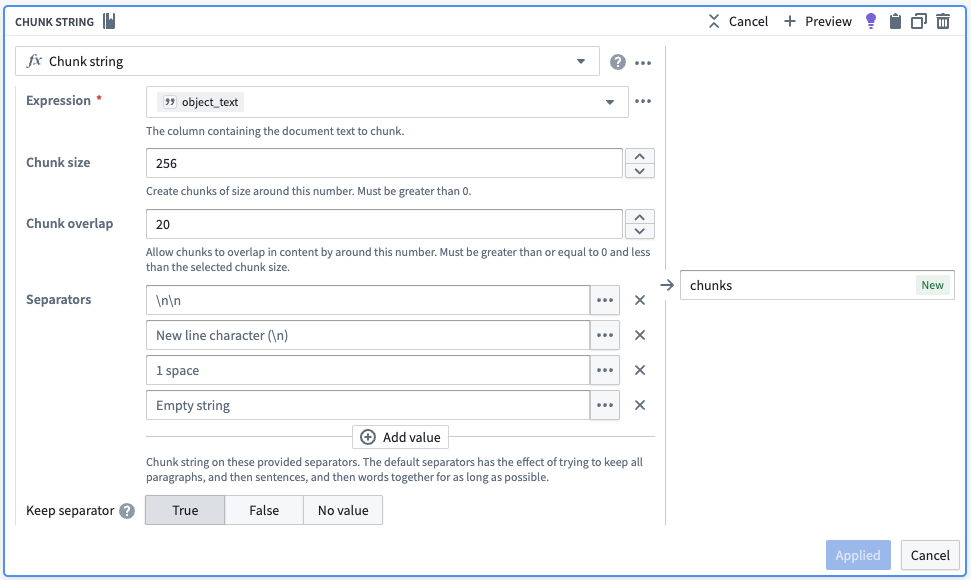
We initiate the process by employing the Chunk String board, which introduces an extra column containing an array of object_text segmented into smaller pieces. The board accommodates various chunking approaches, such as overlap and separators, to ensure that each semantic concept remains coherent and unique.
The below screenshot of a Chunk String board shows a simple strategy which you may alter for use toward your own use case. The below configuration would attempt to return chunks that are roughly 256 characters in size. Effectively, the board splits text on the highest priority separator until each chunk is equal to or smaller than the chunk size. If there are no more highest priority separators to split on and some chunks are still too large, it moves to the next separator until either all the chunks are equal or smaller than the chunk size or there are no more separators to use. Finally, the board will ensure that for each chunk identified, the chunk following has an overlap that covers the last 20 characters of the previous chunk.
| object_id | object_text | chunks |
|---|---|---|
| abc | gold ring lost | [gold,ring,lost] |
| xyz | fast cars zoom | [fast,cars,zoom] |
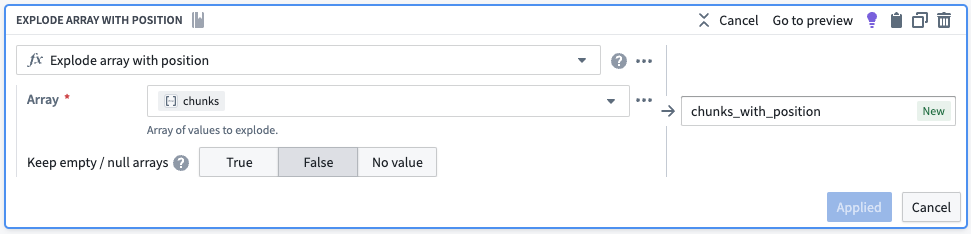
Next we want each element in the array to have its own row. We will use the Explode Array with Position board to transform our dataset to one with six rows. The new column in each of the rows (as seen below) is a struct (map) with two key-value pairs, the position in the array and the element in the array.
| object_id | object_text | chunks | chunks_with_position |
|---|---|---|---|
| abc | gold ring lost | [gold,ring,lost] | {position:0, element:gold} |
| abc | gold ring lost | [gold,ring,lost] | {position:1, element:ring} |
| abc | gold ring lost | [gold,ring,lost] | {position:2, element:lost} |
| xyz | fast cars zoom | [fast,cars,zoom] | {position:0, element:fast} |
| xyz | fast cars zoom | [fast,cars,zoom] | {position:1, element:cars} |
| xyz | fast cars zoom | [fast,cars,zoom] | {position:2, element:zoom} |
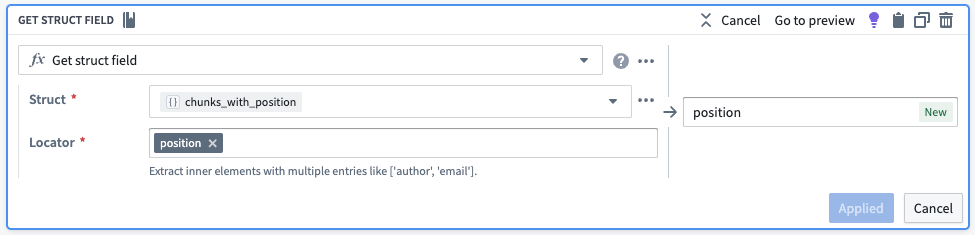
From there, we will pull out the position and the element into their own columns.
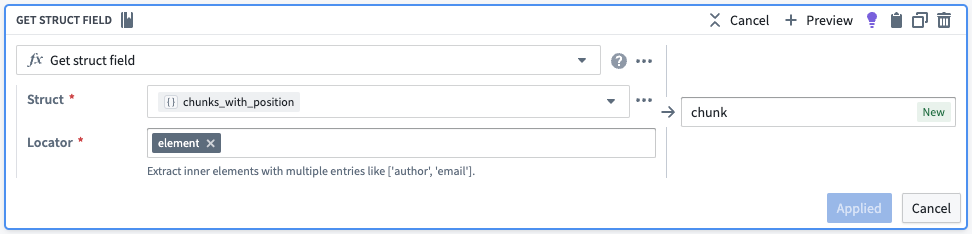
| object_id | object_text | chunks | chunks_with_position | position | chunk |
|---|---|---|---|---|---|
| abc | gold ring lost | [gold,ring,lost] | {position:0, element:gold} | 0 | gold |
| abc | gold ring lost | [gold,ring,lost] | {position:1, element:ring} | 1 | ring |
| abc | gold ring lost | [gold,ring,lost] | {position:2, element:lost} | 2 | lost |
| xyz | fast cars zoom | [fast,cars,zoom] | {position:0, element:fast} | 0 | fast |
| xyz | fast cars zoom | [fast,cars,zoom] | {position:1, element:cars} | 1 | cars |
| xyz | fast cars zoom | [fast,cars,zoom] | {position:2, element:zoom} | 2 | zoom |
To create a unique identifier for each chunk, we will convert the chunk position in its array to a string and then concatenate it to the original object ID. We will also drop the unnecessary columns.
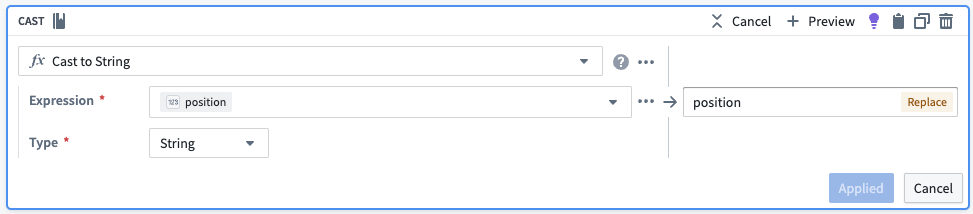
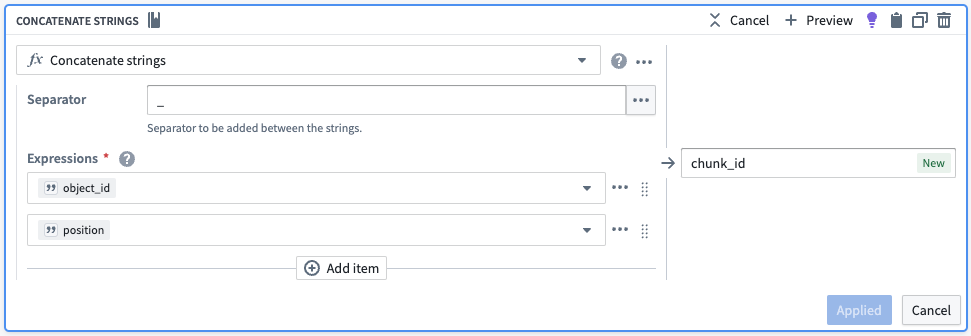

| object_id | chunk | chunk_id |
|---|---|---|
| abc | gold | abc_0 |
| abc | ring | abc_1 |
| abc | lost | abc_2 |
| xyz | fast | xyz_0 |
| xyz | cars | xyz_1 |
| xyz | zoom | xyz_2 |
Now, we have six rows representing six different chunks, each with the object_id (for linking), the new chunk_id to be a new primary key, and the chunk to be embedded as described in semantic search workflow. This results in the table as follows:
| object_id | chunk | chunk_id | embedding |
|---|---|---|---|
| abc | gold | abc_0 | [-0.7,...,0.4] |
| abc | ring | abc_1 | [0.6,...,-0.2] |
| abc | lost | abc_2 | [-0.8,...,0.9] |
| xyz | fast | xyz_0 | [0.3,...,-0.5] |
| xyz | cars | xyz_1 | [-0.1,...,0.8] |
| xyz | zoom | xyz_2 | [0.2,...,-0.3] |
中文翻译
文档处理
本文将讨论从PDF文档或图像中提取数据时的一些实用注意事项。
数据提取
本文提供了使用Pipeline Builder解析PDF以进行语义搜索(Semantic Search)的基本指南,并建议在仅包含文本内容时,如何在Workshop应用程序中呈现信息。
语义搜索是与PDF配合使用的强大工具,特别是当内容被分解为较小的"块(Chunks)"并分别嵌入时,这有助于用户和工作流找到原本难以访问的重要信息。考虑到PDF中大量未被利用的非结构化知识,这一点尤其有用。
使用方法很简单:将PDF上传至Foundry,提取文本,对文本进行分块,搜索这些块,并将搜索结果与对应的PDF并排呈现,供用户进行真实来源的交叉验证。
请按照以下步骤导入PDF并从中提取文本:
- 将PDF作为媒体集(Media Set)导入
- 将媒体集添加到Pipeline Builder
- 使用获取媒体引用(Get Media References)面板
- 使用文本提取(Text Extraction)面板
分块(Chunking)
本文概述了如何将基本的分块策略整合到语义搜索工作流中。在此上下文中,分块是指将较大的文本片段拆分为较小的文本片段。这样做的好处在于,嵌入模型(Embedding Model)对文本有最大输入长度限制,而且关键在于,较小的文本片段在搜索时语义区分度更高。分块常用于解析大型文档,如PDF。
主要目标是,将长文本分割成较小的"块",每个块都通过链接(Link)关联回原始本体论(Ontology)对象。
分块示例
作为起点,我们将展示如何在Pipeline Builder中无需编写代码即可实现基本的分块策略。对于更高级的策略,我们建议在管道中使用代码仓库(Code Repository)。
为便于说明,我们将使用一个简单的两行数据集,包含两列:object_id 和 object_text。为便于理解,下面的 object_text 示例特意设置得很短。
| object_id | object_text |
|---|---|
| abc | gold ring lost |
| xyz | fast cars zoom |
我们首先使用分块字符串(Chunk String)面板,该面板会引入一个额外列,其中包含分割成较小片段的 object_text 数组。该面板支持多种分块方法,例如重叠(Overlap)和分隔符(Separator),以确保每个语义概念保持连贯且唯一。
下方分块字符串面板的截图展示了一个简单的策略,您可以根据自己的用例进行调整。以下配置将尝试返回大小约为256个字符的块。实际上,该面板会按优先级最高的分隔符分割文本,直到每个块的大小等于或小于块大小。如果已没有优先级最高的分隔符可供分割,但某些块仍然过大,则会转向下一个分隔符,直到所有块都等于或小于块大小,或者没有更多分隔符可用。最后,该面板会确保对于识别出的每个块,其后续块与前一个块的最后20个字符存在重叠。
| object_id | object_text | chunks |
|---|---|---|
| abc | gold ring lost | [gold,ring,lost] |
| xyz | fast cars zoom | [fast,cars,zoom] |
接下来,我们希望数组中的每个元素都拥有自己的行。我们将使用展开数组并保留位置(Explode Array with Position)面板,将数据集转换为六行。每行中的新列(如下所示)是一个结构体(Struct)(映射),包含两个键值对:数组中的位置和数组中的元素。
| object_id | object_text | chunks | chunks_with_position |
|---|---|---|---|
| abc | gold ring lost | [gold,ring,lost] | {position:0, element:gold} |
| abc | gold ring lost | [gold,ring,lost] | {position:1, element:ring} |
| abc | gold ring lost | [gold,ring,lost] | {position:2, element:lost} |
| xyz | fast cars zoom | [fast,cars,zoom] | {position:0, element:fast} |
| xyz | fast cars zoom | [fast,cars,zoom] | {position:1, element:cars} |
| xyz | fast cars zoom | [fast,cars,zoom] | {position:2, element:zoom} |
然后,我们将位置和元素提取到各自的列中。
| object_id | object_text | chunks | chunks_with_position | position | chunk |
|---|---|---|---|---|---|
| abc | gold ring lost | [gold,ring,lost] | {position:0, element:gold} | 0 | gold |
| abc | gold ring lost | [gold,ring,lost] | {position:1, element:ring} | 1 | ring |
| abc | gold ring lost | [gold,ring,lost] | {position:2, element:lost} | 2 | lost |
| xyz | fast cars zoom | [fast,cars,zoom] | {position:0, element:fast} | 0 | fast |
| xyz | fast cars zoom | [fast,cars,zoom] | {position:1, element:cars} | 1 | cars |
| xyz | fast cars zoom | [fast,cars,zoom] | {position:2, element:zoom} | 2 | zoom |
为了为每个块创建唯一标识符,我们将块在其数组中的位置转换为字符串,然后将其与原始对象ID拼接。我们还将删除不必要的列。
| object_id | chunk | chunk_id |
|---|---|---|
| abc | gold | abc_0 |
| abc | ring | abc_1 |
| abc | lost | abc_2 |
| xyz | fast | xyz_0 |
| xyz | cars | xyz_1 |
| xyz | zoom | xyz_2 |
现在,我们有六行数据,代表六个不同的块,每行包含 object_id(用于链接)、新的 chunk_id(作为新的主键)以及 chunk(用于嵌入,如语义搜索工作流所述)。最终得到如下表格:
| object_id | chunk | chunk_id | embedding |
|---|---|---|---|
| abc | gold | abc_0 | [-0.7,...,0.4] |
| abc | ring | abc_1 | [0.6,...,-0.2] |
| abc | lost | abc_2 | [-0.8,...,0.9] |
| xyz | fast | xyz_0 | [0.3,...,-0.5] |
| xyz | cars | xyz_1 | [-0.1,...,0.8] |
| xyz | zoom | xyz_2 | [0.2,...,-0.3] |