Store scenario metadata as objects(将场景元数据存储为对象)
You can define and store metadata of a scenario in the Ontology, where each object represents a scenario, to create a persisted scenario.
When stored in the Ontology, scenarios are shareable and collaborative. Teams can compare multiple persisted scenarios side-by-side, attach rich metadata including descriptions and authorship, and link scenarios to related objects for easy organization. Persisted scenarios inherit Foundry's permissions and governance model, ensuring proper access control, and create a durable audit trail of the decision-making process.
Configure in Ontology Manager
To configure the scenario object type in Ontology Manager, follow the steps below:
-
In Ontology Manager, navigate to the Object types tab and select + New object type.
-
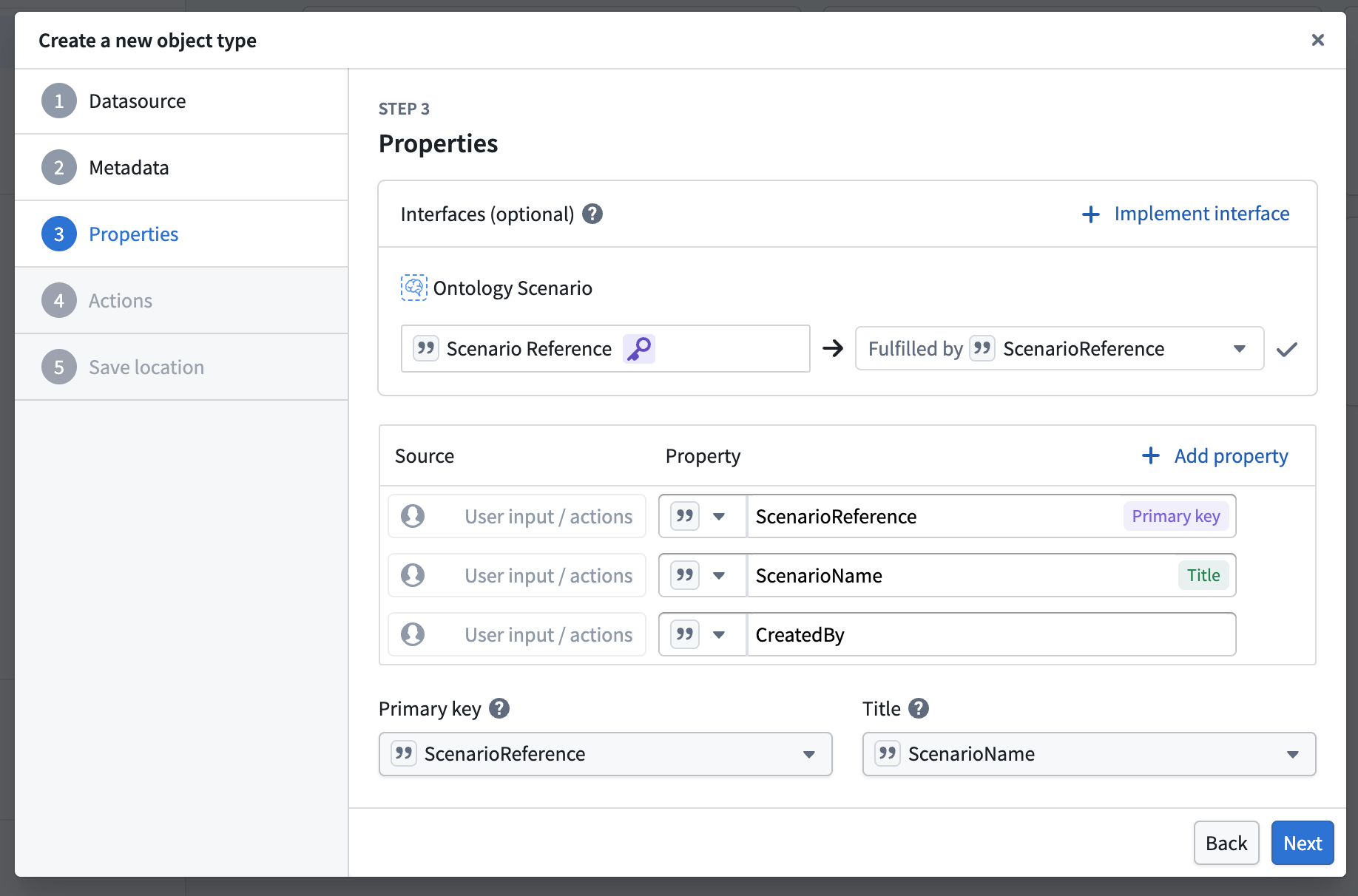
Follow the configuration wizard. At step 3 (Properties), choose to Add an interface, then search for the Ontology Scenario interface. Ensure that Scenario Reference is mapped to the primary key of your object type, then complete the remaining steps.
-
Once the new object type is created, open the Properties tab and confirm that the Primary Key property has a value type of Scenario Reference assigned to it.
-
Optionally, add additional properties to store metadata about the scenario, such as Created By or Description. Save the configuration and wait for the initial sync to complete.
Functions on a scenario
All functions, except AIP Logic functions, can be run on a scenario as is. If they are reading from the Ontology, they will read the state of the Ontology on the scenario. If they are making Ontology edits, they will make those edits on the scenario. Contact Palantir Support if you want to use AIP Logic on a scenario.
中文翻译
将场景元数据存储为对象
您可以在本体论(Ontology)中定义并存储场景的元数据,其中每个对象代表一个场景,从而创建持久化(persisted)场景。
当存储在本体论中时,场景具有可共享和可协作的特性。团队可以并排比较多个持久化场景,附加包括描述和作者信息在内的丰富元数据,并将场景链接到相关对象以便于组织管理。持久化场景继承了Foundry的权限和治理模型,确保适当的访问控制,并为决策过程创建持久的审计追踪。
在Ontology Manager中配置
要配置Ontology Manager中的场景对象类型,请按照以下步骤操作:
-
在Ontology Manager中,导航至对象类型(Object types)选项卡,选择+ 新建对象类型(New object type)。
-
按照配置向导进行操作。在第3步(属性(Properties))中,选择添加(Add)接口,然后搜索Ontology Scenario接口。确保场景引用(Scenario Reference)映射到对象类型的主键,然后完成其余步骤。
-
创建新对象类型后,打开属性(Properties)选项卡,确认主键(Primary Key)属性已分配场景引用(Scenario Reference)值类型。
-
(可选)添加其他属性来存储场景的元数据,例如创建者(Created By)或描述(Description)。保存配置并等待初始同步完成。
场景上的函数
除AIP逻辑(AIP Logic)函数外,所有函数均可直接在场景上运行。如果函数从本体论读取数据,它们将读取场景中本体论的状态;如果函数对本体论进行编辑,它们将在场景上执行这些编辑。如需在场景上使用AIP逻辑,请联系Palantir支持团队。