Object Set Service limitations(对象集服务(Object Set Service)限制)
The Object Set Service (OSS) is the service responsible for querying and retrieving objects from the Ontology. OSS uses a tiered execution strategy to balance performance and scale, automatically selecting the optimal approach based on the size and complexity of your query.
This page explains how OSS handles queries of different sizes and the limitations you should be aware of when working with object sets.
Query execution strategies
OSS uses a tiered execution strategy that automatically selects the optimal approach for processing your query:
-
Pushdown to storage layer: For simple queries, OSS pushes operations directly to the storage layer to take advantage of indexed data structures. This is the fastest execution path and requires minimal compute overhead.
-
In-memory execution: For queries with more complex operations, OSS loads data into memory for fast processing up to a certain capacity. This is optimal for moderate-scale queries.
-
Spark-based execution: For large-scale queries that exceed in-memory capacity, OSS automatically falls back to Spark-based distributed compute. This enables processing of much larger object sets at the cost of additional latency and compute usage.
The transition between these execution strategies is automatic and based on multiple factors:
- Object set size: Larger sets trigger Spark execution
- Query complexity: Certain advanced features (derived properties, intermediary link types, interface Search Arounds) require Spark execution regardless of size
- Available compute resources: OSS balances performance and resource utilization
OSS may use multiple execution strategies within a single complex query for different stages of execution. Understanding the thresholds and limitations of each approach will help you design efficient queries and understand performance characteristics.
OSS execution flow for Object Storage V2
The following diagram illustrates how OSS selects the appropriate execution strategy based on your query. This decision process may be executed multiple times within a single query, depending on the complexity of each stage:
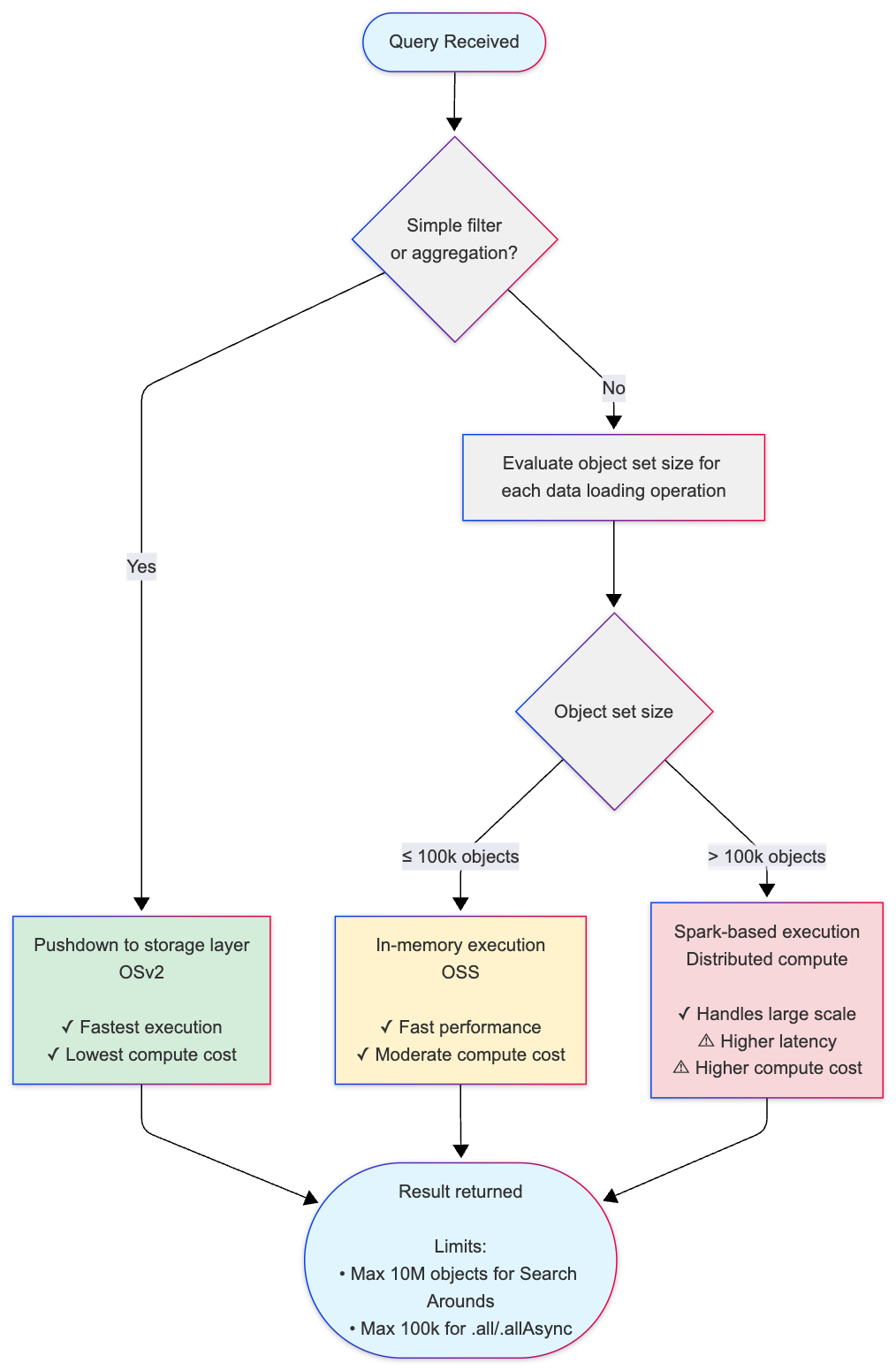
Key thresholds:
- 100,000 objects (default threshold): Threshold for switching from in-memory to Spark-based execution for Search Arounds and derived properties.
- Internal pagination threshold: If any data loading step requires more than 25 pages of data from Object Storage V2, OSS falls back to Spark.
- 10,000,000 objects (default threshold): Maximum result set size for Search Around operations (leaf limit).
- 100,000 objects (default threshold): Maximum for loading objects into memory using
.all()or.allAsync()(OSDK limitation;getAllObjectsAPI can load more).
Execution strategy comparison
| Strategy | When Used | Performance | Compute Cost | Use Cases |
|---|---|---|---|---|
| Pushdown to storage | Simple filters and aggregations | Fastest | Lowest | Basic queries that can be resolved by indexed lookups |
| In-memory execution | Object sets ≤100k | Fast | Moderate | Most Search Arounds, moderate-scale queries |
| Spark-based execution | Object sets >100k | Slower (higher latency) | Higher | Large-scale Search Arounds, complex multi-step queries |
Object set size limitations
OSS enforces different size limits depending on the storage backend and operation type. These limits ensure system stability and predictable performance.
Object Storage V1 (Phonograph) [Planned deprecation]
:::callout{theme="warning" title="Planned deprecation"} Object Storage V1 (Phonograph) is in the planned deprecation phase of development and will be unavailable after June 30, 2026. Migrate your object types and link types to Object Storage V2. :::
Object Storage V1 has the following limitations:
- Loading objects into memory: Maximum of 100,000 objects can be loaded using
.all()or.allAsync()methods in Functions on Objects. - Search Around operations: When performing a Search Around from object set A to object set B, the result set (object set B) cannot exceed 100,000 objects.
These limits apply to all operations in Object Storage V1. There is no automatic fallback to Spark-based execution for larger queries.
Object Storage V2
Object Storage V2 provides greater flexibility and scale through its hybrid execution model:
- In-memory execution: By default, OSS processes queries in-memory for object sets up to 100,000 objects.
- Spark-based execution: When a Search Around operation involves more than 100,000 objects, OSS automatically transitions to Spark-based distributed compute.
- Search Around result limits: The result set from a Search Around operation (the "leaf" object set being loaded from a single datasource) cannot exceed 10 million objects per individual Search Around operation. Additionally, the total number of objects across all datasets loaded during query execution cannot exceed 30 million objects.
- Loading objects into memory (OSDK limitation): When loading objects using
.all()or.allAsync()methods in the Ontology SDK, the maximum is 100,000 objects to prevent memory exhaustion and function timeouts. You can load more objects using thegetAllObjectsAPI endpoints.
:::callout{theme="neutral"} Loading more than 10,000 objects in Functions on Objects may cause execution timeouts depending on the complexity of your function logic. Consider using pagination or filtering to reduce the object set size. :::
Understanding Search Around result sets
When you perform a Search Around operation to traverse a link relationship between objects, OSS uses a specialized type of join operation to efficiently find related objects.
For example, when you search from a set of customer objects to find all related order objects through a link relationship:
- The starting set is your customer objects (the objects you're searching from)
- The result set is the order objects that are linked to those customers (the objects you're searching to)
OSS implements Search Around operations using a left-semi join, which returns only the objects from the result set that have matching links, without duplicating data from the starting set. The 10 million object limit applies to this result set — the total collection of distinct objects returned after traversing the link relationship.
Best practices for working within OSS limitations
To ensure optimal performance and avoid hitting size limitations:
-
Filter early: Apply filters to reduce object set sizes before performing joins or loading objects into memory. OSS takes advantage of indexed data structures to make filtered queries more efficient.
-
Avoid operations that cannot leverage indexes: Filtering, aggregations, sorting, and other operations on derived properties and computed SQL columns require evaluation of all rows and cannot use internal indexes. These operations will not use the fast pushdown path and may trigger in-memory or Spark execution even for small object sets. For example, if you want to filter for all orders that happened in May 2026, avoid using
(MONTH FROM order_date) = 'May' AND (YEAR FROM order_date) = '2026'. Instead, use a range filter:order_date > '2026-05-01' && order_date < '2026-06-01'. -
Use pagination: When working with large object sets in Functions on Objects, use pagination patterns to process objects in batches rather than loading all objects at once.
-
Monitor object set sizes: Use aggregation queries to understand the size of your object sets before performing expensive operations like Search Arounds. Search Around operations are computationally expensive, which is why OSS enforces these size limits.
-
Optimize data models: If you frequently hit size limitations, consider restructuring your Ontology using traditional data modeling principles. Denormalizing your Ontology by consolidating related data into object properties can reduce the need for expensive Search Around operations and make queries more efficient. You can also create more targeted object types or link relationships that naturally produce smaller result sets.
-
Consider compute costs: Spark-based execution uses more compute resources than in-memory execution. Queries that trigger Spark fallback will consume additional compute-seconds.
:::callout{theme="neutral"} OSS uses size estimation to determine whether to execute queries. If the estimated size significantly exceeds the limit (more than 2x), the query may fail before reaching the exact threshold. This is a performance optimization to avoid expensive exact counting operations. :::
Related resources
- Ontology architecture: Learn more about the Object Set Service and other components of the Ontology backend.
- Compute usage with Ontology queries: Understand how different query patterns affect compute usage.
- Functions on Objects: Learn how to write efficient functions that work with object sets.
- Object sets API reference: Detailed API documentation for working with object sets.
中文翻译
# 对象集服务(Object Set Service)限制
对象集服务(Object Set Service, OSS)是负责从本体论(Ontology)中查询和检索对象的服务。OSS 采用分层执行策略来平衡性能与规模,会根据查询的大小和复杂性自动选择最优方法。
本文档解释了 OSS 如何处理不同规模的查询,以及在使用对象集时应注意的限制。
## 查询执行策略
OSS 采用分层执行策略,自动选择处理查询的最优方法:
1. **下推至存储层(Pushdown to storage layer):** 对于简单查询,OSS 将操作直接下推至存储层,以利用索引数据结构。这是最快的执行路径,计算开销最小。
2. **内存执行(In-memory execution):** 对于包含更复杂操作的查询,OSS 会将数据加载到内存中进行快速处理,但有一定容量上限。这适用于中等规模的查询。
3. **基于 Spark 的执行(Spark-based execution):** 对于超出内存容量的大规模查询,OSS 会自动回退到基于 Spark 的分布式计算。这可以处理更大的对象集,但代价是额外的延迟和计算资源消耗。
这些执行策略之间的转换是自动的,基于以下多个因素:
* **对象集大小:** 较大的集合会触发 Spark 执行。
* **查询复杂性:** 某些高级功能(派生属性、中间链接类型、接口搜索周边(Search Arounds))无论规模大小都需要 Spark 执行。
* **可用计算资源:** OSS 会平衡性能与资源利用率。
对于单个复杂查询的不同执行阶段,OSS 可能会使用多种执行策略。了解每种方法的阈值和限制将有助于您设计高效的查询并理解其性能特征。
### 对象存储 V2 的 OSS 执行流程
下图说明了 OSS 如何根据您的查询选择适当的执行策略。此决策过程可能在单个查询中执行多次,具体取决于每个阶段的复杂性:

**关键阈值:**
* **100,000 个对象(默认阈值):** 对于搜索周边(Search Arounds)和派生属性,从内存执行切换到基于 Spark 的执行的阈值。
* **内部分页阈值:** 如果任何数据加载步骤需要从对象存储 V2 获取超过 25 页的数据,OSS 将回退到 Spark。
* **10,000,000 个对象(默认阈值):** 搜索周边(Search Around)操作的最大结果集大小(叶子限制)。
* **100,000 个对象(默认阈值):** 使用 `.all()` 或 `.allAsync()` 加载到内存中的对象的最大数量(OSDK 限制;`getAllObjects` API 可以加载更多)。
### 执行策略比较
| 策略 | 使用时机 | 性能 | 计算成本 | 用例 |
| :--- | :--- | :--- | :--- | :--- |
| **下推至存储(Pushdown to storage)** | 简单的过滤和聚合 | 最快 | 最低 | 可通过索引查找解决的基本查询 |
| **内存执行(In-memory execution)** | 对象集 ≤ 10万 | 快 | 中等 | 大多数搜索周边(Search Arounds),中等规模查询 |
| **基于 Spark 的执行(Spark-based execution)** | 对象集 > 10万 | 较慢(延迟更高) | 较高 | 大规模搜索周边(Search Arounds),复杂的多步骤查询 |
## 对象集大小限制
根据存储后端和操作类型的不同,OSS 会实施不同的大小限制。这些限制确保了系统的稳定性和可预测的性能。
### 对象存储 V1 (Phonograph) \[计划弃用]
:::callout{theme="warning" title="计划弃用"}
对象存储 V1 (Phonograph) 正处于[计划弃用](https://palantir.com/docs/foundry/platform-overview/development-life-cycle/)阶段,将于 2026 年 6 月 30 日后不可用。请[将您的对象类型和链接类型迁移](https://palantir.com/docs/foundry/object-backend/osv1-osv2-migration/)到对象存储 V2。
:::
对象存储 V1 具有以下限制:
* **将对象加载到内存:** 在[对象函数(Functions on Objects)](https://palantir.com/docs/foundry/functions/overview/)中使用 `.all()` 或 `.allAsync()` 方法最多可加载 **100,000 个对象**。
* **搜索周边(Search Around)操作:** 从对象集 A 执行搜索周边(Search Around)到对象集 B 时,结果集(对象集 B)不能超过 **100,000 个对象**。
这些限制适用于对象存储 V1 中的所有操作。对于更大的查询,没有自动回退到基于 Spark 的执行。
### 对象存储 V2
对象存储 V2 通过其混合执行模型提供了更大的灵活性和规模:
* **内存执行:** 默认情况下,OSS 在内存中处理最多 **100,000 个对象**的对象集查询。
* **基于 Spark 的执行:** 当搜索周边(Search Around)操作涉及超过 **100,000 个对象**时,OSS 会自动转换到基于 Spark 的分布式计算。
* **搜索周边(Search Around)结果限制:** 来自搜索周边(Search Around)操作的结果集(从单个数据源加载的“叶子”对象集)不能超过 **1000 万个对象**。此外,在查询执行期间加载的所有数据集中对象的总数不能超过 **3000 万个对象**。
* **将对象加载到内存(OSDK 限制):** 在 Ontology SDK 中使用 `.all()` 或 `.allAsync()` 方法加载对象时,最大数量为 **100,000 个对象**,以防止内存耗尽和函数超时。您可以使用 `getAllObjects` API 端点加载更多对象。
:::callout{theme="neutral"}
在对象函数(Functions on Objects)中加载超过 10,000 个对象可能会导致执行超时,具体取决于函数逻辑的复杂性。请考虑使用分页或过滤来减小对象集大小。
:::
## 理解搜索周边(Search Around)结果集
当您执行搜索周边(Search Around)操作来遍历对象之间的链接关系时,OSS 会使用一种特殊类型的连接操作来高效地查找相关对象。
例如,当您从一组客户对象中搜索,通过链接关系查找所有相关的订单对象时:
* **起始集**是您的客户对象(您正在从中搜索的对象)。
* **结果集**是与这些客户相关联的订单对象(您正在搜索的目标对象)。
OSS 使用左半连接(left-semi join)来实现搜索周边(Search Around)操作,该操作仅返回具有匹配链接的结果集中的对象,而不会复制起始集中的数据。1000 万个对象的限制适用于此结果集——即在遍历链接关系后返回的不同对象的完整集合。
## 在 OSS 限制内工作的最佳实践
为确保最佳性能并避免达到大小限制:
* **尽早过滤:** 在执行连接或将对象加载到内存之前,应用过滤器以减少对象集大小。OSS 利用索引数据结构使过滤后的查询更高效。
* **避免无法利用索引的操作:** 对派生属性(derived properties)和计算 SQL 列(computed SQL columns)进行过滤、聚合、排序和其他操作需要评估所有行,并且无法使用内部索引。这些操作不会使用快速下推路径,即使对于小对象集也可能触发内存或 Spark 执行。例如,如果您想过滤所有发生在 2026 年 5 月的订单,请避免使用 `(MONTH FROM order_date) = 'May' AND (YEAR FROM order_date) = '2026'`。相反,请使用范围过滤器:`order_date > '2026-05-01' && order_date < '2026-06-01'`。
* **使用分页:** 在对象函数(Functions on Objects)中处理大型对象集时,使用分页模式分批处理对象,而不是一次加载所有对象。
* **监控对象集大小:** 在执行搜索周边(Search Arounds)等昂贵操作之前,使用聚合查询来了解对象集的大小。搜索周边(Search Around)操作计算成本很高,这就是 OSS 强制执行这些大小限制的原因。
* **优化数据模型:** 如果您经常遇到大小限制,请考虑使用传统数据建模原则重构您的本体论(Ontology)。通过将相关数据合并到对象属性中来反规范化您的本体论(Ontology),可以减少对昂贵的搜索周边(Search Around)操作的需求,并使查询更高效。您还可以创建更具针对性的对象类型或链接关系,这些关系自然会产生更小的结果集。
* **考虑计算成本:** 基于 Spark 的执行比内存执行使用更多的计算资源。触发 Spark 回退的查询将消耗额外的[计算秒数(compute-seconds)](https://palantir.com/docs/foundry/ontologies/query-compute-usage/)。
:::callout{theme="neutral"}
OSS 使用大小估计来确定是否执行查询。如果估计大小显著超过限制(超过 2 倍),查询可能会在达到确切阈值之前失败。这是一种性能优化,旨在避免昂贵的精确计数操作。
:::
## 相关资源
* [本体论架构(Ontology architecture)](https://palantir.com/docs/foundry/object-backend/overview/):详细了解对象集服务(Object Set Service)和本体论(Ontology)后端的其他组件。
* [本体论查询的计算使用量(Compute usage with Ontology queries)](https://palantir.com/docs/foundry/ontologies/query-compute-usage/):了解不同查询模式如何影响计算使用量。
* [对象函数(Functions on Objects)](https://palantir.com/docs/foundry/functions/overview/):了解如何编写处理对象集的高效函数。
* [对象集 API 参考(Object sets API reference)](https://palantir.com/docs/foundry/functions/api-object-sets/):处理对象集的详细 API 文档。