Ontology cleanup(本体论清理(Ontology cleanup))
The Ontology cleanup tool is a safe way to delete object types, and provides a number of benefits, including:
- An easier-to-navigate Ontology without excess object types
- A more performant Ontology as searches and loads are run over fewer object types
- An Ontology without the burden of excess storage costs
The tool aims to help Ontology editors determine the safety of deleting an object type and provides a deprecation option which informs object type users of its future removal.
Access Ontology cleanup tool
The view can be accessed from the home page of the Ontology cleanup tool.
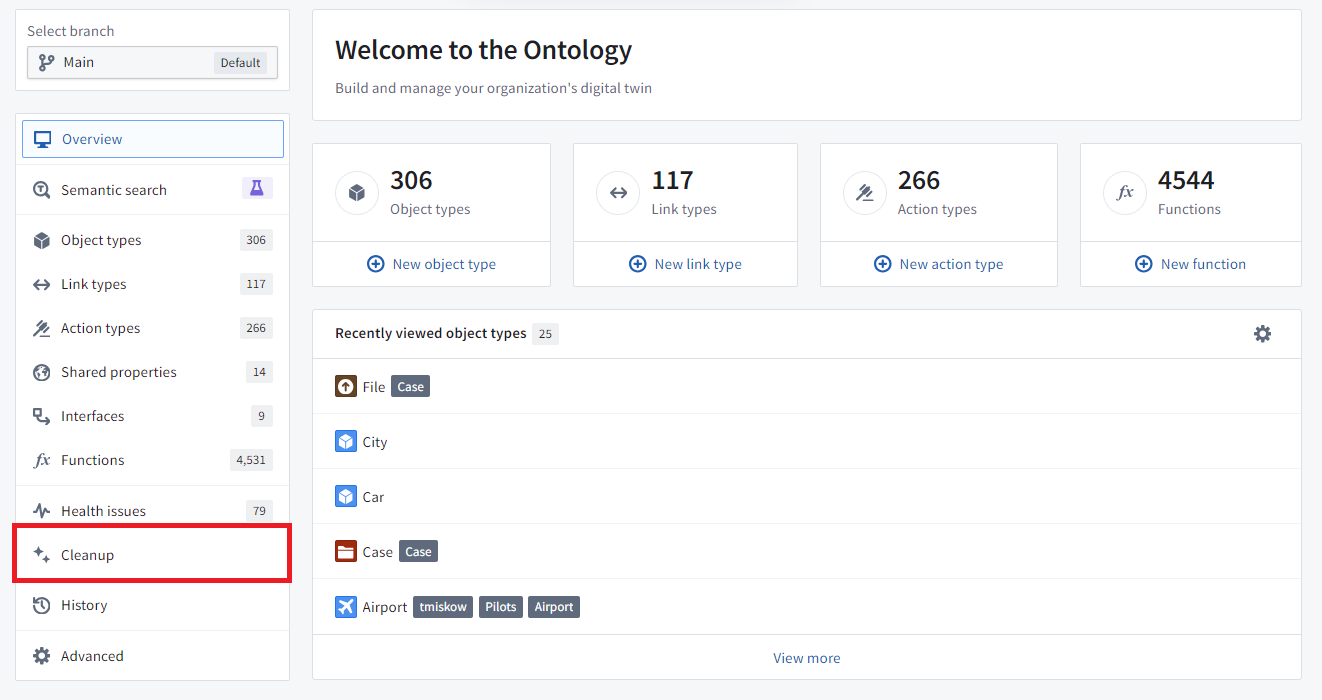
When you opt to Start cleanup, the tool may take time to find cleanup candidates based on the size of your Ontology.
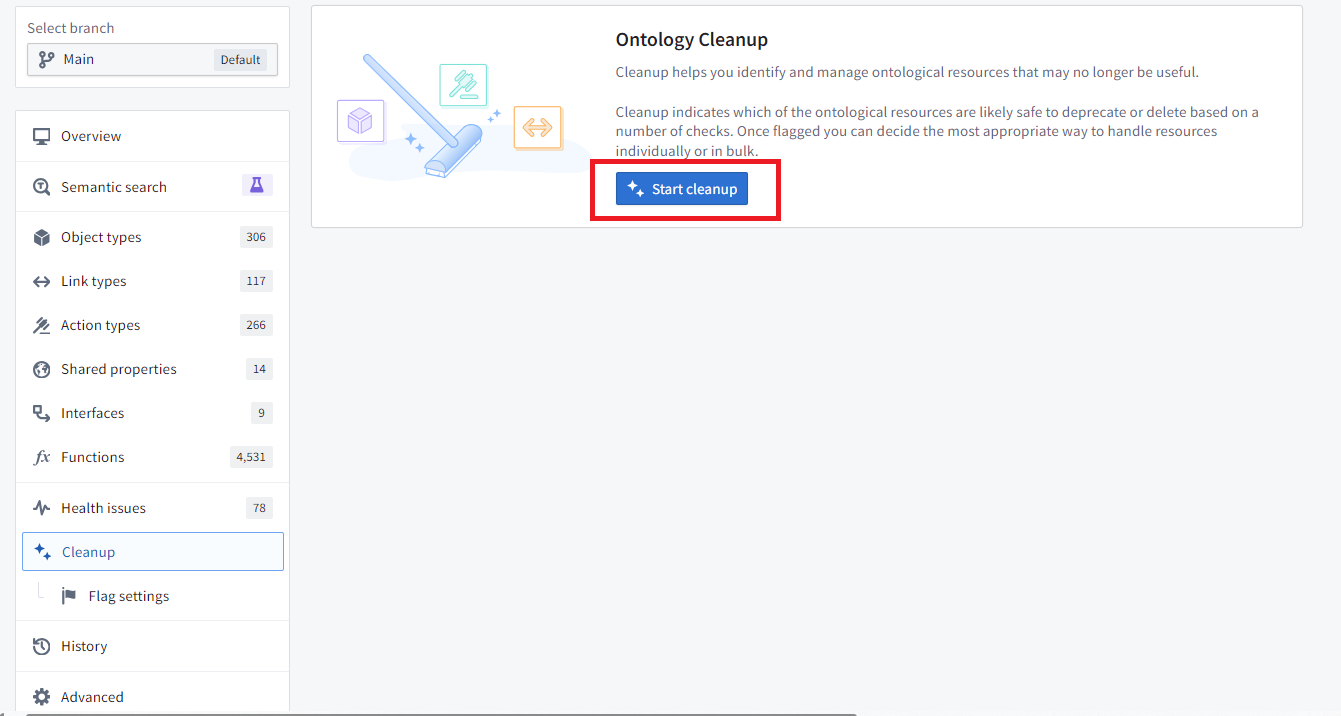
The resulting list of object types operates similarly to the other pages accessed from the home page that display lists. The list can be filtered to specific flags or an object type group that you are responsible for. You can also customize which columns are displayed in the table.
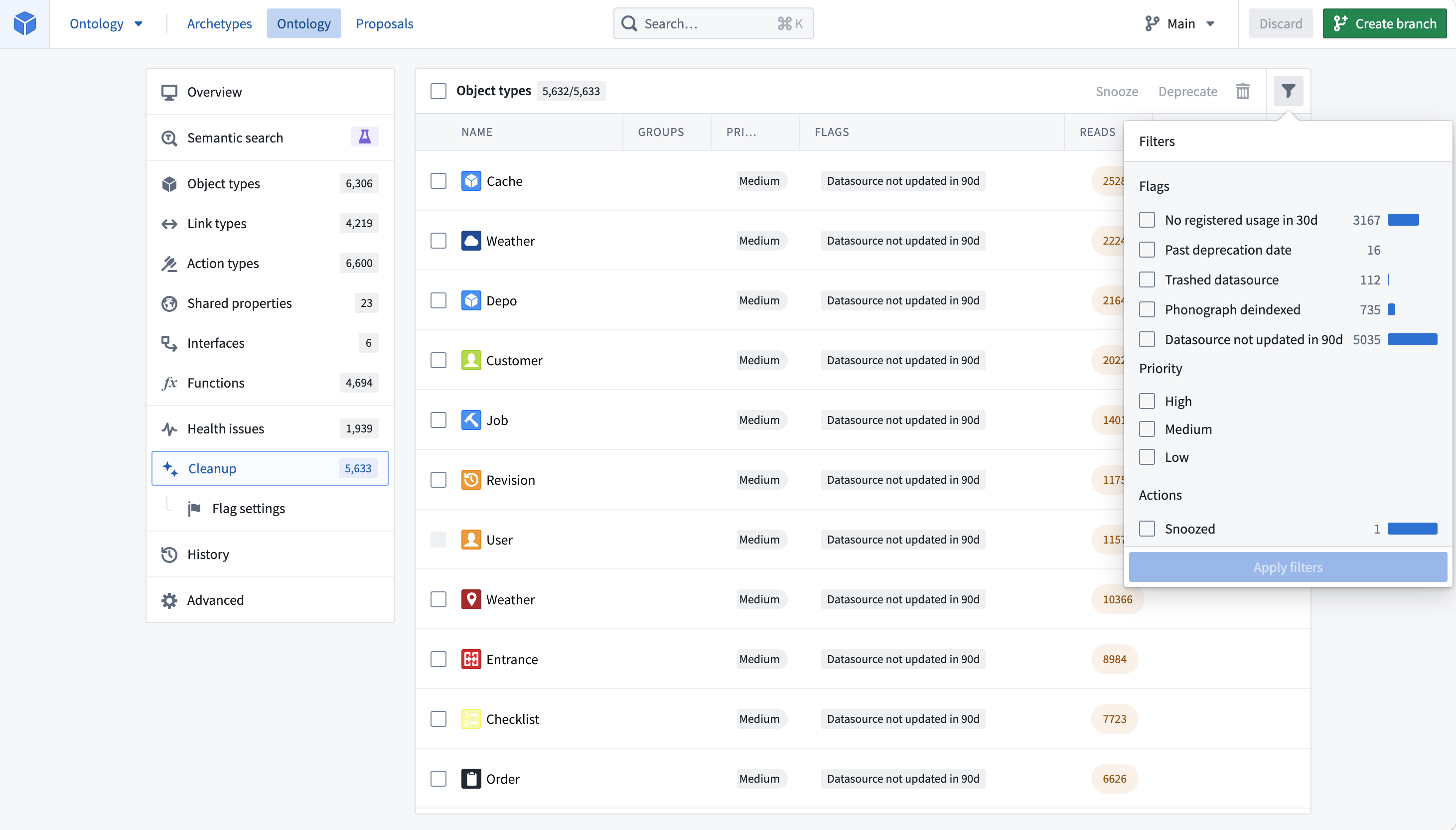
By default, the table is sorted by the highest priority among the flags that an object type triggers.
Cleaning up your Ontology
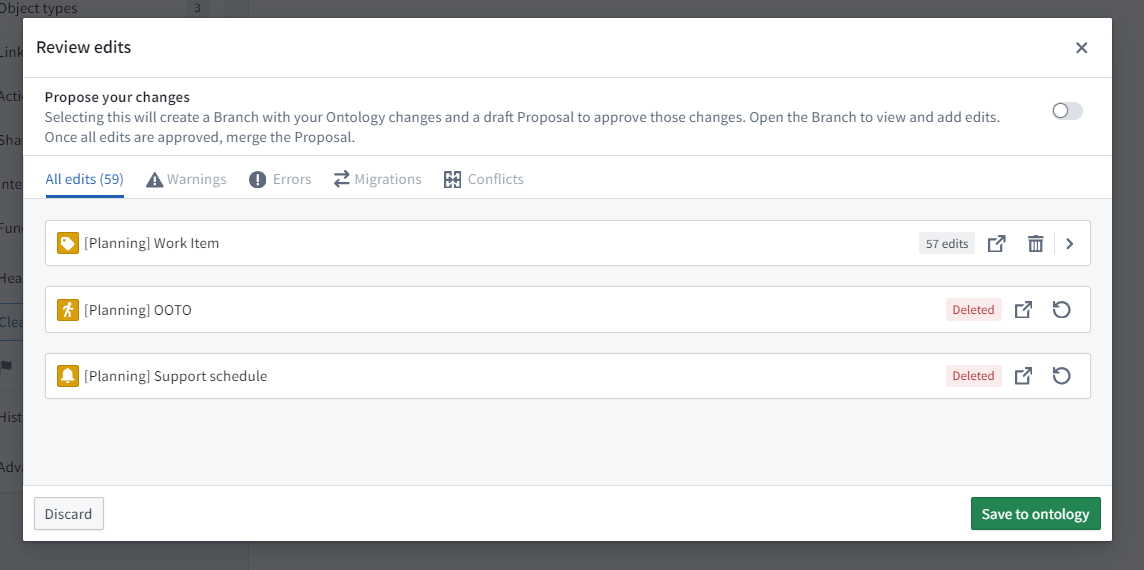
Here is an example where we have filtered down to the “Planning” workflow, a workflow that was being developed but never released.
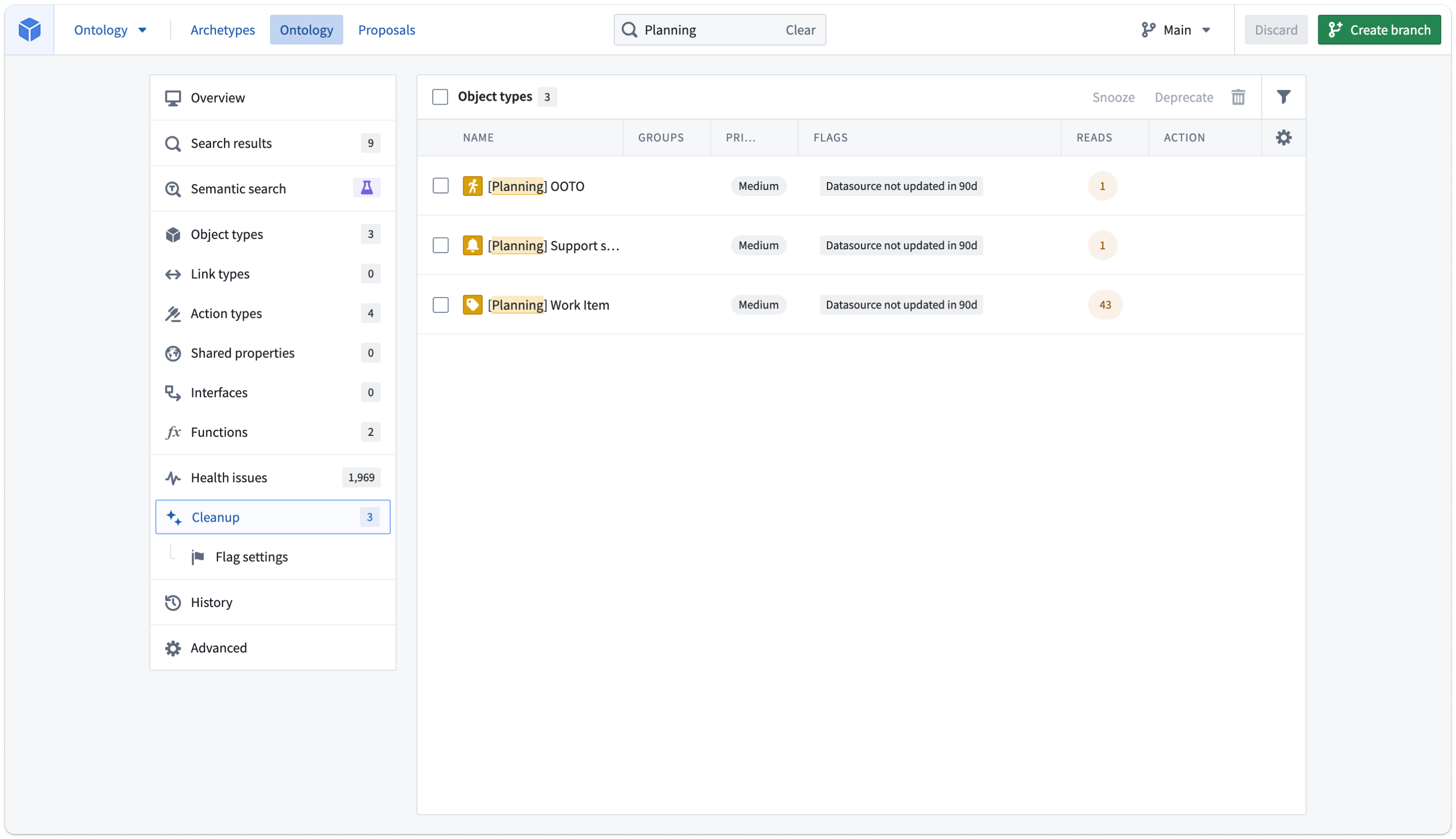
Select the three object types using the in-line checkboxes.
There are three options for managing these object types:
- Snooze: Hide object types from your cleanup queue for a configurable amount of time. Snoozing is an action that will affect only the user that performs it.
- Deprecate: Show object types as deprecated in every context that displays object type status. This option informs users to move to different object types or flag that the object type is still useful. You can set a deadline along with a deprecation so users know how long they have to refrain from using these object types.
- Delete: Delete object types from the Ontology and remove associated data from object storage.
Once you act on an object type in your queue, it disappears from the queue. Use the table filters to view all the actions you have already selected.
Deprecation and deletion are staged the same way as normal Ontology modifications. In the example above, the “Work Item” object type has objects with user edits, so it can be deprecated, while the other two deleted. Selecting Save in the top right enables saving the changes directly to the Ontology or creating a proposal to request review from another user.
Configure Ontology cleanup
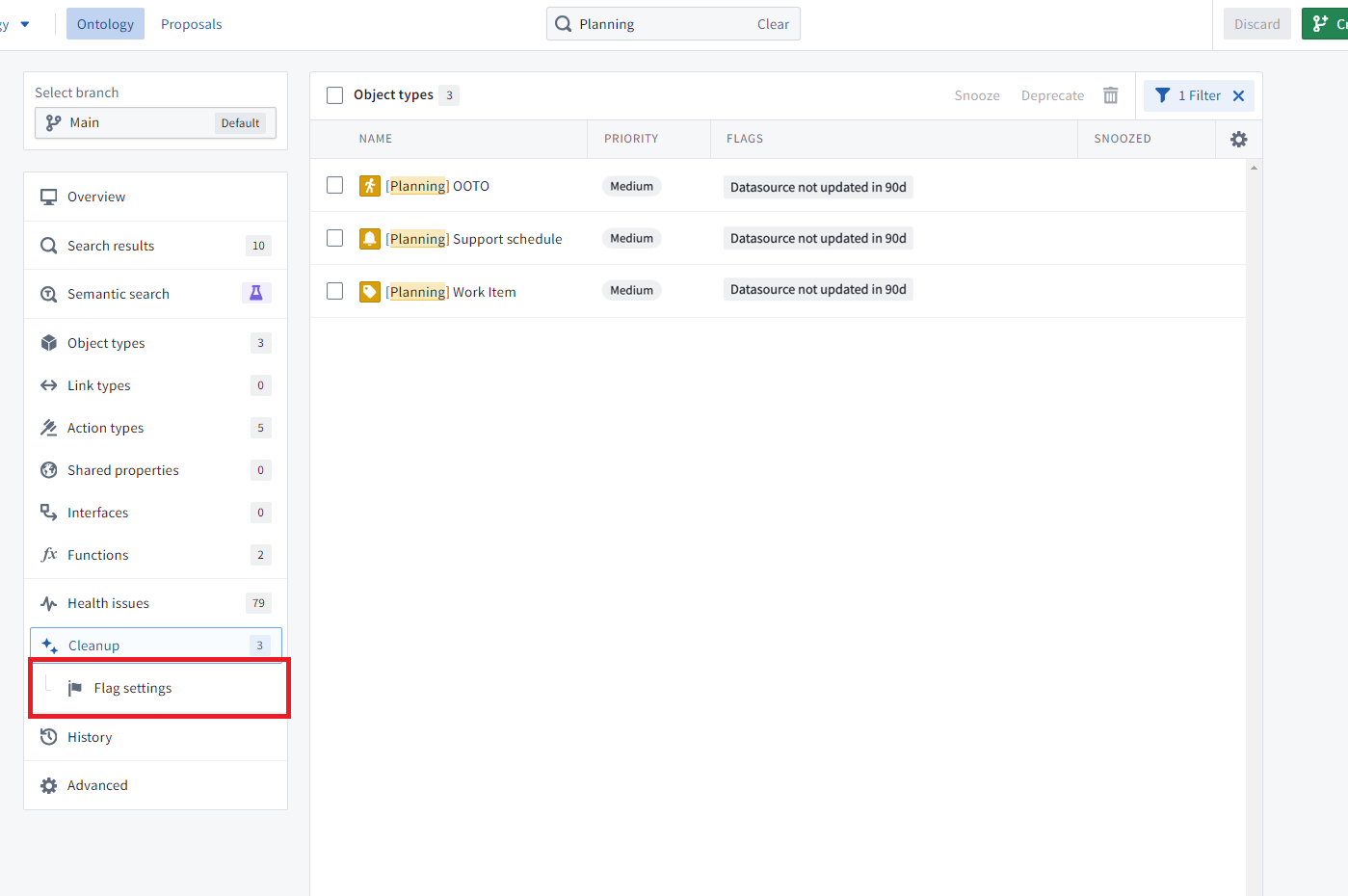
The cleanup page contains a subpage that allows you to customize the flags used and their respective priority.
You can configure flag settings on this page, with a choice of using either the default set or custom flags.
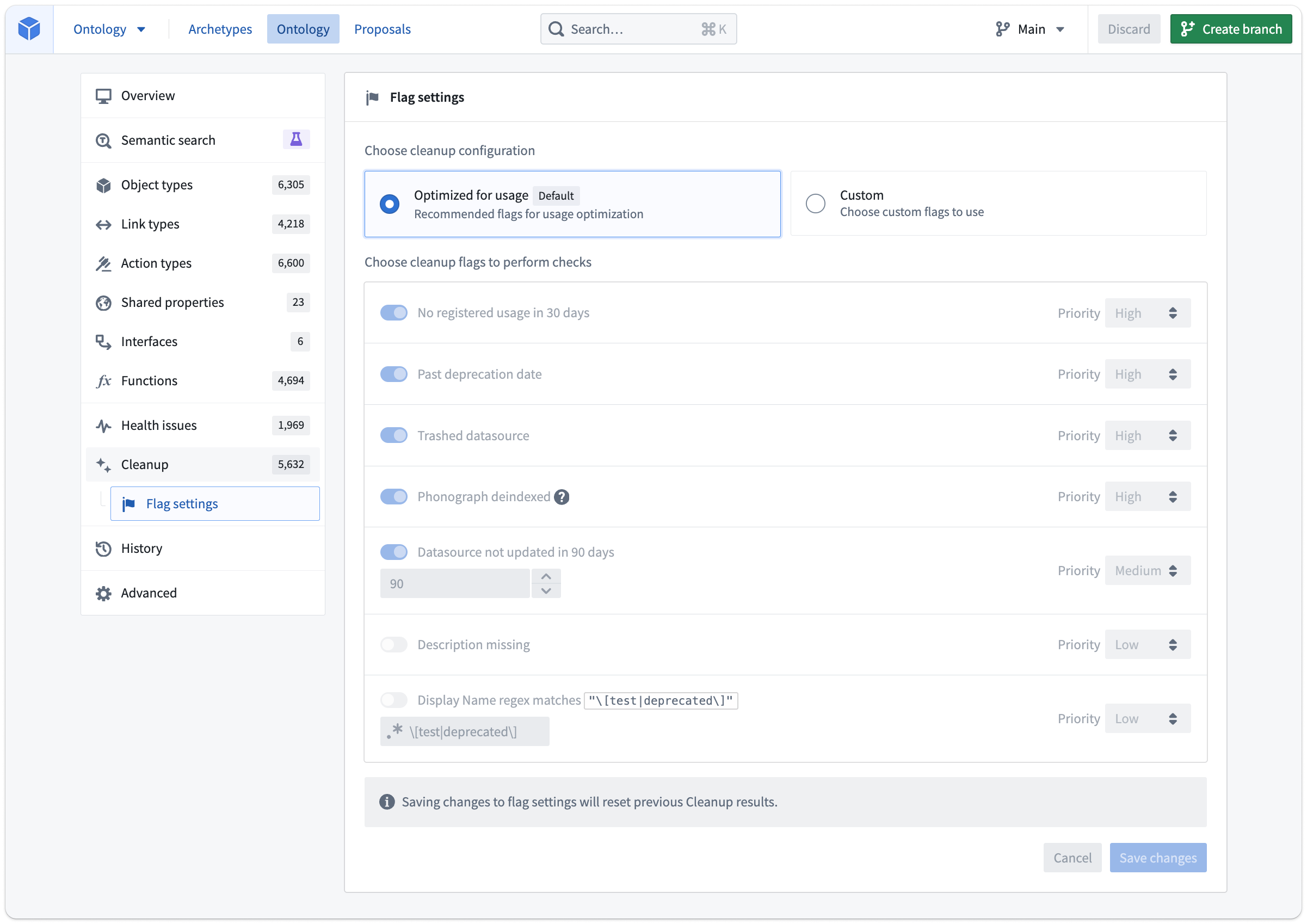
Like snoozing object types from the queue, this is an individual customization that does not affect other Ontology editors.
When you save changes and return to the main Cleanup tab, you will be prompted to recalculate the cleanup queue.
Note that if using a custom flag setup, new flags that get added in the future will not be automatically turned on if they are turned on when using the default set of flags.
Ontology cleanup flags
The following list of flags is aimed at answering common issues, but is not exhaustive:
- Past deprecation date: Object type currently has the
deprecatedstatus and the deprecation date field is in the past. - Trashed datasource: Any datasource (whether dataset, restricted view, or other) backing this object type has been trashed in Compass.
- Datasource not updated in [x] days: Checks with Compass the time of the last modification to the backing datasource.
- Description missing: The object type has a blank description. Does not check for descriptions on all properties of the object type.
- Display name regex matches string: The default value of
\[test|deprecated\]would match object types that have[test]or[deprecated]in their display names. For example, if a common pattern at your Organization is to mark object types in user acceptance testing with the prefixUAT -orTesting -, you would use the regexUAT -|Testing -to find all object types matching this pattern. Supports ECMA (JavaScript) regex syntax. - Phonograph deindexed: Flag only applied to object types in Object Storage V1. There is no equivalent check for Object Storage V2.
中文翻译
本体论清理(Ontology cleanup)
本体论清理工具是一种安全删除对象类型(Object Type)的方法,具有多项优势,包括:
- 更易于导航的本体论,没有多余的对象类型
- 更高性能的本体论,因为搜索和加载操作在更少的对象类型上运行
- 无需承担额外存储成本负担的本体论
该工具旨在帮助本体论编辑者判断删除对象类型的安全性,并提供弃用(Deprecation)选项,告知对象类型用户其未来将被移除。
访问本体论清理工具
可从本体论清理工具的主页访问该视图。
当您选择开始清理(Start cleanup)时,根据本体论的大小,工具可能需要一些时间来查找可清理的候选对象。
生成的对象类型列表的操作方式与从主页访问的其他显示列表的页面类似。列表可以按特定标记(Flag)或您负责的对象类型组进行筛选。您还可以自定义表格中显示的列。
默认情况下,表格按对象类型触发的标记中优先级最高的进行排序。
清理您的本体论
以下示例中,我们筛选到了"规划(Planning)"工作流,这是一个正在开发但从未发布的工作流。
使用行内复选框选择这三个对象类型。
管理这些对象类型有三种选项:
- 休眠(Snooze): 在可配置的时间内将对象类型从清理队列中隐藏。休眠操作仅影响执行该操作的用户。
- 弃用(Deprecate): 在所有显示对象类型状态的上下文中将对象类型标记为已弃用。此选项告知用户迁移到其他对象类型,或标记该对象类型仍然有用。您可以设置弃用的截止日期,以便用户知道他们还有多长时间可以继续使用这些对象类型。
- 删除(Delete): 从本体论中删除对象类型,并从对象存储中移除相关数据。
一旦您对队列中的对象类型执行了操作,它就会从队列中消失。使用表格筛选器查看您已选择的所有操作。
弃用和删除的暂存方式与正常的本体论修改相同。在上述示例中,"工作项(Work Item)"对象类型包含带有用户编辑的对象,因此可以弃用,而其他两个可以删除。选择右上角的保存(Save)可以直接将更改保存到本体论,或创建提案以请求其他用户审核。
配置本体论清理
清理页面包含一个子页面,允许您自定义使用的标记及其各自的优先级。
您可以在此页面上配置标记设置,可以选择使用默认集或自定义标记。
与从队列中休眠对象类型类似,这是个人自定义设置,不会影响其他本体论编辑者。
当您保存更改并返回主清理(Cleanup)选项卡时,系统将提示您重新计算清理队列。
请注意,如果使用自定义标记设置,未来新增的标记在默认标记集下处于开启状态时,不会自动启用。
本体论清理标记
以下标记列表旨在解决常见问题,但并非详尽无遗:
- 已过弃用日期(Past deprecation date): 对象类型当前具有
deprecated状态,且弃用日期字段已过期。 - 数据源已删除(Trashed datasource): 支持此对象类型的任何数据源(无论是数据集、受限视图还是其他)已在Compass中被删除。
- 数据源在[x]天内未更新(Datasource not updated in [x] days): 向Compass查询支持数据源的最后修改时间。
- 缺少描述(Description missing): 对象类型的描述为空。不检查对象类型所有属性的描述。
- 显示名称正则表达式匹配字符串(Display name regex matches string): 默认值
\[test|deprecated\]将匹配显示名称中包含[test]或[deprecated]的对象类型。例如,如果贵组织的常见模式是使用前缀UAT -或Testing -标记用户验收测试中的对象类型,则可以使用正则表达式UAT -|Testing -来查找所有匹配此模式的对象类型。支持ECMA(JavaScript)正则表达式语法。 - Phonograph已取消索引(Phonograph deindexed): 仅适用于对象存储V1(Object Storage V1)中的对象类型。对象存储V2(Object Storage V2)没有相应的检查。