Export, edit, and import an Ontology(导出、编辑和导入本体论(Ontology))
:::callout{theme="neutral"} You should not depend on the exported JSON schema as it may change over time. :::
Ontology schema definitions are stored in a JSON file ↗. An Ontology JSON file can be exported and edited with a code editor or text editor before being imported back into Foundry. This import/export functionality enables two workflows for advanced users:
- If you prefer to make Ontology edits in code, you can bypass the Ontology Manager interface by exporting the Ontology JSON file, editing the JSON file directly in a code editor or text editor, and then importing the modified Ontology JSON file back into the platform.
- If you’d like to copy the working state of one Ontology to another Ontology, you can export the Ontology’s current state as a JSON file and then import the copied JSON back into the platform (making any desired changes to the JSON in a code editor).
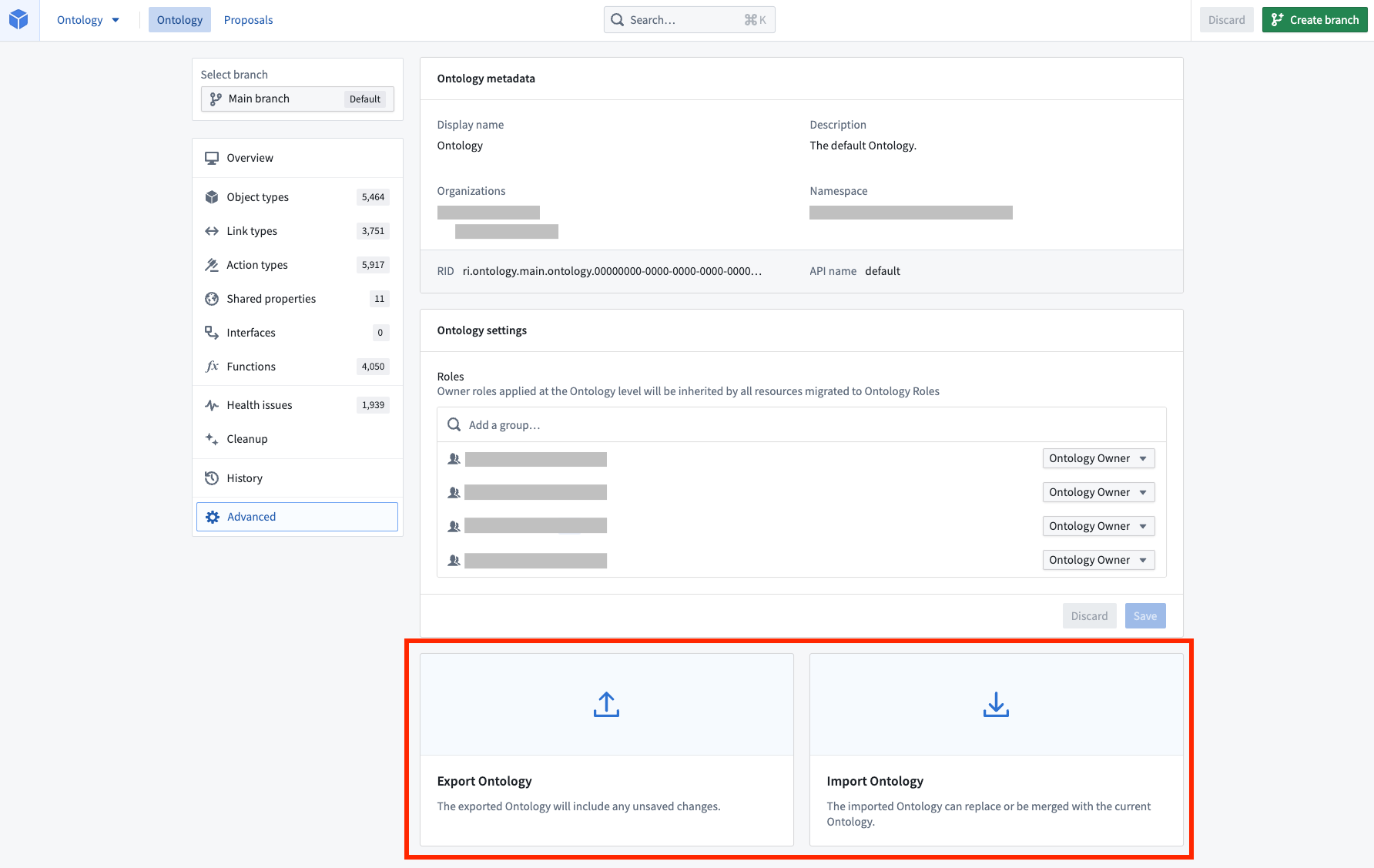
Export
You can export your Ontology working state by selecting the Advanced settings page from the application’s home page and then selecting Export.
:::callout{theme="neutral"} Any changes you have in your working state will be included in the export. :::
Import
You can import a previously exported Ontology working state by selecting the Advanced settings page from the application’s home page and then selecting Import. You will be prompted to choose an Ontology file from your local drive.
Next, select Import, which will recreate the entire working state from the JSON file in the application. You will see the number of changes made in the file that need to be saved in the application header.
:::callout{theme="neutral"} An exported Ontology working state with conditional formatting rules configured on its properties cannot be imported to an Ontology other than the one it was exported from. :::
Troubleshooting
Error: OntologyMetadata:UnreferencedRuleSets
If you receive the error OntologyMetadata:UnreferencedRuleSets, you are trying to import an Ontology working state with conditional formatting rules that are not defined in that Ontology and cannot be transferred over. You will need to delete the conditional formatting rules from the Ontology working state before importing.
中文翻译
导出、编辑和导入本体论(Ontology)
:::callout{theme="neutral"} 请勿依赖导出的JSON模式(Schema),因为它可能会随时间变化。 :::
本体论(Ontology)模式定义存储在JSON文件 ↗中。本体论JSON文件可以导出,并使用代码编辑器或文本编辑器进行编辑,然后再重新导入到Foundry中。这种导入/导出功能为高级用户提供了两种工作流程:
- 如果您更倾向于通过代码编辑本体论,可以绕过本体论管理器(Ontology Manager)界面,直接导出本体论JSON文件,在代码编辑器或文本编辑器中直接编辑JSON文件,然后将修改后的本体论JSON文件重新导入到平台中。
- 如果您希望将一个本体论的工作状态复制到另一个本体论,可以导出本体论的当前状态为JSON文件,然后将复制的JSON文件重新导入到平台中(在代码编辑器中对JSON进行任何所需的修改)。
导出
您可以通过从应用程序主页选择高级(Advanced)设置页面,然后选择导出(Export)来导出本体论的工作状态。
:::callout{theme="neutral"} 工作状态中的所有更改都将包含在导出中。 :::
导入
您可以通过从应用程序主页选择高级(Advanced)设置页面,然后选择导入(Import)来导入先前导出的本体论工作状态。系统将提示您从本地驱动器选择一个本体论文件。
接下来,选择导入(Import),这将从JSON文件在应用程序中重新创建整个工作状态。您将看到文件中需要进行保存的更改数量显示在应用程序标题中。
:::callout{theme="neutral"} 已导出的本体论工作状态如果在其属性上配置了条件格式规则(Conditional Formatting Rules),则无法导入到除导出源本体论以外的其他本体论中。 :::
故障排除
错误:OntologyMetadata:UnreferencedRuleSets
如果您收到OntologyMetadata:UnreferencedRuleSets错误,说明您正在尝试导入一个包含条件格式规则的本体论工作状态,但这些规则未在该本体论中定义,因此无法转移。您需要在导入前从本体论工作状态中删除这些条件格式规则。