Ontology metrics(本体(Ontology)指标)
The Ontology Manager can be configured to show usage metrics for object types and link types.
Key terminology
- Reads: A read is recorded when an application loads objects for a specified object type. This can include displaying objects in a table in Workshop, returning all objects from search for a given object type, aggregating a property on an object type, and so on. Note that one read represents one load request from Object Storage V1 (Phonograph) or the Object Set Service (OSS). Many objects loaded or aggregated at once will only be recorded as a single read. Also note that any object type or link type usage happening in Ontology Manager is not included.
- Writes: A write is recorded when an application makes edits to objects of this type as the result of an Action, Function, Foundry Form, direct Object Explorer edit, or API call. Note that one write represents one edit request sent to Object Storage V1 (Phonograph). Many objects edited in bulk at once will only be recorded as a single write.
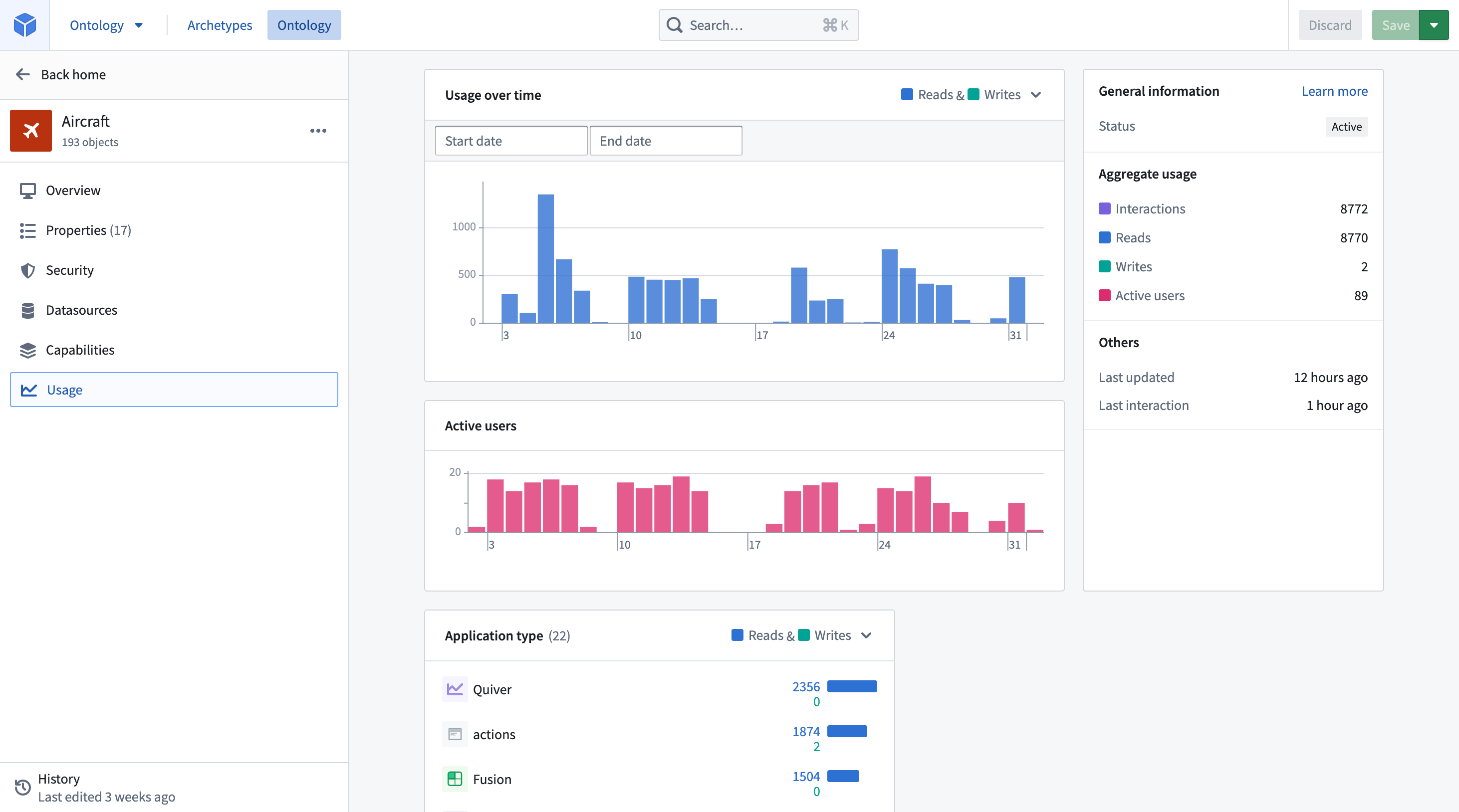
- Interactions: The total number of reads and writes on objects of this type over the last 30 days.
- Active users: The number of unique user IDs that triggered the reads and writes recorded over the last 30 days.
Viewing usage
There are two places in the Ontology Manager to view object type and link type usage:
- A usage graph on the Overview tab: High-level summary of usage over the last 30 days, enabling Ontology users to quickly understand the implications of making a breaking change to this resource.
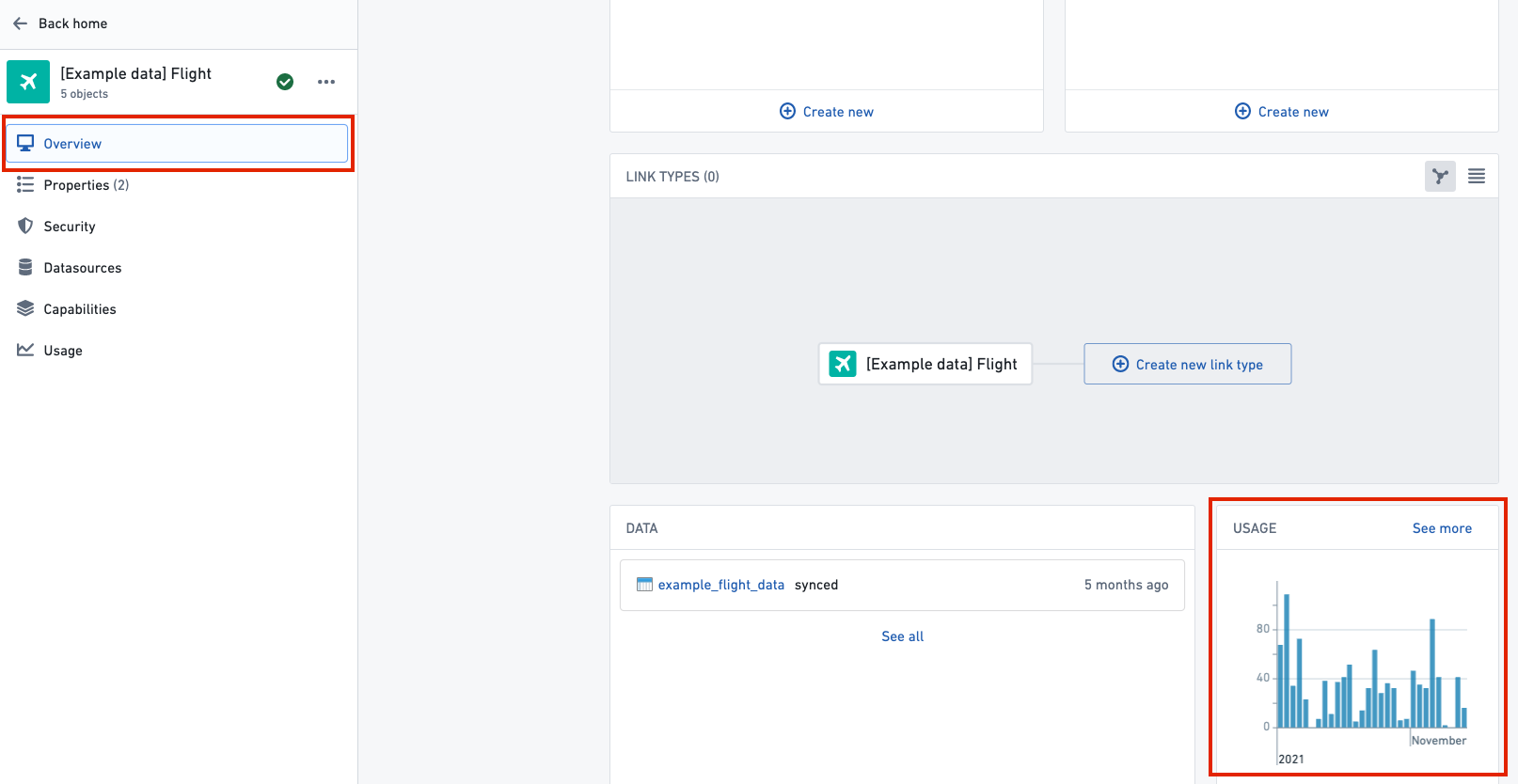
:::callout{theme="warning" title="Warning"} If you see “No usage for the last 30 days” in the usage graph when you would expect to see usage statistics, then it’s possible that internal tables may not have been configured. Contact your Palantir representative for more information. :::
- A dedicated Usage tab: Detailed usage metrics for resources. Users can see, over the last 30 days, who has used each object type, when, and in which Foundry applications. The feature is intended to help Ontology users make Ontology changes more safely by providing a clearer understanding of a change's impact. The Usage tab can also be accessed by clicking See more on the usage graph in the Overview tab.
Enabling Ontology usage
Usage on the Overview tab and detailed usage metrics in the Usage tab are configured from the Ontology settings tab in Control Panel using the Ontology metrics toggle. This toggle can only be enabled or disabled by Ontology administrators and changes may take up to 60 minutes to take effect in Ontology Manager.
Shared Ontology usage
If your organization shares an Ontology with another organization, then the Usage tab will be accessable by users of all organizations that have the Ontology metrics turned on. The usage metrics displayed only includes the usage from users who have access to the object type and those who are from organizations that have the Ontology metrics enabled. See the steps outlined in Enabling Ontology usage for more information.
中文翻译
本体(Ontology)指标
可对本体管理器(Ontology Manager)进行配置,使其展示对象类型(object type)和链接类型(link type)的使用指标。
核心术语
- 读取(Reads):当应用加载指定对象类型的对象时,会记录一次读取。包括在Workshop的表格中展示对象、搜索某一对象类型返回全部结果、聚合某一对象类型的属性等场景。注意,一次读取代表向Object Storage V1 (Phonograph)或对象集服务(Object Set Service, OSS)发起的一次加载请求,一次性加载或聚合多个对象仅会被记录为一次读取。另外请注意,本体管理器内发生的所有对象类型或链接类型使用行为不会被计入统计。
- 写入(Writes):当应用通过Action、Function、Foundry Form、Object Explorer直接编辑或API调用对该类型对象执行编辑操作时,会记录一次写入。注意,一次写入代表向Object Storage V1 (Phonograph)发送的一次编辑请求,批量一次性编辑多个对象仅会被记录为一次写入。
- 交互量(Interactions):过去30天内该类型对象的读取和写入总次数。
- 活跃用户(Active users):过去30天内触发过读取和写入操作的唯一用户ID数量。
查看使用情况
在本体管理器中,有两个位置可以查看对象类型和链接类型的使用情况:
- 概览(Overview) 页签中的使用趋势图:展示过去30天使用情况的高阶汇总,帮助本体用户快速判断对该资源进行破坏性变更会产生的影响。
:::callout{theme="warning" title="警告"} 如果你本应看到使用统计数据,却在使用趋势图中看到“过去30天无使用记录”,则可能是内部表未完成配置。请联系你的Palantir代表获取更多信息。 :::
- 专用的使用(Usage) 页签:展示资源的详细使用指标。用户可以查看过去30天内,都有谁在何时、哪些Foundry应用中使用了每个对象类型。该功能旨在帮助本体用户更清晰地了解变更的影响,从而更安全地修改本体。点击概览页签中使用趋势图的查看更多,也可以进入使用页签。
开启本体使用统计功能
概览页签的使用数据和使用页签的详细使用指标,需要在Control Panel的本体设置页签中,通过本体指标开关进行配置。该开关仅可由本体管理员启停,变更最多需要60分钟才会在本体管理器中生效。