Python OSDK migration guide (1.x to 2.x)(Python OSDK 迁移指南(1.x 到 2.x))
This guide is intended to help you migrate applications using Python OSDK 1.x to Python OSDK 2.x. The sections below explain the differences between the two versions and highlight relevant changes in syntax and structure.
:::callout{theme="neutral"}
Python OSDK documentation is also available in-platform in the Developer Console at /workspace/developer-console/. Use the version picker to select 2.x for documentation on Python OSDK 2.x.
:::
Why upgrade from Python OSDK 1.x to 2.x?
There are four main reasons to upgrade from Python OSDK 1.x to 2.x:
- Shared client used for both Python Platform SDK and OSDK
- Improved return types for queries, links, aggregations, and attachment uploads
- Ability to edit your client configuration
- Beta features
Shared client used for both Python Platform SDK and OSDK
Developing with both the OSDK and Platform SDK no longer requires users to manage two separate clients. Both SDKs can now be accessed through a single client.
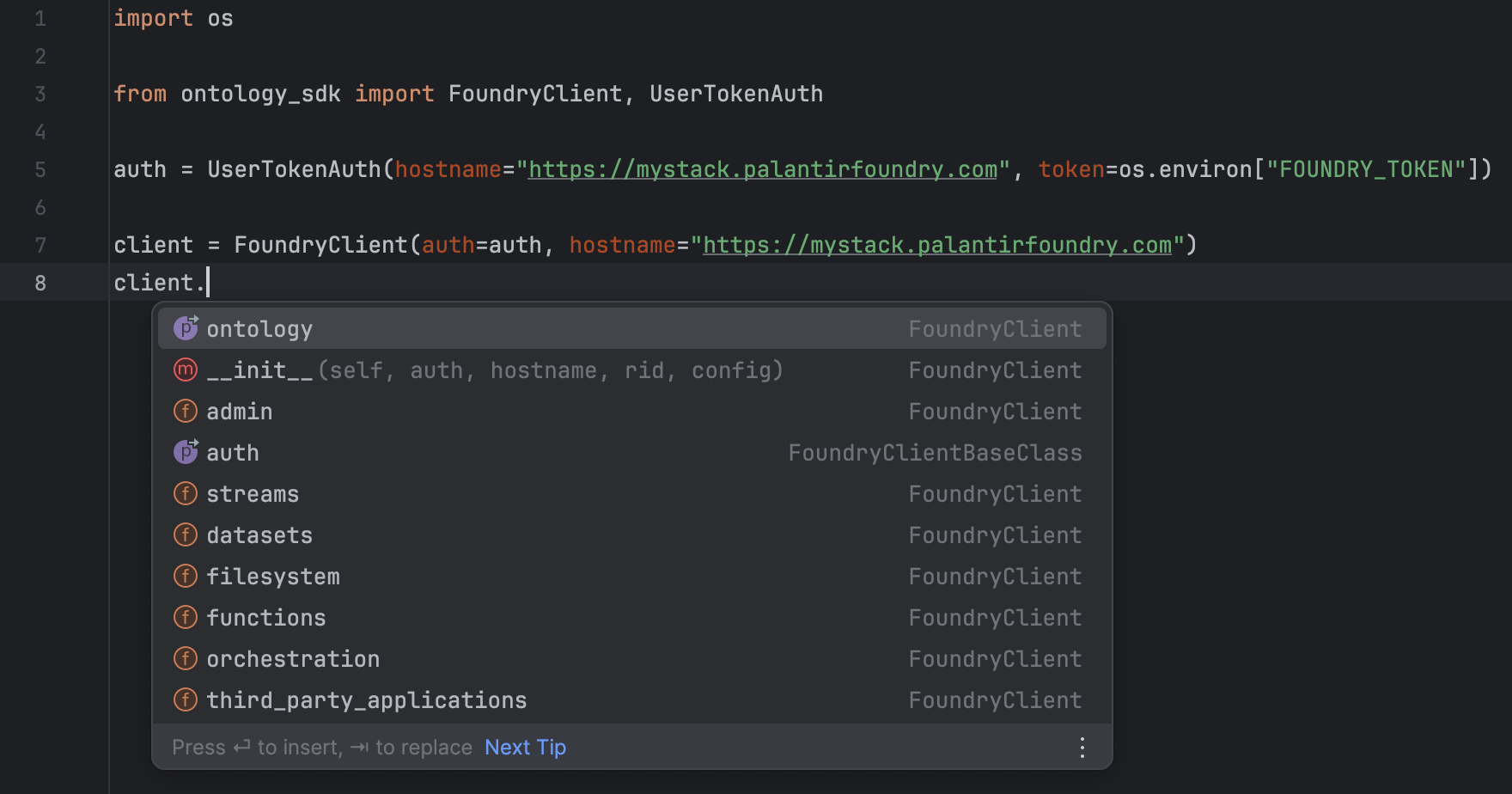
Improved return types for queries, links, aggregations, and attachment uploads
- Queries can return objects, object sets, attachments, two-dimensional aggregations, three-dimensional aggregations, and map types.
- In Python OSDK V1, function queries whose return types were objects, object sets, and attachments would return the object identifiers for each of these types. For example, if a query returns an object, in V1, the query would actually return the object primary key as opposed to an instance of the object. Now, queries return an instance of the type.
- Python OSDK V1 did not support two-dimensional aggregations, three-dimensional aggregations, or map types. These are now supported in OSDK V2.
- Links return object sets or
Optional[Objects] - One-to-many / many-to-many type links now return object sets and one-to-one / many-to-one type links return
Optional[Objects]. - For one-to-one / many-to-one type links, users no longer need to use
.getto retrieve the linked object. The link itself will be the object. - For one-to-many / many-to-many type links, all methods available to object sets (such as
.page,.where, or.group_by) are now available to these links. In Python OSDK V1, only the methods.iterateand.getwere available. - Aggregations return an
AggregateObjectsResponse - In Python OSDK V1, aggregation responses were of type
dict[str, Any], where the keys were fields such as excluded items, accuracy, data, and so on. With Python OSDK V2, aggregations now return an instance ofAggregateObjectsResponse, whose fields are the same as the V1 dict type, but with improved type safety. TheAggregateObjectsResponsein Python OSDK V2 has a.to_dictmethod, which will return the same response as in V1. - To perform a "group by range" in Python OSDK V1, you would need to input a list of dicts, where the keys of each dict were "start_value" and "end_value", and the values of each dict were the start and end of the range. In V2, the input type is now a set of tuples, where the first element of the tuple is inferred to be the "start_value" and the second element the "end_value".
- Attachment upload returns an
Attachment - In Python OSDK V1,
client.ontology.attachments.upload(...)returned anAttachmentMetadata. In V2, uploading an attachment returns anAttachment.
Ability to edit your client configuration
In Python OSDK V1, there was no easy way to edit the client configuration when sending requests. For example, if a user wanted to edit the user-agent of their requests, they would have to access the reserved ._session method on their client in order to do so. To avoid this issue, Python OSDK V2 provides a Config class that users can import and pass into their clients.
This new Config class has the following structure:
class Config:

# Configuration for the HTTP session.


    default_headers: Optional[Dict[str, str]] = ...
    # HTTP headers to include with all requests.

    proxies: Optional[Dict[Literal["http", "https"], str]] = None
    # Proxies to use for HTTP and HTTPS requests.

    timeout: Optional[Union[int, float]] = None
    # The default timeout for all requests in seconds.

    verify: Optional[Union[bool, str]] = True
    # SSL verification, can be a boolean or a path to a CA bundle.

    default_params: Optional[Dict[str, Any]] = None
    # URL query parameters to include with all requests.

    scheme: Literal["http", "https"] = "https"
    # URL scheme to use ('http' or 'https'). Defaults to 'https'.
Python OSDK 1.x (legacy)
from ontology_sdk import FoundryClient

client = FoundryClient()
client._session._user_agent += "something_new"
Python OSDK 2.x
from ontology_sdk import FoundryClient, Config

config = Config(default_headers={"Content-Type": "application/json"})
client = FoundryClient(config=config)
Beta features
Beta features have the potential to change, and their syntax, stability, and existence are not guaranteed. Stable releases of the Python OSDK V2 contain beta features, allowing you to try them out and provide feedback. To use a beta feature, you must import AllowBetaFeatures from foundry_sdk_runtime and either write your code within its context, or decorate your code with @AllowBetaFeatures(). When using Foundry Python functions, the @function decorator contains a beta boolean.
Use beta features with AllowBetaFeatures
from foundry_sdk_runtime.decorators import AllowBetaFeatures

with AllowBetaFeatures():
    <your code>
Use beta features by decorating methods with AllowBetaFeatures
from foundry_sdk_runtime.decorators import AllowBetaFeatures

@AllowBetaFeatures()
my_func():
    <your code>
Use beta features in Foundry Python functions
The following code is required for Python functions to accept ontology objects with beta properties.
from functions.api import function

@function(beta=True)
def my_function():
    <your code>
Beta features in Python OSDK V2 include the following:
- Derived properties
- Nearest neighbor object set filtering
- New object property type: Markings
- New object property type: Media
- New object property type: Vector
Derived properties
Derived properties are properties calculated at runtime based on the values of other properties or links on objects. With OSDK V2, you can create derived properties on your object sets.
from foundry_sdk_runtime import AllowBetaFeatures
from ontology_sdk.ontology.objects import Object


with AllowBetaFeatures():
    derived_object_type = Object.object_type.derived

    my_object_set = client.ontology.object.with_properties(
        my_new_property=derived_object_type.linked_object.id.count()
    )

    result = my_object_set.take(1)

    print(result)
# Example output:
# Object(id=1, my_new_property=3.0)
Nearest neighbor object set filtering
In OSDK V2, you can filter object sets using nearest_neighbors to find the set of objects whose specified vector property is nearest to a provided query vector or text.
from foundry_sdk_runtime import AllowBetaFeatures
from ontology_sdk.ontology.objects import Object


my_object_set = client.ontology.objects.Object

with AllowBetaFeatures():
    closest_objects = my_object_set.nearest_neighbors(
        query="my query",
        num_neighbors=3,
        vector_property=Object.object_type.vector_property
    )
    print(list(closest_objects))

# Example output:
# [
#     Object(rid=None, _score=None, id=1, embedding=None),
#     Object(rid=None, _score=None, id=2, embedding=None),
#     Object(rid=None, _score=None, id=3, embedding=None)
# ]
New object property type: Markings
Markings in the OSDK are a string that represents mandatory security controls used to restrict resource access to only those users who satisfy all applied marking criteria.
from foundry_sdk_runtime import AllowBetaFeatures
from foundry_sdk_runtime.markings import Marking


my_object_set = client.ontology.objects.Object

with AllowBetaFeatures():
    my_object = my_object_set.get(1)

    print(my_object.marking_property)
# Example output:
# Marking("MyMarking")
New object property type: Media
A media property allows you to interact with their media types. You can get the content, metadata, and information on the media reference from media properties.
from foundry_sdk_runtime import AllowBetaFeatures
from foundry_sdk_runtime.media import Media


my_object_set = client.ontology.objects.Object

with AllowBetaFeatures():
    my_object = my_object_set.get(1)
    print(my_object.media_property)
# Example output:
# Media("media_property")

    print(my_object.media_property.get_media_content())
# Example output:
# <_io.BytesIO object at 0x106ed32c0>

    print(my_object.media_property.get_media_metadata())
# Example output:
# MediaMetadata(
#     path='my_file.png'
#     size_bytes=1408
#     media_type='image/png'
# )

    print(my_object.media_property.get_media_reference())
# Example output:
# MediaReference(
#     mime_type='image/png'
#     reference=MediaSetViewItemWrapper(
#         media_set_view_item=MediaSetViewItem(
#             media_set_rid='ri.mio.main.media-set.00000000-0000-0000-0000-000000000000',
#             media_set_view_rid='ri.mio.main.view.00000000-0000-0000-0000-000000000000',
#             media_item_rid='ri.mio.main.media-item.00000000-0000-0000-0000-000000000000',
#             token=None
#         ),
#         type='mediaSetViewItem'
#     )
# )
New object property type: Vector
Vector properties are lists of floats. They can be used to perform nearest neighbor filtering.
from foundry_sdk_runtime import AllowBetaFeatures
from foundry_sdk_runtime.vector import Vector
from ontology_sdk.ontology.objects import Object


my_object_set = client.ontology.objects.Object

with AllowBetaFeatures():
    my_object = my_object_set.get(
        1,
        properties=[Object.object_type.vector_property]
    )

    print(my_object.vector_property)
# Example output:
# Vector([0.014408838003873825, ..., -0.012173213064670563])
How to upgrade from Python OSDK 1.x to 2.x
You can generate a new SDK version for an existing Developer Console application using the Python OSDK 2.x generator (accessed through the Generate new version option) in the SDK versions tab of your application.
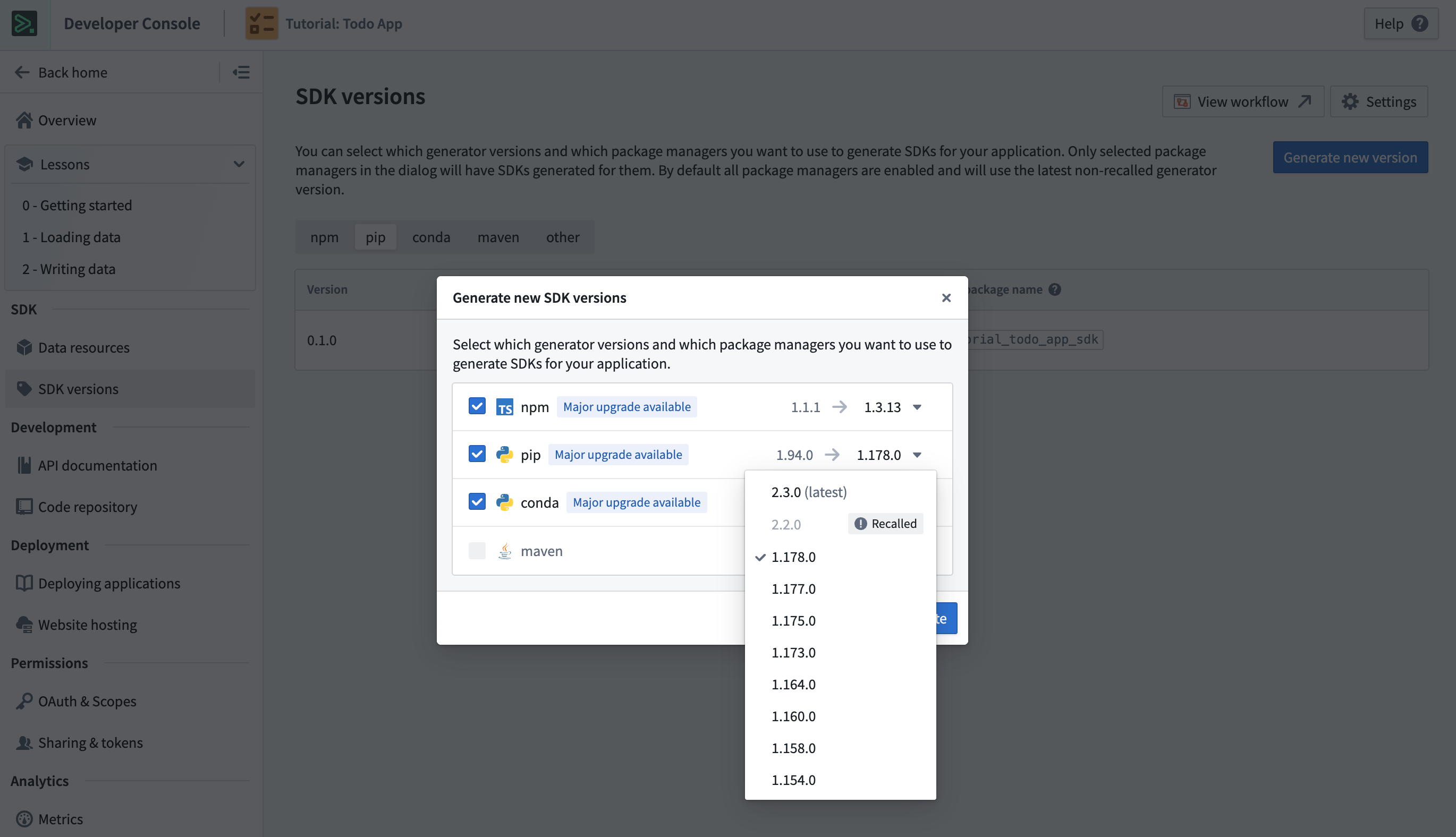
Existing applications must also have the required dependencies to use the newly generated SDK. New applications created in Developer Console will generate SDKs using the Python OSDK 2.x generator by default. You can quickly get started by following the instructions in the Start developing tab.
Syntax translations and return type changes from Python OSDK 1.x to 2.x
This section contains simple examples that illustrate how to map between Python OSDK 1.x and 2.x.
Filtering
- You must include
.object_typein thewhereexpression when referencing the property that is being filtered on. .is_member_ofhas been renamed to.in_..starts_withhas been renamed to.contains_all_terms_in_order_prefix_last_term.
Filtering with Python OSDK 1.x (legacy)
client.ontology.object.where(Object.id.is_member_of([1, 2, 3])).take(1)
Filtering with Python OSDK 2.x
client.ontology.object.where(Object.object_type.id.in_([1, 2, 3])).take(1)
Links
Return type changes
| Link type | V1 response | V2 response |
|---|---|---|
| One-to-one / many-to-one | ObjectLinkClass instance | Optional[Object] |
| One-to-many / many-to-many | ObjectLinkClass instance | ObjectSet instance |
One-to-one or many-to-one links with Python OSDK 1.x (legacy)
In Python OSDK V1, use .get to retrieve the linked object.
linked_obj: Optional[LinkedObject] = client.ontology.object.linked_object.get()
One-to-many or many-to-many links with Python OSDK 1.x (legacy)
In Python OSDK V1, the only methods available are .iterate and .get.
linked_obj: ObjectLinkType = client.ontology.object.linked_object

linked_obj.iterate() → Iterable[LinkedObject]
linked_obj.get(1) → Optional[LinkedObject]
One-to-one or many-to-one links with Python OSDK 2.x
In Python OSDK V2, the link itself is a method that returns an instance of the linked object.
linked_obj: Optional[LinkedObject] = client.ontology.object.linked_object()
One-to-many or many-to-many links with Python OSDK 2.x
In Python OSDK V2, any method available to object sets are now available on links, including .take, .where, and .group_by; this makes it easier to filter, aggregate, and iterate over links.
linked_obj: LinkedObjectSet = client.ontology.object.linked_object()

# All V1 methods are available

linked_obj.iterate() → Iterable[LinkedObject]
linked_obj.get(1) → Optional[LinkedObject]

# Search, aggregation, and iteration is now available

from ontology_sdk.ontology.objects import LinkedObject

result: float = linked_obj.where(LinkedObject.object_type.id > 5).count().compute()
Queries
Queries in OSDK V2 have changes to their return types, and all arguments to queries in V2 are keyword arguments.
Return type changes
| Return type | Object primary key (float, string) | Object instance |
|---|---|---|
| Object | Object primary key (float, string) | Object instance |
| ObjectSet | ObjectSet RID (string) | ObjectSet instance |
| Attachment | Attachment RID (string) | Attachment instance |
Object queries with Python OSDK 1.x (legacy)
result: float = client.ontology.queries.query_object_output(1)

print(result)
# Example output:
# 1.0
Object set queries with Python OSDK 1.x (legacy)
result: str = client.ontology.queries.query_object_set_output(1)

print(result)
# Example output:
# "ri.object-set.main.object-set.e5c05475-8766-4804-9be0-66cf7854de5c"
Attachment queries with Python OSDK 1.x (legacy)
result: str = client.ontology.queries.query_attachment_output(1)

print(result)
# Example output:
# "ri.attachments.main.attachment.2c1432f8-0378-45f2-8280-55d858cb71fc"
Object queries with Python OSDK 2.x
result: Object = client.ontology.queries.query_object_output(object_id = 1)

print(result)
# Example output:
# Object(id = 1)
Object set queries with Python OSDK 2.x
result: ObjectSet = client.ontology.queries.query_object_set_output(object_id = 1)

print(result)
# Example output:
# ObjectSet(object_set_definition=...)
Attachment queries with Python OSDK 2.x
result: Attachment = client.ontology.queries.query_attachment_output(object_id = 1)

print(result)
# Example output:
# Attachment(rid="ri.attachments.main.attachment.2c1432f8-0378-45f2-8280-55d858cb71fc")
Two-dimensional aggregation queries with Python OSDK 2.x
result: QueryTwoDimensionalAggregation = client.ontology.queries.query_two_dimensional_output()

print(result)
# Example output:
# QueryTwoDimensionalAggregation(
#     groups=[
#         QueryAggregation(key='1', value=2.0),
#         QueryAggregation(key='2', value=3.0)
#     ]
# )
Three-dimensional aggregation queries with Python OSDK 2.x
result: QueryThreeDimensionalAggregation = client.ontology.queries.query_three_dimensional_output()

print(result)
# Example output:
# QueryThreeDimensionalAggregation(
#     groups=[
#         NestedQueryAggregation(
#             key='1',
#             groups=[
#                 QueryAggregation(key='ABC', value=2.0),
#                 QueryAggregation(key='DEF', value=4.0)
#             ]
#         ),
#         NestedQueryAggregation(
#             key='2',
#             groups=[
#                 QueryAggregation(key='GHI', value=1.0),
#                 QueryAggregation(key='JKL', value=1.0)
#             ]
#         )
#     ]
# )
Map type queries with Python OSDK 2.x
result: dict[Object, int] = client.ontology.queries.query_map_output(object_id = 1)

print(result)
# Example output:
# {
#     Object(id=1): 1,
#     Object(id=2): 3
# }
Aggregations
Aggregations that return more than a single value (that is, those derived from .group_by and .aggregate) return AggregateObjectsResponse as opposed to Dict[str, Any]. If you would like to return the Python OSDK V1 response, the AggregateObjectsResponse has a .to_dict method on it, which returns a dictionary representation of the response.
| V1 response | V2 response |
|---|---|
| Dict[str, Any] | AggregateObjectsResponse |
Aggregations with Python OSDK 1.x (legacy)
result: dict[str, Any] = client.ontology.objects.Object.aggregate({
                             "min_id": Object.object_type.id.min(),
                             "max_id": Object.object_type.id.max()
                         }).compute()

print(result)
# Example output:
# {
#     'accuracy': 'ACCURATE',
#     'data': [
#         {
#             'group': {},
#             'metrics': [
#                 {'name': 'min_id', 'value': 1.0},
#                 {'name': 'max_id', 'value': 99.0}
#             ]
#         }
#     ]
# }
Aggregations with Python OSDK 2.x
result: AggregateObjectsResponse = client.ontology.objects.Object.aggregate({
    "min_id": Object.object_type.id.min(),
    "max_id": Object.object_type.id.max()
}).compute()

print(result)
# Example output:
# AggregateObjectsResponse(
#     excluded_items=None,
#     accuracy='ACCURATE',
#     data=[
#         AggregateObjectsResponseItem(
#             group={},
#             metrics=[
#                 AggregationMetricResult(name='min_id', value=1.0),
#                 AggregationMetricResult(name='max_id', value=99.0)
#             ]
#         )
#     ]
# )
Attachments
In OSDK V1, when uploading an attachment, the return type is an AttachmentMetadata. In V2, the return type is an Attachment.
Upload attachment with Python OSDK 1.x (legacy)
result: AttachmentMetadata = client.ontology.attachments.upload(
    file_path="file.json",
    attachment_name="myFile"
)
print(result)
# Example output:
# AttachmentMetadata(
#     rid='ri.attachments.main.attachment.00000000-0000-0000-0000-000000000000',
#     filename='myFile',
#     size_bytes=20,
#     media_type='*/*',
#     type='single'
# )
Upload attachment with Python OSDK 2.x
result: Attachment = client.ontology.attachments.upload(
    file_path="file.json",
    attachment_name="myFile"
)
print(result)
# Example output:
# Attachment(rid=ri.attachments.main.attachment.00000000-0000-0000-0000-000000000000)

print(result.get_metadata())
# Example output:
# AttachmentMetadata(
#     rid='ri.attachments.main.attachment.00000000-0000-0000-0000-000000000000',
#     filename='myFile',
#     size_bytes=20,
#     media_type='*/*',
#     type='single'
# )

print(result.read().getvalue())
# Example output:
# b'My example file.\n'
Group by
In OSDK V1, when grouping by ranges, the accepted input is a list of dicts, where the keys of each dict are start_value and end_value, and the values are the start and end of each range. In V2, the new input type is a set of tuples, where the first element of the tuple is the start_value and the second element is the end_value for each range.
Group by ranges with Python OSDK 1.x (legacy)
from ontology_sdk.ontology.objects import Object

client.ontology.objects.Object.group_by(
    Object.object_type.int_property.ranges(
        [{"start_value": 1, "end_value": 2}, {"start_value": 3, "end_value": 4}]
    )
)
Group by ranges with Python OSDK 2.x
from ontology_sdk.ontology.objects import Object

client.ontology.objects.Object.group_by(
    Object.object_type.int_property.ranges({(1, 2), (3, 4)})
)
Property type changes from Python OSDK 1.x to 2.x
- GeoTypes:
Pointis renamed toGeoPoint.
Error handling
Request exceptions are now imported directly from foundry_sdk instead of foundry_sdk_runtime.errors. This includes the following exceptions:
- PalantirRPCException
- NotAuthenticated
- EnvironmentNotConfigured
Error handling with Python OSDK 1.x (legacy)
from foundry_sdk_runtime.errors import PalantirRPCException
Error handling with Python OSDK 2.x
from foundry_sdk import PalantirRPCException
Other differences
ActionResponse
ActionResponsehas been changed toSyncApplyActionResponse.BatchActionResponsehas been changed toBatchApplyActionResponse.ValidationResulthas been removed as anenum. It exists as aLiteraland can be imported fromfoundry_sdk.v2.ontologies.models.
Actions with Python OSDK 1.x (legacy)
from ontology_sdk.types import (
    ActionConfig,
    ActionMode,
    ReturnEditsMode,
    ValidationResult
)
from foundry_sdk_runtime.types import ActionResponse

response: ActionResponse = client.ontology.actions.action_example(
    action_config=ActionConfig(
        mode=ActionMode.VALIDATE_AND_EXECUTE,
        return_edits=ReturnEditsMode.ALL),
    parameter_example="value"
)
if response.validation.validation_result == ValidationResult.VALID:
    ...

print(response)
# Example output:
# ActionResponse(
#     validation=ValidateActionResponse(
#         result='VALID',
#         submission_criteria=[],
#         parameters={}
#     ),
#     edits=EditsActionResponse(
#         type='edits',
#         edits=[
#             EditObjectResponse(
#                 type='addObject',
#                 primary_key='value',
#                 object_type='ExampleObjectType'
#             )
#         ],
#         added_objects_count=1,
#         modified_objects_count=0,
#         deleted_objects_count=0,
#         added_links_count=0,
#         deleted_links_count=0
#     )
# )
Actions with Python OSDK 2.x
from foundry_sdk_runtime.types import (
    ActionConfig,
    ActionMode,
    ReturnEditsMode,
    SyncApplyActionResponse
)

response: SyncApplyActionResponse = client.ontology.actions.action_example(
    action_config=ActionConfig(
        mode=ActionMode.VALIDATE_AND_EXECUTE,
        return_edits=ReturnEditsMode.ALL),
    parameter_example="value"
)
if response.validation.result == "VALID":
    ...

print(response)
# Example output:
# SyncApplyActionResponse(
#     validation=ValidateActionResponse(
#         result='VALID',
#         submission_criteria=[],
#         parameters={}
#     ),
#     edits=ObjectEdits(
#         type='edits',
#         edits=[
#             AddObject(
#                 primary_key='value',
#                 object_type='ExampleObjectType',
#                 type='addObject'
#             )
#         ],
#         added_object_count=1,
#         modified_objects_count=0,
#         deleted_objects_count=0,
#         added_links_count=0,
#         deleted_links_count=0
#     )
# )
Batch actions with Python OSDK 1.x (legacy)
from ontology_sdk.types import BatchActionConfig, ReturnEditsMode
from ontology_sdk.ontology.action_types import ActionExampleBatchRequest
from foundry_sdk_runtime.types import BatchActionResponse

response: BatchActionResponse = client.ontology.batch_actions.action_example(
    batch_action_config=BatchActionConfig(return_edits=ReturnEditsMode.ALL),
    requests=[
        ActionExampleBatchRequest(
            parameter_example="value_1"
        ),
        ActionExampleBatchRequest(
            parameter_example="value_2"
        )
    ]
)

print(response)
# Example output:
# BatchActionResponse(
#     edits=EditsActionResponse(
#         type='edits',
#         edits=[
#             EditObjectResponse(
#                 type='addObject',
#                 primary_key='value_1',
#                 object_type='ExampleObjectType'
#             ),
#             EditObjectResponse(
#                 type='addObject',
#                 primary_key='value_2',
#                 object_type='ExampleObjectType'
#             )
#         ],
#         added_objects_count=2,
#         modified_objects_count=0,
#         deleted_objects_count=0,
#         added_links_count=0,
#         deleted_links_count=0
#     )
# )
Batch actions with Python OSDK 2.x
from foundry_sdk_runtime.types import BatchActionConfig, BatchApplyActionResponse, ReturnEditsMode
from ontology_sdk.ontology.action_types import ActionExampleBatchRequest

response: BatchApplyActionResponse = client.ontology.batch_actions.action_example(
    batch_action_config=BatchActionConfig(return_edits=ReturnEditsMode.ALL),
    requests=[
        ActionExampleBatchRequest(
            parameter_example="value_1"
        ),
        ActionExampleBatchRequest(
            parameter_example="value_2"
        )
    ]
)

print(response)
# Example output:
# BatchApplyActionResponse(
#     edits=BatchActionObjectEdits(
#         type='edits',
#         edits=[
#             AddObject(
#                 primary_key='value_1',
#                 object_type='ExampleObjectType',
#                 type='addObject'
#             ),
#             AddObject(
#                 primary_key='value_2',
#                 object_type='ExampleObjectType',
#                 type='addObject'
#             )
#         ],
#         added_object_count=2,
#         modified_objects_count=0,
#         deleted_objects_count=0,
#         added_links_count=0,
#         deleted_links_count=0
#     )
# )
中文翻译
Python OSDK 迁移指南(1.x 到 2.x)
本指南旨在帮助您将使用 Python OSDK 1.x 的应用程序迁移到 Python OSDK 2.x。以下章节将说明两个版本之间的差异,并重点介绍语法和结构方面的相关变更。
:::callout{theme="neutral"}
Python OSDK 文档也可在平台内的开发者控制台(Developer Console)中获取,路径为 /workspace/developer-console/。请使用版本选择器选择 2.x 以查看 Python OSDK 2.x 的文档。
:::
为何要从 Python OSDK 1.x 升级到 2.x?
从 Python OSDK 1.x 升级到 2.x 主要有四个原因:
Python Platform SDK 和 OSDK 共用同一客户端
同时使用 OSDK 和 Platform SDK 进行开发时,用户不再需要管理两个独立的客户端。现在,通过一个客户端即可访问这两个 SDK。
查询、链接、聚合和附件上传的返回类型得到改进
- 查询可以返回对象、对象集、附件、二维聚合、三维聚合和映射类型。
- 在 Python OSDK V1 中,返回类型为对象、对象集和附件的函数查询会返回这些类型的对象标识符。例如,如果查询返回一个对象,在 V1 中,查询实际上会返回对象的主键,而不是对象的实例。现在,查询会返回该类型的实例。
- Python OSDK V1 不支持二维聚合、三维聚合或映射类型。这些功能现在已在 OSDK V2 中得到支持。
- 链接返回对象集或
Optional[Objects] - 一对多/多对多类型的链接现在返回对象集,一对一/多对一类型的链接返回
Optional[Objects]。 - 对于一对一/多对一类型的链接,用户不再需要使用
.get来检索链接的对象。链接本身即为该对象。 - 对于一对多/多对多类型的链接,对象集可用的所有方法(如
.page、.where或.group_by)现在也可用于这些链接。在 Python OSDK V1 中,仅.iterate和.get方法可用。 - 聚合返回
AggregateObjectsResponse - 在 Python OSDK V1 中,聚合响应的类型为
dict[str, Any],其中键是排除项、准确性、数据等字段。使用 Python OSDK V2 后,聚合现在返回AggregateObjectsResponse的实例,其字段与 V1 的 dict 类型相同,但类型安全性更高。Python OSDK V2 中的AggregateObjectsResponse具有.to_dict方法,该方法将返回与 V1 相同的响应。 - 要在 Python OSDK V1 中执行"按范围分组",您需要输入一个字典列表,其中每个字典的键为 "start_value" 和 "end_value",每个字典的值为范围的起始值和结束值。在 V2 中,输入类型现在是一组元组,其中元组的第一个元素被推断为 "start_value",第二个元素为 "end_value"。
- 附件上传返回
Attachment - 在 Python OSDK V1 中,
client.ontology.attachments.upload(...)返回AttachmentMetadata。在 V2 中,上传附件返回Attachment。
能够编辑客户端配置
在 Python OSDK V1 中,发送请求时没有简单的方法来编辑客户端配置。例如,如果用户想要编辑其请求的用户代理(user-agent),他们必须访问客户端上保留的 ._session 方法才能实现。为避免此问题,Python OSDK V2 提供了一个 Config 类,用户可以导入并将其传递给客户端。
这个新的 Config 类具有以下结构:
class Config:

# HTTP 会话的配置。


    default_headers: Optional[Dict[str, str]] = ...
    # 包含在所有请求中的 HTTP 标头。

    proxies: Optional[Dict[Literal["http", "https"], str]] = None
    # 用于 HTTP 和 HTTPS 请求的代理。

    timeout: Optional[Union[int, float]] = None
    # 所有请求的默认超时时间(秒)。

    verify: Optional[Union[bool, str]] = True
    # SSL 验证,可以是布尔值或 CA 捆绑包的路径。

    default_params: Optional[Dict[str, Any]] = None
    # 包含在所有请求中的 URL 查询参数。

    scheme: Literal["http", "https"] = "https"
    # 使用的 URL 方案('http' 或 'https')。默认为 'https'。
Python OSDK 1.x(旧版)
from ontology_sdk import FoundryClient

client = FoundryClient()
client._session._user_agent += "something_new"
Python OSDK 2.x
from ontology_sdk import FoundryClient, Config

config = Config(default_headers={"Content-Type": "application/json"})
client = FoundryClient(config=config)
Beta 功能
Beta 功能可能会发生变化,其语法、稳定性和存在性均不受保证。Python OSDK V2 的稳定版本包含 Beta 功能,允许您试用并提供反馈。要使用 Beta 功能,您必须从 foundry_sdk_runtime 导入 AllowBetaFeatures,并在其上下文中编写代码,或使用 @AllowBetaFeatures() 装饰您的代码。使用 Foundry Python 函数时,@function 装饰器包含一个 beta 布尔值。
使用 AllowBetaFeatures 使用 Beta 功能
from foundry_sdk_runtime.decorators import AllowBetaFeatures

with AllowBetaFeatures():
    <your code>
通过使用 AllowBetaFeatures 装饰方法来使用 Beta 功能
from foundry_sdk_runtime.decorators import AllowBetaFeatures

@AllowBetaFeatures()
my_func():
    <your code>
在 Foundry Python 函数中使用 Beta 功能
以下代码是 Python 函数接受具有 Beta 属性的本体论对象所必需的。
from functions.api import function

@function(beta=True)
def my_function():
    <your code>
Python OSDK V2 中的 Beta 功能包括:
派生属性
派生属性是在运行时根据对象上其他属性或链接的值计算得出的属性。使用 OSDK V2,您可以在对象集上创建派生属性。
from foundry_sdk_runtime import AllowBetaFeatures
from ontology_sdk.ontology.objects import Object


with AllowBetaFeatures():
    derived_object_type = Object.object_type.derived

    my_object_set = client.ontology.object.with_properties(
        my_new_property=derived_object_type.linked_object.id.count()
    )

    result = my_object_set.take(1)

    print(result)
# 示例输出:
# Object(id=1, my_new_property=3.0)
最近邻对象集过滤
在 OSDK V2 中,您可以使用 nearest_neighbors 过滤对象集,以查找其指定向量属性最接近提供的查询向量或文本的对象集。
from foundry_sdk_runtime import AllowBetaFeatures
from ontology_sdk.ontology.objects import Object


my_object_set = client.ontology.objects.Object

with AllowBetaFeatures():
    closest_objects = my_object_set.nearest_neighbors(
        query="my query",
        num_neighbors=3,
        vector_property=Object.object_type.vector_property
    )
    print(list(closest_objects))

# 示例输出:
# [
#     Object(rid=None, _score=None, id=1, embedding=None),
#     Object(rid=None, _score=None, id=2, embedding=None),
#     Object(rid=None, _score=None, id=3, embedding=None)
# ]
新对象属性类型:标记
OSDK 中的标记(Markings)是一个字符串,表示用于限制资源访问的强制性安全控制,仅允许满足所有已应用标记条件的用户访问。
from foundry_sdk_runtime import AllowBetaFeatures
from foundry_sdk_runtime.markings import Marking


my_object_set = client.ontology.objects.Object

with AllowBetaFeatures():
    my_object = my_object_set.get(1)

    print(my_object.marking_property)
# 示例输出:
# Marking("MyMarking")
新对象属性类型:媒体
媒体属性允许您与其媒体类型进行交互。您可以从媒体属性获取内容、元数据和媒体引用的信息。
from foundry_sdk_runtime import AllowBetaFeatures
from foundry_sdk_runtime.media import Media


my_object_set = client.ontology.objects.Object

with AllowBetaFeatures():
    my_object = my_object_set.get(1)
    print(my_object.media_property)
# 示例输出:
# Media("media_property")

    print(my_object.media_property.get_media_content())
# 示例输出:
# <_io.BytesIO object at 0x106ed32c0>

    print(my_object.media_property.get_media_metadata())
# 示例输出:
# MediaMetadata(
#     path='my_file.png'
#     size_bytes=1408
#     media_type='image/png'
# )

    print(my_object.media_property.get_media_reference())
# 示例输出:
# MediaReference(
#     mime_type='image/png'
#     reference=MediaSetViewItemWrapper(
#         media_set_view_item=MediaSetViewItem(
#             media_set_rid='ri.mio.main.media-set.00000000-0000-0000-0000-000000000000',
#             media_set_view_rid='ri.mio.main.view.00000000-0000-0000-0000-000000000000',
#             media_item_rid='ri.mio.main.media-item.00000000-0000-0000-0000-000000000000',
#             token=None
#         ),
#         type='mediaSetViewItem'
#     )
# )
新对象属性类型:向量
向量属性是浮点数列表。它们可用于执行最近邻过滤。
from foundry_sdk_runtime import AllowBetaFeatures
from foundry_sdk_runtime.vector import Vector
from ontology_sdk.ontology.objects import Object


my_object_set = client.ontology.objects.Object

with AllowBetaFeatures():
    my_object = my_object_set.get(
        1,
        properties=[Object.object_type.vector_property]
    )

    print(my_object.vector_property)
# 示例输出:
# Vector([0.014408838003873825, ..., -0.012173213064670563])
如何从 Python OSDK 1.x 升级到 2.x
您可以使用 Python OSDK 2.x 生成器(通过应用程序的 SDK 版本 选项卡中的 生成新版本 选项访问)为现有的开发者控制台应用程序生成新的 SDK 版本。
现有应用程序还必须具有所需的依赖项才能使用新生成的 SDK。在开发者控制台中创建的新应用程序将默认使用 Python OSDK 2.x 生成器生成 SDK。您可以按照 开始开发 选项卡中的说明快速入门。
从 Python OSDK 1.x 到 2.x 的语法转换和返回类型变更
本节包含简单的示例,说明如何在 Python OSDK 1.x 和 2.x 之间进行映射。
过滤
- 在引用被过滤的属性时,必须在
where表达式中包含.object_type。 .is_member_of已重命名为.in_。.starts_with已重命名为.contains_all_terms_in_order_prefix_last_term。
使用 Python OSDK 1.x(旧版)进行过滤
client.ontology.object.where(Object.id.is_member_of([1, 2, 3])).take(1)
使用 Python OSDK 2.x 进行过滤
client.ontology.object.where(Object.object_type.id.in_([1, 2, 3])).take(1)
链接
返回类型变更
| 链接类型 | V1 响应 | V2 响应 |
|---|---|---|
| 一对一/多对一 | ObjectLinkClass 实例 | Optional[Object] |
| 一对多/多对多 | ObjectLinkClass 实例 | ObjectSet 实例 |
使用 Python OSDK 1.x(旧版)的一对一或多对一链接
在 Python OSDK V1 中,使用 .get 检索链接的对象。
linked_obj: Optional[LinkedObject] = client.ontology.object.linked_object.get()
使用 Python OSDK 1.x(旧版)的一对多或多对多链接
在 Python OSDK V1 中,唯一可用的方法是 .iterate 和 .get。
linked_obj: ObjectLinkType = client.ontology.object.linked_object

linked_obj.iterate() → Iterable[LinkedObject]
linked_obj.get(1) → Optional[LinkedObject]
使用 Python OSDK 2.x 的一对一或多对一链接
在 Python OSDK V2 中,链接本身是一个返回链接对象实例的方法。
linked_obj: Optional[LinkedObject] = client.ontology.object.linked_object()
使用 Python OSDK 2.x 的一对多或多对多链接
在 Python OSDK V2 中,对象集可用的任何方法现在也可用于链接,包括 .take、.where 和 .group_by;这使得过滤、聚合和迭代链接更加容易。
linked_obj: LinkedObjectSet = client.ontology.object.linked_object()

# 所有 V1 方法均可用

linked_obj.iterate() → Iterable[LinkedObject]
linked_obj.get(1) → Optional[LinkedObject]

# 现在支持搜索、聚合和迭代

from ontology_sdk.ontology.objects import LinkedObject

result: float = linked_obj.where(LinkedObject.object_type.id > 5).count().compute()
查询
OSDK V2 中的查询对其返回类型进行了更改,并且 V2 中查询的所有参数都是关键字参数。
返回类型变更
| 返回类型 | 对象主键(浮点数、字符串) | 对象实例 |
|---|---|---|
| 对象 | 对象主键(浮点数、字符串) | 对象实例 |
| 对象集 | 对象集 RID(字符串) | ObjectSet 实例 |
| 附件 | 附件 RID(字符串) | Attachment 实例 |
使用 Python OSDK 1.x(旧版)的对象查询
result: float = client.ontology.queries.query_object_output(1)

print(result)
# 示例输出:
# 1.0
使用 Python OSDK 1.x(旧版)的对象集查询
result: str = client.ontology.queries.query_object_set_output(1)

print(result)
# 示例输出:
# "ri.object-set.main.object-set.e5c05475-8766-4804-9be0-66cf7854de5c"
使用 Python OSDK 1.x(旧版)的附件查询
result: str = client.ontology.queries.query_attachment_output(1)

print(result)
# 示例输出:
# "ri.attachments.main.attachment.2c1432f8-0378-45f2-8280-55d858cb71fc"
使用 Python OSDK 2.x 的对象查询
result: Object = client.ontology.queries.query_object_output(object_id = 1)

print(result)
# 示例输出:
# Object(id = 1)
使用 Python OSDK 2.x 的对象集查询
result: ObjectSet = client.ontology.queries.query_object_set_output(object_id = 1)

print(result)
# 示例输出:
# ObjectSet(object_set_definition=...)
使用 Python OSDK 2.x 的附件查询
result: Attachment = client.ontology.queries.query_attachment_output(object_id = 1)

print(result)
# 示例输出:
# Attachment(rid="ri.attachments.main.attachment.2c1432f8-0378-45f2-8280-55d858cb71fc")
使用 Python OSDK 2.x 的二维聚合查询
result: QueryTwoDimensionalAggregation = client.ontology.queries.query_two_dimensional_output()

print(result)
# 示例输出:
# QueryTwoDimensionalAggregation(
#     groups=[
#         QueryAggregation(key='1', value=2.0),
#         QueryAggregation(key='2', value=3.0)
#     ]
# )
使用 Python OSDK 2.x 的三维聚合查询
result: QueryThreeDimensionalAggregation = client.ontology.queries.query_three_dimensional_output()

print(result)
# 示例输出:
# QueryThreeDimensionalAggregation(
#     groups=[
#         NestedQueryAggregation(
#             key='1',
#             groups=[
#                 QueryAggregation(key='ABC', value=2.0),
#                 QueryAggregation(key='DEF', value=4.0)
#             ]
#         ),
#         NestedQueryAggregation(
#             key='2',
#             groups=[
#                 QueryAggregation(key='GHI', value=1.0),
#                 QueryAggregation(key='JKL', value=1.0)
#             ]
#         )
#     ]
# )
使用 Python OSDK 2.x 的映射类型查询
result: dict[Object, int] = client.ontology.queries.query_map_output(object_id = 1)

print(result)
# 示例输出:
# {
#     Object(id=1): 1,
#     Object(id=2): 3
# }
聚合
返回多个值的聚合(即从 .group_by 和 .aggregate 派生的聚合)返回 AggregateObjectsResponse,而不是 Dict[str, Any]。如果您希望返回 Python OSDK V1 的响应,AggregateObjectsResponse 具有 .to_dict 方法,该方法返回响应的字典表示形式。
| V1 响应 | V2 响应 |
|---|---|
| Dict[str, Any] | AggregateObjectsResponse |
使用 Python OSDK 1.x(旧版)的聚合
result: dict[str, Any] = client.ontology.objects.Object.aggregate({
                             "min_id": Object.object_type.id.min(),
                             "max_id": Object.object_type.id.max()
                         }).compute()

print(result)
# 示例输出:
# {
#     'accuracy': 'ACCURATE',
#     'data': [
#         {
#             'group': {},
#             'metrics': [
#                 {'name': 'min_id', 'value': 1.0},
#                 {'name': 'max_id', 'value': 99.0}
#             ]
#         }
#     ]
# }
使用 Python OSDK 2.x 的聚合
result: AggregateObjectsResponse = client.ontology.objects.Object.aggregate({
    "min_id": Object.object_type.id.min(),
    "max_id": Object.object_type.id.max()
}).compute()

print(result)
# 示例输出:
# AggregateObjectsResponse(
#     excluded_items=None,
#     accuracy='ACCURATE',
#     data=[
#         AggregateObjectsResponseItem(
#             group={},
#             metrics=[
#                 AggregationMetricResult(name='min_id', value=1.0),
#                 AggregationMetricResult(name='max_id', value=99.0)
#             ]
#         )
#     ]
# )
附件
在 OSDK V1 中,上传附件时,返回类型是 AttachmentMetadata。在 V2 中,返回类型是 Attachment。
使用 Python OSDK 1.x(旧版)上传附件
result: AttachmentMetadata = client.ontology.attachments.upload(
    file_path="file.json",
    attachment_name="myFile"
)
print(result)
# 示例输出:
# AttachmentMetadata(
#     rid='ri.attachments.main.attachment.00000000-0000-0000-0000-000000000000',
#     filename='myFile',
#     size_bytes=20,
#     media_type='*/*',
#     type='single'
# )
使用 Python OSDK 2.x 上传附件
result: Attachment = client.ontology.attachments.upload(
    file_path="file.json",
    attachment_name="myFile"
)
print(result)
# 示例输出:
# Attachment(rid=ri.attachments.main.attachment.00000000-0000-0000-0000-000000000000)

print(result.get_metadata())
# 示例输出:
# AttachmentMetadata(
#     rid='ri.attachments.main.attachment.00000000-0000-0000-0000-000000000000',
#     filename='myFile',
#     size_bytes=20,
#     media_type='*/*',
#     type='single'
# )

print(result.read().getvalue())
# 示例输出:
# b'My example file.\n'
分组
在 OSDK V1 中,按范围分组时,接受的输入是一个字典列表,其中每个字典的键是 start_value 和 end_value,值是每个范围的起始值和结束值。在 V2 中,新的输入类型是一组元组,其中元组的第一个元素是每个范围的 start_value,第二个元素是 end_value。
使用 Python OSDK 1.x(旧版)按范围分组
from ontology_sdk.ontology.objects import Object

client.ontology.objects.Object.group_by(
    Object.object_type.int_property.ranges(
        [{"start_value": 1, "end_value": 2}, {"start_value": 3, "end_value": 4}]
    )
)
使用 Python OSDK 2.x 按范围分组
from ontology_sdk.ontology.objects import Object

client.ontology.objects.Object.group_by(
    Object.object_type.int_property.ranges({(1, 2), (3, 4)})
)
从 Python OSDK 1.x 到 2.x 的属性类型变更
- 地理类型:
Point已重命名为GeoPoint。
错误处理
请求异常现在直接从 foundry_sdk 导入,而不是从 foundry_sdk_runtime.errors 导入。这包括以下异常:
- PalantirRPCException
- NotAuthenticated
- EnvironmentNotConfigured
使用 Python OSDK 1.x(旧版)的错误处理
from foundry_sdk_runtime.errors import PalantirRPCException
使用 Python OSDK 2.x 的错误处理
from foundry_sdk import PalantirRPCException
其他差异
ActionResponse
ActionResponse已更改为SyncApplyActionResponse。BatchActionResponse已更改为BatchApplyActionResponse。ValidationResult已作为enum被移除。它作为Literal存在,可以从foundry_sdk.v2.ontologies.models导入。
使用 Python OSDK 1.x(旧版)的操作
from ontology_sdk.types import (
    ActionConfig,
    ActionMode,
    ReturnEditsMode,
    ValidationResult
)
from foundry_sdk_runtime.types import ActionResponse

response: ActionResponse = client.ontology.actions.action_example(
    action_config=ActionConfig(
        mode=ActionMode.VALIDATE_AND_EXECUTE,
        return_edits=ReturnEditsMode.ALL),
    parameter_example="value"
)
if response.validation.validation_result == ValidationResult.VALID:
    ...

print(response)
# 示例输出:
# ActionResponse(
#     validation=ValidateActionResponse(
#         result='VALID',
#         submission_criteria=[],
#         parameters={}
#     ),
#     edits=EditsActionResponse(
#         type='edits',
#         edits=[
#             EditObjectResponse(
#                 type='addObject',
#                 primary_key='value',
#                 object_type='ExampleObjectType'
#             )
#         ],
#         added_objects_count=1,
#         modified_objects_count=0,
#         deleted_objects_count=0,
#         added_links_count=0,
#         deleted_links_count=0
#     )
# )
使用 Python OSDK 2.x 的操作
from foundry_sdk_runtime.types import (
    ActionConfig,
    ActionMode,
    ReturnEditsMode,
    SyncApplyActionResponse
)

response: SyncApplyActionResponse = client.ontology.actions.action_example(
    action_config=ActionConfig(
        mode=ActionMode.VALIDATE_AND_EXECUTE,
        return_edits=ReturnEditsMode.ALL),
    parameter_example="value"
)
if response.validation.result == "VALID":
    ...

print(response)
# 示例输出:
# SyncApplyActionResponse(
#     validation=ValidateActionResponse(
#         result='VALID',
#         submission_criteria=[],
#         parameters={}
#     ),
#     edits=ObjectEdits(
#         type='edits',
#         edits=[
#             AddObject(
#                 primary_key='value',
#                 object_type='ExampleObjectType',
#                 type='addObject'
#             )
#         ],
#         added_object_count=1,
#         modified_objects_count=0,
#         deleted_objects_count=0,
#         added_links_count=0,
#         deleted_links_count=0
#     )
# )
使用 Python OSDK 1.x(旧版)的批量操作
from ontology_sdk.types import BatchActionConfig, ReturnEditsMode
from ontology_sdk.ontology.action_types import ActionExampleBatchRequest
from foundry_sdk_runtime.types import BatchActionResponse

response: BatchActionResponse = client.ontology.batch_actions.action_example(
    batch_action_config=BatchActionConfig(return_edits=ReturnEditsMode.ALL),
    requests=[
        ActionExampleBatchRequest(
            parameter_example="value_1"
        ),
        ActionExampleBatchRequest(
            parameter_example="value_2"
        )
    ]
)

print(response)
# 示例输出:
# BatchActionResponse(
#     edits=EditsActionResponse(
#         type='edits',
#         edits=[
#             EditObjectResponse(
#                 type='addObject',
#                 primary_key='value_1',
#                 object_type='ExampleObjectType'
#             ),
#             EditObjectResponse(
#                 type='addObject',
#                 primary_key='value_2',
#                 object_type='ExampleObjectType'
#             )
#         ],
#         added_objects_count=2,
#         modified_objects_count=0,
#         deleted_objects_count=0,
#         added_links_count=0,
#         deleted_links_count=0
#     )
# )
使用 Python OSDK 2.x 的批量操作
from foundry_sdk_runtime.types import BatchActionConfig, BatchApplyActionResponse, ReturnEditsMode
from ontology_sdk.ontology.action_types import ActionExampleBatchRequest

response: BatchApplyActionResponse = client.ontology.batch_actions.action_example(
    batch_action_config=BatchActionConfig(return_edits=ReturnEditsMode.ALL),
    requests=[
        ActionExampleBatchRequest(
            parameter_example="value_1"
        ),
        ActionExampleBatchRequest(
            parameter_example="value_2"
        )
    ]
)

print(response)
# 示例输出:
# BatchApplyActionResponse(
#     edits=BatchActionObjectEdits(
#         type='edits',
#         edits=[
#             AddObject(
#                 primary_key='value_1',
#                 object_type='ExampleObjectType',
#                 type='addObject'
#             ),
#             AddObject(
#                 primary_key='value_2',
#                 object_type='ExampleObjectType',
#                 type='addObject'
#             )
#         ],
#         added_object_count=2,
#         modified_objects_count=0,
#         deleted_objects_count=0,
#         added_links_count=0,
#         deleted_links_count=0
#     )
# )