Troubleshooting(故障排除)
This page contains tips for troubleshooting errors that you may encounter while developing your OSDK React application. If you have other issues or are unable to resolve your issue with this guide, report an issue to Palantir Support.
Workspace errors
If working from within the Palantir platform, you will be using a VS Code workspaces running on Palantir's Code Workspaces infrastructure. Further troubleshooting information can be found in the following documentation:
npm troubleshooting steps
If you are having issues running your npm commands, try the following troubleshooting steps:
- Delete the lock file (
package-lock.json) and the dependency folder (node_modules/), then re-run the failing command. - Pause and resume the workspace.
NPM MODULE_NOT_FOUND error: Adding new dependencies
Code Repositories requires your dependencies to be explicitly declared.
By default, we add the following npm repositories:
- Common OSDK dependencies:
foundry-sdk-asset-bundle,osdk-templates-bundle - npmjs.com ↗ mirror:
external-npm-npmjs - Your OSDK:
SDK Artifacts Repository - <rid>
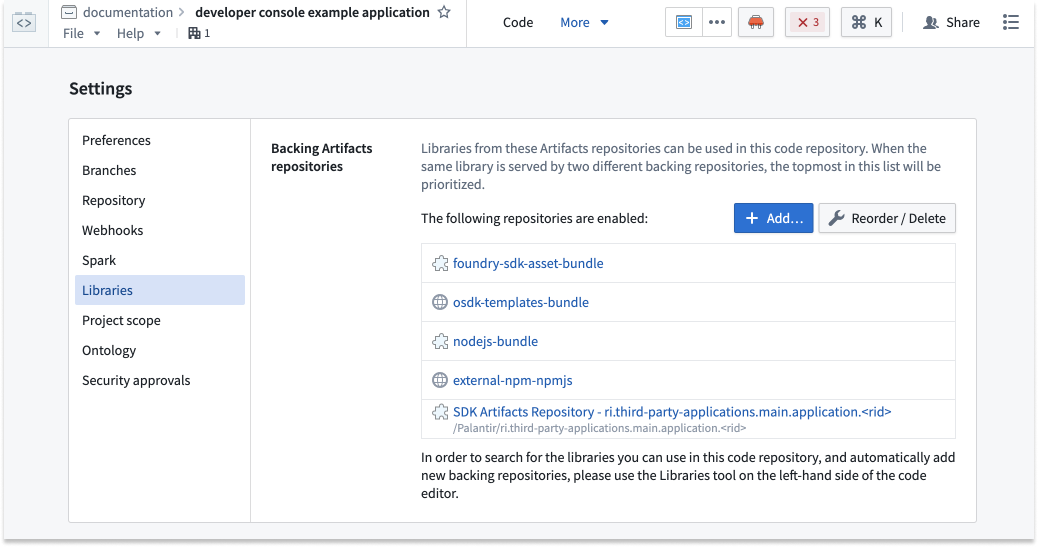
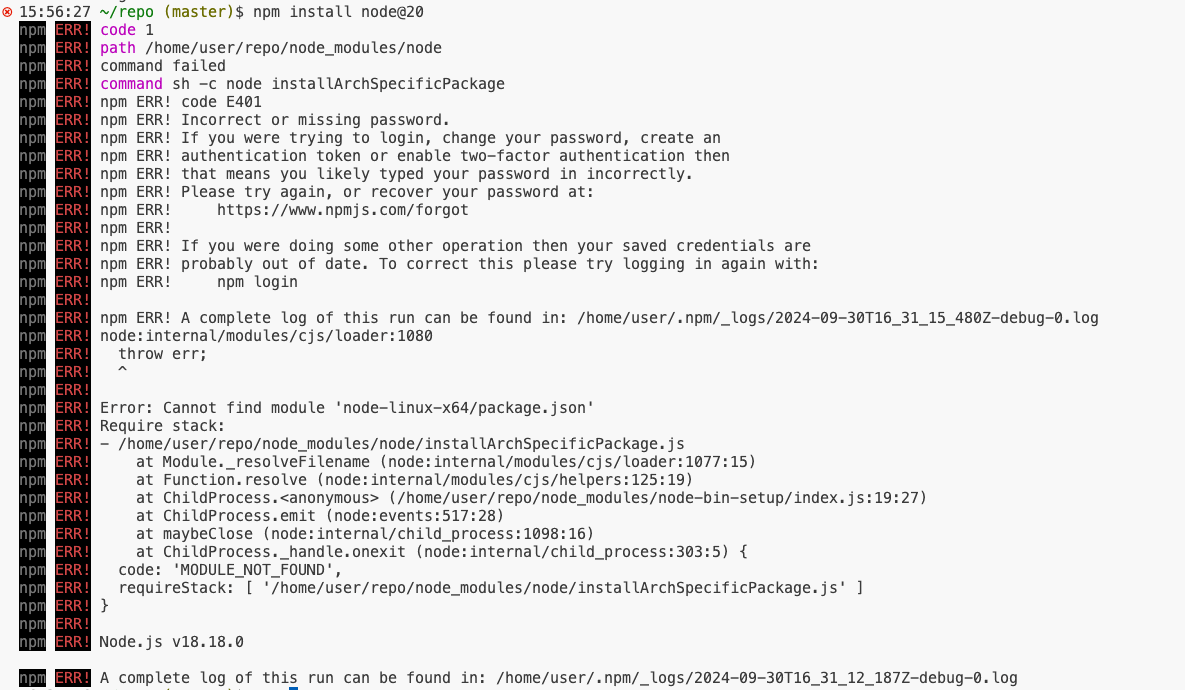
The npm install <package> command may fail if you try to add a package that is not present in any of the backing repositories. For example, if the package you try to install is private, you must ensure it is present as a repository Artifact. Review our Artifacts documentation for more information.
Example error:
:::callout{theme="neutral"}
The error code E401 Incorrect or missing password will be emitted by npm when npmjs.com is unreachable from within a VS Code workspace.
:::
中文翻译
故障排除
本页面包含在开发 OSDK React 应用程序时可能遇到的错误排查技巧。如果您遇到其他问题,或无法通过本指南解决问题,请向 Palantir 支持团队提交问题。
工作区错误
如果在 Palantir 平台内工作,您将使用运行在 Palantir 的 Code Workspaces 基础设施上的 VS Code 工作区。更多故障排除信息可参考以下文档:
npm 故障排除步骤
如果在运行 npm 命令时遇到问题,请尝试以下故障排除步骤:
- 删除锁定文件(
package-lock.json)和依赖文件夹(node_modules/),然后重新运行失败的命令。 - 暂停并恢复工作区。
NPM MODULE_NOT_FOUND 错误:添加新依赖项
代码仓库要求您明确声明依赖项。
默认情况下,我们会添加以下 npm 仓库:
- 通用 OSDK 依赖项:
foundry-sdk-asset-bundle、osdk-templates-bundle - npmjs.com ↗ 镜像:
external-npm-npmjs - 您的 OSDK:
SDK Artifacts Repository - <rid>
如果您尝试添加的包不在任何后端仓库中,npm install <package> 命令可能会失败。例如,如果您尝试安装的包是私有的,则必须确保它作为仓库构件(Artifact)存在。有关更多信息,请查阅我们的构件文档。
错误示例:
:::callout{theme="neutral"}
当 VS Code 工作区内无法访问 npmjs.com 时,npm 会抛出错误 code E401 Incorrect or missing password。
:::