Sample architecture(示例架构)
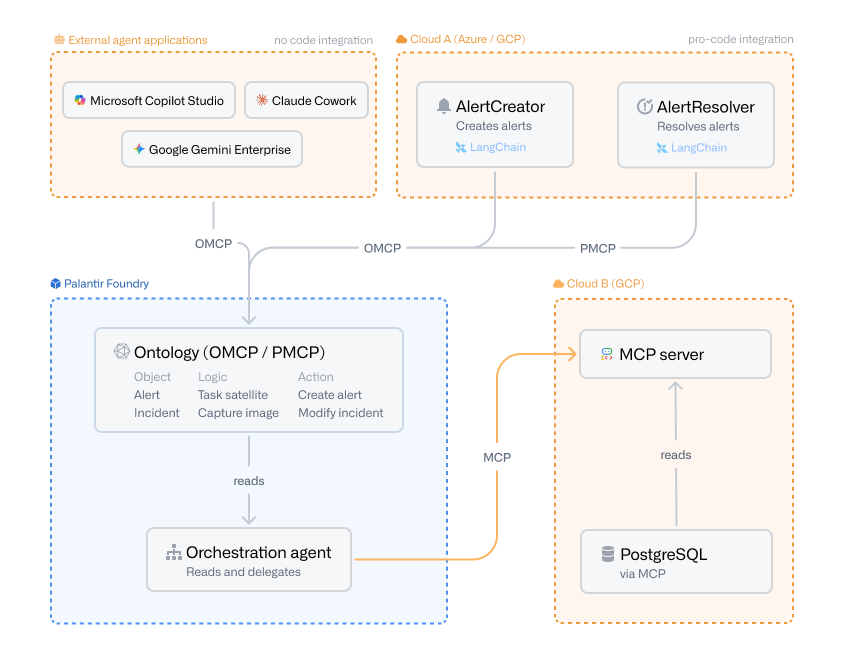
The diagram below illustrates how Ontology MCP (OMCP) and Palantir MCP (PMCP) fit into a broader agentic architecture that spans Palantir Foundry and external clouds.
Agents consuming the ontology
The diagram shows two integration paths into the Foundry ontology.
The first is a no-code integration from the External agent applications section. Platforms such as Microsoft Copilot Studio, Claude Cowork ↗, and Google Gemini Enterprise connect to the ontology directly through Ontology MCP (OMCP), without requiring any custom agent code. This makes OMCP a practical entry point for teams that want to expose ontology data and actions to existing enterprise AI assistants.
The second is a pro-code integration from Cloud A (Azure / GCP). Two agents,AlertCreator and AlertResolver, run outside of Foundry and are built with a framework such as LangChain ↗. They could also be hosted inside Foundry as a compute module. Regardless of where they run, each agent connects to the Foundry ontology through one of two MCP servers:
- Ontology MCP (OMCP):
AlertCreatoruses Ontology MCP to write data into the ontology, executing predefined actions to create newAlertobjects. Ontology MCP exposes object types, action types, and query functions defined for the Developer Console application, which makes it well suited for agents that must safely write data through controlled, restricted actions. - Palantir MCP (PMCP):
AlertResolveruses Palantir MCP to interact with the platform itself, for example, to update ontology types or work with datasets, transforms, and other platform resources during development workflows.
Inside Foundry, an orchestration agent runs in a container, reads from the ontology, and delegates work to other agents. This pattern lets you keep the ontology as the system of record while letting specialized agents handle individual tasks.
Foundry-hosted agents consuming external MCP servers
The orchestration agent illustrates the outgoing direction of MCP. Rather than exposing Foundry resources to an external client, the Foundry-hosted agent acts as an MCP client and connects out to an MCP server running in Cloud B (GCP). The MCP server in turn reads from a PostgreSQL database that is itself exposed through an MCP server. This pattern lets Foundry-hosted agents reach external systems and remote agents through a standardized MCP interface, without requiring custom connectors for each backend.
Tools exposed through Ontology MCP
Ontology MCP turns the resources you have configured in your Developer Console application into MCP tools that an agent can call:
- Object types: Every object type included in the Developer Console application is reachable through a SQL tool, which lets agents read ontology data by issuing SQL queries against the exposed object types.
- Action types: Each action type included in the application becomes its own MCP tool, so agents can invoke a specific, predefined action to write data into the ontology.
- Query functions: Individual query functions can be exposed as their own MCP tools, giving agents access to bespoke read or compute logic that you have authored.
Agents as tools
Ontology MCP also supports exposing other agents as tools. When you build agentic logic with AIP Logic or an AIP chatbot, you can save that logic as a function and then expose it through MCP. From the perspective of the calling agent, the AIP Logic function or chatbot is just another tool it can invoke, letting you compose higher-level agents on top of agents you have already built in Foundry.
For a side-by-side comparison of Ontology MCP and Palantir MCP, see the overview.
中文翻译
示例架构
下图展示了 Ontology MCP(OMCP)和 Palantir MCP(PMCP)如何融入一个跨越 Palantir Foundry 和外部云的更广泛的智能体架构(agentic architecture)。
消费本体的智能体
该图展示了连接到 Foundry 本体的两种集成路径。
第一种是从外部智能体应用部分进行的无代码集成。Microsoft Copilot Studio、Claude Cowork ↗ 和 Google Gemini Enterprise 等平台通过 Ontology MCP(OMCP)直接连接到本体,无需任何自定义智能体代码。这使得 OMCP 成为希望向现有企业 AI 助手暴露本体数据和操作的团队的实用切入点。
第二种是从云 A(Azure / GCP) 进行的专业代码集成。两个智能体 AlertCreator 和 AlertResolver 在 Foundry 外部运行,并使用 LangChain ↗ 等框架构建。它们也可以作为计算模块托管在 Foundry 内部。无论它们在何处运行,每个智能体都通过两个 MCP 服务器之一连接到 Foundry 本体:
- Ontology MCP(OMCP):
AlertCreator使用 Ontology MCP 将数据写入本体,执行预定义操作以创建新的Alert对象。Ontology MCP 暴露了为 Developer Console 应用程序定义的对象类型、操作类型和查询函数,这使得它非常适合需要通过受控、受限操作安全地写入数据的智能体。 - Palantir MCP(PMCP):
AlertResolver使用 Palantir MCP 与平台本身交互,例如,在开发工作流中更新本体类型或处理数据集、转换和其他平台资源。
在 Foundry 内部,一个编排智能体在容器中运行,从本体读取数据,并将工作委派给其他智能体。这种模式让您可以将本体作为记录系统(system of record),同时让专门的智能体处理各自的任务。
Foundry 托管的智能体消费外部 MCP 服务器
编排智能体展示了 MCP 的出站方向。Foundry 托管的智能体不是将 Foundry 资源暴露给外部客户端,而是充当 MCP 客户端,并连接到在云 B(GCP) 中运行的 MCP 服务器。该 MCP 服务器反过来从一个 PostgreSQL 数据库读取数据,而该数据库本身通过一个 MCP 服务器暴露。这种模式让 Foundry 托管的智能体能够通过标准化的 MCP 接口访问外部系统和远程智能体,而无需为每个后端构建自定义连接器。
通过 Ontology MCP 暴露的工具
Ontology MCP 将您在 Developer Console 应用程序中配置的资源转换为智能体可以调用的 MCP 工具:
- 对象类型(Object types): Developer Console 应用程序中包含的每个对象类型都可以通过 SQL 工具访问,这让智能体能够通过对暴露的对象类型执行 SQL 查询来读取本体数据。
- 操作类型(Action types): 应用程序中包含的每个操作类型都成为自己的 MCP 工具,因此智能体可以调用特定的、预定义的操作将数据写入本体。
- 查询函数(Query functions): 各个查询函数可以作为自己的 MCP 工具暴露,让智能体能够访问您编写的定制化读取或计算逻辑。
智能体作为工具
Ontology MCP 还支持将其他智能体暴露为工具。当您使用 AIP Logic 或 AIP 聊天机器人构建智能体逻辑时,您可以将该逻辑保存为函数,然后通过 MCP 暴露。从调用智能体的角度来看,AIP Logic 函数或聊天机器人只是它可以调用的另一个工具,这让您能够在已在 Foundry 中构建的智能体之上组合更高级的智能体。
有关 Ontology MCP 和 Palantir MCP 的并排比较,请参阅概述。