Migrate from Object Storage V1 (Phonograph) to Object Storage V2(从对象存储 V1(Phonograph)迁移至对象存储 V2)
The architecture changes necessary for the improvements in Object Storage V2 (OSv2) require a migration of object types and many-to-many link types with join tables in Object Storage V1 (Phonograph) to Object Storage V2 (OSv2).
:::callout{theme="warning"} Migration from Object Storage V1 to V2 is mandatory for all object types. Ontology Manager provides an integrated framework for the migration of object types and many-to-many link types. :::
The Foundry Ontology does not require migrating all object types and many-to-many link types at once. It will continue its normal operation with some of the object types being in Object Storage V1 (Phonograph) and some in Object Storage V2 (OSv2). Foundry's Ontology Manager also supports migrating ontology types in bulk.
Considerations before running a migration
Migration behavior
- Any changes to Ontology definitions on object types that would result in a Funnel replacement pipeline will abort any ongoing migrations. To avoid this, ensure that the object type schema remains stable for the entire migration (including soaking period), and perform any schema changes before initiating the migration.
- Object Storage V1 (Phonograph) registrations are updated synchronously for any changes saved in Ontology Manager. However, Funnel records ontology definition changes asynchronously, resulting in a delay between saving an ontology change in Ontology Manager and that change being detected by Funnel. Because of this, migration events like
startorabortmay appear in Ontology Manager with a delay of several seconds after the ontology is saved. - Object Storage V1 (Phonograph) supports editing object and link types directly through Object Storage V1 (Phonograph) edit APIs. This interaction is deprecated and not compatible with OSv2. Before initiating the migration for an object type with user edits, ensure that your usage is compatible. Then, locate the object type in Ontology Manager and navigate to the Datasources tab. Toggle on
Only allow edits via actionsto unblock the migration of that object type. - User edits will be automatically disabled during the entire migration period, including soak period, starting from the moment of migration definition. New user edits cannot be posted during the migration process, but object reads will remain accessible without disruption.
- The migration provides the option to preserve the edit history and attribution of object types.
- Enabling this option will include edit history with the migration process. Note that this will incur additional compute costs for processing and storage.
- If the option to preserve edit history is not enabled, the edit history and attribution of object types will not be preserved during the migration and the latest state of each object instance from Object Storage V1 (Phonograph) will be migrated to Object Storage V2. Once the migration is complete, it will not be possible to recover the full edit history from Object Storage V1 (Phonograph). Users are required to acknowledge that when migrating to Object Storage V2, the history of user edits (Actions) will not be preserved, except for Action Logs.
- When migrating object types with decimal properties, additional action may be required to set the decimal precision or scale. The following errors may occur if the object contains a decimal property, or the precision or scale of the decimal needs to be set on that property:
- Error:
The current version of the object type has an invalid definition which Object Storage V2 is unable to index. ObjectsDataFunnel:DecimalPropertyTypeMissingPrecisionOrScalewhen configuring the migration to Object Storage V2 - Error:
Precision does not match backing column. - Error:
Scale does not match backing column. - To resolve these errors related to object types with decimal properties, follow these steps:
- Navigate to the Properties tab in Ontology Manager.
- Select the property with the error.
- Set the desired Precision and Scale values for that property. Using the Fix button will automatically set the Precision and Scale values based on your backing data.
Incompatible usage
:::callout{theme="neutral"} If the Incompatible usage view is not accessible, contact your Palantir representative about enabling this feature. :::
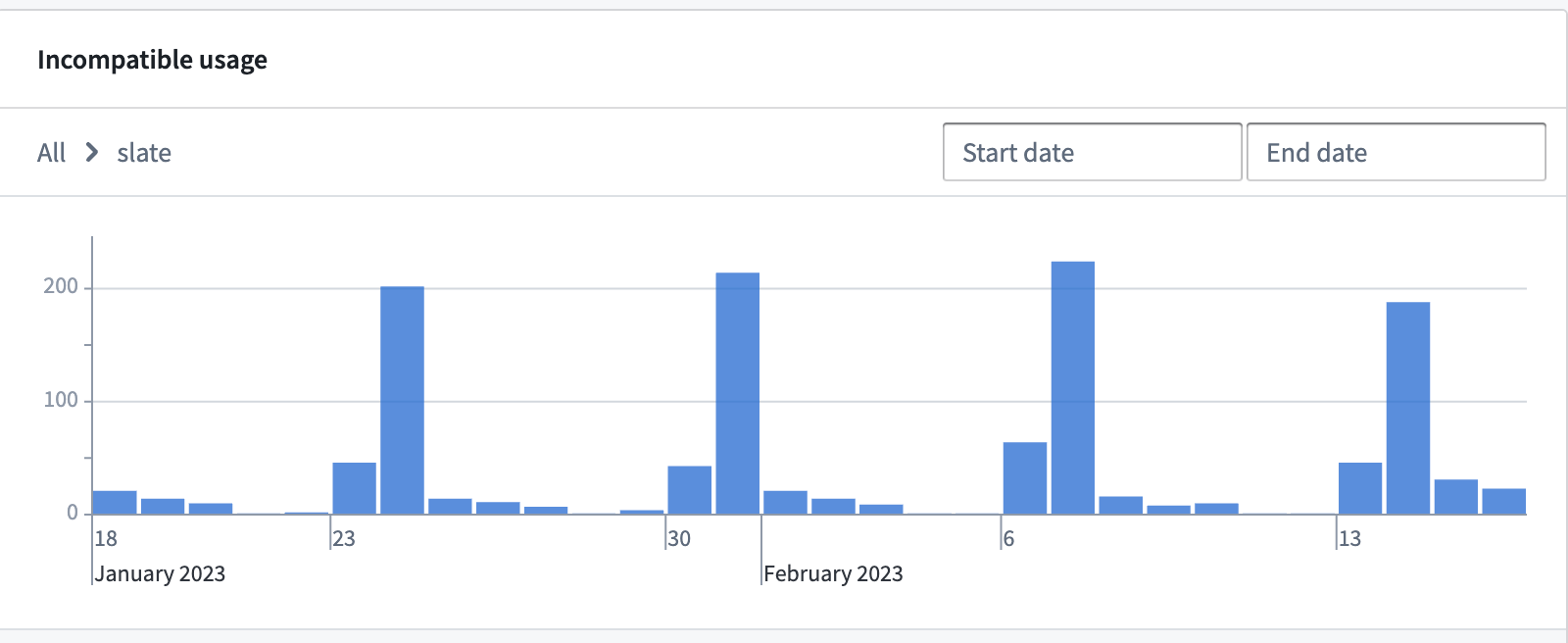
Certain interactions in Object Storage V2 are considered breaking changes and they are not compatible with Object Storage V2. This incompatible usage is tracked and reported in Ontology Manager. Selecting the Incompatible usage alert will provide a visualization of any incompatible usage in the last 30 days to assist in remediation.
Non-blocking incompatible usage
Some incompatible usage, like direct API calls to Object Storage V1 (Phonograph) endpoints, will not block initiating a migration to OSv2 but will fail after the object type is migrated to OSv2.

You should investigate incompatible usage and determine whether action is needed, such as migrating direct Object Storage V1 (Phonograph) calls to Object Set Service for object queries/reads, Actions for object edits, and Ontology Metadata Service for object type metadata information. If these incompatible usage are no longer relevant or can break without consequence, you can initiate the migration without remediation.
Blocking incompatible usage
Other changes between OSv1 and OSv2, such as not enabling editing by actions only, will actively block the migration in Ontology Manager.

In this situation, you must remove any occurrences of the incompatible usage before starting the migration.
No incompatible usage
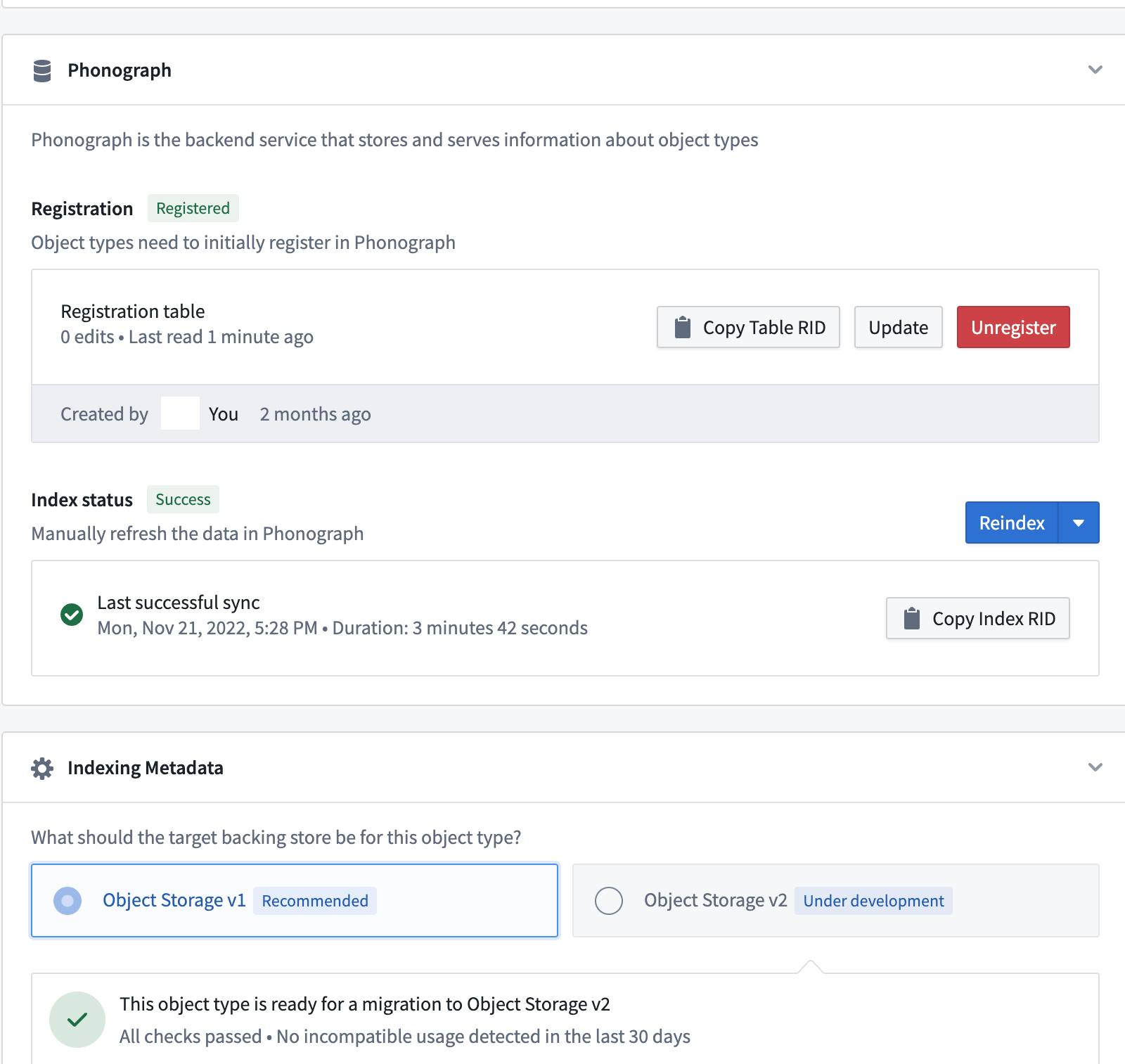
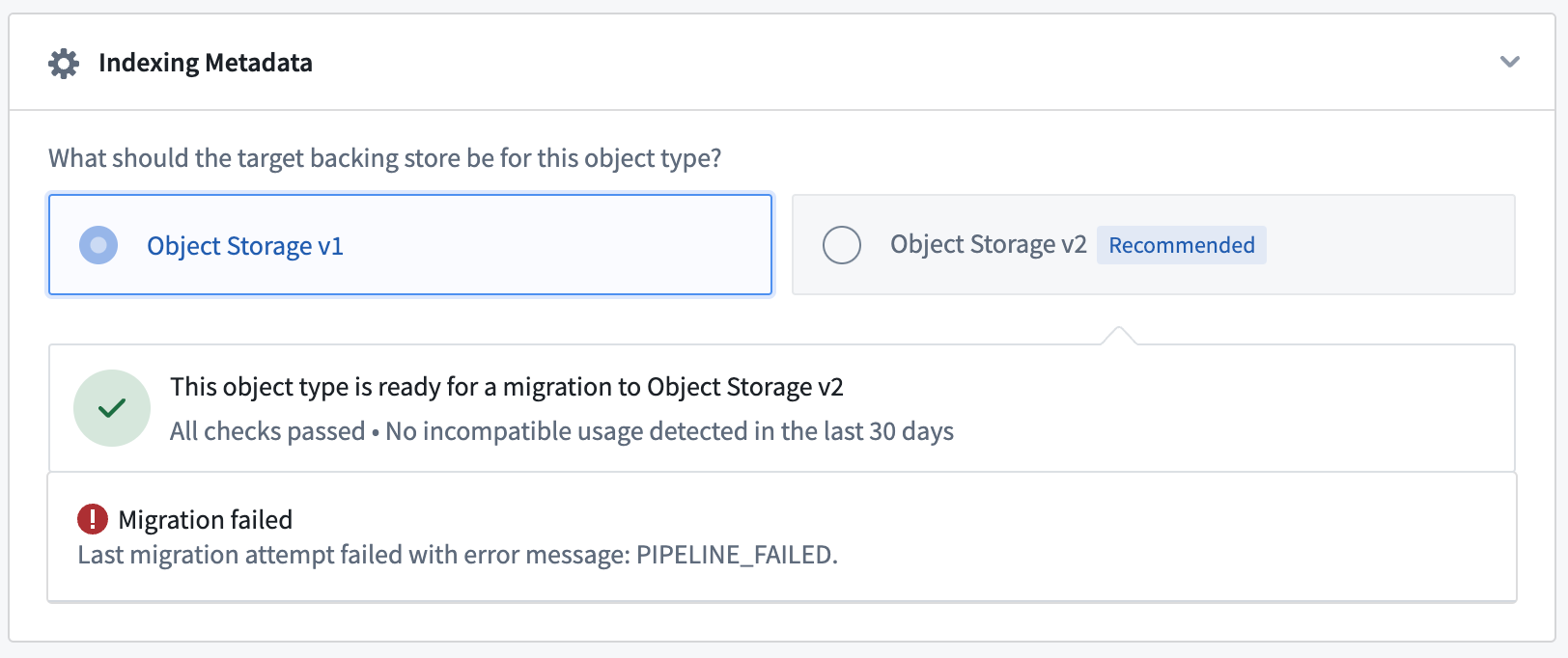
Object types without any incompatible usage or breaking changes will display a green tick icon in the banner to indicate that the object type is ready to migrate.

Migrating an entity
Starting a migration
To start the migration, navigate to the Datasources tab of your object type or many-to-many link type with a join table, and go to the Indexing Metadata section. If the object type is eligible for migration, you will be able to select the Object Storage V2 radio button that will open a wizard for selecting migration parameters. If this section is not present, you are most likely working in an ontology where Object Storage V2 is enforced for all object types and join table link types.
:::callout{theme="neutral"} The Ontology Metadata Service tracks incompatible usage of object types backed by Object Storage V1 (Phonograph) and will trigger an alert when attempting to migrate an object type with incompatible usage. Also, you must still ensure that the object type schema does not contain any breaking changes. :::
Transition windows
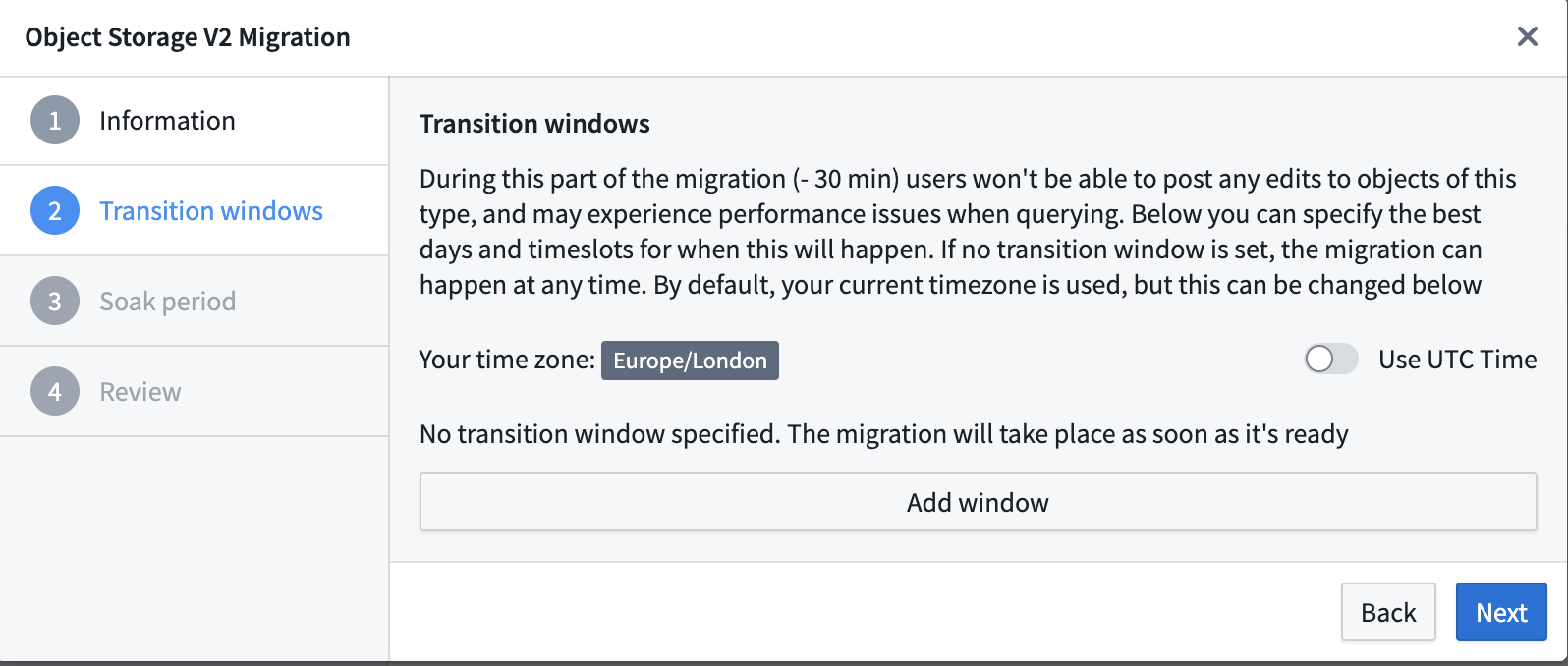
The Transition windows options allow you to set preferred time windows for a safe migration; for instance, you may want to set a day of the week and time when an object type's use case has minimal activity. Keep in mind that after the migration process begins, it may take up to 30 minutes to initiate the first Funnel pipeline. If the migration cannot be completed within the first transition window, then Object Set Service will wait until the next window to begin reading data from OSv2.
If no transition window is set, the migration will start as soon the first Funnel pipeline succeeds.
:::callout{theme="neutral"} A transition window will be computed after the first sync to OSv2 finishes successfully. This means that if a first sync completes in the middle of a configured transition window the migration is not going to consider this as an acceptable transition window and will try to take the next one. :::
Disabled action types
During the migration, users will not be able to apply edits as they will be automatically disabled during the entire migration period, including the soaking period, starting from the moment of migration definition. Note that object reads will remain accessible without disruption.
Soak period
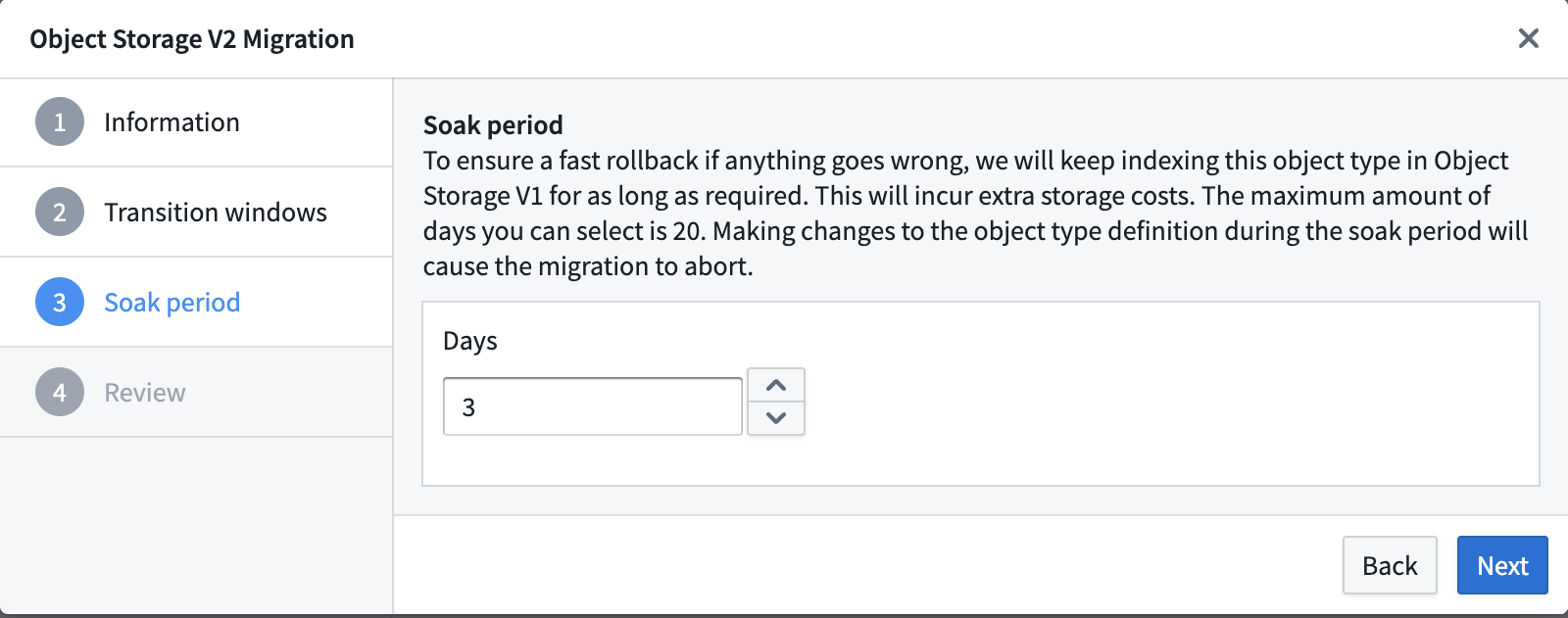
If you need to revert to Object Storage V1 (Phonograph) during the migration process, this is possible without re-indexing data during the soak period. The migration framework will keep the Object Storage v1 (Phonograph) index up-to-date along with Object Storage V2 (OSv2) until the end of the soak period. The soak period can be set in increments of days, up to a maximum of 14 days (with the option to specify hours), and will only begin after the migration passes a transition window. Setting the soak period to 0 days will delete the OSv1 index for that object type as soon as the OSv2 index is ready and the transition window is activated.
During the soak period, the Foundry Ontology backend will automatically route all queries to OSv2 and any request to OSv1 will be rejected. This time period can be used to validate that the workflows that read object types are working as expected after the migration. If you experience any issues during the soak period, you can abort the migration to immediately switch back to using OSv1 indices.
After the soak period ends, it is not possible to rollback to OSv1. You may contact Palantir Support with any questions.
:::callout{theme="warning"} Note that object types will be dual-indexed in OSv1 and OSv2 during the soak period; this will incur additional compute and storage usage. If you would like to avoid the additional resource usage, you can set the soak period to 0 days when configuring the migration. :::
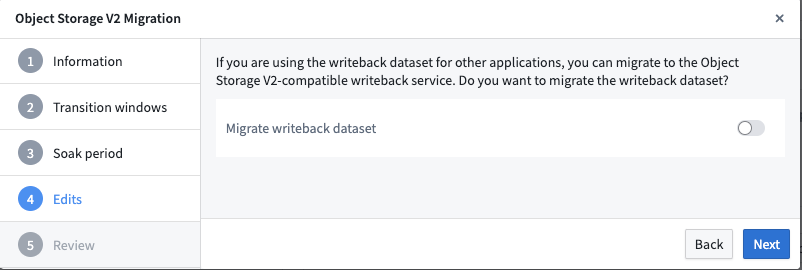
Migrating a writeback dataset
In Object Storage V1 (Phonograph), writeback datasets are required to enable user edits on an object type or a many-to-many link type with a join table. Object Storage V2 replaces writeback datasets with materialized datasets. Object Storage V2 does not require materialized datasets to enable user edits. With optional materialized datasets in OSv2, you only need to create materializations if they are required for downstream usage.
Writeback datasets of object and link types can be migrated as materialization datasets in OSv2. The materialization dataset will keep the same columns, retaining compatibility with existing downstream pipelines. This toggle is only relevant if you are using the current writeback dataset in other applications. User edits will still be migrated to OSv2.
:::callout{theme="neutral"} If you choose not to migrate the writeback dataset, the dataset itself will not get deleted. Instead, the dataset will be static and contain data from the last build time. :::
:::callout{theme="warning"} If the writeback dataset contains columns that are not mapped to any object type property, those columns will be dropped as part of the migration. :::
Aborting the migration
If performance regression is observed or bugs are encountered after switching to Object Storage V2, you can safely abort an ongoing migration during the soak period and revert back to OSv1. Throughout the migration process, the migration framework ensures that the OSv1 index is kept up to date with any new data syncs.
If the object type being migrated has existing user edits, any new user edits will be disabled until the migration is completed.
Sync failures
Your object type may fail to sync during the migration process. If this is the case, you will see a PIPELINE_FAILED error in the Indexing Metadata section of your object types Datasources tab. If that happens, follow the instructions for debugging funnel batch pipelines to investigate and remediate the issue.
Bulk migrations
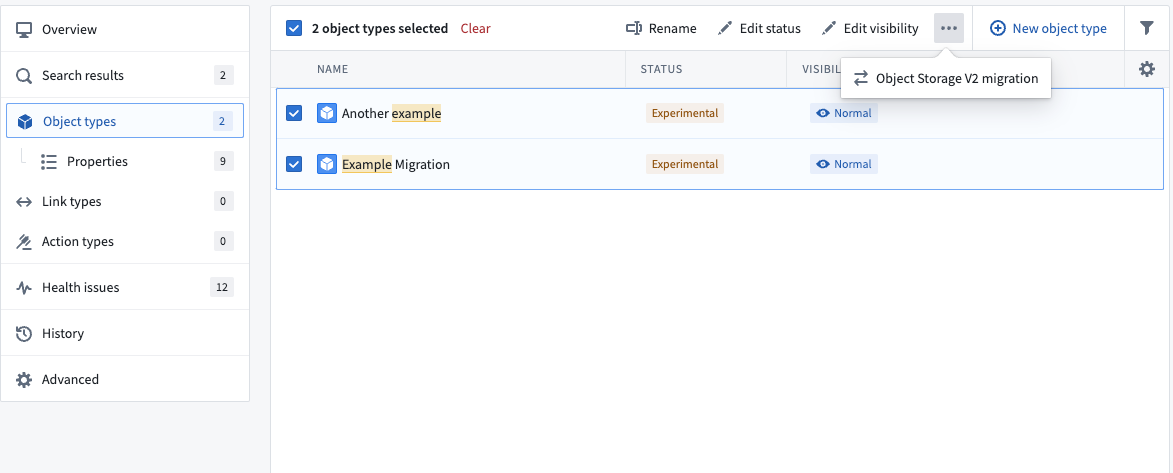
You can run migrations in bulk using the same transition window and soak time configurations by navigating to the Object types section in the left-hand navigation bar and selecting multiple object types at the same time. The process and setup wizard are the same as when migrating a single object type. We recommend gradual migrations that bulk-migrate less than 100 entities at a time to prevent unexpected complexity or errors.
This wizard will not appear in the interface for ontologies that only have OSv2 enabled.
中文翻译
从对象存储 V1(Phonograph)迁移至对象存储 V2
对象存储 V2(OSv2)的改进所需的架构变更,要求将对象类型以及对象存储 V1(Phonograph)中带有连接表的多对多链接类型迁移至对象存储 V2(OSv2)。
:::callout{theme="warning"} 从对象存储 V1 到 V2 的迁移是所有对象类型的强制要求。Ontology Manager 为对象类型和多对多链接类型的迁移提供了集成框架。 :::
Foundry Ontology 不要求一次性迁移所有对象类型和多对多链接类型。它将继续正常运行,部分对象类型位于对象存储 V1(Phonograph),部分位于对象存储 V2(OSv2)。Foundry 的 Ontology Manager 也支持批量迁移本体类型。
运行迁移前的注意事项
迁移行为
- 对对象类型的 Ontology 定义所做的任何更改,如果会导致Funnel 替换管道,都将中止任何正在进行的迁移。为避免这种情况,请确保在整个迁移期间(包括浸泡期)对象类型模式保持稳定,并在启动迁移之前执行任何模式更改。
- 对象存储 V1(Phonograph)的注册会针对 Ontology Manager 中保存的任何更改进行同步更新。但是,Funnel 会异步记录 Ontology 定义的更改,导致在 Ontology Manager 中保存 Ontology 更改与 Funnel 检测到该更改之间存在延迟。因此,诸如
start或abort之类的迁移事件可能会在 Ontology 保存后延迟几秒才出现在 Ontology Manager 中。 - 对象存储 V1(Phonograph)支持直接通过对象存储 V1(Phonograph)编辑 API 编辑对象和链接类型。此交互方式已弃用,且与 OSv2 不兼容。在启动对包含用户编辑的对象类型的迁移之前,请确保您的使用方式兼容。然后,在 Ontology Manager 中找到该对象类型,导航至 数据源 选项卡。开启
仅允许通过操作进行编辑以解除对该对象类型的迁移限制。 - 从迁移定义的那一刻起,用户编辑将在整个迁移期间(包括浸泡期)自动禁用。在迁移过程中无法发布新的用户编辑,但对象读取将保持可访问,不会中断。
- 迁移提供了保留对象类型编辑历史和归属的选项。
- 启用此选项将在迁移过程中包含编辑历史。请注意,这将产生额外的计算成本用于处理和存储。
- 如果未启用保留编辑历史的选项,则在迁移期间不会保留对象类型的编辑历史和归属,对象存储 V1(Phonograph)中每个对象实例的最新状态将迁移到对象存储 V2。迁移完成后,将无法从对象存储 V1(Phonograph)恢复完整的编辑历史。用户必须确认,在迁移到对象存储 V2 时,除了操作日志之外,用户编辑(操作)的历史将不会被保留。
- 迁移具有小数属性的对象类型时,可能需要额外操作来设置小数的精度或小数位数。如果对象包含小数属性,或者需要在该属性上设置小数的精度或小数位数,则可能出现以下错误:
- 错误:
The current version of the object type has an invalid definition which Object Storage V2 is unable to index. ObjectsDataFunnel:DecimalPropertyTypeMissingPrecisionOrScale在配置迁移到对象存储 V2 时出现 - 错误:
Precision does not match backing column. - 错误:
Scale does not match backing column. - 要解决这些与具有小数属性的对象类型相关的错误,请执行以下步骤:
- 导航至 Ontology Manager 中的 属性 选项卡。
- 选择出现错误的属性。
- 为该属性设置所需的精度和小数位数。使用 修复 按钮将根据您的支持数据自动设置精度和小数位数。
不兼容的使用方式
:::callout{theme="neutral"} 如果无法访问 不兼容的使用方式 视图,请联系您的 Palantir 代表以启用此功能。 :::
对象存储 V2 中的某些交互被视为重大更改,并且与对象存储 V2 不兼容。这种不兼容的使用方式会在 Ontology Manager 中进行跟踪和报告。选择 不兼容的使用方式 警报将提供过去 30 天内任何不兼容使用情况的可视化,以协助进行修复。
非阻塞性不兼容使用方式
某些不兼容的使用方式,例如直接调用对象存储 V1(Phonograph)端点的 API,不会阻止启动向 OSv2 的迁移,但在对象类型迁移到 OSv2 后会失败。
您应该调查不兼容的使用方式,并确定是否需要采取行动,例如将对对象存储 V1(Phonograph)的直接调用迁移到 Object Set Service 以进行对象查询/读取,迁移到 Actions 以进行对象编辑,以及迁移到 Ontology Metadata Service 以获取对象类型元数据信息。如果这些不兼容的使用方式不再相关或可以中断而不会产生后果,您可以在不进行修复的情况下启动迁移。
阻塞性不兼容使用方式
OSv1 和 OSv2 之间的其他更改,例如未启用仅通过操作进行编辑,将主动阻止 Ontology Manager 中的迁移。
在这种情况下,您必须在开始迁移之前移除任何不兼容使用方式的实例。
无不兼容使用方式
没有任何不兼容使用方式或重大更改的对象类型将在横幅中显示绿色勾选图标,表明该对象类型已准备好迁移。
迁移实体
启动迁移
要启动迁移,请导航至对象类型或带有连接表的多对多链接类型的 数据源 选项卡,然后转到 索引元数据 部分。如果对象类型符合迁移条件,您将能够选择对象存储 V2 单选按钮,该按钮将打开一个用于选择迁移参数的向导。如果此部分不存在,您很可能正在一个对所有对象类型和连接表链接类型强制使用对象存储 V2 的本体中工作。
:::callout{theme="neutral"} Ontology Metadata Service 会跟踪由对象存储 V1(Phonograph)支持的对象类型的不兼容使用情况,并在尝试迁移具有不兼容使用情况的对象类型时触发警报。此外,您仍必须确保对象类型模式不包含任何重大更改。 :::
过渡窗口
过渡窗口 选项允许您为安全迁移设置首选时间窗口;例如,您可能希望设置一周中的某天和某个时间,此时对象类型的使用场景活动最少。请记住,迁移过程开始后,可能需要最多 30 分钟才能启动第一个 Funnel 管道。如果迁移无法在第一个过渡窗口内完成,则 Object Set Service 将等待下一个窗口才开始从 OSv2 读取数据。
如果未设置过渡窗口,迁移将在第一个 Funnel 管道成功后立即开始。
:::callout{theme="neutral"} 过渡窗口将在首次同步到 OSv2 成功完成后计算。这意味着,如果首次同步在配置的过渡窗口中间完成,迁移不会将其视为可接受的过渡窗口,并将尝试下一个窗口。 :::
禁用的操作类型
在迁移期间,用户将无法应用编辑,因为从迁移定义的那一刻起,编辑将在整个迁移期间(包括浸泡期)自动禁用。请注意,对象读取将保持可访问,不会中断。
浸泡期
如果您需要在迁移过程中回退到对象存储 V1(Phonograph),这在 浸泡期 内是可能的,无需重新索引数据。迁移框架将使对象存储 V1(Phonograph)索引与对象存储 V2(OSv2)一起保持最新,直到浸泡期结束。浸泡期可以按天递增设置,最长可达 14 天(可以选择指定小时),并且仅在迁移通过过渡窗口后开始。将浸泡期设置为 0 天将在 OSv2 索引就绪且过渡窗口激活后立即删除该对象类型的 OSv1 索引。
在浸泡期间,Foundry Ontology 后端将自动将所有查询路由到 OSv2,并且对 OSv1 的任何请求都将被拒绝。这段时间可用于验证读取对象类型的工作流在迁移后是否按预期工作。如果您在浸泡期间遇到任何问题,可以中止迁移以立即切换回使用 OSv1 索引。
浸泡期结束后,无法回滚到 OSv1。如有任何疑问,请联系 Palantir 支持。
:::callout{theme="warning"} 请注意,在浸泡期间,对象类型将在 OSv1 和 OSv2 中双重索引;这将产生额外的计算和存储使用量。如果您希望避免额外的资源使用,可以在配置迁移时将浸泡期设置为 0 天。 :::
迁移回写数据集
在对象存储 V1(Phonograph)中,回写数据集 是启用对对象类型或带有连接表的多对多链接类型进行用户编辑所必需的。对象存储 V2 用物化数据集取代了回写数据集。对象存储 V2 不需要物化数据集来启用用户编辑。使用 OSv2 中可选的物化数据集,您仅在下游使用需要时才需要创建物化。
对象和链接类型的回写数据集可以作为 OSv2 中的物化数据集进行迁移。物化数据集将保留相同的列,保持与现有下游管道的兼容性。此切换仅当您在其他应用程序中使用当前回写数据集时才相关。用户编辑仍将迁移到 OSv2。
:::callout{theme="neutral"} 如果您选择不迁移回写数据集,数据集本身不会被删除。相反,数据集将变为静态,并包含上次构建时间的数据。 :::
:::callout{theme="warning"} 如果回写数据集包含未映射到任何对象类型属性的列,这些列将在迁移过程中被删除。 :::
中止迁移
如果在切换到对象存储 V2 后观察到性能下降或遇到错误,您可以在浸泡期内安全地中止正在进行的迁移并回退到 OSv1。在整个迁移过程中,迁移框架确保 OSv1 索引与任何新的数据同步保持同步。
如果正在迁移的对象类型存在现有的用户编辑,则任何新的用户编辑都将被禁用,直到迁移完成。
同步失败
您的对象类型在迁移过程中可能同步失败。如果发生这种情况,您将在对象类型 数据源 选项卡的 索引元数据 部分看到 PIPELINE_FAILED 错误。如果发生这种情况,请按照调试 Funnel 批处理管道的说明进行调查和修复。
批量迁移
您可以通过导航至左侧导航栏中的 对象类型 部分并同时选择多个对象类型,使用相同的过渡窗口和浸泡时间配置来批量运行迁移。过程和设置向导与迁移单个对象类型时相同。我们建议逐步迁移,一次批量迁移少于 100 个实体,以防止出现意外的复杂性或错误。
此向导不会出现在仅启用了 OSv2 的本体的界面中。