How user edits are applied(用户编辑如何应用)
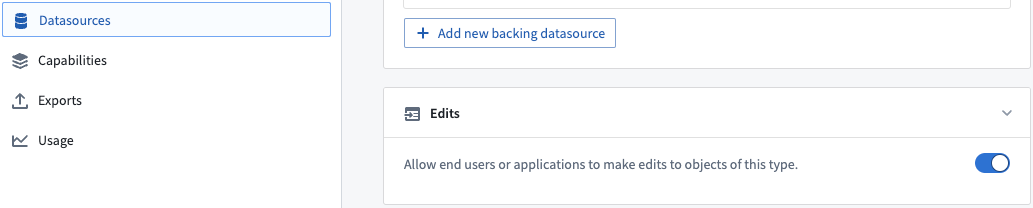
User edits can be enabled and disabled using the Edits toggle in the Datasources tab of the Ontology Manager, as shown in the screenshot below.
Edit objects via Actions
This section describes how the Ontology manages object edits with Actions.
When an Action is applied to an object, link, or object set, the data-modification logic is immediately applied to the index in the object databases and periodically flushed into a persistent store in the form of Foundry datasets owned and managed by Funnel. More information can be found in the documentation on persistent storage of user edits.
User edits on live data
When an Action is triggered, the Actions service sends a modification instruction to the Funnel service. This instruction is stored in a Funnel-managed queue that has offset tracking to support simultaneous user edits. Object Storage V2 tracks these offsets for any object type and any many-to-many link type with join tables. The offsets are applied to the live indexed data in the object database; if an object read occurring as part of an ontology query happens after a user modification is sent, the object read is guaranteed to contain the user edits.
How to discard/wipe/delete existing user edits
Data already containing user edits can only be updated via additional user edits. There is no mechanism to directly undo a single user edit or deletion other than to make additional user edits (for example, object actions) to update the object or to recreate the object.
In some circumstances, it may be desirable to discard all existing user edits in order to reset the state of all objects to be the same as in the input datasource. For example, you may want to delete all user edits applied during testing of an object type before releasing the object type in production.
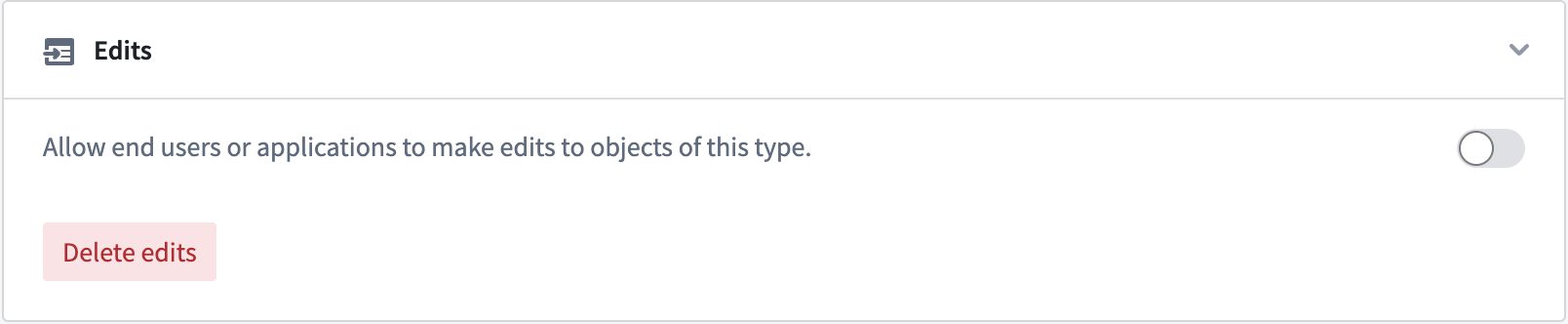
Object Storage V2 offers a schema migration framework for migrating user edits. The "drop all edits" instruction can be used to discard all existing user edits on an object type. This migration instruction can be applied by clicking the Delete edits button in the Edits section of the Datasources tab in the Ontology Manager.
Object Storage V1 (Phonograph) does not have schema migration support, but removing the writeback dataset configuration from the object type will delete all the existing user edits and can be used as a workaround.
Ontology entity version control
During the process of applying an Action, object type definitions and object instances are loaded for various purposes, such as Action validations, Functions, and Action side effects. Object instances may change over the course of applying an Action, so it is important to guarantee transactionality to avoid potential data correctness issues (such as applying the Action to the wrong version of an object).
The Ontology includes mechanisms for checking version consistency of both object types and object instances, with differing behaviors between Object Storage V1 (Phonograph) and Object Storage V2.
Entity version control between front-end consumers and the Actions server
Consider the following scenario where a user loads the object property value at versions {V1, V2, V3, ...} in an Action form. The front-end consumer application calls the /apply endpoint of the Actions server with those object property values, but that request does not include the versions. Upon receiving this request, the Actions server loads the objects within the /apply endpoint at versions {V1', V2', V3', ...}. Note that there is no guarantee that the versions {V1, V2, V3, ...} loaded on the front end and the versions {V1', V2', V3', ...} loaded by the Actions server will always be the same.
Entity version control within the Actions server
Object Storage V1 (Phonograph) [Planned deprecation]
:::callout{theme="warning" title="Planned deprecation"}
Object Storage V1 (Phonograph) is in the planned deprecation phase of development and will be unavailable after June 30, 2026. Migrate your Object Types and Link Types to Object Storage V2. Reference the Migrate object types and many-to-many link types from Object Storage v1 to v2 intervention in Upgrade Assistant for more information.
Contact Palantir Support if you have questions about the OSv1 to OSv2 migration in your workflows.
:::
With Object Storage V1 (Phonograph), the Actions server tracks the version of a loaded object and loads the same version from the cache throughout the Action execution. When a user edit is applied in Object Storage V1 (Phonograph), the object version is included in the request. Object Storage V1 (Phonograph) then checks if any of the object versions have changed and will throw a StaleObject error if a change is detected.
These checks ensure general consistency within the Actions server. For example, Object Storage V1 guarantees that an Action will generate a synchronous webhook, execute, validate, and apply edits on the same version of an object. Note that object changes at a property level are not checked, so user edits on irrelevant properties of an object can trigger StaleObject conflicts.
Object Storage V2
With Object Storage V2, the Actions server performs its own object version checks before posting user edits to the Funnel service, but on a limited subset of the versions collected by the server as compared to Object Storage V1 (Phonograph).
The Actions server only checks the versions of objects that are directly used to generate edits, such as the version of some object A that had one of its properties copied onto object B, and these versions are only checked against edited object versions.
This behavior reduces the frequency of StaleObject conflicts, with a consequence of weaker guarantees with OSv2. In Object Storage V2, the Actions service always loads objects at the same versions throughout an Action /apply, but does not guarantee that objects read outside of edit generation have not changed during the course of an Action.
Cross-backend Actions
An Action type is considered "cross-backend" if it modifies objects in OSv1 and OSv2 at the same time. In such cases, the Actions service performs checks on:
- All read and/or edited objects in OSv1, and
- All edited objects in OSv2.
Persistent storage of user edits
All indexed data in object databases are considered ephemeral, requiring persistent storing of all Ontology data in other ways. Similarly, user edits applied through Actions also must be stored persistently. The Foundry datasources that back object types are already persistently stored in the form of Foundry datasets, restricted views, and so on.
As discussed in the Funnel pipelines documentation, the Funnel service owns and manages several Foundry datasets, including a merged dataset that combines data coming from datasources and user edits. The merged dataset is automatically built; this ensures that user edits stored in the queue are persistently stored in Foundry and that the queue is emptied in order to prevent the queue from growing too large. By default, this build job is triggered:
- Whenever there is a new data transaction in object type datasources, or
- In the absence of new data in the datasources, every 6 hours, if edits had been detected on any objects.
Resolve conflicting user edits and datasource updates
Objects in the Foundry Ontology can be created and modified by both input datasources and user edits. When a single object (that is, a row or object with a specific primary key value) receives data from both the input datasource and user edits, these received values must be transparently resolved with a conflict resolution strategy.
:::callout{theme="warning"} Deletions are not considered an edit. Once a deletion is applied, the object is no longer visible regardless of datasource state. If the object is later recreated, it will not inherit the previous edits. :::
There are two strategies for resolving conflicts:
Strategy 1: Apply user edits (default)
With this strategy, the final state of an object is always determined by the user edits applied to it, regardless of any future datasource updates for edited properties in the same object.
Refer to the flow chart below to determine the latest state of your objects based on user edits and datasource updates.
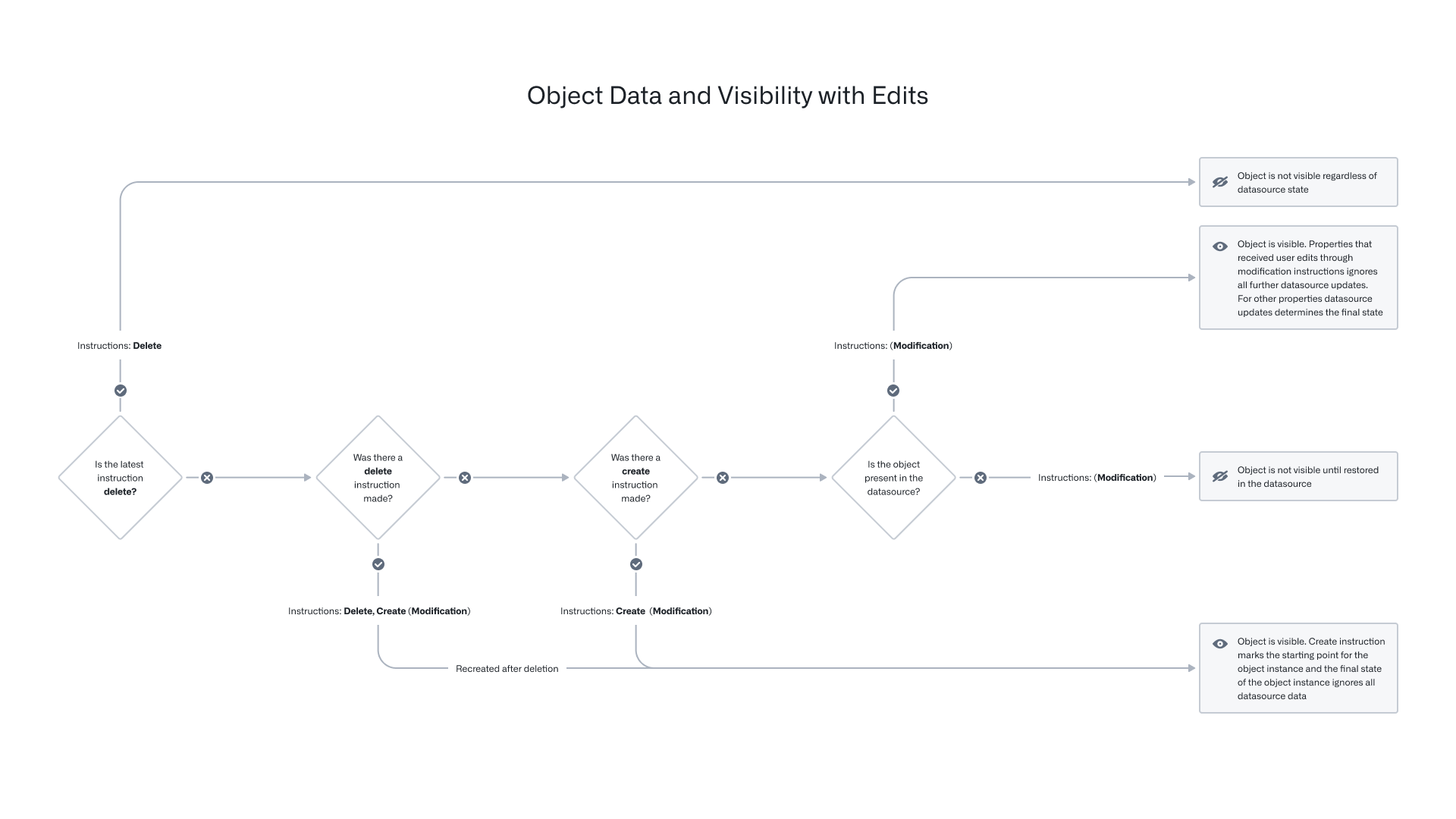
The table below shows how the state of a specific object would be updated after receiving user edits and input datasource updates, following the "user edits always win" conflict resolution strategy.
| Time | Current datasource row state | User edit | Final object state | Explanation |
|---|---|---|---|---|
| T0 | columns = {pk_column = pk1, col1 = val1, col2 = val2} |
properties = {pk_column = pk1, col1 = val1, col2 = val2}, deleted = false |
||
| T1 | columns = {} |
properties = {}, deleted = true |
Row disappears from the datasource, and the object is no longer in the Foundry Ontology | |
| T2 | columns = {pk_column = pk1, col1 = val1, col2 = val2} |
properties = {pk_column = pk1, col1 = val1, col2 = val2}, deleted = false |
Same row reappears in the datasource | |
| T3 | columns = {pk_column = pk1, col1 = val1, col2 = val2} |
Modify object: properties = {pk_column = pk1, col2 = newVal2} |
properties = {pk_column = pk1, col1 = val1, col2 = newVal2}, deleted = false |
User runs a Modify object Action |
| T4 | columns = {} |
properties = {}, deleted = true |
Row disappears from the datasource again, and the object is no longer in the Foundry Ontology | |
| T5 | columns = {pk_column = pk1, col1 = val1, col2 = val2} |
properties = {pk_column = pk1, col1 = val1, col2 = newVal2}, deleted = false |
Same row reappears in the datasource, and the previous user edit is still applied to the object when the row reappears | |
| T6 | columns = {pk_column = pk1, col1 = newVal1, col2 = val2} |
properties = {pk_column = pk1, col1 = newVal1, col2 = newVal2}, deleted = false |
An unedited property (col1) receives data update from the input datasource, and it is applied to the object |
|
| T7 | columns = {pk_column = pk1, col1 = newVal1, col2 = val2} |
Delete object | properties = {}, deleted = true |
User runs a Delete object Action, and the object is no longer in the Foundry Ontology |
| T8 | columns = {pk_column = pk1, col1 = newVal1, col2 = val2, col3 = null} |
properties = {}, deleted = true |
||
| T9 | columns = {pk_column = pk1, col1 = newVal1, col2 = val2, col3 = null} |
Create object: properties = {pk_column = pk1, col3 = val3} |
properties = {pk_column = pk1, col1 = null, col2 = null, col3 = val3}, deleted = false |
User runs a Create object Action |
| T10 | columns = {pk_column = pk1, col1 = newVal1, col2 = newVal2, col3 = newVal3} |
properties = {pk_column = pk1, col1 = null, col2 = null, col3 = val3}, deleted = false |
col3 is updated in the input datasource but is no longer considered for the final state of the object due to the prior Create object Action |
|
| T11 | columns = {pk_column = pk1, col1 = newVal1, col2 = newVal2, col3 = newVal3} |
Modify object: properties = {pk_column = pk1, col2 = newVal22} |
properties = {pk_column = pk1, col1 = null, col2 = newVal22, col3 = val3}, deleted = false |
User runs a Modify object Action |
| T12 | columns = {} |
properties = {pk_column = pk1, col1 = null, col2 = newVal22, col3 = val3}, deleted = false |
Row disappears from the datasource, but the object is still in the Foundry Ontology as it was last created by a user edit | |
| T13 | columns = {pk_column = pk1, col1 = newVal1, col2 = newVal2, col3 = newVal3} |
Delete object | properties = {}, deleted = true |
Row reappears, but user runs a Delete object Action and the object is deleted |
| T14 | columns = {pk_column = pk1, col1 = newVal1, col2 = newVal2, col3 = newVal3} |
Modify object: properties = {pk_column = pk1, col2 = newVal2, col3 = val3} |
properties = {}, deleted = true |
User runs a Modify object Action on a deleted object; any Modify object Action call will fail |
Strategy 2: Apply most recent value
With this strategy, user edits are conditionally applied; that is, user edits are only applied if the timestamp of the user edit is more recent than the timestamp value coming from the datasource for the given object. Note that because the timestamp of each edit is compared against the unedited timestamp value coming from the datasource, it is possible for some newer user edits to apply and older user edits to not apply on the same object.
Configuration
Conflict resolution strategies are configured at the object type level and are only supported for OSv2 object types.
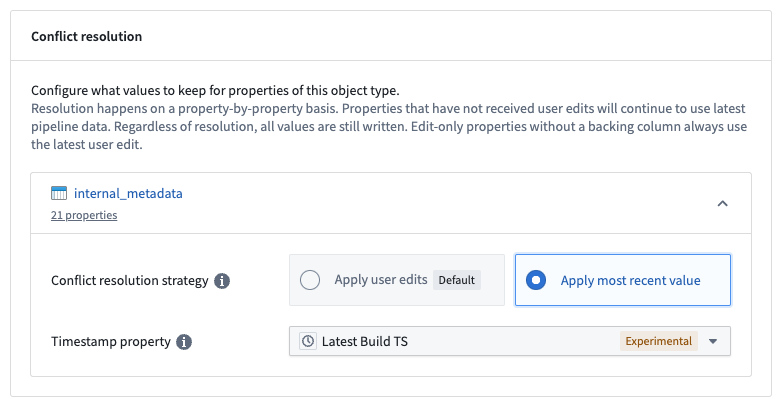
Users can configure this option in the Ontology Manager, under the Datasources section. Each datasource of the object type can have different resolution strategies. For example, for an object type backed by two datasources, one datasource can use Apply user edits (default) while the other datasource can use Apply most recent value. The Apply most recent value option requires that the datasource contains a property with the timestamp type; the date property type will not work for this option. The timestamp property is used to compare and decide whether a user edit should be applied. The timestamp property must be in Coordinated Universal Time (UTC).
Behavior
As soon as the Apply most recent value conflict resolution strategy is saved for a datasource, all user edits to properties backed by that datasource will be conditionally applied.
For each conditional edit, the resolution works by comparing the timestamp value in the backing datasource with the timestamp associated with the edit. For user edits to those properties applied after the conflict resolution strategy was changed, they will be conditionally applied based on the timestamp of the action submission that resulted in that edit, and any existing edits to those properties will be conditionally applied based on the timestamp of the conflict resolution strategy change.
The user edit is applied if the value of the timestamp property in the backing datasource is older than the timestamp associated with the user edit, otherwise the edit is ignored.
If an edit updates properties across multiple datasources, then whether those edits will be conditionally applied or always applied will be determined by the resolution strategy of the datasource that backs the property.
Refer to the updated flow chart below to determine the latest state of your objects based on user edits and datasource updates.
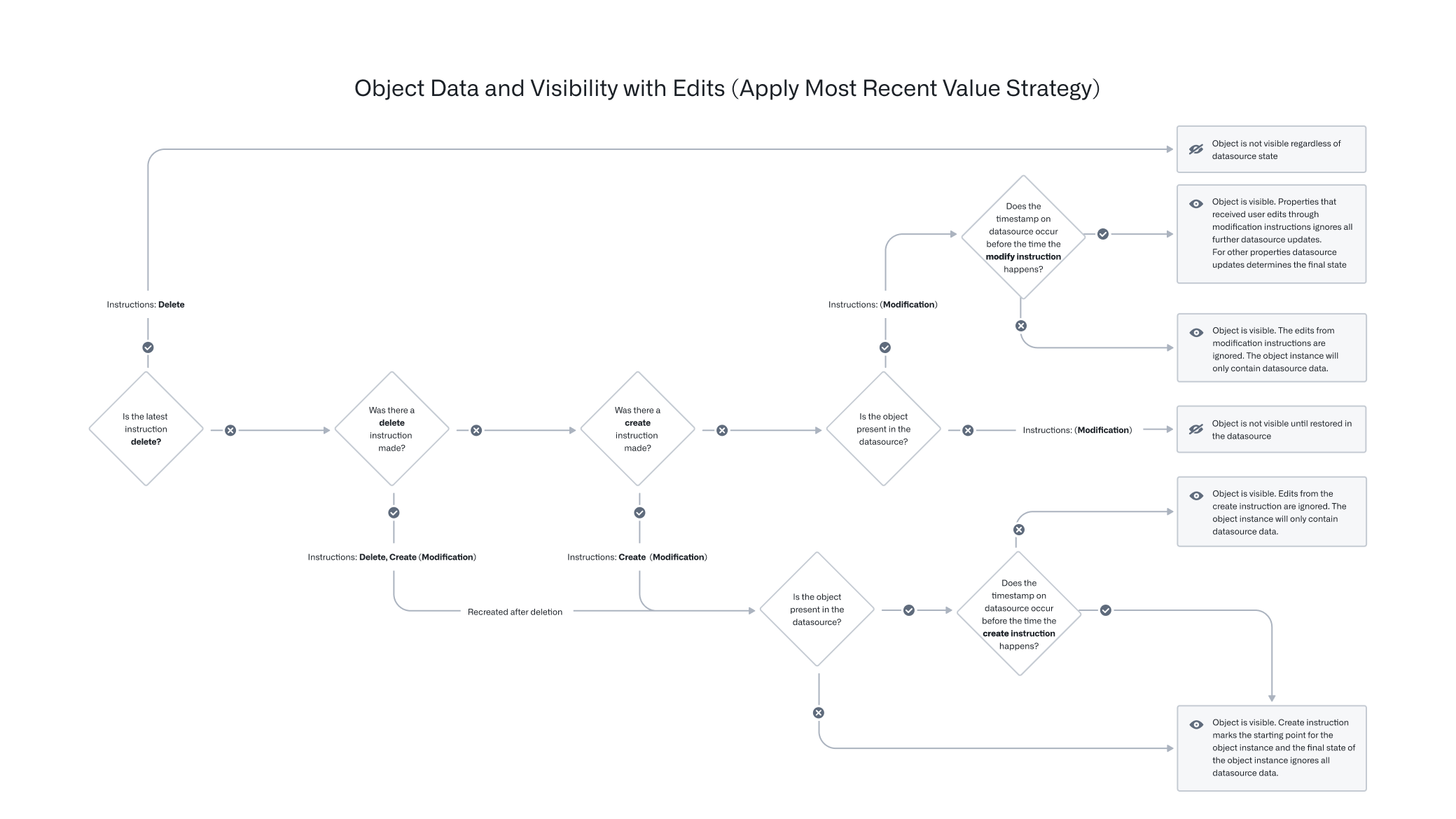
The following example illustrates this behavior. Assume there are two objects for a Ticket object type with the following data in the backing datasource, where the Apply most recent value option is enabled.
| Ticket ID | Title | Timestamp | Priority | Type |
|---|---|---|---|---|
| 101 | Ticket One | January 1, 2010, 9:00 AM UTC | P1 | Product Bug |
| 102 | Ticket Two | P2 | Feature Request |
Suppose three actions have been run on these tickets, namely:
- Both tickets had their title set to "Ticket" at 8:30 AM on January 1, 2010.
- Both tickets had their priority set to "P0" at 9:30 AM on January 1, 2010.
- Both tickets had their Type set to "Unknown" at 10:30 AM on January 1, 2010.
Then the observed state of the two objects in the ontology would be:
| Ticket ID | Title | Timestamp | Priority | Type |
|---|---|---|---|---|
| 101 | Ticket One | January 1, 2010, 9:00 AM UTC | P0 | Unknown |
| 102 | Ticket | P0 | Unknown |
For the ticket with Ticket ID of 101, the edit to the Title property was not applied, because that edit was created before the 9:00 AM timestamp in the backing datasource. However, the edits to the other two properties occurred after 9:00 AM, and so are reflected in the resolved objects.
For the ticket with Ticket ID of 102, there is no value for the timestamp property in the backing datasource, so all three conditional edits are applied, regardless of their associated timestamps.
Edit-only properties
For edit-only properties, user edits will always apply regardless of the timestamp on the input datasource.
Returning to the ticket example above, consider the following table:
| Ticket ID | Title | Timestamp | Priority | Team (edit-only property) |
|---|---|---|---|---|
| 102 | Ticket Two | January 1, 2050, 9:00 AM UTC | P2 | Sales |
Suppose an action type, Change team is used to modify the Team property to Recruiting. If the Change team action is applied to Ticket Two, the team will be set to Recruiting. Regardless of which strategy is used for resolving conflicts, since Team is an edit-only property, edits will apply.
The behavior remains the same when an Action modifies both edit-only and normal properties. Normal property edits are applied based on conditions, while edit-only property edits always apply.
Only input datasource values considered
Note that the Ontology only compares edit timestamps against the timestamp value from the input datasource. Even if users change the timestamp property via user edits, the conditional comparison will only happen between the timestamp from the input datasource and the user edit application time.
As a result of this behavior, the timestamp property must be backed by a timestamp column from the input datasource. If the source system does not provide a timestamp value to indicate the update time of the data feed, the timestamp column of the input datasource can be modified in the data pipeline.
Returning to the ticket example above, consider the following table:
| Ticket ID | Title | Timestamp | Priority |
|---|---|---|---|
| 101 | Ticket One | January 1, 2010, 9:00 AM UTC | P1 |
Suppose an action type Change Timestamp is used to modify the timestamp of the above ticket to January 1, 2050, 9:00 AM UTC.
| Ticket ID | Title | Timestamp | Priority |
|---|---|---|---|
| 101 | Ticket One | ~~January 1, 2010, 9:00 AM UTC~~ January 1, 2050, 9:00 AM UTC | P1 |
If the Change Priority action is now applied to Ticket One, the priority will still be set to P0.
Despite the timestamp of the object shown, the comparison will only happen between the timestamp from the input datasource and the user edit application time.
中文翻译
用户编辑如何应用
用户编辑可以通过本体管理器(Ontology Manager)中数据源(Datasources)选项卡的编辑(Edits)开关来启用或禁用,如下方截图所示。
通过操作(Actions)编辑对象
本节描述本体(Ontology)如何通过操作(Actions)管理对象编辑。
当操作(Action)应用于对象、链接或对象集时,数据修改逻辑会立即应用到对象数据库的索引中,并定期以Funnel拥有和管理的Foundry数据集形式刷新到持久存储中。更多信息请参阅用户编辑的持久存储文档。
实时数据上的用户编辑
当触发操作(Action)时,操作服务(Actions service)会向Funnel服务发送修改指令。该指令存储在Funnel管理的队列中,该队列具有偏移量跟踪功能以支持同时进行的用户编辑。对象存储V2(Object Storage V2)为任何对象类型和任何具有连接表的多对多链接类型跟踪这些偏移量。这些偏移量应用于对象数据库中的实时索引数据;如果作为本体查询一部分的对象读取发生在用户修改发送之后,则该对象读取保证包含用户编辑。
如何丢弃/清除/删除现有用户编辑
已包含用户编辑的数据只能通过额外的用户编辑进行更新。除了进行额外的用户编辑(例如,对象操作)来更新对象或重新创建对象外,没有直接撤销单个用户编辑或删除的机制。
在某些情况下,可能需要丢弃所有现有用户编辑,以将所有对象的状态重置为与输入数据源相同。例如,您可能希望在将对象类型发布到生产环境之前,删除在测试期间应用于该对象类型的所有用户编辑。
对象存储V2(Object Storage V2)提供了用于迁移用户编辑的模式迁移框架。"删除所有编辑"指令可用于丢弃对象类型上的所有现有用户编辑。可以通过在本体管理器(Ontology Manager)的数据源(Datasources)选项卡的编辑(Edits)部分点击删除编辑(Delete edits)按钮来应用此迁移指令。
对象存储V1(Object Storage V1)(Phonograph)不支持模式迁移,但从对象类型中删除回写数据集配置将删除所有现有用户编辑,可作为临时解决方案。
本体实体版本控制
在应用操作(Action)的过程中,对象类型定义和对象实例会被加载用于各种目的,例如操作验证(Action validations)、函数(Functions)和操作副作用(side effects)。对象实例在应用操作(Action)的过程中可能会发生变化,因此保证事务性以避免潜在的数据正确性问题(例如,将操作应用于错误版本的对象)非常重要。
本体(Ontology)包含检查对象类型和对象实例版本一致性的机制,对象存储V1(Object Storage V1)(Phonograph)和对象存储V2(Object Storage V2)的行为有所不同。
前端消费者与操作服务器之间的实体版本控制
考虑以下场景:用户在操作表单(Action form)中加载版本为{V1, V2, V3, ...}的对象属性值。前端消费者应用程序使用这些对象属性值调用操作服务器(Actions server)的/apply端点,但该请求不包含版本信息。收到此请求后,操作服务器在/apply端点内加载版本为{V1', V2', V3', ...}的对象。请注意,无法保证前端加载的版本{V1, V2, V3, ...}与操作服务器加载的版本{V1', V2', V3', ...}始终相同。
操作服务器内部的实体版本控制
对象存储V1(Object Storage V1)(Phonograph) [计划弃用]
:::callout{theme="warning" title="计划弃用"} 对象存储V1(Object Storage V1)(Phonograph)处于开发的计划弃用阶段,将在2026年6月30日后不可用。请将您的对象类型和链接类型迁移到对象存储V2(Object Storage V2)。有关更多信息,请参考升级助手(Upgrade Assistant)中的"将对象类型和多对多链接类型从对象存储v1迁移到v2"干预。 如果您对工作流中的OSv1到OSv2迁移有疑问,请联系Palantir支持。 :::
使用对象存储V1(Object Storage V1)(Phonograph)时,操作服务器(Actions server)跟踪已加载对象的版本,并在整个操作执行过程中从缓存加载相同版本。当在对象存储V1(Object Storage V1)(Phonograph)中应用用户编辑时,对象版本包含在请求中。然后对象存储V1(Object Storage V1)(Phonograph)检查是否有任何对象版本已更改,如果检测到更改,将抛出StaleObject错误。
这些检查确保操作服务器内部的一致性。例如,对象存储V1(Object Storage V1)保证操作(Action)将在同一版本的对象上生成同步webhook、执行、验证和应用编辑。请注意,不检查属性级别的对象更改,因此对对象不相关属性的用户编辑可能会触发StaleObject冲突。
对象存储V2(Object Storage V2)
使用对象存储V2(Object Storage V2)时,操作服务器(Actions server)在将用户编辑发布到Funnel服务之前执行自己的对象版本检查,但与对象存储V1(Object Storage V1)(Phonograph)相比,仅针对服务器收集的版本子集进行检查。
操作服务器(Actions server)仅检查直接用于生成编辑的对象的版本,例如某个对象A的某个属性被复制到对象B上的版本,并且这些版本仅与编辑后的对象版本进行检查。
这种行为减少了StaleObject冲突的频率,但代价是OSv2的保证较弱。在对象存储V2(Object Storage V2)中,操作服务(Actions service)始终在操作/apply过程中加载相同版本的对象,但不保证在操作执行期间,在编辑生成之外读取的对象没有发生变化。
跨后端操作(Cross-backend Actions)
如果操作类型(Action type)同时修改OSv1和OSv2中的对象,则被视为"跨后端"。在这种情况下,操作服务(Actions service)对以下内容执行检查:
- OSv1中所有读取和/或编辑的对象,以及
- OSv2中所有编辑的对象。
用户编辑的持久存储
对象数据库中的所有索引数据都被视为临时数据,需要通过其他方式持久存储所有本体(Ontology)数据。同样,通过操作(Actions)应用的用户编辑也必须持久存储。支持对象类型的Foundry数据源已经以Foundry数据集、受限视图等形式持久存储。
如Funnel管道文档中所述,Funnel服务拥有并管理多个Foundry数据集,包括一个合并数据集,该数据集结合了来自数据源和用户编辑的数据。合并数据集会自动构建;这确保了存储在队列中的用户编辑被持久存储在Foundry中,并且队列被清空以防止队列增长过大。默认情况下,此构建作业在以下情况下触发:
- 每当对象类型数据源中有新的数据事务时,或者
- 在数据源中没有新数据的情况下,每6小时触发一次(如果在任何对象上检测到编辑)。
解决冲突的用户编辑和数据源更新
Foundry本体(Ontology)中的对象可以通过输入数据源和用户编辑来创建和修改。当单个对象(即具有特定主键值的行或对象)同时从输入数据源和用户编辑接收数据时,必须通过冲突解决策略透明地解决这些接收到的值。
:::callout{theme="warning"} 删除不被视为编辑。一旦应用删除,无论数据源状态如何,该对象都不再可见。如果稍后重新创建该对象,它将不会继承之前的编辑。 :::
有两种解决冲突的策略:
策略1:应用用户编辑(默认)
使用此策略,对象的最终状态始终由应用于它的用户编辑决定,无论同一对象中已编辑属性的任何未来数据源更新如何。
请参考下面的流程图,根据用户编辑和数据源更新确定对象的最新状态。
下表显示了在接收用户编辑和输入数据源更新后,特定对象的状态如何按照"用户编辑始终优先"的冲突解决策略进行更新。
| 时间 | 当前数据源行状态 | 用户编辑 | 最终对象状态 | 说明 |
|---|---|---|---|---|
| T0 | columns = {pk_column = pk1, col1 = val1, col2 = val2} |
properties = {pk_column = pk1, col1 = val1, col2 = val2}, deleted = false |
||
| T1 | columns = {} |
properties = {}, deleted = true |
行从数据源消失,对象不再存在于Foundry本体(Ontology)中 | |
| T2 | columns = {pk_column = pk1, col1 = val1, col2 = val2} |
properties = {pk_column = pk1, col1 = val1, col2 = val2}, deleted = false |
同一行重新出现在数据源中 | |
| T3 | columns = {pk_column = pk1, col1 = val1, col2 = val2} |
修改对象:properties = {pk_column = pk1, col2 = newVal2} |
properties = {pk_column = pk1, col1 = val1, col2 = newVal2}, deleted = false |
用户运行修改对象(Modify object)操作(Action) |
| T4 | columns = {} |
properties = {}, deleted = true |
行再次从数据源消失,对象不再存在于Foundry本体(Ontology)中 | |
| T5 | columns = {pk_column = pk1, col1 = val1, col2 = val2} |
properties = {pk_column = pk1, col1 = val1, col2 = newVal2}, deleted = false |
同一行重新出现在数据源中,当行重新出现时,之前的用户编辑仍然应用于该对象 | |
| T6 | columns = {pk_column = pk1, col1 = newVal1, col2 = val2} |
properties = {pk_column = pk1, col1 = newVal1, col2 = newVal2}, deleted = false |
未编辑的属性(col1)从输入数据源接收数据更新,并应用于对象 |
|
| T7 | columns = {pk_column = pk1, col1 = newVal1, col2 = val2} |
删除对象 | properties = {}, deleted = true |
用户运行删除对象(Delete object)操作(Action),对象不再存在于Foundry本体(Ontology)中 |
| T8 | columns = {pk_column = pk1, col1 = newVal1, col2 = val2, col3 = null} |
properties = {}, deleted = true |
||
| T9 | columns = {pk_column = pk1, col1 = newVal1, col2 = val2, col3 = null} |
创建对象:properties = {pk_column = pk1, col3 = val3} |
properties = {pk_column = pk1, col1 = null, col2 = null, col3 = val3}, deleted = false |
用户运行创建对象(Create object)操作(Action) |
| T10 | columns = {pk_column = pk1, col1 = newVal1, col2 = newVal2, col3 = newVal3} |
properties = {pk_column = pk1, col1 = null, col2 = null, col3 = val3}, deleted = false |
col3在输入数据源中更新,但由于之前的创建对象(Create object)操作(Action),不再考虑用于对象的最终状态 |
|
| T11 | columns = {pk_column = pk1, col1 = newVal1, col2 = newVal2, col3 = newVal3} |
修改对象:properties = {pk_column = pk1, col2 = newVal22} |
properties = {pk_column = pk1, col1 = null, col2 = newVal22, col3 = val3}, deleted = false |
用户运行修改对象(Modify object)操作(Action) |
| T12 | columns = {} |
properties = {pk_column = pk1, col1 = null, col2 = newVal22, col3 = val3}, deleted = false |
行从数据源消失,但对象仍然存在于Foundry本体(Ontology)中,因为它最后是由用户编辑创建的 | |
| T13 | columns = {pk_column = pk1, col1 = newVal1, col2 = newVal2, col3 = newVal3} |
删除对象 | properties = {}, deleted = true |
行重新出现,但用户运行删除对象(Delete object)操作(Action),对象被删除 |
| T14 | columns = {pk_column = pk1, col1 = newVal1, col2 = newVal2, col3 = newVal3} |
修改对象:properties = {pk_column = pk1, col2 = newVal2, col3 = val3} |
properties = {}, deleted = true |
用户对已删除对象运行修改对象(Modify object)操作(Action);任何修改对象(Modify object)操作调用都将失败 |
策略2:应用最新值
使用此策略,用户编辑有条件地应用;也就是说,仅当用户编辑的时间戳比给定对象的数据源时间戳值更新时,才应用用户编辑。请注意,由于每个编辑的时间戳与来自数据源的未编辑时间戳值进行比较,因此同一对象上可能应用一些较新的用户编辑,而较旧的用户编辑则不应用。
配置
冲突解决策略在对象类型级别配置,并且仅支持OSv2对象类型。
用户可以在本体管理器(Ontology Manager)的数据源(Datasources)部分配置此选项。对象类型的每个数据源可以有不同的解决策略。例如,对于由两个数据源支持的对象类型,一个数据源可以使用应用用户编辑(默认)(Apply user edits (default)),而另一个数据源可以使用应用最新值(Apply most recent value)。应用最新值(Apply most recent value)选项要求数据源包含一个时间戳类型的属性;日期属性类型不适用于此选项。时间戳属性用于比较并决定是否应应用用户编辑。时间戳属性必须使用协调世界时(UTC)。
行为
一旦为数据源保存了应用最新值(Apply most recent value)冲突解决策略,对该数据源支持的所有属性的用户编辑将有条件地应用。
对于每个条件编辑,解决方式是通过比较支持数据源中的时间戳值与编辑关联的时间戳。对于在冲突解决策略更改之后应用于这些属性的用户编辑,将根据导致该编辑的操作提交的时间戳有条件地应用,而对这些属性的任何现有编辑将根据冲突解决策略更改的时间戳有条件地应用。
如果支持数据源中时间戳属性的值早于与用户编辑关联的时间戳,则应用该用户编辑,否则忽略该编辑。
如果编辑更新了跨多个数据源的属性,则这些编辑是有条件应用还是始终应用将由支持该属性的数据源的解决策略决定。
请参考下面的更新流程图,根据用户编辑和数据源更新确定对象的最新状态。
以下示例说明了此行为。假设工单(Ticket)对象类型有两个对象,在支持数据源中有以下数据,并且启用了应用最新值(Apply most recent value)选项。
| 工单ID | 标题 | 时间戳 | 优先级 | 类型 |
|---|---|---|---|---|
| 101 | 工单一 | 2010年1月1日 上午9:00 UTC | P1 | 产品缺陷 |
| 102 | 工单二 | P2 | 功能请求 |
假设对这些工单运行了三个操作(Actions),即:
- 两个工单的标题在2010年1月1日上午8:30设置为"工单"。
- 两个工单的优先级在2010年1月1日上午9:30设置为"P0"。
- 两个工单的类型在2010年1月1日上午10:30设置为"未知"。
那么本体中两个对象的观察状态将是:
| 工单ID | 标题 | 时间戳 | 优先级 | 类型 |
|---|---|---|---|---|
| 101 | 工单一 | 2010年1月1日 上午9:00 UTC | P0 | 未知 |
| 102 | 工单 | P0 | 未知 |
对于工单ID为101的工单,对标题属性的编辑未应用,因为该编辑是在支持数据源中9:00 AM时间戳之前创建的。然而,对其他两个属性的编辑发生在9:00 AM之后,因此反映在解决后的对象中。
对于工单ID为102的工单,支持数据源中没有时间戳属性的值,因此所有三个条件编辑都被应用,无论其关联的时间戳如何。
仅编辑属性
对于仅编辑属性(edit-only properties),无论输入数据源上的时间戳如何,用户编辑始终应用。
回到上面的工单示例,考虑下表:
| 工单ID | 标题 | 时间戳 | 优先级 | 团队(仅编辑属性) |
|---|---|---|---|---|
| 102 | 工单二 | 2050年1月1日 上午9:00 UTC | P2 | 销售 |
假设使用操作类型更改团队(Change team)将团队(Team)属性修改为招聘(Recruiting)。如果将更改团队(Change team)操作应用于工单二,团队将设置为招聘(Recruiting)。无论使用哪种冲突解决策略,由于团队(Team)是仅编辑属性,编辑都将应用。
当操作(Action)同时修改仅编辑属性和普通属性时,行为保持不变。普通属性编辑根据条件应用,而仅编辑属性编辑始终应用。
仅考虑输入数据源值
请注意,本体(Ontology)仅将编辑时间戳与输入数据源的时间戳值进行比较。即使用户通过用户编辑更改了时间戳属性,条件比较也仅在输入数据源的时间戳和用户编辑应用时间之间进行。
由于此行为,时间戳属性必须由输入数据源的时间戳列支持。如果源系统不提供指示数据馈送更新时间的时间戳值,则可以在数据管道中修改输入数据源的时间戳列。
回到上面的工单示例,考虑下表:
| 工单ID | 标题 | 时间戳 | 优先级 |
|---|---|---|---|
| 101 | 工单一 | 2010年1月1日 上午9:00 UTC | P1 |
假设使用操作类型更改时间戳(Change Timestamp)将上述工单的时间戳修改为2050年1月1日 上午9:00 UTC。
| 工单ID | 标题 | 时间戳 | 优先级 |
|---|---|---|---|
| 101 | 工单一 | ~~2010年1月1日 上午9:00 UTC~~ 2050年1月1日 上午9:00 UTC | P1 |
如果现在将更改优先级(Change Priority)操作应用于工单一,优先级仍将设置为P0。尽管显示了对象的时间戳,但比较仅在输入数据源的时间戳和用户编辑应用时间之间进行。