Materializations(物化(Materializations))
Up-to-date data is critical to many Foundry workflows. Ontology users can create materializations of indexed data from the Ontology that contains the latest state of each object by combining data from both input datasources and user edits.
Use cases for materializations
The two main use cases for materializations are:
- Building downstream Foundry pipelines that require the latest state of each object including user edits.
- Enabling downloads of Ontology data containing the latest state of all objects for an object type.
:::callout{theme="neutral"} We recommend orchestrating bulk downloads in Foundry by creating materialized datasets and initiating the downloads through existing download workflows for other Foundry datasets, such as data exports and exports through Foundry transforms. :::
Create a materialized dataset
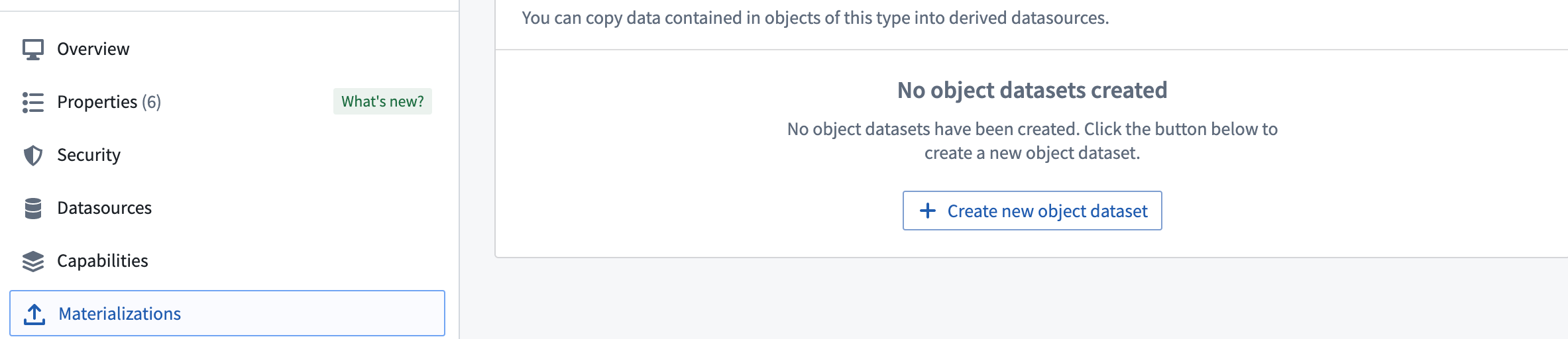
Navigate to the Materializations tab by toggling the Edits configuration in the Datasources tab in Ontology Manager. On the Materializations tab, you can create materialized object datasets or object restricted views with various configurations depending on input datasource types. Note that Materializations will update automatically and cannot be built manually from Dataset Preview.
Comparison of writeback datasets and materialized datasets
In object storage v1 (OSv1), also known as phonograph, writeback datasets are the equivalent of materialized datasets. Writeback datasets are required in OSv1 to enable user edits on an object type or a many-to-many link type with a join table.
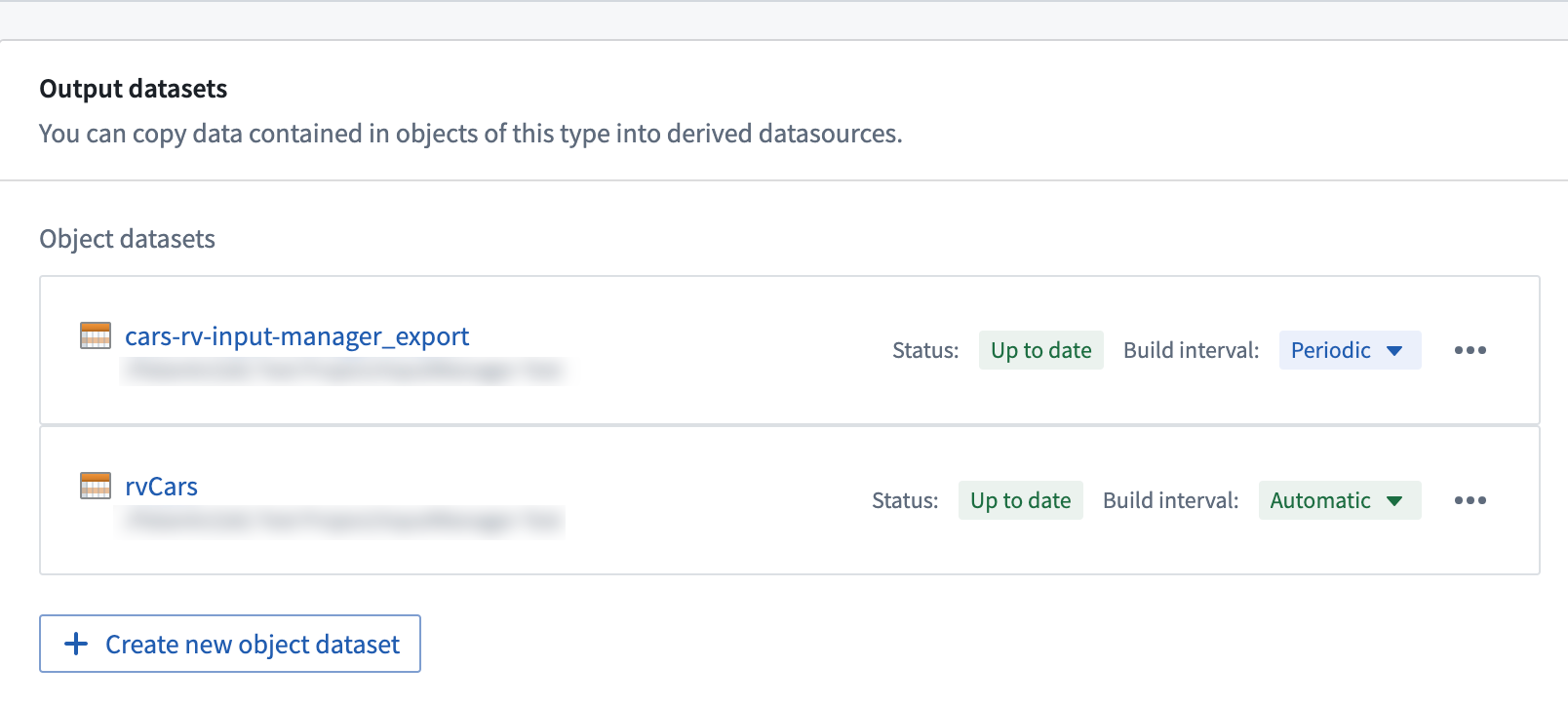
Object storage v2 (OSv2) does not require materialized datasets to enable user edits. Instead, users can enable user edits for an object type by toggling the Edits configuration in the Datasources tab in Ontology Manager. This makes materializations optional in OSv2 such that users would only need to create materializations if needed for the two main use cases mentioned above. OSv2 also allows multiple materialized datasets to be created, in case users want to materialize only a subset of the properties from an object type.
Other behavior differences between OSv1 writeback datasets and OSv2 materialized datasets are described below.
Build schedules in writeback and materialized datasets
OSv1 (Phonograph) writeback datasets and OSv2 materialized datasets handle build schedules differently.
- In OSv1, there is no mechanism to trigger builds for writeback datasets when there are new user edits. Instead, users can create schedules for building their writeback datasets as often as they want. When there is no new data, these builds are automatically aborted to avoid using any additional compute. If no schedule is set up and the writeback dataset is not being built, the data in the writeback dataset may not be an accurate representation of the Ontology.
- OSv2 is designed to address two separate use cases differently.
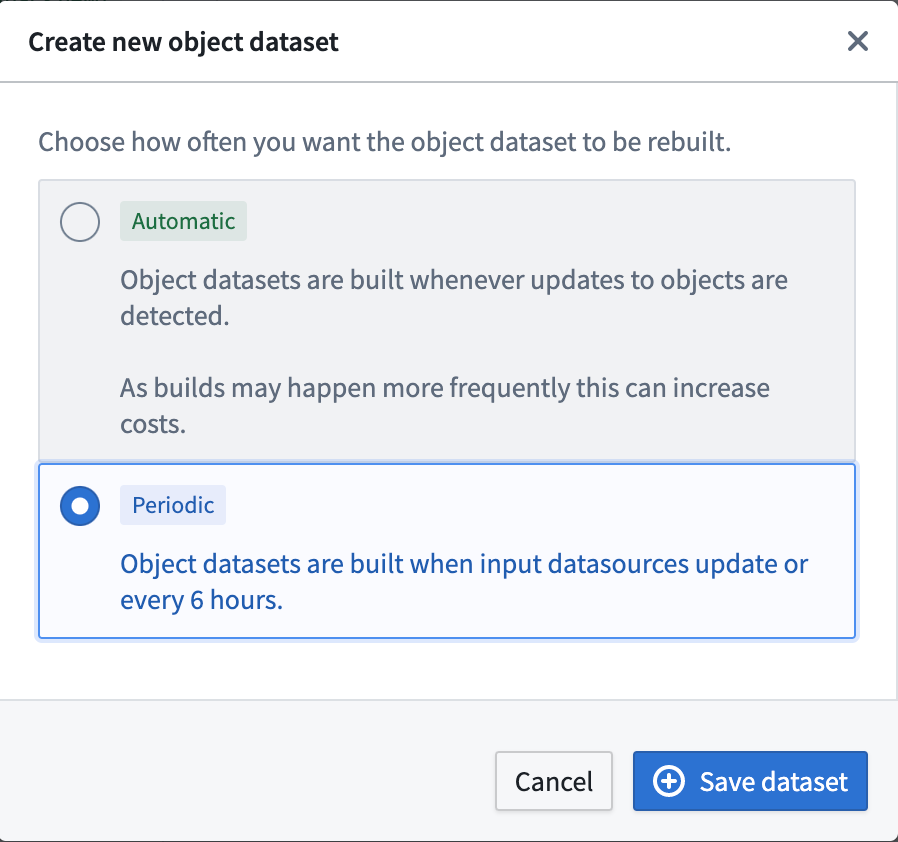
- To have user edits reflected in the materialized datasets as soon as edits are applied, users can enable automatic propagation of user edits. This mode propagates user edits to the configured materialized datasets automatically (with a latency of a few minutes). This may incur additional cost as more frequent builds may occur depending on the frequency of new user edits.
- If the latency of user edit propagation to materialized datasets is not critical, users can reduce costs by configuring periodic builds. In this mode, materialized datasets are rebuilt whenever the input datasources have new data or every 6 hours.
Retention of writeback and materialized datasets
The retention of writeback and materialized datasets do not work the same.
-
In OSv1, the writeback dataset acts like a regular dataset in the sense that it can be put on specific retention policies that can be specified within the platform. This enables users to look back at the historical snapshots of the object type state if the writeback dataset is built regularly.
-
In OSv2, materialized datasets are subject to a retention that is not customizable. Historical transactions are constantly deleted and only the latest snapshot is guaranteed to be available. In this case, users will have to set up a transform downstream if it is important to keep historical snapshots of object type states. This retention policy also applies in the case of object type deletion, where a downstream transform is also required to keep a materialized dataset of a deleted object type.
Dataset schema in writeback and materialized datasets
OSv1 (Phonograph) writeback datasets and OSv2 materialized datasets relate to input datasource schemas differently.
- In OSv1, the schema of the input datasource is copied and used as the schema of the writeback dataset.
- OSv2 changes this behavior to increase the legibility of the Foundry Ontology. Since users are materializing data from the Ontology, the schema used for materialized datasets is copied from the Ontology definitions instead of relying on the backing datasource configuration. Specifically, the API Name metadata of each property is used as the schema of the materialized dataset. Contact your Palantir representative if you want to continue using the schema of the input datasource while migrating from OSv1 to OSv2 (for example, to guarantee backward compatibility for existing writeback datasets).
:::callout{theme="warning"}
__ prefixed columns (e.g. __is_deleted, __patch_offset) in the materialized dataset are metadata columns used by Foundry for deduplication purposes and do not represent any information on the state of the object type. These columns could be renamed or removed from future releases without prior warning and should not be used in production workflows.
:::
Restricted view materialization options
OSv1 (Phonograph) does not allow materializing restricted views for object types that are granularly permissioned using restricted views as an input datasource. Users can only materialize writeback datasets that contain all the rows from the backing dataset of the restricted view input datasource. Users are then responsible for properly securing access to the writeback dataset based on their access restrictions.
In OSv2, users can configure both regular datasets or restricted views as materialized resources for object types that are granularly permissioned using restricted views as an input datasource, as shown below.
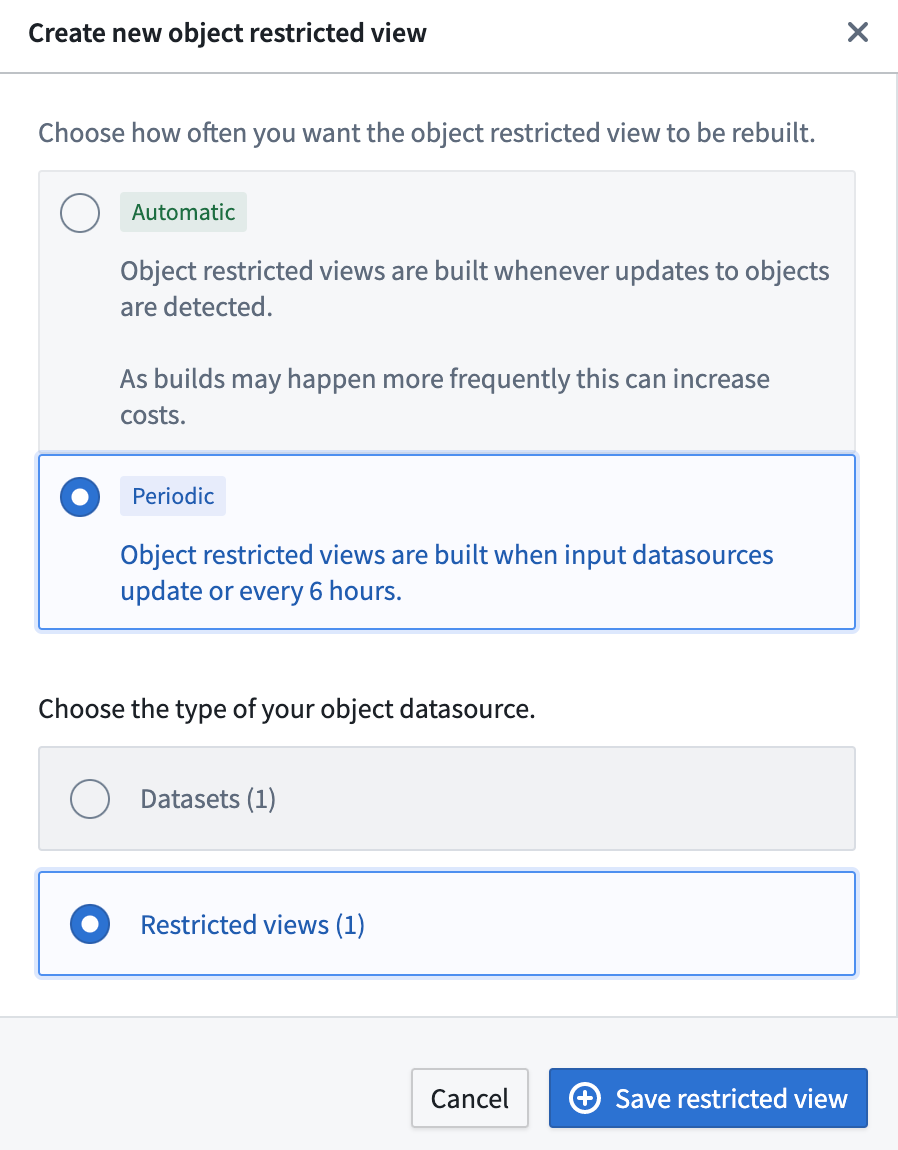
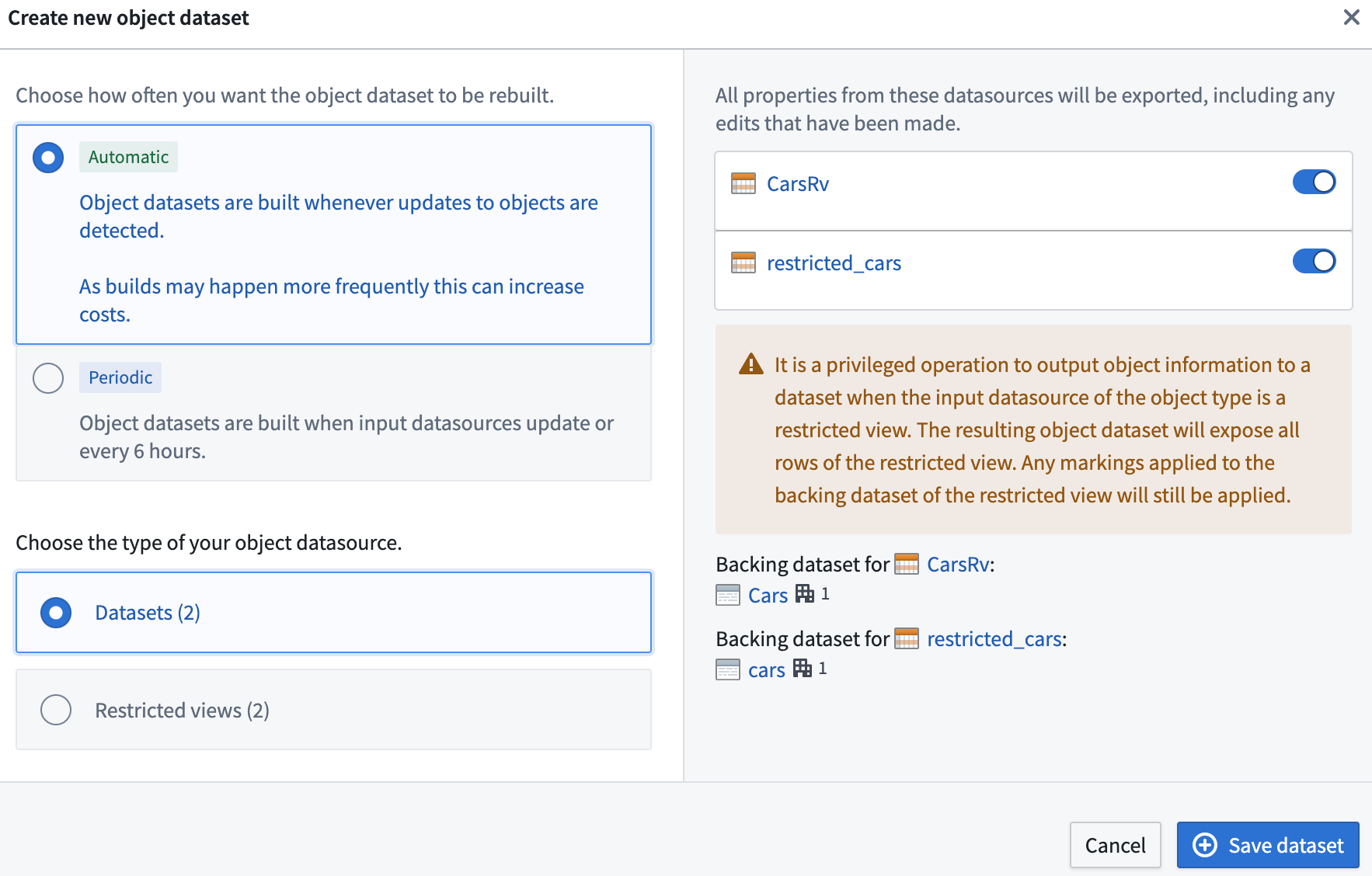
In the case of an object type having multiple input datasources, users can configure their materialized datasets by selecting which input datasources they would like to materialize data from. If an input datasource is not selected, object type properties mapped from that input datasource will not be reflected in the materialized dataset. If some of the input datasources are restricted views, users have two options:
- Users can select one of the restricted view resources to materialize as a restricted view. An example configuration is shown below.
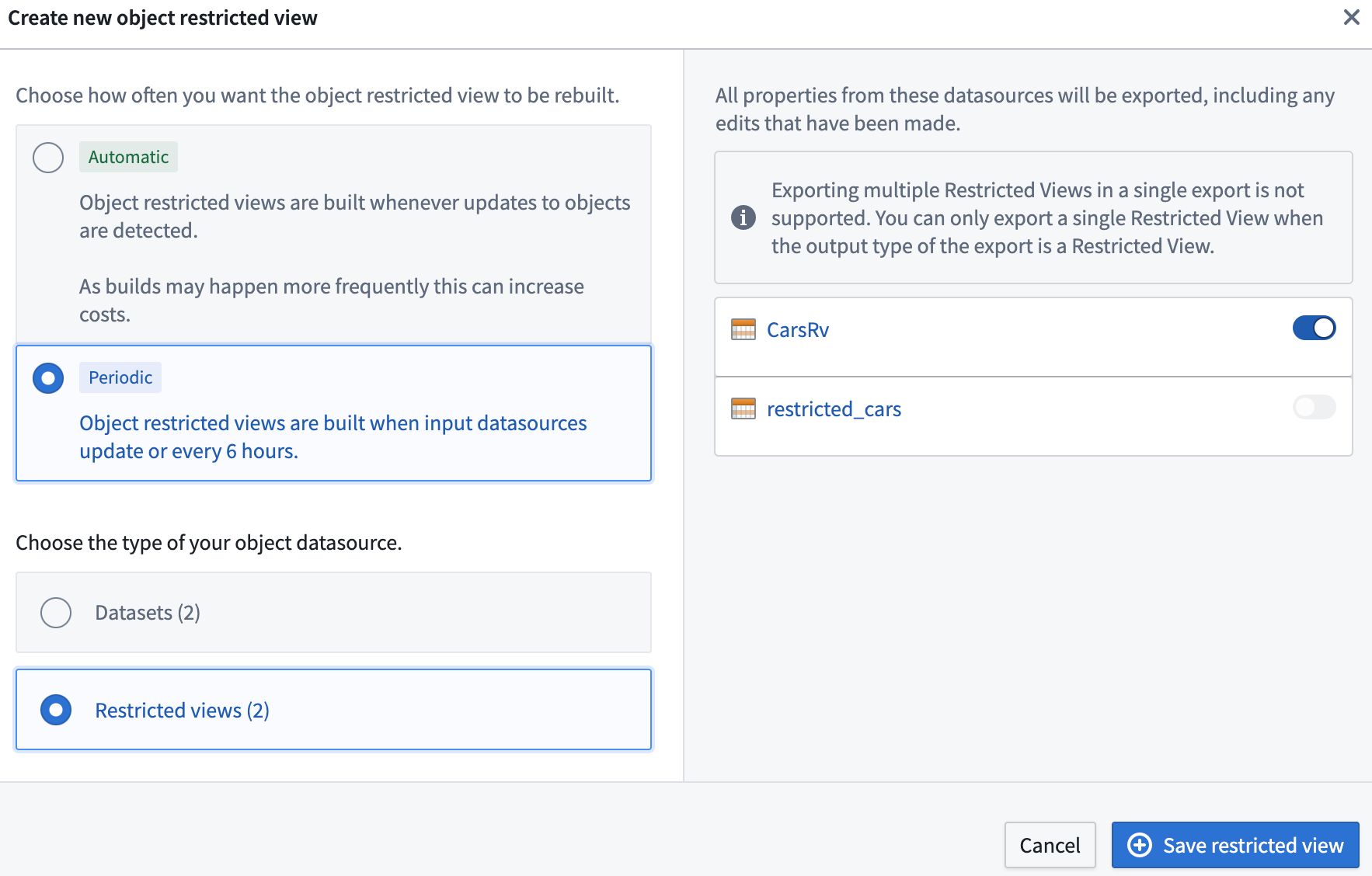
- Users can select multiple input datasources, but in that case they can only materialize ontology data as a Foundry dataset. This limitation exists because different restricted view input datasources can have different policy configurations, and restricted views do not currently support setting column-level policies. An example configuration is shown below.
Materializing datasets from restricted views
As stated above, both OSv1 and OSv2 allow object types with restricted views as input datasources to be materialized as regular datasets. Note that this is the only place in the platform where users can convert a restricted view to a dataset, since restricted views cannot be used as transform inputs. Materialized datasets do not carry restricted view policies, so creating and visualizing materialized datasets requires an elevated set of permissions.
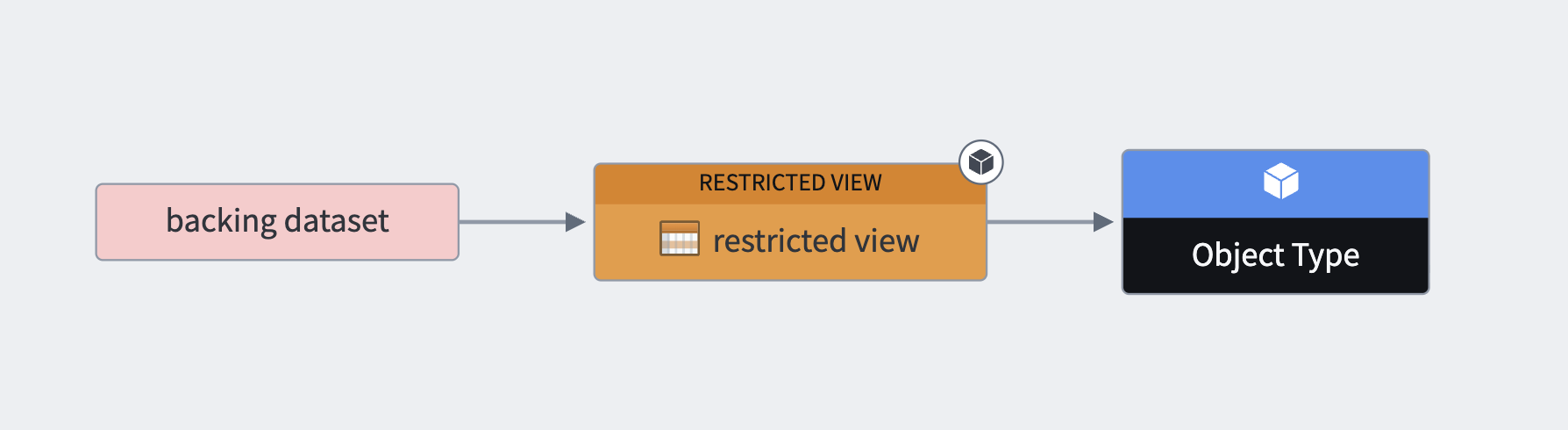
We will use the following terms for explanatory purposes:
- Object type: The object type at hand.
- Restricted view: The restricted view backing the object type.
- Backing dataset: The backing dataset of the restricted view.
The diagram below demonstrates the relationship between the backing dataset, restricted view, and object type.
With these definitions in mind, we will now cover what a user requires to create a new materialized dataset and view its transaction. Note that these are two separate steps.
In order to create a new materialized dataset, the user requires permission to perform an identity transformation from the backing dataset to a new dataset. Security-wise, this means that a user needs to satisfy discretionary and mandatory controls on both the backing dataset and the restricted view.
If these conditions are met, the user will have the option to create a new materialized dataset, as shown in the example below.

If these conditions are not met, the user will not have this option. In the following example, the user does not have the necessary discretionary controls and therefore cannot create a materialized dataset.

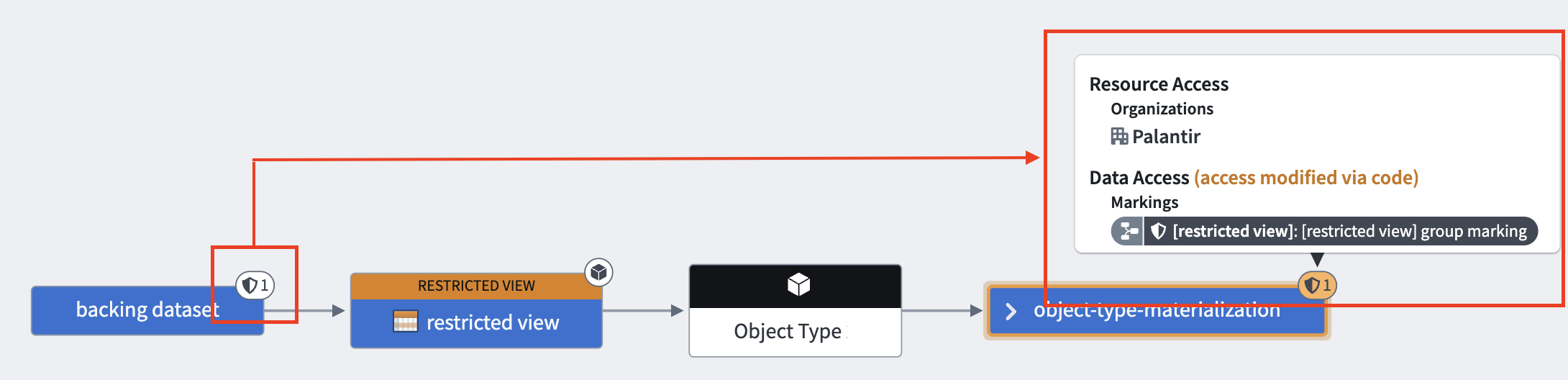
To view the materialized dataset's transaction, the user must be able to view the transaction of the backing dataset. In other words, the user must satisfy the mandatory controls of the backing dataset's transaction as well.
This is demonstrated in the following diagram, where we can see the backing dataset, restricted view, the object type, and the materialized dataset. The markings from the backing dataset, which are severed in the restricted view, get propagated to the materialized dataset. This means that the user needs to satisfy this marking to view the transaction.
For OSv2 object types, if the object type contains properties of type mandatory control, the materialized dataset also requires the user to satisfy all mandatory controls on Allowed markings, Allowed organizations and Max classification. Provenance is carried over from the backing dataset as described above, and the mandatory controls defined at the object type are also enforced for object types containing properties of type mandatory control.
Below is a diagram of a backing dataset with one marking, a materialized dataset with two markings coming from the backing dataset, and a marking that is configured in the object type.

The backing dataset contains the following marking:

In the object type configuration, we can configure a property of type mandatory control with another marking, as shown below.

As a result of this configuration, the materialized dataset will carry provenance from both the backing dataset and the object type, which contains a property of type mandatory control.

Materializing datasets from restricted view restrictions
You cannot configure a materialization dataset if a restricted view in OSv2 contains any of the following policies:
- If the restricted view contains a condition that references a user's mandatory controls and is applied to a string property. Instead, you must convert the string property in your ontology to a mandatory control property, ensuring that you can configure a maximum Classification-based Access Control or mandatory marking set.
- If the restricted view has authorized group ID conditions.
- If the restricted view datasource has conditions that directly reference organizations or markings as static values. Instead, you must ensure that the organization and marking granular conditions reference mandatory control properties and not string properties or static values.
Branching
Materializations can be used with Global Branches with the following limitations:
- Materializations cannot be created on a branch.
- Materializations cannot be edited on a branch.
Changes made to an object type that has an associated materialization will be indexed in a branch. Any updates from that branch will be written to the materialized dataset or restricted view. Deleting an object type or removing it from a branch will also delete the branch in the materialized dataset. Due to limitations with restricted views, materialized restricted view branches will not be deleted. A solution to this limitation is currently under development.
中文翻译
物化(Materializations)
最新数据对许多 Foundry 工作流至关重要。本体(Ontology)用户可以通过结合输入数据源和用户编辑的数据,创建包含每个对象最新状态的物化(materializations)数据。
物化的使用场景
物化的两个主要使用场景包括:
- 构建需要包含用户编辑在内的每个对象最新状态的下游 Foundry 管道。
- 支持下载包含某个对象类型所有对象最新状态的本体数据。
:::callout{theme="neutral"} 我们建议在 Foundry 中通过创建物化数据集,并利用现有的其他 Foundry 数据集下载工作流(如数据导出和通过 Foundry 转换进行的导出)来编排批量下载。 :::
创建物化数据集
在 Ontology Manager 的 Datasources 选项卡中切换 Edits 配置,导航至 Materializations 选项卡。在 Materializations 选项卡上,您可以根据输入数据源类型创建具有不同配置的物化对象数据集或对象受限视图(object restricted views)。请注意,物化数据将自动更新,无法从 Dataset Preview 手动构建。
回写数据集与物化数据集的比较
在对象存储 v1(OSv1,也称为 phonograph)中,回写数据集(writeback datasets)等同于物化数据集。在 OSv1 中,回写数据集是启用对象类型或具有连接表的多对多链接类型的用户编辑所必需的。
对象存储 v2(OSv2)不需要物化数据集来启用用户编辑。相反,用户可以通过在 Ontology Manager 的 Datasources 选项卡中切换 Edits 配置来启用对象类型的用户编辑。这使得物化在 OSv2 中成为可选项,用户仅需在需要上述两个主要使用场景时创建物化。OSv2 还允许创建多个物化数据集,以便用户仅物化对象类型的部分属性。
OSv1 回写数据集与 OSv2 物化数据集的其他行为差异如下所述。
回写数据集和物化数据集的构建调度
OSv1(Phonograph)回写数据集和 OSv2 物化数据集处理构建调度的方式不同。
- 在 OSv1 中,当有新的用户编辑时,没有机制可以触发回写数据集的构建。相反,用户可以创建调度来按所需频率构建回写数据集。当没有新数据时,这些构建会自动中止以避免使用额外的计算资源。如果未设置调度且回写数据集未在构建,则回写数据集中的数据可能无法准确反映本体状态。
- OSv2 的设计针对两个不同的使用场景采取了不同的处理方式。
- 若希望用户编辑在应用后立即反映到物化数据集中,用户可以启用用户编辑的自动传播。此模式会自动将用户编辑传播到配置的物化数据集(延迟几分钟)。这可能会产生额外成本,因为根据新用户编辑的频率,可能会发生更频繁的构建。
- 如果用户编辑传播到物化数据集的延迟不关键,用户可以通过配置定期构建来降低成本。在此模式下,物化数据集会在输入数据源有新数据时或每 6 小时重新构建一次。
回写数据集和物化数据集的保留策略
回写数据集和物化数据集的保留策略工作方式不同。
-
在 OSv1 中,回写数据集的行为类似于常规数据集,可以应用平台内指定的特定保留策略。如果回写数据集定期构建,用户可以查看对象类型状态的历史快照。
-
在 OSv2 中,物化数据集受限于不可自定义的保留策略。历史事务会被持续删除,仅保证提供最新快照。在这种情况下,如果保留对象类型状态的历史快照很重要,用户必须设置下游转换。此保留策略也适用于对象类型删除的情况,此时也需要下游转换来保留已删除对象类型的物化数据集。
回写数据集和物化数据集的数据集模式
OSv1(Phonograph)回写数据集和 OSv2 物化数据集与输入数据源模式的关系不同。
- 在 OSv1 中,输入数据源的模式会被复制并用作回写数据集的模式。
- OSv2 改变了这一行为,以提高 Foundry 本体的可读性。由于用户是从本体物化数据,物化数据集使用的模式是从本体定义中复制的,而不是依赖于底层数据源配置。具体来说,每个属性的 API 名称元数据被用作物化数据集的模式。如果您在从 OSv1 迁移到 OSv2 时希望继续使用输入数据源的模式(例如,为保证现有回写数据集的向后兼容性),请联系您的 Palantir 代表。
:::callout{theme="warning"}
物化数据集中以 __ 为前缀的列(例如 __is_deleted、__patch_offset)是 Foundry 用于去重的元数据列,不代表对象类型的任何状态信息。这些列可能会在未来的版本中重命名或删除,恕不另行通知,不应在生产工作流中使用。
:::
受限视图物化选项
OSv1(Phonograph)不允许对使用受限视图(restricted views)作为输入数据源进行细粒度权限控制的对象类型进行物化。用户只能物化包含受限视图输入数据源底层数据集中所有行的回写数据集。然后,用户有责任根据其访问限制适当保护对回写数据集的访问。
在 OSv2 中,对于使用受限视图作为输入数据源进行细粒度权限控制的对象类型,用户可以将常规数据集或受限视图配置为物化资源,如下所示。
对于具有多个输入数据源的对象类型,用户可以通过选择要从中物化数据的输入数据源来配置其物化数据集。如果未选择某个输入数据源,则从该输入数据源映射的对象类型属性将不会反映在物化数据集中。如果某些输入数据源是受限视图,用户有两个选项:
- 用户可以选择其中一个受限视图资源,将其物化为受限视图。示例如下所示。
- 用户可以选择多个输入数据源,但在这种情况下,只能将本体数据物化为 Foundry 数据集。此限制是因为不同的受限视图输入数据源可能具有不同的策略配置,而受限视图目前不支持设置列级策略。示例如下所示。
从受限视图物化数据集
如上所述,OSv1 和 OSv2 都允许将具有受限视图作为输入数据源的对象类型物化为常规数据集。请注意,这是平台中唯一可以将受限视图转换为数据集的地方,因为受限视图不能用作转换输入。物化数据集不携带受限视图策略,因此创建和查看物化数据集需要一组提升的权限。
为便于解释,我们将使用以下术语:
- 对象类型(Object type): 当前讨论的对象类型。
- 受限视图(Restricted view): 支持该对象类型的受限视图。
- 底层数据集(Backing dataset): 受限视图的底层数据集。
下图展示了底层数据集、受限视图和对象类型之间的关系。
基于这些定义,我们将介绍用户创建新物化数据集和查看其事务所需要的权限。请注意,这是两个独立的步骤。
为了创建新的物化数据集,用户需要拥有从底层数据集到新数据集执行身份转换(identity transformation)的权限。从安全角度来看,这意味着用户需要满足底层数据集和受限视图上的自由裁量控制(discretionary controls)和强制控制(mandatory controls)。
如果满足这些条件,用户将可以选择创建新的物化数据集,如下例所示。
如果不满足这些条件,用户将没有此选项。在以下示例中,用户没有必要的自由裁量控制,因此无法创建物化数据集。
要查看物化数据集的事务,用户必须能够查看底层数据集的事务。换句话说,用户还必须满足底层数据集事务的强制控制。
如下图所示,我们可以看到底层数据集、受限视图、对象类型和物化数据集。来自底层数据集的标记(markings)在受限视图中被切断,但会传播到物化数据集。这意味着用户需要满足此标记才能查看事务。
对于 OSv2 对象类型,如果对象类型包含强制控制类型的属性,物化数据集还要求用户满足 Allowed markings、Allowed organizations 和 Max classification 上的所有强制控制。来源信息如上所述从底层数据集继承,并且对于包含强制控制类型属性的对象类型,还会强制执行在对象类型级别定义的强制控制。
下图展示了一个带有一个标记的底层数据集、一个带有来自底层数据集的两个标记的物化数据集,以及在对象类型中配置的一个标记。
底层数据集包含以下标记:
在对象类型配置中,我们可以使用另一个标记配置一个强制控制类型的属性,如下所示。
由于此配置,物化数据集将携带来自底层数据集和包含强制控制类型属性的对象类型的来源信息。
从受限视图物化数据集的限制
如果 OSv2 中的受限视图包含以下任何策略,则无法配置物化数据集:
- 如果受限视图包含引用用户强制控制并应用于字符串属性的条件。相反,您必须将本体中的字符串属性转换为强制控制属性,确保可以配置最大基于分类的访问控制或强制标记集。
- 如果受限视图具有授权的组 ID 条件。
- 如果受限视图数据源具有直接引用组织或标记作为静态值的条件。相反,您必须确保组织和标记的细粒度条件引用强制控制属性,而不是字符串属性或静态值。
分支
物化可以与全局分支(Global Branches)一起使用,但有以下限制:
- 不能在分支上创建物化。
- 不能在分支上编辑物化。
对具有关联物化的对象类型所做的更改将在分支中索引。来自该分支的任何更新都将写入物化数据集或受限视图。删除对象类型或将其从分支中移除也将删除物化数据集中的分支。由于受限视图的限制,物化受限视图的分支将不会被删除。此限制的解决方案正在开发中。