Manage schema changes(管理模式变更(Manage schema changes))
Changing object type schema
Workflows and applications built on the Foundry Ontology should evolve as an organization's needs change; in some cases, this evolution may involve updating the schema of object types in a way that requires additional changes elsewhere ("breaking changes"). Examples of breaking changes to the schema include changing the data type of an existing property, changing an object type’s backing datasource, or changing the primary key of an object type. See below for a full list of breaking schema changes.
In Object Storage V1 (Phonograph), the user interface discourages such schema changes, particularly when an object type has received user edits. This is because such user edits cannot be migrated in OSv1; instead, breaking changes will result in the loss of existing user edits unless time-consuming and complex manual intervention can be performed.
Object Storage V2 removes this restriction on schema changes to facilitate flexible and iterative workflow building. To that end, OSv2 provides a schema migration framework with a list of predefined migrations that can be applied to existing user edits after a breaking schema change. The Ontology Manager automatically detects breaking schema changes and guides users to select a migration option from the predefined list. See below for a full list of supported migrations.
Example workflow
In this example workflow, a user deletes the Description property from an object type that has existing user edits. Ontology Manager automatically identifies this as a breaking schema change and displays a warning that a migration is required, as seen in the screenshot below.
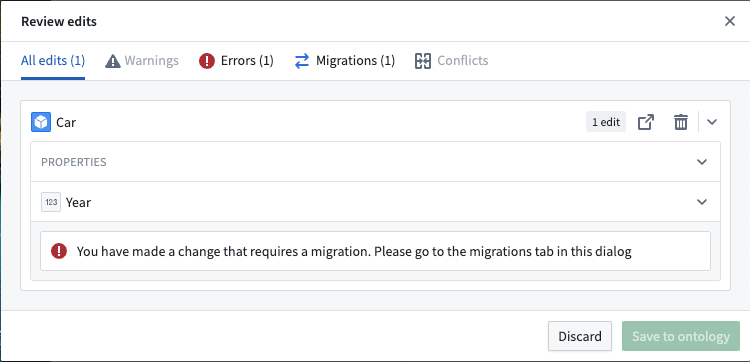
In addition to displaying a warning, Ontology Manager will present a Migrations tab in the Review changes interface when the user wants to save their changes to the Ontology. Ontology Manager will block the user from saving changes until they define a migration for the breaking change. This prevents the change from breaking other workflows.
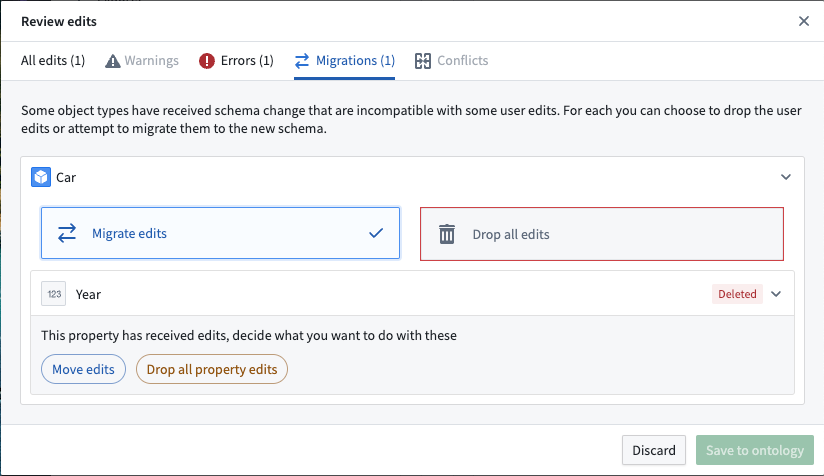
When the user navigates to the Migrations tab, the Ontology Manager displays the available migration options based on the type of breaking change, as shown below.
Once a schema change is specified and saved by a user in the Ontology Manager, a new schema version is created for the object type in the backend, and a corresponding replacement Funnel batch pipeline is orchestrated to update the index of the object type. The new object type version will be queryable by the Object Set Service (OSS) and other consumers of the Ontology APIs as soon as the replacement pipeline is completed and the new version is declared to be fully hydrated by object databases.
List of breaking schema changes
The following changes in the Ontology are considered to be breaking schema changes:
- Changing the input datasources of an object type
- Changing the primary key of an object type
- Changing the data type of a property
- Changing the ID of a property that has received user edits
- Deleting a property that has received user edits
- Deleting a struct field that has received user edits
- Changing the data type of a struct field
List of non-breaking schema changes
The following changes in the Ontology are not considered to be breaking schema changes:
- Changing the display name, title key, render hints, type classes, or visibility of a property that has received user edits
- Deleting properties or making schema changes to properties that have never received user edits
- Deleting struct fields or making schema changes to struct fields that have never received user edits
List of supported schema migrations in OSv2
Below is the full list of schema migrations that are currently supported in Object Storage V2.
-
Drop all property edits: This migration instruction drops all existing user edits on a specific property of an object type. User edits on other properties of the object type are not impacted. This instruction is generally used when deleting a property from an object type and there is no new property as a replacement.
-
Drop all struct field edits: This migration instruction drops all existing user edits on a specific struct field within a struct property of an object type. User edits on other struct fields on the same struct property are not impacted. This instruction is generally used when deleting a struct field from a struct property, and there is no new replacement struct field.
-
Drop all edits: This migration instruction drops all existing user edits on all properties of an object type. When this migration runs, the state of all objects of an object type is reset to data in the input datasources. To execute this migration, navigate to the Datasources tab of the object type and select Delete edits, located in the Edits section.
-
Move edits: This migration instruction moves all existing user edits on a specific property or on the entire object type. This instruction is generally used in two cases:
- When an existing property is renamed or deleted and being replaced by a new property, or
-
When the input datasource of an object type is being replaced by another datasource.
-
Move struct field edits: This migration instruction moves all existing user edits on a specific struct field to another struct field. This instruction is generally used when an existing struct field is deleted and being replaced by a new struct field.
-
Cast property to new type: This migration instruction casts the data type of existing user edits on a specific property to the new data type of the property. The list of supported data type casts are:
- Attachment → String
- Boolean → String
- Date → String
- Double → Integer
- Double → Long
- Double → String
- Geopoint → String
- Geoshape → String
- Integer → Long
- Integer → Double
- Integer → String
- Long → Integer
- Long → Double
- Long → String
- Mandatory marking → String
- String → Integer
- String → Long
- String → Double
- String → Boolean
- String → Date
- String → Timestamp
- String → Geopoint
- String → Geoshape
-
Timestamp → String
-
Cast struct field to new type: This migration instruction casts the data type of existing user edits on a specific struct field to the new data type of the struct field. The list of supported data type casts are:
- Boolean → String
- Date → String
- Double → Integer
- Double → Long
- Double → String
- Geopoint → String
- Integer → Long
- Integer → Double
- Integer → String
- Long → Integer
- Long → Double
- Long → String
- String → Integer
- String → Long
- String → Double
- String → Boolean
- String → Date
- String → Timestamp
- String → Geopoint
-
Timestamp → String
-
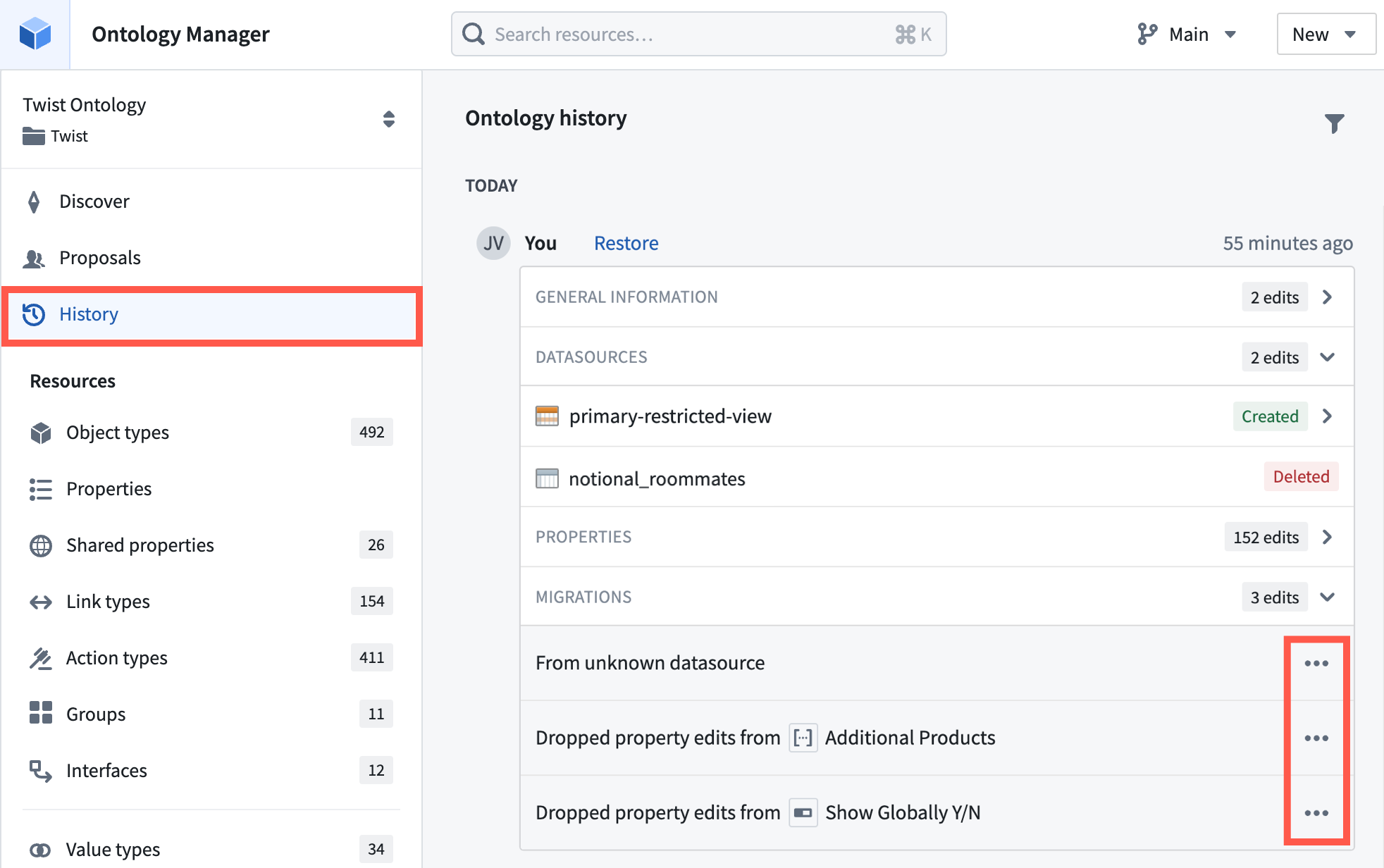
Revert migration: This migration instruction reverts a previously-applied schema migration. This instruction is generally used when a saved Ontology change is being reverted through the History section in the Ontology Manager.
- To revert a migration, navigate to the History section in the Ontology Manager for the desired ontology, expand the Migrations section within the history event, open the ... menu on the migration event, and select Revert. Once the migrations have been reverted, save the modifications within the Ontology Manager.
:::callout{theme="neutral"}
You can only apply up to 500 schema migrations at a single time. If the number of schema changes exceeds this limit, the migration must be performed in batches.
The current schema migration framework does not support applying migration instructions on the primary key property of object types.
:::
中文翻译
管理模式变更(Manage schema changes)
更改对象类型模式(Changing object type schema)
基于 Foundry Ontology 构建的工作流和应用程序应随着组织需求的变化而演进;在某些情况下,这种演进可能涉及以需要额外更改的方式更新对象类型的模式(即"破坏性变更")。模式破坏性变更的示例包括更改现有属性的数据类型、更改对象类型的后端数据源(backing datasource)或更改对象类型的主键(primary key)。请参阅下方破坏性模式变更的完整列表。
在对象存储 V1(Object Storage V1,Phonograph)中,用户界面不鼓励此类模式变更,尤其是在对象类型已收到用户编辑(user edits)的情况下。这是因为在 OSv1 中无法迁移此类用户编辑;相反,除非能够执行耗时且复杂的手动干预,否则破坏性变更将导致现有用户编辑丢失。
对象存储 V2(Object Storage V2)移除了对模式变更的这一限制,以促进灵活且迭代的工作流构建。为此,OSv2 提供了一个模式迁移框架(schema migration framework),其中包含一系列预定义的迁移(predefined migrations),可在破坏性模式变更后应用于现有用户编辑。Ontology Manager 会自动检测破坏性模式变更,并引导用户从预定义列表中选择迁移选项。请参阅下方OSv2 中支持的迁移完整列表。
示例工作流
在此示例工作流中,用户从已存在用户编辑的对象类型中删除了 Description 属性。Ontology Manager 会自动将此识别为破坏性模式变更,并显示警告,提示需要进行迁移,如下方截图所示。
除了显示警告外,当用户想要保存对 Ontology 的更改时,Ontology Manager 会在审查更改(Review changes)界面中显示一个迁移(Migrations)选项卡。Ontology Manager 将阻止用户保存更改,直到他们为破坏性变更定义迁移。这可以防止该变更破坏其他工作流。
当用户导航到迁移选项卡时,Ontology Manager 会根据破坏性变更的类型显示可用的迁移选项,如下所示。
一旦用户在 Ontology Manager 中指定并保存了模式变更,后端会为该对象类型创建一个新的模式版本(schema version),并编排相应的替换 Funnel 批处理管道(replacement Funnel batch pipeline)以更新该对象类型的索引。一旦替换管道完成,并且新版本被声明为已完全由对象数据库水合(hydrated by object databases),新的对象类型版本即可由对象集服务(Object Set Service,OSS)和其他 Ontology API 的消费者进行查询。
破坏性模式变更列表(List of breaking schema changes)
以下 Ontology 中的变更被视为破坏性模式变更:
- 更改对象类型的输入数据源(input datasources)
- 更改对象类型的主键
- 更改属性的数据类型
- 更改已收到用户编辑的属性的 ID
- 删除已收到用户编辑的属性
- 删除已收到用户编辑的结构体字段(struct field)
- 更改结构体字段的数据类型
非破坏性模式变更列表(List of non-breaking schema changes)
以下 Ontology 中的变更不被视为破坏性模式变更:
- 更改已收到用户编辑的属性的显示名称、标题键(title key)、渲染提示(render hints)、类型类(type classes)或可见性(visibility)
- 删除从未收到用户编辑的属性,或对从未收到用户编辑的属性进行模式变更
- 删除从未收到用户编辑的结构体字段,或对从未收到用户编辑的结构体字段进行模式变更
OSv2 中支持的模式迁移列表(List of supported schema migrations in OSv2)
以下是对象存储 V2 中当前支持的模式迁移的完整列表。
-
删除所有属性编辑(Drop all property edits): 此迁移指令会删除对象类型特定属性上的所有现有用户编辑。该对象类型其他属性上的用户编辑不受影响。此指令通常用于从对象类型中删除属性且没有新属性作为替代的情况。
-
删除所有结构体字段编辑(Drop all struct field edits): 此迁移指令会删除对象类型结构体属性(struct property)内特定结构体字段上的所有现有用户编辑。同一结构体属性上其他结构体字段的用户编辑不受影响。此指令通常用于从结构体属性中删除结构体字段且没有新的替代结构体字段的情况。
-
删除所有编辑(Drop all edits): 此迁移指令会删除对象类型所有属性上的所有现有用户编辑。当此迁移运行时,对象类型中所有对象的状态将重置为输入数据源中的数据。要执行此迁移,请导航到对象类型的数据源(Datasources)选项卡,然后选择编辑部分中的删除编辑(Delete edits)。
-
移动编辑(Move edits): 此迁移指令会移动特定属性或整个对象类型上的所有现有用户编辑。此指令通常用于以下两种情况:
- 当现有属性被重命名或删除,并由新属性替代时,或
-
当对象类型的输入数据源被另一个数据源替代时。
-
移动结构体字段编辑(Move struct field edits): 此迁移指令会将特定结构体字段上的所有现有用户编辑移动到另一个结构体字段。此指令通常用于现有结构体字段被删除并由新结构体字段替代的情况。
-
将属性转换为新类型(Cast property to new type): 此迁移指令会将特定属性上现有用户编辑的数据类型转换为该属性的新数据类型。支持的数据类型转换列表如下:
- 附件(Attachment)→ 字符串(String)
- 布尔值(Boolean)→ 字符串
- 日期(Date)→ 字符串
- 双精度浮点数(Double)→ 整数(Integer)
- 双精度浮点数 → 长整数(Long)
- 双精度浮点数 → 字符串
- 地理点(Geopoint)→ 字符串
- 地理形状(Geoshape)→ 字符串
- 整数 → 长整数
- 整数 → 双精度浮点数
- 整数 → 字符串
- 长整数 → 整数
- 长整数 → 双精度浮点数
- 长整数 → 字符串
- 强制标记(Mandatory marking)→ 字符串
- 字符串 → 整数
- 字符串 → 长整数
- 字符串 → 双精度浮点数
- 字符串 → 布尔值
- 字符串 → 日期
- 字符串 → 时间戳(Timestamp)
- 字符串 → 地理点
- 字符串 → 地理形状
-
时间戳 → 字符串
-
将结构体字段转换为新类型(Cast struct field to new type): 此迁移指令会将特定结构体字段上现有用户编辑的数据类型转换为该结构体字段的新数据类型。支持的数据类型转换列表如下:
- 布尔值 → 字符串
- 日期 → 字符串
- 双精度浮点数 → 整数
- 双精度浮点数 → 长整数
- 双精度浮点数 → 字符串
- 地理点 → 字符串
- 整数 → 长整数
- 整数 → 双精度浮点数
- 整数 → 字符串
- 长整数 → 整数
- 长整数 → 双精度浮点数
- 长整数 → 字符串
- 字符串 → 整数
- 字符串 → 长整数
- 字符串 → 双精度浮点数
- 字符串 → 布尔值
- 字符串 → 日期
- 字符串 → 时间戳
- 字符串 → 地理点
-
时间戳 → 字符串
-
回滚迁移(Revert migration): 此迁移指令会回滚先前应用的模式迁移。此指令通常用于通过 Ontology Manager 中的历史记录(History)部分撤销已保存的 Ontology 变更。
- 要回滚迁移,请导航到所需 Ontology 的 Ontology Manager 中的历史记录部分,展开历史事件中的迁移部分,打开迁移事件上的 ... 菜单,然后选择回滚(Revert)。迁移回滚后,在 Ontology Manager 中保存修改。
:::callout{theme="neutral"}
您一次最多只能应用 500 个模式迁移。如果模式变更数量超过此限制,则必须分批执行迁移。
当前的模式迁移框架不支持对对象类型的主键属性应用迁移指令。
:::