Enable user edit history(启用用户编辑历史(User Edit History))
Tracking the history of user edits to objects indexed into Object Storage V2. Enable or disable this feature using the Track user edit history toggle in the Datasources tab of the Ontology Manager, as shown in the screenshot below.

To allow user edits, the Edits toggle must be enabled.
Common issues and notes
- The edit history reflects the changes made to objects after enabling the Track user edit history. Any changes prior to the activation of this feature will not be tracked.
- Once you enable the Track user edit history, it takes a few minutes to initialize. During this short period, users can't perform actions on these objects.
- If you are migrating from Object Storage V1 to Object Storage V2, ensure that
preserve edit historyis checked during the migration if you want to retain the edit history. - Users who have access to the current state of an object (object with the same primary key) can access the entire history of the object. This implies that if an object is deleted and recreated, users can still see the history that occurred prior to the deletion action.
After enabling Track user edit history, the Edit History widget can be added to Workshop modules or Workshop-backed object views to display edit histories.
Disable edit history
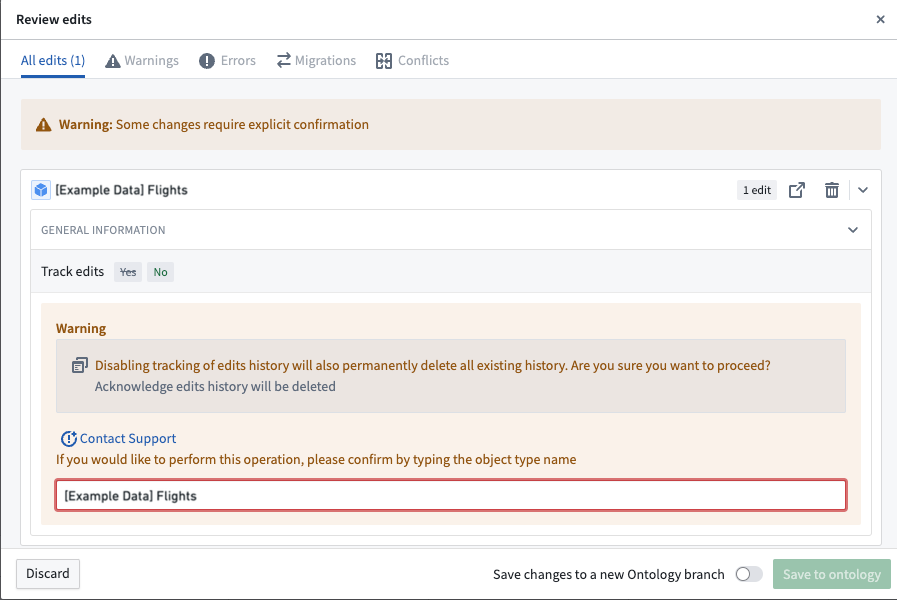
Disabling Track user edit history permanently deletes all existing edit histories for this object type. Before saving the ontology, users will receive a warning and must confirm an acknowledgment that edit history will be deleted.
中文翻译
启用用户编辑历史(User Edit History)
追踪用户对已索引至对象存储V2(Object Storage V2)中对象的编辑历史。您可以通过本体管理器(Ontology Manager)中数据源(Datasources)选项卡下的追踪用户编辑历史(Track user edit history)开关来启用或禁用此功能,如下图所示。
要允许用户编辑,必须先启用编辑开关(Edits toggle)。
常见问题与说明
- 编辑历史仅反映启用追踪用户编辑历史后对对象所做的更改。在此功能激活之前发生的任何更改将不会被追踪。
- 启用追踪用户编辑历史后,需要几分钟时间进行初始化。在此期间,用户无法对这些对象执行操作。
- 如果您正在从对象存储V1(Object Storage V1)迁移至对象存储V2,且希望保留编辑历史,请确保在迁移过程中勾选
保留编辑历史(preserve edit history)。 - 拥有对象当前状态(具有相同主键的对象)访问权限的用户可以访问该对象的完整历史。这意味着,如果某个对象被删除后重新创建,用户仍可查看删除操作之前的历史记录。
启用追踪用户编辑历史后,可将编辑历史组件(Edit History widget)添加至Workshop模块或基于Workshop的对象视图中,以显示编辑历史。
禁用编辑历史
禁用追踪用户编辑历史将永久删除该对象类型的所有现有编辑历史。在保存本体之前,用户将收到警告,并必须确认已了解编辑历史将被删除。