FAQ(常见问题解答)
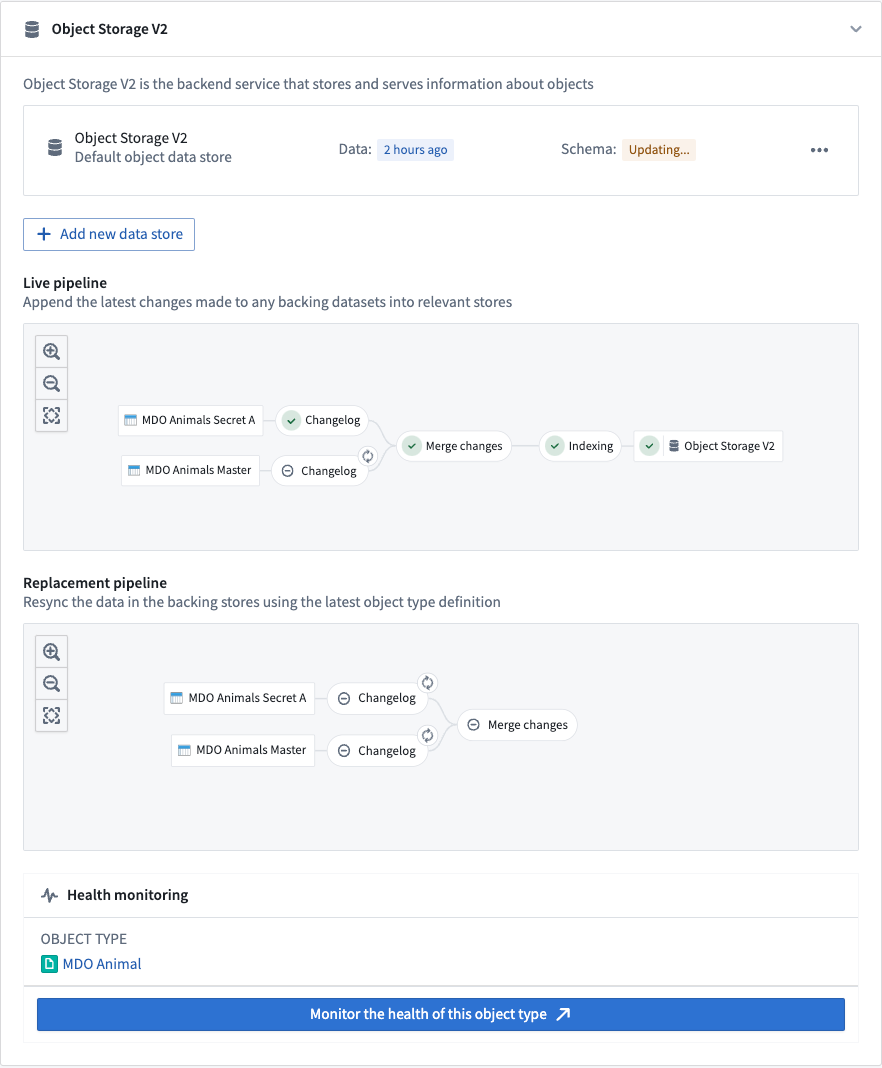
How do I know when an object type has been indexed into OSv2?
The Ontology Manager application has a dedicated pipeline graph that shows the status of various jobs in a Funnel pipeline. A green tick in the Object Storage V2 node in the graph indicates that the indexing is complete and the object type is ready to be queried from OSv2.
Why might an indexing job fail even though it was successfully registered with Object Storage V1 (Phonograph) before?
Data validations in OSv1 and OSv2 differ slightly.
OSv1 behavior is generally dictated by the behavior of the underlying data store, given its tight coupling with the underlying distributed document store and search engine. OSv2 has stricter validations to ensure the quality of data going into the Ontology, and to provide more deterministic behavior and increased legibility across the system compared to OSv1.
Therefore, some indexing pipelines may encounter validation errors when using OSv2 that were previously accepted by OSv1. For a detailed list of such breaking changes, see the documentation on Ontology breaking changes between OSv1 and OSv2.
One of the jobs failed but might succeed if I retry. How do I trigger a rebuild?
OSv2 manages all aspects of jobs, including job retries. If a job fails due to a transient error that might be resolved by rebuilding the job, OSv2 will automatically retry the job after approximately five minutes. If OSv2 detects that the job failed terminally (due to an invalid data format, for example), it will automatically retry only when new data is available. In cases where object types are backed by restricted view datasources, jobs are triggered when either the data or the policy changes.
Is there a limit to the size of data that can be indexed?
The index size is mainly limited by the storage space in the object databases into which a given object type is indexed. For example, in the OSv2 data store this would be the disk space of the search nodes.
If there is not enough disk space, indexing jobs will not succeed and will report the underlying problem in the pipeline graph in the Ontology Manager application. If you encounter disk space errors, contact your Palantir representative.
Can I backfill large scale historical data for object types with streaming datasources?
There are two phases when syncing object types backed by streaming datasources; internal stream creation, and indexing. Streaming indexing jobs have comparable indexing latency to Funnel batch pipelines, using Spark to heavily parallelize the initial processing of historical streaming data. This indexing latency is comparable to user edits on live Ontology data. Internal stream creation is typically the limiting factor; it utilizes our streaming infrastructure to process the datasource on a per-record basis.
What is the expected latency for streaming into the Ontology?
The most time-consuming part of Funnel streaming pipelines is Flink checkpointing to allow for "exactly once" streaming consistency. The default checkpoint frequency is once every second, so that is the dominating latency between the data arriving in the input stream and being indexed into the Ontology. We perform continuous experiments to evaluate cost/performance/latency tradeoffs by reducing the frequency and even removing it all together.
Contact Palantir Support to configure the behavior where necessary.
What is the expected throughput for streaming into Ontology?
Indexing throughput is limited to 2 MB/s per object type into the Object Storage v2 object database. Contact Palantir Support if you need a higher indexing throughput.
Can I specify a timestamp that my objects will be deduplicated by when using stream datasources in the Ontology?
No, Funnel streaming pipelines preserve the ordering of the input stream when indexing. Data should be written to the stream in order. This can be done in the upstream streaming pipeline by windowing the data by the event timestamp and specifying the primary keys such that the data is hash partitioned.
Does Ontology streaming support change data capture (CDC) workflows?
Funnel streaming pipelines supports create, update, and deletion workflows. You can find more documentation on how to set up deletion metadata in the change data capture documentation.
Can I write partial rows to the Ontology when using stream datasources? Can I update a few properties at a time instead of providing the entire object?
Currently, no. Resolving the entire object should be done in an upstream pipeline. If stateful streaming does not solve this problem for you due to scale issues, contact Palantir Support.
Can I use Ontology streaming for many-to-many link types?
Yes, it is supported. Learn more about how to configure ontology types with streaming datasources in our documentation.
Is streaming supported for object databases other than Object Storage v2 (materializations or Automate, for example)?
Ontology streaming is currently only supported by the Object Storage v2 object database. Contact Palantir Support if you need this functionality in other object databases.
Are materializations supported for object types with stream datasources?
No; given user edits are not supported for object types with stream datasources, a materialized dataset would be no different than the archive dataset in the stream. With the current architecture, the deduplicated view in a dataset cannot be provided.
My Funnel streaming pipeline is always running. How can I cancel it?
Funnel streaming pipelines cannot be cancelled by users. Funnel keeps streams alive always because production object types require high availability. This setup may potentially incur unwanted cost when prototyping. Contact Palantir Support if this becomes a significant deterrent for your use case. Alternatively, you can try switching the object type to a batch one during the prototyping phase.
How can I cut over my stream datasource from one stream to another without downtime?
Funnel streaming pipelines have a heuristic to determine if its pipeline is “up to date” with a replacement stream before switching over to the new one. You can change the datasource to point to a different stream or branch of your stream with the following steps:
- Run your new logic on a separate stream (or another branch).
- Wait for the new stream to finish the replay, such as after all historical records are processed.
- Change your object type input datasource to the new stream.
- Funnel streaming pipelines will keep the live pipeline on the original stream up until the replacement pipeline on the new stream is fully indexed.
- Once the Funnel has finished the cutover, you can turn off the original stream.
What are some common mistakes that may lead to unintended consequences?
- If your data is inconsistent with what you expect, ensure that your input stream is ordered the way you expect.
- Funnel streaming pipelines perform the same validations as Funnel batch pipelines. However, for streaming pipelines, there is no mechanism to throw an error in the user transform because the stream processing cannot be paused, so the invalid records are dropped.
What is the cost of Ontology streaming?
Funnel streaming pipeline compute is calculated the same way as normal streaming resources. Review our streaming compute usage documentation for more information on streaming resource costs.
How do retention windows work?
Retention windows were initially developed as a data size limiting mechanism during a beta release. Therefore, it is only implemented as a best effort. This means objects within the retention window will be queryable, but objects outside of it will be eventually deleted. For example, if the retention window is set to two weeks, and an object of the stream datasource was last updated by the input stream three weeks ago, that object may be deleted from that object type. However, that object may also stay in the Ontology for many more days and is never guaranteed to be removed within any specific timeframe.
The current mechanism for "cleaning up" old data from the Ontology is through pipeline replacement which, by default, runs every two weeks. On replacement, the Funnel streaming pipeline replays the stream from the beginning of the retention window, thereby removing older objects from the Ontology. Contact Palantir Support if you have a need to delete old objects more regularly.
If no retention window is set, then all data from the input stream source will be ingested into the Ontology.
Why is my stream source being indexed in batch or failing with duplicate errors?
In Ontology Manager, you must always explicitly specify your input data source as a stream; this applies for both object types with streaming datasources and restricted views backed by streams. Otherwise, your data source will fall back to indexing as a standard Funnel batch pipeline. Review our documentation on configuring streaming object types for more details.
Can I query object types with streaming datasources through Ontology functions?
Yes, querying the Ontology work the same way for streaming object types and batch object types.
中文翻译
常见问题解答
如何判断对象类型是否已索引到 OSv2?
本体论管理器(Ontology Manager)应用程序具有专用的管道图,可显示漏斗(Funnel)管道中各项作业的状态。图中对象存储 V2(Object Storage V2)节点上的绿色勾选标记表示索引已完成,该对象类型已准备好从 OSv2 查询。
为什么索引作业可能失败,即使之前已成功注册到对象存储 V1(Object Storage V1, Phonograph)?
OSv1 和 OSv2 中的数据验证略有不同。
OSv1 的行为通常由底层数据存储的行为决定,因为它与底层分布式文档存储和搜索引擎紧密耦合。OSv2 具有更严格的验证,以确保进入本体论(Ontology)的数据质量,并提供比 OSv1 更确定性的行为和更高的系统可读性。
因此,一些索引管道在使用 OSv2 时可能会遇到 OSv1 之前接受的验证错误。有关此类重大变更的详细列表,请参阅 OSv1 和 OSv2 之间的本体论重大变更文档。
某个作业失败了,但重试可能会成功。如何触发重建?
OSv2 管理作业的所有方面,包括作业重试。如果作业因可能通过重建解决的临时错误而失败,OSv2 将在大约五分钟后自动重试该作业。如果 OSv2 检测到作业已终止性失败(例如,由于数据格式无效),则仅在有新数据可用时自动重试。在对象类型由受限视图数据源支持的情况下,当数据或策略发生变化时会触发作业。
可索引的数据大小是否有限制?
索引大小主要受对象数据库中的存储空间限制,给定对象类型会被索引到这些数据库中。例如,在 OSv2 数据存储中,这将是搜索节点的磁盘空间。
如果没有足够的磁盘空间,索引作业将不会成功,并会在本体论管理器(Ontology Manager)应用程序的管道图中报告底层问题。如果遇到磁盘空间错误,请联系您的 Palantir 代表。
我可以为具有流数据源的对象类型回填大规模历史数据吗?
同步具有流数据源支持的对象类型有两个阶段:内部流创建和索引。流式索引作业具有与漏斗批处理管道(Funnel batch pipelines)相当的索引延迟,使用 Spark 高度并行化历史流数据的初始处理。此索引延迟与对实时本体论数据的用户编辑相当。内部流创建通常是限制因素;它利用我们的流式基础设施逐条处理数据源。
流式数据进入本体论的预期延迟是多少?
漏斗流式管道(Funnel streaming pipelines)中最耗时的部分是 Flink 检查点,以实现"恰好一次"的流式一致性。默认检查点频率为每秒一次,因此这是数据到达输入流与索引到本体论之间的主要延迟。我们持续进行实验,通过降低频率甚至完全移除检查点来评估成本/性能/延迟的权衡。
如有必要,请联系 Palantir 支持以配置相关行为。
流式数据进入本体论的预期吞吐量是多少?
索引吞吐量限制为每个对象类型每秒 2 MB 进入对象存储 v2 对象数据库。如果需要更高的索引吞吐量,请联系 Palantir 支持。
在使用本体论中的流数据源时,我可以指定用于对象去重的时间戳吗?
不可以,漏斗流式管道(Funnel streaming pipelines)在索引时保留输入流的顺序。数据应按顺序写入流。这可以在上游流式管道中通过按事件时间戳对数据进行窗口化,并指定主键以使数据进行哈希分区来实现。
本体论流式是否支持变更数据捕获(CDC)工作流?
漏斗流式管道(Funnel streaming pipelines)支持创建、更新和删除工作流。您可以在变更数据捕获文档中找到有关如何设置删除元数据的更多文档。
使用流数据源时,我可以向本体论写入部分行吗?我可以一次只更新几个属性,而不是提供整个对象吗?
目前不支持。应在上游管道中解析整个对象。如果由于规模问题,有状态流式(stateful streaming)无法为您解决此问题,请联系 Palantir 支持。
我可以将本体论流式用于多对多链接类型吗?
是的,支持此功能。在我们的文档中了解更多关于如何配置具有流数据源的本体论类型的信息。
除了对象存储 v2(例如物化(Materializations)或自动化(Automate))之外,其他对象数据库是否支持流式?
本体论流式目前仅由对象存储 v2 对象数据库支持。如果您在其他对象数据库中需要此功能,请联系 Palantir 支持。
具有流数据源的对象类型是否支持物化(Materializations)?
不支持;由于具有流数据源的对象类型不支持用户编辑,物化数据集与流中的归档数据集没有区别。在当前架构下,无法提供数据集中的去重视图。
我的漏斗流式管道一直在运行。如何取消它?
漏斗流式管道无法由用户取消。漏斗始终保持流活跃,因为生产对象类型需要高可用性。这种设置可能在原型设计阶段产生不必要的成本。如果这对您的用例造成重大阻碍,请联系 Palantir 支持。或者,您可以尝试在原型设计阶段将对象类型切换为批处理类型。
如何在不宕机的情况下将流数据源从一个流切换到另一个流?
漏斗流式管道(Funnel streaming pipelines)具有一种启发式方法,可以在切换到新流之前确定其管道是否与替换流"保持同步"。您可以按照以下步骤更改数据源以指向不同的流或流的分支:
- 在单独的流(或另一个分支)上运行您的新逻辑。
- 等待新流完成重放,例如在所有历史记录处理完毕后。
- 将您的对象类型输入数据源更改为新流。
- 漏斗流式管道将保持原始流上的实时管道,直到新流上的替换管道完全索引。
- 漏斗完成切换后,您可以关闭原始流。
哪些常见错误可能导致意外后果?
- 如果您的数据与预期不一致,请确保您的输入流按您期望的方式排序。
- 漏斗流式管道(Funnel streaming pipelines)执行与漏斗批处理管道(Funnel batch pipelines)相同的验证。但是,对于流式管道,没有机制可以在用户转换中抛出错误,因为流处理无法暂停,因此无效记录会被丢弃。
本体论流式的成本是多少?
漏斗流式管道(Funnel streaming pipeline)的计算方式与普通流式资源相同。请查阅我们的流式计算使用文档,了解有关流式资源成本的更多信息。
保留窗口(Retention windows)如何工作?
保留窗口最初是在测试版发布期间作为数据大小限制机制开发的。因此,它仅作为尽力而为的方式实现。这意味着保留窗口内的对象将可查询,但保留窗口外的对象最终将被删除。例如,如果保留窗口设置为两周,并且流数据源的某个对象上次由输入流更新是在三周前,则该对象可能会从该对象类型中删除。但是,该对象也可能在本体论中保留更多天,并且从不保证在任何特定时间范围内被移除。
当前从本体论"清理"旧数据的机制是通过管道替换(pipeline replacement),默认每两周运行一次。替换时,漏斗流式管道从保留窗口的开头重放流,从而从本体论中移除较旧的对象。如果您需要更定期地删除旧对象,请联系 Palantir 支持。
如果未设置保留窗口,则输入流源中的所有数据都将被摄取到本体论中。
为什么我的流源被批量索引或出现重复错误而失败?
在本体论管理器(Ontology Manager)中,您必须始终明确指定您的输入数据源为流;这适用于具有流数据源的对象类型和由流支持的受限视图(restricted views)。否则,您的数据源将回退为作为标准漏斗批处理管道(Funnel batch pipeline)进行索引。请查阅我们关于配置流式对象类型的文档以获取更多详细信息。
我可以通过本体论函数(Ontology functions)查询具有流数据源的对象类型吗?
是的,查询本体论对于流式对象类型和批处理对象类型的工作方式相同。