Funnel batch pipelines(Funnel 批量管道(Funnel batch pipelines))
Funnel batch pipelines are internal job pipelines that orchestrate the efficient indexing of data (both from Foundry datasources and from user edits) into OSv2 in a batch fashion, ensuring up-to-date data and metadata in the Ontology.
Components of a Funnel batch pipeline
A Funnel batch pipeline is comprised of a series of Foundry build jobs:
The screenshot below shows an example Funnel batch pipeline.
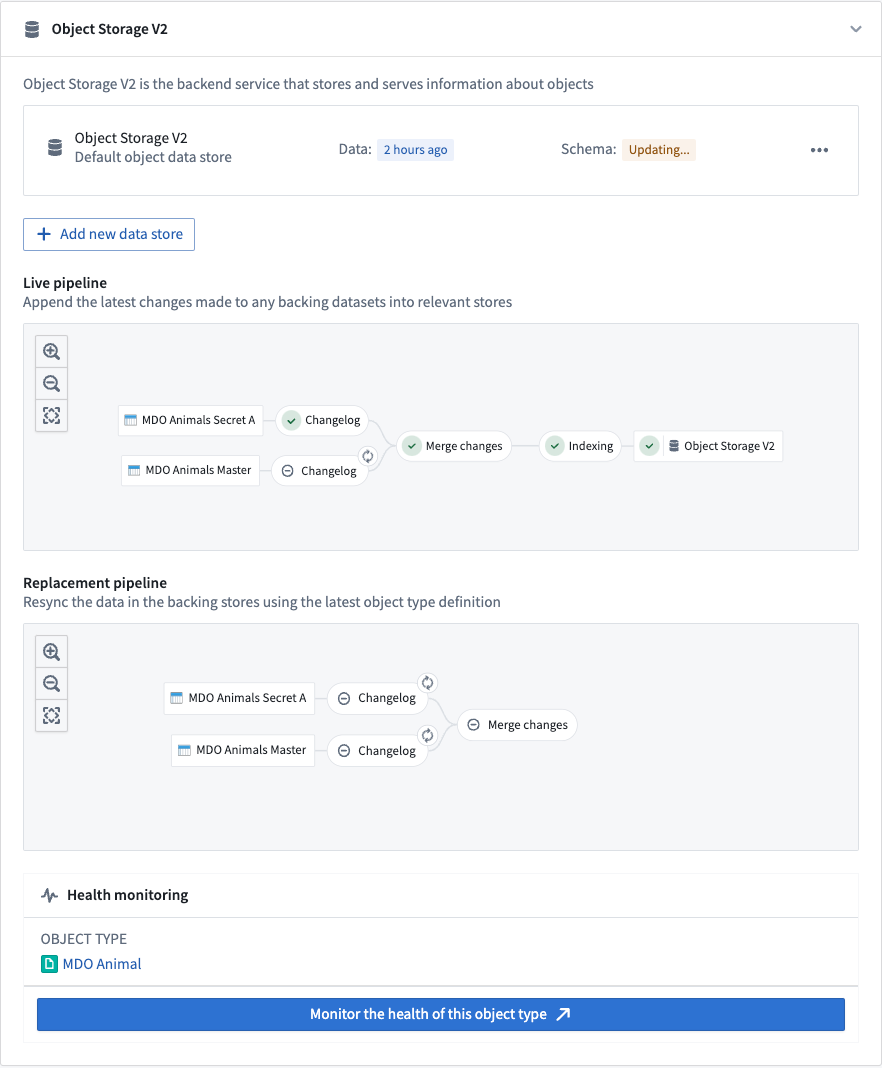
Changelog
In the changelog job, Funnel automatically computes the data difference for all datasources when the datasources receive new data or transactions, then creates intermediate changelog datasets in a Funnel pipeline. Changelog datasets receive APPEND transactions that contain the data difference in each transaction to provide incremental computation semantics. These changelog datasets are owned and controlled by Funnel, and thus are not accessible to users.
Merge changes
In the merge changes job, all changelog datasets from the changelog step and any recent user edits coming from Actions are joined by the object type’s primary key to merge all changes and store them in a separate dataset. These merged datasets are owned and controlled by Funnel, and thus are not accessible to users.
Indexing
After changes are merged, Funnel starts an indexing job per object database to convert all rows in the final dataset with all merged changes into a format compatible with the object databases configured for the object type. For example, for the canonical OSv2 database, all of the rows in the merged changes dataset from the previous step are converted to index files; these files are stored in a separate index dataset. These index datasets are owned and controlled by Funnel, and thus are not accessible to users.
Hydration
Once the indexing job is complete, object databases must prepare the indexed data for querying. Using OSv2 as an example, this preparation step involves downloading the index files from the dataset into the disks of the OSv2 database search nodes. This process, known as hydration, is the final step of our example Funnel batch pipeline for updating the data of an object type.
The progress of the hydration job is reported in the Ontology Manager application, as seen in the screenshot below.
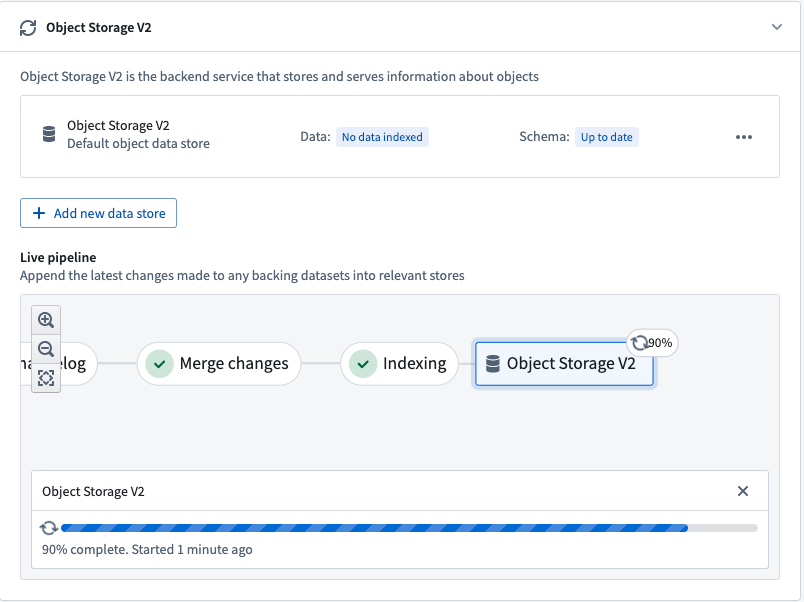
Once these steps are completed, the object type is ready for use and can be queried by other services, externally or in Foundry.
Live and replacement Funnel pipelines
Two separate Funnel pipelines are involved when there is a data update or a schema update to an object type. The screenshot below displays these two Funnel pipelines:
Live pipelines
Funnel live pipelines update object types in production with new data from Foundry datasources. Live pipelines run whenever their respective datasources are updated. Additionally, if user edits on objects are detected, live pipelines will run every six hours regardless of any explicit backing dataset update; this ensures that user edits are persisted during the merge changes step of indexing into the Funnel-owned dataset.
Note that user edits are applied to indexes in object databases immediately; a regular six-hour job interval allows a built-in control mechanism to persistently store this data in Foundry.
Replacement pipelines
When the schema of an object type changes and the previous pipeline’s schema is no longer up-to-date, a new replacement pipeline must be provisioned for orchestrating object type updates. Schema changes can include adding a new property type to an object type, changing an existing property type, or replacing the input datasource of an object type with another datasource.
While the live pipeline continues to run on its usual cadence, Funnel will orchestrate a replacement pipeline in the background without impacting the live data being served to users. After the replacement pipeline successfully runs for the first time, the live pipeline will be discarded and replaced by the replacement pipeline; the object type’s schema and data will be updated accordingly.
:::callout{theme="neutral"} Although schema changes are the most common reason for Funnel to provision a replacement pipeline, Funnel will sometimes automatically provision a replacement pipeline for performance reasons based on various heuristics. :::
Incremental and full reindexing
:::callout{theme="neutral"} The following documentation is specific to the canonical Object Storage V2 data store. For information on the indexing behavior of Object Storage V1 (Phonograph), see the OSv1 documentation. :::
Incremental indexing (default)
The canonical Object Storage V2 data store automatically computes the data difference for every new transaction in a datasource and incrementally indexes only new data updates. Funnel pipelines use incremental indexing by default for all object types. Incremental indexing allows the Funnel pipeline to run more quickly than if all data had to be indexed again.
For example, imagine you have an object type with 100 objects, backed by a 100-row datasource. If 10 of those rows change in a new data update, rather than reindexing all 100 objects regardless of the transaction type in the input datasource, the Funnel batch pipeline will create a new APPEND transaction in the changelog dataset that contains only the 10 modified rows.
Incremental indexing of incremental datasets
Object Storage V2 uses a "most recent transaction wins" strategy when syncing object types backed by incremental datasets. If the dataset contains more than one row for the same primary key, the data of the row in the most recent transaction will be present in the Ontology. You may not have duplicate primary keys within a single transaction. Note that this behavior is not related to how user edits and datasource update conflicts are handled.
Consider an incremental dataset that receives updates to rows through APPEND transactions, usually called a changelog dataset. A new version of the same data is represented by a new row with an updated value but the same primary key, appended to the dataset in one transaction. A column named is_deleted is not treated as a deletion column by default. To use a deletion column, the datasource schema must include legacy Object Storage v1 changelog metadata that identifies the column.
Object Storage V2 syncs a changelog dataset as follows:
- If a primary key appears in multiple transactions, the row from the most recent transaction will be kept.
- Each transaction must contain at most one row per primary key.
- A deletion column is respected only when it is declared in legacy Object Storage v1 changelog metadata.
You will likely need to perform an incremental window transform on your changelog dataset to ensure each transaction contains, at most, one row per primary key.
from pyspark.sql.window import Window
from pyspark.sql import functions as F

ordering_window = Window().partitionBy('primary_key').orderBy(F.col('ordering').desc())
df = df.withColumn('rank', F.row_number().over(ordering_window))
df = df.filter((F.col('rank') == 1) & ~F.col('is_deleted'))
Views incremental indexing
Dataset views have limitations with incremental indexing. Because a view abstracts the underlying data structure, Funnel attempts to use incremental builds to save costs. However, the following limitations apply:
- Views with deletion columns are always fully reindexed because Funnel cannot determine which rows have been deleted.
- Incremental builds may produce inconsistent results when deduplication column values conflict with transaction ordering. Funnel uses a "last edit wins" strategy: rows with larger deduplication column values are ignored if they fall outside the incremental window. To avoid this, either add a deletion column to trigger full reindexes or ensure that deduplication column values always increase with each transaction.
- Retention policies that delete from the latest view on the underlying dataset may cause unexpected results if old data is removed. In such cases, a full reindex will produce correct results.
Full reindexing (special cases)
Funnel pipelines will use batch indexing (in which all objects are reindexed) in these cases:
- When more than a certain percentage of the rows in the input datasource are modified in the same transaction, reindexing can be computationally less expensive and faster compared to computing a changelog and indexing incrementally. The default threshold is set to 80% of rows changed in the same transaction.
- When certain changes in object type schemas require a Funnel replacement pipeline, which will create an entirely new Funnel pipeline in the background (including OSv2 indexes).
- When user triggers a full reindex through Ontology Manager.
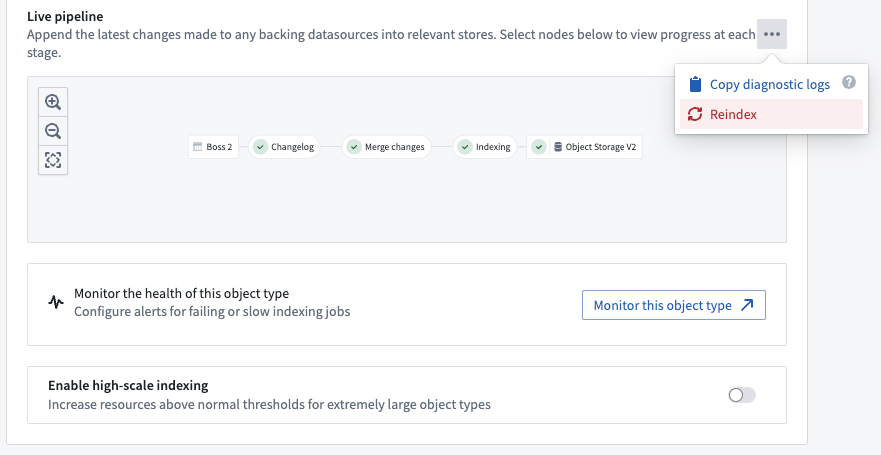
Monitor Funnel pipelines
Funnel pipelines are comprised of multiple build jobs; monitoring views enable users to track the health of specific jobs in Funnel pipelines by creating a set of monitoring rules.
Users can create a monitoring view by selecting Monitor the health of this object type in the Ontology Manager. This takes users to the monitoring views tab of the Data Health application, as seen in the screenshot below.
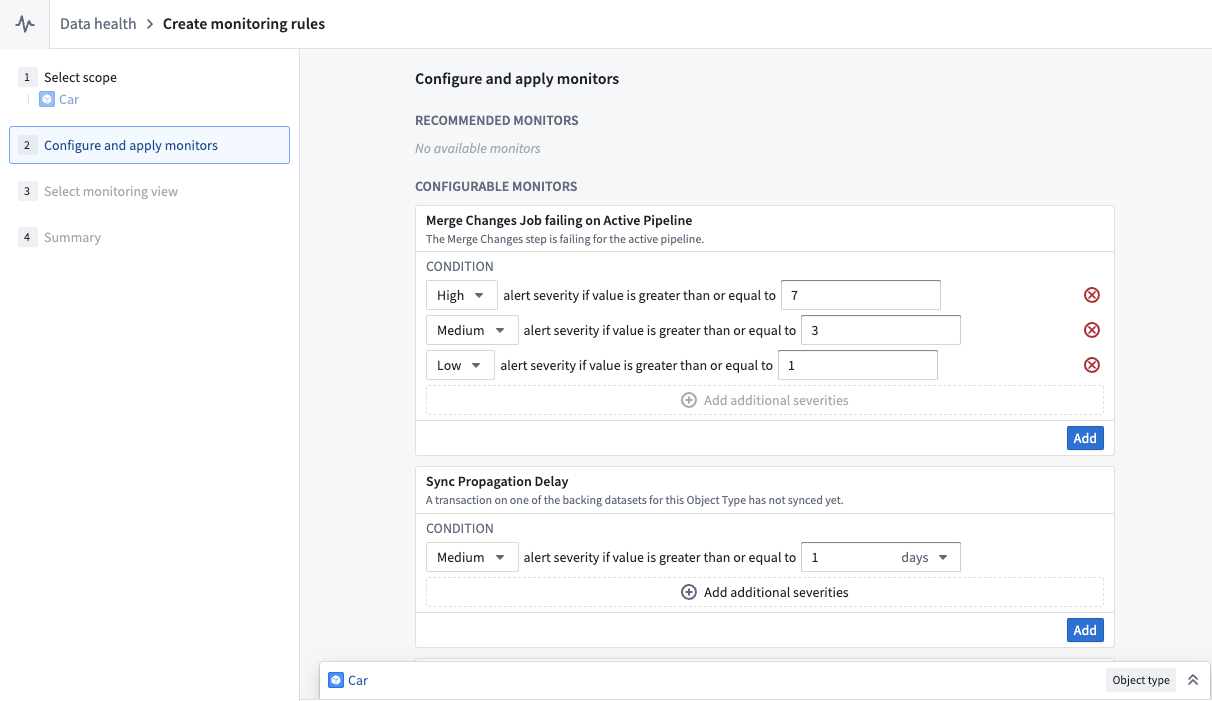
From the monitoring views tab, users can create rules for monitoring jobs in both live pipelines and replacement pipelines. Users can also add Sync Propagation Delay rules to be notified when the freshness of the indexed data in object databases passes the threshold defined in the rule.
In contrast, Object Storage V1 (Phonograph) uses health checks to monitor syncs for Ontology entities; there is only a single sync job in OSv1 for object types, and users can define these health checks directly on the sync jobs.
Debug a pipeline
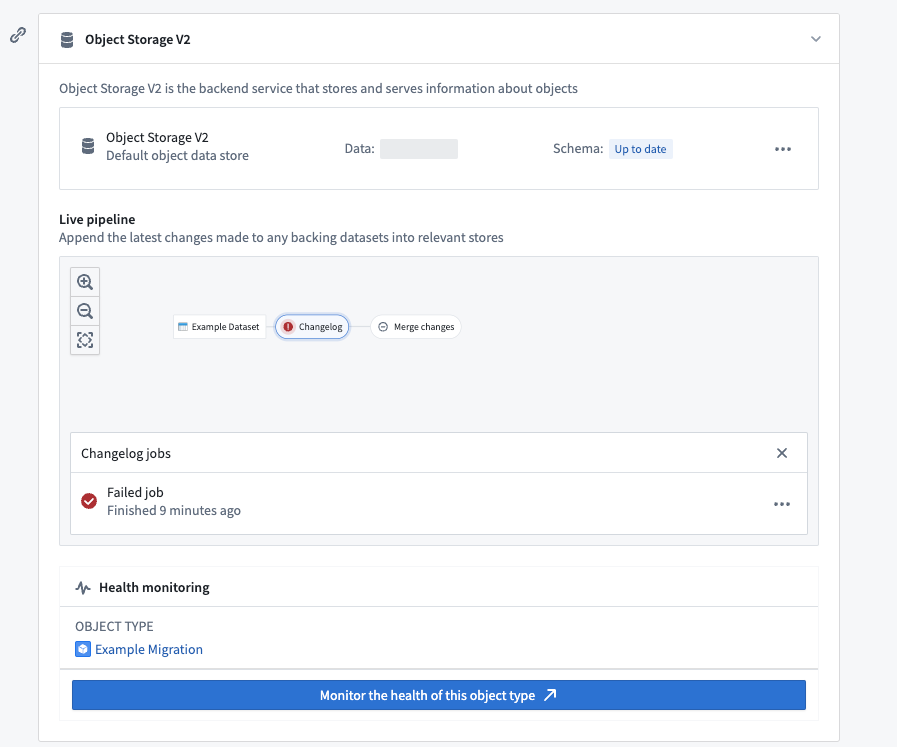
Foundry build jobs may fail for a number of reasons. Users with View permissions on the backing datasource of an object type can check the pipeline errors through the Live pipeline dashboard in the object type’s Datasources tab. Choose the failed job in the pipeline graph, then select Failed job as seen in the screenshot below.
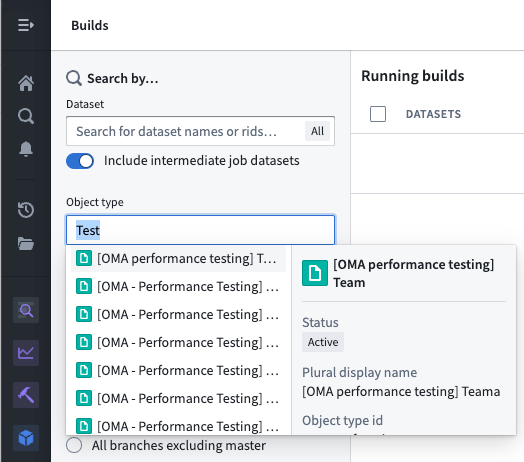
Alternatively, users can list all build jobs for a given object type by navigating to the Builds application application and filtering by object type in the search filters on the left panel.
中文翻译
Funnel 批量管道(Funnel batch pipelines)
Funnel 批量管道是内部作业管道,用于以批量方式高效编排数据索引(包括来自 Foundry 数据源的数据和用户编辑的数据)到 OSv2 中,确保本体(Ontology)中的数据与元数据保持最新。
Funnel 批量管道的组件
Funnel 批量管道由一系列 Foundry 构建作业 组成:
下方截图展示了一个 Funnel 批量管道的示例。
变更日志(Changelog)
在变更日志作业中,当数据源接收到新数据或新事务时,Funnel 会自动计算所有数据源的数据差异,然后在 Funnel 管道中创建中间变更日志数据集。变更日志数据集接收 APPEND 事务,这些事务包含每次事务中的数据差异,以提供增量计算语义。这些变更日志数据集由 Funnel 拥有和控制,因此用户无法访问。
合并变更(Merge changes)
在合并变更作业中,来自变更日志步骤的所有变更日志数据集以及来自操作(Actions)的任何近期用户编辑,会通过对象类型的主键进行连接,以合并所有变更并将其存储在一个单独的数据集中。这些合并后的数据集由 Funnel 拥有和控制,因此用户无法访问。
索引(Indexing)
变更合并完成后,Funnel 会为每个对象数据库启动一个索引作业,将包含所有合并变更的最终数据集中的所有行,转换为与该对象类型配置的对象数据库兼容的格式。例如,对于标准 OSv2 数据库,上一步合并变更数据集中的所有行都会被转换为索引文件;这些文件存储在一个单独的索引数据集中。这些索引数据集由 Funnel 拥有和控制,因此用户无法访问。
水合(Hydration)
索引作业完成后,对象数据库必须准备好索引数据以供查询。以 OSv2 为例,这一准备步骤包括将索引文件从数据集下载到 OSv2 数据库搜索节点的磁盘中。这一过程称为水合,是我们示例中 Funnel 批量管道更新对象类型数据的最后一步。
水合作业的进度会在本体管理器(Ontology Manager)应用中报告,如下方截图所示。
一旦这些步骤完成,对象类型即可投入使用,并可由其他服务(外部或在 Foundry 内部)进行查询。
实时管道与替换管道(Live and replacement Funnel pipelines)
当对象类型发生数据更新或模式更新时,会涉及两个独立的 Funnel 管道。下方截图展示了这两个 Funnel 管道:
实时管道(Live pipelines)
Funnel 实时管道使用来自 Foundry 数据源的新数据更新生产环境中的对象类型。实时管道会在其各自的数据源更新时运行。此外,如果检测到用户对对象进行了编辑,实时管道将每六小时运行一次,无论是否有任何显式的底层数据集更新;这确保了用户编辑在索引的合并变更步骤中持久化到 Funnel 拥有的数据集中。
请注意,用户编辑会立即应用于对象数据库中的索引;每六小时一次的常规作业间隔提供了一种内置控制机制,用于将这些数据持久存储在 Foundry 中。
替换管道(Replacement pipelines)
当对象类型的模式发生更改,且先前管道的模式不再是最新时,必须配置一个新的替换管道来编排对象类型的更新。模式更改可能包括:向对象类型添加新的属性类型、更改现有属性类型,或将对象类型的输入数据源替换为另一个数据源。
在实时管道继续按常规节奏运行的同时,Funnel 会在后台编排一个替换管道,而不会影响正在向用户提供的实时数据。替换管道首次成功运行后,实时管道将被丢弃并由替换管道取代;对象类型的模式和数据将相应更新。
:::callout{theme="neutral"} 虽然模式更改是 Funnel 配置替换管道的最常见原因,但 Funnel 有时也会基于各种启发式规则,出于性能原因自动配置替换管道。 :::
增量索引与全量重新索引(Incremental and full reindexing)
:::callout{theme="neutral"} 以下文档专门针对标准对象存储 V2(Object Storage V2)数据存储。有关对象存储 V1(Phonograph)的索引行为信息,请参阅 OSv1 文档。 :::
增量索引(默认)
标准对象存储 V2 数据存储会自动计算数据源中每个新事务的数据差异,并仅增量索引新的数据更新。Funnel 管道默认对所有对象类型使用增量索引。增量索引使得 Funnel 管道的运行速度比必须重新索引所有数据时更快。
例如,假设您有一个包含 100 个对象的对象类型,由一个 100 行的数据源支持。如果在新数据更新中有 10 行发生了变化,Funnel 批量管道 不会重新索引所有 100 个对象(无论输入数据源中的事务类型如何),而是会在变更日志数据集中创建一个新的 APPEND 事务,其中仅包含这 10 个修改过的行。
增量数据集的增量索引
对象存储 V2 在同步由增量数据集支持的对象类型时,使用"最近事务优先"策略。如果数据集中同一主键对应多行,则最近事务中该行的数据将出现在本体中。单个事务内不允许存在重复的主键。请注意,此行为与用户编辑和数据源更新冲突的处理方式无关。
考虑一个通过 APPEND 事务接收行更新的增量数据集,通常称为变更日志数据集。同一数据的新版本通过一个新行表示,该行具有更新后的值但主键相同,并在一个事务中追加到数据集中。名为 is_deleted 的列默认不会被视作删除列。要使用删除列,数据源模式必须包含标识该列的旧版对象存储 v1 变更日志元数据。
对象存储 V2 按如下方式同步变更日志数据集:
- 如果某个主键出现在多个事务中,则保留最近事务中的行。
- 每个事务中,每个主键最多只能包含一行。
- 仅当在旧版对象存储 v1 变更日志元数据中声明了删除列时,该列才会被识别。
您可能需要对变更日志数据集执行增量窗口转换,以确保每个事务中每个主键最多包含一行。
from pyspark.sql.window import Window
from pyspark.sql import functions as F

ordering_window = Window().partitionBy('primary_key').orderBy(F.col('ordering').desc())
df = df.withColumn('rank', F.row_number().over(ordering_window))
df = df.filter((F.col('rank') == 1) & ~F.col('is_deleted'))
视图的增量索引
数据集视图在增量索引方面存在限制。由于视图抽象了底层数据结构,Funnel 会尝试使用增量构建以节省成本。但是,存在以下限制:
- 带有删除列的视图始终会进行全量重新索引,因为 Funnel 无法确定哪些行已被删除。
- 当去重列值与事务排序冲突时,增量构建可能产生不一致的结果。Funnel 使用"最后编辑优先"策略:如果去重列值较大的行落在增量窗口之外,则会被忽略。为避免此问题,可以添加删除列以触发全量重新索引,或者确保去重列值随每次事务递增。
- 底层数据集上的从最新视图中删除的保留策略 如果删除了旧数据,可能会导致意外结果。在这种情况下,全量重新索引将产生正确的结果。
全量重新索引(特殊情况)
在以下情况下,Funnel 管道将使用批量索引(即重新索引所有对象):
- 当输入数据源中同一事务内修改的行数超过一定百分比时,与计算变更日志并进行增量索引相比,重新索引在计算上可能更便宜且更快。默认阈值设置为同一事务中 80% 的行发生变化。
- 当对象类型模式的某些更改需要 Funnel 替换管道时,该管道将在后台创建一个全新的 Funnel 管道(包括 OSv2 索引)。
- 当用户通过本体管理器触发全量重新索引时。
监控 Funnel 管道
Funnel 管道由多个构建作业组成;监控视图 使用户能够通过创建一组监控规则来跟踪 Funnel 管道中特定作业的健康状况。
用户可以通过在本体管理器中选择监控此对象类型的健康状况来创建监控视图。这将引导用户进入数据健康(Data Health)应用的监控视图选项卡,如下方截图所示。
在监控视图选项卡中,用户可以创建用于监控实时管道和替换管道中作业的规则。用户还可以添加同步传播延迟规则,以便在对象数据库中索引数据的时效性超过规则中定义的阈值时收到通知。
相比之下,对象存储 V1(Phonograph)使用健康检查来监控本体实体的同步;OSv1 中对象类型只有一个同步作业,用户可以直接在该同步作业上定义这些健康检查。
调试管道
Foundry 构建作业可能因多种原因失败。对对象类型底层数据源拥有查看权限的用户可以通过对象类型数据源选项卡中的实时管道仪表板检查管道错误。在管道图中选择失败的作业,然后选择失败的作业,如下方截图所示。
或者,用户可以通过导航到构建应用,并在左侧面板的搜索过滤器中按对象类型进行过滤,来列出给定对象类型的所有构建作业。