Funnel streaming pipelines(漏斗式流式管道(Funnel streaming pipelines))
In addition to batch Ontology data indexing, Object Storage V2 supports low-latency streaming data indexing into the Ontology by using Foundry streams as input datasources. By departing from the batch infrastructure used for non-streaming Foundry datasets, streams enable indexing of data into Foundry Ontology on the order of seconds or minutes to support latency sensitive operational workflows.
:::callout{theme="neutral"} If you have more questions about Ontology streaming behavior, review our frequently asked questions documentation.
For guidance on the performance and the latency of streaming pipelines, review our streaming performance considerations documentation. :::
Current product limitations of streaming object types
Streaming in Object Storage V2 uses a “most recent update wins” strategy, where every stream is treated like a changelog stream. If your events are coming from your source out of order, you will end up with incorrect data in your Ontology. If you can guarantee order in your input stream, Object Storage V2 streaming will handle your updates with the same order.
Ontology streaming behavior and its feature set is still actively developed; below are some of the current product limitations to consider before using Ontology streaming:
- User edits are not supported on streaming object types. As a workaround, you can either push user edits as a data change into the input stream or configure an additional object type with a non-streaming input datasource to let users make their edits on that auxiliary object type. Alternatively, you can enable edits on stream-backed object types by switching the object be backed by direct datasources.
- Multi-datasource object types (MDOs) are not supported on streaming object types.
- Outside of Workshop, no other Foundry frontend application supports live data refresh because, historically, they do not expect streaming updates. Although the underlying Ontology data is changing constantly for streaming object types, you will need to refresh whenever you want new data outside Workshop.
- In the Datasources tab of an object type in Ontology Manager, users are able to configure monitors for Funnel batch pipeline failures and invalid records. Currently, there is no support for monitors or metrics for object types with stream datasources (for example, pipeline latency).
- Record size cannot exceed 1MB, and the object type cannot contain more than 250 properties. You should consider a different ontology model with smaller object types if you need to stream larger records into your ontology.
Configuring streaming object types
Object types with stream input datasources are configured directly in Pipeline Builder or the Ontology Manager, similar to any other Foundry Ontology object type.
:::callout{theme="neutral"} If you do not yet have an input stream configured, you can create one through integrating with an existing stream in the Data Connection application or by building a stream pipeline in Pipeline Builder. :::
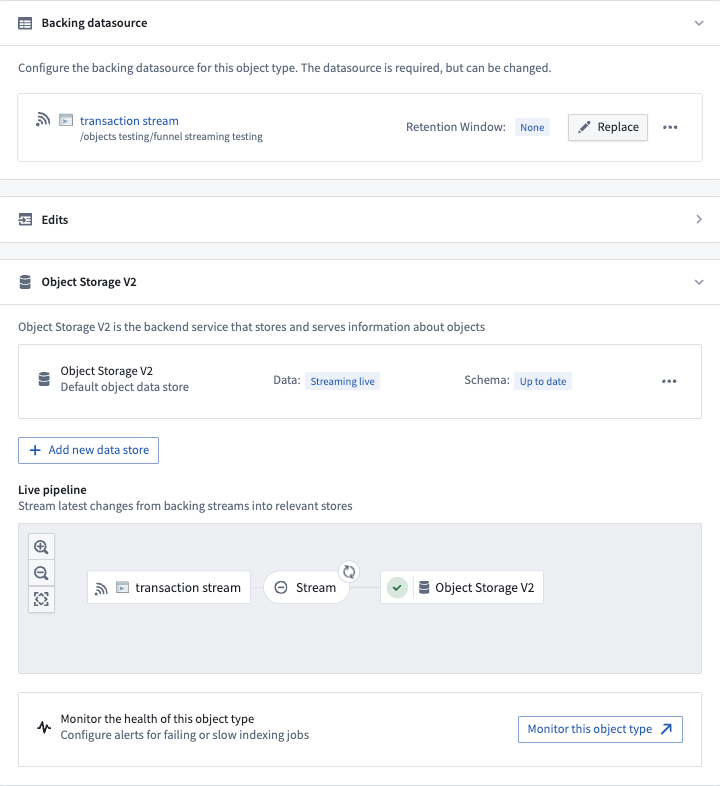
After creating a new object type (or using an existing object type), navigate to the Datasources tab in Ontology Manager, select a stream input datasource in the Backing datasource section as shown below, and save your changes into the Foundry Ontology.
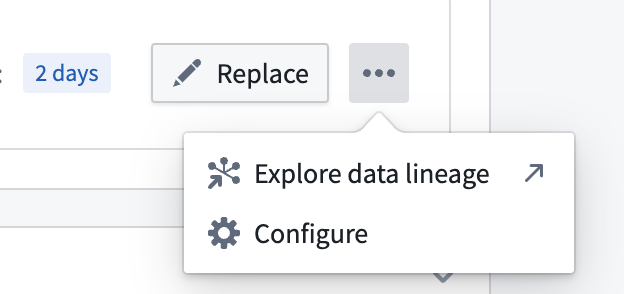
For additional configurations over the input datasource stream, select the ellipses button for more options as shown below.
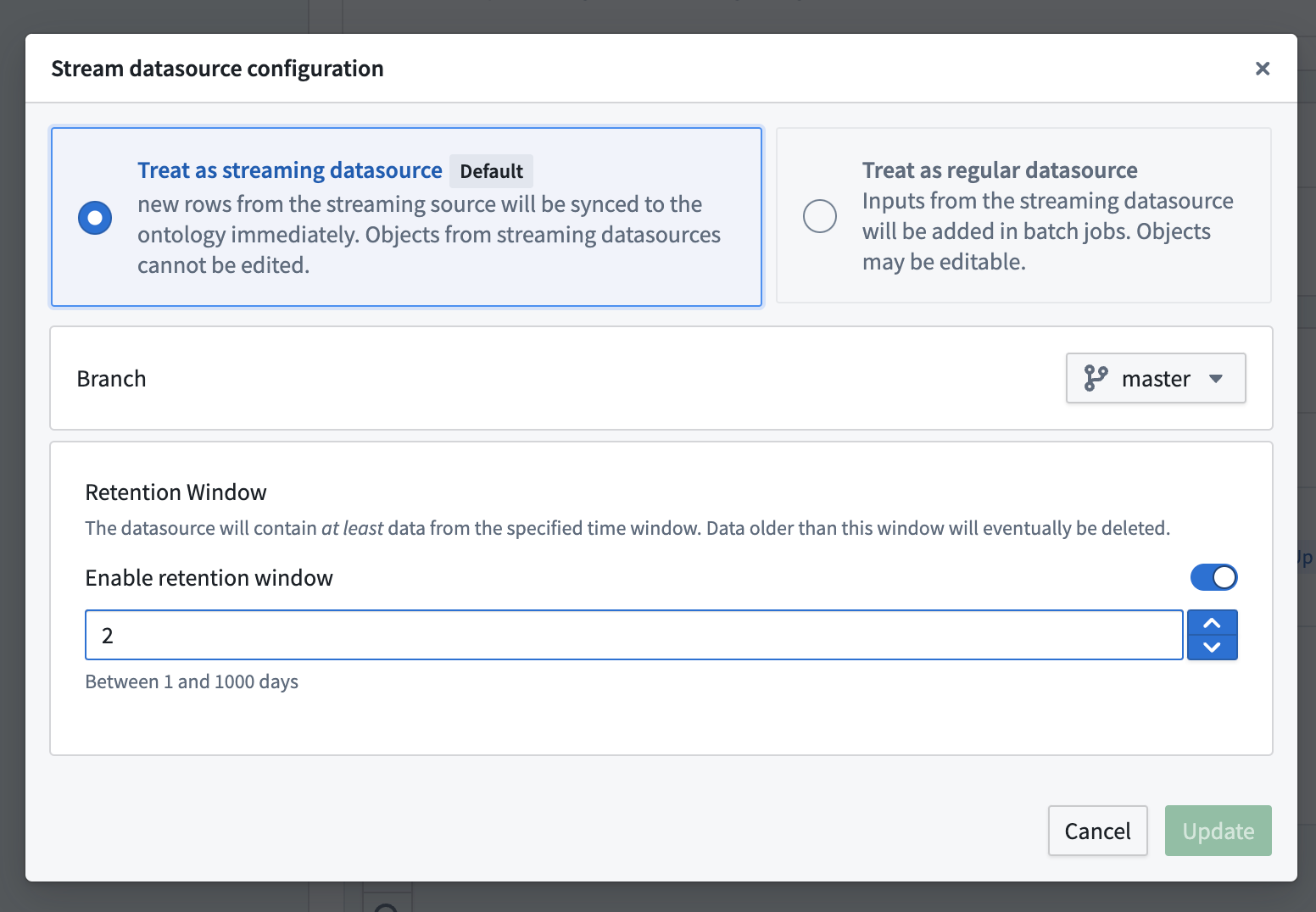
:::callout{theme="neutral"} Stream datasources can also be configured for many-to-many link types. :::
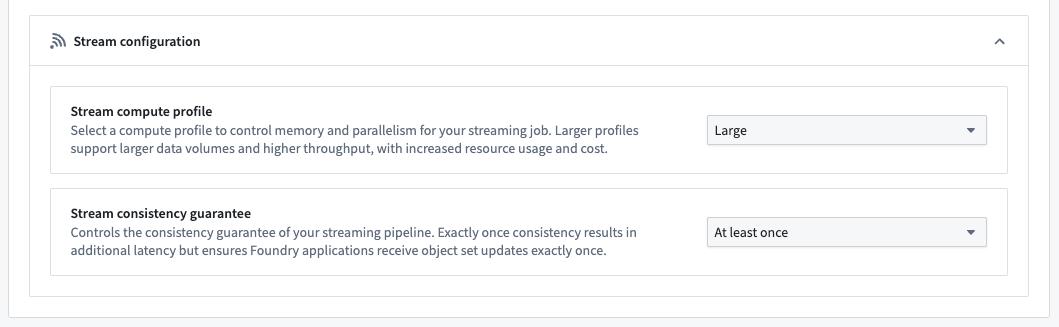
The Stream configuration section provides options to optimize your object type's streaming job.
- Stream compute profile: By default, an object type's streaming job uses a compute profile suitable for most input streams. However, object types backed by very high-throughput streams may require more resources to prevent the pipeline from lagging. Alternatively, object types backed by low-throughput streams can use a smaller profile to save on compute resource cost. If none of the available options are suitable, contact your Palantir representative.
- Stream consistency guarantee: By default, an object type's streaming job uses the exactly-once consistency guarantee, which results in additional latency compared to at-least-once but ensures Foundry applications receive object set updates exactly once. Enabling the at-least-once consistency guarantee reduces latency; however, in rare cases, Foundry applications may receive duplicate updates when an object set changes. For example, an object set-based automation could trigger multiple times. Consider enabling at-least-once for latency-sensitive object types.
:::callout{theme="neutral"} Modifying an object type's stream configuration will restart its associated streaming job, causing a temporary delay for new streaming records to be processed. :::
Debugging streaming pipelines
The interface between streams and the Ontology can be considered conceptually similar to changelog datasets. Each record in the input stream will contain the data for each property being written into the Ontology. Each record will update all of the properties for a given object, specified by primary key. Deletions can be specified on the input record by setting metadata on the input stream.
Funnel will index records in the order that they are written to the datasource stream, so those streams should be partitioned by primary key and ordered by event timestamp which can be done in the upstream Pipeline Builder pipeline.
If you are having issues with your stream pipelines, review the debug a failing stream documentation.
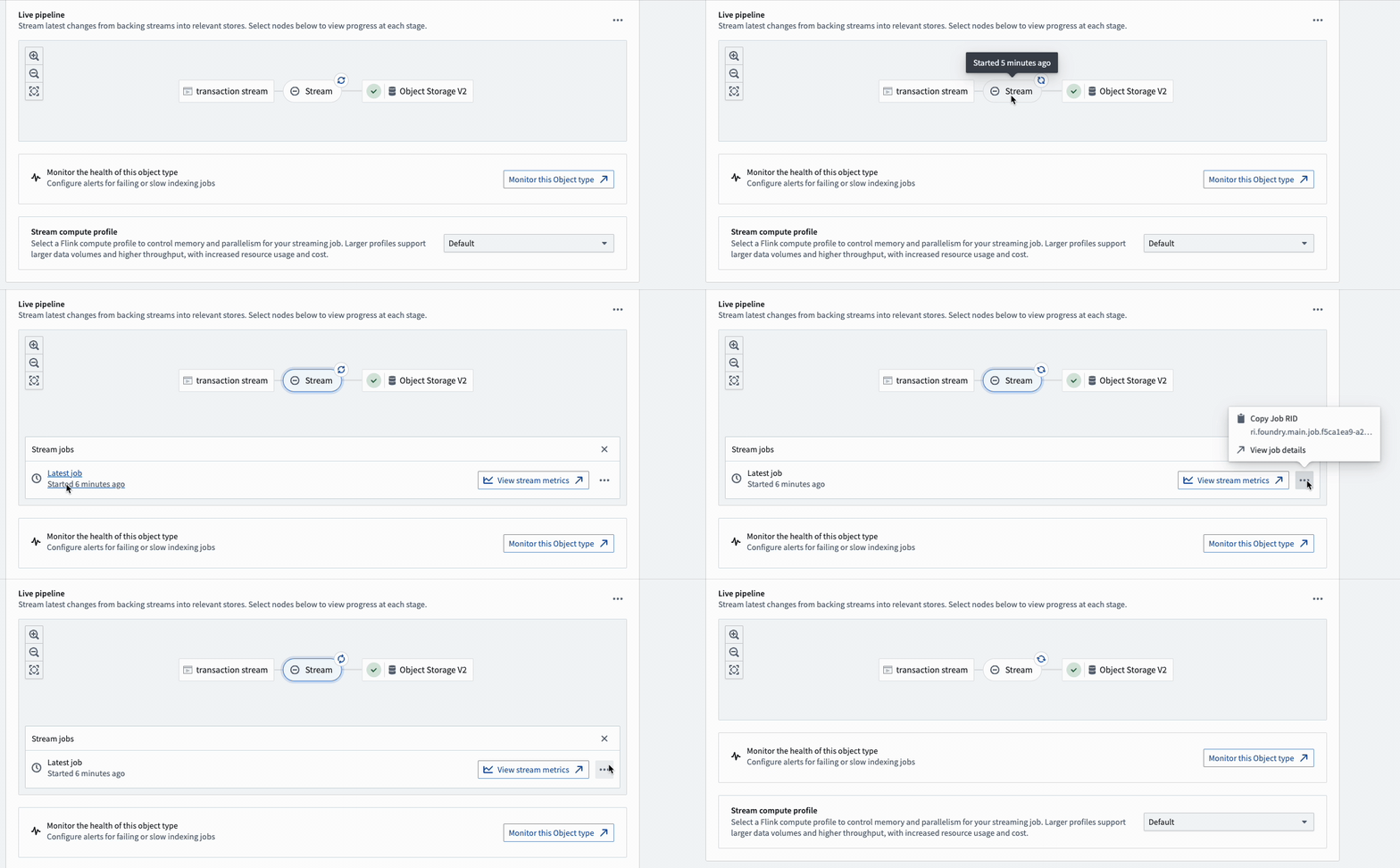
To view details and metrics for an object type's streaming job, select the Stream bubble in the pipeline diagram.
中文翻译
漏斗式流式管道(Funnel streaming pipelines)
除了批量本体数据索引外,Object Storage V2 还支持通过使用 Foundry 流(streams)作为输入数据源(input datasources),将低延迟流式数据索引到本体中。与用于非流式 Foundry 数据集的批量基础设施不同,流能够在数秒或数分钟内将数据索引到 Foundry 本体,从而支持对延迟敏感的操作工作流。
:::callout{theme="neutral"} 如果您对本体的流式行为有更多疑问,请查阅我们的常见问题解答文档。
有关流式管道的性能和延迟指导,请查阅我们的流式性能考量文档。 :::
流式对象类型的当前产品限制
Object Storage V2 中的流式处理采用"最新更新优先"策略,每个流都被视为变更日志流(changelog stream)。如果事件从源系统无序到达,本体中将出现错误数据。如果您能保证输入流中的顺序,Object Storage V2 流式处理将按相同顺序处理您的更新。
本体的流式行为及其功能集仍在积极开发中;以下是使用本体流式处理前需要考虑的一些当前产品限制:
- 流式对象类型不支持用户编辑。作为变通方案,您可以将用户编辑作为数据变更推送到输入流中,或者配置一个使用非流式输入数据源的额外对象类型,让用户在该辅助对象类型上进行编辑。或者,您可以通过将对象切换为使用直接数据源(direct datasources)来启用对流式支持对象类型的编辑。
- 流式对象类型不支持多数据源对象类型(MDOs)。
- 除 Workshop 外,其他 Foundry 前端应用均不支持实时数据刷新,因为从历史上看,它们并不预期流式更新。尽管流式对象类型的底层本体数据在不断变化,但在 Workshop 之外,您需要手动刷新才能获取新数据。
- 在 Ontology Manager 的对象类型的 Datasources 选项卡中,用户可以配置针对 Funnel 批量管道失败和无效记录的监控器(monitors)。目前,对于使用流数据源的对象类型(例如管道延迟),尚不支持监控器或指标。
- 记录大小不能超过 1MB,且对象类型不能包含超过 250 个属性。如果您需要将更大的记录流式传输到本体中,应考虑采用包含较小对象类型的其他本体模型。
配置流式对象类型
使用流输入数据源的对象类型可直接在 Pipeline Builder 或 Ontology Manager 中配置,与任何其他 Foundry 本体对象类型类似。
:::callout{theme="neutral"} 如果您尚未配置输入流,可以通过在 Data Connection 应用中集成现有流或在 Pipeline Builder 中构建流管道来创建一个。 :::
创建新对象类型(或使用现有对象类型)后,导航至 Ontology Manager 中的 Datasources 选项卡,在 Backing datasource 部分选择一个流输入数据源(如下所示),然后将更改保存到 Foundry 本体中。
如需对输入数据源流进行额外配置,请选择省略号按钮以获取更多选项,如下所示。
:::callout{theme="neutral"} 流数据源也可以配置用于多对多链接类型。 :::
Stream configuration 部分提供了优化对象类型流式作业的选项。
- 流计算配置(Stream compute profile): 默认情况下,对象类型的流式作业使用适用于大多数输入流的计算配置。然而,由极高吞吐量流支持的对象类型可能需要更多资源以防止管道延迟。反之,由低吞吐量流支持的对象类型可以使用较小的配置以节省计算资源成本。如果可用选项均不合适,请联系您的 Palantir 代表。
- 流一致性保证(Stream consistency guarantee): 默认情况下,对象类型的流式作业使用恰好一次(exactly-once)一致性保证,这相比至少一次(at-least-once)会带来额外延迟,但能确保 Foundry 应用恰好一次收到对象集更新。启用至少一次一致性保证可降低延迟;但在极少数情况下,当对象集发生变化时,Foundry 应用可能会收到重复更新。例如,基于对象集的自动化可能会多次触发。对于延迟敏感的对象类型,建议启用至少一次。
:::callout{theme="neutral"} 修改对象类型的流配置将重启其关联的流式作业,导致新的流式记录处理出现暂时延迟。 :::
调试流式管道
流与本体之间的接口在概念上可视为类似于变更日志数据集(changelog datasets)。输入流中的每条记录将包含要写入本体的每个属性的数据。每条记录将更新由主键指定的给定对象的所有属性。可以通过在输入流上设置元数据来指定删除操作。
Funnel 将按照记录写入数据源流的顺序进行索引,因此这些流应按主键分区并按事件时间戳排序,这可以在上游的 Pipeline Builder 管道中完成。
如果您的流管道遇到问题,请查阅调试失败的流文档。
要查看对象类型流式作业的详细信息和指标,请选择管道图中的 Stream 气泡。