Edit link types(编辑链接类型)
:::callout{theme="warning" title="Warning"} Editing a link type can have application-breaking consequences that can disrupt user workflows. Read the section below on potential breaking changes before proceeding with any link type edits. :::
Potential breaking changes
Link type without writeback
Changes that require Object Storage V1 (Phonograph) to unregister and reregister the backing datasource of a link type will make the links of that type unavailable in user applications during that reindex time; these changes are described below.
The following changes will unregister and reregister (or delete) the backing datasource of a link type when saved:
- Changing a many-to-many link type’s backing datasource.
- Changing the cardinality of a link type.
- Changing the foreign key of a link type.
- Deleting a link type.
When you try to save any of these changes, you will be warned about the potential impact on user applications.

For example, if a link type is used in a search around in a Workshop application, that Workshop application will be broken until the reindex completes. You can track the progress of the reindex for a link type in the Phonograph pane of its Datasources page.

Learn more about Object Storage V1 (Phonograph).
Link type with writeback
If a link type has writeback enabled, extra precaution should be taken when making edits to that link type. The history of edits made to a link type are stored in Object Storage V1 (Phonograph). Every time a writeback dataset is built, the history of edits is reapplied to get the final state of edited links in the writeback dataset. When the backing datasource of a link type is unregistered from Object Storage V1 (Phonograph), the history of edits in Objects Storage V1 (Phonograph) is deleted and future builds of the writeback dataset will fail.
In addition to the changes that require unregistering that were listed in the previous section, unregistering is required for link types with writeback when schema changes are made to any column of a backing datasource to a link type that has ever received edits, even if does not currently receive edits. Schema changes include changes to the name and base type of the column.
:::callout{theme="warning" title="Warning"} Object Storage V1 (Phonograph) will not automatically unregister the backing datasource of a link type in response to one of these schema changes. Instead, the reindex will fail and will only succeed if the saved schema changes are undone, or if you manually unregister and reregister the backing datasource of a link type in the Phonograph pane of the link type’s Datasources page. :::
When you try to save any changes that risk erasing the edits history, you will be warned about the potential impact on edits.

Now that you understand the considerations in editing existing link types, you can safely make your changes.
Edit an existing link type
- Navigate to an existing link type
- Delete a link type
- Change a backing datasource
- Edit a link type’s metadata
Navigate to an existing link type
You can always change the link type you are working on by selecting the link type page from the home page sidebar and selecting a different link type from the list. You can also always search for a new link type in the search bar in the application header. Read more about navigation.
Delete a link type
You can delete an object type by selecting the  (three dots) icon at the top right of the link type view sidebar (see image below) and then selecting the Delete option from the dropdown. A dialog will pop up to confirm you want to stage the link type for deletion.
- Note that the deletion of the link type only takes effect after you save your changes, and will break any views or applications referencing the object type.
- Note that link types with an
activestatus cannot be deleted. Read more about statuses.

Change a backing datasource
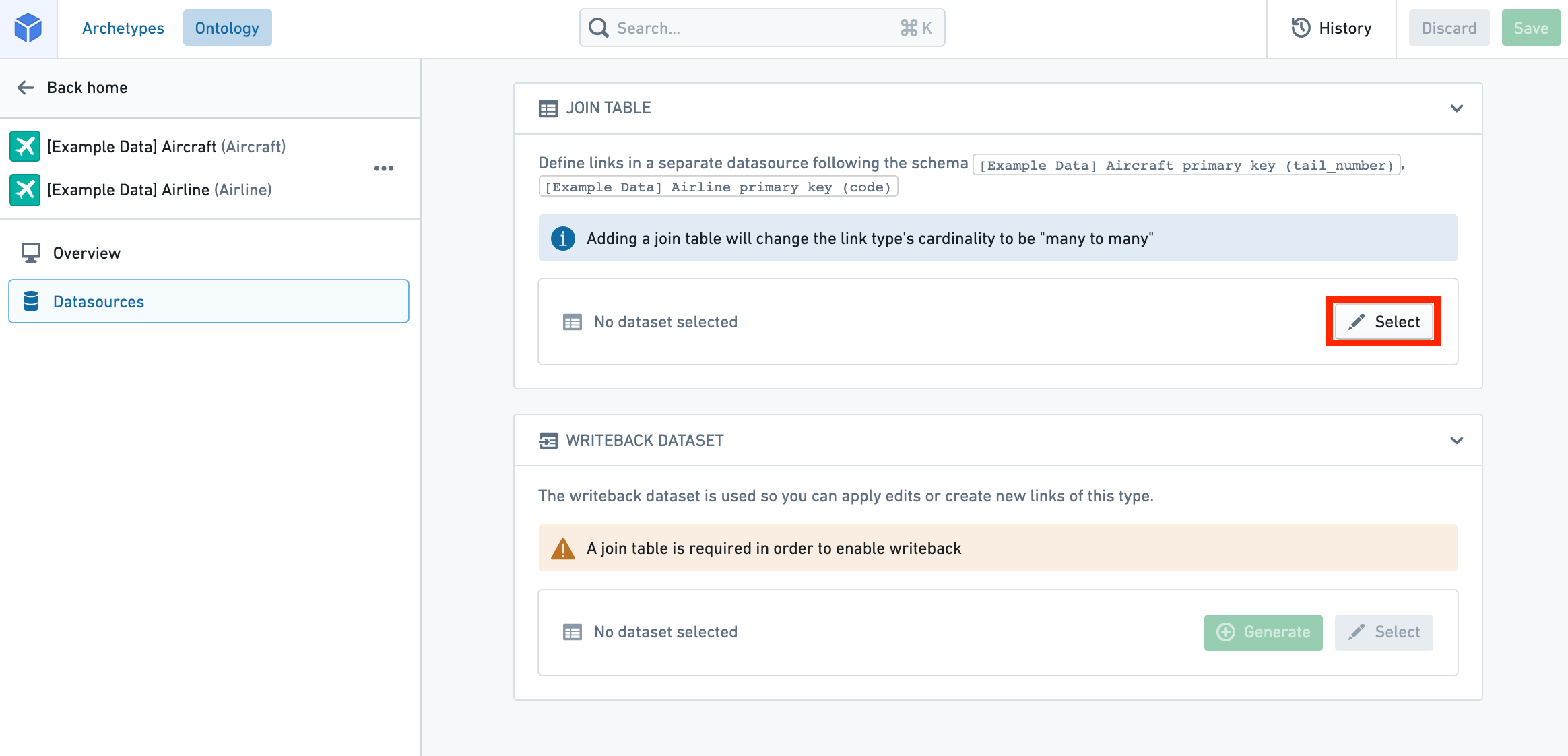
You can change a backing datasource:
- Navigate to the Datasources page of the link type view.
- Select the
 Select icon next to the existing datasource. This will allow you to browse and select available datasources in Foundry.
:::callout{theme="warning" title="Warning"} Changing the backing datasource of a link type will remove any connection between columns in the old datasource and the keys that define your link type. Keys will be automatically remapped for you only if you change to a new datasource with the same schema as the old datasource. Otherwise, you will need to remap the keys to the new datasource. :::
Edit a link type’s metadata

- Status: Select the existing status at the top of the link type pane to open a dropdown of available statuses. Select from the
deprecated,experimental, andactivestatuses. - Read more about statuses.
- Key: Select from the dropdowns to change foreign keys, or column mappings in a many-to-many link type.
- Note that in a link type with many-to many cardinality, the columns in the backing datasource must map to the primary keys of the object types. If the type of the primary key property of the object type is not the same as the type of the column it is being mapped to in the link type’s backing datasource, an error will prevent you from saving.
- In a link type with any other cardinality, the application requires that the key of one of the object types must map to the Primary key of that object type, ensuring that the “one” side of the Cardinality is unique.
- API name: Select into the existing API name to change its value.
- Note that you cannot change the API name for link types with an
activestatus.- Read more about statuses.
- Read more about valid API names.
- Visibility: Check the visibility from the link visibility list. A
prominentlink type will prompt applications to show this link type first to users. Ahiddenlink type will not appear in user applications. - Type classes: Apply type classes as additional metadata that can be interpreted by applications.
- Consult the list of available type classes for more information.
中文翻译
编辑链接类型
:::callout{theme="warning" title="警告"} 编辑链接类型可能产生影响应用程序运行的后果,从而干扰用户工作流。在继续编辑链接类型之前,请先阅读下方关于潜在破坏性变更的内容。 :::
潜在破坏性变更
无回写功能的链接类型
需要对象存储 V1(Phonograph)注销并重新注册链接类型底层数据源的变更,将在重新索引期间导致该类型的链接在用户应用程序中不可用;这些变更如下所述。
以下变更在保存时会注销并重新注册(或删除)链接类型的底层数据源:
- 更改多对多链接类型的底层数据源。
- 更改链接类型的基数(Cardinality)。
- 更改链接类型的外键(Foreign Key)。
- 删除链接类型。
当您尝试保存上述任一变更时,系统将警告您可能对用户应用程序产生的影响。
例如,如果某个链接类型在 Workshop 应用程序的搜索功能中被使用,则该 Workshop 应用程序将在重新索引完成前无法正常运行。您可以在链接类型数据源页面的 Phonograph 窗格中跟踪重新索引的进度。
具有回写功能的链接类型
如果链接类型启用了回写功能,则在编辑该链接类型时应格外谨慎。链接类型的编辑历史存储在对象存储 V1(Phonograph)中。每次构建回写数据集时,都会重新应用编辑历史,以获取回写数据集中已编辑链接的最终状态。当链接类型的底层数据源从对象存储 V1(Phonograph)注销时,对象存储 V1(Phonograph)中的编辑历史将被删除,后续的回写数据集构建将失败。
除了上一节中列出的需要注销的变更外,对于具有回写功能的链接类型,如果对曾经接收过编辑的链接类型的底层数据源任何列进行架构变更(即使当前未接收编辑),也需要注销。架构变更包括列名称和基本类型(Base Type)的更改。
:::callout{theme="warning" title="警告"} 对象存储 V1(Phonograph)不会自动响应此类架构变更而注销链接类型的底层数据源。相反,重新索引将失败,并且只有在撤销已保存的架构变更,或您在链接类型数据源页面的 Phonograph 窗格中手动注销并重新注册链接类型的底层数据源时,重新索引才能成功。 :::
当您尝试保存任何可能擦除编辑历史的变更时,系统将警告您可能对编辑产生的影响。
现在您已了解编辑现有链接类型时的注意事项,可以安全地进行更改了。
编辑现有链接类型
导航到现有链接类型
您可以通过从主页侧边栏选择链接类型页面,然后从列表中选择不同的链接类型,来随时更改您正在处理的链接类型。您也可以始终在应用程序标题中的搜索栏中搜索新的链接类型。了解更多关于导航的信息。
删除链接类型
您可以通过选择链接类型视图侧边栏右上角的 (三点)图标(见下图),然后从下拉菜单中选择删除选项来删除对象类型。系统将弹出一个对话框,确认您是否要暂存该链接类型以供删除。
- 请注意,链接类型的删除仅在您保存更改后生效,并且会破坏引用该对象类型的任何视图或应用程序。
- 请注意,状态为
active(活跃)的链接类型无法删除。了解更多关于状态的信息。
更改底层数据源
您可以更改底层数据源:
- 导航到链接类型视图的数据源页面。
- 选择现有数据源旁边的 选择图标。这将允许您浏览并选择 Foundry 中可用的数据源。
:::callout{theme="warning" title="警告"} 更改链接类型的底层数据源将移除旧数据源中列与定义链接类型的键之间的所有连接。仅当您更改为与旧数据源架构相同的新数据源时,键才会自动为您重新映射。否则,您需要将键重新映射到新数据源。 :::
编辑链接类型的元数据
- 状态: 选择链接类型窗格顶部的现有状态,以打开可用状态的下拉菜单。从
deprecated(已弃用)、experimental(实验性)和active(活跃)状态中选择。 - 了解更多关于状态的信息。
- 键: 从下拉菜单中选择以更改外键,或更改多对多链接类型中的列映射。
- 请注意,在具有多对多基数的链接类型中,底层数据源中的列必须映射到对象类型的主键。如果对象类型主键属性的类型与链接类型底层数据源中映射到的列类型不同,则会出现错误,阻止您保存。
- 在具有任何其他基数的链接类型中,应用程序要求其中一个对象类型的键必须映射到该对象类型的主键,以确保基数的“一”方是唯一的。
- API 名称: 选择现有 API 名称以更改其值。
- 请注意,您无法更改状态为
active(活跃)的链接类型的 API 名称。- 了解更多关于状态的信息。
- 了解更多关于有效的 API 名称的信息。
- 可见性: 从链接可见性列表中勾选可见性。
prominent(突出)链接类型将提示应用程序优先向用户显示此链接类型。hidden(隐藏)链接类型将不会出现在用户应用程序中。 - 类型类: 应用类型类作为可由应用程序解释的附加元数据。
- 请查阅可用类型类列表以获取更多信息。