Render hints(渲染提示)
Foundry uses render hints to communicate information about the use of Ontology properties to Object Storage V1 (Phonograph) and user applications in the platform. For example, the sortable render hint on a string property tells applications to allow users to sort on that property, as in a timeline or a chart.
Many render hints are tied to reindex performance for an object type. For instance, you can use render hints to indicate to Object Storage V1 (Phonograph) that a property does not need to be aggregated or sorted in applications, so that Object Storage V1 has less work to do when indexing those properties.
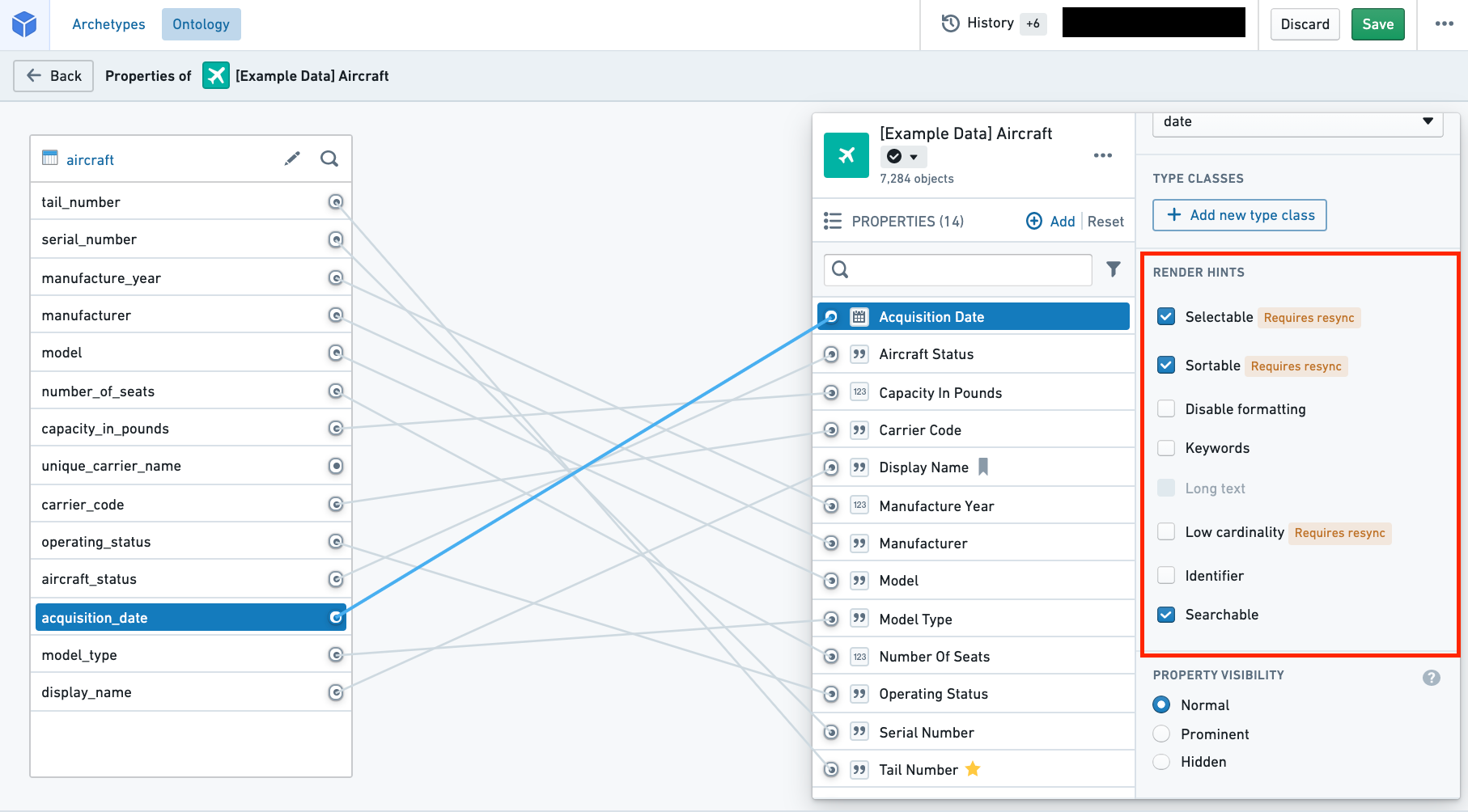
You can select and deselect render hints in the properties pane of the property editor (see image below).
The following table shares the Name and Description for each of the available render hints. The table also provides information on two technical aspects of render hints: "Adds raw index?" and "Requires reindex?" (described below).
- Adds raw index?
- In order to apply a render hint that adds a raw index, Object Storage V1 (Phonograph) stores the render hint information by creating another index when storing the backing dataset.
- Because of this additional index, for the property with a render hint applied, two columns will be counted toward the total number of columns indexed into Object Storage V1 (Phonograph).
- This explains why deselecting these render hints improves performance of reindex into Object Storage V1 (Phonograph).
- Requires reindex?
- Some render hints will be immediately applied in user applications as soon as their selection is saved in the Ontology Manager.
- For other render hints that require a reindex, the object type's backing datasources must be reindexed into Objects Storage V1 (Phonograph) before the changes will be reflected in user applications.
- You can wait for the next triggered reindex or you can manually start the reindex by navigating to the Datasources tab of the object type and selecting the blue Reindex button in the Phonograph pane.
| Name | Description | Adds raw index? | Requires reindex? |
|---|---|---|---|
| Disable formatting | - Enable if property values should not be formatted in Object Views according to a browser location’s local numerical formatting standards. | ||
| Identifier | - Enable to improve reindex performance and specify primary keys and foreign keys that have a numerical base type and don’t need to be formatted or treated as numbers. - For example, Object Views won’t format the property values as numbers and Object Explorer won’t enable filtering the keys by a range. |
||
| Keywords | - Enable to highlight this property in its own section when displaying properties in Object Views. | ||
| Long text | - Enable if property values contains a large amount of text. - For example, Object Views will display this property’s values in a more readable format. |
||
| Low cardinality | - Enable to indicate to applications that there are not many possible values for this property. - For example, some Object View widgets will only allow filtering on properties with not many possible values. - The Searchable render hint must also be selected along with Low cardinality. |
yes | yes |
| Selectable | - Enable on string properties to allow users to perform aggregations on this property. - For example, this property will be aggregated in Object Explorer histograms and Object View charts. - Enable on numeric and date properties to allow users to perform aggregation on exact term values and not only distributions. - Disable to improve reindex performance if the property will not be aggregated in applications. - Enable to use the Exact Match filter capability. - The Searchable render hint must also be selected along with Selectable. |
yes | yes |
| Sortable | - Enable on string properties to allow users to sort on this property. - Numeric and date properties are always sortable. - For example, timelines and charts in Object Views will be sorted on this property. - Disable to improve reindex performance if the property will not be sorted on in applications. - Not recommended for arrays, which will sort based on the minimum value in the array. - The Searchable render hint must also be selected along with Sortable. |
yes | yes |
| Searchable | - Disable to improve reindex performance if the property will not be searched or sorted on in applications. - The performance improvements will be especially significant if the property contains large strings. - Searchable must be selected in order for applications to apply the Selectable, Sortable, or Low cardinality render hints. |
yes | yes |
| Enable leading wildcards | - Enable on string properties to support leading wildcard queries. - The Searchable render hint must also be selected along with Enable leading wildcards. |
yes | yes |
| Enable regex queries | - Enable on string properties to support regex queries. - The Searchable render hint must also be selected along with Enable regex queries. |
yes | yes |
中文翻译
渲染提示
Foundry 使用渲染提示(render hints)向平台中的对象存储 V1 (Phonograph) 和用户应用程序传达关于本体属性使用方式的信息。例如,字符串属性上的 sortable 渲染提示会告知应用程序允许用户按该属性进行排序,如时间线或图表中的操作。
许多渲染提示与对象类型的重新索引性能相关。例如,您可以使用渲染提示向对象存储 V1 (Phonograph) 表明某个属性在应用程序中无需进行聚合或排序,从而减少对象存储 V1 在索引这些属性时的工作量。
您可以在属性编辑器的属性面板中选择或取消选择渲染提示(见下图)。
下表列出了每个可用渲染提示的名称和描述。该表还提供了渲染提示两个技术方面的信息:"是否添加原始索引?"和"是否需要重新索引?"(如下所述)。
- 是否添加原始索引?
- 为了应用添加原始索引的渲染提示,对象存储 V1 (Phonograph) 会在存储底层数据集时通过创建另一个索引来存储渲染提示信息。
- 由于这个额外索引,对于应用了渲染提示的属性,将有两列计入索引到对象存储 V1 (Phonograph) 的总列数中。
- 这解释了为什么取消选择这些渲染提示可以提高重新索引到对象存储 V1 (Phonograph) 的性能。
- 是否需要重新索引?
- 某些渲染提示在保存到本体管理器后,会立即在用户应用程序中生效。
- 对于其他需要重新索引的渲染提示,对象类型的底层数据源必须重新索引到对象存储 V1 (Phonograph) 后,更改才会在用户应用程序中反映。
- 您可以等待下一次触发的重新索引,也可以通过导航到对象类型的数据源(Datasources)选项卡,并在Phonograph窗格中选择蓝色的重新索引(Reindex)按钮来手动启动重新索引。
| 名称 | 描述 | 是否添加原始索引? | 是否需要重新索引? |
|---|---|---|---|
| 禁用格式化(Disable formatting) | - 启用:如果属性值不应根据浏览器位置的本地数字格式标准在对象视图中进行格式化。 | ||
| 标识符(Identifier) | - 启用:以提高重新索引性能,并指定具有数值基础类型且无需格式化为数字或按数字处理的主键和外键。 - 例如,对象视图不会将属性值格式化为数字,对象浏览器不会启用按范围过滤键的功能。 |
||
| 关键词(Keywords) | - 启用:在对象视图中显示属性时,将此属性突出显示在其自己的部分中。 | ||
| 长文本(Long text) | - 启用:如果属性值包含大量文本。 - 例如,对象视图将以更易读的格式显示此属性的值。 |
||
| 低基数(Low cardinality) | - 启用:向应用程序指示此属性的可能值不多。 - 例如,某些对象视图小部件仅允许对可能值不多的属性进行过滤。 - 必须同时选择可搜索(Searchable)渲染提示与低基数。 |
是 | 是 |
| 可选择(Selectable) | - 启用:在字符串属性上允许用户对此属性执行聚合。 - 例如,此属性将在对象浏览器直方图和对象视图图表中进行聚合。 - 启用:在数值和日期属性上允许用户对精确术语值(而非仅分布)执行聚合。 - 禁用:如果属性不会在应用程序中聚合,以提高重新索引性能。 - 启用:以使用精确匹配(Exact Match)过滤功能。 - 必须同时选择可搜索(Searchable)渲染提示与可选择。 |
是 | 是 |
| 可排序(Sortable) | - 启用:在字符串属性上允许用户按此属性排序。 - 数值和日期属性始终可排序。 - 例如,对象视图中的时间线和图表将按此属性排序。 - 禁用:如果属性不会在应用程序中排序,以提高重新索引性能。 - 不推荐用于数组,数组将基于数组中的最小值进行排序。 - 必须同时选择可搜索(Searchable)渲染提示与可排序。 |
是 | 是 |
| 可搜索(Searchable) | - 禁用:如果属性不会在应用程序中搜索或排序,以提高重新索引性能。 - 如果属性包含大字符串,性能提升将尤为显著。 - 必须选择可搜索,以便应用程序应用可选择、可排序或低基数渲染提示。 |
是 | 是 |
| 启用前导通配符(Enable leading wildcards) | - 启用:在字符串属性上支持前导通配符查询。 - 必须同时选择可搜索(Searchable)渲染提示与启用前导通配符。 |
是 | 是 |
| 启用正则表达式查询(Enable regex queries) | - 启用:在字符串属性上支持正则表达式查询。 - 必须同时选择可搜索(Searchable)渲染提示与启用正则表达式查询。 |
是 | 是 |