Actions(操作(Actions))
:::callout{theme="warning"} Object Monitors are superseded by Automate. Automate is a fully backward-compatible product that offers a single entry point for all business automation in the platform. :::
Actions may be automatically run when an object monitor triggers or recovers.
Configuring Actions
Subscribers may configure Actions to run when there is a new monitor triggered activity event. The Action will be submitted automatically by the monitor as soon as the evaluation completes. If multiple users have configured Actions, Actions will be run separately for each user.
Affected objects
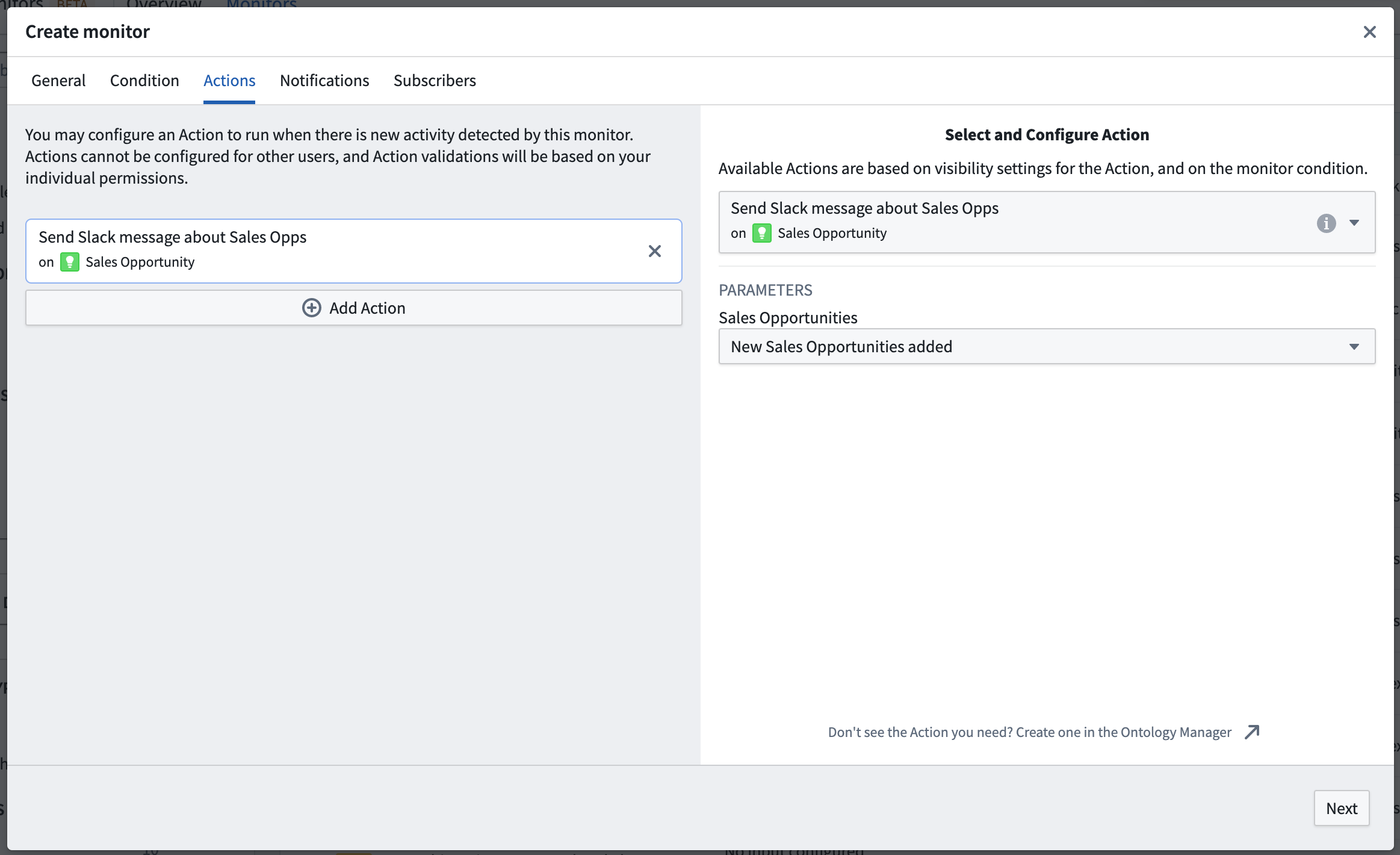
For event conditions, the set of objects detected by the monitor can be passed into the Action as an object set parameter. In the Actions tab of the monitor configuration page, the parameter should be configured to accept an ObjectSet<> of the same object type that is being monitored. An option to provide the set of objects will become available for selection.
:::callout{theme="warning"} This object set cannot be used as an input to Action notifications; only the user who configured the Action effect will have access to the set of affected objects for that monitor execution. :::
Action visibility settings
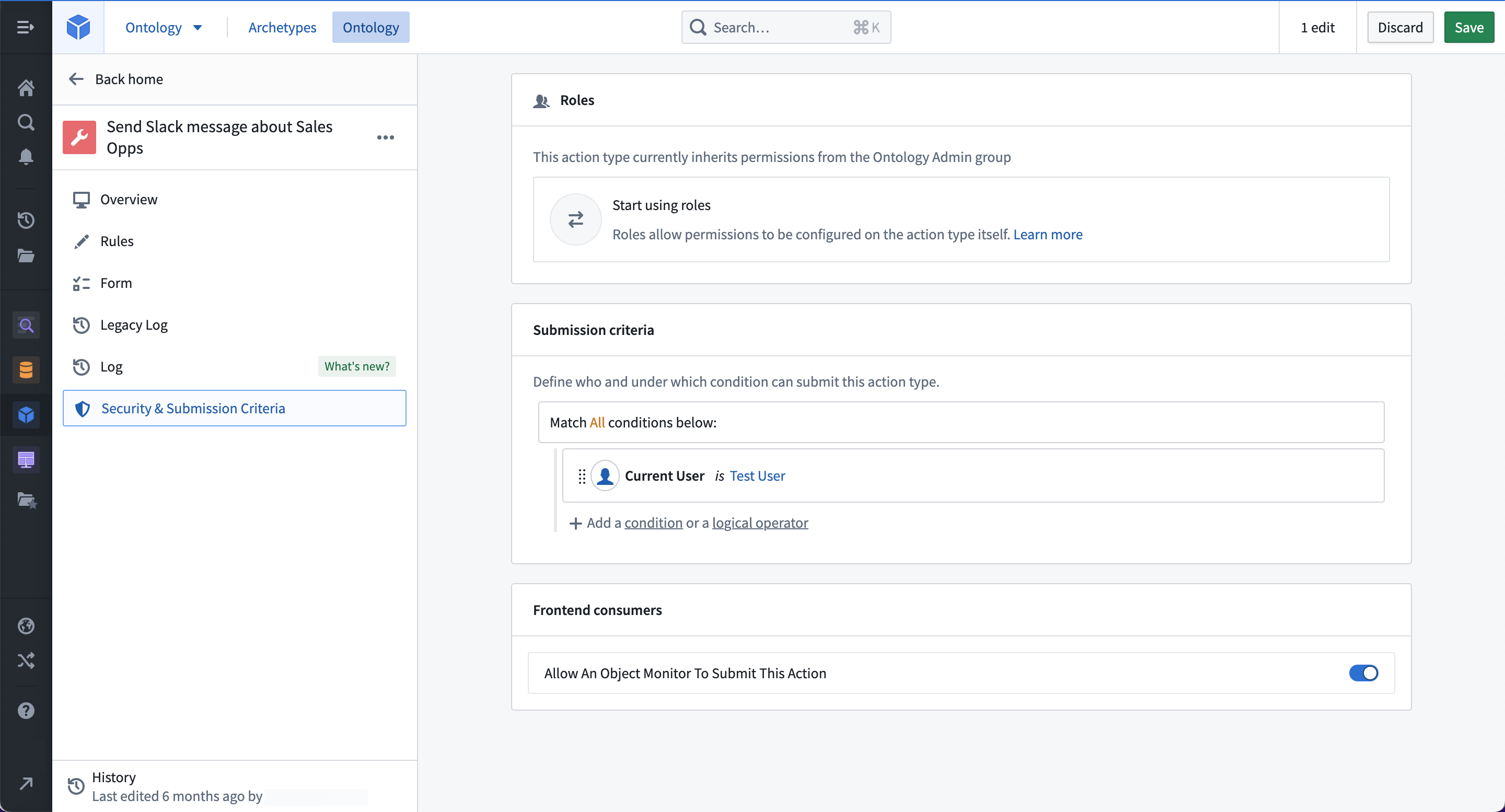
Not all Actions may be appropriate to use with object monitors. You can disable an Action from appearing in object monitoring once you configure the Action type in the Ontology Manager. After creating an Action type, view its details by clicking on the Action type from the Action type list, then click on the Security & Submission Criteria tab in the left side panel. Then, find the Frontend consumers section and toggle off the switch to "Allow An Object Monitor To Submit This Action".

Permissions
Actions are associated with a specific user subscribed to the monitor. This means that a subscriber configuring an Action must pass the submission criteria for that Action.
Actions may not be configured on behalf of other subscribers.
:::callout{theme="warning"} As Actions run on behalf of a specific user, the Action will no longer run if that user unsubscribes or if that user account is disabled or deleted. :::
中文翻译
操作(Actions)
:::callout{theme="warning"} 对象监视器(Object Monitors)已被自动化(Automate)取代。自动化(Automate)是一个完全向后兼容的产品,为平台中的所有业务自动化提供单一入口点。 :::
操作(Actions)可以在对象监视器(Object Monitor)触发或恢复时自动运行。
配置操作(Actions)
订阅者可以配置操作(Actions),使其在出现新的监视器已触发(monitor triggered)活动事件时运行。评估完成后,监视器将自动提交该操作(Action)。如果多个用户配置了操作(Actions),则每个用户的操作(Actions)将分别运行。
受影响的对象
对于事件条件,监视器检测到的对象集可以作为对象集参数传递给操作(Action)。在监视器配置(monitor configuration)页面的操作(Actions)选项卡中,应将参数配置为接受与被监视对象相同对象类型的ObjectSet<>。届时将出现一个选项,用于提供对象集。
:::callout{theme="warning"} 此对象集不能用作操作通知(Action notifications)的输入;只有配置了操作效果(Action effect)的用户才能访问该监视器执行所影响的受影响对象集。 :::
操作可见性设置
并非所有操作(Actions)都适合与对象监视器(Object Monitors)一起使用。在本体论管理器(Ontology Manager)中配置操作类型(Action type)后,您可以禁用操作(Action)在对象监视中的显示。创建操作类型(Action type)后,通过从操作类型(Action type)列表中点击该操作类型(Action type)查看其详细信息,然后点击左侧面板中的安全与提交标准(Security & Submission Criteria)选项卡。接着,找到前端消费者(Frontend consumers)部分,并关闭"允许对象监视器提交此操作(Allow An Object Monitor To Submit This Action)"的开关。
权限
操作(Actions)与订阅监视器的特定用户相关联。这意味着配置操作(Action)的订阅者必须通过该操作(Action)的提交标准(submission criteria)。
不能代表其他订阅者配置操作(Actions)。
:::callout{theme="warning"} 由于操作(Actions)代表特定用户运行,如果该用户取消订阅,或者该用户账户被禁用或删除,该操作(Action)将不再运行。 :::