Activity(活动)
:::callout{theme="warning"} Object Monitors are superseded by Automate. Automate is a fully backward-compatible product that offers a single entry point for all business automation in the platform. :::
Object monitor activity is recorded based on the condition and when certain metadata properties are changed or updated.
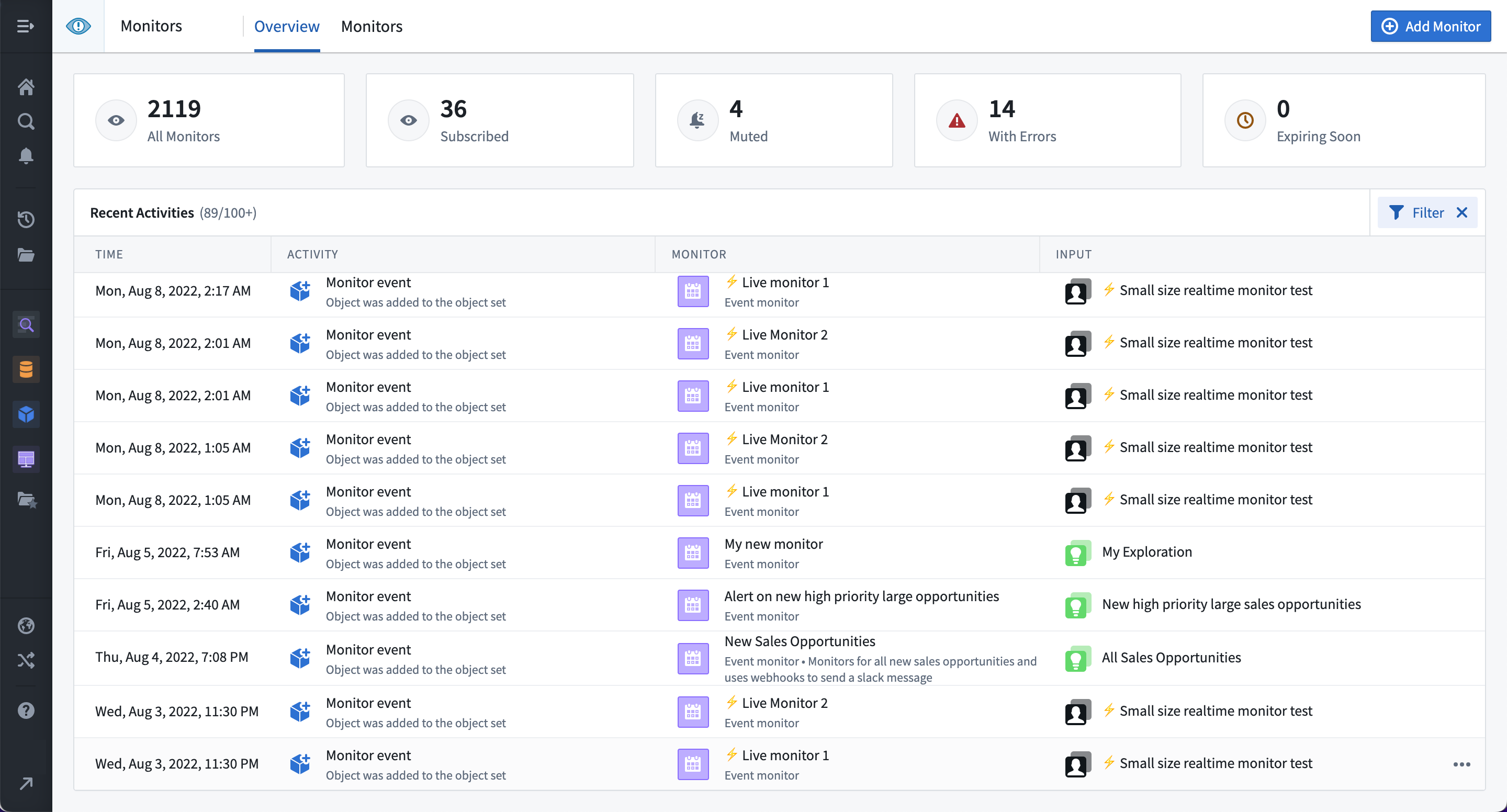
The activity timeline for all monitors subscribed to by a user is displayed on the Overview page of the Object Monitors application.
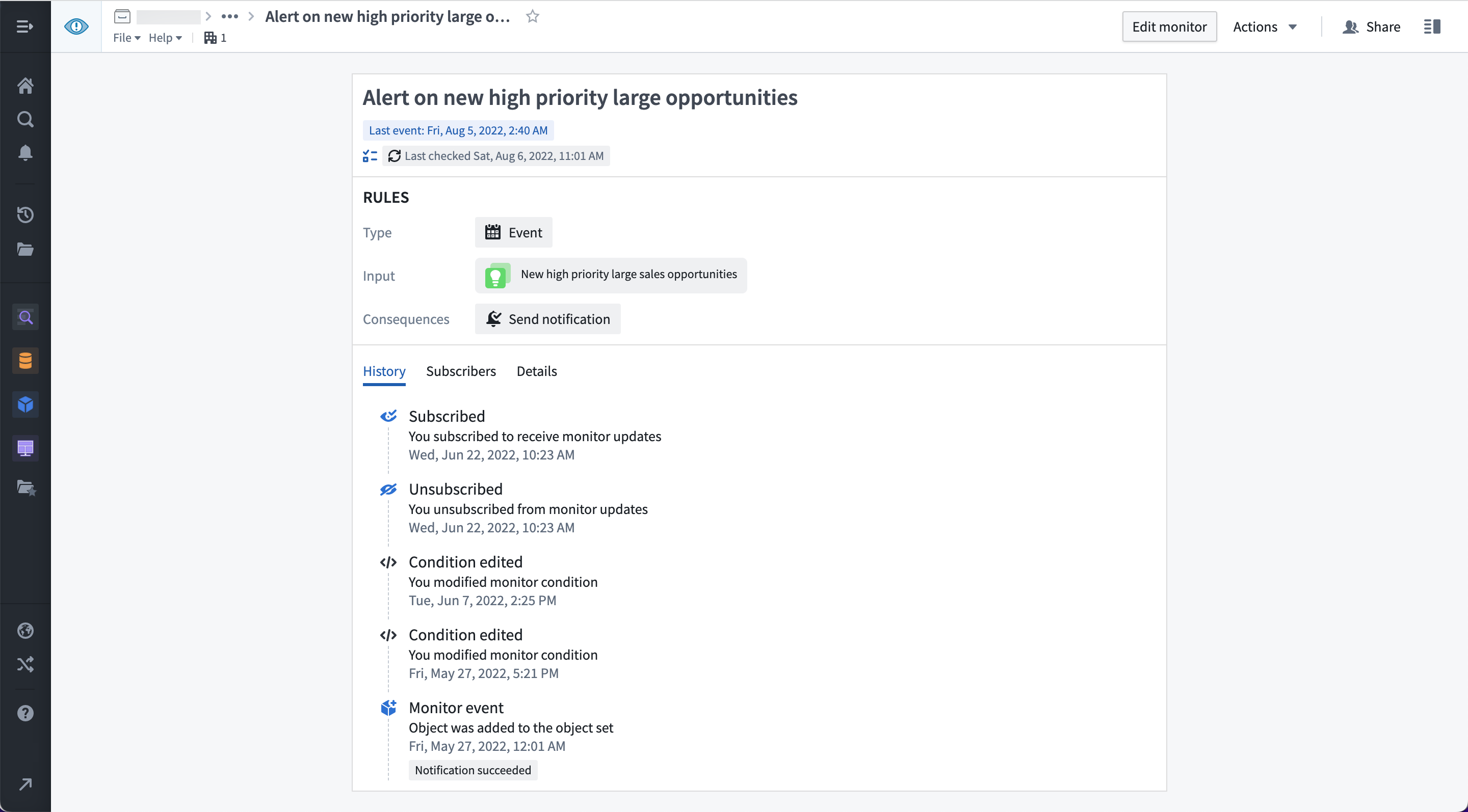
The activity timeline for a single monitor is displayed under the History tab in the individual monitor overview panel.
Activity event types
Monitor triggered
Monitor triggered is recorded when a threshold condition changes status from false to true and when there are events detected for an event condition.
Monitor recovered
Monitor recovered is recorded when a threshold condition changes status from true to false. Event conditions never result in monitor recovered activity.
Condition edited
Condition edited is recorded when the monitor condition is updated by any user.
Subscribed
Subscribed is recorded when you subscribe to a monitor. Activity from periods where you are not subscribed will not be recorded or displayed.
Unsubscribed
Unsubscribed is recorded when you unsubscribe from a monitor. Activity from periods where you are not subscribed will not be recorded or displayed.
Evaluation failed
Evaluation failed is recorded when a monitor fails to evaluate for any reason. Details about the failure can be viewed from the activity History view for that monitor. Evaluation failed may also be shown in cases where the monitor condition was successfully evaluated, but the notifications or Actions failed.
Muted
Muted is recorded when a monitor is muted by any user. Muting applies to all subscribers. Muted monitors will still be evaluated, but no side effects (e.g. notifications or Actions) will be triggered.
Unmuted
Unmuted is recorded when a monitor stops being muted. Muting applies to all subscribers, and monitors will be automatically unmuted after the mute time period expires.
Disabled
Disabled is recorded when a monitor is disabled by any user or when a monitor is automatically disabled due to excessive activity. Disabling applies to all subscribers. Disabled monitors are not evaluated.
Enabled
Enabled is recorded when a monitor stops being disabled. Enabling applies to all subscribers, and monitors are re-enabled after the disabled time period expires.
中文翻译
活动
:::callout{theme="warning"} 对象监控器(Object Monitors)已被自动化(Automate)取代。自动化(Automate)是一款完全向后兼容的产品,为平台中所有业务自动化提供单一入口。 :::
对象监控器(Object Monitor)的活动记录基于条件以及特定元数据属性被更改或更新时触发。
用户订阅的所有监控器的活动时间线显示在对象监控器(Object Monitors)应用的概览(Overview)页面上。
单个监控器的活动时间线显示在单个监控器概览面板的历史记录(History)选项卡下。
活动事件类型
监控器已触发(Monitor triggered)
当阈值条件状态从false变为true,或事件条件检测到事件时,记录监控器已触发(Monitor triggered)。
监控器已恢复(Monitor recovered)
当阈值条件状态从true变为false时,记录监控器已恢复(Monitor recovered)。事件条件永远不会产生监控器已恢复(Monitor recovered)活动。
条件已编辑(Condition edited)
当任何用户更新监控器条件时,记录条件已编辑(Condition edited)。
已订阅(Subscribed)
当您订阅监控器时,记录已订阅(Subscribed)。未订阅期间的活动不会被记录或显示。
已取消订阅(Unsubscribed)
当您取消订阅监控器时,记录已取消订阅(Unsubscribed)。未订阅期间的活动不会被记录或显示。
评估失败(Evaluation failed)
当监控器因任何原因评估失败时,记录评估失败(Evaluation failed)。失败详情可在该监控器的活动历史记录(History)视图中查看。如果监控器条件评估成功但通知或操作(Actions)失败,也可能显示评估失败(Evaluation failed)。
已静音(Muted)
当任何用户将监控器静音时,记录已静音(Muted)。静音适用于所有订阅者。静音的监控器仍会进行评估,但不会触发任何副作用(例如通知或操作)。
已取消静音(Unmuted)
当监控器停止静音时,记录已取消静音(Unmuted)。静音适用于所有订阅者,监控器将在静音时间到期后自动取消静音。
已禁用(Disabled)
当任何用户禁用监控器,或监控器因活动过于频繁而被自动禁用时,记录已禁用(Disabled)。禁用适用于所有订阅者。禁用的监控器不会进行评估。
已启用(Enabled)
当监控器停止禁用状态时,记录已启用(Enabled)。启用适用于所有订阅者,监控器将在禁用时间到期后重新启用。